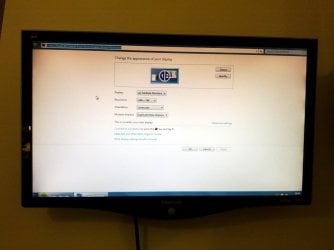
Solved Laptops external monitor has the edges cut off

Jleagle

New member
Local time
10:39 PM
Messages
11
Location
England
Its not too much of a problem but would rather know what's causing it so I could I can fix it.

The laptop is 16/9 and so is the monitor?

Image attached

Thanks.
 

Attachments

  • IMG_20111223_184803.jpg
    IMG_20111223_184803.jpg
    166.9 KB · Views: 210

My Computer My Computer

At a glance

Windows 7 Ultimate x644GB
Computer Manufacturer/Model Number
Packard Bell
OS
Windows 7 Ultimate x64
Memory
4GB
Internet Speed
1MB

My Computer My Computer

At a glance

win 7 ultimate32bit, Win8.1pro wmc 32bitamd phenom x4 9600corsair twinxs 2x2gb2x nvidia 1gb 8500gt
Computer type
PC/Desktop
Computer Manufacturer/Model Number
self build
OS
win 7 ultimate32bit, Win8.1pro wmc 32bit
CPU
amd phenom x4 9600
Motherboard
asus m2n32-sli deluxe
Memory
corsair twinxs 2x2gb
Graphics Card(s)
2x nvidia 1gb 8500gt
Sound Card
onboard
Monitor(s) Displays
23" PB Viseo 233d
Screen Resolution
1920x1080
Hard Drives
maxtor sata 500gb
maxtor sata 320gb
fujitsu sata200gb
PSU
oryxx tornado 750w
Case
thermaltake xaser lll
Cooling
artic freezer64 pro + 7 case fans
Do you have the laptop resolution set to the native resolution of the external monitor ? Try that.
 

My Computer My Computer

At a glance

Windows 10 Pro x64Intel Core i7 6700KGSkill TridentZ RGB 16GB 3600 16-16-16-36EVGA GTX 980 Ti SC x2
Computer type
PC/Desktop
Computer Manufacturer/Model Number
Skylake Special #666
OS
Windows 10 Pro x64
CPU
Intel Core i7 6700K
Motherboard
Asus Sabertooth Z170 Mark 1
Memory
GSkill TridentZ RGB 16GB 3600 16-16-16-36
Graphics Card(s)
EVGA GTX 980 Ti SC x2
Sound Card
Realtek High Definition
Monitor(s) Displays
AOC G2460PG
Screen Resolution
1920 x 1080 144Hz
Hard Drives
Samsung 860 Pro 256GB, Seagate Barracuda 4TB x2
PSU
EVGA 1000 P2, EVGA White Custom Braided Cables
Case
Corsair Vengeance C70 Gunmetal Black
Cooling
Corsair H100i v2, Corsair ML120 x2, Thermal Grizzly Kryonaut
Keyboard
Logitech G910 Orion Spectrum
Mouse
Logitech G700s
Internet Speed
Verizon Fios Quantum Gateway 75/75
Antivirus
Windows Defender, Malwarebytes Free 3.8.3
Browser
Chrome
Other Info
Corsair SP120 x4, LG Blu-ray Drive, Durabrand HT-395 100 Watt Dolby Digital Amp, Corsair H2100 Wireless 7.1 Headset
Hi Jleagle, Welcome to the forums , Have a look at this thread http://www.sevenforums.com/graphic-cards/65278-edges-getting-cut-off-my-monitor.html It may answer your problem ;)

Thanks for the link, I have an Intel graphics card so none of the answers in that thread seem to work and I cant find any Intel equivalent.

I am using an HDMI cable and its happening all the time.

Do you have the laptop resolution set to the native resolution of the external monitor ? Try that.

The native resolution is 1920x1080 but my laptop doesn't go that high? Is there any way to force the laptop higher than allowed?
 

My Computer My Computer

At a glance

Windows 7 Ultimate x644GB
Computer Manufacturer/Model Number
Packard Bell
OS
Windows 7 Ultimate x64
Memory
4GB
Internet Speed
1MB
Well then try setting them both the same.
 

My Computer My Computer

At a glance

Windows 10 Pro x64Intel Core i7 6700KGSkill TridentZ RGB 16GB 3600 16-16-16-36EVGA GTX 980 Ti SC x2
Computer type
PC/Desktop
Computer Manufacturer/Model Number
Skylake Special #666
OS
Windows 10 Pro x64
CPU
Intel Core i7 6700K
Motherboard
Asus Sabertooth Z170 Mark 1
Memory
GSkill TridentZ RGB 16GB 3600 16-16-16-36
Graphics Card(s)
EVGA GTX 980 Ti SC x2
Sound Card
Realtek High Definition
Monitor(s) Displays
AOC G2460PG
Screen Resolution
1920 x 1080 144Hz
Hard Drives
Samsung 860 Pro 256GB, Seagate Barracuda 4TB x2
PSU
EVGA 1000 P2, EVGA White Custom Braided Cables
Case
Corsair Vengeance C70 Gunmetal Black
Cooling
Corsair H100i v2, Corsair ML120 x2, Thermal Grizzly Kryonaut
Keyboard
Logitech G910 Orion Spectrum
Mouse
Logitech G700s
Internet Speed
Verizon Fios Quantum Gateway 75/75
Antivirus
Windows Defender, Malwarebytes Free 3.8.3
Browser
Chrome
Other Info
Corsair SP120 x4, LG Blu-ray Drive, Durabrand HT-395 100 Watt Dolby Digital Amp, Corsair H2100 Wireless 7.1 Headset
Well then try setting them both the same.

Windows wont let me change one at a time, if you zoom into the screenshot in the first post you can see its making me set the resolution for both of them at the same time. Currently both are set to 1366x768.
 

My Computer My Computer

At a glance

Windows 7 Ultimate x644GB
Computer Manufacturer/Model Number
Packard Bell
OS
Windows 7 Ultimate x64
Memory
4GB
Internet Speed
1MB
I just found a setting on my monitor that lets you chose between to different types of HDMI input, I used the other one and it works perfectly now. Thanks.
 

My Computer My Computer

At a glance

Windows 7 Ultimate x644GB
Computer Manufacturer/Model Number
Packard Bell
OS
Windows 7 Ultimate x64
Memory
4GB
Internet Speed
1MB
If you have an Nvidia card you must set the resolution for external monitors in the NVIDIA Control Panel, If you have an ATI card you need to do the same thing in the ATI Catalyst Control center.

(I had the same problem that fixed it)
 

My Computer My Computer

At a glance

Windows 7 Home Premium x64Core i7 2600K4GB DDR3 Kingston HyperXGigabyte GTX 670
Computer Manufacturer/Model Number
Homebuilt
OS
Windows 7 Home Premium x64
CPU
Core i7 2600K
Motherboard
Asus P8Z77-V LX
Memory
4GB DDR3 Kingston HyperX
Graphics Card(s)
Gigabyte GTX 670
Sound Card
Realtek HD Audio
Monitor(s) Displays
Delium Monitor
Screen Resolution
1360 x 768
Hard Drives
C: (500GB)
PSU
Corsair 620W
Case
Antec
Cooling
Cooling Master
Keyboard
Logitech
Mouse
Logitech wireless mouse M 505
Internet Speed
60MBPS
My card is Intel it think, it was setup fine the whole time, just my monitor wasnt :rolleyes:
 

My Computer My Computer

At a glance

Windows 7 Ultimate x644GB
Computer Manufacturer/Model Number
Packard Bell
OS
Windows 7 Ultimate x64
Memory
4GB
Internet Speed
1MB
Back
Top
