
Large emails get stuck in Outlook outbox

zzzimba

New member
Local time
8:26 AM
Messages
11
[FONT=&quot]When sending a large e-mail file in Win 7 Outlook, typically a large mp3 file, Outlook will sometimes get hung up and the e-mail will not leave the outbox. It stays stuck there trying to send repeatedly but never successfully, messing up everything else in Outlook. I have done lots of on-line homework and there are many more suggested simple solutions, but this is the only one that seems to get the job done: Delete a Message Stuck in the Outbox[/FONT]

[FONT=&quot][/FONT]
[FONT=&quot]It's a real pain! It took me about four hours to find the solution that works and then at least 30 minutes every time I have to research the article and then hack Outlook to free up the stuck email in the outbox. The MS corporate on-line forum teckies insist that it is a e-mail client server problem, which is absolutely false as many others also agree. I don't care if the e-mail does not get through as much as I just want to be able to delete it from the outbox when it gets hung up in a never ending loop of trying to send perpetually, eating up processing power, and it will never leave and it can't ever be DELETED without some serious hacks to the Outlook program. That's not a client/server issue.
[/FONT]


Anyone else have the same problem or find a simple solution?
[FONT=&quot][/FONT]
 

My Computer My Computer

OS
win 7
[FONT=&quot]When sending a large e-mail file in Win 7 Outlook, typically a large mp3 file, Outlook will sometimes get hung up and the e-mail will not leave the outbox. It stays stuck there trying to send repeatedly but never successfully, messing up everything else in Outlook. I have done lots of on-line homework and there are many more suggested simple solutions, but this is the only one that seems to get the job done: Delete a Message Stuck in the Outbox[/FONT]


[FONT=&quot]It's a real pain! It took me about four hours to find the solution that works and then at least 30 minutes every time I have to research the article and then hack Outlook to free up the stuck email in the outbox. The MS corporate on-line forum teckies insist that it is a e-mail client server problem, which is absolutely false as many others also agree. I don't care if the e-mail does not get through as much as I just want to be able to delete it from the outbox when it gets hung up in a never ending loop of trying to send perpetually, eating up processing power, and it will never leave and it can't ever be DELETED without some serious hacks to the Outlook program. That's not a client/server issue.
[/FONT]


Anyone else have the same problem or find a simple solution?
I'm sorry to contradict, but I think this is a server problem. If you send an attachment that is larger than the server-set limit, you'll run into problems. A common limit is 5Mb - are the troublesome files bigger than that? If so, how about breaking them up into sub-5Mb chunks using WinRAR (or similar), then have the recipient decompress and reassemble them, again using WinRAR, at the other end? That should avoid the problems with things getting stuck in the annoying loop. WinRAR has a 40 day trial period so you can find out if it is any use for you for free.
 

My Computer My Computer

Computer Manufacturer/Model Number
Custom
OS
Windows 7 Enterprise x64
CPU
Intel i7 920
Motherboard
Asus P6T Deluxe v2
Memory
6 GB
Graphics Card(s)
nVidia GTX260 + nVidia 3D
Sound Card
Onboard
Monitor(s) Displays
Samsung SyncMaster 2233RZ
Screen Resolution
1680 x 1050
Hard Drives
1 x 64GB SSD primary
2 x 1 TB (mirrored)
PSU
700W
Other Info
Edimax 802.11n Wireless PCI Card
Netgear DG834G router
Thanks for the link to the site. I have saved it.
 

My Computer My Computer

Computer Manufacturer/Model Number
Home built
OS
Windows 7 Ultimate 32 bit
CPU
Intel(R) Pentium(R) 4 CPU 3.00GHz
Motherboard
ASUS P4P800-VM Motherboard Chipset: Intel 865G + ICH5
Memory
2.50 GB RAM
Graphics Card(s)
NVIDIA GeForce 7600 GS
Sound Card
SoundMax Integrated Digital Audio (Chip)
Monitor(s) Displays
ViewSonic VX 1962 wm
Screen Resolution
1680 X 1050
Hard Drives
Seagate Barracuda 7200.10 80 GB
ST380215A ATA Device 18.6 GB
Western Digital "My Book" external hard drive 750 GB
Cooling
Fan based
Keyboard
Microsoft Comfort Curve Keyboard 2000 v10 USB
Mouse
Logitec optic USB
Internet Speed
3.01 Mb/s download 0.64 Mb/s upload
If you cant send via email; upload to another site, then send link e.g.
Mediafire.com (files)-(incldn mp3s)
imageshack.us (images)
 

My Computer My Computer

Computer type
Laptop
Computer Manufacturer/Model Number
HP
OS
Windows 7 64 Bit Home Premium
CPU
Intel core I3
Motherboard
Unkown
Memory
4Gb
Graphics Card(s)
Ati Mobility Radeon
Sound Card
Default
Monitor(s) Displays
1
Hard Drives
c:/ 277Gb
PSU
Unknown
Case
HP Pavilion DV7
Cooling
Default
Keyboard
Default
Mouse
Default
Internet Speed
50Mb/s VIRGIN MEDIA CABLE (FIBRE-OPTIC)
Other Info
Bought November 2011
Each ISP seems to have different file size limits. Find out from your ISP what they have. And then there is always the upload route as pixelpro suggests. Skydrive is another possibility.
 

My Computer My Computer

Computer Manufacturer/Model Number
HP, Dell, Gateway, Toshiba - 4 laptops and 2 desktops
OS
Vista, Windows7, Mint Mate, Zorin, Windows 8
CPU
from 1.6GHz Duo to i7
Monitor(s) Displays
2x HP w2207
Hard Drives
5x HDD, 7x SSD, 12x Externals
Keyboard
with trackball - no mices
Mouse
Trackball mice
Internet Speed
DSL 6000
i know some providers sizes:
Virgin= 20mb+
Sky=20mb+
talk talk= 10mb (around this)
.... trying to find more
 

My Computer My Computer

Computer type
Laptop
Computer Manufacturer/Model Number
HP
OS
Windows 7 64 Bit Home Premium
CPU
Intel core I3
Motherboard
Unkown
Memory
4Gb
Graphics Card(s)
Ati Mobility Radeon
Sound Card
Default
Monitor(s) Displays
1
Hard Drives
c:/ 277Gb
PSU
Unknown
Case
HP Pavilion DV7
Cooling
Default
Keyboard
Default
Mouse
Default
Internet Speed
50Mb/s VIRGIN MEDIA CABLE (FIBRE-OPTIC)
Other Info
Bought November 2011
Thanks for the suggestions so far gang but If you have not experienced this Outlook phenomenon personally (yet), it's really quite a tangled mess, and I never experienced it before myself until Win / Outlook 7 came along. While there have been some logical solutions and work-rounds suggested, they are aimed at treating some symptoms and do nothing for the main dis-ease.

For example, my last OS was XP. Whenever I exceeded my server's limits when sending an e-mail with attachments, I would get an "error message" back from the server saying that the file was too large and it could not sent. Well then, no big deal. I would just delete the email from the Outbox and go on to "plan B", whatever that may be. The problem now is that without executing the afore mentioned/linked hack in my first post, that over-sized email (in Win 7) will remain hung up in the outbox and enter into a never ending loop of trying to send it for 10 minutes and then just immediately begin again. There is no deleting it and no other human intervention is possible to terminate the process. Meanwhile Outlook is erratic and mostly useless. Shutting down Outlook and rebooting it only starts the cycle over again.

So, even if I am guilty of sending a file to large for my server (FYI - Its Yahoo Upgraded Premium subscription), why would my ISP be responsiblefor Outlook's bad behaviors and refusal to allow me to delete a message from the outbox? I've tried everything imaginable on several different occasions when this issue arises and I am convinced there is some kind of bug in Outlook 7's backside. If Outlook 7 refuses to allow deletion of an e-mail stuck in the outbox (and just tries to send it over and over and over)... is that an ISP issue?

I've done a fair amount of on-line homework to try and understand/correct the issue. It definitely seems to be a recognized popular problem in some help forums, and its not just my own imagination. But there seems to be no uniform consensus on its singular solution, or any MS confession that its another major hick-up in the Win 7 platform.

Am I crazy or can any one confirm who is still running XP that this problem is unique to Win 7? For example, try sending a oversized file relative to your server and if things don't work out, you will likely get an error message and then you can just delete that e-mail from the outbox. Am I right or am I crazy?

Thanks again for any thoughts on this matter!

Your friend, Zimba in San Antonio, TX
 

My Computer My Computer

OS
win 7
What you say sounds logical. Unfortunately I have to give up because I never used Outlook. I use AOL and never had any mail problems. AOL behaves exactly like you state regarding XP.
 

My Computer My Computer

Computer Manufacturer/Model Number
HP, Dell, Gateway, Toshiba - 4 laptops and 2 desktops
OS
Vista, Windows7, Mint Mate, Zorin, Windows 8
CPU
from 1.6GHz Duo to i7
Monitor(s) Displays
2x HP w2207
Hard Drives
5x HDD, 7x SSD, 12x Externals
Keyboard
with trackball - no mices
Mouse
Trackball mice
Internet Speed
DSL 6000
So, even if I am guilty of sending a file to large for my server (FYI - Its Yahoo Upgraded Premium subscription), why would my ISP be responsiblefor Outlook's bad behaviors and refusal to allow me to delete a message from the outbox? I've tried everything imaginable on several different occasions when this issue arises and I am convinced there is some kind of bug in Outlook 7's backside. If Outlook 7 refuses to allow deletion of an e-mail stuck in the outbox (and just tries to send it over and over and over)... is that an ISP issue?
It looks like Yahoo's limit for email attachments is 25Mb. Are the files that won't send bigger than that? When you attach a file to an email in Outlook, it will tell you the size, as in the screenshot below (a 34Mb MP3 by my favourite band :)). If it's bigger than 25Mb then don't send it. I think the problem is that for bigger files, Outlook tries to send, then the SMTP server eventually realises the attachment is too big and tries to bounce it back to you: without a blazingly fast connection, it's going to take a while to sort itself out.
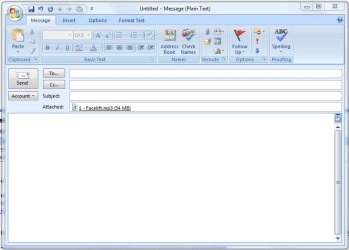
One workaround would be to tell Outlook only to send emails when you want it to (you can change send/receive behaviour under Tools > Send/Receive > Send/Receive Settings...). That way, if you get a stuck email, you can force quit out of Outlook then restart it without it immediately trying to send again. That should allow you to delete the email without having to hack anything :)
 

Attachments

  • Attachment.JPG
    Attachment.JPG
    48.4 KB · Views: 57

My Computer My Computer

Computer Manufacturer/Model Number
Custom
OS
Windows 7 Enterprise x64
CPU
Intel i7 920
Motherboard
Asus P6T Deluxe v2
Memory
6 GB
Graphics Card(s)
nVidia GTX260 + nVidia 3D
Sound Card
Onboard
Monitor(s) Displays
Samsung SyncMaster 2233RZ
Screen Resolution
1680 x 1050
Hard Drives
1 x 64GB SSD primary
2 x 1 TB (mirrored)
PSU
700W
Other Info
Edimax 802.11n Wireless PCI Card
Netgear DG834G router
Do you have your antivirus set to do email scanning? Try disabling the email integration or uninstall and reinstall without the email scanning feature.
 

My Computer My Computer

Computer Manufacturer/Model Number
Too many to describe...
OS
Windows 7 x64 pro/ Windows 7 x86 Pro/ XP SP3 x86
Or you could try to disconnect from the internet in order to delete it, or possibly go into safe mode to delete it. Just a thought.
 

My Computer My Computer

Computer Manufacturer/Model Number
NVIDIA
OS
Windows 7 Enterprise x64
CPU
AMD Athlon 64X2 Dual Core 3800+
Motherboard
GeForce 6100-M9
Memory
OCZ Platinum Dual Channel - 4x1Gb
Graphics Card(s)
NVIDIA GeForce 8800 GT PCI Express x16
Sound Card
Creative Audigy Sound Blaster Extreme PCI
Monitor(s) Displays
Compaq 7500
Screen Resolution
1024x768
Hard Drives
C: Seagate ST3250318AS SataII - 250Gb

D: Seagate ST3500418AS SataII - 500Gb
PSU
OCZ 600w Dual 12v Rails
Case
Thermaltake
Cooling
OCZ Heatsinks, Fans, and Thermal Paste on CPU & Chipsets
Keyboard
Logitech
Mouse
Radio Shack PS2
Internet Speed
Cable
Other Info
Dual Pioneer DVD/RW optical drives. LG CD/RW optical drive.
I have had this occur twice with my Windows Seven and Outlook 2007 and the emails were not particularly large. I have sent many larger emails. I had to go off line and delete the emails from the outbox. I also had this happen several times with XP and Outlook 2003. In all instances, both with Outlook 2003 and 2007, it occurred when I was replying to an email. I have not had it happen with any emails I composed new regardless of size. I think it is an Outlook bug rather than an OS bug.

I did notice that the emails I was replying to when the hang-up ocurred originated via Windstream.net and Hughes.net. I have no idea what originating email client was.
 

My Computer My Computer

Computer Manufacturer/Model Number
Home built
OS
Windows 7 Ultimate 32 bit
CPU
Intel(R) Pentium(R) 4 CPU 3.00GHz
Motherboard
ASUS P4P800-VM Motherboard Chipset: Intel 865G + ICH5
Memory
2.50 GB RAM
Graphics Card(s)
NVIDIA GeForce 7600 GS
Sound Card
SoundMax Integrated Digital Audio (Chip)
Monitor(s) Displays
ViewSonic VX 1962 wm
Screen Resolution
1680 X 1050
Hard Drives
Seagate Barracuda 7200.10 80 GB
ST380215A ATA Device 18.6 GB
Western Digital "My Book" external hard drive 750 GB
Cooling
Fan based
Keyboard
Microsoft Comfort Curve Keyboard 2000 v10 USB
Mouse
Logitec optic USB
Internet Speed
3.01 Mb/s download 0.64 Mb/s upload
Thanks for everybody's suggestions!

I reluctantly tried to send a large 18 MB MP3 file to myself to recreate the problem. I have sent smaller files in the past and started the troubles that led me to post this topic. Much to my surprise, the e-mail was sent and received successfully.

I have not had the issue in over a month so at this point, if its not broke, I'm not going to tempt fate my jacking with it any more unless it becomes a problem again.

Everyone offered good suggestions and theories which I had investigated most or all in the past with no positive net result. The only thing which did save the day was the link I provided in my original post. I'll post it again for anyone that has had similiar difficulties.

[FONT=&quot]Delete a Message Stuck in the Outbox
[/FONT]
http://www.outlook-tips.net/howto/stuck_message.htm
[FONT=&quot]
[/FONT]
Thanks again everyone and I'll park this topic, at least for now. Best Regards, Zimba :D
 

My Computer My Computer

OS
win 7
Glad to hear the problem is in remission.
 

My Computer My Computer

Computer Manufacturer/Model Number
Home built
OS
Windows 7 Ultimate 32 bit
CPU
Intel(R) Pentium(R) 4 CPU 3.00GHz
Motherboard
ASUS P4P800-VM Motherboard Chipset: Intel 865G + ICH5
Memory
2.50 GB RAM
Graphics Card(s)
NVIDIA GeForce 7600 GS
Sound Card
SoundMax Integrated Digital Audio (Chip)
Monitor(s) Displays
ViewSonic VX 1962 wm
Screen Resolution
1680 X 1050
Hard Drives
Seagate Barracuda 7200.10 80 GB
ST380215A ATA Device 18.6 GB
Western Digital "My Book" external hard drive 750 GB
Cooling
Fan based
Keyboard
Microsoft Comfort Curve Keyboard 2000 v10 USB
Mouse
Logitec optic USB
Internet Speed
3.01 Mb/s download 0.64 Mb/s upload
Back
Top