
Lastwake Command

How to See What Woke Up Your Computer Last

   Information
This will show you how to see what device, task, or etc... has woken up your computer from sleep or hibernation last in Vista, Windows 7, and Windows 8.

This will work best if you do this right after your computer wakes up, and before the next time is sleeps. Otherwise you may miss what last woke it previously.


OPTION ONE

Using the "lastwake" Command


1. Open a command prompt in Vista, Windows 7, or Windows 8.

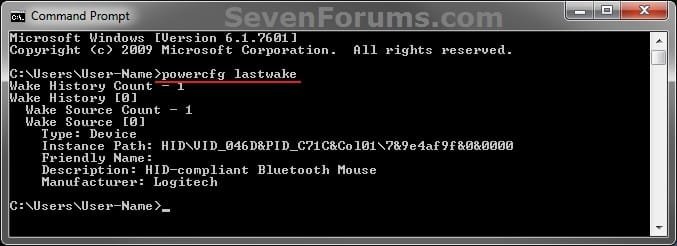
2. In the command prompt, copy and paste the command below and press enter. (see screenshot below step 3)
powercfg lastwake
3. You will now see what last woke up your computer. (see screenshot below)
CMD.jpg

For example:
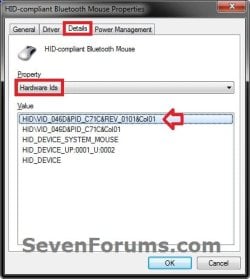
This is what last woke up my computer from above. Just for information purposes, you can look this up in Device Manager (devmgmt.msc).
HID=Human Interface Device

  • Description - HID-compliant Bluetooth Mouse
Description.jpg

  • Instance Path - HID\VID_046D&PID_C71C&REV_0101&Col01
Instance-Path.jpg
4. See related links below if you wish to not allow this device or item to wake the computer anymore.


OPTION TWO

Reading the "Wake Source" Event Viewer Log


1. For how, see: How to Read the Wake Source Log in Event Viewer for Vista, Windows 7, and Windows 8
That's it,
Shawn


Last edited:
Thank you. The powercfg -lastwake command is not working as you described. The following is the result of running it every time the laptop woke up. The first one was a spontaneous wake the rest were by opening the display, NOT a BUTTON!
Thanks.
Gábor

Microsoft Windows [Version 6.1.7601]
Copyright (c) 2009 Microsoft Corporation. All rights reserved.

C:\Windows\system32>powercfg -lastwake
Wake History Count - 1
Wake History [0]
Wake Source Count - 0

C:\Windows\system32>powercfg -lastwake
Wake History Count - 1
Wake History [0]
Wake Source Count - 1
Wake Source [0]
Type: Fixed Feature
Power Button

C:\Windows\system32>powercfg -lastwake
Wake History Count - 1
Wake History [0]
Wake Source Count - 1
Wake Source [0]
Type: Fixed Feature
Power Button

C:\Windows\system32>powercfg -lastwake
Wake History Count - 1
Wake History [0]
Wake Source Count - 1
Wake Source [0]
Type: Fixed Feature
Power Button

C:\Windows\system32>powercfg -lastwake
Wake History Count - 1
Wake History [0]
Wake Source Count - 1
Wake Source [0]
Type: Fixed Feature
Power Button

C:\Windows\system32>powercfg -lastwake
Wake History Count - 1
Wake History [0]
Wake Source Count - 1
Wake Source [0]
Type: Fixed Feature
Power Button
 

My Computer My Computer

Computer Manufacturer/Model Number
HP TouchSmart tm2 Notebook PC
OS
Windows 7 Professional x64
CPU
Intel(R) Core(TM) i5 CPU U 470 @ 1334MHz
Memory
8 GB
Graphics Card(s)
ATI + Intel
Sound Card
IDT
Case
Convertible Notebook
Hello Gábor, and welcome to Seven Forums.

"Power Button" may just be a general term used for whatever action "opening the display" you did to wake the computer.

You might also check the items listed in this tutorial to see if it may help determine what woke up your computer as well.

Power Options and Sleep Mode Problems - Vista Forums
 

My Computer My Computer

Computer type
PC/Desktop
Computer Manufacturer/Model Number
Self built custom
OS
64-bit Windows 11 Pro for Workstations
CPU
Intel i7-8700K OC'd to 5 GHz
Motherboard
ASUS ROG Maximus XI Formula Z390
Memory
64 GB (4x16GB) G.SKILL TridentZ RGB DDR4 3600 MHz
Graphics Card(s)
ASUS ROG-STRIX-GTX1080TI-O11G-GAMING
Sound Card
Integrated
Monitor(s) Displays
2 x Samsung Odyssey G7 27"
Screen Resolution
2560x1440
Hard Drives
1TB Samsung 990 PRO M.2,
4TB Samsung 990 PRO PRO M.2,
TerraMaster F8 SSD Plus NAS
PSU
Seasonic Prime Titanium 850W
Case
Thermaltake Core P3
Cooling
Corsair Hydro H115i
Keyboard
Logitech wireless K800
Mouse
Logitech MX Master 4
Internet Speed
2 Gb/s Download and 100 Mb/s Upload
Antivirus
Malwarebyte Anti-Malware Premium
Browser
Google Chrome
Other Info
Logitech Z625 speaker system,
Logitech BRIO 4K Pro webcam,
HP Color LaserJet Pro MFP M477fdn,
APC SMART-UPS RT 1000 XL - SURT1000XLI,
Galaxy S23 Plus phone
Hello Brink,

Thank you for the quick reply. And thank you for the welcome as well.
I followed your tutorial, and after checking everything the only setting that was different was the:

PCI Express -> Link State Power Management -> Off

For me it was "On". I made the change and so far (about a week) it seems that it works: the laptop did not wake on its own.

The "opening the display" just meant that I opened the screen/lid/display of my laptop up.
Which should not happen actually, since I set the action for "When I close the lid" as "Do nothing".
On all the other laptops I worked with this setting allowed me to also open the laptop without it turning on, but this is a bit off topic.

Thanks again and now that the world did not come to an end (May 21 was supposed to be the end of the world, later it was rescheduled to be October 21 and May 21 was to be the date of "Rapture") I wish you have a good day!

Gábor
 

My Computer My Computer

Computer Manufacturer/Model Number
HP TouchSmart tm2 Notebook PC
OS
Windows 7 Professional x64
CPU
Intel(R) Core(TM) i5 CPU U 470 @ 1334MHz
Memory
8 GB
Graphics Card(s)
ATI + Intel
Sound Card
IDT
Case
Convertible Notebook
Hello Gábor,

That's great news. I'm happy to hear that you got it sorted. Thank you for posting back with your results. :)

Next it will be for Halloween night. ;)
 

My Computer My Computer

Computer type
PC/Desktop
Computer Manufacturer/Model Number
Self built custom
OS
64-bit Windows 11 Pro for Workstations
CPU
Intel i7-8700K OC'd to 5 GHz
Motherboard
ASUS ROG Maximus XI Formula Z390
Memory
64 GB (4x16GB) G.SKILL TridentZ RGB DDR4 3600 MHz
Graphics Card(s)
ASUS ROG-STRIX-GTX1080TI-O11G-GAMING
Sound Card
Integrated
Monitor(s) Displays
2 x Samsung Odyssey G7 27"
Screen Resolution
2560x1440
Hard Drives
1TB Samsung 990 PRO M.2,
4TB Samsung 990 PRO PRO M.2,
TerraMaster F8 SSD Plus NAS
PSU
Seasonic Prime Titanium 850W
Case
Thermaltake Core P3
Cooling
Corsair Hydro H115i
Keyboard
Logitech wireless K800
Mouse
Logitech MX Master 4
Internet Speed
2 Gb/s Download and 100 Mb/s Upload
Antivirus
Malwarebyte Anti-Malware Premium
Browser
Google Chrome
Other Info
Logitech Z625 speaker system,
Logitech BRIO 4K Pro webcam,
HP Color LaserJet Pro MFP M477fdn,
APC SMART-UPS RT 1000 XL - SURT1000XLI,
Galaxy S23 Plus phone
So what exactly does "Wake Source Count - 0" tell us? Because something is waking my computer up, but all I see is...

Wake History Count - 1
Wake History [0]
Wake Source Count - 0

This helped me fix a classic wake on Ethernet problem before, but now I'm not sure.
 

My Computer My Computer

Computer Manufacturer/Model Number
Wat Racing Development
OS
Windows 7 Ultimate x64
CPU
Q9450
Motherboard
Asus Rampage
Memory
8 GB G.Skill
Graphics Card(s)
NVIDIA 8800 GTX
Sound Card
Auzen X-Fi Prelude
Monitor(s) Displays
3x Sony FW900
Hard Drives
Intel X25-M SSD - 160 GB
2x WD Caviar Black WD2001FASS - 2 TB
PSU
Ultra X3 1000W
Case
Silverstone TJ-09
Cooling
Thermalright Ultra-120 Extreme
Hello Pixel Eater,

That indicates it doesn't have a wake source and a reason why.

If you haven't already, give OPTION TWO a try to see if Event Viewer may have a log of what woke the computer up.

Hope this helps for now. :)
 

My Computer My Computer

Computer type
PC/Desktop
Computer Manufacturer/Model Number
Self built custom
OS
64-bit Windows 11 Pro for Workstations
CPU
Intel i7-8700K OC'd to 5 GHz
Motherboard
ASUS ROG Maximus XI Formula Z390
Memory
64 GB (4x16GB) G.SKILL TridentZ RGB DDR4 3600 MHz
Graphics Card(s)
ASUS ROG-STRIX-GTX1080TI-O11G-GAMING
Sound Card
Integrated
Monitor(s) Displays
2 x Samsung Odyssey G7 27"
Screen Resolution
2560x1440
Hard Drives
1TB Samsung 990 PRO M.2,
4TB Samsung 990 PRO PRO M.2,
TerraMaster F8 SSD Plus NAS
PSU
Seasonic Prime Titanium 850W
Case
Thermaltake Core P3
Cooling
Corsair Hydro H115i
Keyboard
Logitech wireless K800
Mouse
Logitech MX Master 4
Internet Speed
2 Gb/s Download and 100 Mb/s Upload
Antivirus
Malwarebyte Anti-Malware Premium
Browser
Google Chrome
Other Info
Logitech Z625 speaker system,
Logitech BRIO 4K Pro webcam,
HP Color LaserJet Pro MFP M477fdn,
APC SMART-UPS RT 1000 XL - SURT1000XLI,
Galaxy S23 Plus phone
This has been a great help in determining what is waking my computer every hour. Thanks

BTW,

For example:
This is what last woke up my computer from above. Just for information purposes, you can look this up in Device Manager (devmgmt.msc).
HID=Harware ID

  • Description - HID-compliant Bluetooth Mouse

I believe that in this case "HID" refers to "Human Interface Device". ;)
 

My Computer My Computer

Computer type
Laptop
Computer Manufacturer/Model Number
asus
OS
windows 7 ultimate 32 bit
Hi I have tried command prompt and gotten
Wake History Count - 1
Wake History [0]
Wake Source Count - 0

I tried option 2 and got
Sleep Time: ‎2015‎-‎07‎-‎09T13:31:38.329965500Z
Wake Time: ‎2015‎-‎07‎-‎09T13:46:45.997946700Z

Wake Source: Unknown

I cannot stop it from waking up
 

My Computer My Computer

Computer type
PC/Desktop
Computer Manufacturer/Model Number
Custom build
OS
Nova Scotia
CPU
Intel(R) Core™ i7-4790K 4.0 GHz 8MB Intel Smart Cache LGA115
Motherboard
MSI Z97S SLI Krait Edition ATX w/ GIGABit LAN, 2 PCIe x16, 3
Memory
8GB (4GBx2) DDR3/1600MHz Dual Channel Memory
Graphics Card(s)
EVGA Superclocked NVIDIA GeForce GTX 960 2GB GDDR5 PCIe 3.0
Hard Drives
128GB SanDisk SSD + 2TB SATA III Hard Drive Combo
Antivirus
None
Browser
Chrome

My Computer My Computer

Computer type
PC/Desktop
Computer Manufacturer/Model Number
Self built custom
OS
64-bit Windows 11 Pro for Workstations
CPU
Intel i7-8700K OC'd to 5 GHz
Motherboard
ASUS ROG Maximus XI Formula Z390
Memory
64 GB (4x16GB) G.SKILL TridentZ RGB DDR4 3600 MHz
Graphics Card(s)
ASUS ROG-STRIX-GTX1080TI-O11G-GAMING
Sound Card
Integrated
Monitor(s) Displays
2 x Samsung Odyssey G7 27"
Screen Resolution
2560x1440
Hard Drives
1TB Samsung 990 PRO M.2,
4TB Samsung 990 PRO PRO M.2,
TerraMaster F8 SSD Plus NAS
PSU
Seasonic Prime Titanium 850W
Case
Thermaltake Core P3
Cooling
Corsair Hydro H115i
Keyboard
Logitech wireless K800
Mouse
Logitech MX Master 4
Internet Speed
2 Gb/s Download and 100 Mb/s Upload
Antivirus
Malwarebyte Anti-Malware Premium
Browser
Google Chrome
Other Info
Logitech Z625 speaker system,
Logitech BRIO 4K Pro webcam,
HP Color LaserJet Pro MFP M477fdn,
APC SMART-UPS RT 1000 XL - SURT1000XLI,
Galaxy S23 Plus phone
Thats what I just tried I got this I said
Sleep Time: ‎2015‎-‎07‎-‎09T13:31:38.329965500Z
Wake Time: ‎2015‎-‎07‎-‎09T13:46:45.997946700Z

Wake Source: Unknown

Also I just noticed this is windows 7 forums, Im on windows 8 :/
 

My Computer My Computer

Computer type
PC/Desktop
Computer Manufacturer/Model Number
Custom build
OS
Nova Scotia
CPU
Intel(R) Core™ i7-4790K 4.0 GHz 8MB Intel Smart Cache LGA115
Motherboard
MSI Z97S SLI Krait Edition ATX w/ GIGABit LAN, 2 PCIe x16, 3
Memory
8GB (4GBx2) DDR3/1600MHz Dual Channel Memory
Graphics Card(s)
EVGA Superclocked NVIDIA GeForce GTX 960 2GB GDDR5 PCIe 3.0
Hard Drives
128GB SanDisk SSD + 2TB SATA III Hard Drive Combo
Antivirus
None
Browser
Chrome

My Computer My Computer

Computer type
PC/Desktop
Computer Manufacturer/Model Number
Self built custom
OS
64-bit Windows 11 Pro for Workstations
CPU
Intel i7-8700K OC'd to 5 GHz
Motherboard
ASUS ROG Maximus XI Formula Z390
Memory
64 GB (4x16GB) G.SKILL TridentZ RGB DDR4 3600 MHz
Graphics Card(s)
ASUS ROG-STRIX-GTX1080TI-O11G-GAMING
Sound Card
Integrated
Monitor(s) Displays
2 x Samsung Odyssey G7 27"
Screen Resolution
2560x1440
Hard Drives
1TB Samsung 990 PRO M.2,
4TB Samsung 990 PRO PRO M.2,
TerraMaster F8 SSD Plus NAS
PSU
Seasonic Prime Titanium 850W
Case
Thermaltake Core P3
Cooling
Corsair Hydro H115i
Keyboard
Logitech wireless K800
Mouse
Logitech MX Master 4
Internet Speed
2 Gb/s Download and 100 Mb/s Upload
Antivirus
Malwarebyte Anti-Malware Premium
Browser
Google Chrome
Other Info
Logitech Z625 speaker system,
Logitech BRIO 4K Pro webcam,
HP Color LaserJet Pro MFP M477fdn,
APC SMART-UPS RT 1000 XL - SURT1000XLI,
Galaxy S23 Plus phone
powercfg -devicequery wake_armed

NONE

(Ive turned everything off previously)
 

My Computer My Computer

Computer type
PC/Desktop
Computer Manufacturer/Model Number
Custom build
OS
Nova Scotia
CPU
Intel(R) Core™ i7-4790K 4.0 GHz 8MB Intel Smart Cache LGA115
Motherboard
MSI Z97S SLI Krait Edition ATX w/ GIGABit LAN, 2 PCIe x16, 3
Memory
8GB (4GBx2) DDR3/1600MHz Dual Channel Memory
Graphics Card(s)
EVGA Superclocked NVIDIA GeForce GTX 960 2GB GDDR5 PCIe 3.0
Hard Drives
128GB SanDisk SSD + 2TB SATA III Hard Drive Combo
Antivirus
None
Browser
Chrome
Also I should note this is a new computer that I just got and its had this problem from the start. So I'm thinking it might be a manufacturing error? I dont know
 

My Computer My Computer

Computer type
PC/Desktop
Computer Manufacturer/Model Number
Custom build
OS
Nova Scotia
CPU
Intel(R) Core™ i7-4790K 4.0 GHz 8MB Intel Smart Cache LGA115
Motherboard
MSI Z97S SLI Krait Edition ATX w/ GIGABit LAN, 2 PCIe x16, 3
Memory
8GB (4GBx2) DDR3/1600MHz Dual Channel Memory
Graphics Card(s)
EVGA Superclocked NVIDIA GeForce GTX 960 2GB GDDR5 PCIe 3.0
Hard Drives
128GB SanDisk SSD + 2TB SATA III Hard Drive Combo
Antivirus
None
Browser
Chrome
To troubleshoot, disconnect anything that you have connected to the PC and put it to sleep to see if it still wakes up. If not, connect each device one at a time testing in between to see if the PC wakes with it connected until hopefully a culprit is revealed.
 

My Computer My Computer

Computer type
PC/Desktop
Computer Manufacturer/Model Number
Self built custom
OS
64-bit Windows 11 Pro for Workstations
CPU
Intel i7-8700K OC'd to 5 GHz
Motherboard
ASUS ROG Maximus XI Formula Z390
Memory
64 GB (4x16GB) G.SKILL TridentZ RGB DDR4 3600 MHz
Graphics Card(s)
ASUS ROG-STRIX-GTX1080TI-O11G-GAMING
Sound Card
Integrated
Monitor(s) Displays
2 x Samsung Odyssey G7 27"
Screen Resolution
2560x1440
Hard Drives
1TB Samsung 990 PRO M.2,
4TB Samsung 990 PRO PRO M.2,
TerraMaster F8 SSD Plus NAS
PSU
Seasonic Prime Titanium 850W
Case
Thermaltake Core P3
Cooling
Corsair Hydro H115i
Keyboard
Logitech wireless K800
Mouse
Logitech MX Master 4
Internet Speed
2 Gb/s Download and 100 Mb/s Upload
Antivirus
Malwarebyte Anti-Malware Premium
Browser
Google Chrome
Other Info
Logitech Z625 speaker system,
Logitech BRIO 4K Pro webcam,
HP Color LaserJet Pro MFP M477fdn,
APC SMART-UPS RT 1000 XL - SURT1000XLI,
Galaxy S23 Plus phone
Alright I will but excuse me for an hour I'm in class but I'll try that right as I get back
 

My Computer My Computer

Computer type
PC/Desktop
Computer Manufacturer/Model Number
Custom build
OS
Nova Scotia
CPU
Intel(R) Core™ i7-4790K 4.0 GHz 8MB Intel Smart Cache LGA115
Motherboard
MSI Z97S SLI Krait Edition ATX w/ GIGABit LAN, 2 PCIe x16, 3
Memory
8GB (4GBx2) DDR3/1600MHz Dual Channel Memory
Graphics Card(s)
EVGA Superclocked NVIDIA GeForce GTX 960 2GB GDDR5 PCIe 3.0
Hard Drives
128GB SanDisk SSD + 2TB SATA III Hard Drive Combo
Antivirus
None
Browser
Chrome
Ok. I'll be here when ready. :)
 

My Computer My Computer

Computer type
PC/Desktop
Computer Manufacturer/Model Number
Self built custom
OS
64-bit Windows 11 Pro for Workstations
CPU
Intel i7-8700K OC'd to 5 GHz
Motherboard
ASUS ROG Maximus XI Formula Z390
Memory
64 GB (4x16GB) G.SKILL TridentZ RGB DDR4 3600 MHz
Graphics Card(s)
ASUS ROG-STRIX-GTX1080TI-O11G-GAMING
Sound Card
Integrated
Monitor(s) Displays
2 x Samsung Odyssey G7 27"
Screen Resolution
2560x1440
Hard Drives
1TB Samsung 990 PRO M.2,
4TB Samsung 990 PRO PRO M.2,
TerraMaster F8 SSD Plus NAS
PSU
Seasonic Prime Titanium 850W
Case
Thermaltake Core P3
Cooling
Corsair Hydro H115i
Keyboard
Logitech wireless K800
Mouse
Logitech MX Master 4
Internet Speed
2 Gb/s Download and 100 Mb/s Upload
Antivirus
Malwarebyte Anti-Malware Premium
Browser
Google Chrome
Other Info
Logitech Z625 speaker system,
Logitech BRIO 4K Pro webcam,
HP Color LaserJet Pro MFP M477fdn,
APC SMART-UPS RT 1000 XL - SURT1000XLI,
Galaxy S23 Plus phone
Hey just posting an update. I unplugged everything and it didn't wake from sleep for about 40 minutes then I plugged everything in slowly over spans of about 20-30min and it wasn't waking still. So I turned it off and on again and soon after with everything plugged in it turned on again. So now I'll unplug one at a time again. This time I have classes for about 3 hours again but before I left for classes I unplugged the Ethernet cord because that's what I think might be the problem. So when I get back I'll see if it came off of sleep mode and let u know. By the way, thanks a lot for all this help
 

My Computer My Computer

Computer type
PC/Desktop
Computer Manufacturer/Model Number
Custom build
OS
Nova Scotia
CPU
Intel(R) Core™ i7-4790K 4.0 GHz 8MB Intel Smart Cache LGA115
Motherboard
MSI Z97S SLI Krait Edition ATX w/ GIGABit LAN, 2 PCIe x16, 3
Memory
8GB (4GBx2) DDR3/1600MHz Dual Channel Memory
Graphics Card(s)
EVGA Superclocked NVIDIA GeForce GTX 960 2GB GDDR5 PCIe 3.0
Hard Drives
128GB SanDisk SSD + 2TB SATA III Hard Drive Combo
Antivirus
None
Browser
Chrome
Great news so far. Now it's just a process of elimination matter. :)
 

My Computer My Computer

Computer type
PC/Desktop
Computer Manufacturer/Model Number
Self built custom
OS
64-bit Windows 11 Pro for Workstations
CPU
Intel i7-8700K OC'd to 5 GHz
Motherboard
ASUS ROG Maximus XI Formula Z390
Memory
64 GB (4x16GB) G.SKILL TridentZ RGB DDR4 3600 MHz
Graphics Card(s)
ASUS ROG-STRIX-GTX1080TI-O11G-GAMING
Sound Card
Integrated
Monitor(s) Displays
2 x Samsung Odyssey G7 27"
Screen Resolution
2560x1440
Hard Drives
1TB Samsung 990 PRO M.2,
4TB Samsung 990 PRO PRO M.2,
TerraMaster F8 SSD Plus NAS
PSU
Seasonic Prime Titanium 850W
Case
Thermaltake Core P3
Cooling
Corsair Hydro H115i
Keyboard
Logitech wireless K800
Mouse
Logitech MX Master 4
Internet Speed
2 Gb/s Download and 100 Mb/s Upload
Antivirus
Malwarebyte Anti-Malware Premium
Browser
Google Chrome
Other Info
Logitech Z625 speaker system,
Logitech BRIO 4K Pro webcam,
HP Color LaserJet Pro MFP M477fdn,
APC SMART-UPS RT 1000 XL - SURT1000XLI,
Galaxy S23 Plus phone
Hey so I got back from class and it was not on. So I'm going to be inclined to say right now that it is my Ethernet cord that is somehow causing the problem.
 

My Computer My Computer

Computer type
PC/Desktop
Computer Manufacturer/Model Number
Custom build
OS
Nova Scotia
CPU
Intel(R) Core™ i7-4790K 4.0 GHz 8MB Intel Smart Cache LGA115
Motherboard
MSI Z97S SLI Krait Edition ATX w/ GIGABit LAN, 2 PCIe x16, 3
Memory
8GB (4GBx2) DDR3/1600MHz Dual Channel Memory
Graphics Card(s)
EVGA Superclocked NVIDIA GeForce GTX 960 2GB GDDR5 PCIe 3.0
Hard Drives
128GB SanDisk SSD + 2TB SATA III Hard Drive Combo
Antivirus
None
Browser
Chrome
Back
Top