Latest AMD Catalyst Video Driver for Windows 7

Status
Not open for further replies.
Is there any place I could still find the older versions of the drivers/installation packages? I have an ATI Radeon HD 4250 integrated on my mobo, and it has been being terribly tempermental with cutting straight to the latest drivers (12-6 &/or 12-8). I have up to version 11-6 installed so far, but from what everyone seems to be saying here, I should only go up to 12-3. My backup collection is missing the inbetweens. =/

Incidentally, do you know how when you right-click on the desktop background, there should be a link right on top of the context menu for Catalyst Control Center? That's disappeared for me. CCC is installed again and opens and runs fine (finally), but no link. Any clue as to why that is?
Edit: I found the old posts about this. I'll look into it once I get the drivers fully updated if it has not resolved itself by then.


Hello Denise,

Here you go for the ATI Radeon HD 4250 integrated. It should be for both 64-bit Vista and Windows 7 though.

Previous Catalyst

or

Current 12.6 : AMD Catalyst


Installing the driver should restore the "Catalyst Control Center" desktop context menu item, but if not, then this will help show you how to.

http://www.sevenforums.com/tutorial...l-center-add-remove-desktop-context-menu.html

Hope this helps, :)
Shawn
 

My Computer My Computer

At a glance

64-bit Windows 11 Pro for WorkstationsIntel i7-8700K OC'd to 5 GHz64 GB (4x16GB) G.SKILL TridentZ RGB DDR4 3600...ASUS ROG-STRIX-GTX1080TI-O11G-GAMING
Computer type
PC/Desktop
Computer Manufacturer/Model Number
Self built custom
OS
64-bit Windows 11 Pro for Workstations
CPU
Intel i7-8700K OC'd to 5 GHz
Motherboard
ASUS ROG Maximus XI Formula Z390
Memory
64 GB (4x16GB) G.SKILL TridentZ RGB DDR4 3600 MHz
Graphics Card(s)
ASUS ROG-STRIX-GTX1080TI-O11G-GAMING
Sound Card
Integrated
Monitor(s) Displays
2 x Samsung Odyssey G7 27"
Screen Resolution
2560x1440
Hard Drives
1TB Samsung 990 PRO M.2,
4TB Samsung 990 PRO PRO M.2,
TerraMaster F8 SSD Plus NAS
PSU
Seasonic Prime Titanium 850W
Case
Thermaltake Core P3
Cooling
Corsair Hydro H115i
Keyboard
Logitech wireless K800
Mouse
Logitech MX Master 4
Internet Speed
2 Gb/s Download and 100 Mb/s Upload
Antivirus
Malwarebyte Anti-Malware Premium
Browser
Google Chrome
Other Info
Logitech Z625 speaker system,
Logitech BRIO 4K Pro webcam,
HP Color LaserJet Pro MFP M477fdn,
APC SMART-UPS RT 1000 XL - SURT1000XLI,
Galaxy S23 Plus phone
I have updated a machine running Windows Vista HP SP2 x32bits with an Ati Radeon HD4850 to the legacy version 12.6 successfully (it was told in the download at AMD is was for the HD 4XXX series).

What might happen, is the need to reverse to a version 11.x and then step by step go to version 12.6. that's what i did and everything is running smooth now.
Well just for grins, I decided to try and make some kind of progress by doing what you suggest... reverting back to an old Catalyst driver version and then coming forward.

I believe they changed the installation method sometime in 2011(?), making use of their new "Catalyst Install Manager", so I'm not sure just how far back one can go to try and come forward one release at a time from there.

Anyway, to start, I used my currently installed Catalyst Install MAnager to uninstall all current software. Then I ran Driver Fusion (newest version of Driver Sweeper). And after a re-boot, I tried to install an old driver.

Well I could not even install ANY driver! Not 12.1, 12.2, 12.3, 12.4 or 12.6. And I'm currently running 12.3, so obviously I'd installed it successfully and without a problem at sometime in the past. But no longer. Every install showed "FAIL" for both Display Driver and HDMI/audio driver.


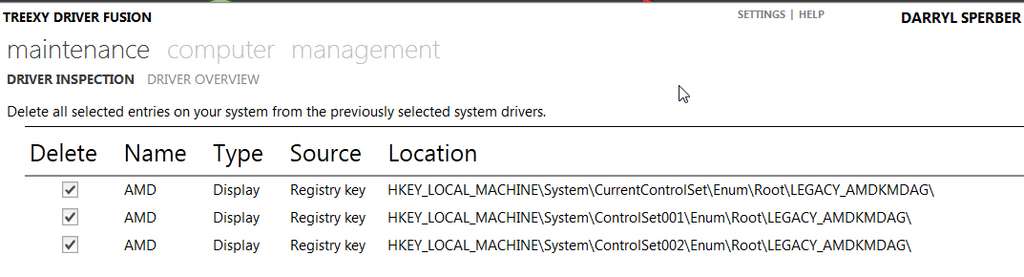
Now curiously, Driver Fusion could NOT delete THREE REGISTRY KEYS association with AMD drivers:

amdregistrykeyswillnotd.jpg


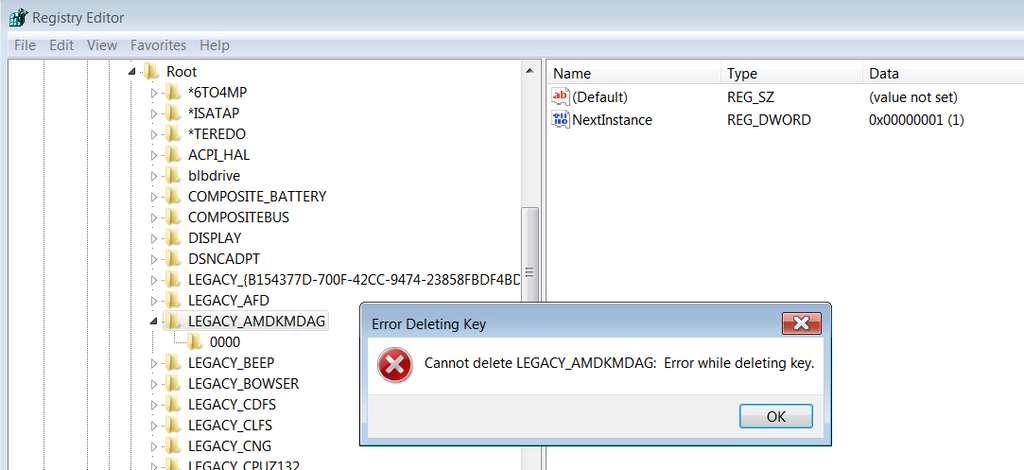
And, when I myself tried to manually delete these keys, I too was unsuccessful:

amdregistrykeyswillnotd.jpg


So I am now of the opinion that it is these three Registry keys and their inability to be deleted (or overwritten/replaced I would suspect as well) which are somehow intimately involved with my now 100% inability to install ANY Catalyst driver.

I suspect that if I reinstalled Win7 from scratch, I would be able to install the final "legacy" v12.6 Catalyst driver without a problem for my now "legacy" HD4850.
 

My Computer My Computer

At a glance

Windows 7 Pro x64 (1), Win7 Pro X64 (2)i5-3350p 3.1Ghz/6MB-cache (1); E8400 3.0Ghz/6...8GB PC3-12800 DDR3 (1); 4GB PC3-10600 DDR3 (2)ATI HD7750 (1), (see TV cards); ATI R7 250 (2)
Computer type
PC/Desktop
Computer Manufacturer/Model Number
Home-built, two systems (1) and (2)
OS
Windows 7 Pro x64 (1), Win7 Pro X64 (2)
CPU
i5-3350p 3.1Ghz/6MB-cache (1); E8400 3.0Ghz/6MB-cache (2)
Motherboard
ASUS P8Z77-V Pro (1); ASUS P5Q3 (2)
Memory
8GB PC3-12800 DDR3 (1); 4GB PC3-10600 DDR3 (2)
Graphics Card(s)
ATI HD7750 (1), (see TV cards); ATI R7 250 (2)
Sound Card
Realtek ALC892 HD Audio (1); Realtek ALC1200 HD Audio (2)
Monitor(s) Displays
Eizo HD2441W LCD, Eizo S2433W (1); Eizo 24" S2433W (2)
Screen Resolution
1920x1200, 1920x1200 (1); 1920x1200 (2)
Hard Drives
(1) 1TB SATA-II (7200RPM), 2x2TB SATA-III (7200RPM), 250GB SATA-III (10000RPM) for OS; 2x2TB external USB 3.0

(2) 320GB SATA-II (7200RPM), 750GB SATA-II (7200RPM), 150GB SATA-II (10000RPM) for OS; 2TB external USB 3.0
PSU
Nesteq ECS-6001 600W (1); Nesteq ECS-5001 500W (2)
Case
Acousti-Case 360 (1) and (2)
Cooling
Noctua NH-U12P SE2 for CPU, 2x120mm case fans (1) and (2)
Keyboard
IBM PS/2 (1) and (2)
Mouse
Logitech MX Revolution wireless (1); Microsoft wired (2)
Internet Speed
100mbps down / 10mbps up
Antivirus
Microsoft Security Essentials; Malwarebyte Anti-Malware Pro
Browser
Firefox
Other Info
Ceton InfiniTV 4-tuner cablecard-enabled TV card as well as Hauppauge HVR-2250 OTA/ATSC 2-tuner TV card in (1), running under Win7 WMC
Final post-script, I'm sure...

Heard back from the author of Driver Fusion regarding those three Registry keys which apparently couldn't be deleted. He advised that I need to check the "FORCE to delete entries" in the "Cleaning" section of Settings, which for some reason is not on by default when you install the product. He also said that while it appears to still be present after the "clean" (and they currently don't have a way to avoid that but are working on one), when you re-boot you will see that the three entries are indeed gone.

He then said the 12.6 install should work. It didn't. Same failure of driver to install.

He also suggested (based on his own experience with a laptop that also has a legacy ATI card in it, so that he too has had to fight to get the 12.6 drivers installed) that if a straightforward INSTALL doesn't get the drivers installed, that after that I could simply try the normal Windows approach to updating a driver... pointing to the folder into which the ATI 12.6 installer file expanded so that the relevant INF file(s) would be there.

In other words, Device Manager -> select ATI 4800 Series Display Adapter -> Update Driver -> Browse my computer for driver software (manual install) -> specify the folder in which the ATI 12.6 installer got expanded and check "include subfolders".

So I then tried that "plan B", and amazingly the Windows driver update process apparently found the proper INF file and proceeded to actually install that 12.6 driver!!! I was astonished.

Re-boot, and sure enough it would appear 12.6 was now installed and operational!!

Except that right-click on the desktop did NOT show Catalyst Control Center at the top of the popup menu. I'm sure this is somehow the unintended consequence of the manual Windows install for the driver itself, rather than getting it done by the Catalyst Install Manager (which had failed to install the driver although it did install CCC successfully).

So I then went to Control Panel -> uninstall programs -> AMD Catalyst Install Manager -> change, and did a selective uninstall of Catalyst Control Center. That completed successfully.

Then I ran SETUP.EXE from the expanded 12.6 installer folder, and did a custom install to select only Catalyst Control Center. This completed successfully.

And now, once again, I have CCC on the popup menu from the desktop. And using it to check software, sure enough I DO HAVE v12.6 drivers installed!!!

I have finally emerged victorious, with v12.6 now installed for my HD4850!! Not exactly the simple install I was hoping for, but at least I've emerged victorious.

Still have no idea why the official Catalyst installers of any version no longer succeed in installing a driver on my system, but at this point I DON'T CARE!!!

CASE CLOSED.
 

My Computer My Computer

At a glance

Windows 7 Pro x64 (1), Win7 Pro X64 (2)i5-3350p 3.1Ghz/6MB-cache (1); E8400 3.0Ghz/6...8GB PC3-12800 DDR3 (1); 4GB PC3-10600 DDR3 (2)ATI HD7750 (1), (see TV cards); ATI R7 250 (2)
Computer type
PC/Desktop
Computer Manufacturer/Model Number
Home-built, two systems (1) and (2)
OS
Windows 7 Pro x64 (1), Win7 Pro X64 (2)
CPU
i5-3350p 3.1Ghz/6MB-cache (1); E8400 3.0Ghz/6MB-cache (2)
Motherboard
ASUS P8Z77-V Pro (1); ASUS P5Q3 (2)
Memory
8GB PC3-12800 DDR3 (1); 4GB PC3-10600 DDR3 (2)
Graphics Card(s)
ATI HD7750 (1), (see TV cards); ATI R7 250 (2)
Sound Card
Realtek ALC892 HD Audio (1); Realtek ALC1200 HD Audio (2)
Monitor(s) Displays
Eizo HD2441W LCD, Eizo S2433W (1); Eizo 24" S2433W (2)
Screen Resolution
1920x1200, 1920x1200 (1); 1920x1200 (2)
Hard Drives
(1) 1TB SATA-II (7200RPM), 2x2TB SATA-III (7200RPM), 250GB SATA-III (10000RPM) for OS; 2x2TB external USB 3.0

(2) 320GB SATA-II (7200RPM), 750GB SATA-II (7200RPM), 150GB SATA-II (10000RPM) for OS; 2TB external USB 3.0
PSU
Nesteq ECS-6001 600W (1); Nesteq ECS-5001 500W (2)
Case
Acousti-Case 360 (1) and (2)
Cooling
Noctua NH-U12P SE2 for CPU, 2x120mm case fans (1) and (2)
Keyboard
IBM PS/2 (1) and (2)
Mouse
Logitech MX Revolution wireless (1); Microsoft wired (2)
Internet Speed
100mbps down / 10mbps up
Antivirus
Microsoft Security Essentials; Malwarebyte Anti-Malware Pro
Browser
Firefox
Other Info
Ceton InfiniTV 4-tuner cablecard-enabled TV card as well as Hauppauge HVR-2250 OTA/ATSC 2-tuner TV card in (1), running under Win7 WMC
Congratulations, and good share that may help others :thumbsup:

A Guy
 

My Computer My Computer

At a glance

Windows 10 Home x64INTEL Core i5-750 Quad-Core 3.37GHzHyperX Fury Black Series 8GB (2 x 4GB) 1866MhzEVGA GeForce GTX 750 Superclocked 1GB 128-Bit...
Computer type
PC/Desktop
OS
Windows 10 Home x64
CPU
INTEL Core i5-750 Quad-Core 3.37GHz
Motherboard
ASUS P7P55D
Memory
HyperX Fury Black Series 8GB (2 x 4GB) 1866Mhz
Graphics Card(s)
EVGA GeForce GTX 750 Superclocked 1GB 128-Bit GDDR5
Monitor(s) Displays
LG 32MA68HY 32" IPS
Screen Resolution
1920 x 1080
Hard Drives
Samsung 840 Evo 120GB, SEAGATE 500GB Barracuda® 7200.12, SATA 3 Gb/s, 7200 RPM, 16MB cache
PSU
ANTEC TruePower New TP-550, 80 PLUS, 550W
Case
ANTEC Three Hundred Illusion
Cooling
COOLER MASTER Hyper 212 Plus, 4 x 120mm 1 x 140mm Noctua's
Internet Speed
85 + Mbps
Antivirus
Avast
Browser
Vivaldi
I agree, excellent report..

the legacy 12.6 is currently the recommended driver for all AMD cards, prior to the 5*** series..
hence, it will be used on a great many PC's - your report may prove extremely useful to those with similar problems when upgrading drivers..

apparently AMD will review the legacy driver on a six-monthly basis..
 

My Computer My Computer

At a glance

Windows10 Pro - 64Bit vs.10547i7-965 Extreme Edition (8 Cores) at 3.3GHz (n...12G Corsair Dominator DDR3 - tripled2xAMD SapphireNITRO R9 380(4G) crossfire
Computer type
PC/Desktop
Computer Manufacturer/Model Number
benchtec, built to personal specs
OS
Windows10 Pro - 64Bit vs.10547
CPU
i7-965 Extreme Edition (8 Cores) at 3.3GHz (no OC)
Motherboard
BloodRageX58 (Socket1366)
Memory
12G Corsair Dominator DDR3 - tripled
Graphics Card(s)
2xAMD SapphireNITRO R9 380(4G) crossfire
Sound Card
Sonar(SB)X-Fi onboard
Monitor(s) Displays
SyncMaster P2050 20"
Screen Resolution
1600x900 (widescreen)
Hard Drives
480G\OCZSolid3SSD, 64G\OCZVertex3SSD,60G\OCZVertex2SSD, 1TB\spinpointF1SATAHDD
PSU
1200w Power Station Gold
Case
ANTEC 900/2 all blue lights, etc..
Cooling
Noctua SE1366 NH-U12P - a tight fit, but a monster cooler!!
Keyboard
Logitech G19 (wired)
Mouse
Logitech G9 Laser (wired)
Internet Speed
150mb unlimited
Browser
IE11(RP)
Other Info
Xbox One, Nokia735 Windows10 mobile, LG HD/DVD/Blu-Ray r/w, CyberlinkPowerDVD15, LogitechZ5500-SS(5.1), LogitechG35Phones-SS(7.1),MSOffice 2007,CorelDrawX7,Painter2016, Wacom Intuos Pro-SE
Final post-script, I'm sure...

Heard back from the author of Driver Fusion regarding those three Registry keys which apparently couldn't be deleted. He advised that I need to check the "FORCE to delete entries" in the "Cleaning" section of Settings, which for some reason is not on by default when you install the product. He also said that while it appears to still be present after the "clean" (and they currently don't have a way to avoid that but are working on one), when you re-boot you will see that the three entries are indeed gone.

He then said the 12.6 install should work. It didn't. Same failure of driver to install.

He also suggested (based on his own experience with a laptop that also has a legacy ATI card in it, so that he too has had to fight to get the 12.6 drivers installed) that if a straightforward INSTALL doesn't get the drivers installed, that after that I could simply try the normal Windows approach to updating a driver... pointing to the folder into which the ATI 12.6 installer file expanded so that the relevant INF file(s) would be there.

In other words, Device Manager -> select ATI 4800 Series Display Adapter -> Update Driver -> Browse my computer for driver software (manual install) -> specify the folder in which the ATI 12.6 installer got expanded and check "include subfolders".

So I then tried that "plan B", and amazingly the Windows driver update process apparently found the proper INF file and proceeded to actually install that 12.6 driver!!! I was astonished.

Re-boot, and sure enough it would appear 12.6 was now installed and operational!!

Except that right-click on the desktop did NOT show Catalyst Control Center at the top of the popup menu. I'm sure this is somehow the unintended consequence of the manual Windows install for the driver itself, rather than getting it done by the Catalyst Install Manager (which had failed to install the driver although it did install CCC successfully).

So I then went to Control Panel -> uninstall programs -> AMD Catalyst Install Manager -> change, and did a selective uninstall of Catalyst Control Center. That completed successfully.

Then I ran SETUP.EXE from the expanded 12.6 installer folder, and did a custom install to select only Catalyst Control Center. This completed successfully.

And now, once again, I have CCC on the popup menu from the desktop. And using it to check software, sure enough I DO HAVE v12.6 drivers installed!!!

I have finally emerged victorious, with v12.6 now installed for my HD4850!! Not exactly the simple install I was hoping for, but at least I've emerged victorious.

Still have no idea why the official Catalyst installers of any version no longer succeed in installing a driver on my system, but at this point I DON'T CARE!!!

CASE CLOSED.

Yeah, sometimes go through the device manager to manually find the .inf to install the proper drivers is a good choice.

At least this post could serve some stuck with Driver Fusion.

Glad you sorted out.
 

My Computer My Computer

At a glance

Windows 7 Professional SP1 - x64 [Non-UEFI Boot]Ivy Bridge Core i5 3570K (Delidded)G.Skill "Ares" DDR3 PC3-12800 - 1600MHz (16Gb)Asus Dual-RX480-O4G
Computer type
PC/Desktop
Computer Manufacturer/Model Number
Custom Build
OS
Windows 7 Professional SP1 - x64 [Non-UEFI Boot]
CPU
Ivy Bridge Core i5 3570K (Delidded)
Motherboard
Asus P8Z77-V LE PLUS
Memory
G.Skill "Ares" DDR3 PC3-12800 - 1600MHz (16Gb)
Graphics Card(s)
Asus Dual-RX480-O4G
Sound Card
Creative Sound Blaster Z w/5.1 sound system
Monitor(s) Displays
Asus IPS 23"
Screen Resolution
16/9
Hard Drives
Internal:
500Go Sata 6Gb/s (x2)
500Go Sata 3Gb/s (x2)
SSD 60Go Sata 6Gb/s
PSU
In Win C 900W Series 80+ Platinum
Case
Thermaltake Chaser A71
Cooling
Custom Water Cooling Loop
Keyboard
Cooler Master QuickFire XTi
Mouse
Razer Imperator 2012 (4G)
Antivirus
MSE
Browser
IE 11.0.xxx Rtm
Other Info
"Raid0" with Intel Smart Response Technology (HDD/SSD)
Btw, thank you so much for the links, Brink! I'd rep you but have to wait a bit. I had a bunch of other problems what with my ext hdd not being recognized on eSATA but only USB2, onboard HDMI not registering as even existing, and a couple other programs giving me woes. So I started from a clean slate again, and magically everything is working again! I haven't tried to bring my ATI driver up to date yet. I'm just happy the original is working for now, but the old CCC is soooo annoying. I may have to make some good use of dsperber's report as well. Still, always great to have access to every other version. & the registry fix, hopefully won't need it this time. Thanks guys!
 

My Computer My Computer

At a glance

Windows 7 Pro x64 SP1AMD Phenom II x6 1090T Black Edition 3.2GHzPatriot G ‘Sector 5’ Edition 8GB (2 x 4GB) 16...
Computer type
PC/Desktop
OS
Windows 7 Pro x64 SP1
CPU
AMD Phenom II x6 1090T Black Edition 3.2GHz
Motherboard
ASUS M4A88TD-V EVO/USB3
Memory
Patriot G ‘Sector 5’ Edition 8GB (2 x 4GB) 1600MHz
Sound Card
(onboard) Realtek® ALC 892 8-Channel High Definition Audio
Monitor(s) Displays
ViewSonic VX2253 22"
Screen Resolution
1920x1080
Hard Drives
Transcend SSD720 2.5" SATAIII 64GB SSD; Western Digital Caviar Green WD20EARS 2TB 64MB 3.5" HDD
LG WH10LS30 10X Blu-ray Burner with LightScribe
PSU
CORSAIR TX Series 950W ATX12V 80 Plus Bronze
Case
Cooler Master HAF X NVidia Edition; 5 Green LED Fans!
Cooling
CORSAIR A70 120mm Dual-Fan
Keyboard
Verbatim 97472 Mini Wireless Slim
Mouse
bundled Verbatim 97472 Wireless
Antivirus
Avast
Browser
Chrome
Other Info
Ultraportable/Desktop Replacement Laptop:
circa Oct 2006,
Dell XPS M1210,
Windows 7 Professional 32-bit,
Intel Core 2 Duo T7200 2.0GHz,
3.25 (4) GB of RAM,
NVidia GeForce Go 7400,
500GB Seagate Momentus 7200RPM HDD
You're most welcome Denise. I'm happy to hear that you got it sorted. :)
 

My Computer My Computer

At a glance

64-bit Windows 11 Pro for WorkstationsIntel i7-8700K OC'd to 5 GHz64 GB (4x16GB) G.SKILL TridentZ RGB DDR4 3600...ASUS ROG-STRIX-GTX1080TI-O11G-GAMING
Computer type
PC/Desktop
Computer Manufacturer/Model Number
Self built custom
OS
64-bit Windows 11 Pro for Workstations
CPU
Intel i7-8700K OC'd to 5 GHz
Motherboard
ASUS ROG Maximus XI Formula Z390
Memory
64 GB (4x16GB) G.SKILL TridentZ RGB DDR4 3600 MHz
Graphics Card(s)
ASUS ROG-STRIX-GTX1080TI-O11G-GAMING
Sound Card
Integrated
Monitor(s) Displays
2 x Samsung Odyssey G7 27"
Screen Resolution
2560x1440
Hard Drives
1TB Samsung 990 PRO M.2,
4TB Samsung 990 PRO PRO M.2,
TerraMaster F8 SSD Plus NAS
PSU
Seasonic Prime Titanium 850W
Case
Thermaltake Core P3
Cooling
Corsair Hydro H115i
Keyboard
Logitech wireless K800
Mouse
Logitech MX Master 4
Internet Speed
2 Gb/s Download and 100 Mb/s Upload
Antivirus
Malwarebyte Anti-Malware Premium
Browser
Google Chrome
Other Info
Logitech Z625 speaker system,
Logitech BRIO 4K Pro webcam,
HP Color LaserJet Pro MFP M477fdn,
APC SMART-UPS RT 1000 XL - SURT1000XLI,
Galaxy S23 Plus phone
At least this post could serve some stuck with Driver Fusion.

Sounds like that could have been the cause of the problem to begin with. You're also not likely to ever get the author of it (or any of the other "driver cleaning" programs) to admit that it was their program that caused it.

At least you managed to get the driver to install manually through Device Manager, used to be when that sort of thing happened you were left with either re-installing Windows or loading back an image (if you had one) from before using the cleaner.
 

My Computer My Computer

At a glance

Win 7 Ultimate x64FX-8350 @ 4.6 GHz so farADATA XPG V1 Series Black 8GB DDR3 1600Sapphire R9 270x Dual-X
Computer type
PC/Desktop
Computer Manufacturer/Model Number
Me
OS
Win 7 Ultimate x64
CPU
FX-8350 @ 4.6 GHz so far
Motherboard
Asus M5A97 EVO
Memory
ADATA XPG V1 Series Black 8GB DDR3 1600
Graphics Card(s)
Sapphire R9 270x Dual-X
Sound Card
Xonar DGX w/ Corsair Vengence 1300
Monitor(s) Displays
Acer S232HL Abid
Screen Resolution
1920x1080
Hard Drives
120 GB OCZ Vertex 3
500 GB Seagate 7200.12
PSU
Antec Earthwatts 650W Green
Case
Antec Three Hundred
Cooling
Cooler Master 212 EVO
Keyboard
Logitech G510
Mouse
Logitech G500s
Internet Speed
35000/3000

My Computer My Computer

At a glance

Win 7 Ultimate x64FX-8350 @ 4.6 GHz so farADATA XPG V1 Series Black 8GB DDR3 1600Sapphire R9 270x Dual-X
Computer type
PC/Desktop
Computer Manufacturer/Model Number
Me
OS
Win 7 Ultimate x64
CPU
FX-8350 @ 4.6 GHz so far
Motherboard
Asus M5A97 EVO
Memory
ADATA XPG V1 Series Black 8GB DDR3 1600
Graphics Card(s)
Sapphire R9 270x Dual-X
Sound Card
Xonar DGX w/ Corsair Vengence 1300
Monitor(s) Displays
Acer S232HL Abid
Screen Resolution
1920x1080
Hard Drives
120 GB OCZ Vertex 3
500 GB Seagate 7200.12
PSU
Antec Earthwatts 650W Green
Case
Antec Three Hundred
Cooling
Cooler Master 212 EVO
Keyboard
Logitech G510
Mouse
Logitech G500s
Internet Speed
35000/3000

My Computer My Computer

At a glance

Operating System : Windows 7 Home Premium Edi...Processor : Intel Core 2 Quad Q8300 @ 2500 MHzPhysical Memory :8GB Corsair4x 2GB 800MHz C5 ...Video Card : XFX 6700 AMD
Computer Manufacturer/Model Number
packard bell IXTREME M5722
OS
Operating System : Windows 7 Home Premium Edition 6.01.7600 SP1 (x64)
CPU
Processor : Intel Core 2 Quad Q8300 @ 2500 MHz
Motherboard
Mainboard : Packard Bell (Acer EG43M )
Memory
Physical Memory :8GB Corsair4x 2GB 800MHz C5 DDR2
Graphics Card(s)
Video Card : XFX 6700 AMD
Monitor(s) Displays
Maestro 234DL - BenQ V2220 - BenQ VW2420H
Screen Resolution
Current Display :1920x1080p pixels at 60 Hz in HD LED
Hard Drives
Hard Disks : WDC (1000 GB)
Drive C: (Hard Disk) : 428 GB available on 491 GB
Drive D: (Hard Disk) : 426 GB available on 492 GB
SAMSUNG spinpoint HD103SJ 1000.2 GB
(X 2) KINGSTON SSD NOW V 30GB
PSU
XFX ProSeries 550W PSU
Case
PACKARD BELL IXTREME
Cooling
System Blower Current: 150mA Air Flow16CFM ;Akasa 90mm rear
Keyboard
Gigabyte Aivia K8100
Mouse
TRUST-Wireless Laser Mouse - Carbon edition MI-7770C
Internet Speed
TP-LINK > TL-WN951N / AV500 Gigabit Powerline Adapters
Browser
chrome dev
Other Info
EXTRA COOLING>(FAN CONTROLLER) PC Bay Cooler 3 x 40mm fans; Akasa AK-HD-BL Blue hard drive cooler 2 x 40 mm fan 4500 rpm 29.7 dBA
Bios> American Megatrends Inc.
Version : P01-A1
Date : 08/31/2009
Thank you Richard. First post updated. :)
 

My Computer My Computer

At a glance

64-bit Windows 11 Pro for WorkstationsIntel i7-8700K OC'd to 5 GHz64 GB (4x16GB) G.SKILL TridentZ RGB DDR4 3600...ASUS ROG-STRIX-GTX1080TI-O11G-GAMING
Computer type
PC/Desktop
Computer Manufacturer/Model Number
Self built custom
OS
64-bit Windows 11 Pro for Workstations
CPU
Intel i7-8700K OC'd to 5 GHz
Motherboard
ASUS ROG Maximus XI Formula Z390
Memory
64 GB (4x16GB) G.SKILL TridentZ RGB DDR4 3600 MHz
Graphics Card(s)
ASUS ROG-STRIX-GTX1080TI-O11G-GAMING
Sound Card
Integrated
Monitor(s) Displays
2 x Samsung Odyssey G7 27"
Screen Resolution
2560x1440
Hard Drives
1TB Samsung 990 PRO M.2,
4TB Samsung 990 PRO PRO M.2,
TerraMaster F8 SSD Plus NAS
PSU
Seasonic Prime Titanium 850W
Case
Thermaltake Core P3
Cooling
Corsair Hydro H115i
Keyboard
Logitech wireless K800
Mouse
Logitech MX Master 4
Internet Speed
2 Gb/s Download and 100 Mb/s Upload
Antivirus
Malwarebyte Anti-Malware Premium
Browser
Google Chrome
Other Info
Logitech Z625 speaker system,
Logitech BRIO 4K Pro webcam,
HP Color LaserJet Pro MFP M477fdn,
APC SMART-UPS RT 1000 XL - SURT1000XLI,
Galaxy S23 Plus phone
New AMD 12.11 BETA 4 video driver released. See first post for more details. :)
 

My Computer My Computer

At a glance

64-bit Windows 11 Pro for WorkstationsIntel i7-8700K OC'd to 5 GHz64 GB (4x16GB) G.SKILL TridentZ RGB DDR4 3600...ASUS ROG-STRIX-GTX1080TI-O11G-GAMING
Computer type
PC/Desktop
Computer Manufacturer/Model Number
Self built custom
OS
64-bit Windows 11 Pro for Workstations
CPU
Intel i7-8700K OC'd to 5 GHz
Motherboard
ASUS ROG Maximus XI Formula Z390
Memory
64 GB (4x16GB) G.SKILL TridentZ RGB DDR4 3600 MHz
Graphics Card(s)
ASUS ROG-STRIX-GTX1080TI-O11G-GAMING
Sound Card
Integrated
Monitor(s) Displays
2 x Samsung Odyssey G7 27"
Screen Resolution
2560x1440
Hard Drives
1TB Samsung 990 PRO M.2,
4TB Samsung 990 PRO PRO M.2,
TerraMaster F8 SSD Plus NAS
PSU
Seasonic Prime Titanium 850W
Case
Thermaltake Core P3
Cooling
Corsair Hydro H115i
Keyboard
Logitech wireless K800
Mouse
Logitech MX Master 4
Internet Speed
2 Gb/s Download and 100 Mb/s Upload
Antivirus
Malwarebyte Anti-Malware Premium
Browser
Google Chrome
Other Info
Logitech Z625 speaker system,
Logitech BRIO 4K Pro webcam,
HP Color LaserJet Pro MFP M477fdn,
APC SMART-UPS RT 1000 XL - SURT1000XLI,
Galaxy S23 Plus phone
At the moment I'm having big issues with both 12.10 and the 12.11 Beta. I haven't worked out the issue is, as it starts as soon as I reboot after installing either of these drivers (on either Windows 8 release preview, or Windows 7 Ultimate x64).

I'm running two Radeon HD 6970's in Crossfire, with 2 monitors each running at 2560x1440.

As soon as I roll back to my old drivers, it's fine again.
 

My Computer My Computer

At a glance

Windows 8 Pro x64i7 920 D0 @ 4GHzOCZ Platinum 6GBRadeon 4890
Computer type
PC/Desktop
Computer Manufacturer/Model Number
Own Build
OS
Windows 8 Pro x64
CPU
i7 920 D0 @ 4GHz
Motherboard
Asus P6T Deluxe V2
Memory
OCZ Platinum 6GB
Graphics Card(s)
Radeon 4890
Sound Card
Onboard
Monitor(s) Displays
20" Viewsonic WS
Hard Drives
1TB
750GB
2x250GB
200GB
74GB Raptor
PSU
Coolermaster 650W
Case
Silverstone TJ10
Cooling
6x120mm
I see some people are already having headaches with 12.10

Personaly I havn't even dabled into wanting to download it
I was looking at the new 12.10 CAP that it does a better X-fire performance
I havn't had issues to want to jump on a new driver I'll wait it out untill it becomes needed
 

My Computer My Computer

At a glance

Windows 10 Home Premium 64bit sp1Intel I7-6700K @ 4.6 Ghz 1.344 volts everyday OC32GB G-Skill TridentZ 3200mhz 16-18-18-38 DDR4Sli Gigabyte Windforce GTX 980 G1
Computer type
PC/Desktop
Computer Manufacturer/Model Number
CoreI7-6700K MrFingerIII Special Builds
OS
Windows 10 Home Premium 64bit sp1
CPU
Intel I7-6700K @ 4.6 Ghz 1.344 volts everyday OC
Motherboard
Asrock Fatality K6 Z170 Socket 1151
Memory
32GB G-Skill TridentZ 3200mhz 16-18-18-38 DDR4
Graphics Card(s)
Sli Gigabyte Windforce GTX 980 G1
Sound Card
AC97 Creative Rage Tactic 3D Headphones Bluetooth
Monitor(s) Displays
27" Asus ROG Swift PG278Q G-Sync 48" Vizio Smart HD TV
Screen Resolution
2560x1440p 27"- 48" Currently Gaming at 2560x1440p Res 2K
Hard Drives
250GB Samsung Evo840SSD Seagate baracuda 500 GB WD Mybook 500Gb 1TB Seagate Barracuda
PSU
HX1050w Corsair Silver 80plus certified crosfire/sli
Case
Enthod Pro Full Tower
Cooling
Corsair H110i GT 280 mm High Performance WaterBlock
Keyboard
Logitech wireless keyboard
Mouse
Logitech wireless mouse
Internet Speed
Cox Cable 100+ mb
Antivirus
WebRoot Spysweeper with Antivirus
Browser
IE-10, Chrome, Opera
Other Info
My Other Rig is a AMD FX8320E @4.6Ghz 16GB Ballistic Sport Ram
Mobo Asrock Fatality 990FX 120GB OCZ SSD 1TB Seagate Barracuda Corsair H75 Cooling PSU Corsair CX750
GPU GTX Gigabyte 970G1
Seems to be only having issues with crossfire setups, my single card setup runs pretty much the same on 12.10 as it did in 12.8,. Will report if I get any issues with my single card setup,using a 6870 atm.
 

My Computer My Computer

At a glance

Windows 10 64bitAMD Phenom II X4 925 (Deneb)(2.8GHz) OC 3.4GHzCorsair Vengeance DDR3 4GBX2 (8192MB)XFX HD 6870 1GB (OC)- 940MHz core, mem 1150MHz
Computer type
PC/Desktop
Computer Manufacturer/Model Number
custom build
OS
Windows 10 64bit
CPU
AMD Phenom II X4 925 (Deneb)(2.8GHz) OC 3.4GHz
Motherboard
M5A78L-MLX Plus
Memory
Corsair Vengeance DDR3 4GBX2 (8192MB)
Graphics Card(s)
XFX HD 6870 1GB (OC)- 940MHz core, mem 1150MHz
Monitor(s) Displays
Vizio 26' 1920x1080 / Acer 1336x768
Screen Resolution
1920x1080 60Hz /1336x768
Hard Drives
Kingston Digital 60GB SSDNow V300/500gb HDD Western Digital 7200rpm (/WD 160GB HDD 7200rpm
PSU
CORSAIR CX600 600w
Case
AZZA Orion 202 EVO
Cooling
cooler master hyper TX3 cpu cooler
Keyboard
Razer DeathStalker
Mouse
Logitech Optical Gaming Mouse G400
Antivirus
Defualt on win 10
Browser
Firefox
Other Info
cpu is overclocked in bios
I'm having NSIS error when i try to run 12.10 driver exe... on site the size of file is mentioned 184MB but when start download it shows 73MB only.. on IE, FF, Chrome and all. Does AMD site has problem?
 

My Computer My Computer

At a glance

Windows 10 ProCore i5 9600KCorsair Vengeance Pro 2x 8GB (16GB) 3200MHz DDR4MSI GTX 1070 Gaming X 8GB
Computer type
PC/Desktop
Computer Manufacturer/Model Number
Self Built
OS
Windows 10 Pro
CPU
Core i5 9600K
Motherboard
ASUS ROG Strix Z390-F Gaming
Memory
Corsair Vengeance Pro 2x 8GB (16GB) 3200MHz DDR4
Graphics Card(s)
MSI GTX 1070 Gaming X 8GB
Sound Card
ASRock A-Style Purity Sound
Monitor(s) Displays
ASUS VX239H IPS
Screen Resolution
1920x1080
Hard Drives
XPG SPECTRIX S40G 2566GB M.2 NVMe | Patriot P210 512GB SSD | Seagate BarraCuda 4TB 5400RPM
PSU
Thermaltake Smart 600w RGB 80Plus
Case
NZXT H500 with 3x Corsair HD120 RGB w/Node Pro
Cooling
Cryorig H7
Keyboard
Corsair K70 RapidFire RGB (Cherry MX Speed)
Mouse
Logitech G402 Hyperion Fury
Internet Speed
20MB Cable Broadband
Browser
Chrome
Other Info
Corsair MM300 Extended Anti-Fray Mouse Pad | Edifier C2 2.1ch Sound System | XBOX One S Controller | XBOX 360 Wireless Controller for Windows | APC SUA1000i Smart-UPS | PS4 Slim 500GB [Region 1 - USA]
IDK but i was able to update fine through CCC itself
 

My Computer My Computer

At a glance

Windows 10 64bitAMD Phenom II X4 925 (Deneb)(2.8GHz) OC 3.4GHzCorsair Vengeance DDR3 4GBX2 (8192MB)XFX HD 6870 1GB (OC)- 940MHz core, mem 1150MHz
Computer type
PC/Desktop
Computer Manufacturer/Model Number
custom build
OS
Windows 10 64bit
CPU
AMD Phenom II X4 925 (Deneb)(2.8GHz) OC 3.4GHz
Motherboard
M5A78L-MLX Plus
Memory
Corsair Vengeance DDR3 4GBX2 (8192MB)
Graphics Card(s)
XFX HD 6870 1GB (OC)- 940MHz core, mem 1150MHz
Monitor(s) Displays
Vizio 26' 1920x1080 / Acer 1336x768
Screen Resolution
1920x1080 60Hz /1336x768
Hard Drives
Kingston Digital 60GB SSDNow V300/500gb HDD Western Digital 7200rpm (/WD 160GB HDD 7200rpm
PSU
CORSAIR CX600 600w
Case
AZZA Orion 202 EVO
Cooling
cooler master hyper TX3 cpu cooler
Keyboard
Razer DeathStalker
Mouse
Logitech Optical Gaming Mouse G400
Antivirus
Defualt on win 10
Browser
Firefox
Other Info
cpu is overclocked in bios
Hello Seven Forums, my first post.

I was going to ask this in another thread but it was too old. Basically, has the installer been fixed? I ask because since 12.4 my CCC info panel has refused to display any further driver update: 12.6, 12.8 and as of today's attempt, 12.10 have each been downloaded, installed (both as a normal update and from a clean slate (a lengthy procedure from another forum)). The thread google linked to on this forum said 'Solved' in the search result but no solution.

http://www.sevenforums.com/drivers/230422-catalyst-driver-v12-4-not-installing.html

Thanks for any feedback
 

My Computer My Computer

At a glance

Dual Boot Win 7 Pro x86 + Win XP SP3
OS
Dual Boot Win 7 Pro x86 + Win XP SP3
mangomito welcome to the Seven Forums.

Would help to know which card you have. If it is anything prior to the Hd 5xxx series then the 12.6 is the best you're going, as AMD as declared all cards prior to that legacy and they are no longer supported in the latest Catalyst suite's.
 

My Computer My Computer

At a glance

Win 7 Ultimate x64FX-8350 @ 4.6 GHz so farADATA XPG V1 Series Black 8GB DDR3 1600Sapphire R9 270x Dual-X
Computer type
PC/Desktop
Computer Manufacturer/Model Number
Me
OS
Win 7 Ultimate x64
CPU
FX-8350 @ 4.6 GHz so far
Motherboard
Asus M5A97 EVO
Memory
ADATA XPG V1 Series Black 8GB DDR3 1600
Graphics Card(s)
Sapphire R9 270x Dual-X
Sound Card
Xonar DGX w/ Corsair Vengence 1300
Monitor(s) Displays
Acer S232HL Abid
Screen Resolution
1920x1080
Hard Drives
120 GB OCZ Vertex 3
500 GB Seagate 7200.12
PSU
Antec Earthwatts 650W Green
Case
Antec Three Hundred
Cooling
Cooler Master 212 EVO
Keyboard
Logitech G510
Mouse
Logitech G500s
Internet Speed
35000/3000
Status
Not open for further replies.
Back
Top