Final post-script, I'm sure...
Nope... one more final final post-script.
I'm an idiot.
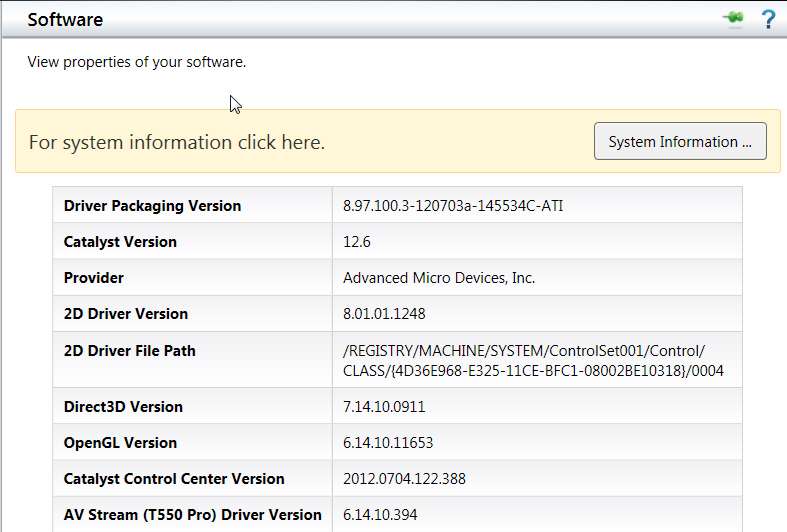
I had occasion to rebuild my two machines this weekend, and transplanted my HD4850 to the other machine. Consequently I had to uninstall currently running Catalyst 12.8 (in support of the HD5770 previously in the machine) in order to install 12.6 or lower since the HD4850 needed it. Well once again I was unable to install 12.6, and had to revert to my old 12.3 which would install.
However even after getting 12.3 installed, for some reason I couldn't use the "trick" I thought I'd discovered and described earlier a few weeks ago, of simply using Device Manager to "update drivers", pointing to where the 12.6 INF file was located. This had worked successfully for me a few weeks back to get from 12.3 to 12.6, but not this weekend for some reason.
Well, the problem all along with being unable to update drivers past 12.3 for my HD4850 would appear to be that I WAS USING THE WRONG INSTALLER FILE!!! Actually, I must have had two different downloaded versions of 12.6, because absolutely the Device Manager approach DID work a few weeks ago, even though this weekend's attempt failed. And this weekend, apparently I was using the wrong 12.6 installer.
The answer is that I foolishly thought that "all 12.6 installer files were the same", but that's apparently NOT the case. Yes, 12.6 is the last driver version supported for the HD4850 at this time, but there is a difference in the "WHQL" 12.6 installer file for HD5xxx and above and the "legacy WHQL" 12.6 installer file for HD4xxx and below, in terms of the "supported hardware" specified in the INF.
The
64-bit 12.6 WHQL drivers which I downloaded from Guru3D and tried to use for my HD4850 is NOT the proper file. This is apparently the installer for the HD5xxx and above. That's why nothing good ever came from it when I used it for my HD4850 even though it worked perfectly for my HD5770.
In fact, the
CORRECT 64-bit 12.6 WHQL installer file to be used for HD4xxx and below is the "legacy" version (which includes support for the older HD AGP series cards as well as HD4xxx and below PCIe cards) which
I have now properly downloaded from the ATI site.
Once I finally understood this (and how dumb I'd been all this time), I ran the CORRECT installer file.
And sure enough, it seemed to go without a hitch. The proper usual imbedded components were offered for installation, including driver, install manager, CCC, etc.. I unchecked a few items but the rest of the install went fine, except for a mysterious "Windows installer has closed" error message during the installation (while it was installing Catalyst Control Center). I clicked OK to make the message disappear, and the rest of the CCC install seemed to continue until finished.
But after re-booting, CCC would not launch. It was theoretically installed, but it would not launch.
Well, now I decided I was indeed very very close (since Device Manager DID show that the 12.6 driver had actually been installed!), and that it was now time to just revert back to the "recipe" I had discovered for getting CCC to fully uninstall/install correctly after which it will indeed launch successfully, and which
has been documented in another thread:
Uninstall just CCC selectively (using Catalyst Install Manager), and then:
1. Check that registry locations are empty:a. HKCU/Software/ATI/ACE
b. HKLM/Software/ATI/ACE
2. Check that (Program Files (X86) folder )/ATI Technologies/ATI.ACE is empty
3. Check (Windows folder)/Assembly folder to see if there's any files with Public Key Token of "90ba9c70f846762e" (Sort by Public key token to get a easier view). All these tokens should be uninstalled by right clicking and uninstalling.
4. Check that (Document and Settings)/(User)/AppData/Local/ATI/ACE is empty
5. Reboot.
6. Reinstall just CCC selectively, by running SETUP.EXE from the expanded Catalyst installer folder.
In fact, I observed that many of the alluded to "leftover" components of CCC were actually still there, in the Registry, folders, etc., apparently NOT being completely uninstalled by the Catalyst Install Manager although I'd gone through a selective uninstall of CCC.
And I now believe the reason that occurred is that the original install of CCC itself failed (i.e. the "Windows Installer has closed" message), so that the resulting install log which would be used in reverse for an uninstall was actually incomplete. This may or may not have had something to do with the existing Catalyst 12.3 I currently had installed, but for whatever reason the install of 12.6 CCC did NOT actually run "clean". And because of that the selective uninstall of CCC also did not complete successfully, leaving many of these leftover components around which apparently then interferes with any subsequent attempt to reinstall CCC.
And that's why the above "recipe" for removing CCC completely is so significant. And the reason for it now all becomes clear.
Anyway, I simply followed the steps of the above recipe, to truly clean out CCC. There were two DLL's in the ATI Technologies folder that I couldn't delete until I first rebooted, but I deleted them successfully after the reboot.
Then, as the final step of the recipe states, I just did a "custom selective" install of only CCC from SETUP.EXE in the same "legacy" WHQL 12.6 expanded driver installation folder, and this time IT RAN TO NORMAL COMPLETION WITH NO "WINDOWS INSTALLER HAS FAILED" ERROR.
One more reboot just for good luck, and now everything is truly installed, up-to-date at 12.6 (from the HD4850 from this "legacy" installer), running perfectly, and the case is closed.
I believe this will be the very last post-script. All it took really was getting the correct "legacy" version of the 12.6 driver installer file for HD4xxx and below, instead of the incorrect 12.6 installer for HD5000 and above.
And then the other item about CCC not installing, or not launching, and how to resolve that... well, that's truly worth knowing.