Latest AMD Catalyst Video Driver for Windows 7

Status
Not open for further replies.
argghh I failed one of my biggest annoyances - not mentioning specific hardware! Sorry.

i'm not ashamed to say it's an old one, HD3850 (AGP). now don't strike me down with a blowtorch but i'm not a gamer, i've a console for that so my system atm serves it's daily purposes. the reason for this current state of confusion is due to not booting into 7 for quite a while (all my work and image editing utils are accessed through XP) and a dialogue popped up saying there was an update for 12.10, so i applied it. i went and checked ATI (AMD's) website and yes (thanks for the info) i now realise 12.6 will be the best i can hope for BUT when i tried 12.6 the first time it was released CCC didn't show it had been updated. i since rolled back to 12.4 because .6 was somehow useless playing stutter-free 720p on youtube, .4 was, and still remains, great. i guess for now i shall dismiss future updates until i return from the stone age and upgrade my hardware :)
 

My Computer My Computer

At a glance

Dual Boot Win 7 Pro x86 + Win XP SP3
OS
Dual Boot Win 7 Pro x86 + Win XP SP3
Final post-script, I'm sure...
Nope... one more final final post-script.

I'm an idiot.

I had occasion to rebuild my two machines this weekend, and transplanted my HD4850 to the other machine. Consequently I had to uninstall currently running Catalyst 12.8 (in support of the HD5770 previously in the machine) in order to install 12.6 or lower since the HD4850 needed it. Well once again I was unable to install 12.6, and had to revert to my old 12.3 which would install.

However even after getting 12.3 installed, for some reason I couldn't use the "trick" I thought I'd discovered and described earlier a few weeks ago, of simply using Device Manager to "update drivers", pointing to where the 12.6 INF file was located. This had worked successfully for me a few weeks back to get from 12.3 to 12.6, but not this weekend for some reason.


Well, the problem all along with being unable to update drivers past 12.3 for my HD4850 would appear to be that I WAS USING THE WRONG INSTALLER FILE!!! Actually, I must have had two different downloaded versions of 12.6, because absolutely the Device Manager approach DID work a few weeks ago, even though this weekend's attempt failed. And this weekend, apparently I was using the wrong 12.6 installer.

The answer is that I foolishly thought that "all 12.6 installer files were the same", but that's apparently NOT the case. Yes, 12.6 is the last driver version supported for the HD4850 at this time, but there is a difference in the "WHQL" 12.6 installer file for HD5xxx and above and the "legacy WHQL" 12.6 installer file for HD4xxx and below, in terms of the "supported hardware" specified in the INF.

The 64-bit 12.6 WHQL drivers which I downloaded from Guru3D and tried to use for my HD4850 is NOT the proper file. This is apparently the installer for the HD5xxx and above. That's why nothing good ever came from it when I used it for my HD4850 even though it worked perfectly for my HD5770.

In fact, the CORRECT 64-bit 12.6 WHQL installer file to be used for HD4xxx and below is the "legacy" version (which includes support for the older HD AGP series cards as well as HD4xxx and below PCIe cards) which I have now properly downloaded from the ATI site.


Once I finally understood this (and how dumb I'd been all this time), I ran the CORRECT installer file.

And sure enough, it seemed to go without a hitch. The proper usual imbedded components were offered for installation, including driver, install manager, CCC, etc.. I unchecked a few items but the rest of the install went fine, except for a mysterious "Windows installer has closed" error message during the installation (while it was installing Catalyst Control Center). I clicked OK to make the message disappear, and the rest of the CCC install seemed to continue until finished.

But after re-booting, CCC would not launch. It was theoretically installed, but it would not launch.

Well, now I decided I was indeed very very close (since Device Manager DID show that the 12.6 driver had actually been installed!), and that it was now time to just revert back to the "recipe" I had discovered for getting CCC to fully uninstall/install correctly after which it will indeed launch successfully, and which has been documented in another thread:

Uninstall just CCC selectively (using Catalyst Install Manager), and then:

1. Check that registry locations are empty:
a. HKCU/Software/ATI/ACE
b. HKLM/Software/ATI/ACE
2. Check that (Program Files (X86) folder )/ATI Technologies/ATI.ACE is empty

3. Check (Windows folder)/Assembly folder to see if there's any files with Public Key Token of "90ba9c70f846762e" (Sort by Public key token to get a easier view). All these tokens should be uninstalled by right clicking and uninstalling.

4. Check that (Document and Settings)/(User)/AppData/Local/ATI/ACE is empty

5. Reboot.

6. Reinstall just CCC selectively, by running SETUP.EXE from the expanded Catalyst installer folder.

In fact, I observed that many of the alluded to "leftover" components of CCC were actually still there, in the Registry, folders, etc., apparently NOT being completely uninstalled by the Catalyst Install Manager although I'd gone through a selective uninstall of CCC.

And I now believe the reason that occurred is that the original install of CCC itself failed (i.e. the "Windows Installer has closed" message), so that the resulting install log which would be used in reverse for an uninstall was actually incomplete. This may or may not have had something to do with the existing Catalyst 12.3 I currently had installed, but for whatever reason the install of 12.6 CCC did NOT actually run "clean". And because of that the selective uninstall of CCC also did not complete successfully, leaving many of these leftover components around which apparently then interferes with any subsequent attempt to reinstall CCC.

And that's why the above "recipe" for removing CCC completely is so significant. And the reason for it now all becomes clear.

Anyway, I simply followed the steps of the above recipe, to truly clean out CCC. There were two DLL's in the ATI Technologies folder that I couldn't delete until I first rebooted, but I deleted them successfully after the reboot.

Then, as the final step of the recipe states, I just did a "custom selective" install of only CCC from SETUP.EXE in the same "legacy" WHQL 12.6 expanded driver installation folder, and this time IT RAN TO NORMAL COMPLETION WITH NO "WINDOWS INSTALLER HAS FAILED" ERROR.

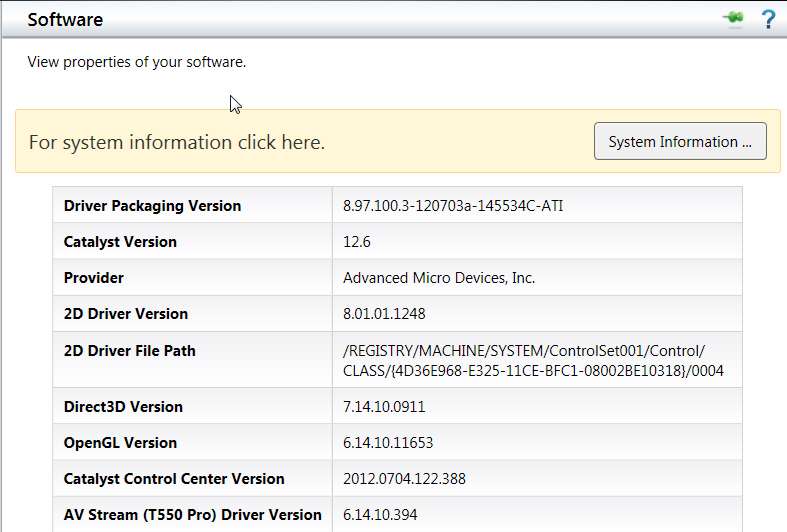
One more reboot just for good luck, and now everything is truly installed, up-to-date at 12.6 (from the HD4850 from this "legacy" installer), running perfectly, and the case is closed.

catalyst126.jpg


I believe this will be the very last post-script. All it took really was getting the correct "legacy" version of the 12.6 driver installer file for HD4xxx and below, instead of the incorrect 12.6 installer for HD5000 and above.

And then the other item about CCC not installing, or not launching, and how to resolve that... well, that's truly worth knowing.

 

My Computer My Computer

At a glance

Windows 7 Pro x64 (1), Win7 Pro X64 (2)i5-3350p 3.1Ghz/6MB-cache (1); E8400 3.0Ghz/6...8GB PC3-12800 DDR3 (1); 4GB PC3-10600 DDR3 (2)ATI HD7750 (1), (see TV cards); ATI R7 250 (2)
Computer type
PC/Desktop
Computer Manufacturer/Model Number
Home-built, two systems (1) and (2)
OS
Windows 7 Pro x64 (1), Win7 Pro X64 (2)
CPU
i5-3350p 3.1Ghz/6MB-cache (1); E8400 3.0Ghz/6MB-cache (2)
Motherboard
ASUS P8Z77-V Pro (1); ASUS P5Q3 (2)
Memory
8GB PC3-12800 DDR3 (1); 4GB PC3-10600 DDR3 (2)
Graphics Card(s)
ATI HD7750 (1), (see TV cards); ATI R7 250 (2)
Sound Card
Realtek ALC892 HD Audio (1); Realtek ALC1200 HD Audio (2)
Monitor(s) Displays
Eizo HD2441W LCD, Eizo S2433W (1); Eizo 24" S2433W (2)
Screen Resolution
1920x1200, 1920x1200 (1); 1920x1200 (2)
Hard Drives
(1) 1TB SATA-II (7200RPM), 2x2TB SATA-III (7200RPM), 250GB SATA-III (10000RPM) for OS; 2x2TB external USB 3.0

(2) 320GB SATA-II (7200RPM), 750GB SATA-II (7200RPM), 150GB SATA-II (10000RPM) for OS; 2TB external USB 3.0
PSU
Nesteq ECS-6001 600W (1); Nesteq ECS-5001 500W (2)
Case
Acousti-Case 360 (1) and (2)
Cooling
Noctua NH-U12P SE2 for CPU, 2x120mm case fans (1) and (2)
Keyboard
IBM PS/2 (1) and (2)
Mouse
Logitech MX Revolution wireless (1); Microsoft wired (2)
Internet Speed
100mbps down / 10mbps up
Antivirus
Microsoft Security Essentials; Malwarebyte Anti-Malware Pro
Browser
Firefox
Other Info
Ceton InfiniTV 4-tuner cablecard-enabled TV card as well as Hauppauge HVR-2250 OTA/ATSC 2-tuner TV card in (1), running under Win7 WMC
is that for lenovo y460 with radeon hd 5650 ?
 

My Computer My Computer

At a glance

Windows 7 Home Premium 64bit
OS
Windows 7 Home Premium 64bit
AMD Catalyst 12.11 Beta6:

AMD Catalyst 12.11 Beta6 resolves the issue with engine and memory clocks running too high when the GPU is idle. Clocks will now run at the proper level when the GPU is idle. This issue was only observed with specific displays and was observed in the AMD Catalyst 12.11Beta 4 and AMD Catalyst 12.10 drivers; The AMD Catalyst 12.11 Beta6 has replaced the AMD Catalyst 12.11Beta 4 driver that was posted Oct 23, 2012.

AMD Beta Driver (official)
 

My Computer My Computer

At a glance

Windows 7 Professional SP1 - x64 [Non-UEFI Boot]Ivy Bridge Core i5 3570K (Delidded)G.Skill "Ares" DDR3 PC3-12800 - 1600MHz (16Gb)Asus Dual-RX480-O4G
Computer type
PC/Desktop
Computer Manufacturer/Model Number
Custom Build
OS
Windows 7 Professional SP1 - x64 [Non-UEFI Boot]
CPU
Ivy Bridge Core i5 3570K (Delidded)
Motherboard
Asus P8Z77-V LE PLUS
Memory
G.Skill "Ares" DDR3 PC3-12800 - 1600MHz (16Gb)
Graphics Card(s)
Asus Dual-RX480-O4G
Sound Card
Creative Sound Blaster Z w/5.1 sound system
Monitor(s) Displays
Asus IPS 23"
Screen Resolution
16/9
Hard Drives
Internal:
500Go Sata 6Gb/s (x2)
500Go Sata 3Gb/s (x2)
SSD 60Go Sata 6Gb/s
PSU
In Win C 900W Series 80+ Platinum
Case
Thermaltake Chaser A71
Cooling
Custom Water Cooling Loop
Keyboard
Cooler Master QuickFire XTi
Mouse
Razer Imperator 2012 (4G)
Antivirus
MSE
Browser
IE 11.0.xxx Rtm
Other Info
"Raid0" with Intel Smart Response Technology (HDD/SSD)
after doing tests over the past few months, I've plumped for the 12.7 BETA dated 25th June
as (by far) the best drivers for my 6870's in crossfire..:geek:

word is, that anything 12.10 and later will be a hit-or-miss for 6*** series cards, depending on which model/configuration you are running..

things are improving for 7*** series owners, and people are reporting good performance with the 12.11 BETA v6
it will run on my 6870's, but general performance is not good - severe drop in overall fps
and terrible performance in Flash/Youtube vids as well as streaming TV - blocky and lumpy..:confused:
 

My Computer My Computer

At a glance

Windows10 Pro - 64Bit vs.10547i7-965 Extreme Edition (8 Cores) at 3.3GHz (n...12G Corsair Dominator DDR3 - tripled2xAMD SapphireNITRO R9 380(4G) crossfire
Computer type
PC/Desktop
Computer Manufacturer/Model Number
benchtec, built to personal specs
OS
Windows10 Pro - 64Bit vs.10547
CPU
i7-965 Extreme Edition (8 Cores) at 3.3GHz (no OC)
Motherboard
BloodRageX58 (Socket1366)
Memory
12G Corsair Dominator DDR3 - tripled
Graphics Card(s)
2xAMD SapphireNITRO R9 380(4G) crossfire
Sound Card
Sonar(SB)X-Fi onboard
Monitor(s) Displays
SyncMaster P2050 20"
Screen Resolution
1600x900 (widescreen)
Hard Drives
480G\OCZSolid3SSD, 64G\OCZVertex3SSD,60G\OCZVertex2SSD, 1TB\spinpointF1SATAHDD
PSU
1200w Power Station Gold
Case
ANTEC 900/2 all blue lights, etc..
Cooling
Noctua SE1366 NH-U12P - a tight fit, but a monster cooler!!
Keyboard
Logitech G19 (wired)
Mouse
Logitech G9 Laser (wired)
Internet Speed
150mb unlimited
Browser
IE11(RP)
Other Info
Xbox One, Nokia735 Windows10 mobile, LG HD/DVD/Blu-Ray r/w, CyberlinkPowerDVD15, LogitechZ5500-SS(5.1), LogitechG35Phones-SS(7.1),MSOffice 2007,CorelDrawX7,Painter2016, Wacom Intuos Pro-SE
AMD Catalyst 12.11 Beta6:

AMD Catalyst 12.11 Beta6 resolves the issue with engine and memory clocks running too high when the GPU is idle. Clocks will now run at the proper level when the GPU is idle. This issue was only observed with specific displays and was observed in the AMD Catalyst 12.11Beta 4 and AMD Catalyst 12.10 drivers; The AMD Catalyst 12.11 Beta6 has replaced the AMD Catalyst 12.11Beta 4 driver that was posted Oct 23, 2012.

AMD Beta Driver (official)

Thank you NoN. First post updated. :)
 

My Computer My Computer

At a glance

64-bit Windows 11 Pro for WorkstationsIntel i7-8700K OC'd to 5 GHz64 GB (4x16GB) G.SKILL TridentZ RGB DDR4 3600...ASUS ROG-STRIX-GTX1080TI-O11G-GAMING
Computer type
PC/Desktop
Computer Manufacturer/Model Number
Self built custom
OS
64-bit Windows 11 Pro for Workstations
CPU
Intel i7-8700K OC'd to 5 GHz
Motherboard
ASUS ROG Maximus XI Formula Z390
Memory
64 GB (4x16GB) G.SKILL TridentZ RGB DDR4 3600 MHz
Graphics Card(s)
ASUS ROG-STRIX-GTX1080TI-O11G-GAMING
Sound Card
Integrated
Monitor(s) Displays
2 x Samsung Odyssey G7 27"
Screen Resolution
2560x1440
Hard Drives
1TB Samsung 990 PRO M.2,
4TB Samsung 990 PRO PRO M.2,
TerraMaster F8 SSD Plus NAS
PSU
Seasonic Prime Titanium 850W
Case
Thermaltake Core P3
Cooling
Corsair Hydro H115i
Keyboard
Logitech wireless K800
Mouse
Logitech MX Master 4
Internet Speed
2 Gb/s Download and 100 Mb/s Upload
Antivirus
Malwarebyte Anti-Malware Premium
Browser
Google Chrome
Other Info
Logitech Z625 speaker system,
Logitech BRIO 4K Pro webcam,
HP Color LaserJet Pro MFP M477fdn,
APC SMART-UPS RT 1000 XL - SURT1000XLI,
Galaxy S23 Plus phone
AMD Beta7 already on his way!


Additional update found in AMD Catalyst 12.11 Beta7
  • Call of Duty Black Ops 2: AMD CrossFire performance has been improved in the AMD Catalyst 12.11 Beta7 release (especially at higher resolutions – such as 2560x1600)
  • Please note that AMD Catalyst 12.11 Beta 7 includes all of the fixes found in previous versions of AMD Catalyst 12.11 Beta
Official AMD Beta driver
 

My Computer My Computer

At a glance

Windows 7 Professional SP1 - x64 [Non-UEFI Boot]Ivy Bridge Core i5 3570K (Delidded)G.Skill "Ares" DDR3 PC3-12800 - 1600MHz (16Gb)Asus Dual-RX480-O4G
Computer type
PC/Desktop
Computer Manufacturer/Model Number
Custom Build
OS
Windows 7 Professional SP1 - x64 [Non-UEFI Boot]
CPU
Ivy Bridge Core i5 3570K (Delidded)
Motherboard
Asus P8Z77-V LE PLUS
Memory
G.Skill "Ares" DDR3 PC3-12800 - 1600MHz (16Gb)
Graphics Card(s)
Asus Dual-RX480-O4G
Sound Card
Creative Sound Blaster Z w/5.1 sound system
Monitor(s) Displays
Asus IPS 23"
Screen Resolution
16/9
Hard Drives
Internal:
500Go Sata 6Gb/s (x2)
500Go Sata 3Gb/s (x2)
SSD 60Go Sata 6Gb/s
PSU
In Win C 900W Series 80+ Platinum
Case
Thermaltake Chaser A71
Cooling
Custom Water Cooling Loop
Keyboard
Cooler Master QuickFire XTi
Mouse
Razer Imperator 2012 (4G)
Antivirus
MSE
Browser
IE 11.0.xxx Rtm
Other Info
"Raid0" with Intel Smart Response Technology (HDD/SSD)
Thank you NoN. First post updated.
smile.gif
 

My Computer My Computer

At a glance

64-bit Windows 11 Pro for WorkstationsIntel i7-8700K OC'd to 5 GHz64 GB (4x16GB) G.SKILL TridentZ RGB DDR4 3600...ASUS ROG-STRIX-GTX1080TI-O11G-GAMING
Computer type
PC/Desktop
Computer Manufacturer/Model Number
Self built custom
OS
64-bit Windows 11 Pro for Workstations
CPU
Intel i7-8700K OC'd to 5 GHz
Motherboard
ASUS ROG Maximus XI Formula Z390
Memory
64 GB (4x16GB) G.SKILL TridentZ RGB DDR4 3600 MHz
Graphics Card(s)
ASUS ROG-STRIX-GTX1080TI-O11G-GAMING
Sound Card
Integrated
Monitor(s) Displays
2 x Samsung Odyssey G7 27"
Screen Resolution
2560x1440
Hard Drives
1TB Samsung 990 PRO M.2,
4TB Samsung 990 PRO PRO M.2,
TerraMaster F8 SSD Plus NAS
PSU
Seasonic Prime Titanium 850W
Case
Thermaltake Core P3
Cooling
Corsair Hydro H115i
Keyboard
Logitech wireless K800
Mouse
Logitech MX Master 4
Internet Speed
2 Gb/s Download and 100 Mb/s Upload
Antivirus
Malwarebyte Anti-Malware Premium
Browser
Google Chrome
Other Info
Logitech Z625 speaker system,
Logitech BRIO 4K Pro webcam,
HP Color LaserJet Pro MFP M477fdn,
APC SMART-UPS RT 1000 XL - SURT1000XLI,
Galaxy S23 Plus phone
Guys just got a 7770,i have allready installed 12.10 drivers,but i heard that the new beta drivers give a performance boost,so should i update? Ive had bad experiences with beta drivers before so unsure. Anyone trying the betas?
 

My Computer My Computer

At a glance

Windows 7 Ultimate 64bitI5 4670k @3.4GhzCorsair Vengeance PRO 8GB (2x4GB) @1600MhzEVGA GTX 970 FTW Edition!
Computer type
PC/Desktop
Computer Manufacturer/Model Number
Custom
OS
Windows 7 Ultimate 64bit
CPU
I5 4670k @3.4Ghz
Motherboard
Asus Maximus VI Hero Z87
Memory
Corsair Vengeance PRO 8GB (2x4GB) @1600Mhz
Graphics Card(s)
EVGA GTX 970 FTW Edition!
Sound Card
Supreme FX
Monitor(s) Displays
ASUS MS228H 22' 2MS/1080p
Screen Resolution
1920x1080
Hard Drives
Intel 730 240gb SSD
Barracuda Seagate 2TB Sata 6GB/s 64MB cache
PSU
Silverstone 850w 80+ silver Efficiency
Case
Corsair Carbide Air 540 White!
Cooling
CM Hyper D92
Keyboard
Razer DeathStalker!
Mouse
Razer Taipan Battlefield 4 Collectors Edition
Internet Speed
Broadband 8MB
Antivirus
MS essentials.
Browser
Chrome and firefox.
Other Info
Headsets: Steelseries Neckband for Gaming and JVC RX-500 for movies
Guys just got a 7770,i have allready installed 12.10 drivers,but i heard that the new beta drivers give a performance boost,so should i update? Ive had bad experiences with beta drivers before so unsure. Anyone trying the betas?

Honestly I wouldn't just updated to 12.10 myself this morning

Beta drivers have killed my performance somewhat and causes massive stall issues when gaming so for one I leave them alone now untill the finish product because guess what you are the Guinea pig when it comes to a beta driver
 

My Computer My Computer

At a glance

Windows 10 Home Premium 64bit sp1Intel I7-6700K @ 4.6 Ghz 1.344 volts everyday OC32GB G-Skill TridentZ 3200mhz 16-18-18-38 DDR4Sli Gigabyte Windforce GTX 980 G1
Computer type
PC/Desktop
Computer Manufacturer/Model Number
CoreI7-6700K MrFingerIII Special Builds
OS
Windows 10 Home Premium 64bit sp1
CPU
Intel I7-6700K @ 4.6 Ghz 1.344 volts everyday OC
Motherboard
Asrock Fatality K6 Z170 Socket 1151
Memory
32GB G-Skill TridentZ 3200mhz 16-18-18-38 DDR4
Graphics Card(s)
Sli Gigabyte Windforce GTX 980 G1
Sound Card
AC97 Creative Rage Tactic 3D Headphones Bluetooth
Monitor(s) Displays
27" Asus ROG Swift PG278Q G-Sync 48" Vizio Smart HD TV
Screen Resolution
2560x1440p 27"- 48" Currently Gaming at 2560x1440p Res 2K
Hard Drives
250GB Samsung Evo840SSD Seagate baracuda 500 GB WD Mybook 500Gb 1TB Seagate Barracuda
PSU
HX1050w Corsair Silver 80plus certified crosfire/sli
Case
Enthod Pro Full Tower
Cooling
Corsair H110i GT 280 mm High Performance WaterBlock
Keyboard
Logitech wireless keyboard
Mouse
Logitech wireless mouse
Internet Speed
Cox Cable 100+ mb
Antivirus
WebRoot Spysweeper with Antivirus
Browser
IE-10, Chrome, Opera
Other Info
My Other Rig is a AMD FX8320E @4.6Ghz 16GB Ballistic Sport Ram
Mobo Asrock Fatality 990FX 120GB OCZ SSD 1TB Seagate Barracuda Corsair H75 Cooling PSU Corsair CX750
GPU GTX Gigabyte 970G1
Beta 8 now,

AMD Catalyst

AMD Catalyst 12.11 Beta8 is now available, and includes the following updates:
(Please note that AMD Catalyst 12.11 Beta8 includes all of the fixes found in previous versions of AMD Catalyst 12.11 Beta)

  • Improves performance up to 5% in Max Payne 3
  • Includes single GPU performance updates for Far Cry 3
  • Improves CrossFire scaling for Planetside 2 (Crossfire scaling is still limited to ~30% at 2560x1600)
  • Resolves the Skyrim lighting issue (missing a lighting pass) for the AMD Radeon HD 7900 Series
  • Resolves the hang encountered playing Dishonored on the AMD Radeon HD 6000 and AMD Radeon HD 5000 Series
  • AMD Catalyst 12.11 Beta 8 for Linux includes significant performance improvements for Left for Dead 2
 

My Computer My Computer

At a glance

Win 7 Ultimate x64FX-8350 @ 4.6 GHz so farADATA XPG V1 Series Black 8GB DDR3 1600Sapphire R9 270x Dual-X
Computer type
PC/Desktop
Computer Manufacturer/Model Number
Me
OS
Win 7 Ultimate x64
CPU
FX-8350 @ 4.6 GHz so far
Motherboard
Asus M5A97 EVO
Memory
ADATA XPG V1 Series Black 8GB DDR3 1600
Graphics Card(s)
Sapphire R9 270x Dual-X
Sound Card
Xonar DGX w/ Corsair Vengence 1300
Monitor(s) Displays
Acer S232HL Abid
Screen Resolution
1920x1080
Hard Drives
120 GB OCZ Vertex 3
500 GB Seagate 7200.12
PSU
Antec Earthwatts 650W Green
Case
Antec Three Hundred
Cooling
Cooler Master 212 EVO
Keyboard
Logitech G510
Mouse
Logitech G500s
Internet Speed
35000/3000
Thank you Richard. First post updated. :)
 

My Computer My Computer

At a glance

64-bit Windows 11 Pro for WorkstationsIntel i7-8700K OC'd to 5 GHz64 GB (4x16GB) G.SKILL TridentZ RGB DDR4 3600...ASUS ROG-STRIX-GTX1080TI-O11G-GAMING
Computer type
PC/Desktop
Computer Manufacturer/Model Number
Self built custom
OS
64-bit Windows 11 Pro for Workstations
CPU
Intel i7-8700K OC'd to 5 GHz
Motherboard
ASUS ROG Maximus XI Formula Z390
Memory
64 GB (4x16GB) G.SKILL TridentZ RGB DDR4 3600 MHz
Graphics Card(s)
ASUS ROG-STRIX-GTX1080TI-O11G-GAMING
Sound Card
Integrated
Monitor(s) Displays
2 x Samsung Odyssey G7 27"
Screen Resolution
2560x1440
Hard Drives
1TB Samsung 990 PRO M.2,
4TB Samsung 990 PRO PRO M.2,
TerraMaster F8 SSD Plus NAS
PSU
Seasonic Prime Titanium 850W
Case
Thermaltake Core P3
Cooling
Corsair Hydro H115i
Keyboard
Logitech wireless K800
Mouse
Logitech MX Master 4
Internet Speed
2 Gb/s Download and 100 Mb/s Upload
Antivirus
Malwarebyte Anti-Malware Premium
Browser
Google Chrome
Other Info
Logitech Z625 speaker system,
Logitech BRIO 4K Pro webcam,
HP Color LaserJet Pro MFP M477fdn,
APC SMART-UPS RT 1000 XL - SURT1000XLI,
Galaxy S23 Plus phone
Guys just got a 7770,i have allready installed 12.10 drivers,but i heard that the new beta drivers give a performance boost,so should i update? Ive had bad experiences with beta drivers before so unsure. Anyone trying the betas?

Honestly I wouldn't just updated to 12.10 myself this morning

Beta drivers have killed my performance somewhat and causes massive stall issues when gaming so for one I leave them alone now untill the finish product because guess what you are the Guinea pig when it comes to a beta driver
Well at least im not the only one having problems with the beta's! Will wait then. But AMD is releasing soo many beta's now,why not make one that does everything? :p
 

My Computer My Computer

At a glance

Windows 7 Ultimate 64bitI5 4670k @3.4GhzCorsair Vengeance PRO 8GB (2x4GB) @1600MhzEVGA GTX 970 FTW Edition!
Computer type
PC/Desktop
Computer Manufacturer/Model Number
Custom
OS
Windows 7 Ultimate 64bit
CPU
I5 4670k @3.4Ghz
Motherboard
Asus Maximus VI Hero Z87
Memory
Corsair Vengeance PRO 8GB (2x4GB) @1600Mhz
Graphics Card(s)
EVGA GTX 970 FTW Edition!
Sound Card
Supreme FX
Monitor(s) Displays
ASUS MS228H 22' 2MS/1080p
Screen Resolution
1920x1080
Hard Drives
Intel 730 240gb SSD
Barracuda Seagate 2TB Sata 6GB/s 64MB cache
PSU
Silverstone 850w 80+ silver Efficiency
Case
Corsair Carbide Air 540 White!
Cooling
CM Hyper D92
Keyboard
Razer DeathStalker!
Mouse
Razer Taipan Battlefield 4 Collectors Edition
Internet Speed
Broadband 8MB
Antivirus
MS essentials.
Browser
Chrome and firefox.
Other Info
Headsets: Steelseries Neckband for Gaming and JVC RX-500 for movies
I have been using the latest beta without issues atm,my small stutters I use to get in team fortress 2 have seem to been fixed. Um though i use a 6870 so for you it would probably be a total different experience for you. It varies from machine to machine.
 

My Computer My Computer

At a glance

Windows 10 64bitAMD Phenom II X4 925 (Deneb)(2.8GHz) OC 3.4GHzCorsair Vengeance DDR3 4GBX2 (8192MB)XFX HD 6870 1GB (OC)- 940MHz core, mem 1150MHz
Computer type
PC/Desktop
Computer Manufacturer/Model Number
custom build
OS
Windows 10 64bit
CPU
AMD Phenom II X4 925 (Deneb)(2.8GHz) OC 3.4GHz
Motherboard
M5A78L-MLX Plus
Memory
Corsair Vengeance DDR3 4GBX2 (8192MB)
Graphics Card(s)
XFX HD 6870 1GB (OC)- 940MHz core, mem 1150MHz
Monitor(s) Displays
Vizio 26' 1920x1080 / Acer 1336x768
Screen Resolution
1920x1080 60Hz /1336x768
Hard Drives
Kingston Digital 60GB SSDNow V300/500gb HDD Western Digital 7200rpm (/WD 160GB HDD 7200rpm
PSU
CORSAIR CX600 600w
Case
AZZA Orion 202 EVO
Cooling
cooler master hyper TX3 cpu cooler
Keyboard
Razer DeathStalker
Mouse
Logitech Optical Gaming Mouse G400
Antivirus
Defualt on win 10
Browser
Firefox
Other Info
cpu is overclocked in bios
does this work with 4200 series?
 

My Computer My Computer

At a glance

Windows 7 Home Premium 64-Bit
OS
Windows 7 Home Premium 64-Bit

My Computer My Computer

At a glance

64-bit Windows 11 Pro for WorkstationsIntel i7-8700K OC'd to 5 GHz64 GB (4x16GB) G.SKILL TridentZ RGB DDR4 3600...ASUS ROG-STRIX-GTX1080TI-O11G-GAMING
Computer type
PC/Desktop
Computer Manufacturer/Model Number
Self built custom
OS
64-bit Windows 11 Pro for Workstations
CPU
Intel i7-8700K OC'd to 5 GHz
Motherboard
ASUS ROG Maximus XI Formula Z390
Memory
64 GB (4x16GB) G.SKILL TridentZ RGB DDR4 3600 MHz
Graphics Card(s)
ASUS ROG-STRIX-GTX1080TI-O11G-GAMING
Sound Card
Integrated
Monitor(s) Displays
2 x Samsung Odyssey G7 27"
Screen Resolution
2560x1440
Hard Drives
1TB Samsung 990 PRO M.2,
4TB Samsung 990 PRO PRO M.2,
TerraMaster F8 SSD Plus NAS
PSU
Seasonic Prime Titanium 850W
Case
Thermaltake Core P3
Cooling
Corsair Hydro H115i
Keyboard
Logitech wireless K800
Mouse
Logitech MX Master 4
Internet Speed
2 Gb/s Download and 100 Mb/s Upload
Antivirus
Malwarebyte Anti-Malware Premium
Browser
Google Chrome
Other Info
Logitech Z625 speaker system,
Logitech BRIO 4K Pro webcam,
HP Color LaserJet Pro MFP M477fdn,
APC SMART-UPS RT 1000 XL - SURT1000XLI,
Galaxy S23 Plus phone
New AMD 12.11 BETA 11 video driver released. See first post for more details. :)
 

My Computer My Computer

At a glance

64-bit Windows 11 Pro for WorkstationsIntel i7-8700K OC'd to 5 GHz64 GB (4x16GB) G.SKILL TridentZ RGB DDR4 3600...ASUS ROG-STRIX-GTX1080TI-O11G-GAMING
Computer type
PC/Desktop
Computer Manufacturer/Model Number
Self built custom
OS
64-bit Windows 11 Pro for Workstations
CPU
Intel i7-8700K OC'd to 5 GHz
Motherboard
ASUS ROG Maximus XI Formula Z390
Memory
64 GB (4x16GB) G.SKILL TridentZ RGB DDR4 3600 MHz
Graphics Card(s)
ASUS ROG-STRIX-GTX1080TI-O11G-GAMING
Sound Card
Integrated
Monitor(s) Displays
2 x Samsung Odyssey G7 27"
Screen Resolution
2560x1440
Hard Drives
1TB Samsung 990 PRO M.2,
4TB Samsung 990 PRO PRO M.2,
TerraMaster F8 SSD Plus NAS
PSU
Seasonic Prime Titanium 850W
Case
Thermaltake Core P3
Cooling
Corsair Hydro H115i
Keyboard
Logitech wireless K800
Mouse
Logitech MX Master 4
Internet Speed
2 Gb/s Download and 100 Mb/s Upload
Antivirus
Malwarebyte Anti-Malware Premium
Browser
Google Chrome
Other Info
Logitech Z625 speaker system,
Logitech BRIO 4K Pro webcam,
HP Color LaserJet Pro MFP M477fdn,
APC SMART-UPS RT 1000 XL - SURT1000XLI,
Galaxy S23 Plus phone
Confirming this 12.11 (BETA11) works OK with 6870's in crossfire..

Skyrim running lot smoother than with earlier 12.11 BETA's - better definition and colours..
Internet Explorer10 (Windows7 review version) also functions well..
 

My Computer My Computer

At a glance

Windows10 Pro - 64Bit vs.10547i7-965 Extreme Edition (8 Cores) at 3.3GHz (n...12G Corsair Dominator DDR3 - tripled2xAMD SapphireNITRO R9 380(4G) crossfire
Computer type
PC/Desktop
Computer Manufacturer/Model Number
benchtec, built to personal specs
OS
Windows10 Pro - 64Bit vs.10547
CPU
i7-965 Extreme Edition (8 Cores) at 3.3GHz (no OC)
Motherboard
BloodRageX58 (Socket1366)
Memory
12G Corsair Dominator DDR3 - tripled
Graphics Card(s)
2xAMD SapphireNITRO R9 380(4G) crossfire
Sound Card
Sonar(SB)X-Fi onboard
Monitor(s) Displays
SyncMaster P2050 20"
Screen Resolution
1600x900 (widescreen)
Hard Drives
480G\OCZSolid3SSD, 64G\OCZVertex3SSD,60G\OCZVertex2SSD, 1TB\spinpointF1SATAHDD
PSU
1200w Power Station Gold
Case
ANTEC 900/2 all blue lights, etc..
Cooling
Noctua SE1366 NH-U12P - a tight fit, but a monster cooler!!
Keyboard
Logitech G19 (wired)
Mouse
Logitech G9 Laser (wired)
Internet Speed
150mb unlimited
Browser
IE11(RP)
Other Info
Xbox One, Nokia735 Windows10 mobile, LG HD/DVD/Blu-Ray r/w, CyberlinkPowerDVD15, LogitechZ5500-SS(5.1), LogitechG35Phones-SS(7.1),MSOffice 2007,CorelDrawX7,Painter2016, Wacom Intuos Pro-SE
Going to test the new beta,currently using 12.11(beta 8 ). Will post some feedback if this update messes something up or works fine. Testing on a Single 6870.

EDIT: Seems to work fine,about the same as the previous drivers on my rig,couple fps gains on tf2 though.
 
Last edited:

My Computer My Computer

At a glance

Windows 10 64bitAMD Phenom II X4 925 (Deneb)(2.8GHz) OC 3.4GHzCorsair Vengeance DDR3 4GBX2 (8192MB)XFX HD 6870 1GB (OC)- 940MHz core, mem 1150MHz
Computer type
PC/Desktop
Computer Manufacturer/Model Number
custom build
OS
Windows 10 64bit
CPU
AMD Phenom II X4 925 (Deneb)(2.8GHz) OC 3.4GHz
Motherboard
M5A78L-MLX Plus
Memory
Corsair Vengeance DDR3 4GBX2 (8192MB)
Graphics Card(s)
XFX HD 6870 1GB (OC)- 940MHz core, mem 1150MHz
Monitor(s) Displays
Vizio 26' 1920x1080 / Acer 1336x768
Screen Resolution
1920x1080 60Hz /1336x768
Hard Drives
Kingston Digital 60GB SSDNow V300/500gb HDD Western Digital 7200rpm (/WD 160GB HDD 7200rpm
PSU
CORSAIR CX600 600w
Case
AZZA Orion 202 EVO
Cooling
cooler master hyper TX3 cpu cooler
Keyboard
Razer DeathStalker
Mouse
Logitech Optical Gaming Mouse G400
Antivirus
Defualt on win 10
Browser
Firefox
Other Info
cpu is overclocked in bios
Only difference I've encountered is that the windows experience index does not seem to be able to complete the task with the new driver installed.

That's about it, running great with my HD7770
 

My Computer My Computer

At a glance

Windows 7 professional X64AMD A10-5800K OC@ 4.4Ghz.8GB Kingston HyperX Blu 1333mhzXFX HD7870 2GB Core Edition
Computer type
PC/Desktop
OS
Windows 7 professional X64
CPU
AMD A10-5800K OC@ 4.4Ghz.
Motherboard
Gigabyte F2A85X-UP4
Memory
8GB Kingston HyperX Blu 1333mhz
Graphics Card(s)
XFX HD7870 2GB Core Edition
Monitor(s) Displays
Acer AL2216W
Screen Resolution
1680x1050
Hard Drives
Seagate Barracuda 500gb 7200rpm
Seagate Barracuda 1.5TB 7200rpm
PSU
Cooler Master Silent Pro M 850W
Case
Thermaltake Commander MS-I
Cooling
Cooler Master N520
Mouse
Logitech M504
Internet Speed
10Mbps
Status
Not open for further replies.
Back
Top