

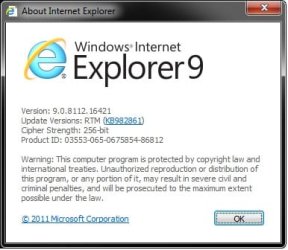
Latest Internet Explorer 9 (IE9) Release
Note
- The 64-bit (x64) IE9 installer is to be downloaded if you have 64-bit (x64) Windows 7 installed. The installer will have both the 32-bit (x86) and 64-bit (x64) IE9 included with the 32-bit IE9 used by default in 64-bit Windows.
- The 32-bit (x86) IE9 installer is to be downloaded if you have 32-bit (x86) Windows 7 installed. The installer will only have the 32-bit (x86) IE9 included with it as the default in 32-bit Windows.
- No need to uninstall IE9 RC. The IE9 RTM final will install and replace it.
IE9 Standalone MSU (Windows Update) Download Links
Windows 7 X86 http://go.microsoft.com/fwlink/?LinkId=210145
Windows 7 X64 http://go.microsoft.com/fwlink/?LinkId=210143
Tip
- Prerequisites for installing Internet Explorer 9
- How to Turn the Menu Bar On or Off in Windows 7
- How do I install or uninstall Internet Explorer 9?
- How to Pin and Unpin Websites from IE9 to the Taskbar or Start Menu
- How to Enable or Disable Internet Explorer 9 Ability to Pin Sites
- How to Change the Default Download Location in Internet Explorer 9
- How to Delete and Clear the Download History in Internet Explorer 9
- How to Drag and Drop the Tabs in Internet Explorer 9
- How to See the Download Speed and Time in IE9 Download Manager
- How to Open Recently Closed Tabs in Internet Explorer 9
- How to Turn "Show tabs on a separate row" On or Off in Internet Explorer 9
- How to Turn "ActiveX Filtering" On or Off in Internet Explorer 9
- How to Change or Turn On or Off the Clicking Sound while Browsing Internet and Windows Explorer
- How to Turn the Command Bar On or Off in Internet Explorer 9 (IE9)
- How to Move Stop and Refresh Buttons to Left or Right of Address Bar in Internet Explorer 9
- How to Customize the Commmand Bar in Internet Explorer 9
- How to View and Track Downloads in Internet Explorer 9
- How to Move the "Command Bar" to the Left or Right in Internet Explorer 9 (IE9)
Last edited:
My Computer
At a glance
64-bit Windows 11 Pro for WorkstationsIntel i7-8700K OC'd to 5 GHz64 GB (4x16GB) G.SKILL TridentZ RGB DDR4 3600...ASUS ROG-STRIX-GTX1080TI-O11G-GAMING
- Computer type
- PC/Desktop
- Computer Manufacturer/Model Number
- Self built custom
- OS
- 64-bit Windows 11 Pro for Workstations
- CPU
- Intel i7-8700K OC'd to 5 GHz
- Motherboard
- ASUS ROG Maximus XI Formula Z390
- Memory
- 64 GB (4x16GB) G.SKILL TridentZ RGB DDR4 3600 MHz
- Graphics Card(s)
- ASUS ROG-STRIX-GTX1080TI-O11G-GAMING
- Sound Card
- Integrated
- Monitor(s) Displays
- 2 x Samsung Odyssey G7 27"
- Screen Resolution
- 2560x1440
- Hard Drives
- 1TB Samsung 990 PRO M.2,
4TB Samsung 990 PRO PRO M.2,
TerraMaster F8 SSD Plus NAS
- PSU
- Seasonic Prime Titanium 850W
- Case
- Thermaltake Core P3
- Cooling
- Corsair Hydro H115i
- Keyboard
- Logitech wireless K800
- Mouse
- Logitech MX Master 4
- Internet Speed
- 2 Gb/s Download and 100 Mb/s Upload
- Antivirus
- Malwarebyte Anti-Malware Premium
- Browser
- Google Chrome
- Other Info
- Logitech Z625 speaker system,
Logitech BRIO 4K Pro webcam,
HP Color LaserJet Pro MFP M477fdn,
APC SMART-UPS RT 1000 XL - SURT1000XLI,
Galaxy S23 Plus phone


