
Latest Logitech SetPoint Software

Airbot

----------------------
VIP
SF Team
Local time
6:46 PM
Messages
18,396
Latest Logitech SetPoint Released

   Note
Date: January 19, 2023
Software Version: 6.90.66
OS supported: Windows 7, 8, 10, and 11
File Size: 4.6 MB

Why Update?
  • Removal of Unifying software support
  • Bug fixes & improvements
Logitech -SetPoint Download

Logitech -Software Downloads

 
Last edited by a moderator:

My Computer

Computer type
PC/Desktop
Computer Manufacturer/Model Number
Airbot 2.0
OS
Windows 7 Ultimate x64 SP1
CPU
Core i7 920 (D0) @ 4Ghz, *26c idle *65c full load on air
Motherboard
Asus P6X58D Premium - Sata 6Gb/s - USB 3.0
Memory
12GB DDR3 Corsair Dominator -CMD12GX3M6A1600C8 at 1600MHz
Graphics Card(s)
Zotac Geforce GTX 770
Sound Card
ASUS Xonar D2X
Monitor(s) Displays
1 LG 24" Flatron W2453V-PF 1 Samsung 24" P2450H both 2ms RT
Screen Resolution
1920x1080@60hz
Hard Drives
1 Samsung 250GB 840 Evo SSD
1 OCZ Vertex2 180GB SSD
1 TB Samsung Spinpoint F1 7200RPM 32MB cache
2 500GB WD Caviar Blacks 7200RPM 32MB cache (WD5001AALS)

Pioneer DVD Burner DVR-S18M
PSU
Corsair HX1000W
Case
Cooler Master HAF 932
Cooling
Case Fans *3 230mm, *1 140mm/CPU - *Tuniq Tower 120 Extreme
Keyboard
Logitech Wireless MK700
Mouse
Logitech Wireless MK700
Internet Speed
DL 15 Mbps UL 0.98 Mbps
Antivirus
None
Browser
Firefox Nightly
Other Info
Processor-7.7 *RAM- 7.9 *Graphics-7.9 *Gaming Graphics- 7.9 *SSD- 7.8 W.E.I final score= 7.7
*Phone- LG Nexus 5
When it goes online during installation it must detect an update. Mine shows
the same information.
And thanks for the heads up on the update.
 

My Computer

Computer type
PC/Desktop
Computer Manufacturer/Model Number
Acer M5641
OS
Windows 7 Home Premium 64bit
CPU
Q6600
Motherboard
Nvidia MCP73PV
Memory
4GB.
Graphics Card(s)
Sapphire Vapor-X 5750
Sound Card
XFI Extreem music
Monitor(s) Displays
Acer X223W
Screen Resolution
1680x1050
Hard Drives
WD10 02FAEX
WD64 00AAKS
PSU
stock 450w
Case
acer
Cooling
stock
Keyboard
Microsoft Digital Media Pro.
Mouse
Logitech MX620
Internet Speed
49.51Mbs down 4.98Mbs up 17.6ms ping
Antivirus
MSE
Browser
Waterfox
Other Info
Shaw Cable
Netgear R6200
I assume this update seems to only apply to newer devices? I have an MX 610, and Setpoint is version 4.8. Checking for updates says I have the newest, and if I go to logitech's website and select my mouse, it still only shows 4.8. I have been quite frustrated with it, as it keeps resetting my app profiles, and keeps thinking I have an LX7 which YEARS AGO was paired to the receiver for my S510 keyboard, even on a different windows install! Apparently that info is stored IN the receiver! So I constantly have to switch it back to the MX610 which is on a different receiver, and when I do, it resets my settings. Even had to reinstall Windows once because it decided I had the LX7 and the MX610 no longer showed up. So... kinda hoping for an update.
 

My Computer

Computer Manufacturer/Model Number
Homebuilt
OS
Windows 7 Ultimate x64
CPU
Athlon II 440
Motherboard
MSI 880GMA
Memory
4GB G-SKILL DDR3
Graphics Card(s)
Radeon HD 6850
Sound Card
Onboard
Monitor(s) Displays
Acer P224w LCD
Screen Resolution
1680x1200
Hard Drives
Too many to shake a usb stick at.
PSU
OCZ ModXTream Pro 600
Case
Ultra Aluminus
Cooling
Stock AMD
Keyboard
Logitech S510
Mouse
Logitech MX610
Setpoint 6 problem

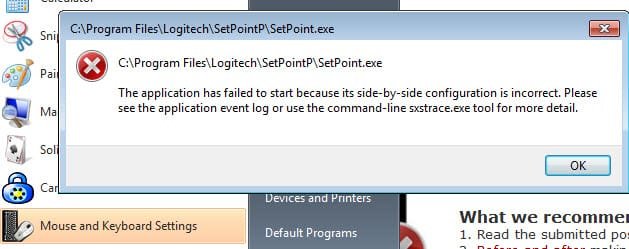
The Mouse and Keyboard Settings options doesn't work for me in W7 32-bit on my laptop. Have a V450 wireless mouse. Mouse seems to work better with the Logitech software than with what comes as standard in the W7 catalogue.
 

Attachments

  • setpoint_6_sucks.jpg
    setpoint_6_sucks.jpg
    27.5 KB · Views: 698

My Computer

Computer Manufacturer/Model Number
DIY
OS
windows 7
CPU
Intel Core2 Quad Q9450 @ 2.26GHz
Motherboard
Ausus Striker II Extreme
Memory
4GB Corsair DDR3-SDRAM PC3-10700 (667 MHz)
Graphics Card(s)
Video Card : NVIDIA GeForce GTX 280
Sound Card
Auzen X-Fi Prelude 7 driving Logitech Z-5500 sound system
Monitor(s) Displays
Monitor Type : BenQ BenQ 241W Z - 24 inches
Hard Drives
2 x Hitachi (500 GB)
2 x Hitachi (1000 GB)
PSU
Coolermaster Real Power M850
Case
CM Stacker 830 NVIDIA Edition
Cooling
Thermaltake Big Typ 120 VX CL-P0310-01 Heatpipe CPU Cooler
Logitech Tracball

I use a logitech trackball and I let MS software control it. Works great and I don't have third party software loaded.
 

My Computer

Computer Manufacturer/Model Number
BGC (Bob's Garage Crew)
OS
win 7 X64 Ultimate SP1
CPU
I3770K
Motherboard
Asus P8Z77-V Deluxe
Memory
G Skill F3-14900CL9-4GBXL x 4
Graphics Card(s)
NVIDIA GeForce GTX670 + Intel 4000
Sound Card
Realtek HD 5.1 (MOB)
Monitor(s) Displays
Asus VW224T (1)
Screen Resolution
1920 x 1080
Hard Drives
SATA Corsair Force GT 2.5" 180GB (System) Sata 3
OCZ Vertex3 120GB
OCZ Vertex 2 120GB 2.5" SATA II
ST31000524AS 1000.2GB
WD15EARS (External)
PSU
CoolerMaster 1000 Watt
Case
CoolerMaster HAF X
Cooling
CPU -- CoolerMaster 520N
Keyboard
MS Wireless 3000 V2
Mouse
MS Wireless 3000 V2
Internet Speed
Cable
Antivirus
Norton Internet Security
Browser
IE9
Other Info
AMI Bios 1805
OC'd 3%
This latest version seems much leaner than previous version and works like a champ !
 

My Computer

Computer type
PC/Desktop
Computer Manufacturer/Model Number
A blend of brains, brawn and dumb luck.
OS
Windows 7 Ultimate 64
CPU
i7 3770k OC'd 4.6 @ 1.17v, also FX 8120 & i5 miniITX
Motherboard
MSI P67A-GD80 b3
Memory
32 gb G.Skill Sniper DDR3 10-12-12-31 @ 2133
Graphics Card(s)
XFX Radeon 7870 2GB DDR5
Sound Card
Sound Blaster Z Series Card
Monitor(s) Displays
(2) LG LED 23" 1920 x 1080 2ms Monitors via mini d-port
Screen Resolution
1680 X 1050 p
Hard Drives
Samsung 256 gb 830 SSD sata III
(1) 1 tb WD Black
(2) 1 tb Hitachi deskmates/sata II
(2) 1 tb WD green/sata II
(2) 3 tb Seagate Barracuda
(1) 120 gb OCZ Vertex SS
(1) Drobo 5N w/5 Seagate 3tb
PSU
EVGA modular 1000G2 80% gold rating & APC 1200 RS
Case
CoolerMaster Storm Styker
Cooling
7 case fans 140mm & 120mm, NZXT Kraken X60
Keyboard
(2) Logitech Illuminated Keyboards (1) usb (1) wireless
Mouse
Logitech G700 & T-BC21 - nano nx for the laptop
Internet Speed
Basic 120mbps down
Antivirus
Trend Micro Titanium Max Security & Malwarebytes Premium
Browser
Chrome and IE 10
Other Info
5 Noctua case fans + 3 Noctua in p/p on NZXT cooler
Integrated hot swap drive bays for 2.5" Drives
(2) Lite-on dvd/cd/Blu Ray optical 22X
Integrated fan controller and led on/off
HP Officejet Pro 8630 all-n-one
Hot-swappable 3.5" hard drive bay
Netgear Nighthawk router
Asus USB 3 & sata 6 PCIe card
Vantec IDE to sata adptr./Ultra sata adptr
Lenovo L420 i5 lappy with m sata
Drobo 5N advanced NAS
These updated driver/ application posts are always nice. Thanks. Fabe
 

My Computer

Computer Manufacturer/Model Number
Self Built
OS
Windows 7 ultimate 64 bit / XP Home sp3
CPU
intel Core 2 Duo E8400 3.0ghz
Motherboard
Asus P5ND bios 1401
Memory
8 gigs 1066 OCZ Fata1ty
Graphics Card(s)
EVGA GTX 580 Call of Duty Black Ops Edition
Sound Card
Creative Soundblaster Audigy 2zs
Monitor(s) Displays
Asus 24in LCD's 2MS X2
Screen Resolution
1920x1080p @60Hz
Hard Drives
WD Caviar 500 Black/ WD Caviar 200 Blue
PSU
OCZ 700W GameXtreme
Case
NZXT Apollo
Cooling
Corsair H50 CPU/120mm x3 /60mm x2 /Corsair Dominator Ram
Keyboard
Logitech Bluetooth Wireless MX5000
Mouse
Logitech Bluetooth Wireless MX1000
Internet Speed
Download 19.83 Upload 0.97
Other Info
Logitech Z2300 Speakers/ Bose Noise Cancelling Headphones/Avermedia PCI-e Hybrid TV Bravo/Epson NX415 all in one/ 4 Port Powered USB Hub/ LG 10x Bluray Burner /TSST Corp DVDRW External
I have a G7 mouse and whenever I installed setpoint 4.8 on windows 7 or vista it always made my mouse lag. does anyone know if it still does this with version 6.0?
 

My Computer

OS
Windows 7 Ultimate x64
I have a G7 mouse and whenever I installed setpoint 4.8 on windows 7 or vista it always made my mouse lag. does anyone know if it still does this with version 6.0?

I use a G3-MX518 in combo with a G15 keyboard & I think this is the best driver yet for gaming!
Seems to have smoother control over the sensitivity +/- on my mouse using it for on the fly adjustments during gameplay.
So for me I'd say NO, the 4.9 drivers do not make your mouse lag...
at least not for me! :D

The only way to know for sure how it's going to effect your mouse is to install it & test it out... ;)
 

My Computer

Computer Manufacturer/Model Number
ABS Tech Ultimate X9
OS
Windows® 7 Ultimate x64 SP1
CPU
Intel Core 2 Duo E8400 (E0) @ 4.0GHz
Motherboard
ASUS P5Q Pro Turbo / 1780 FSB
Memory
G.SKILL-F2-8500CL5D-4GBPK (2x2Gbs) (5-5-5-15) @ 1067Mhz
Graphics Card(s)
EVGA GTX 470 SC (845/1690/2000) 160Gbs
Sound Card
VIA HD Audio / Boston Acoustics
Monitor(s) Displays
Acer X222W HD 22" LCD 2500:1 / 5ms
Screen Resolution
1680x1050
Hard Drives
Seagate Barracuda SATAII 2 x 320GB
Seagate Barracuda SATAII 1Tb
Intel® Rapid Storage Technology v10.1.0.1008
AHCI-NCQ Enabled
PSU
Silent Pro GOLD 80 PLUS 800w /95% efficiency / SLI-Crossfire
Case
ABS Stealth Black-Custom
Cooling
CoolerMaster V6GT 6 Heatpipe 200w CPU Cooler
Keyboard
Logitech G15 Gaming Keyboard (Old Style Blue!)
Mouse
Logitech MX518 Gaming Mouse
Internet Speed
1Mbs-up/ 6Mbs-down
I have a G7 mouse and whenever I installed setpoint 4.8 on windows 7 or vista it always made my mouse lag. does anyone know if it still does this with version 6.0?

I use a G3-MX518 in combo with a G15 keyboard & I think this is the best driver yet for gaming!
Seems to have smoother control over the sensitivity +/- on my mouse using it for on the fly adjustments during gameplay.
So for me I'd say NO, the 4.9 drivers do not make your mouse lag...
at least not for me! :D

The only way to know for sure how it's going to effect your mouse is to install it & test it out... ;)

Does this SetPoint offers something for the G15 keyboard added LCD pannel as the LCD Manager does?
 

My Computer

OS
Windows 7 Ultimate x64 SP1 | OSX Lion 10.7 x64
CPU
Intel Core i5 750
Motherboard
Asus P7P55D LE
Memory
4x Corsair Value DDR-3 1333MHz 2Gb
Graphics Card(s)
Sapphire HD4850 512Mb HDMI+DVI+VGA
Sound Card
Sound Blaster Audigy 2 ZS Platinum
Monitor(s) Displays
Samsung Syncmaster 245BW
Screen Resolution
1920x1200
Hard Drives
Samsung Spinpoint 160Gb
Seagate Barracuda 200Gb
PSU
Seventeam 650W ATX 2.3
Case
Coolermaster Centurion 532
Cooling
Stock cooling system
Keyboard
Logitech G15 Gaming Keyboard
Mouse
Razer Deathadder
Internet Speed
10Mbit Down / 1Mbit Up ADSL2+M
Other Info
Apple AirPort Extreme 802.11n (single band)
1Tb External USB HDD (AEBS volume)
Linksys WAG120N ADSL2+ Modem/Router
I have a G7 mouse and whenever I installed setpoint 4.8 on windows 7 or vista it always made my mouse lag. does anyone know if it still does this with version 6.0?

I use a G3-MX518 in combo with a G15 keyboard & I think this is the best driver yet for gaming!
Seems to have smoother control over the sensitivity +/- on my mouse using it for on the fly adjustments during gameplay.
So for me I'd say NO, the 4.9 drivers do not make your mouse lag...
at least not for me! :D

The only way to know for sure how it's going to effect your mouse is to install it & test it out... ;)

Does this SetPoint offers something for the G15 keyboard added LCD pannel as the LCD Manager does?

No, this is in the Logitech keyboard Game Panel Software drivers update. ;)
G15 KB Drivers: http://www.logitech.com/index.cfm/434/180?section=downloadshttp://www.logitech.com/en-us/434/180?selectedcrid=434&hub=1&selectedcid=180
 

My Computer

Computer Manufacturer/Model Number
ABS Tech Ultimate X9
OS
Windows® 7 Ultimate x64 SP1
CPU
Intel Core 2 Duo E8400 (E0) @ 4.0GHz
Motherboard
ASUS P5Q Pro Turbo / 1780 FSB
Memory
G.SKILL-F2-8500CL5D-4GBPK (2x2Gbs) (5-5-5-15) @ 1067Mhz
Graphics Card(s)
EVGA GTX 470 SC (845/1690/2000) 160Gbs
Sound Card
VIA HD Audio / Boston Acoustics
Monitor(s) Displays
Acer X222W HD 22" LCD 2500:1 / 5ms
Screen Resolution
1680x1050
Hard Drives
Seagate Barracuda SATAII 2 x 320GB
Seagate Barracuda SATAII 1Tb
Intel® Rapid Storage Technology v10.1.0.1008
AHCI-NCQ Enabled
PSU
Silent Pro GOLD 80 PLUS 800w /95% efficiency / SLI-Crossfire
Case
ABS Stealth Black-Custom
Cooling
CoolerMaster V6GT 6 Heatpipe 200w CPU Cooler
Keyboard
Logitech G15 Gaming Keyboard (Old Style Blue!)
Mouse
Logitech MX518 Gaming Mouse
Internet Speed
1Mbs-up/ 6Mbs-down
Any point in upgrading my SetPoint 5.30.39 / Driver 4.90.80 for a G500 gaming mouse? I like lean, but that's the only benefit I see. Someone enlighten me!
 

My Computer

Computer Manufacturer/Model Number
Me
OS
Windows 7 Enterprise 64-bit
CPU
Intel Core2Quad Q9300 Yorkfield 2.5GHz (Running @ 3.23GHz)
Motherboard
ASUS P5Q
Memory
4GB (2GB x 2) G.Skill DDR2-1066
Graphics Card(s)
ASUS EAH5850 Direct CU 1GB DDR5
Sound Card
ASUS Xonar DX
Monitor(s) Displays
ASUS VH236H
Screen Resolution
1920 x 1080 (native)
Hard Drives
All Western Digital Caviar Drives (_BEST_ HDD brand):
OS Disk (C:): 160GB
Storage (D:): 500GB
Storage (E:): 250GB
External Storage (Firewire): 500GB
PSU
Ultra 800W Modular design
Case
Thermaltake Tsunami Dream
Cooling
Cooler Master GeminII S heatsink + 150mm fan
Keyboard
Saitek Cyborg
Mouse
Logitech G500
Internet Speed
3Mb down / 768Kb up
Other Info
I liek milk.

ASUS is the BOMB!
I fail to understand ( actually I dont ) why companies such as Logitech insist on making their customers download a bloater unnecessary software package just to get the drivers for their products.

Personally, I downloaded and extracted my mouse drivers and dumped the rest. XP/Vista/Win7 standard control panel mouse controls are sufficient, at least for me they are.

Regardless, working on Win7x64 before delete/removal.

Tester
 

My Computer

OS
XP
Updated first post with new SetPoint 6.10. :)
 

My Computer

Computer type
PC/Desktop
Computer Manufacturer/Model Number
Airbot 2.0
OS
Windows 7 Ultimate x64 SP1
CPU
Core i7 920 (D0) @ 4Ghz, *26c idle *65c full load on air
Motherboard
Asus P6X58D Premium - Sata 6Gb/s - USB 3.0
Memory
12GB DDR3 Corsair Dominator -CMD12GX3M6A1600C8 at 1600MHz
Graphics Card(s)
Zotac Geforce GTX 770
Sound Card
ASUS Xonar D2X
Monitor(s) Displays
1 LG 24" Flatron W2453V-PF 1 Samsung 24" P2450H both 2ms RT
Screen Resolution
1920x1080@60hz
Hard Drives
1 Samsung 250GB 840 Evo SSD
1 OCZ Vertex2 180GB SSD
1 TB Samsung Spinpoint F1 7200RPM 32MB cache
2 500GB WD Caviar Blacks 7200RPM 32MB cache (WD5001AALS)

Pioneer DVD Burner DVR-S18M
PSU
Corsair HX1000W
Case
Cooler Master HAF 932
Cooling
Case Fans *3 230mm, *1 140mm/CPU - *Tuniq Tower 120 Extreme
Keyboard
Logitech Wireless MK700
Mouse
Logitech Wireless MK700
Internet Speed
DL 15 Mbps UL 0.98 Mbps
Antivirus
None
Browser
Firefox Nightly
Other Info
Processor-7.7 *RAM- 7.9 *Graphics-7.9 *Gaming Graphics- 7.9 *SSD- 7.8 W.E.I final score= 7.7
*Phone- LG Nexus 5
Thank you Aaron. :)

The taskbar navigation icon is much better with this version.
 

My Computer

Computer type
PC/Desktop
Computer Manufacturer/Model Number
Self built custom
OS
64-bit Windows 11 Pro for Workstations
CPU
Intel i7-8700K OC'd to 5 GHz
Motherboard
ASUS ROG Maximus XI Formula Z390
Memory
64 GB (4x16GB) G.SKILL TridentZ RGB DDR4 3600 MHz
Graphics Card(s)
ASUS ROG-STRIX-GTX1080TI-O11G-GAMING
Sound Card
Integrated
Monitor(s) Displays
2 x Samsung Odyssey G7 27"
Screen Resolution
2560x1440
Hard Drives
1TB Samsung 990 PRO M.2,
4TB Samsung 990 PRO PRO M.2,
TerraMaster F8 SSD Plus NAS
PSU
Seasonic Prime Titanium 850W
Case
Thermaltake Core P3
Cooling
Corsair Hydro H115i
Keyboard
Logitech wireless K800
Mouse
Logitech MX Master 4
Internet Speed
2 Gb/s Download and 100 Mb/s Upload
Antivirus
Malwarebyte Anti-Malware Premium
Browser
Google Chrome
Other Info
Logitech Z625 speaker system,
Logitech BRIO 4K Pro webcam,
HP Color LaserJet Pro MFP M477fdn,
APC SMART-UPS RT 1000 XL - SURT1000XLI,
Galaxy S23 Plus phone
Thank you Aaron. :)

The taskbar navigation icon is much better with this version.

It is better looking than that last one. ;)

Thanks Aaron for the update on the update.:geek:
 

My Computer

Computer type
PC/Desktop
Computer Manufacturer/Model Number
Self Built
OS
Win 10 Pro x64
CPU
Intel I5-2500K @3.3GHz
Motherboard
Asrock P67 Extreme4
Memory
16GB G.Skill Ripjaws X (4x4GB)
Graphics Card(s)
EVGA GeForce 750 Ti SC 2GB
Sound Card
ASUS Xonar DG 5.1 Channels 24-bit 96KHz PCI Interface Sound
Monitor(s) Displays
auria eq2367
Screen Resolution
1920 x 1080
Hard Drives
250GB Samsung 850 EVO SSD
1TB WD Blue
1TB Hitachi
PSU
SeaSonic X 650W 80 Plus Gold
Case
Corsair Obsidian 750D
Cooling
Corsair H60, Three 140mm case fans
Keyboard
Logitech Wireless Keyboard K520
Mouse
Logitech Wireless Mouse M310
Internet Speed
Wave Broadband ~ 100 dn 5 up
Antivirus
Windows Defender, Malwarebytes Premium
Browser
Edge, IE11, Chrome
Other Info
Laptop specs: HP g7-1365dx /
CPU: AMD A6-3420M APU with Radeon(tm) HD Graphics /
RAM: Crucial 8Gb (2x4Gb) /
SSD: Crucial M4-CT128M4SSD2 ATA Device/ FW 000F /
GFX: AMD Radeon HD 6520G /
OS: Windows 10 Pro x64
I personally am having a mojor issue with this release. I have a G9 mouse and noticed that the program to modify my button for the mouse was not available, I know at time of build of this computer (2 weeks ago give or take) that I installed Setpoint. I went to Logitech's website to re-install it and cannot.
I download and run the program but on install it errors with the following display

Setpoint failed to install. Please restart your computer and try again.
(324, 325, 326, 329, 204)

When I hit finish a dialog box opens with:

Windows cannot find C:\Program Files\Logitech\SetPointG\SetPointII.exe

I believe I am having issues somewhere in this area ...

If you have an older version of SetPoint installed on your system, it will be removed while installing SetPoint 6.1 and your system will reboot during the installation process.

My computer does not restart and I tried to drop SetPointII.exe from a previous copy I found on my backup external ... it erased it and hung with the above errors.

What is my issue?
 

My Computer

OS
Win 7 x64
Are you downloading the correct file? SetPoint 64-bit - G9 Laser Mouse - Seeing how you have Windows 7 64-bit.
 

My Computer

Computer type
PC/Desktop
Computer Manufacturer/Model Number
Custom built by me.
OS
Windows 10 Pro
CPU
Intel Core i7-4770K (3.5Ghz)
Motherboard
Gigabyte G1 Sniper 5 (F10 Bios)
Memory
32 gig Corsair Dominator Platinum (4x8Gig)
Graphics Card(s)
Sapphire Tri-X R9 Fury
Sound Card
Soundblaster ZXR
Monitor(s) Displays
NEC PA242W 24" LCD Monitor
Screen Resolution
1920 x 1200
Hard Drives
Primary - Samsung 850 Pro (512gig), Samsung 840 Pro (256gig), 2TB WD Caviar Black.
PSU
EVGA Supernova 1000 G2
Case
Cooler Master HAF X
Cooling
Corsair H100i with Corsair Air Series SP120 Quiet Fans
Keyboard
Logitech Wireless Wave
Mouse
Logitech Performance MX
Internet Speed
High Speed Cable
Antivirus
Norton Security
Browser
IE11
Other Info
Memory Timings - 1866MHz @ 9-9-9-27-1T @ 1.5 volts
Yes, I have tried all different ways to ensure I get the correct files. Auto discovery of my Logitech devices, enter name of device, and select from a picture of my device. Then selected Win 7 and 64 bit.
 

My Computer

OS
Win 7 x64
July, 20, 2010

Setpoint has been updated to 6.15.

The changelog hasn't been changed from 6.10 that was released a couple months ago.

It appears to only update the Setpoint control software, and not the drivers in Device Manager.

First post in thread updated.
 

My Computer

Computer type
PC/Desktop
Computer Manufacturer/Model Number
Airbot 2.0
OS
Windows 7 Ultimate x64 SP1
CPU
Core i7 920 (D0) @ 4Ghz, *26c idle *65c full load on air
Motherboard
Asus P6X58D Premium - Sata 6Gb/s - USB 3.0
Memory
12GB DDR3 Corsair Dominator -CMD12GX3M6A1600C8 at 1600MHz
Graphics Card(s)
Zotac Geforce GTX 770
Sound Card
ASUS Xonar D2X
Monitor(s) Displays
1 LG 24" Flatron W2453V-PF 1 Samsung 24" P2450H both 2ms RT
Screen Resolution
1920x1080@60hz
Hard Drives
1 Samsung 250GB 840 Evo SSD
1 OCZ Vertex2 180GB SSD
1 TB Samsung Spinpoint F1 7200RPM 32MB cache
2 500GB WD Caviar Blacks 7200RPM 32MB cache (WD5001AALS)

Pioneer DVD Burner DVR-S18M
PSU
Corsair HX1000W
Case
Cooler Master HAF 932
Cooling
Case Fans *3 230mm, *1 140mm/CPU - *Tuniq Tower 120 Extreme
Keyboard
Logitech Wireless MK700
Mouse
Logitech Wireless MK700
Internet Speed
DL 15 Mbps UL 0.98 Mbps
Antivirus
None
Browser
Firefox Nightly
Other Info
Processor-7.7 *RAM- 7.9 *Graphics-7.9 *Gaming Graphics- 7.9 *SSD- 7.8 W.E.I final score= 7.7
*Phone- LG Nexus 5
Back
Top