Latest NVIDIA ForceWare Video Drivers Windows 7

My Computer My Computer

OS
Windows 7 Ultimate Edition x64
CPU
Q9650 E0 @ 4.0 GHz 1.304v
Motherboard
eVGA 750i FTW!
Memory
2x2GB Corsair Dominator PC2-8500C5D 1100 Mhz 5-5-5-15
Graphics Card(s)
eVGA/Gigabyte GTX 480's SLI
Sound Card
X-Fi XtremeGamer
Monitor(s) Displays
Dell U2410 24" IPS Panel (Beautiful)
Screen Resolution
1900 x 1200 & 1680 x 1050
Hard Drives
WD Caviar Black 640GB AALS x2 (Raid0) + Seagate Pro 500GB External x2
PSU
Enermax Revolution 85+ 1050w PSU
Case
Cooler Master HAF 932 H20
Cooling
Apogee GTZ, Feser 360, D5 Vario, Scythe GT 1850's
Keyboard
Logitech G11
Mouse
Logitech MX-518 / G9
Internet Speed
Fast!
Other Info
Nikon D40 DSLR 18-105mm VR - Nikon 35mm f/1.8 & 55-200mm VR
Bose Companion 3 - 16GB Patriot Xporter USB - ATH AD900's & UR Triple.Fi 10 Custom Phones w/ 32GB iPod Touch 3rd Gen -
Google Nexus One (Phone Rocks!) w/ Kingston 16GB MicroSDHC Class 10 running Amon RA1.7 and Cyan 5.06.1
that sounds like quite a rough time you've had there mate....:(

but im running the W7 185.85 WHQLs without a hitch..???,

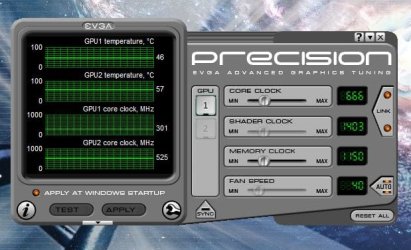
& look....its even throttling as of 1min ago :eek:

throttle.JPG

these speradic problems seem to be increasing of late, & being BETA or WHQL makes no difference, theyre ALL suffering.


:)SK
 

My Computer My Computer

Computer Manufacturer/Model Number
myself
OS
SEVEN x64
CPU
Q9450 @ 3.6GHZ 1.34v
Motherboard
ASUS P5K PREMIUM P35
Memory
8GB 1066 buffalo firestix @ 1152mhz CL5
Graphics Card(s)
Sapphire HD 5970 + GTX260 (physX)
Sound Card
Creative X-FI Xtreme Gamer
Monitor(s) Displays
SAMSUNG 20'' & SAMSUNG 23'' (dual screens)
Screen Resolution
2048x1152 & 1680x1050
Hard Drives
1x seagate 160gb IDE & 1x seagate 160gb SATA
PSU
XCILIO 850w (78A)
Case
CM590 1x 120x38mm & 2x92x38mm / 4x 120x25mm
Cooling
AC7 PRO @ 92x38mm blower, Lamptron military bus bay controll
Keyboard
LOGITECH E110
Mouse
logitech NX5
Internet Speed
2MB
Other Info
its a continual ''work in progress''....
Ya I've noticed that Signed or not, some have problems. and some people don't.

So Skunk, when you right click on the desktop to click refresh, enter the NV Contorl Panel, or to go to personalize and such.. when you right click on desktop is it fast.. mine takes around 5 seconds. It's the NV driver. for sure.

I installed the latest 185.85 and it FINALLY installed. it worked this time. my NV Control panel is working again. and my cards are now finally downclocking Correctly.

right now I'm at 301 on Core, 602 on shader, and the weird part is 1188 on Memory. even though it's set for 999 the stock speed. so the memory reading is my only problem..

I still have to wait forever for my right click on desktop to work. but I'll live with it for now.

I'm going to try and game on .85 and see how it goes.

update* I just played a solid few hours on 185.85 and I didn't have anymore Nvidia related crashes like before. those might have been because I was running a vista driver.. I also played with my SLI at default speeds. when I OC the 260's i think those might make it unstable as well. I'll need to do more testing on that. but I just played about 3 hours with no problems.

awesome!
 
Last edited:

My Computer My Computer

OS
Windows 7 Ultimate Edition x64
CPU
Q9650 E0 @ 4.0 GHz 1.304v
Motherboard
eVGA 750i FTW!
Memory
2x2GB Corsair Dominator PC2-8500C5D 1100 Mhz 5-5-5-15
Graphics Card(s)
eVGA/Gigabyte GTX 480's SLI
Sound Card
X-Fi XtremeGamer
Monitor(s) Displays
Dell U2410 24" IPS Panel (Beautiful)
Screen Resolution
1900 x 1200 & 1680 x 1050
Hard Drives
WD Caviar Black 640GB AALS x2 (Raid0) + Seagate Pro 500GB External x2
PSU
Enermax Revolution 85+ 1050w PSU
Case
Cooler Master HAF 932 H20
Cooling
Apogee GTZ, Feser 360, D5 Vario, Scythe GT 1850's
Keyboard
Logitech G11
Mouse
Logitech MX-518 / G9
Internet Speed
Fast!
Other Info
Nikon D40 DSLR 18-105mm VR - Nikon 35mm f/1.8 & 55-200mm VR
Bose Companion 3 - 16GB Patriot Xporter USB - ATH AD900's & UR Triple.Fi 10 Custom Phones w/ 32GB iPod Touch 3rd Gen -
Google Nexus One (Phone Rocks!) w/ Kingston 16GB MicroSDHC Class 10 running Amon RA1.7 and Cyan 5.06.1
NVIDIA 185.85 driver problem

I notice quite a few people having problems with the 185.85 driver for Win 7.
The NVIDIA 185.85 64-bit driver appeared to install properly, but it later crashed my system badly. Took me 2 hours to fix it all.
Not happy NVIDIA!:mad:
 

My Computer My Computer

Computer type
PC/Desktop
Computer Manufacturer/Model Number
Me
OS
Windows 7 Ultimate 64-bit
CPU
Intel Core i7 3770K
Motherboard
Asus P8Z77-V PRO
Memory
G.Skill ARES DDR3 1600 - 3 x 4GB
Graphics Card(s)
ASUS HD7770-DC-1GD5-V2
Sound Card
on board
Monitor(s) Displays
ASUS PB278Q PLS LED LCD 6ms
Screen Resolution
2560 x 1440
Hard Drives
Samsung 840 EVO SSD 500GB
2 x Seagate SATA3 2TB 64Mb Cache (ST2000DM001)
PSU
Corsair HX-650
Case
Coolermaster Centurion 5 II
Cooling
Coolermaster Hyper 212 Plus
Keyboard
Logitech K290
Mouse
MS Wireless Laser Mouse 5000
Internet Speed
100Mb down / 2.5Mb up
Other Info
Leadtek DTV2000DS Dual HD TV Tuner
USB3 kit for 2 front panel USB3 ports
I don't know what nVidia are thinking about, but, as they have such a large market share, one would think that they would get it right once in a while. According to the nVidia forums and from my own experience, this has been going on, off and on, for years.

I replaced my ATI card when I got fed up with their software screwing up and now this...!!

Nowhere to turn....LOL.
 

My Computer My Computer

Computer type
PC/Desktop
Computer Manufacturer/Model Number
Alienware® ALX X58
OS
Win 7 Ult SP1/Win 10 Pro (all x64)
CPU
Intel® Core™ i7-975 Extreme O/C to 4.02 GHz, 8MB Cache
Motherboard
Asus® P6T Deluxe V2 X58 LGA1366
Memory
24GB Corsair Vengeance DDR3 SDRAM at 1600MHz - 6 x 4096MB
Graphics Card(s)
1792 MB NVIDIA® GeForce® GTX 295 Dual Core
Sound Card
Onboard Soundmax® High-Definition 7.1 Performance Audio
Monitor(s) Displays
Samsung XL2370 LED backlit 23" W/S 2ms response time
Screen Resolution
1920 X 1080
Hard Drives
2 x 500gb SATA II
1 x 1TB SATA II
1 external eSATA LaCie 3TB
(Non-RAID)
PSU
Alienware® 1200 Watt Multi-GPU
Case
Alienware® P2 ALX Chassis with AlienIce™ 3.0 Video Cooling
Cooling
Alienware® High-Perf. Liquid Cooling + Acoustic Dampening
Keyboard
Microsoft® Wireless Entertainment 8000 + Logitech® G15 Wired
Mouse
Microsoft® Wireless Laser 8000 + Logitech® G9 Wired
Internet Speed
1Gb/s
Antivirus
McAfee LiveSafe
Browser
Firefox - latest
Other Info
Using non-RAID on purpose as I find RAID to be too temperamental.
Now set to AHCI
I see what you mean. In the mean time I'm having No problems with the 185.85 except for the long context menu thing on desktop. everywhere else when I right click works fine. It's ONLY on the desktop. So I'm just going to learn not to click on desktop as much. lol.

I sure hope the drivers continue to improve. They usually do so we can only wait.
 

My Computer My Computer

OS
Windows 7 Ultimate Edition x64
CPU
Q9650 E0 @ 4.0 GHz 1.304v
Motherboard
eVGA 750i FTW!
Memory
2x2GB Corsair Dominator PC2-8500C5D 1100 Mhz 5-5-5-15
Graphics Card(s)
eVGA/Gigabyte GTX 480's SLI
Sound Card
X-Fi XtremeGamer
Monitor(s) Displays
Dell U2410 24" IPS Panel (Beautiful)
Screen Resolution
1900 x 1200 & 1680 x 1050
Hard Drives
WD Caviar Black 640GB AALS x2 (Raid0) + Seagate Pro 500GB External x2
PSU
Enermax Revolution 85+ 1050w PSU
Case
Cooler Master HAF 932 H20
Cooling
Apogee GTZ, Feser 360, D5 Vario, Scythe GT 1850's
Keyboard
Logitech G11
Mouse
Logitech MX-518 / G9
Internet Speed
Fast!
Other Info
Nikon D40 DSLR 18-105mm VR - Nikon 35mm f/1.8 & 55-200mm VR
Bose Companion 3 - 16GB Patriot Xporter USB - ATH AD900's & UR Triple.Fi 10 Custom Phones w/ 32GB iPod Touch 3rd Gen -
Google Nexus One (Phone Rocks!) w/ Kingston 16GB MicroSDHC Class 10 running Amon RA1.7 and Cyan 5.06.1
Nvidia Driver on Windows Update

Wouldn't you know it.
Windows update is today offering me an NVIDIA driver update (for Win 7 64-bit), but the link to more info leads to a dead-end.

I just want to know which version they are offering as I dont want to waste my quota downloading V185.85.

I dont know why Microsoft find it so hard offer a bit of useful info (e.g. version no.) for the driver updates offered.
 

My Computer My Computer

Computer type
PC/Desktop
Computer Manufacturer/Model Number
Me
OS
Windows 7 Ultimate 64-bit
CPU
Intel Core i7 3770K
Motherboard
Asus P8Z77-V PRO
Memory
G.Skill ARES DDR3 1600 - 3 x 4GB
Graphics Card(s)
ASUS HD7770-DC-1GD5-V2
Sound Card
on board
Monitor(s) Displays
ASUS PB278Q PLS LED LCD 6ms
Screen Resolution
2560 x 1440
Hard Drives
Samsung 840 EVO SSD 500GB
2 x Seagate SATA3 2TB 64Mb Cache (ST2000DM001)
PSU
Corsair HX-650
Case
Coolermaster Centurion 5 II
Cooling
Coolermaster Hyper 212 Plus
Keyboard
Logitech K290
Mouse
MS Wireless Laser Mouse 5000
Internet Speed
100Mb down / 2.5Mb up
Other Info
Leadtek DTV2000DS Dual HD TV Tuner
USB3 kit for 2 front panel USB3 ports
I agree. Some description of the what the updates are would go a long way.
 

My Computer My Computer

Computer type
PC/Desktop
Computer Manufacturer/Model Number
Alienware® ALX X58
OS
Win 7 Ult SP1/Win 10 Pro (all x64)
CPU
Intel® Core™ i7-975 Extreme O/C to 4.02 GHz, 8MB Cache
Motherboard
Asus® P6T Deluxe V2 X58 LGA1366
Memory
24GB Corsair Vengeance DDR3 SDRAM at 1600MHz - 6 x 4096MB
Graphics Card(s)
1792 MB NVIDIA® GeForce® GTX 295 Dual Core
Sound Card
Onboard Soundmax® High-Definition 7.1 Performance Audio
Monitor(s) Displays
Samsung XL2370 LED backlit 23" W/S 2ms response time
Screen Resolution
1920 X 1080
Hard Drives
2 x 500gb SATA II
1 x 1TB SATA II
1 external eSATA LaCie 3TB
(Non-RAID)
PSU
Alienware® 1200 Watt Multi-GPU
Case
Alienware® P2 ALX Chassis with AlienIce™ 3.0 Video Cooling
Cooling
Alienware® High-Perf. Liquid Cooling + Acoustic Dampening
Keyboard
Microsoft® Wireless Entertainment 8000 + Logitech® G15 Wired
Mouse
Microsoft® Wireless Laser 8000 + Logitech® G9 Wired
Internet Speed
1Gb/s
Antivirus
McAfee LiveSafe
Browser
Firefox - latest
Other Info
Using non-RAID on purpose as I find RAID to be too temperamental.
Now set to AHCI
P.S. It didn't offer me any nVidia updates and I already have 185.85.
 

My Computer My Computer

Computer type
PC/Desktop
Computer Manufacturer/Model Number
Alienware® ALX X58
OS
Win 7 Ult SP1/Win 10 Pro (all x64)
CPU
Intel® Core™ i7-975 Extreme O/C to 4.02 GHz, 8MB Cache
Motherboard
Asus® P6T Deluxe V2 X58 LGA1366
Memory
24GB Corsair Vengeance DDR3 SDRAM at 1600MHz - 6 x 4096MB
Graphics Card(s)
1792 MB NVIDIA® GeForce® GTX 295 Dual Core
Sound Card
Onboard Soundmax® High-Definition 7.1 Performance Audio
Monitor(s) Displays
Samsung XL2370 LED backlit 23" W/S 2ms response time
Screen Resolution
1920 X 1080
Hard Drives
2 x 500gb SATA II
1 x 1TB SATA II
1 external eSATA LaCie 3TB
(Non-RAID)
PSU
Alienware® 1200 Watt Multi-GPU
Case
Alienware® P2 ALX Chassis with AlienIce™ 3.0 Video Cooling
Cooling
Alienware® High-Perf. Liquid Cooling + Acoustic Dampening
Keyboard
Microsoft® Wireless Entertainment 8000 + Logitech® G15 Wired
Mouse
Microsoft® Wireless Laser 8000 + Logitech® G9 Wired
Internet Speed
1Gb/s
Antivirus
McAfee LiveSafe
Browser
Firefox - latest
Other Info
Using non-RAID on purpose as I find RAID to be too temperamental.
Now set to AHCI
geForce 6200 in the dark...

I've got a geforce 6200 on a 32 bit system. When I attempt to run 185.85_desktop_win7_32bit_english_whql, it stops to tell me that it has detected no compatible hardware, then quits.

I'm dual-booting xp and 7; xp sees the board just fine, but 7 doesn't seem to see it at all.

What gives??
 

My Computer My Computer

OS
Windows 7 rc

My Computer My Computer

Computer type
PC/Desktop
Computer Manufacturer/Model Number
Alienware® ALX X58
OS
Win 7 Ult SP1/Win 10 Pro (all x64)
CPU
Intel® Core™ i7-975 Extreme O/C to 4.02 GHz, 8MB Cache
Motherboard
Asus® P6T Deluxe V2 X58 LGA1366
Memory
24GB Corsair Vengeance DDR3 SDRAM at 1600MHz - 6 x 4096MB
Graphics Card(s)
1792 MB NVIDIA® GeForce® GTX 295 Dual Core
Sound Card
Onboard Soundmax® High-Definition 7.1 Performance Audio
Monitor(s) Displays
Samsung XL2370 LED backlit 23" W/S 2ms response time
Screen Resolution
1920 X 1080
Hard Drives
2 x 500gb SATA II
1 x 1TB SATA II
1 external eSATA LaCie 3TB
(Non-RAID)
PSU
Alienware® 1200 Watt Multi-GPU
Case
Alienware® P2 ALX Chassis with AlienIce™ 3.0 Video Cooling
Cooling
Alienware® High-Perf. Liquid Cooling + Acoustic Dampening
Keyboard
Microsoft® Wireless Entertainment 8000 + Logitech® G15 Wired
Mouse
Microsoft® Wireless Laser 8000 + Logitech® G9 Wired
Internet Speed
1Gb/s
Antivirus
McAfee LiveSafe
Browser
Firefox - latest
Other Info
Using non-RAID on purpose as I find RAID to be too temperamental.
Now set to AHCI
185.85 problem here and 181s. They will not run need for speed pro street or undercover.

I also lost 2 points on the wei with the 185s, strange but true. The even stranger thing is they have whql stamp!
 

My Computer My Computer

Computer Manufacturer/Model Number
Custom Build.
OS
Windows 7 Ultimate x64.
CPU
i5 760 @ 4.2Ghz. 1.18v
Motherboard
Gigabyte - H55M-USB3
Memory
4g Corsair xms3 ddr3, 1600Mhz.
Graphics Card(s)
Gigabyte GTX-560Ti soc edition
Sound Card
Asus Xonar Dx - Logitech Z5500.
Monitor(s) Displays
Acer 22" LCD Wide screen 1680-1050 -Samsung 42" Plasma....
Screen Resolution
1680/1050 -----1920/1080p.
Hard Drives
2x 2TB Seagate Go Flex,
1x 1TB Seagate,
1x 640WD Black,
x16 Gig sandisc flash drive,
1x8Gig sandisc flash drive.
PSU
XigmaTek 80plus NRP-PC702 - 700w dual 30a.
Case
Venus Gamers Midi Tower Case with LED Display
Cooling
Arctic Freezer 7 Pro Rev 2... x2 Arctic F8 case fans........
Keyboard
Logitech G15-v2 Gaming.
Mouse
Microsoft Sidewinder X8.
Internet Speed
Virgin Media - 50mb down- 8mb up.
Other Info
x2 Xbox 360 wireless controllers...

Dual layer optical disc drive...

Chrome 79million

A.V = MSE
I've got a geforce 6200 on a 32 bit system. When I attempt to run 185.85_desktop_win7_32bit_english_whql, it stops to tell me that it has detected no compatible hardware, then quits.

I'm dual-booting xp and 7; xp sees the board just fine, but 7 doesn't seem to see it at all.

What gives??

In my 2nd pc, I have 6200A-LE. 185.85 driver, 32 bit installed perfect for me no problems. On the recent betas however, I had to add 2 lines for my card's id to two places in the .inf, following the format for the other cards. This will enable you to install yours from the device manager. Post back if you need further help or instruction. You can get the id for your card from right clicking the card in the device manager, choose properties, then details tab. Change property to Hardware, then your value is listed below. It is the string of 4 numbers directly to the right of DEV_.

If you want, I'll make the .inf for you if you tell me the 4 number string I described how to find above.
 

My Computer My Computer

Computer Manufacturer/Model Number
self built
OS
7600.20510 x86
CPU
P4 550 3.4 GHz HT running at 3.5 GHz
Motherboard
MSI PM8M3-V (MS-7211 v1.x) Micro-ATX mainboard
Memory
OCZ 2 GB(2x1GB) DDR400mHz running @ 414 mHz
Graphics Card(s)
HIS Radeon HD 3850 IceQ 3 Turbo HDMI Dual DL-DVI AGP
Sound Card
MOTU Traveler firewire studio interface 192 kHz 24 bit
Monitor(s) Displays
22" widescreen Acer X223W LCD, 17" Compaq P75 CRT
Screen Resolution
1680x1050 and 1280x1024
Hard Drives
SATA I x2 WD, 400 GB and 120 GB, SATA 2 WD Caviar Black 1 TB
PSU
350W generic
Case
Cybertronpc, it glows blue
Cooling
stock cpu fan, Ice-Q 3 gpu and system, many case fans
Keyboard
Logitch Classical Keyboard 200
Mouse
Logitech Mediaplay cordless
Internet Speed
1792/448 kbits/sec
Other Info
SATA II PCI fake RAID adapter, 1 GB Readyboost, original ATI Remote Wonder (even works with WMC perfectly), Logitech Rumblepad 2 game controller x2
Hey, I'm having a bit of trouble here.

I downloaded the 185.85s for Windows 7 64 bit...I'm on a Gateway 7805u FX notebook (which isn't listed as a notebook that is not supported) with a 1GB GeForce 9800GS and I'm running on the Windows 7 RC...

Anyway, my problem is when I go to install the drivers, I start up the exe, works fine, but then when I get to "Select the features you want to install" the only option I get is "NVIDIA HD AUDIO DRIVER (1734k)". As far as I know, my sound card on this laptop doesn't even support Nvidia drivers, so I don't know why that's showing up. Secondly, why won't it let me install the actual graphics card drivers? I have a card that is supported on the list, but yet it won't let me even select the drivers on that list, because they're not there to begin with.

I'm completely out of ideas. I've never had any trouble updating drivers before... especially with an issue like this one.

Anyone know what could be wrong?

Thanks!
 

My Computer My Computer

OS
Windows 7 RC
Problem to run Directv 2PC

Purchased a new GTX 275 and installed with Win 7 -64 and latest 185.85 drivers. Everything seems fine other than Directv 2PC will not run and let me view my DVR content over my network.

Error message is "GPU does not support Screen capture protection for protected content - update SW or modify driver settings"
I don't see an option for that in the nVidia control panel.

Any ideas how to correct this?

I didn't try the drivers that came with the GPU, that may be worth a try in case its related to 185.85.

I also posted this at Nvidia forums.
 

My Computer My Computer

Computer Manufacturer/Model Number
Home Brew
OS
Win 7 RC1
CPU
Intel Q6600
Motherboard
Gigabyte GA EP45 -UDP3
Memory
2x 2GB Crucial
Graphics Card(s)
BFG GTX 275
Sound Card
on board
Monitor(s) Displays
Samsung T220
PSU
Corsair 530
Case
Antec
Cooling
Multi Air
Keyboard
Logitech Duo
Mouse
MX 700
Error message is "GPU does not support Screen capture protection for protected content - update SW or modify driver settings"
I don't see an option for that in the nVidia control panel.

Any ideas how to correct this?

That sounds like the DRM is getting in the way. Did the card that you bought say that it supported HDPC?
 

My Computer My Computer

Computer Manufacturer/Model Number
Hand Built
OS
Windows 7 x64 build 7100
CPU
2.67GHz Intel i7
Motherboard
ASUS P6T
Memory
6GB DDR3
Graphics Card(s)
2xEVGA 9800 GT 512MB DDR3
Sound Card
Creative X-Fi Elite Pro
Monitor(s) Displays
2 Acer
Screen Resolution
1920x1080 and 1680x1050
Hard Drives
2 WD Green 1TB SATA 7200RPM
PSU
500W Antec
Case
Antec Sonata
Cooling
Standard
Keyboard
Microsoft Wireless Multimedia
Mouse
Microsoft Wireless Laser
Internet Speed
T1 - 1.54 MB
Other Info
DVD-RW and LG Blue-Ray/HD-DVD Combo Drive
1TB MyBook USB Removable for backup
That sounds like the DRM is getting in the way. Did the card that you bought say that it supported HDPC?

Checked on the box and yes it says the GTX 275 is HDCP capable - Dual Link and HDMI capable.

So you think that someone is worried in case I try to re-record the DVR content? How do I find out? try and contact cyberlink and or directTV?

Update: I checked a little more and my GTX 260 has the same HDCP feature (but doesn't say HDMI capable) it runs 185-85 on XP Pro without issues on Directv 2PC. So I think its more related to Win 7 -64.
 
Last edited:

My Computer My Computer

Computer Manufacturer/Model Number
Home Brew
OS
Win 7 RC1
CPU
Intel Q6600
Motherboard
Gigabyte GA EP45 -UDP3
Memory
2x 2GB Crucial
Graphics Card(s)
BFG GTX 275
Sound Card
on board
Monitor(s) Displays
Samsung T220
PSU
Corsair 530
Case
Antec
Cooling
Multi Air
Keyboard
Logitech Duo
Mouse
MX 700
So you think that someone is worried in case I try to re-record the DVR content? How do I find out? try and contact cyberlink and or directTV?

Not at all sure what the next step should be. I'd try Cyberlink maybe. DirecTV is never very helpful. You'll probably just get a "we don't support that" type answer. Hey, but YMMV.

Good luck and let us know if you work out a solution.
 

My Computer My Computer

Computer Manufacturer/Model Number
Hand Built
OS
Windows 7 x64 build 7100
CPU
2.67GHz Intel i7
Motherboard
ASUS P6T
Memory
6GB DDR3
Graphics Card(s)
2xEVGA 9800 GT 512MB DDR3
Sound Card
Creative X-Fi Elite Pro
Monitor(s) Displays
2 Acer
Screen Resolution
1920x1080 and 1680x1050
Hard Drives
2 WD Green 1TB SATA 7200RPM
PSU
500W Antec
Case
Antec Sonata
Cooling
Standard
Keyboard
Microsoft Wireless Multimedia
Mouse
Microsoft Wireless Laser
Internet Speed
T1 - 1.54 MB
Other Info
DVD-RW and LG Blue-Ray/HD-DVD Combo Drive
1TB MyBook USB Removable for backup
Not sure if this is relevant BUT when I first downloaded nVidia's Windows 7 drivers I kept getting a error message or it just wouldn't install them, I know this is strange but I downloaded them while using Firefox and it's downloader, well I then downloaded them using IE8 and they installed perfectly.. I know this maybe irrelevant but I just had to put it out there in case this is causing others a problem..
 

My Computer My Computer

OS
Windows Vista & 7
Back
Top