Latest NVIDIA ForceWare Video Drivers Windows 7

A lot of problems are directly related to leftovers

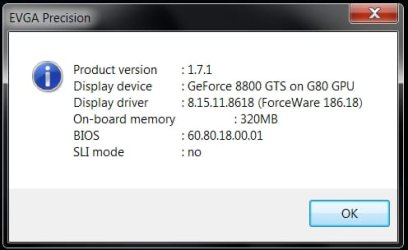
I haven't had ANY Nvidia Graphics driver problems since I started using DH DriverCleaner.Net (years now) using any of the newest drivers & yes I'm currently running v186.18 which has given me my highest scores yet in Vantage.

Most graphics driver problems are either related to installation over the top of the drivers that come with the 7 OS or from then not completely uninstalling & leaving bits & pieces behind that will interfere & conflict with the new drivers you are installing. So to fix this problem you use DriverCleaner.

BEFORE you install your new Drivers...
After you upgrade or fresh install the W7 OS you have to first manually remove the drivers it installs, (do this in device manager) then before you reboot use DriverCleaner to delete all the Nvidia graphics drivers out of the systems folders drivercabs.

Now when you reboot it won't be able to install any drivers except for the generic "Standard Graphics Drivers" which doesn't effect Nvidia driver installations.

Now you can install whatever graphics driver version you want without any driver conflicts at all!

Because I do this everytime, EVERYTHING Works perfectly (x64 too)...
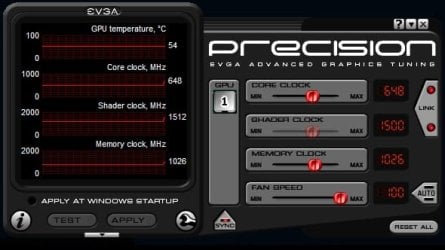
I can change to any resolution my monitor supports & EVGA Precision works perfectly with no crashing at all.
Btw, for those that don't already know this...EVGA Precision is made by the same guy that makes Riva Tuner! He was contracted by EVGA to make this for them. ;)

Just a tip for those that don't already know about uninstalling, cleaning & installing new graphics drivers... ;)
Drivercleaner

How to use DriverCleaner...
Drivercleaner
 

Attachments

  • Image 0.jpg
    Image 0.jpg
    28.6 KB · Views: 48
  • Image 1.jpg
    Image 1.jpg
    29 KB · Views: 27
  • Image 2.jpg
    Image 2.jpg
    18.4 KB · Views: 26
Last edited:

My Computer My Computer

Computer Manufacturer/Model Number
ABS Tech Ultimate X9
OS
Windows® 7 Ultimate x64 SP1
CPU
Intel Core 2 Duo E8400 (E0) @ 4.0GHz
Motherboard
ASUS P5Q Pro Turbo / 1780 FSB
Memory
G.SKILL-F2-8500CL5D-4GBPK (2x2Gbs) (5-5-5-15) @ 1067Mhz
Graphics Card(s)
EVGA GTX 470 SC (845/1690/2000) 160Gbs
Sound Card
VIA HD Audio / Boston Acoustics
Monitor(s) Displays
Acer X222W HD 22" LCD 2500:1 / 5ms
Screen Resolution
1680x1050
Hard Drives
Seagate Barracuda SATAII 2 x 320GB
Seagate Barracuda SATAII 1Tb
Intel® Rapid Storage Technology v10.1.0.1008
AHCI-NCQ Enabled
PSU
Silent Pro GOLD 80 PLUS 800w /95% efficiency / SLI-Crossfire
Case
ABS Stealth Black-Custom
Cooling
CoolerMaster V6GT 6 Heatpipe 200w CPU Cooler
Keyboard
Logitech G15 Gaming Keyboard (Old Style Blue!)
Mouse
Logitech MX518 Gaming Mouse
Internet Speed
1Mbs-up/ 6Mbs-down
I haven't had ANY Nvidia Graphics driver problems since I started using DH DriverCleaner.Net (years now) using any of the newest drivers & yes I'm currently running v186.18 which has given me my highest scores yet in Vantage.

Most graphics driver problems are either related to installation over the top of the drivers that come with the 7 OS or from then not completely uninstalling & leaving bits & pieces behind that will interfere & conflict with the new drivers you are installing. So to fix this problem you use DriverCleaner.

BEFORE you install your new Drivers...
After you upgrade or fresh install the W7 OS you have to first manually remove the drivers it installs, (do this in device manager) then before you reboot use DriverCleaner to delete all the Nvidia graphics drivers out of the systems folders drivercabs.

Now when you reboot it won't be able to install any drivers except for the generic "Standard Graphics Drivers" which doesn't effect Nvidia driver installations.

Now you can install whatever graphics driver version you want without any driver conflicts at all!

Because I do this everytime, EVERYTHING Works perfectly (x64 too)...
I can change to any resolution my monitor supports & EVGA Precision works perfectly with no crashing at all.
Btw, for those that don't already know this...EVGA Precision is made by the same guy that makes Riva Tuner! He was contracted by EVGA to make this for them. ;)

Just a tip for those that don't already know about uninstalling, cleaning & installing new graphics drivers... ;)
Drivercleaner

How to use DriverCleaner...
Drivercleaner

Are you sure that the default driver doesnt effect nVidia drivers? At least Im unable to install nVidia drivers while the default are installed, and Im unable to uninstall the default drivers, because as soon as I've rebooted, its back.. :shock:
 

My Computer My Computer

OS
Windows 7 7232
CPU
C2D 6420 @ 3.4GHz
Motherboard
Abit P35 Off Limits
Memory
Kingston 4 x 2GB 800MHz
Graphics Card(s)
nVidia GeForce 8800 GTS
Monitor(s) Displays
Samsung SyncMaster T220
FYI - WOW, the 186.18 driver installed without reboot very quick and they are the first drivers for my 9500GT cards (in 2 machines) that boosted mt WEI by almost 1 point! I cannot remember drivers affecting the WEI before. These are well worth the download if you have the 9500GT. WOW again! Amazing what good drivers can do. i'm also using 7 64 bit.
 

My Computer My Computer

Computer Manufacturer/Model Number
Keeps changing - (Custom)
OS
Windows 7 Professional x64
CPU
Intel Core i7 860
Motherboard
Gigabyte GA-P55-UD4P
Memory
4GB DDR3 Mushkin 1600Mhz @ 7-8-7-20
Graphics Card(s)
MSI GTS250 1GB DDR3 Twin Frozr
Sound Card
Onboard realtek
Monitor(s) Displays
Samsung SyncMaster 24" P2450 + Samsung 20" 2033
Screen Resolution
1920 X 1080 and 1600 X 900 (#2 system 1440 X 900)
Hard Drives
Patriot Inferno 120GB SSD + 3 WD Blue 640GB drives
PSU
Corsair 750 HX Modular
Case
Lancool PC-K62
Cooling
Cooler Master TX3 CPU cooler and 4-140mm and 1-120mm case
Keyboard
Gigabyte USB keyboard
Mouse
Microsoft wireless laser mouse 5000
Internet Speed
7 Mb down 1.5 up
Other Info
System #2: AMD Phenom II X6 1055T (Freezer 7 Pro cooler) - Gigabyte 880GMA-UD2H - WD 500GB Black - 9500GT (1GB) 500W OCZ modular PSU - Antec 200 case. System #3 (LapTop) Core 2 Duo T6670 - 320GB 7200RPM HD - 4GB DDR3 RAM.
New BETA drivers for Geforce cards.....;) 186.24

NVIDIA's upcoming beta driver suite has been leaked by sections of the Chinese media. The new driver, GeForce 186.24 (6.14.11.8624) is dated 23/06/2009, and follows the release of 186.18 by over two weeks. Due to the lack of a release-notes document from NVIDIA, not much is known about this released except that it expands the supported products list significantly, adding several IGPs and some GPUs belonging to the new 40 nm GT21x series. Be cautioned, this is a beta release that does not originate from NVIDIA's website, and is not guaranteed.
186.24 x64

186.24 x86


   Warning
these are BETA drivers & are NOT officially supported by Nvidia


My Computer My Computer

Computer Manufacturer/Model Number
myself
OS
SEVEN x64
CPU
Q9450 @ 3.6GHZ 1.34v
Motherboard
ASUS P5K PREMIUM P35
Memory
8GB 1066 buffalo firestix @ 1152mhz CL5
Graphics Card(s)
Sapphire HD 5970 + GTX260 (physX)
Sound Card
Creative X-FI Xtreme Gamer
Monitor(s) Displays
SAMSUNG 20'' & SAMSUNG 23'' (dual screens)
Screen Resolution
2048x1152 & 1680x1050
Hard Drives
1x seagate 160gb IDE & 1x seagate 160gb SATA
PSU
XCILIO 850w (78A)
Case
CM590 1x 120x38mm & 2x92x38mm / 4x 120x25mm
Cooling
AC7 PRO @ 92x38mm blower, Lamptron military bus bay controll
Keyboard
LOGITECH E110
Mouse
logitech NX5
Internet Speed
2MB
Other Info
its a continual ''work in progress''....
Are you sure that the default driver doesnt effect nVidia drivers? At least Im unable to install nVidia drivers while the default are installed, and Im unable to uninstall the default drivers, because as soon as I've rebooted, its back.. :shock:

Technically previous Nvidia drivers don't conflict either... Really all you need is the .sys .inf and I think there is a third file but i'm to lazy to figure it out. Windows only needs 3 files for drivers to work, so when you install a new driver it overwrites themm... the problem people have is windows doesn't like to overwrite things that are in use (such as the current driver) but if you do it properly (ie safe mode for example, or as administrator) then you can tell win stfu and overwrite. Now the native drivers (win) can't really be uninstalled, because you HAVE to have some form of video driver that's native. Otherwise wtf are you going to do when you uninstall your current nvidia drivers to install new ones? Takes a lil' thinking but you get it, you'd have no visual. In linux that's fine, you have cmd, but in windows you can't just kill the x server and expect to have some input since the xserver is intagrated with how windows loads. Technically there is a stand alone kernel, but blah. So whatever you do don't try to find a way to permentaly delete your native drivers, you may end up wrecking something you don't know you liked.
 

My Computer My Computer

Computer Manufacturer/Model Number
Custom
OS
Windows 7, Linux
CPU
AMD Phemon II x2 3@3750
Motherboard
ASRock M3A770DE
Memory
1G Crucial 1666
Graphics Card(s)
8800GT OC (custom OC)
Sound Card
Sound Blaster Live! (never changes!)
Monitor(s) Displays
Vivitron 22"
Screen Resolution
1600x1200
Hard Drives
Western Digital 120G/160G SATA
Maxtor 80G IDE
PSU
450w
Case
Unknown
Cooling
Custom Air cooled
Keyboard
Logitech
Mouse
Logitech M-BZ15A Laser
Internet Speed
Cable 10mbit
190.38 beta - Released

This is a beta driver for GeForce 6, 7, 8, 9, 100, and 200-series desktop GPUs and ION GPUs.
New in Release 190.38
Adds support for OpenGL 3.1
Adds support for CUDA 2.3 for improved performance in GPU Computing applications. See CUDA Zone for more details.
Adds a new user-controlled power management setting for GeForce 9-series and later graphics cards. This option allows users to set a performance level for each DirectX or OpenGL application.
Includes several new control panel features and numerous bug fixes. More information can be found in the release documentation.
Existing Support:
Supports Microsoft’s new DirectX Compute API on Windows 7.
Supports single GPU and NVIDIA SLI technology* on DirectX 9, DirectX 10, and OpenGL including 3-way SLI, Quad SLI, and SLI support on SLI-certified Intel X58-based motherboards.
Installs PhysX System Software version 9.09.0428.
Supports NVIDIA PhysX acceleration on a dedicated GeForce graphics card. Use one card for graphics and dedicate a different card for PhysX processing for game-changing physical effects. Learn more here.
Supports GeForce Plus Power Pack #3. Download these FREE PhysX and CUDA applications now!
Supports GPU overclocking and temperature monitoring by installing NVIDIA System Tools software.

vista64
http://www.nvidia.com/object/win7_wi...0.38_beta.html
vista32
http://www.nvidia.com/object/win7_wi...0.38_beta.html
win7 64
http://www.nvidia.com/object/win7_wi...0.38_beta.html
win7 32
http://www.nvidia.com/object/win7_wi...0.38_beta.html
xp32
GeForce/ION Driver Release 190
xp64
GeForce/ION Driver Release 190
 

My Computer My Computer

OS
Win 7 Ultimate 64 RTM
CPU
Q6600 @ 3.03GHZ
Motherboard
ASRock Penryn1600SLI-110d
Memory
8GB @ 338MHZ
Graphics Card(s)
Palit GTX260 @ 707/1544/1200
Sound Card
[4.1 ] - Creative Labs XFI-GAMER
Monitor(s) Displays
SyncMaster T240 24" Dvi/HDMi
Screen Resolution
1920x1200
Hard Drives
Hitachi 500GB
PSU
Winpower 750Watt
Case
Thermaltake Soprano
Cooling
Oem Cooler
Keyboard
HP Keyboard
Mouse
Optical Microsoft Mouse
Internet Speed
3MBIT 350kb/s+


Thats a good news i hope they release the WHQL of this soon coz last 186.18 is giving me headaches on games:mad:
 

My Computer My Computer

Computer Manufacturer/Model Number
BXD-X1A
OS
Windows 7 X64
CPU
Intel C2D E8400 @ 3Ghz
Motherboard
Gigabyte GA-EP43-US3L
Memory
Patriot Viper II Series PC2-8500 4GB kit @ 1000 (5-5-5-15) 2
Graphics Card(s)
Galaxy GTX 260+ 896MB 216SP
Sound Card
Creative SoundBlaster Audigy Value
Monitor(s) Displays
LG W2043T 20" LCD wide
Screen Resolution
1600x900 @60Hz
Hard Drives
Samsung SATA 250GB
WD Caviar SATA 160GB
PSU
OCZ ModXStream Pro 600w PSU
Case
Cooler Master 690 pure (RC-690K) chasis
Cooling
Cooler Master V8
Keyboard
Logitech G110 gaming keyboard
Mouse
NZXT Avatar mouse
Internet Speed
DSL @ 1280kbps
Other Info
3x2.1 subwoofer
[Logitech S200]
[Edifier M1350]
[Eacan E-099]
Belkin N150 Enhanced Wireless Router
LG GH22 SuperMulti DVDRewriter 22x
Xbox 360 wired controller
BigBen Xbox 360 wired controller
BigBen Racing seat 4in1
Steelseries QcK limited edition WOTLK gaming mousepad
Deep Cool Rockman (PWM)
1 Cooler Master blue led silent fan 120mm (front)
2 Deep Cool Wind Blade 120mm fan (top)
1 G

Great news. Do you know if it's possible to install WDDM 1.0 drivers on Win7?
(My Leadtek tuner's driver doesn't like nVidia WDDM 1.1 drivers.)
The latest driver that works perfectly for me is 185.81, but I'd like to install a newer one.

I've tried to install in Vista compatibility mode, but it doesn't help.
 

My Computer My Computer

OS
Windows 7 x64 b7264
Thank you Neil. First post has been updated. :)
 

My Computer My Computer

Computer type
PC/Desktop
Computer Manufacturer/Model Number
Self built custom
OS
64-bit Windows 11 Pro for Workstations
CPU
Intel i7-8700K OC'd to 5 GHz
Motherboard
ASUS ROG Maximus XI Formula Z390
Memory
64 GB (4x16GB) G.SKILL TridentZ RGB DDR4 3600 MHz
Graphics Card(s)
ASUS ROG-STRIX-GTX1080TI-O11G-GAMING
Sound Card
Integrated
Monitor(s) Displays
2 x Samsung Odyssey G7 27"
Screen Resolution
2560x1440
Hard Drives
1TB Samsung 990 PRO M.2,
4TB Samsung 990 PRO PRO M.2,
TerraMaster F8 SSD Plus NAS
PSU
Seasonic Prime Titanium 850W
Case
Thermaltake Core P3
Cooling
Corsair Hydro H115i
Keyboard
Logitech wireless K800
Mouse
Logitech MX Master 4
Internet Speed
2 Gb/s Download and 100 Mb/s Upload
Antivirus
Malwarebyte Anti-Malware Premium
Browser
Google Chrome
Other Info
Logitech Z625 speaker system,
Logitech BRIO 4K Pro webcam,
HP Color LaserJet Pro MFP M477fdn,
APC SMART-UPS RT 1000 XL - SURT1000XLI,
Galaxy S23 Plus phone
ive installed these 190.38 drivers ad they are sweet seem a boost in some games no bsod so to me these seem all good. :)
 

My Computer My Computer

OS
windows 7 RTM
CPU
Q6600 @ 3.9
Motherboard
IP 35-E
Memory
8GB GEIL BLACK DRAGON
Graphics Card(s)
GTX 260-216
Monitor(s) Displays
SAMSUNG T240
Screen Resolution
1920X1200
Hard Drives
2X 500GB
PSU
COOLERMASTER 750 WATT
Case
HAF 932
Cooling
SYTHE MINE
Keyboard
TRUST WIRELESS KEYBOARD
Internet Speed
8 MEG
+1. Sweet.:D
 

My Computer My Computer

Computer Manufacturer/Model Number
The Monolith. 3.1
OS
Windows 7 Home Premium 64 bit
CPU
i7 [email protected]
Motherboard
Gigabyte Z77-D3H
Memory
2x4GB Corsair Vegeance DDR3
Graphics Card(s)
XFX GTX 260 Black Edition
Sound Card
none-through large stereo hi fi
Monitor(s) Displays
Croosover 27MDP LED IPS Dell 2408 WFP
Screen Resolution
2560x1440 1920x1200
Hard Drives
1x Samsung 840Pro 128GB SSD
1x Samsung Spinpoint F1 1TB
PSU
Corsair AX 850 Watt
Case
Cooler Master ACTS 840
Cooling
Be Quiet! Dark Rock Pro
Keyboard
Enermax Aurora
Mouse
Logitech Ballmouse
Internet Speed
20MBPS
186.34 WHQL-certified driver for GeForce GT 220 released.
 

My Computer My Computer

Computer type
PC/Desktop
Computer Manufacturer/Model Number
Airbot 2.0
OS
Windows 7 Ultimate x64 SP1
CPU
Core i7 920 (D0) @ 4Ghz, *26c idle *65c full load on air
Motherboard
Asus P6X58D Premium - Sata 6Gb/s - USB 3.0
Memory
12GB DDR3 Corsair Dominator -CMD12GX3M6A1600C8 at 1600MHz
Graphics Card(s)
Zotac Geforce GTX 770
Sound Card
ASUS Xonar D2X
Monitor(s) Displays
1 LG 24" Flatron W2453V-PF 1 Samsung 24" P2450H both 2ms RT
Screen Resolution
1920x1080@60hz
Hard Drives
1 Samsung 250GB 840 Evo SSD
1 OCZ Vertex2 180GB SSD
1 TB Samsung Spinpoint F1 7200RPM 32MB cache
2 500GB WD Caviar Blacks 7200RPM 32MB cache (WD5001AALS)

Pioneer DVD Burner DVR-S18M
PSU
Corsair HX1000W
Case
Cooler Master HAF 932
Cooling
Case Fans *3 230mm, *1 140mm/CPU - *Tuniq Tower 120 Extreme
Keyboard
Logitech Wireless MK700
Mouse
Logitech Wireless MK700
Internet Speed
DL 15 Mbps UL 0.98 Mbps
Antivirus
None
Browser
Firefox Nightly
Other Info
Processor-7.7 *RAM- 7.9 *Graphics-7.9 *Gaming Graphics- 7.9 *SSD- 7.8 W.E.I final score= 7.7
*Phone- LG Nexus 5
Thank you Aaron. First post updated. :)

I sure hope that they do not branch off with to many versions for different models. :eek:
 

My Computer My Computer

Computer type
PC/Desktop
Computer Manufacturer/Model Number
Self built custom
OS
64-bit Windows 11 Pro for Workstations
CPU
Intel i7-8700K OC'd to 5 GHz
Motherboard
ASUS ROG Maximus XI Formula Z390
Memory
64 GB (4x16GB) G.SKILL TridentZ RGB DDR4 3600 MHz
Graphics Card(s)
ASUS ROG-STRIX-GTX1080TI-O11G-GAMING
Sound Card
Integrated
Monitor(s) Displays
2 x Samsung Odyssey G7 27"
Screen Resolution
2560x1440
Hard Drives
1TB Samsung 990 PRO M.2,
4TB Samsung 990 PRO PRO M.2,
TerraMaster F8 SSD Plus NAS
PSU
Seasonic Prime Titanium 850W
Case
Thermaltake Core P3
Cooling
Corsair Hydro H115i
Keyboard
Logitech wireless K800
Mouse
Logitech MX Master 4
Internet Speed
2 Gb/s Download and 100 Mb/s Upload
Antivirus
Malwarebyte Anti-Malware Premium
Browser
Google Chrome
Other Info
Logitech Z625 speaker system,
Logitech BRIO 4K Pro webcam,
HP Color LaserJet Pro MFP M477fdn,
APC SMART-UPS RT 1000 XL - SURT1000XLI,
Galaxy S23 Plus phone
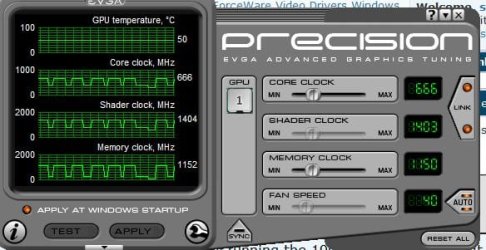
might have to try the 186.34's, im currently running the 190.38's but look what it does to my clock speeds :(, the 2D clocks keep jumping up & down, my GPU is 6c hotter with these....
711.JPG


though the performance is better than 186.18.....
 

My Computer My Computer

Computer Manufacturer/Model Number
myself
OS
SEVEN x64
CPU
Q9450 @ 3.6GHZ 1.34v
Motherboard
ASUS P5K PREMIUM P35
Memory
8GB 1066 buffalo firestix @ 1152mhz CL5
Graphics Card(s)
Sapphire HD 5970 + GTX260 (physX)
Sound Card
Creative X-FI Xtreme Gamer
Monitor(s) Displays
SAMSUNG 20'' & SAMSUNG 23'' (dual screens)
Screen Resolution
2048x1152 & 1680x1050
Hard Drives
1x seagate 160gb IDE & 1x seagate 160gb SATA
PSU
XCILIO 850w (78A)
Case
CM590 1x 120x38mm & 2x92x38mm / 4x 120x25mm
Cooling
AC7 PRO @ 92x38mm blower, Lamptron military bus bay controll
Keyboard
LOGITECH E110
Mouse
logitech NX5
Internet Speed
2MB
Other Info
its a continual ''work in progress''....
ya thats all wacked out skunk.

I'm still on 186.08 for now
 

My Computer My Computer

OS
Windows 7 Ultimate Edition x64
CPU
Q9650 E0 @ 4.0 GHz 1.304v
Motherboard
eVGA 750i FTW!
Memory
2x2GB Corsair Dominator PC2-8500C5D 1100 Mhz 5-5-5-15
Graphics Card(s)
eVGA/Gigabyte GTX 480's SLI
Sound Card
X-Fi XtremeGamer
Monitor(s) Displays
Dell U2410 24" IPS Panel (Beautiful)
Screen Resolution
1900 x 1200 & 1680 x 1050
Hard Drives
WD Caviar Black 640GB AALS x2 (Raid0) + Seagate Pro 500GB External x2
PSU
Enermax Revolution 85+ 1050w PSU
Case
Cooler Master HAF 932 H20
Cooling
Apogee GTZ, Feser 360, D5 Vario, Scythe GT 1850's
Keyboard
Logitech G11
Mouse
Logitech MX-518 / G9
Internet Speed
Fast!
Other Info
Nikon D40 DSLR 18-105mm VR - Nikon 35mm f/1.8 & 55-200mm VR
Bose Companion 3 - 16GB Patriot Xporter USB - ATH AD900's & UR Triple.Fi 10 Custom Phones w/ 32GB iPod Touch 3rd Gen -
Google Nexus One (Phone Rocks!) w/ Kingston 16GB MicroSDHC Class 10 running Amon RA1.7 and Cyan 5.06.1
I installed Win7 RC 64-bit and I can't get the nVidia drivers to install for my 9600M GT card. I had a problem with Vista 64-bit as well, but was manually able to install them without a problem. In Win7, I keep getting an error message that no supported hardware was found. But when I run the widget on nVidia's website, it finds the card without a problem and recommends 186.03...but I can't install it :mad: By the way, this is in a Dell XPS One 24".
 

My Computer My Computer

Computer Manufacturer/Model Number
Dell XPS One 24"
OS
Windows 7 RC 64-bit
CPU
Intel Core 2 Quad Q8200
Graphics Card(s)
GeForce 9600M GT
Official 190.38 Released

NVIDIA's GeForce 190.38 driver suite which arrived in beta form about a week ago, received its official status with WHQL-certification. The driver, like its beta version, introduces a list of changes as described in the release notes documents for for Windows 7, Vista, and XP, including a new release of the PhysX system software, version 9.09.0428. It supports the entire range of NVIDIA GPUs from GeForce 6 series and upwards, and NVIDIA ION, ION LE platforms. Important changes over the previous 186 series drivers include:

  • Support for the OpenGL 3.1 API
  • CUDA 2.3 support for improved performance in GPU Computing applications. See CUDA Zone for more details
  • A new user-controlled power management setting for GeForce 9-series and later graphics cards. This option allows users to set a performance level for each DirectX or OpenGL application
  • Includes several new control panel features and numerous bug fixes
DOWNLOAD: NVIDIA GeForce 190.38 WHQL for Windows 7, Vista, and XP (32-bit and 64-bit)
 

My Computer My Computer

OS
Win 7 Ultimate 64 RTM
CPU
Q6600 @ 3.03GHZ
Motherboard
ASRock Penryn1600SLI-110d
Memory
8GB @ 338MHZ
Graphics Card(s)
Palit GTX260 @ 707/1544/1200
Sound Card
[4.1 ] - Creative Labs XFI-GAMER
Monitor(s) Displays
SyncMaster T240 24" Dvi/HDMi
Screen Resolution
1920x1200
Hard Drives
Hitachi 500GB
PSU
Winpower 750Watt
Case
Thermaltake Soprano
Cooling
Oem Cooler
Keyboard
HP Keyboard
Mouse
Optical Microsoft Mouse
Internet Speed
3MBIT 350kb/s+
Thank you Neil. First post updated for the new WHQL 190.38 release. :)
 

My Computer My Computer

Computer type
PC/Desktop
Computer Manufacturer/Model Number
Self built custom
OS
64-bit Windows 11 Pro for Workstations
CPU
Intel i7-8700K OC'd to 5 GHz
Motherboard
ASUS ROG Maximus XI Formula Z390
Memory
64 GB (4x16GB) G.SKILL TridentZ RGB DDR4 3600 MHz
Graphics Card(s)
ASUS ROG-STRIX-GTX1080TI-O11G-GAMING
Sound Card
Integrated
Monitor(s) Displays
2 x Samsung Odyssey G7 27"
Screen Resolution
2560x1440
Hard Drives
1TB Samsung 990 PRO M.2,
4TB Samsung 990 PRO PRO M.2,
TerraMaster F8 SSD Plus NAS
PSU
Seasonic Prime Titanium 850W
Case
Thermaltake Core P3
Cooling
Corsair Hydro H115i
Keyboard
Logitech wireless K800
Mouse
Logitech MX Master 4
Internet Speed
2 Gb/s Download and 100 Mb/s Upload
Antivirus
Malwarebyte Anti-Malware Premium
Browser
Google Chrome
Other Info
Logitech Z625 speaker system,
Logitech BRIO 4K Pro webcam,
HP Color LaserJet Pro MFP M477fdn,
APC SMART-UPS RT 1000 XL - SURT1000XLI,
Galaxy S23 Plus phone
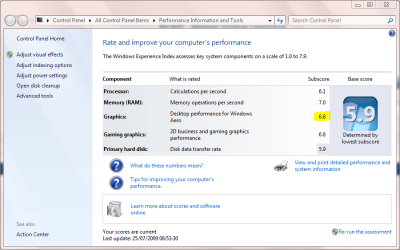
Please note that you may need to run the WEI assessment twice after installing this driver (190.38). The first time I ran it, the graphics category highlighted read 1.0. :confused: This was obviously wrong, so I ran the tool again. All is now well. :)
Capture.PNG
 

My Computer My Computer

Computer type
PC/Desktop
Computer Manufacturer/Model Number
Dwarf Dwf/11/2012 r09/2013
OS
Windows 8.1 Pro RTM x64
CPU
Intel Core-i5-3570K 4-core @ 3.4GHz (Ivy Bridge) (OC 4.4GHz)
Motherboard
ASRock Z77 Extreme4-M
Memory
4 x 4GB DDR3-1600 Corsair Vengeance CMZ8GX3M2A1600C9B (16GB)
Graphics Card(s)
MSI GeForce GTX770 Gaming OC 2GB
Sound Card
Realtek High Definition on board solution (ALC 898)
Monitor(s) Displays
ViewSonic VA1912w Widescreen (VGA)
Screen Resolution
1440x900
Hard Drives
OCZ Agility 3 SSD 120GB SATA III x2 (RAID 0)
Samsung HD501LJ 500GB SATA II x2
Hitachi HDS721010CLA332 1TB SATA II
Iomega 1.5TB Ext USB 2.0
WD 2.0TB Ext USB 3.0
PSU
XFX Pro Series 850W Semi-Modular
Case
Gigabyte IF233
Cooling
1 x 120mm Front Inlet 1 x 120mm Rear Exhaust
Keyboard
Microsoft Comfort Curve Keyboard 3000 (USB)
Mouse
Microsoft Comfort Mouse 3000 for Business (USB)
Internet Speed
NetGear DG834Gv3 ADSL Modem/Router (Ethernet) ~4.0 Mb/s (O2)
Antivirus
Avast! 8.0.1497
Browser
IE 11
Other Info
Optical Drive: HL-DT-ST BD-RE BH10LS30 SATA Bluray
Lexmark S305 Printer/Scanner/Copier (USB)
WEI Score: 8.1/8.1/8.5/8.5/8.25
Asus Eee PC 1011PX Netbook (Windows 7 x86 Starter)
Back
Top