Latest NVIDIA ForceWare Video Drivers Windows 7

Brink

Administrator
Staff member


   Tip
NVIDIA GRAPHICS FIRMWARE UPDATE TOOL FOR DISPLAYPORT 1.3 AND 1.4 DISPLAYS

Version: 1.0
Release Date: 2018.06.04
Operating System: Windows 7 64-bit, Windows 8 64-bit, Windows 8.1 64-bit

NVIDIA GRAPHICS FIRMWARE UPDATE TOOL FOR DISPLAYPORT 1.3 AND 1.4 - Windows 10 Forums


NVIDIA GeForce Security Update Driver (non-WHQL)
   Information
Version: 475.14
Release Date for Desktops and Notebooks: July 09, 2024
In Device Manager: 27.21.14.7514

Download: GeForce Security Update Driver 64-bit Windows 7/8

GeForce Security Update Driver Release Notes (PDF)

Control Panel User's Guide (PDF)

   Note
New Features
NVIDIA has released a software security update display driver for GeForce GPUs to be used with Windows 7/8.x which is no longer supported by Game Ready Drivers. Effective October 2021, Game Ready Driver upgrades, including performance enhancements, new features, and bug fixes, are exclusively available for systems utilizing Windows 10 and Window 11 as their operating system. Critical security updates will be available on systems utilizing Windows 7 through September 2024.

See Security Bulletin: NVIDIA GPU Display Driver – July 2024, which is posted shortly afterthe release date of this software, and will be posted on the NVIDIA Product Securitypage.

This display driver is not WHQL certified because Microsoft no longer accepts driversubmissions for WHQL certification on Windows 7. For information about installing thisdriver, see the NVIDIA knowledge base article Changes to the display driver installationprocess under Microsoft Windows 7.

Fixed Issues
This version of the driver has no fixed issues.

Open Issues
As with every released driver, version 475.14 of this driver has open issues and enhancement requests associated with it. This section includes lists of issues that are not fixed and features that are not implemented in this version. Some of the issues may not have been thoroughly investigated and, in fact, may not be NVIDIA issues. Others may have workarounds.
 
Last edited:

My Computer

Computer type
PC/Desktop
Computer Manufacturer/Model Number
Self built custom
OS
64-bit Windows 11 Pro for Workstations
CPU
Intel i7-8700K OC'd to 5 GHz
Motherboard
ASUS ROG Maximus XI Formula Z390
Memory
64 GB (4x16GB) G.SKILL TridentZ RGB DDR4 3600 MHz
Graphics Card(s)
ASUS ROG-STRIX-GTX1080TI-O11G-GAMING
Sound Card
Integrated
Monitor(s) Displays
2 x Samsung Odyssey G7 27"
Screen Resolution
2560x1440
Hard Drives
1TB Samsung 990 PRO M.2,
4TB Samsung 990 PRO PRO M.2,
TerraMaster F8 SSD Plus NAS
PSU
Seasonic Prime Titanium 850W
Case
Thermaltake Core P3
Cooling
Corsair Hydro H115i
Keyboard
Logitech wireless K800
Mouse
Logitech MX Master 4
Internet Speed
2 Gb/s Download and 100 Mb/s Upload
Antivirus
Malwarebyte Anti-Malware Premium
Browser
Google Chrome
Other Info
Logitech Z625 speaker system,
Logitech BRIO 4K Pro webcam,
HP Color LaserJet Pro MFP M477fdn,
APC SMART-UPS RT 1000 XL - SURT1000XLI,
Galaxy S23 Plus phone
Hello Brink.

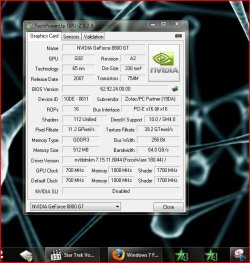
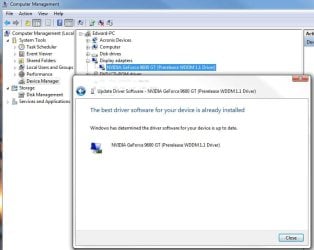
I just tried to update to the same 178.24 driver that I'm currently running on my Vista and it seems it won't allow it....:huh:...Any ideas?

NVIDIA_Driver.JPG


Later :confused: Ted
 

My Computer

Computer Manufacturer/Model Number
* BFK Customs *
OS
W 7 64-bit Ultimate
CPU
Intel Q9550 Yorkfield
Motherboard
ASUS P5Q Pro
Memory
8GB Dominator 8500C5D
Graphics Card(s)
ATI : XFX 5870
Sound Card
Realtek HD Audio 7-1
Monitor(s) Displays
1x 47" LCD HDMI & 3x 26" LCD HDMI
Screen Resolution
1920x1080P & 1920x1200
Hard Drives
1x 80GB Intel X25-M G2 SSD : 1x 500GB & 1x 640GB WD Caviar Black(s)
PSU
Corsair 620HX
Case
Cooler Master RC-690
Cooling
Tuniq Tower 120, 2x 140mm and 3x 120mm case fans
Keyboard
Microsoft 500
Mouse
Razer Diamondback 3G
Internet Speed
14 Mb/s
Other Info
1x Koutech 3Gb/s SATA HDD Hot Swap Rack
I don't know but maybe that particular driver was meant for windows 7 for Beta testing and that's why it came up in Windows update, just a thought.
 

My Computer

Computer Manufacturer/Model Number
Home Brew
OS
Windows 7 Ultimate Vista Ultimate x64
CPU
Core 2 Duo E8500 3.16Ghz @ 3.8Ghz
Motherboard
eVGA 750i FTW
Memory
2x2Gigs Patriot PC2-6400 LL
Graphics Card(s)
Inno3D GeForce GTX260 216 SP
Monitor(s) Displays
ASUS VW222U 22" 2ms Response time
Screen Resolution
1680x1050
Hard Drives
SATA 150GB
SATA II 250GB
USB IDE 750GB Ext.
PSU
HYTEC 600W & Thermaltake 650W Toughpower Power Exp
Case
Thermaltake Armor LCS (Liquid Cooling System)
Cooling
Liquid Cooling System
Keyboard
Logitech G15 Gaming Keyboard
Mouse
Logitech G9 Gaming Mouse
Hi all......

for anyone interested in the Beta offerings, i just installed the 180.44 Nvidia driver, running smooth as silk on W7!!;)
gpu3.JPG

:)SK
 

My Computer

Computer Manufacturer/Model Number
myself
OS
SEVEN x64
CPU
Q9450 @ 3.6GHZ 1.34v
Motherboard
ASUS P5K PREMIUM P35
Memory
8GB 1066 buffalo firestix @ 1152mhz CL5
Graphics Card(s)
Sapphire HD 5970 + GTX260 (physX)
Sound Card
Creative X-FI Xtreme Gamer
Monitor(s) Displays
SAMSUNG 20'' & SAMSUNG 23'' (dual screens)
Screen Resolution
2048x1152 & 1680x1050
Hard Drives
1x seagate 160gb IDE & 1x seagate 160gb SATA
PSU
XCILIO 850w (78A)
Case
CM590 1x 120x38mm & 2x92x38mm / 4x 120x25mm
Cooling
AC7 PRO @ 92x38mm blower, Lamptron military bus bay controll
Keyboard
LOGITECH E110
Mouse
logitech NX5
Internet Speed
2MB
Other Info
its a continual ''work in progress''....
Hello Mr Grim.

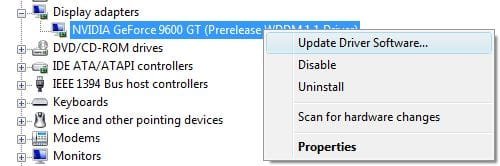
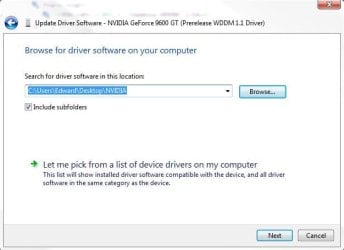
No I didn't get it from WU; I even had the Ethernet cable unplugged from the machine during the attempt. I tried to update to the same driver I had saved to one of my partitions. That's probably the reason it failed; how would I do it then?

Thanks for the help!

NVIDIA_Driver2.JPG NVIDIA_Driver3.JPG


Later ;) Ted
 

My Computer

Computer Manufacturer/Model Number
* BFK Customs *
OS
W 7 64-bit Ultimate
CPU
Intel Q9550 Yorkfield
Motherboard
ASUS P5Q Pro
Memory
8GB Dominator 8500C5D
Graphics Card(s)
ATI : XFX 5870
Sound Card
Realtek HD Audio 7-1
Monitor(s) Displays
1x 47" LCD HDMI & 3x 26" LCD HDMI
Screen Resolution
1920x1080P & 1920x1200
Hard Drives
1x 80GB Intel X25-M G2 SSD : 1x 500GB & 1x 640GB WD Caviar Black(s)
PSU
Corsair 620HX
Case
Cooler Master RC-690
Cooling
Tuniq Tower 120, 2x 140mm and 3x 120mm case fans
Keyboard
Microsoft 500
Mouse
Razer Diamondback 3G
Internet Speed
14 Mb/s
Other Info
1x Koutech 3Gb/s SATA HDD Hot Swap Rack
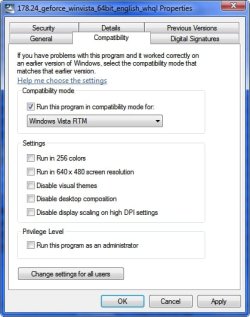
You might be better off trying to just click on the execute file for the driver but fist go into properties and change it compatibility mode for Vista.

That's what did the first time I installed it before I got one from the Windows Update and it seemed to install without any problems.

The driver you have now is the same one i am using at the moment and that was the one I got from the windows update and I couldn't find that particular driver on the Nvidia website.
 

Attachments

  • 2008-11-20_010106.jpg
    2008-11-20_010106.jpg
    141 KB · Views: 2,824

My Computer

Computer Manufacturer/Model Number
Home Brew
OS
Windows 7 Ultimate Vista Ultimate x64
CPU
Core 2 Duo E8500 3.16Ghz @ 3.8Ghz
Motherboard
eVGA 750i FTW
Memory
2x2Gigs Patriot PC2-6400 LL
Graphics Card(s)
Inno3D GeForce GTX260 216 SP
Monitor(s) Displays
ASUS VW222U 22" 2ms Response time
Screen Resolution
1680x1050
Hard Drives
SATA 150GB
SATA II 250GB
USB IDE 750GB Ext.
PSU
HYTEC 600W & Thermaltake 650W Toughpower Power Exp
Case
Thermaltake Armor LCS (Liquid Cooling System)
Cooling
Liquid Cooling System
Keyboard
Logitech G15 Gaming Keyboard
Mouse
Logitech G9 Gaming Mouse
Hello.

@Mr Grim; I just tried that and got the same result; oh well, if it ain't broke don't fix it!
Knowing the way I fix things sometime it'll cease to work at all....:huh:

Thanks for trying to help though!


Later :) Ted
 

My Computer

Computer Manufacturer/Model Number
* BFK Customs *
OS
W 7 64-bit Ultimate
CPU
Intel Q9550 Yorkfield
Motherboard
ASUS P5Q Pro
Memory
8GB Dominator 8500C5D
Graphics Card(s)
ATI : XFX 5870
Sound Card
Realtek HD Audio 7-1
Monitor(s) Displays
1x 47" LCD HDMI & 3x 26" LCD HDMI
Screen Resolution
1920x1080P & 1920x1200
Hard Drives
1x 80GB Intel X25-M G2 SSD : 1x 500GB & 1x 640GB WD Caviar Black(s)
PSU
Corsair 620HX
Case
Cooler Master RC-690
Cooling
Tuniq Tower 120, 2x 140mm and 3x 120mm case fans
Keyboard
Microsoft 500
Mouse
Razer Diamondback 3G
Internet Speed
14 Mb/s
Other Info
1x Koutech 3Gb/s SATA HDD Hot Swap Rack
Ted,

Have you tried the 180.43 beta driver version? That's the one I am using without problems.
 

My Computer

Computer type
PC/Desktop
Computer Manufacturer/Model Number
Self built custom
OS
64-bit Windows 11 Pro for Workstations
CPU
Intel i7-8700K OC'd to 5 GHz
Motherboard
ASUS ROG Maximus XI Formula Z390
Memory
64 GB (4x16GB) G.SKILL TridentZ RGB DDR4 3600 MHz
Graphics Card(s)
ASUS ROG-STRIX-GTX1080TI-O11G-GAMING
Sound Card
Integrated
Monitor(s) Displays
2 x Samsung Odyssey G7 27"
Screen Resolution
2560x1440
Hard Drives
1TB Samsung 990 PRO M.2,
4TB Samsung 990 PRO PRO M.2,
TerraMaster F8 SSD Plus NAS
PSU
Seasonic Prime Titanium 850W
Case
Thermaltake Core P3
Cooling
Corsair Hydro H115i
Keyboard
Logitech wireless K800
Mouse
Logitech MX Master 4
Internet Speed
2 Gb/s Download and 100 Mb/s Upload
Antivirus
Malwarebyte Anti-Malware Premium
Browser
Google Chrome
Other Info
Logitech Z625 speaker system,
Logitech BRIO 4K Pro webcam,
HP Color LaserJet Pro MFP M477fdn,
APC SMART-UPS RT 1000 XL - SURT1000XLI,
Galaxy S23 Plus phone
Hello Brink....:)

No sir, I haven't. I'll have to try it later.

Thanks Shawn!


Later ;) Ted
 

My Computer

Computer Manufacturer/Model Number
* BFK Customs *
OS
W 7 64-bit Ultimate
CPU
Intel Q9550 Yorkfield
Motherboard
ASUS P5Q Pro
Memory
8GB Dominator 8500C5D
Graphics Card(s)
ATI : XFX 5870
Sound Card
Realtek HD Audio 7-1
Monitor(s) Displays
1x 47" LCD HDMI & 3x 26" LCD HDMI
Screen Resolution
1920x1080P & 1920x1200
Hard Drives
1x 80GB Intel X25-M G2 SSD : 1x 500GB & 1x 640GB WD Caviar Black(s)
PSU
Corsair 620HX
Case
Cooler Master RC-690
Cooling
Tuniq Tower 120, 2x 140mm and 3x 120mm case fans
Keyboard
Microsoft 500
Mouse
Razer Diamondback 3G
Internet Speed
14 Mb/s
Other Info
1x Koutech 3Gb/s SATA HDD Hot Swap Rack
New NVIDIA 180.48 driver version released 11-19-2008 for 8800, 9, and 200 series. See first post for details.
 

My Computer

Computer type
PC/Desktop
Computer Manufacturer/Model Number
Self built custom
OS
64-bit Windows 11 Pro for Workstations
CPU
Intel i7-8700K OC'd to 5 GHz
Motherboard
ASUS ROG Maximus XI Formula Z390
Memory
64 GB (4x16GB) G.SKILL TridentZ RGB DDR4 3600 MHz
Graphics Card(s)
ASUS ROG-STRIX-GTX1080TI-O11G-GAMING
Sound Card
Integrated
Monitor(s) Displays
2 x Samsung Odyssey G7 27"
Screen Resolution
2560x1440
Hard Drives
1TB Samsung 990 PRO M.2,
4TB Samsung 990 PRO PRO M.2,
TerraMaster F8 SSD Plus NAS
PSU
Seasonic Prime Titanium 850W
Case
Thermaltake Core P3
Cooling
Corsair Hydro H115i
Keyboard
Logitech wireless K800
Mouse
Logitech MX Master 4
Internet Speed
2 Gb/s Download and 100 Mb/s Upload
Antivirus
Malwarebyte Anti-Malware Premium
Browser
Google Chrome
Other Info
Logitech Z625 speaker system,
Logitech BRIO 4K Pro webcam,
HP Color LaserJet Pro MFP M477fdn,
APC SMART-UPS RT 1000 XL - SURT1000XLI,
Galaxy S23 Plus phone
Thanks Brink, maybe I'll give that one a whirl....:)


Later ;) Ted
 

My Computer

Computer Manufacturer/Model Number
* BFK Customs *
OS
W 7 64-bit Ultimate
CPU
Intel Q9550 Yorkfield
Motherboard
ASUS P5Q Pro
Memory
8GB Dominator 8500C5D
Graphics Card(s)
ATI : XFX 5870
Sound Card
Realtek HD Audio 7-1
Monitor(s) Displays
1x 47" LCD HDMI & 3x 26" LCD HDMI
Screen Resolution
1920x1080P & 1920x1200
Hard Drives
1x 80GB Intel X25-M G2 SSD : 1x 500GB & 1x 640GB WD Caviar Black(s)
PSU
Corsair 620HX
Case
Cooler Master RC-690
Cooling
Tuniq Tower 120, 2x 140mm and 3x 120mm case fans
Keyboard
Microsoft 500
Mouse
Razer Diamondback 3G
Internet Speed
14 Mb/s
Other Info
1x Koutech 3Gb/s SATA HDD Hot Swap Rack
Newest Nvidia Driver

Has anybody tried the newest Nvidia drivers 180.70 and 180.60?
 

My Computer

OS
Windows 7 Ultimate x64
CPU
Intel Pentium D 830
Motherboard
ASUS P5ND2-SLI
Memory
6GB PC5600
Graphics Card(s)
2 x 7800 Nvidia GT
Sound Card
Sound Blaster Audigy 2
Monitor(s) Displays
22" Acer Widscreen
Hard Drives
80 GB Hitachi
No they haven't been released for my card.
 

My Computer

Computer Manufacturer/Model Number
HP Compaq Presario/SR5113WM
OS
Windows 7 Ultimate x64/ Windows Vista Ultimate x64
CPU
AMD Athlon 64 X2 3600+ 1.9Ghz
Motherboard
Asus M2N68-LA
Memory
PNY Optima Memory DDR2 2GB 2x1 kit
Graphics Card(s)
PNY Nvidia 8400 GS 256MB
Sound Card
On board RealTek
Monitor(s) Displays
Acer X163W LCD
Screen Resolution
1366x768
Hard Drives
Western Digital 160 GB SATA 3G (3.0Gb/sec)
7200 rpm
Western Digital 160 GB IDE
PSU
Dynex 400w
Case
Nothin Special
Cooling
Stock
Keyboard
Standard 102 key with volume and sleep buttons
Mouse
Wireless Logitech LX7
Internet Speed
Comcrap 10mb cable
Other Info
Insignia 2.1 speakers, wireless Xbox 360 controller w/plug n play charger, Belkin wireless G + mimo usb network adapter.
I am using the 180.60 from the advice of xguntherc on Vistax64, he also said that the 180.70 was other words a dud and people were having allot of issues with it, so go with the 180.60 I'm having no troubles with it and it's supposed to give increased fps in most games.
 

My Computer

Computer Manufacturer/Model Number
Home Brew
OS
Windows 7 Ultimate Vista Ultimate x64
CPU
Core 2 Duo E8500 3.16Ghz @ 3.8Ghz
Motherboard
eVGA 750i FTW
Memory
2x2Gigs Patriot PC2-6400 LL
Graphics Card(s)
Inno3D GeForce GTX260 216 SP
Monitor(s) Displays
ASUS VW222U 22" 2ms Response time
Screen Resolution
1680x1050
Hard Drives
SATA 150GB
SATA II 250GB
USB IDE 750GB Ext.
PSU
HYTEC 600W & Thermaltake 650W Toughpower Power Exp
Case
Thermaltake Armor LCS (Liquid Cooling System)
Cooling
Liquid Cooling System
Keyboard
Logitech G15 Gaming Keyboard
Mouse
Logitech G9 Gaming Mouse
I am using the 180.60 from the advice of xguntherc on Vistax64, he also said that the 180.70 was other words a dud and people were having allot of issues with it, so go with the 180.60 I'm having no troubles with it and it's supposed to give increased fps in most games.

Thanks for the heads up. I had the latest official Nvidia drivers installed and they were giving me issues. I went ahead an installed the 180.70 and saw a little improvement. I will install the 180.60 and see of those go!

Update: I tweaked around with the 180.70. They seem to be running pretty good on my machine. I did notice an increase on FPS. So far so good :)
 
Last edited:

My Computer

OS
Windows 7 Ultimate x64
CPU
Intel Pentium D 830
Motherboard
ASUS P5ND2-SLI
Memory
6GB PC5600
Graphics Card(s)
2 x 7800 Nvidia GT
Sound Card
Sound Blaster Audigy 2
Monitor(s) Displays
22" Acer Widscreen
Hard Drives
80 GB Hitachi
Hello,

I'm new to the forums, but I'm so frustrated I figured I'd post and see if anybody else has the solution to this problem. I'm able to install Windows 7 32 bit just fine, but when I install any nvidia drivers (the ones via WU or official Nvidia site) I get a black screen just after the "windows loading" screen on reboot. I can boot into safe mode, but even removing drivers doesn't fix it. I'm stuck reinstalling windows. I recently installed Vista 64 bit on another hdd and have the same problem (although I can uninstall drivers in safe mode just fine in vista). I have two EVGA 8500GT cards, an ASUS M2N32-SLI Deluxe Wifi Edition mobo, and an HP W2007 monitor. Any help would be much appreciated.
 

My Computer

OS
windows xp, windows vista, windows 7
I also had this similiar issue. What I did to solve it was change from my dvi cable to my vga cable for my monitor. When I did this it worked for me. If that doesnt work try to find compatible drivers for your monitor.
 

My Computer

OS
Windows 7 Ultimate x64
CPU
Intel Pentium D 830
Motherboard
ASUS P5ND2-SLI
Memory
6GB PC5600
Graphics Card(s)
2 x 7800 Nvidia GT
Sound Card
Sound Blaster Audigy 2
Monitor(s) Displays
22" Acer Widscreen
Hard Drives
80 GB Hitachi
this just kills me because the nvidia drivers work in xp...I haven't tried switching to vga yet. I'll give that a go.
 

My Computer

OS
windows xp, windows vista, windows 7
I unfortunately haven't benched in a while - and I haven't installed W7 as an OS on the HD yet, just as a VM - so I cannot really test the new drivers to see if they are any better....

Anyone else?
 

My Computers

System One System Two

  • Computer type
    PC/Desktop
    Computer Manufacturer/Model Number
    The Beast Model A (homebrew)
    OS
    Windows 11 21H2 Current build
    CPU
    AMD Ryzen 9 3950X
    Motherboard
    MSI MEG X570 GODLIKE
    Memory
    4 * 32 GB - Corsair Vengeance 3600 MHz
    Graphics Card(s)
    EVGA GeForce RTX 3080 Ti XC3 ULTRA GAMING (12G-P5-3955-KR)
    Sound Card
    Realtek® ALC1220 Codec
    Monitor(s) Displays
    2x Eve Spectrum ES07D03 4K Gaming Monitor (Matte) | Eve Spec
    Screen Resolution
    3x 3840 x 2160
    Hard Drives
    3x Samsung 980 Pro NVMe PCIe 4 M.2 2 TB SSD (MZ-V8P2T0B/AM) } 3x Sabrent Rocket NVMe 4.0 1 TB SSD
    PSU
    PC Power & Cooling’s Silencer Series 1050 Watt, 80 Plus Plat
    Case
    Fractal Design Define 7 XL Dark ATX Full Tower Case
    Cooling
    SteelSeries Apex Pro Wired Gaming Keyboard
    Keyboard
    SteelSeries Apex Pro
    Mouse
    Logitech MX Master 3S | MX Master 3 for business
    Internet Speed
    AT&T LightSpeed Gigabit Duplex Ftth
    Antivirus
    Windows Defender + MB 3
    Browser
    Nightly (default) + Firefox (stable),Chrome, Edge
  • Computer type
    PC/Desktop
    System Manufacturer/Model Number
    Dell Latitude E5470
    OS
    ChromeOS Flex Dev Channel (current)
    CPU
    Intel(R) Core(TM) i5-6300U CPU @ 2.40GHz, 2501 Mhz, 2 Core(s), 4 Logical Processor(s)
    Motherboard
    Dell
    Memory
    16 GB
    Graphics Card(s)
    Intel(R) HD Graphics 520
    Sound Card
    Intel(R) HD Graphics 520 + RealTek Audio
    Monitor(s) Displays
    Dell laptop display 15"
    Screen Resolution
    1920 * 1080
    Hard Drives
    Toshiba 128GB M.2 22300 drive
    INTEL Cherryville 520 Series SSDSC2CW180A 180 GB SATA III SSD
    PSU
    Dell
    Case
    Dell
    Cooling
    Dell
    Keyboard
    Dell
    Mouse
    Logitech MX Master 3S (shared w. Sys 1) | Dell TouchPad
    Internet Speed
    AT&T LightSpeed Gigabit Duplex Ftth
I was able to get drivers installed no problem once I removed one of my 8500gt cards. Intalling with only one went fine. I'll try to put the card back in and sli later...
 

My Computer

OS
windows xp, windows vista, windows 7
Back
Top