Latest Version of Comodo Firewall Released

just a heads up. When updating it obviously carries over your settings from the previous version.

Not so with a recommended clean install although previous fFirewall and Defense+ settings can be imported if upgrading within a similarly numbered version of Comodo.

~Maxx~
.
da59fa57.png

I was being lazy, thanks mate. just done one but have a problem with port 135. look in my secure thread in this section, help would be appreciated.
 

My Computer My Computer

Computer Manufacturer/Model Number
XP3000+
OS
Windows 7
CPU
AMD Athlon Barton
Motherboard
MSI MS-6712 (Socket-A)
Memory
2.5GB DDR @ 169MHz 2.5-3-3-7
Graphics Card(s)
RADEON 9200 SERIES
Sound Card
Realtek AC'97 Audio for VIA (R) Audio Controller
Monitor(s) Displays
256MB RADEON 9200 SERIES
Screen Resolution
1280 x 1024
Hard Drives
Seagate ST3160021A ATA Device 150GB
Cooling
Fans
just done one but have a problem with port 135. look in my secure thread in this section, help would be appreciated.

Could you provide a link to that thread?

~Maxx~

46498ae1.png
 
Last edited:

My Computer My Computer

Computer Manufacturer/Model Number
HP HPE 270f
OS
Windows 7 x64 Home Premium
CPU
Intel Core i7 930 @ 2.8 Ghz Socket 1366 LGA
Motherboard
Pegatron Truckee v1.04E41
Memory
8 GB 1366 Mhz DDR3 (PC3-10700) RAM
Graphics Card(s)
ATI Radeon 5770 1 GB DDR5 RAM
Sound Card
Realtech High Definition
Monitor(s) Displays
32" Sony Bravia
Screen Resolution
1366 X 768
Hard Drives
Intel 25nm 120 GB Series 320 SSD HD Tune- 265 MBps Read/ 130 MBps Write

LaCie 1TB + 1TB RAID 0 eSATA Drive HD Tune- 160 MBps Read/ 90 MBps Write
Keyboard
Logitech Illuminated
Mouse
Logitech MX Revolution
Internet Speed
36.4 Mbps Maximum on a 37 Mbps Motorola SB501 Modem

My Computer My Computer

Computer Manufacturer/Model Number
XP3000+
OS
Windows 7
CPU
AMD Athlon Barton
Motherboard
MSI MS-6712 (Socket-A)
Memory
2.5GB DDR @ 169MHz 2.5-3-3-7
Graphics Card(s)
RADEON 9200 SERIES
Sound Card
Realtek AC'97 Audio for VIA (R) Audio Controller
Monitor(s) Displays
256MB RADEON 9200 SERIES
Screen Resolution
1280 x 1024
Hard Drives
Seagate ST3160021A ATA Device 150GB
Cooling
Fans
Have you run the Comodo Stealth Ports Wizard to 'Block all incoming connections to make my ports stealth for everyone'?

~Maxx~

46498ae1.png
 
Last edited:

My Computer My Computer

Computer Manufacturer/Model Number
HP HPE 270f
OS
Windows 7 x64 Home Premium
CPU
Intel Core i7 930 @ 2.8 Ghz Socket 1366 LGA
Motherboard
Pegatron Truckee v1.04E41
Memory
8 GB 1366 Mhz DDR3 (PC3-10700) RAM
Graphics Card(s)
ATI Radeon 5770 1 GB DDR5 RAM
Sound Card
Realtech High Definition
Monitor(s) Displays
32" Sony Bravia
Screen Resolution
1366 X 768
Hard Drives
Intel 25nm 120 GB Series 320 SSD HD Tune- 265 MBps Read/ 130 MBps Write

LaCie 1TB + 1TB RAID 0 eSATA Drive HD Tune- 160 MBps Read/ 90 MBps Write
Keyboard
Logitech Illuminated
Mouse
Logitech MX Revolution
Internet Speed
36.4 Mbps Maximum on a 37 Mbps Motorola SB501 Modem
ye and those are the only settings that are set in global rules, only changed one thing and that was log the block rule, ip in
 

My Computer My Computer

Computer Manufacturer/Model Number
XP3000+
OS
Windows 7
CPU
AMD Athlon Barton
Motherboard
MSI MS-6712 (Socket-A)
Memory
2.5GB DDR @ 169MHz 2.5-3-3-7
Graphics Card(s)
RADEON 9200 SERIES
Sound Card
Realtek AC'97 Audio for VIA (R) Audio Controller
Monitor(s) Displays
256MB RADEON 9200 SERIES
Screen Resolution
1280 x 1024
Hard Drives
Seagate ST3160021A ATA Device 150GB
Cooling
Fans
The new and improved Comodo v5.0.163652.1142 has been released. I've had it installed for a couple of days on my Win 7 desktop and so far it seems to run even quieter than the initial v5.0.162636.1135 release aka Comodo 2011.

374ed123.jpg


~Maxx~

46498ae1.png
 
Last edited:

My Computer My Computer

Computer Manufacturer/Model Number
HP HPE 270f
OS
Windows 7 x64 Home Premium
CPU
Intel Core i7 930 @ 2.8 Ghz Socket 1366 LGA
Motherboard
Pegatron Truckee v1.04E41
Memory
8 GB 1366 Mhz DDR3 (PC3-10700) RAM
Graphics Card(s)
ATI Radeon 5770 1 GB DDR5 RAM
Sound Card
Realtech High Definition
Monitor(s) Displays
32" Sony Bravia
Screen Resolution
1366 X 768
Hard Drives
Intel 25nm 120 GB Series 320 SSD HD Tune- 265 MBps Read/ 130 MBps Write

LaCie 1TB + 1TB RAID 0 eSATA Drive HD Tune- 160 MBps Read/ 90 MBps Write
Keyboard
Logitech Illuminated
Mouse
Logitech MX Revolution
Internet Speed
36.4 Mbps Maximum on a 37 Mbps Motorola SB501 Modem
Installed version 5 on Windows 7 x64, Bad JuJu.......Quad-core 2.4mhz, 8gb ram and web experience slowed to a crawl, could not load web sites, backed it out and everything returned to normal. Will try the version 4 next.

Version 4 same issues, clearly not for my desktop which is already behind a firewall router.

Installed version 5 on Windows 7 x86 laptop, P4m 2.6mhz, 2gb ram and everything is good. No negative impact, working well as advertized. Will stay with it as this one is allowed direct access to internet without a firewall router when not at home.
 
Last edited:

My Computer My Computer

Computer Manufacturer/Model Number
Systemax N2000 Gaming PC
OS
Windows 7 Ultimate x64
CPU
Q6600 @2.4ghz (G0 stepping)
Motherboard
XFX nforce 680i LT
Memory
8 gb OCZ vista essential sli PC-6400
Graphics Card(s)
Dual 9800gt in SLI mode
Sound Card
Integrated 8.1 High Definition Audio
Monitor(s) Displays
Dual Sceptre x246w 24 inch monitors
Screen Resolution
1920 x 1200 each monitor
Hard Drives
500 GB SATA II / 7500 rpm
PSU
Cooler Master Real Power Pro 1250W
Case
N2000 server tower
Cooling
Thermaltake Bigwater 760 is
Keyboard
MS Intelitype 6000 v2.0
Mouse
MS Intelipoint 6000
Internet Speed
Wi-power 1.5GB up / 512k down
Other Info
Windows 7 Ultimate x64, Windows 7 Pro x64, Windows Home Premium X86, Windows XP pro, Windows Home Server x86, Ubuntu 10.4 x86 and x64, Ubuntu server 10.4, SQL Server 2005, MySQL 5.0
35b272db.png


bobtran- My Win 7 x64 computer does not suffer the same slowdown as you described when running the Comodo Firewall behind a firewall router. There were some problems early on with v4 starting the Sandboxie driver, but those were resolved. What browser are you using?

~Maxx~

46498ae1.png
 
Last edited:

My Computer My Computer

Computer Manufacturer/Model Number
HP HPE 270f
OS
Windows 7 x64 Home Premium
CPU
Intel Core i7 930 @ 2.8 Ghz Socket 1366 LGA
Motherboard
Pegatron Truckee v1.04E41
Memory
8 GB 1366 Mhz DDR3 (PC3-10700) RAM
Graphics Card(s)
ATI Radeon 5770 1 GB DDR5 RAM
Sound Card
Realtech High Definition
Monitor(s) Displays
32" Sony Bravia
Screen Resolution
1366 X 768
Hard Drives
Intel 25nm 120 GB Series 320 SSD HD Tune- 265 MBps Read/ 130 MBps Write

LaCie 1TB + 1TB RAID 0 eSATA Drive HD Tune- 160 MBps Read/ 90 MBps Write
Keyboard
Logitech Illuminated
Mouse
Logitech MX Revolution
Internet Speed
36.4 Mbps Maximum on a 37 Mbps Motorola SB501 Modem
35b272db.png


bobtran- My Win 7 x64 computer does not suffer the same slowdown as you described when running the Comodo Firewall behind a firewall router. There were some problems early on with v4 starting the Sandboxie driver, but those were resolved. What browser are you using?

~Maxx~
.
da59fa57.png

Firefox x86 (3.6.10) and Minefield x64 (4.0b8pre). Issue occurs with both.
 

My Computer My Computer

Computer Manufacturer/Model Number
Systemax N2000 Gaming PC
OS
Windows 7 Ultimate x64
CPU
Q6600 @2.4ghz (G0 stepping)
Motherboard
XFX nforce 680i LT
Memory
8 gb OCZ vista essential sli PC-6400
Graphics Card(s)
Dual 9800gt in SLI mode
Sound Card
Integrated 8.1 High Definition Audio
Monitor(s) Displays
Dual Sceptre x246w 24 inch monitors
Screen Resolution
1920 x 1200 each monitor
Hard Drives
500 GB SATA II / 7500 rpm
PSU
Cooler Master Real Power Pro 1250W
Case
N2000 server tower
Cooling
Thermaltake Bigwater 760 is
Keyboard
MS Intelitype 6000 v2.0
Mouse
MS Intelipoint 6000
Internet Speed
Wi-power 1.5GB up / 512k down
Other Info
Windows 7 Ultimate x64, Windows 7 Pro x64, Windows Home Premium X86, Windows XP pro, Windows Home Server x86, Ubuntu 10.4 x86 and x64, Ubuntu server 10.4, SQL Server 2005, MySQL 5.0
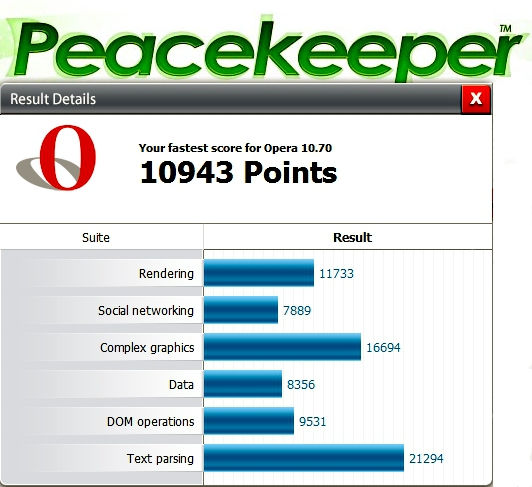
I've only used Opera on my Win 7 x64 computer, but it seems to be doing an fairly good job and it works very well with Comodo running in the virtual space of Sandboxie from which this Peacekeeper Browser Benchtest was done...

a8cd466c.png


~Maxx~

46498ae1.png
 
Last edited:

My Computer My Computer

Computer Manufacturer/Model Number
HP HPE 270f
OS
Windows 7 x64 Home Premium
CPU
Intel Core i7 930 @ 2.8 Ghz Socket 1366 LGA
Motherboard
Pegatron Truckee v1.04E41
Memory
8 GB 1366 Mhz DDR3 (PC3-10700) RAM
Graphics Card(s)
ATI Radeon 5770 1 GB DDR5 RAM
Sound Card
Realtech High Definition
Monitor(s) Displays
32" Sony Bravia
Screen Resolution
1366 X 768
Hard Drives
Intel 25nm 120 GB Series 320 SSD HD Tune- 265 MBps Read/ 130 MBps Write

LaCie 1TB + 1TB RAID 0 eSATA Drive HD Tune- 160 MBps Read/ 90 MBps Write
Keyboard
Logitech Illuminated
Mouse
Logitech MX Revolution
Internet Speed
36.4 Mbps Maximum on a 37 Mbps Motorola SB501 Modem
I've only used Opera on my Win 7 x64 computer, but it seems to be doing an fairly good job and it works very well with Comodo running in the virtual space of Sandboxie from which this Peacekeeper Browser Benchtest was done...

a8cd466c.png


~Maxx~
.
da59fa57.png

Glad to hear it works for you.

Since I am already behind a firewall router anyway there is really no reason to change browsers just to run a specific firewall. Especially as the Windows firewall works quite well actually. By the way.....Zonealarm firewall also suffers from some of the same issues and I don't run it either.

Comodo was just a thought to increase security, but not at the cost of abandoning my x64 browser of choice.
 

My Computer My Computer

Computer Manufacturer/Model Number
Systemax N2000 Gaming PC
OS
Windows 7 Ultimate x64
CPU
Q6600 @2.4ghz (G0 stepping)
Motherboard
XFX nforce 680i LT
Memory
8 gb OCZ vista essential sli PC-6400
Graphics Card(s)
Dual 9800gt in SLI mode
Sound Card
Integrated 8.1 High Definition Audio
Monitor(s) Displays
Dual Sceptre x246w 24 inch monitors
Screen Resolution
1920 x 1200 each monitor
Hard Drives
500 GB SATA II / 7500 rpm
PSU
Cooler Master Real Power Pro 1250W
Case
N2000 server tower
Cooling
Thermaltake Bigwater 760 is
Keyboard
MS Intelitype 6000 v2.0
Mouse
MS Intelipoint 6000
Internet Speed
Wi-power 1.5GB up / 512k down
Other Info
Windows 7 Ultimate x64, Windows 7 Pro x64, Windows Home Premium X86, Windows XP pro, Windows Home Server x86, Ubuntu 10.4 x86 and x64, Ubuntu server 10.4, SQL Server 2005, MySQL 5.0
Comodo was just a thought to increase security, but not at the cost of abandoning my x64 browser of choice.

I have the Minefield x64 program on my LaCie HDD ready to install can you pitch me on the advantages of installing it on Win 7 alongside Opera?

~Maxx~
.
da59fa57.png
 

My Computer My Computer

Computer Manufacturer/Model Number
HP HPE 270f
OS
Windows 7 x64 Home Premium
CPU
Intel Core i7 930 @ 2.8 Ghz Socket 1366 LGA
Motherboard
Pegatron Truckee v1.04E41
Memory
8 GB 1366 Mhz DDR3 (PC3-10700) RAM
Graphics Card(s)
ATI Radeon 5770 1 GB DDR5 RAM
Sound Card
Realtech High Definition
Monitor(s) Displays
32" Sony Bravia
Screen Resolution
1366 X 768
Hard Drives
Intel 25nm 120 GB Series 320 SSD HD Tune- 265 MBps Read/ 130 MBps Write

LaCie 1TB + 1TB RAID 0 eSATA Drive HD Tune- 160 MBps Read/ 90 MBps Write
Keyboard
Logitech Illuminated
Mouse
Logitech MX Revolution
Internet Speed
36.4 Mbps Maximum on a 37 Mbps Motorola SB501 Modem
Comodo was just a thought to increase security, but not at the cost of abandoning my x64 browser of choice.

I have the Minefield x64 program on my LaCie HDD ready to install can you pitch me on the advantages of installing it on Win 7 alongside Opera?

~Maxx~
.
da59fa57.png

It's still beta but.......Seems a little faster even than chrome to me, x64 is less vulnerable to virus's currently floating in the wild (this will change I'm sure). Now that Flash Player Square is out, we have flash for the x64 os/browser. One more step to ending the x86 monopoly of the PC.

Servers went there years ago and Microsoft does not even offer x86 server software anymore. Compatibility with the Data Center infrastructure is a must and when both are x64 then there are less avenues of attack from the wild due to the elimination of x86 codes, registers, buffers and other related vulnerabilities. X64 is/has been developed without a lot of the vulnerabilities that were inherent in the x86 kernal.

This is just a personal opinion but Minefield is working very well for me, thus I make the choice to go x64 as much as possible. Less to convert when/if x86 becomes obsolete as it already is on servers. This post was posted using x64 Minefield. I don't mind the bleeding edge as long as some progress is made as a result.

Progress is made by change and change is made by choice.

If you choose to run Minefield read up on the following thread related to crashes as there is a work around in the thread:
http://www.sevenforums.com/browsers-mail/115298-minefield-nightly-build-crashes.html
 

My Computer My Computer

Computer Manufacturer/Model Number
Systemax N2000 Gaming PC
OS
Windows 7 Ultimate x64
CPU
Q6600 @2.4ghz (G0 stepping)
Motherboard
XFX nforce 680i LT
Memory
8 gb OCZ vista essential sli PC-6400
Graphics Card(s)
Dual 9800gt in SLI mode
Sound Card
Integrated 8.1 High Definition Audio
Monitor(s) Displays
Dual Sceptre x246w 24 inch monitors
Screen Resolution
1920 x 1200 each monitor
Hard Drives
500 GB SATA II / 7500 rpm
PSU
Cooler Master Real Power Pro 1250W
Case
N2000 server tower
Cooling
Thermaltake Bigwater 760 is
Keyboard
MS Intelitype 6000 v2.0
Mouse
MS Intelipoint 6000
Internet Speed
Wi-power 1.5GB up / 512k down
Other Info
Windows 7 Ultimate x64, Windows 7 Pro x64, Windows Home Premium X86, Windows XP pro, Windows Home Server x86, Ubuntu 10.4 x86 and x64, Ubuntu server 10.4, SQL Server 2005, MySQL 5.0
Thank you for your candid response...

~Maxx~

46498ae1.png
 
Last edited:

My Computer My Computer

Computer Manufacturer/Model Number
HP HPE 270f
OS
Windows 7 x64 Home Premium
CPU
Intel Core i7 930 @ 2.8 Ghz Socket 1366 LGA
Motherboard
Pegatron Truckee v1.04E41
Memory
8 GB 1366 Mhz DDR3 (PC3-10700) RAM
Graphics Card(s)
ATI Radeon 5770 1 GB DDR5 RAM
Sound Card
Realtech High Definition
Monitor(s) Displays
32" Sony Bravia
Screen Resolution
1366 X 768
Hard Drives
Intel 25nm 120 GB Series 320 SSD HD Tune- 265 MBps Read/ 130 MBps Write

LaCie 1TB + 1TB RAID 0 eSATA Drive HD Tune- 160 MBps Read/ 90 MBps Write
Keyboard
Logitech Illuminated
Mouse
Logitech MX Revolution
Internet Speed
36.4 Mbps Maximum on a 37 Mbps Motorola SB501 Modem
I feel Comodo is causing slow browsing speed with all the browsers on my PC. Has anyone else noticed this? When I close Comodo, the internet works fine.

EDIT: I m using Comodo Internet Security (av+fw).
 

My Computer My Computer

Computer Manufacturer/Model Number
Samsung NP530U4B-S02IN
OS
Windows® 8 Pro (64-bit)
CPU
Intel® Core™ i5 Processor 2467M (1.60GHz, 3MB L3 Cache)
Motherboard
Samsung Electronics
Memory
6GB DDR3 System Memory at 1,333MHz (on BD 4GB + 2GB x 1)
Graphics Card(s)
AMD Radeon™ HD7550M 1GB DDR3 (Ext. Graphic)
Sound Card
Realtek High Definition Audio
Monitor(s) Displays
35.56cm (14.0) SuperBright 300nit HD LED Display
Screen Resolution
1366x768
Hard Drives
1TB S-ATA II Hard Drive (5400RPM) with ExpressCache 16GB SSD
Internet Speed
sucks
Antivirus
Microsoft Security Essentials
Browser
Google Chrome (Sync enabled)
35b272db.png


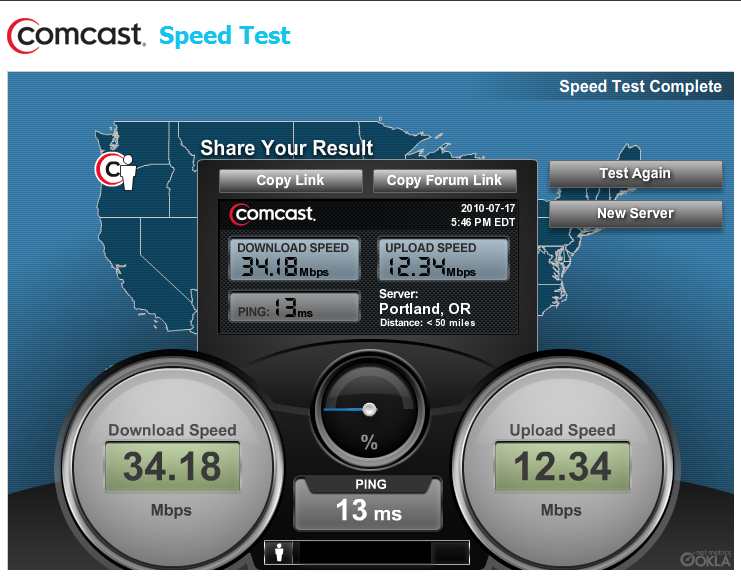
I've used at least a dozen different versions of Comodo on both my Vista and Win 7 computers both with and without the AV and I have never been able to measure a slowdown on my Comcast Broadband.

9c934957.jpg


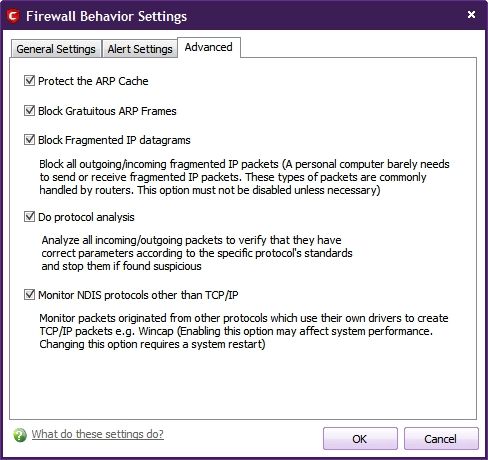
Do you have Monitor NDIS protocols other than TCP/IP enabled in Defense+ because that can impede performance?

~Maxx~

46498ae1.png
 
Last edited:

My Computer My Computer

Computer Manufacturer/Model Number
HP HPE 270f
OS
Windows 7 x64 Home Premium
CPU
Intel Core i7 930 @ 2.8 Ghz Socket 1366 LGA
Motherboard
Pegatron Truckee v1.04E41
Memory
8 GB 1366 Mhz DDR3 (PC3-10700) RAM
Graphics Card(s)
ATI Radeon 5770 1 GB DDR5 RAM
Sound Card
Realtech High Definition
Monitor(s) Displays
32" Sony Bravia
Screen Resolution
1366 X 768
Hard Drives
Intel 25nm 120 GB Series 320 SSD HD Tune- 265 MBps Read/ 130 MBps Write

LaCie 1TB + 1TB RAID 0 eSATA Drive HD Tune- 160 MBps Read/ 90 MBps Write
Keyboard
Logitech Illuminated
Mouse
Logitech MX Revolution
Internet Speed
36.4 Mbps Maximum on a 37 Mbps Motorola SB501 Modem
An interesting mention on the slowing down, I myself found things got so bad my PC stopped running, when I had Comodo and Avira running, it seems fine on its own in my HTPC but its an old version with eh white or silver shield. I have disabled Comodo on this PC due to various other issues.

Also using a Quad with 8gb of memory in a 64bit system.
 

My Computer My Computer

OS
Windows Ultimate 64bit
its an old version with eh white or silver shield.

The version you have sounds like either Comodo v4 or v4.1 which I also had various problems with in both Vista and Win 7, but Comodo 2011 aka v5.0 is a great improvement over those earlier versions in fact I ran v3.14 up until v5 came out due to various conflicts in v4.0 and v4.1 which were kind of like Vista compared to Win 7 in that v5.0 is simply amazing and everything works great now!

~Maxx~
46498ae1.png


COMODO Internet Security 5.0.162636.1135 Released!
 
Last edited:

My Computer My Computer

Computer Manufacturer/Model Number
HP HPE 270f
OS
Windows 7 x64 Home Premium
CPU
Intel Core i7 930 @ 2.8 Ghz Socket 1366 LGA
Motherboard
Pegatron Truckee v1.04E41
Memory
8 GB 1366 Mhz DDR3 (PC3-10700) RAM
Graphics Card(s)
ATI Radeon 5770 1 GB DDR5 RAM
Sound Card
Realtech High Definition
Monitor(s) Displays
32" Sony Bravia
Screen Resolution
1366 X 768
Hard Drives
Intel 25nm 120 GB Series 320 SSD HD Tune- 265 MBps Read/ 130 MBps Write

LaCie 1TB + 1TB RAID 0 eSATA Drive HD Tune- 160 MBps Read/ 90 MBps Write
Keyboard
Logitech Illuminated
Mouse
Logitech MX Revolution
Internet Speed
36.4 Mbps Maximum on a 37 Mbps Motorola SB501 Modem
There is a good reason it's a bad idea to have more than one malware scanner in a computer. Every developer of internet security software is aware of the fact that no one system is perfect, yet none of them want any competition, so there are very few internet security suites that will play nice with any other antimalware program. Kaspersky, McAfee, Avast and AVG all silently block attempts to remove infections with an independent malware removal tool other than malwarebytes or the monthly windows removal tool. NIS and almost every other AV will automatically block Malwarebytes if you activate the malwarebytes protection module for anything other than the website blocking feature. Most of the others that allow malwarebytes without complaint are so weak by themselves as to be useless. Comodo and a few others can work with a 2nd RT scanner, but the system will slow down if you don't manually create exceptions for each in the other program, because each will see the other as an attack when you start a scan.
 
Just tried it out, can I turn off all the pop ups? Very annoying

EDIT: Nevermind, I uninstalled it, reinstalled it just selecting Basic Firewall. I had selected the Default option which came with some kind of...defense or something
 

My Computer My Computer

Computer Manufacturer/Model Number
HP p6270z
OS
Windows 7 Home Premium x64
CPU
AMD Athlon II X4 620
Motherboard
Foxconn ALOE (CPU 1)
Memory
4.00GB Dual Channel DDR3 @ 666Mhz (9-9-9-24)
Graphics Card(s)
HD Radeon 4200 (Integrated)
Sound Card
Realtek High Definition Audio
Monitor(s) Displays
HP 2311 (1920x1080) @ 60Hz
Screen Resolution
1920x1080
Hard Drives
488GB Seagate ST3500418AS SCSI Disk Device (RAID)
Back
Top