Latest Version of Malwarebytes

Thanks MM, I appreciate all your comments and advice.

As you say, it's all moot if we're going to be forced off 1.75/2 soon anyway. I certainly don't want to buy a licence and not get much use from it if I then decide not to go with version 3 and don't have a practical option to stay with version 2.

While I continue with the free version and therefore manual-only scans, I shall continue to check the Malwarebytes forum before each scan just to check that there are no possible false positives being reported that are likely to affect me. I got into that habit after the last major issue which fortunately didn't affect me, and I think the recent issue related to business users and a different version altogether.

The previous discussion was here, I know that because I contributed to it and I'm not registered at Malwarebytes. I think it was a discussion AdvancedSetup also contributed to, I guess I can search my own post history for it if necessary but I'm happy to see how things go with my current arrangements while also seeing how things pan out with the version 3 beta.
 

My Computer My Computer

Computer type
PC/Desktop
Computer Manufacturer/Model Number
Custom build by PC Specialist
OS
Windows 7 Home Premium 64
CPU
AMD Phenom II X4 955
Motherboard
Asus M4A78T-E
Memory
8GB Corsair XMS3 DDR3
Graphics Card(s)
Gigabyte Geforce GTX 960 2GB
Sound Card
SB Audigy
Monitor(s) Displays
BenQ 24"
Screen Resolution
1920 x 1080
Hard Drives
500GB Serial ATA
PSU
1010W Quiet Quad Rail
Case
Antec 900
Cooling
Fenrir
Keyboard
Corsair
Mouse
Logitech
Internet Speed
20mbps
Antivirus
MSE plus MBAM 2.x Free
Browser
Chrome
Other Info
Second desktop different spec but similar level.
Hi:

You don't have to register at their forum to search for either members or their content.
I am pretty certain you will find content about that there, dating back to around March 2014 and thereafter.

Alas, you missed the opportunity to upgrade to Premium at the old price of $24.95.
The new product, which includes both anti-exploit and anti-ransomware features, is now $39.99 per PC.
Thankfully, however, they seem to have preserved (for now) their small discount for multiple licenses purchased at the same transaction.
If you ever change your mind and decide to upgrade, be very careful purchasing your license anywhere but from the official Malwarebytes online store.
If past history is any example, crooks will try to capitalize on customers looking for a "bargain".
This happened more times than I can remember.

Over and out.

MM
 

My Computer My Computer

Computer type
PC/Desktop
Computer Manufacturer/Model Number
Dell Studio XPS 8500
OS
OEM Windows 7 Ult (x64) SP1
CPU
Intel Core-i7 3770 @ 3.4 GHz
Motherboard
"Dell" branded
Memory
16 GB DDR3 SDRAM @ 1333 MHz
Graphics Card(s)
NVidia GeForce GT620 1 GB
Sound Card
THX TruStudio PC
Monitor(s) Displays
Dell U2410 Full HD
Hard Drives
2.0 TB SATA2 @ 7200 RPM
PSU
350W
Keyboard
MS 4000 Ergon - Wired
Mouse
Logitech Anywhere MX
Internet Speed
Cable HSI w/Turbo (router)
Antivirus
KIS-MBAM Premium-MBAE Premium
Browser
Fx (current version); IE
Other Info
And a Win7/64 Pro laptop; And a Win10/64 Pro desktop.
Hi:

You don't have to register at their forum to search for either members or their content.
I am pretty certain you will find content about that there, dating back to around March 2014 and thereafter.

Alas, you missed the opportunity to upgrade to Premium at the old price of $24.95.
The new product, which includes both anti-exploit and anti-ransomware features, is now $39.99 per PC.
Thankfully, however, they seem to have preserved (for now) their small discount for multiple licenses purchased at the same transaction.
If you ever change your mind and decide to upgrade, be very careful purchasing your license anywhere but from the official Malwarebytes online store.
If past history is any example, crooks will try to capitalize on customers looking for a "bargain".
This happened more times than I can remember.

Over and out.

MM

I realise you don't have to be registered to search etc at their forum, my point was that the discussion I recall was one I contributed to and would have been here because I'm not registered to post there.

The increase in cost at Malwarebytes is unfortunate, and with two computers with a varied amount of usage the overall cost is likely to be pretty off-putting for a pensioner like me! Shame they aren't talking about a reduced charge per computer to cover multiple machines, that used to be pretty standard in the industry in the days when I paid for my protection. I'm not wholly averse to paying now, but I stopped paying because I found the more features I got through paying, the more the machines slowed down.

The financial changes, plus the abrupt end of the beta for version 3 when they've barely scratched the surface of the reported issues, and the immediate abandonment of the other cheaper versions makes me seriously wonder whether there's more to this than first meets the eye. I'll stick as I am and see what transpires. Meanwhile, thanks for all your advice, and best regards.
 

My Computer My Computer

Computer type
PC/Desktop
Computer Manufacturer/Model Number
Custom build by PC Specialist
OS
Windows 7 Home Premium 64
CPU
AMD Phenom II X4 955
Motherboard
Asus M4A78T-E
Memory
8GB Corsair XMS3 DDR3
Graphics Card(s)
Gigabyte Geforce GTX 960 2GB
Sound Card
SB Audigy
Monitor(s) Displays
BenQ 24"
Screen Resolution
1920 x 1080
Hard Drives
500GB Serial ATA
PSU
1010W Quiet Quad Rail
Case
Antec 900
Cooling
Fenrir
Keyboard
Corsair
Mouse
Logitech
Internet Speed
20mbps
Antivirus
MSE plus MBAM 2.x Free
Browser
Chrome
Other Info
Second desktop different spec but similar level.
The increase in cost at Malwarebytes is unfortunate, and with two computers with a varied amount of usage the overall cost is likely to be pretty off-putting for a pensioner like me!

Yes, it is high.
I cannot defend it.
Their justification is the inclusion of 2 new technologies (and the cost to R&D and support them).
They likewise justify it with their assertions that version 3 is a satisfactory "AV replacement".
So, while they insist in an as yet unproved and contradictory manner that one can run it side-by-side with a real, paid AV, it does seem as if they are forcing users to choose one or the other, if for no other reason than cost.
Even those users who can afford to buy both may not be willing to do so.

Alas, if you had purchased a lifetime license before March 2014, you would have been all set.
At least for now, they continue to honor their lifetime licenses, even for the MB3 upgrade.

Shame they aren't talking about a reduced charge per computer to cover multiple machines, that used to be pretty standard in the industry in the days when I paid for my protection.
Thankfully, however, they seem to have preserved (for now) their small discount for multiple licenses purchased at the same transaction.
I just checked their online store.
The discount to purchase multiple licenses at the same transaction seems to be in place for now.
If change the number of licenses being purchased from the default of "1", it will recaculate the purchase price to provide the discount.
And there is a 2-year subscription option, to lock in the current price.

Again, I do not defend or endorse any of this. I am merely passing along information.

MM
 
Last edited:

My Computer My Computer

Computer type
PC/Desktop
Computer Manufacturer/Model Number
Dell Studio XPS 8500
OS
OEM Windows 7 Ult (x64) SP1
CPU
Intel Core-i7 3770 @ 3.4 GHz
Motherboard
"Dell" branded
Memory
16 GB DDR3 SDRAM @ 1333 MHz
Graphics Card(s)
NVidia GeForce GT620 1 GB
Sound Card
THX TruStudio PC
Monitor(s) Displays
Dell U2410 Full HD
Hard Drives
2.0 TB SATA2 @ 7200 RPM
PSU
350W
Keyboard
MS 4000 Ergon - Wired
Mouse
Logitech Anywhere MX
Internet Speed
Cable HSI w/Turbo (router)
Antivirus
KIS-MBAM Premium-MBAE Premium
Browser
Fx (current version); IE
Other Info
And a Win7/64 Pro laptop; And a Win10/64 Pro desktop.
They are taking a little bit of a liberty by charging £39 ($49) for it in the UK.
 

My Computer My Computer

Computer type
PC/Desktop
OS
Windows 11
No one having problems with this release?

My hats off to you!
 

My Computer My Computer

Computer type
PC/Desktop
Computer Manufacturer/Model Number
Home Built
OS
Windows `10 Professional 64bit
CPU
Intel i5 [email protected]
Motherboard
MSI P67A-GD55 (MS7681)
Memory
Corsair Vengeance DDR3 1600 16G
Graphics Card(s)
NVIDIA GeForce GT520 1GHz
Sound Card
Realtek High Definition Audio
Monitor(s) Displays
Haans G 241
Screen Resolution
1600X1024
Hard Drives
Crucial MX100 256GB SSD
PSU
OCZ ModXStream Modular High Performance 500 Watt
Case
Rosewill Challenger-U3
Cooling
Just Fans
Keyboard
Kensington K64338B
Mouse
Microsoft wheel mouse 1.1A
Internet Speed
240.0 Mbps
Antivirus
ESET Internet Security
Browser
Firefox
Other Info
SuperAntiSpyware-Pro
Malwarebytes (Premium)
Kerish Doctor
Hi:

Ummm, version 1.75 has not been supported for a long time.
It may still be getting database updates, but I'm not sure.

Version 2.x has been out since March 2014.
It runs on everything from XP to 10.

I highly encourage you to upgrade to 2.2.1.1043, rather than staying with 1.75.
2.2.1.1043 is stable and much more capable than 1.75.
You are far less protected with 1.75 than you would be with 2.2.1.1043.
And, if 1.75 is not receiving updates any longer, the risk of both F/Ps and F/Ns increases substantially.
It would be unhelpful to run 1.75 without current databases.

Alas, in part of the strong-arm tactics to force users to upgrade to MB3, it seems they are no longer offering the installer for 2.2.1.1043 at the MBAM product page or anywhere on the main site.
Perhaps there is a hidden link tucked away somewhere.
As of this moment, it's still available at bleepingcomputer and probably at other 3rd-party sites, such as filehippo or majorgeeks.
I would be VERY careful getting it anywhere else (including cnet), as the file may come with unwanted PUPs or worse....

Cheers,
MM

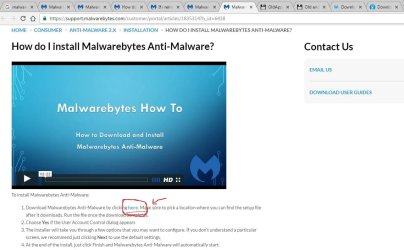
I may have found a hidden link on official site here...
Malwarebytes |

How do I install Malwarebytes Anti-Malwa...

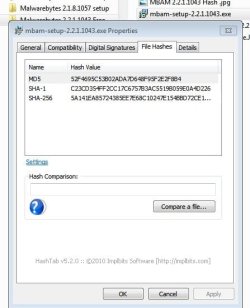
Accidentally came across looking for support. There is a blue "here" hyperlink under the video screen in the page that downloaded MBAM v. 2.2.1.1043
See snips below.

HTH

Cheers,
Froggy
 

Attachments

  • Malwarebytes 2.2.1.1043 Capture.JPG
    Malwarebytes 2.2.1.1043 Capture.JPG
    73.6 KB · Views: 1
  • MBAM HashTab Capture.JPG
    MBAM HashTab Capture.JPG
    37.9 KB · Views: 38

My Computer My Computer

Computer type
PC/Desktop
Computer Manufacturer/Model Number
custom build
OS
Windows 7 Ultimate 64bit & Windows XP Pro (Dual Boot)
CPU
AMD Phenom II x4 965 3.40GHz
Motherboard
ECS A885GM-A2
Memory
8.00 GB
Graphics Card(s)
AMD Radeon HD 6670
Monitor(s) Displays
HP L2445w
Screen Resolution
1920 x 1200
Hard Drives
Samsung SSD 840 series SATA 120GB-Win 7 &
WD 1Tb Caviar Black 7200 rpm-XP Pro
PSU
Cooler Master Elite Power 460 Watt ATX Power Supply
Case
Thermaltake V3 Black Edition ATX Mid Tower
Cooling
Cooler Master Hyper 212 EVO Universal CPU Cooler
Keyboard
Logitech
Internet Speed
30 Mg download-10 Mg upload
Antivirus
Bitdefender & Malwarebytes Pro
Browser
IE 11-because I like a SLOW browser!
I tried my best to explain that the protection has MUCH more to do than "database" updates.
The scanning engines, heuristics and other features "under the hood" for version 2 are much more robust than in version 1.75. (I used to have a list of all the performance/stability/security enhancements for 2 vs. 1, but TBH, it's been such a long time since v1 was replaced, I cannot find it.)
For one thing, anti-rootkit scanning is BUILT-IN to version 2, making it unnecessary to run MBAR-BETA (Malwarebytes Anti-Rootkit BETA) as a standalone. (MBAR-BETA is not intended for casual DIY use by home users without expert guidance -- see disclaimer HERE.)

The point is that 1.75 may still be getting "database" updates for a little while longer.
But that does not mean it is providing good protection or cleanup capability.
The version 2 program itself -- in terms of its scanning engines, anti-rootkit, heuristics and many other features -- provides better protection & cleanup than version 1.75.
I've never had a problem with MBAR -Beta. I don't see what the "expert guidance" is about.
So what is the best suggestion 1) use a V2 install or 2) Install V3? Will V3 attempt real time scanning for the 14 day trial period and clash with my Norton real time scanning? Both 2 & 3 don't seem to have the quick scan option anymore.

Add:
I installed V3 and turned off real time scanning so it doesn't conflict with Norton. Also 2 real time scanning can apparently slow down your PC. When the trial period is over I'm hoping MBAM will still perform the non real time scanning operation.
 
Last edited:

My Computer My Computer

Computer type
PC/Desktop
Computer Manufacturer/Model Number
Own build
OS
Windows 7x64 Home Premium SP1
CPU
Intel i7 2600k
Motherboard
ASUS P8Z68 Deluxe
Memory
G.Skill Ripjaws (DDR3-1600) 2x4GB
Graphics Card(s)
Nvidia GeForce GTS 450; Intel HD Graphics 3000(GT2+)
Monitor(s) Displays
Dell Ultrasharp IPS panel U2311H, Samsung SyncMaster P2350
Screen Resolution
1920x1080
Hard Drives
Samsung 850 Pro SSD 256GB, Samsung SSD 840 120GB, Seagates 1TB Barracuda ST31000528AS x2
PSU
Seasonic M12II 520W
Case
Lian Li Lancool PC-K60
Cooling
Case: 1x120mm, 3x140mm CPU: Hyper 212+
Keyboard
Logitech MK520 (wireless)
Mouse
Logitech MK520
Internet Speed
6-7 Mbps
Antivirus
Norton Security Premium, Malwarebytes on 2 (MSE on 3rd PC)
Browser
FireFox
Other Info
Audio: Logitech Z523 2.1
My weekly full scan with MBAM 2 flagged Auslogics defrag (I still defrag my data HDD). Going to try 3 now that I just made my weekly images. A Guy
 

My Computer My Computer

Computer type
PC/Desktop
OS
Windows 10 Home x64
CPU
INTEL Core i5-750 Quad-Core 3.37GHz
Motherboard
ASUS P7P55D
Memory
HyperX Fury Black Series 8GB (2 x 4GB) 1866Mhz
Graphics Card(s)
EVGA GeForce GTX 750 Superclocked 1GB 128-Bit GDDR5
Monitor(s) Displays
LG 32MA68HY 32" IPS
Screen Resolution
1920 x 1080
Hard Drives
Samsung 840 Evo 120GB, SEAGATE 500GB Barracuda® 7200.12, SATA 3 Gb/s, 7200 RPM, 16MB cache
PSU
ANTEC TruePower New TP-550, 80 PLUS, 550W
Case
ANTEC Three Hundred Illusion
Cooling
COOLER MASTER Hyper 212 Plus, 4 x 120mm 1 x 140mm Noctua's
Internet Speed
85 + Mbps
Antivirus
Avast
Browser
Vivaldi
My weekly full scan with MBAM 2 flagged Auslogics defrag (I still defrag my data HDD). Going to try 3 now that I just made my weekly images. A Guy
My V1.75 did the same thing but wasn't a problem since I haven't used Auslogics defrag for a long time.
When you try V3 let us know what you think.

I don't defrag SSDs obviously and let Windows defrag the HDDs.
 
Last edited:

My Computer My Computer

Computer type
PC/Desktop
Computer Manufacturer/Model Number
Own build
OS
Windows 7x64 Home Premium SP1
CPU
Intel i7 2600k
Motherboard
ASUS P8Z68 Deluxe
Memory
G.Skill Ripjaws (DDR3-1600) 2x4GB
Graphics Card(s)
Nvidia GeForce GTS 450; Intel HD Graphics 3000(GT2+)
Monitor(s) Displays
Dell Ultrasharp IPS panel U2311H, Samsung SyncMaster P2350
Screen Resolution
1920x1080
Hard Drives
Samsung 850 Pro SSD 256GB, Samsung SSD 840 120GB, Seagates 1TB Barracuda ST31000528AS x2
PSU
Seasonic M12II 520W
Case
Lian Li Lancool PC-K60
Cooling
Case: 1x120mm, 3x140mm CPU: Hyper 212+
Keyboard
Logitech MK520 (wireless)
Mouse
Logitech MK520
Internet Speed
6-7 Mbps
Antivirus
Norton Security Premium, Malwarebytes on 2 (MSE on 3rd PC)
Browser
FireFox
Other Info
Audio: Logitech Z523 2.1
My weekly full scan with MBAM 2 flagged Auslogics defrag (I still defrag my data HDD). Going to try 3 now that I just made my weekly images. A Guy

Yes. I had that last week. I don't use it much so I let it go. I mainly use Puran.
 

My Computer My Computer

Computer type
Laptop
Computer Manufacturer/Model Number
Hewlett-Packard/G62-107SA Notebook
OS
Microsoft Windows 7 Home Premium 64-bit Service Pack 1
CPU
Intel(R) Core(TM) i3 CPU M 330 @ 2.13GHz
Motherboard
Hewlett-Packard 1425
Memory
8 GB DDR3
Graphics Card(s)
Intel(R) HD Graphics
Sound Card
Realtek High Definition Audio
Monitor(s) Displays
Builtin
Screen Resolution
1366 x 768 x 32 bits (4294967296 colors) @ 60 Hz
Hard Drives
250 GB SATA Hard Disk Drive 7200 rpm
2TB Seagate GoFlex USB 2 Drive
1TB Iomega Prestige USB 2 Drive
1.5TB Iomega Prestige USB 2 Drive (Samsung)
2TB WD MyBook Live NAS.
Mouse
Logitech Anywhere MX
Internet Speed
152 Mbs download 10 Mbs upload
Antivirus
Norton 360
Browser
Chrome
Installed V3. 1st thing I noticed, no other scanner has slowed my system. I always scan and go right on surfing. Noticed lag several times while scanning. No big deal as I only full scan with everything once a week before making images, but it definitely slowed the system a few times. No issues with EMET. New versions of MBAE can occasionally make me turn of browser parts of EMET. Nada yet with V3 which uninstalled stand alone MBAE during installation. A Guy
 

My Computer My Computer

Computer type
PC/Desktop
OS
Windows 10 Home x64
CPU
INTEL Core i5-750 Quad-Core 3.37GHz
Motherboard
ASUS P7P55D
Memory
HyperX Fury Black Series 8GB (2 x 4GB) 1866Mhz
Graphics Card(s)
EVGA GeForce GTX 750 Superclocked 1GB 128-Bit GDDR5
Monitor(s) Displays
LG 32MA68HY 32" IPS
Screen Resolution
1920 x 1080
Hard Drives
Samsung 840 Evo 120GB, SEAGATE 500GB Barracuda® 7200.12, SATA 3 Gb/s, 7200 RPM, 16MB cache
PSU
ANTEC TruePower New TP-550, 80 PLUS, 550W
Case
ANTEC Three Hundred Illusion
Cooling
COOLER MASTER Hyper 212 Plus, 4 x 120mm 1 x 140mm Noctua's
Internet Speed
85 + Mbps
Antivirus
Avast
Browser
Vivaldi
MB3 does seem to be a real resource hog. It completely locks the system when in it's "preparation" stage and runs at near 100% at times during the scan.
 

My Computer My Computer

Computer type
Laptop
Computer Manufacturer/Model Number
Hewlett-Packard/G62-107SA Notebook
OS
Microsoft Windows 7 Home Premium 64-bit Service Pack 1
CPU
Intel(R) Core(TM) i3 CPU M 330 @ 2.13GHz
Motherboard
Hewlett-Packard 1425
Memory
8 GB DDR3
Graphics Card(s)
Intel(R) HD Graphics
Sound Card
Realtek High Definition Audio
Monitor(s) Displays
Builtin
Screen Resolution
1366 x 768 x 32 bits (4294967296 colors) @ 60 Hz
Hard Drives
250 GB SATA Hard Disk Drive 7200 rpm
2TB Seagate GoFlex USB 2 Drive
1TB Iomega Prestige USB 2 Drive
1.5TB Iomega Prestige USB 2 Drive (Samsung)
2TB WD MyBook Live NAS.
Mouse
Logitech Anywhere MX
Internet Speed
152 Mbs download 10 Mbs upload
Antivirus
Norton 360
Browser
Chrome

My Computer My Computer

Computer type
PC/Desktop
Computer Manufacturer/Model Number
Dell Studio XPS 8500
OS
OEM Windows 7 Ult (x64) SP1
CPU
Intel Core-i7 3770 @ 3.4 GHz
Motherboard
"Dell" branded
Memory
16 GB DDR3 SDRAM @ 1333 MHz
Graphics Card(s)
NVidia GeForce GT620 1 GB
Sound Card
THX TruStudio PC
Monitor(s) Displays
Dell U2410 Full HD
Hard Drives
2.0 TB SATA2 @ 7200 RPM
PSU
350W
Keyboard
MS 4000 Ergon - Wired
Mouse
Logitech Anywhere MX
Internet Speed
Cable HSI w/Turbo (router)
Antivirus
KIS-MBAM Premium-MBAE Premium
Browser
Fx (current version); IE
Other Info
And a Win7/64 Pro laptop; And a Win10/64 Pro desktop.
They are taking a little bit of a liberty by charging £39 ($49) for it in the UK.

Wow.
That is too much, especially for what right now is such a buggy, unstable product.

Despite the assertions of side-by-side compatibility, they do seem to be forcing users to choose.
Even those who CAN afford both a paid AV and paid Malwarebytes 3 may not wish to pay for both.

Whether the product really can be used for sole protection remains to be seen. Thus far, we have only the company's marketing materials to substantiate that. Perhaps it really is that good. Time will tell.

MM
 

My Computer My Computer

Computer type
PC/Desktop
Computer Manufacturer/Model Number
Dell Studio XPS 8500
OS
OEM Windows 7 Ult (x64) SP1
CPU
Intel Core-i7 3770 @ 3.4 GHz
Motherboard
"Dell" branded
Memory
16 GB DDR3 SDRAM @ 1333 MHz
Graphics Card(s)
NVidia GeForce GT620 1 GB
Sound Card
THX TruStudio PC
Monitor(s) Displays
Dell U2410 Full HD
Hard Drives
2.0 TB SATA2 @ 7200 RPM
PSU
350W
Keyboard
MS 4000 Ergon - Wired
Mouse
Logitech Anywhere MX
Internet Speed
Cable HSI w/Turbo (router)
Antivirus
KIS-MBAM Premium-MBAE Premium
Browser
Fx (current version); IE
Other Info
And a Win7/64 Pro laptop; And a Win10/64 Pro desktop.
Update

I'm happy to report that I was wrong about the lack of a direct way to end the Trial.
See HERE at tenforums.

Briefly, it appears that there are now 3 ways to end the Trial

  1. Click the "Deactivate Premium Trial" button/link on the My Account tab of the dashboard (~same as MBAM2)
  2. R&R (same as MBAM2)
  3. Allow the Trial to expire in 14 days (same as MBAM2)
If I understand the explanation provided, the "End Trial" link in the system tray popup has been eliminated.
But at least there *is* a direct way to end it from the dashboard.
That is good.

I was likewise wrong about the complete disappearance of the MBAM2 installer from their site.
The installer for MBAM2 is still available, at least for now.
It's buried in a LINK in a legacy KB article and hard to find.
Happily, it is still available and there is no need to get it from a 3rd-party site.
That is good, but it ought to be easier to find.

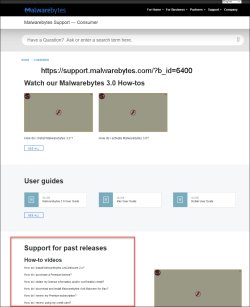
As for the missing MBAM2 Support Content....
Apparently, it is still available, but via what is now essentially an "orphan" link?
Users who do not have the URL bookmarked (especially newcomers to the support page) would not be able to find it.
Heck, after 7 years of EXTENSIVE work at their forum, I could not find it via standard navigation, from the company main page to the "support" link to the "home support" link.

Perhaps I am just lost, trying to navigate the new home/consumer support page.
Unless they have rearranged/updated it, all that's readily accessible to me are a handful of KB articles and (with more digging) a PDF of the MBAM2 UG.
(See screen shot)
Perhaps they will make this content easier to find for those without a bookmark to the old MBAM2 support page?

MM
 

Attachments

  • 2016-12-11_7-02-20.png
    2016-12-11_7-02-20.png
    26.1 KB · Views: 2

My Computer My Computer

Computer type
PC/Desktop
Computer Manufacturer/Model Number
Dell Studio XPS 8500
OS
OEM Windows 7 Ult (x64) SP1
CPU
Intel Core-i7 3770 @ 3.4 GHz
Motherboard
"Dell" branded
Memory
16 GB DDR3 SDRAM @ 1333 MHz
Graphics Card(s)
NVidia GeForce GT620 1 GB
Sound Card
THX TruStudio PC
Monitor(s) Displays
Dell U2410 Full HD
Hard Drives
2.0 TB SATA2 @ 7200 RPM
PSU
350W
Keyboard
MS 4000 Ergon - Wired
Mouse
Logitech Anywhere MX
Internet Speed
Cable HSI w/Turbo (router)
Antivirus
KIS-MBAM Premium-MBAE Premium
Browser
Fx (current version); IE
Other Info
And a Win7/64 Pro laptop; And a Win10/64 Pro desktop.
  • Like
Reactions: mjf
Installed V3. 1st thing I noticed, no other scanner has slowed my system.
When I had MB v3 real time (trial) scanning enabled along with Norton security I did notice a lagging/ slowing effect. Turn MB v3 real time scanning off and things are back to normal. At this stage I plan to use the free capability of MBAM anyway. The PC I'm testing is still a reasonably powerful machine.

When you select SCAN from the dashboard it scans c: relatively quickly (far faster than v1.75). I wonder if this is the old "quick" scan. To scan a specific drive (just like folder & files) you need to right click the drive and select malwarebytes. With v1.75 you clearly had the option to tick select the drive. When you select right click C: and scan it takes longer than SCAN from the dashboard but still far quicker than a full scan with v1.75.
In short it is difficult to understand the functionality difference or gains between v1.75 and v3.0.4.
 

My Computer My Computer

Computer type
PC/Desktop
Computer Manufacturer/Model Number
Own build
OS
Windows 7x64 Home Premium SP1
CPU
Intel i7 2600k
Motherboard
ASUS P8Z68 Deluxe
Memory
G.Skill Ripjaws (DDR3-1600) 2x4GB
Graphics Card(s)
Nvidia GeForce GTS 450; Intel HD Graphics 3000(GT2+)
Monitor(s) Displays
Dell Ultrasharp IPS panel U2311H, Samsung SyncMaster P2350
Screen Resolution
1920x1080
Hard Drives
Samsung 850 Pro SSD 256GB, Samsung SSD 840 120GB, Seagates 1TB Barracuda ST31000528AS x2
PSU
Seasonic M12II 520W
Case
Lian Li Lancool PC-K60
Cooling
Case: 1x120mm, 3x140mm CPU: Hyper 212+
Keyboard
Logitech MK520 (wireless)
Mouse
Logitech MK520
Internet Speed
6-7 Mbps
Antivirus
Norton Security Premium, Malwarebytes on 2 (MSE on 3rd PC)
Browser
FireFox
Other Info
Audio: Logitech Z523 2.1
Hi:

In short it is difficult to understand the functionality difference or gains between v1.75 and v3.0.4.

It's been nearly 3 years since version 1.75 was replaced by version 2.x.
So I would have to hunt for a while to find my old verbiage about the differences between 1.75 and 2.x.
But see this earlier reply here in this thread.
TMAVLSS, 2.x is much, much more capable and powerful than version 1.75.
Scan times may be a bit longer than they were under 1.75, especially if rootkit scanning (not available in 1.75) is enabled. That is normal.

The fact that 1.75 still gets database updates does not mean it is current -- heuristic detections and other detection and removal features were improved for version 2.
BTW, Yes, the scans were renamed for version 2. The old "Quick" scan (default and recommended scan type) became the "Threat" scan (default and recommended scan type).

As for version 3.0, it adds to the capabilities of MBAM2 to include both anti-exploit and anti-ransomware protection. These are 2 new technologies to fight some of the more common malware types/vectors in today's threat landscape.
There are also many refinements "under the hood".
But it still lacks several basic functionalities present in a standard AV.
Whether or not it truly "surpasses" traditional AVs (as claimed) remains to be seen.
Whether it really is sufficient for sole protection as an "AV replacement" (as claimed) remains to be seen.
Whether it can also run side-by-side with a real AV, as a souped-up anti-almost-everything-ware & and without AV compatibility problems (as claimed), remains to be seen.

If you are still running 1.75, yes, you really ought to upgrade to at least to 2.2.1.1043 while you still can.
Your valid license entitles you to that upgrade with no new cost.
It is better real-time protection (Premium) and better scanning (Free and Premium).
Upgrading from 1.75 to 2.2.1.1043 will be less of a UI/UX shock than going from 1.75 to 3.x.
Sadly, both 1.75 and 2.2.1.1043 will be officially mothballed in June 2017, regardless.
So, unless the EOS/EOL date changes, you will eventually need to upgrade to 3.x.

HTH,
MM
 
Last edited:

My Computer My Computer

Computer type
PC/Desktop
Computer Manufacturer/Model Number
Dell Studio XPS 8500
OS
OEM Windows 7 Ult (x64) SP1
CPU
Intel Core-i7 3770 @ 3.4 GHz
Motherboard
"Dell" branded
Memory
16 GB DDR3 SDRAM @ 1333 MHz
Graphics Card(s)
NVidia GeForce GT620 1 GB
Sound Card
THX TruStudio PC
Monitor(s) Displays
Dell U2410 Full HD
Hard Drives
2.0 TB SATA2 @ 7200 RPM
PSU
350W
Keyboard
MS 4000 Ergon - Wired
Mouse
Logitech Anywhere MX
Internet Speed
Cable HSI w/Turbo (router)
Antivirus
KIS-MBAM Premium-MBAE Premium
Browser
Fx (current version); IE
Other Info
And a Win7/64 Pro laptop; And a Win10/64 Pro desktop.
Yep, I burned .1043 to CDs just in case.

For the record, the release works just fine on two of my computers (W7) but it made a mess of two other computers.

Didn't try W10. I must learn patience.
 

My Computer My Computer

Computer type
PC/Desktop
Computer Manufacturer/Model Number
Home Built
OS
Windows `10 Professional 64bit
CPU
Intel i5 [email protected]
Motherboard
MSI P67A-GD55 (MS7681)
Memory
Corsair Vengeance DDR3 1600 16G
Graphics Card(s)
NVIDIA GeForce GT520 1GHz
Sound Card
Realtek High Definition Audio
Monitor(s) Displays
Haans G 241
Screen Resolution
1600X1024
Hard Drives
Crucial MX100 256GB SSD
PSU
OCZ ModXStream Modular High Performance 500 Watt
Case
Rosewill Challenger-U3
Cooling
Just Fans
Keyboard
Kensington K64338B
Mouse
Microsoft wheel mouse 1.1A
Internet Speed
240.0 Mbps
Antivirus
ESET Internet Security
Browser
Firefox
Other Info
SuperAntiSpyware-Pro
Malwarebytes (Premium)
Kerish Doctor
Sadly, both 1.75 and 2.2.1.1043 will be officially mothballed in June 2017, regardless.
So, unless the EOS/EOL date changes, you will eventually need to upgrade to 3.x.

Or find another program that provides the kind of protection that 1.75 and 2.2.1.1043 currently provide, if indeed there is one. Alternatively, some may simply stick with their existing AV and drop the additional layer of protection that Malwarebytes currently look to provide. That's a realistic dilemma for a lot of users if 3.x doesn't have the various concerns about it fully addressed.

Plus, the more Malwarebytes emphasise that MBAM is now an AV, the more users will think they can do without it - its whole appeal was based on the fact that it complemented an AV, not replaced it. That's now clearly changing, and not for the better in my view.
 

My Computer My Computer

Computer type
PC/Desktop
Computer Manufacturer/Model Number
Custom build by PC Specialist
OS
Windows 7 Home Premium 64
CPU
AMD Phenom II X4 955
Motherboard
Asus M4A78T-E
Memory
8GB Corsair XMS3 DDR3
Graphics Card(s)
Gigabyte Geforce GTX 960 2GB
Sound Card
SB Audigy
Monitor(s) Displays
BenQ 24"
Screen Resolution
1920 x 1080
Hard Drives
500GB Serial ATA
PSU
1010W Quiet Quad Rail
Case
Antec 900
Cooling
Fenrir
Keyboard
Corsair
Mouse
Logitech
Internet Speed
20mbps
Antivirus
MSE plus MBAM 2.x Free
Browser
Chrome
Other Info
Second desktop different spec but similar level.
Back
Top