Latest Version of Malwarebytes

Ha your correct it's 5 minutes ;)
View attachment 353414

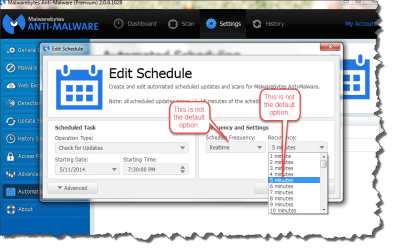
I'm sorry, but neither of the settings in that screen shot is the default.

The default setting for update checks is NOT "realtime", it is "hourly".
(Such "hourly" scheduled update checks are randomized +/- 15 minutes, to balance server load. That is why this is the default setting.)

Selecting "Realtime" is an end-user change to the configuration and settings.
And, yes, there is a drop-down menu of frequency options for realtime updates, but those are not default, either.
That is another end-user configuration change.

Here are links to the User Guide for version 2.1:
HTML
PDF

Thank you,
 

Attachments

  • DefaultUpdate-2015-03-22_12-26-15.png
    DefaultUpdate-2015-03-22_12-26-15.png
    56.9 KB · Views: 0
  • RealtimeUpdate-2015-03-22_12-28-30.png
    RealtimeUpdate-2015-03-22_12-28-30.png
    57.6 KB · Views: 0

My Computer My Computer

Computer type
PC/Desktop
Computer Manufacturer/Model Number
Dell Studio XPS 8500
OS
OEM Windows 7 Ult (x64) SP1
CPU
Intel Core-i7 3770 @ 3.4 GHz
Motherboard
"Dell" branded
Memory
16 GB DDR3 SDRAM @ 1333 MHz
Graphics Card(s)
NVidia GeForce GT620 1 GB
Sound Card
THX TruStudio PC
Monitor(s) Displays
Dell U2410 Full HD
Hard Drives
2.0 TB SATA2 @ 7200 RPM
PSU
350W
Keyboard
MS 4000 Ergon - Wired
Mouse
Logitech Anywhere MX
Internet Speed
Cable HSI w/Turbo (router)
Antivirus
KIS-MBAM Premium-MBAE Premium
Browser
Fx (current version); IE
Other Info
And a Win7/64 Pro laptop; And a Win10/64 Pro desktop.
Not for mine it's the default after install and it's the default for a new scheduled task.
 

My Computer My Computer

Computer type
PC/Desktop
Computer Manufacturer/Model Number
Custom assembled by me :}
OS
Win-7-Pro64bit 7-H-Prem-64bit
CPU
i7-5930K 2nd i9-9940x both water blocked VRM's too
Motherboard
ASUS SABERTOOTH X99 2nd ASUS x299 Apex
Memory
Trident-z 3200C14 2nd Trident-z 3600C16
Graphics Card(s)
EVGA 1080ti ftw3 2nd Titan Xp both water blocked
Sound Card
Built-in Realtek
Monitor(s) Displays
1-AOC G2460PG 24"G-Sync 144Hz/ 2nd 1-ASUS VG248QE 24" 144Hz
Screen Resolution
1920 x 1080 144Hz
Hard Drives
2-Samsung M.2 Evo & Evo Plus
2-Samsung 850 EVO 500GB SSD's/ 3-2.5 W.D. Black 1tb-&3-1tb/3-3.5 WD Black 1tb hdd's
PSU
EVGA SuperNOVA 1000-P2 2nd 1200-P2
Case
2-Corsair Obsidian Series 450D Black ATX Mid Tower
Cooling
Custom water loops
Keyboard
Logitech G710+/ 2nd Logitech G910
Mouse
2-RedDragon M901 Perdition 16400 dpi Gaming mouse = wired
Internet Speed
Comcast Ping 19ms 89.31mbps download speed 6.12mbps upload
Antivirus
Malwarebytes Pro/ Superantispyware Pro
Browser
FireFox & Pale moon
Other Info
2nd ASUS X299 Apex/Intel i9-9940x with Custom water loop/7H-Prem-x64/Corsair 450D case/Ram Trident-z 3600C16 4x8gb / Samsung970Evo plus 500gb SSD/Dual ssd EZ swap evo/PSU EVGA SuperNova 1200w-P2 80+Platinum/GPU Titan Xp /8-ML-140 on push-pull on 2-280GTX rads
Thanks I believe the crazy default I was referring to is checking for updates every 10 minutes,

But the default your referring to just increases insures the chances of getting a bad update ;)

The frequent updates we are referring to are database updates, not program updates. I've never heard of a bad database update.
 

My Computer My Computer

Computer type
PC/Desktop
Computer Manufacturer/Model Number
Custom Build
OS
Win 7 Ultimate 64 bit
CPU
Intel i7-3930K
Motherboard
ASUS P9X79 WS
Memory
Kingston HyperX Genesis 32GB Kit (8x4GB Modules) 1600MHz DDR
Graphics Card(s)
MSI R7850 Twin Frozr 2GD5/OC Radeon HD 7850 2GB 256-bit GDDR
Sound Card
Asus Xonar Essence STX
Monitor(s) Displays
3x Asus VG248QE 24", Vizio 32" TV
Screen Resolution
1920 x 1080, ?
Hard Drives
Samsung 128GB 840 Pro SSD (1),
Samsung 4TB 850 EVO SSDs (4)
Samsung 4TB 850 EVO SSDs (16) external backup drives used in 2.5" hot swap bays in the computer.
PSU
Corsair HX750w
Case
Antec Two Hundred v2 (modified)
Cooling
Cooler Master GeminII S524 120mm (fan replaced with a 140mm)
Keyboard
Logitech G510s
Mouse
Logitech M525 (two in use)
Internet Speed
=< 32Mbps down, 8Mbps up
Antivirus
AVAST!, MBAM, SAS, Spybot S&D (all but MBAM free) Glary Util
Browser
IE11
Other Info
LSI 9211-8i HBA card (8 SATA III ports), 2.5" & 3.5" Hot Swap Bays, HooToo HT-CR001 PCI-E to USB 3.0 Internal Hub + 6 Slot Card Reader, and LG Model CH12LS28 BD-ROM Optical Drive. Also, ScanSnap S1500 ADF duplexing scanner, Canon 9000F flat bed scanner, Corsair SP2500 2.1 speakers, Samsung CLP 415nw laser color printer, Cyberpower PP2200SW UPS
Okay :/
This is a non specific thread covering mbam 2.0 in general which you've said many times to be flawed :)
But it's all good,

I was simply pointing the default update task after activation and it's still the default task for a new task for updating "If" not manually changed which has been questioned by Moxie...

Can anyone else verify ? Task New/ Update/ RealTime is already pre-selected = 5 minutes as a default.
 

My Computer My Computer

Computer type
PC/Desktop
Computer Manufacturer/Model Number
Custom assembled by me :}
OS
Win-7-Pro64bit 7-H-Prem-64bit
CPU
i7-5930K 2nd i9-9940x both water blocked VRM's too
Motherboard
ASUS SABERTOOTH X99 2nd ASUS x299 Apex
Memory
Trident-z 3200C14 2nd Trident-z 3600C16
Graphics Card(s)
EVGA 1080ti ftw3 2nd Titan Xp both water blocked
Sound Card
Built-in Realtek
Monitor(s) Displays
1-AOC G2460PG 24"G-Sync 144Hz/ 2nd 1-ASUS VG248QE 24" 144Hz
Screen Resolution
1920 x 1080 144Hz
Hard Drives
2-Samsung M.2 Evo & Evo Plus
2-Samsung 850 EVO 500GB SSD's/ 3-2.5 W.D. Black 1tb-&3-1tb/3-3.5 WD Black 1tb hdd's
PSU
EVGA SuperNOVA 1000-P2 2nd 1200-P2
Case
2-Corsair Obsidian Series 450D Black ATX Mid Tower
Cooling
Custom water loops
Keyboard
Logitech G710+/ 2nd Logitech G910
Mouse
2-RedDragon M901 Perdition 16400 dpi Gaming mouse = wired
Internet Speed
Comcast Ping 19ms 89.31mbps download speed 6.12mbps upload
Antivirus
Malwarebytes Pro/ Superantispyware Pro
Browser
FireFox & Pale moon
Other Info
2nd ASUS X299 Apex/Intel i9-9940x with Custom water loop/7H-Prem-x64/Corsair 450D case/Ram Trident-z 3600C16 4x8gb / Samsung970Evo plus 500gb SSD/Dual ssd EZ swap evo/PSU EVGA SuperNova 1200w-P2 80+Platinum/GPU Titan Xp /8-ML-140 on push-pull on 2-280GTX rads
Thanks I believe the crazy default I was referring to is checking for updates every 10 minutes,

But the default your referring to just increases insures the chances of getting a bad update ;)

The frequent updates we are referring to are database updates, not program updates. I've never heard of a bad database update.

It was a database update in April 2013 that disabled thousands of computers worldwide.

https://forums.malwarebytes.org/index.php?/topic/125182-yesterdays-database-update-issue/

That is why there is some concern about the auto-quarantine feature (especially when it kicks in after 40 seconds even if you have it disabled), as it was the auto-quarantine of multiple operating system files following a routine database update that brought down so many computers in the short time before MBAM realised there was a problem and pulled the update.
 

My Computer My Computer

Computer type
PC/Desktop
Computer Manufacturer/Model Number
Custom build by PC Specialist
OS
Windows 7 Home Premium 64
CPU
AMD Phenom II X4 955
Motherboard
Asus M4A78T-E
Memory
8GB Corsair XMS3 DDR3
Graphics Card(s)
Gigabyte Geforce GTX 960 2GB
Sound Card
SB Audigy
Monitor(s) Displays
BenQ 24"
Screen Resolution
1920 x 1080
Hard Drives
500GB Serial ATA
PSU
1010W Quiet Quad Rail
Case
Antec 900
Cooling
Fenrir
Keyboard
Corsair
Mouse
Logitech
Internet Speed
20mbps
Antivirus
MSE plus MBAM 2.x Free
Browser
Chrome
Other Info
Second desktop different spec but similar level.
Thanks I believe the crazy default I was referring to is checking for updates every 10 minutes,

But the default your referring to just increases insures the chances of getting a bad update ;)

The frequent updates we are referring to are database updates, not program updates. I've never heard of a bad database update.

It was a database update in April 2013 that disabled thousands of computers worldwide.

https://forums.malwarebytes.org/index.php?/topic/125182-yesterdays-database-update-issue/

That is why there is some concern about the auto-quarantine feature (especially when it kicks in after 40 seconds even if you have it disabled), as it was the auto-quarantine of multiple operating system files following a routine database update that brought down so many computers in the short time before MBAM realised there was a problem and pulled the update.

I stand...er...sit corrected. Apparently, I lucked out and didn't get affected by that.
 

My Computer My Computer

Computer type
PC/Desktop
Computer Manufacturer/Model Number
Custom Build
OS
Win 7 Ultimate 64 bit
CPU
Intel i7-3930K
Motherboard
ASUS P9X79 WS
Memory
Kingston HyperX Genesis 32GB Kit (8x4GB Modules) 1600MHz DDR
Graphics Card(s)
MSI R7850 Twin Frozr 2GD5/OC Radeon HD 7850 2GB 256-bit GDDR
Sound Card
Asus Xonar Essence STX
Monitor(s) Displays
3x Asus VG248QE 24", Vizio 32" TV
Screen Resolution
1920 x 1080, ?
Hard Drives
Samsung 128GB 840 Pro SSD (1),
Samsung 4TB 850 EVO SSDs (4)
Samsung 4TB 850 EVO SSDs (16) external backup drives used in 2.5" hot swap bays in the computer.
PSU
Corsair HX750w
Case
Antec Two Hundred v2 (modified)
Cooling
Cooler Master GeminII S524 120mm (fan replaced with a 140mm)
Keyboard
Logitech G510s
Mouse
Logitech M525 (two in use)
Internet Speed
=< 32Mbps down, 8Mbps up
Antivirus
AVAST!, MBAM, SAS, Spybot S&D (all but MBAM free) Glary Util
Browser
IE11
Other Info
LSI 9211-8i HBA card (8 SATA III ports), 2.5" & 3.5" Hot Swap Bays, HooToo HT-CR001 PCI-E to USB 3.0 Internal Hub + 6 Slot Card Reader, and LG Model CH12LS28 BD-ROM Optical Drive. Also, ScanSnap S1500 ADF duplexing scanner, Canon 9000F flat bed scanner, Corsair SP2500 2.1 speakers, Samsung CLP 415nw laser color printer, Cyberpower PP2200SW UPS
Can anyone else verify ? Task New/ Update/ RealTime is already pre-selected = 5 minutes as a default.

Personally i never had the default as 5 minutes, but i have read many posts where people see this.
I think it's a quirk/bug that affects different PC's differently.
I believe both opinions are true depending on the PC ...

I have seen where my settings don't get carried forward correctly when doing a program update.
I've learned to go though all settings after a program update and make sure they are what they were, and what i want.

Yes, I've done the mbam-clean drill more times than i can count, and have sent info to MBAM support...
 

My Computer My Computer

Computer type
PC/Desktop
Computer Manufacturer/Model Number
home built
OS
Multi-Boot W7_Pro_x64 W8.1_Pro_x64 W10_Pro_x64 +Linux_VMs +Chromium_VM
CPU
AMD Athlon II x4 620
Motherboard
Gigabyte GA-MA785G-UD3H
Memory
6GB GSkill DDR2 800
Graphics Card(s)
AMD 4670 GPU + AMD 4200 IGP
Sound Card
on board Realtek ALC889A
Monitor(s) Displays
RCA 40" LCD TV, Insignia 32" LCD TV, HP 15" LCD monitor
Screen Resolution
1680 x 1050
Hard Drives
OCZ Vertex 3 120GB,
Samsung F3 1TB (3),
Several others - WD, Seagate, Hitachi, ...
PSU
Corsair 500 W
Case
Rosewill mid tower
Cooling
CM 90mm rifle
Keyboard
Gyration wireless, Logitech wireless, Dell USB wired
Mouse
Gyration wireless, Logitech wireless, V7 USB wired
Internet Speed
Spectrum - 100Mbps D / 10Mbps U
Antivirus
Avast, MBAM3, EMET, WinPatrol
Browser
Pale Moon, Firefox, IE
Other Info
2 multi-boot PC's
Mainly HTPC/Office/Gen purpose (no gaming).
Trendnet USB KVM.
LG DVD burner/Blue Ray Player.
Tray system for removable SATA backup drives.

Not currently OCd, under-volted.
I use Hybrid sleep, rarely re-boot or shutdown.

Hauppauge HD-PVR, Avermedia PCIe TV Tuner, Hauppauge PCI TV Tuner.
Clean is useless I've done it seems a hundred times with the same negative results or the same bugs.
1.75... was flawless.
2.0... not at all.
 

My Computer My Computer

Computer type
PC/Desktop
Computer Manufacturer/Model Number
Custom assembled by me :}
OS
Win-7-Pro64bit 7-H-Prem-64bit
CPU
i7-5930K 2nd i9-9940x both water blocked VRM's too
Motherboard
ASUS SABERTOOTH X99 2nd ASUS x299 Apex
Memory
Trident-z 3200C14 2nd Trident-z 3600C16
Graphics Card(s)
EVGA 1080ti ftw3 2nd Titan Xp both water blocked
Sound Card
Built-in Realtek
Monitor(s) Displays
1-AOC G2460PG 24"G-Sync 144Hz/ 2nd 1-ASUS VG248QE 24" 144Hz
Screen Resolution
1920 x 1080 144Hz
Hard Drives
2-Samsung M.2 Evo & Evo Plus
2-Samsung 850 EVO 500GB SSD's/ 3-2.5 W.D. Black 1tb-&3-1tb/3-3.5 WD Black 1tb hdd's
PSU
EVGA SuperNOVA 1000-P2 2nd 1200-P2
Case
2-Corsair Obsidian Series 450D Black ATX Mid Tower
Cooling
Custom water loops
Keyboard
Logitech G710+/ 2nd Logitech G910
Mouse
2-RedDragon M901 Perdition 16400 dpi Gaming mouse = wired
Internet Speed
Comcast Ping 19ms 89.31mbps download speed 6.12mbps upload
Antivirus
Malwarebytes Pro/ Superantispyware Pro
Browser
FireFox & Pale moon
Other Info
2nd ASUS X299 Apex/Intel i9-9940x with Custom water loop/7H-Prem-x64/Corsair 450D case/Ram Trident-z 3600C16 4x8gb / Samsung970Evo plus 500gb SSD/Dual ssd EZ swap evo/PSU EVGA SuperNova 1200w-P2 80+Platinum/GPU Titan Xp /8-ML-140 on push-pull on 2-280GTX rads
Regarding the "Auto-Quarantine" question/confusion, here is my understanding.

A Manual scan will never auto quarantine. This applies to the FREE and PAID version.

For Scheduled Scans, auto quarantine can be disabled in settings. Scheduled Scans are only in the PAID version.

With real-time protection, an auto-update of bad virus definitions can brick a PC immediately or within 40 seconds.
Real-time protection and auto updates are only in the PAID version.

These "rules" apply to all versions: 1.* and 2.*
If I'm wrong, let me know so i can edit this post and remove or correct bad info :)
 

My Computer My Computer

Computer type
PC/Desktop
Computer Manufacturer/Model Number
home built
OS
Multi-Boot W7_Pro_x64 W8.1_Pro_x64 W10_Pro_x64 +Linux_VMs +Chromium_VM
CPU
AMD Athlon II x4 620
Motherboard
Gigabyte GA-MA785G-UD3H
Memory
6GB GSkill DDR2 800
Graphics Card(s)
AMD 4670 GPU + AMD 4200 IGP
Sound Card
on board Realtek ALC889A
Monitor(s) Displays
RCA 40" LCD TV, Insignia 32" LCD TV, HP 15" LCD monitor
Screen Resolution
1680 x 1050
Hard Drives
OCZ Vertex 3 120GB,
Samsung F3 1TB (3),
Several others - WD, Seagate, Hitachi, ...
PSU
Corsair 500 W
Case
Rosewill mid tower
Cooling
CM 90mm rifle
Keyboard
Gyration wireless, Logitech wireless, Dell USB wired
Mouse
Gyration wireless, Logitech wireless, V7 USB wired
Internet Speed
Spectrum - 100Mbps D / 10Mbps U
Antivirus
Avast, MBAM3, EMET, WinPatrol
Browser
Pale Moon, Firefox, IE
Other Info
2 multi-boot PC's
Mainly HTPC/Office/Gen purpose (no gaming).
Trendnet USB KVM.
LG DVD burner/Blue Ray Player.
Tray system for removable SATA backup drives.

Not currently OCd, under-volted.
I use Hybrid sleep, rarely re-boot or shutdown.

Hauppauge HD-PVR, Avermedia PCIe TV Tuner, Hauppauge PCI TV Tuner.
Clean is useless I've done it seems a hundred times with the same negative results or the same bugs.
1.75... was flawless.
2.0... not at all.

True. That's why I waited quite a while before updating to 2.x. So far, I haven't had any problems other than getting familiar with the new UI. I will also wait a while before updating to the newest version to recently come out.
 

My Computer My Computer

Computer type
PC/Desktop
Computer Manufacturer/Model Number
Custom Build
OS
Win 7 Ultimate 64 bit
CPU
Intel i7-3930K
Motherboard
ASUS P9X79 WS
Memory
Kingston HyperX Genesis 32GB Kit (8x4GB Modules) 1600MHz DDR
Graphics Card(s)
MSI R7850 Twin Frozr 2GD5/OC Radeon HD 7850 2GB 256-bit GDDR
Sound Card
Asus Xonar Essence STX
Monitor(s) Displays
3x Asus VG248QE 24", Vizio 32" TV
Screen Resolution
1920 x 1080, ?
Hard Drives
Samsung 128GB 840 Pro SSD (1),
Samsung 4TB 850 EVO SSDs (4)
Samsung 4TB 850 EVO SSDs (16) external backup drives used in 2.5" hot swap bays in the computer.
PSU
Corsair HX750w
Case
Antec Two Hundred v2 (modified)
Cooling
Cooler Master GeminII S524 120mm (fan replaced with a 140mm)
Keyboard
Logitech G510s
Mouse
Logitech M525 (two in use)
Internet Speed
=< 32Mbps down, 8Mbps up
Antivirus
AVAST!, MBAM, SAS, Spybot S&D (all but MBAM free) Glary Util
Browser
IE11
Other Info
LSI 9211-8i HBA card (8 SATA III ports), 2.5" & 3.5" Hot Swap Bays, HooToo HT-CR001 PCI-E to USB 3.0 Internal Hub + 6 Slot Card Reader, and LG Model CH12LS28 BD-ROM Optical Drive. Also, ScanSnap S1500 ADF duplexing scanner, Canon 9000F flat bed scanner, Corsair SP2500 2.1 speakers, Samsung CLP 415nw laser color printer, Cyberpower PP2200SW UPS
With real-time protection, an auto-update of bad virus definitions can brick a PC immediately or within 40 seconds.
Real-time protection and auto updates are only in the PAID version.

So the "auto-update of bad virus definitions" can brick a PC, without a scan of any type, assuming vital system files are quarantined? Purely because definitions are updated?

Can brick or will brick? Only if unattended?

I was bricked in the April 2013 unpleasantness. I had left my PC running and left the house for 2 or 3 hours and came back to a black screen as I recall. Not sure what I would have seen on screen had I been at home watching.
 

My Computer My Computer

Computer type
PC/Desktop
Computer Manufacturer/Model Number
Ignatz Special; 4 speed manual gearbox; factory air conditioning; one of one
OS
Windows 7 Home Premium SP1, 64-bit
CPU
Intel Skylake i5-6600K, not overclocked
Motherboard
AsRock Z170M Extreme 4, micro ATX
Memory
8 GB HyperX DDR4-2666 (2 x 4 GB)
Graphics Card(s)
none; graphics are integrated on CPU
Sound Card
onboard: Realtek ALC1150; external: USB Behringer UF0-202
Monitor(s) Displays
Dell S2340M 23 inch IPS
Screen Resolution
1600 x 900
Hard Drives
System: Crucial MX100 series SSD, 128 GB;
Data: Samsung Spinpoint 103SJ, 1 TB;
Backup: WD Caviar Green WD30EZRX-00D8PB0, 3 TB
PSU
Rosewill SilentNight 500 watt fanless, semi-modular
Case
Antec Solo II
Cooling
Noctua NH-U12S; Noctua F12 intake, Noctua S12A exhaust
Keyboard
Microsoft 200 6JH-00001 USB
Mouse
Dell or Microsoft optical wired; USB
Antivirus
Microsoft Security Essentials and Malwarebytes Premium
Browser
Pale Moon
Other Info
All fans PWM; speeds at idle: CPU circa 500 rpm; intake circa 600 rpm; exhaust circa 600 rpm; CPU temps 27 idle and 47 C load in a warm room (27 C/81 F) when running Intel Extreme Tuning Utility stress test.
Surely this is not limited to Malwarebytes. A faulty virus update to any real time AV could brick Windows.
 

My Computer My Computer

Computer type
Laptop
Computer Manufacturer/Model Number
Hewlett-Packard/G62-107SA Notebook
OS
Microsoft Windows 7 Home Premium 64-bit Service Pack 1
CPU
Intel(R) Core(TM) i3 CPU M 330 @ 2.13GHz
Motherboard
Hewlett-Packard 1425
Memory
8 GB DDR3
Graphics Card(s)
Intel(R) HD Graphics
Sound Card
Realtek High Definition Audio
Monitor(s) Displays
Builtin
Screen Resolution
1366 x 768 x 32 bits (4294967296 colors) @ 60 Hz
Hard Drives
250 GB SATA Hard Disk Drive 7200 rpm
2TB Seagate GoFlex USB 2 Drive
1TB Iomega Prestige USB 2 Drive
1.5TB Iomega Prestige USB 2 Drive (Samsung)
2TB WD MyBook Live NAS.
Mouse
Logitech Anywhere MX
Internet Speed
152 Mbs download 10 Mbs upload
Antivirus
Norton 360
Browser
Chrome
With real-time protection, an auto-update of bad virus definitions can brick a PC immediately or within 40 seconds.
Real-time protection and auto updates are only in the PAID version.

So the "auto-update of bad virus definitions" can brick a PC, without a scan of any type, assuming vital system files are quarantined? Purely because definitions are updated?

Can brick or will brick? Only if unattended?

I was bricked in the April 2013 unpleasantness. I had left my PC running and left the house for 2 or 3 hours and came back to a black screen as I recall. Not sure what I would have seen on screen had I been at home watching.

Yes, it can brick a PC if it detects valid OS system files as malware just with real-time protection (no scan needed). That's what happened in 2013.

If you have Auto quarantine turned off you get 40 seconds to respond to prevent the quarantine.

It's for this reason i changed my auto update to every 4 hours rather than every 1 hour.
I figure i have less chance of getting a bad update if I get updates less often.
It's still a crap-shoot...
 

My Computer My Computer

Computer type
PC/Desktop
Computer Manufacturer/Model Number
home built
OS
Multi-Boot W7_Pro_x64 W8.1_Pro_x64 W10_Pro_x64 +Linux_VMs +Chromium_VM
CPU
AMD Athlon II x4 620
Motherboard
Gigabyte GA-MA785G-UD3H
Memory
6GB GSkill DDR2 800
Graphics Card(s)
AMD 4670 GPU + AMD 4200 IGP
Sound Card
on board Realtek ALC889A
Monitor(s) Displays
RCA 40" LCD TV, Insignia 32" LCD TV, HP 15" LCD monitor
Screen Resolution
1680 x 1050
Hard Drives
OCZ Vertex 3 120GB,
Samsung F3 1TB (3),
Several others - WD, Seagate, Hitachi, ...
PSU
Corsair 500 W
Case
Rosewill mid tower
Cooling
CM 90mm rifle
Keyboard
Gyration wireless, Logitech wireless, Dell USB wired
Mouse
Gyration wireless, Logitech wireless, V7 USB wired
Internet Speed
Spectrum - 100Mbps D / 10Mbps U
Antivirus
Avast, MBAM3, EMET, WinPatrol
Browser
Pale Moon, Firefox, IE
Other Info
2 multi-boot PC's
Mainly HTPC/Office/Gen purpose (no gaming).
Trendnet USB KVM.
LG DVD burner/Blue Ray Player.
Tray system for removable SATA backup drives.

Not currently OCd, under-volted.
I use Hybrid sleep, rarely re-boot or shutdown.

Hauppauge HD-PVR, Avermedia PCIe TV Tuner, Hauppauge PCI TV Tuner.
Yes, it can brick a PC if it detects valid OS system files as malware just with real-time protection (no scan needed). That's what happened in 2013.

If you have Auto quarantine turned off you get 40 seconds to respond to prevent the quarantine.

It's for this reason i changed my auto update to every 4 hours rather than every 1 hour.
I figure i have less chance of getting a bad update if I get updates less often.
It's still a crap-shoot...

It's why I rely on MSE for real-time protection (a lot of other AV programs having bugged me with false positives and performance issues over the years) plus twice-weekly manual scans with the free version of MBAM on which basis it can't force auto-quarantine. I also do a quick forum check to make sure there are no current issues with MBAM before running the updater prior to the scans.
 

My Computer My Computer

Computer type
PC/Desktop
Computer Manufacturer/Model Number
Custom build by PC Specialist
OS
Windows 7 Home Premium 64
CPU
AMD Phenom II X4 955
Motherboard
Asus M4A78T-E
Memory
8GB Corsair XMS3 DDR3
Graphics Card(s)
Gigabyte Geforce GTX 960 2GB
Sound Card
SB Audigy
Monitor(s) Displays
BenQ 24"
Screen Resolution
1920 x 1080
Hard Drives
500GB Serial ATA
PSU
1010W Quiet Quad Rail
Case
Antec 900
Cooling
Fenrir
Keyboard
Corsair
Mouse
Logitech
Internet Speed
20mbps
Antivirus
MSE plus MBAM 2.x Free
Browser
Chrome
Other Info
Second desktop different spec but similar level.
If you have Auto quarantine turned off you get 40 seconds to respond to prevent the quarantine.

During that 40 seconds, what choices are offered to you on the screen?

What's the decision process as the clock ticks?

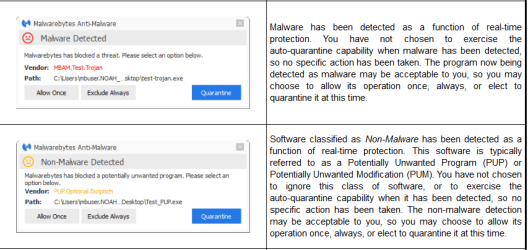
I assume that it would be best to accept the quarantine since you'd have no way of knowing in that 40 seconds that it was a false positive that was going to brick the PC. That's possible but a relatively low probability and therefore a better choice.
 

My Computer My Computer

Computer type
PC/Desktop
Computer Manufacturer/Model Number
Ignatz Special; 4 speed manual gearbox; factory air conditioning; one of one
OS
Windows 7 Home Premium SP1, 64-bit
CPU
Intel Skylake i5-6600K, not overclocked
Motherboard
AsRock Z170M Extreme 4, micro ATX
Memory
8 GB HyperX DDR4-2666 (2 x 4 GB)
Graphics Card(s)
none; graphics are integrated on CPU
Sound Card
onboard: Realtek ALC1150; external: USB Behringer UF0-202
Monitor(s) Displays
Dell S2340M 23 inch IPS
Screen Resolution
1600 x 900
Hard Drives
System: Crucial MX100 series SSD, 128 GB;
Data: Samsung Spinpoint 103SJ, 1 TB;
Backup: WD Caviar Green WD30EZRX-00D8PB0, 3 TB
PSU
Rosewill SilentNight 500 watt fanless, semi-modular
Case
Antec Solo II
Cooling
Noctua NH-U12S; Noctua F12 intake, Noctua S12A exhaust
Keyboard
Microsoft 200 6JH-00001 USB
Mouse
Dell or Microsoft optical wired; USB
Antivirus
Microsoft Security Essentials and Malwarebytes Premium
Browser
Pale Moon
Other Info
All fans PWM; speeds at idle: CPU circa 500 rpm; intake circa 600 rpm; exhaust circa 600 rpm; CPU temps 27 idle and 47 C load in a warm room (27 C/81 F) when running Intel Extreme Tuning Utility stress test.

My Computer My Computer

Computer type
PC/Desktop
Computer Manufacturer/Model Number
home built
OS
Multi-Boot W7_Pro_x64 W8.1_Pro_x64 W10_Pro_x64 +Linux_VMs +Chromium_VM
CPU
AMD Athlon II x4 620
Motherboard
Gigabyte GA-MA785G-UD3H
Memory
6GB GSkill DDR2 800
Graphics Card(s)
AMD 4670 GPU + AMD 4200 IGP
Sound Card
on board Realtek ALC889A
Monitor(s) Displays
RCA 40" LCD TV, Insignia 32" LCD TV, HP 15" LCD monitor
Screen Resolution
1680 x 1050
Hard Drives
OCZ Vertex 3 120GB,
Samsung F3 1TB (3),
Several others - WD, Seagate, Hitachi, ...
PSU
Corsair 500 W
Case
Rosewill mid tower
Cooling
CM 90mm rifle
Keyboard
Gyration wireless, Logitech wireless, Dell USB wired
Mouse
Gyration wireless, Logitech wireless, V7 USB wired
Internet Speed
Spectrum - 100Mbps D / 10Mbps U
Antivirus
Avast, MBAM3, EMET, WinPatrol
Browser
Pale Moon, Firefox, IE
Other Info
2 multi-boot PC's
Mainly HTPC/Office/Gen purpose (no gaming).
Trendnet USB KVM.
LG DVD burner/Blue Ray Player.
Tray system for removable SATA backup drives.

Not currently OCd, under-volted.
I use Hybrid sleep, rarely re-boot or shutdown.

Hauppauge HD-PVR, Avermedia PCIe TV Tuner, Hauppauge PCI TV Tuner.
If you have Auto quarantine turned off you get 40 seconds to respond to prevent the quarantine.

During that 40 seconds, what choices are offered to you on the screen?

What's the decision process as the clock ticks?

I assume that it would be best to accept the quarantine since you'd have no way of knowing in that 40 seconds that it was a false positive that was going to brick the PC. That's possible but a relatively low probability and therefore a better choice.

I think it's always preferable when prompted to quarantine a file to do a little research before allowing it, on a different machine if possible. Any quarantine tends to break whatever program/application it relates to, which is a nuisance even without it relating to the operating system which is clearly disastrous, therefore you really want to be sure it isn't a false positive by reference to the forums so long as you can establish that safely. However, 40 seconds doesn't really allow anything more than a mild panic attack at being told that your machine is compromised, and then the timer's up and the file is quarantined anyway. In any event, it would take me the full 40 seconds to read and inwardly digest either of the two notification boxes DavidE displayed!
 

My Computer My Computer

Computer type
PC/Desktop
Computer Manufacturer/Model Number
Custom build by PC Specialist
OS
Windows 7 Home Premium 64
CPU
AMD Phenom II X4 955
Motherboard
Asus M4A78T-E
Memory
8GB Corsair XMS3 DDR3
Graphics Card(s)
Gigabyte Geforce GTX 960 2GB
Sound Card
SB Audigy
Monitor(s) Displays
BenQ 24"
Screen Resolution
1920 x 1080
Hard Drives
500GB Serial ATA
PSU
1010W Quiet Quad Rail
Case
Antec 900
Cooling
Fenrir
Keyboard
Corsair
Mouse
Logitech
Internet Speed
20mbps
Antivirus
MSE plus MBAM 2.x Free
Browser
Chrome
Other Info
Second desktop different spec but similar level.
David:

I note that those pix from Macrium say "detected as a function of real-time protection". I wonder if that necessarily includes downloaded definition updates.

Maybe the ideal config would be to auto-quarantine the "malware detected" classification and not quarantine the "non-malware detected", but that's not available in the controls.

A 40 second window is so short as to be useless. No one can research anything in that time. It may as well be 5 seconds, to better avoid what might happen in that 35 second differential.
 

My Computer My Computer

Computer type
PC/Desktop
Computer Manufacturer/Model Number
Ignatz Special; 4 speed manual gearbox; factory air conditioning; one of one
OS
Windows 7 Home Premium SP1, 64-bit
CPU
Intel Skylake i5-6600K, not overclocked
Motherboard
AsRock Z170M Extreme 4, micro ATX
Memory
8 GB HyperX DDR4-2666 (2 x 4 GB)
Graphics Card(s)
none; graphics are integrated on CPU
Sound Card
onboard: Realtek ALC1150; external: USB Behringer UF0-202
Monitor(s) Displays
Dell S2340M 23 inch IPS
Screen Resolution
1600 x 900
Hard Drives
System: Crucial MX100 series SSD, 128 GB;
Data: Samsung Spinpoint 103SJ, 1 TB;
Backup: WD Caviar Green WD30EZRX-00D8PB0, 3 TB
PSU
Rosewill SilentNight 500 watt fanless, semi-modular
Case
Antec Solo II
Cooling
Noctua NH-U12S; Noctua F12 intake, Noctua S12A exhaust
Keyboard
Microsoft 200 6JH-00001 USB
Mouse
Dell or Microsoft optical wired; USB
Antivirus
Microsoft Security Essentials and Malwarebytes Premium
Browser
Pale Moon
Other Info
All fans PWM; speeds at idle: CPU circa 500 rpm; intake circa 600 rpm; exhaust circa 600 rpm; CPU temps 27 idle and 47 C load in a warm room (27 C/81 F) when running Intel Extreme Tuning Utility stress test.
Has Mbam released a stable version thats newer than 2.04.1028 or is it still a beta ?

Thank you
 

My Computer My Computer

Computer type
Laptop
Computer Manufacturer/Model Number
Asus laptop U56E
OS
Microsoft Windows 7 Home Premium 64-bit 7601 Multiprocessor Free Service Pack 1
CPU
Intel(R) Core(TM) i5-2430M CPU @ 2.40GHz
Motherboard
ASUSTeK Computer Inc. U56E
Memory
6.00 GB
Graphics Card(s)
Intel(R) HD Graphics 3000
Sound Card
(1) High Definition Audio Device (2) High Definition Audio
Screen Resolution
1366 x 768 x 32 bits (4294967296 colors) @ 60 Hz
Hard Drives
WDC WD6400BPVT-80HXZT3
A few points of clarification:

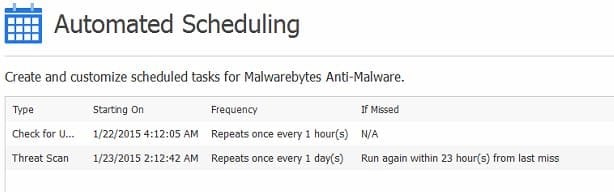
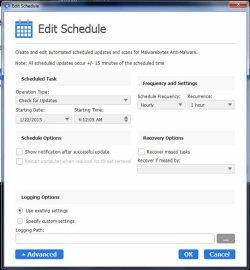
1) It is absolutely NOT the case that default update checks occur in "realtime" and "every 5 minutes". The default settings are "Hourly" and randomized +/- 15 minutes in a new installation. If a user sees any other configuration, then those changes were made by a user with access to the computer and the MBAM installation/settings. If they were retained after a version upgrade, then it would be because the previous version was not completely inactivated and was not completely, cleanly removed prior to the upgrade. (On-top upgrades will retain settings.) "Realtime", "Every 5 Minutes" update checks, by default, on millions of home computers, would unnecessarily bring the update servers to their knees. It simply is not configured that way by default.

2) The illustrations posted here are actually for the current version 2.1.4.1018, not for 2.0. But, as shown, there is an option to "Allow Once", if the user chooses to prevent the automatic quarantine one time, in order to research the detection, or to "Exclude Always" (IOW "Allow Always").

3) The reason for the 40-second timeout is explained in great detail by the former MBAM Product Manager here and in many other threads at the Malwarebytes forum.

4) If users are uncomfortable with the real-time protection or automatic updating of MBAM Premium, then opening the dashboard > "My Account" > "Deactivate" will convert the program to the free, manual, on-demand scanner.

Here are links to the User Guide for the current build:
HTML
PDF

Thank you,
 

Attachments

  • SCHEDULER-1-2015-03022.jpg
    SCHEDULER-1-2015-03022.jpg
    16 KB · Views: 20
  • SCHEDULER-UPDATES-2015-0322.jpg
    SCHEDULER-UPDATES-2015-0322.jpg
    35.4 KB · Views: 20

My Computer My Computer

Computer type
PC/Desktop
Computer Manufacturer/Model Number
Dell Studio XPS 8500
OS
OEM Windows 7 Ult (x64) SP1
CPU
Intel Core-i7 3770 @ 3.4 GHz
Motherboard
"Dell" branded
Memory
16 GB DDR3 SDRAM @ 1333 MHz
Graphics Card(s)
NVidia GeForce GT620 1 GB
Sound Card
THX TruStudio PC
Monitor(s) Displays
Dell U2410 Full HD
Hard Drives
2.0 TB SATA2 @ 7200 RPM
PSU
350W
Keyboard
MS 4000 Ergon - Wired
Mouse
Logitech Anywhere MX
Internet Speed
Cable HSI w/Turbo (router)
Antivirus
KIS-MBAM Premium-MBAE Premium
Browser
Fx (current version); IE
Other Info
And a Win7/64 Pro laptop; And a Win10/64 Pro desktop.
Back
Top