Learning to create .bat files

Lovus

Banned
Local time
1:26 PM
Messages
78
Location
At my HOUSE .
Hi ! I just want to learn on how to create bat files .
Tried googling but too complex for me . Could someone give me basic commands and share some examples for me ?


Any effort are very much appreciated :) . Thanks in advance :D .
 

My Computer

OS
Ultimate 32bit
Cooling
Electric Fan
Internet Speed
Slow as a TURTLE
Hello Lovus,

I'm afraid that's going to be a very broad question. You could post several books on that, and still not cover everything.

Basically, any command that you can run in the command prompt can be placed in a .bat file. A .bat file just runs them automatically in the command prompt as if you typed the commands yourself.


Do you have a more specific action you were wanting to do instead? :)
 

My Computer

Computer type
PC/Desktop
Computer Manufacturer/Model Number
Self built custom
OS
64-bit Windows 11 Pro for Workstations
CPU
Intel i7-8700K OC'd to 5 GHz
Motherboard
ASUS ROG Maximus XI Formula Z390
Memory
64 GB (4x16GB) G.SKILL TridentZ RGB DDR4 3600 MHz
Graphics Card(s)
ASUS ROG-STRIX-GTX1080TI-O11G-GAMING
Sound Card
Integrated
Monitor(s) Displays
2 x Samsung Odyssey G7 27"
Screen Resolution
2560x1440
Hard Drives
1TB Samsung 990 PRO M.2,
4TB Samsung 990 PRO PRO M.2,
TerraMaster F8 SSD Plus NAS
PSU
Seasonic Prime Titanium 850W
Case
Thermaltake Core P3
Cooling
Corsair Hydro H115i
Keyboard
Logitech wireless K800
Mouse
Logitech MX Master 4
Internet Speed
2 Gb/s Download and 100 Mb/s Upload
Antivirus
Malwarebyte Anti-Malware Premium
Browser
Google Chrome
Other Info
Logitech Z625 speaker system,
Logitech BRIO 4K Pro webcam,
HP Color LaserJet Pro MFP M477fdn,
APC SMART-UPS RT 1000 XL - SURT1000XLI,
Galaxy S23 Plus phone
Hi Brink . I am just wondering what are those "echo" commands in your Rebuild_icon_cache.bat and I don't know why I am interested with bat files . I tried typing echo in cmd and replied me "ECHO is on." . So what does that mean ?

Could you give me basic examples of .bat files Brink ? Just be basic and explain me what commands are included .

I am so sorry for inconvinience, I am just interested . :)
Any efforts are very much appreciated :) . Thanks in advance :D .
 

My Computer

OS
Ultimate 32bit
Cooling
Electric Fan
Internet Speed
Slow as a TURTLE
Just type help from a command prompt to get a list of the commands and a description of what they do.

Code:
ASSOC          Displays or modifies file extension associations.
ATTRIB         Displays or changes file attributes.
BREAK          Sets or clears extended CTRL+C checking.
BCDEDIT        Sets properties in boot database to control boot loading.
CACLS          Displays or modifies access control lists (ACLs) of files.
CALL           Calls one batch program from another.
CD             Displays the name of or changes the current directory.
CHCP           Displays or sets the active code page number.
CHDIR          Displays the name of or changes the current directory.
CHKDSK         Checks a disk and displays a status report.
CHKNTFS        Displays or modifies the checking of disk at boot time.
CLS            Clears the screen.
CMD            Starts a new instance of the Windows command interpreter.
COLOR          Sets the default console foreground and background colors.
COMP           Compares the contents of two files or sets of files.
COMPACT        Displays or alters the compression of files on NTFS partitions.
CONVERT        Converts FAT volumes to NTFS.  You cannot convert the
               current drive.
COPY           Copies one or more files to another location.
DATE           Displays or sets the date.
DEL            Deletes one or more files.
DIR            Displays a list of files and subdirectories in a directory.
DISKCOMP       Compares the contents of two floppy disks.
DISKCOPY       Copies the contents of one floppy disk to another.
DISKPART       Displays or configures Disk Partition properties.
DOSKEY         Edits command lines, recalls Windows commands, and
               creates macros.
DRIVERQUERY    Displays current device driver status and properties.
ECHO           Displays messages, or turns command echoing on or off.
ENDLOCAL       Ends localization of environment changes in a batch file.
ERASE          Deletes one or more files.
EXIT           Quits the CMD.EXE program (command interpreter).
FC             Compares two files or sets of files, and displays the
               differences between them.
FIND           Searches for a text string in a file or files.
FINDSTR        Searches for strings in files.
FOR            Runs a specified command for each file in a set of files.
FORMAT         Formats a disk for use with Windows.
FSUTIL         Displays or configures the file system properties.
FTYPE          Displays or modifies file types used in file extension
               associations.
GOTO           Directs the Windows command interpreter to a labeled line in
               a batch program.
GPRESULT       Displays Group Policy information for machine or user.
GRAFTABL       Enables Windows to display an extended character set in
               graphics mode.
HELP           Provides Help information for Windows commands.
ICACLS         Display, modify, backup, or restore ACLs for files and
               directories.
IF             Performs conditional processing in batch programs.
LABEL          Creates, changes, or deletes the volume label of a disk.
MD             Creates a directory.
MKDIR          Creates a directory.
MKLINK         Creates Symbolic Links and Hard Links
MODE           Configures a system device.
MORE           Displays output one screen at a time.
MOVE           Moves one or more files from one directory to another
               directory.
OPENFILES      Displays files opened by remote users for a file share.
PATH           Displays or sets a search path for executable files.
PAUSE          Suspends processing of a batch file and displays a message.
POPD           Restores the previous value of the current directory saved by
               PUSHD.
PRINT          Prints a text file.
PROMPT         Changes the Windows command prompt.
PUSHD          Saves the current directory then changes it.
RD             Removes a directory.
RECOVER        Recovers readable information from a bad or defective disk.
REM            Records comments (remarks) in batch files or CONFIG.SYS.
REN            Renames a file or files.
RENAME         Renames a file or files.
REPLACE        Replaces files.
RMDIR          Removes a directory.
ROBOCOPY       Advanced utility to copy files and directory trees
SET            Displays, sets, or removes Windows environment variables.
SETLOCAL       Begins localization of environment changes in a batch file.
SC             Displays or configures services (background processes).
SCHTASKS       Schedules commands and programs to run on a computer.
SHIFT          Shifts the position of replaceable parameters in batch files.
SHUTDOWN       Allows proper local or remote shutdown of machine.
SORT           Sorts input.
START          Starts a separate window to run a specified program or command.
SUBST          Associates a path with a drive letter.
SYSTEMINFO     Displays machine specific properties and configuration.
TASKLIST       Displays all currently running tasks including services.
TASKKILL       Kill or stop a running process or application.
TIME           Displays or sets the system time.
TITLE          Sets the window title for a CMD.EXE session.
TREE           Graphically displays the directory structure of a drive or
               path.
TYPE           Displays the contents of a text file.
VER            Displays the Windows version.
VERIFY         Tells Windows whether to verify that your files are written
               correctly to a disk.
VOL            Displays a disk volume label and serial number.
XCOPY          Copies files and directory trees.
WMIC           Displays WMI information inside interactive command shell.

For more information on tools see the command-line reference in the online help.

 

My Computer

Computer type
PC/Desktop
OS
Windows 11
Type Help on command prompt to get list of commands:

2012-12-19_200731.png

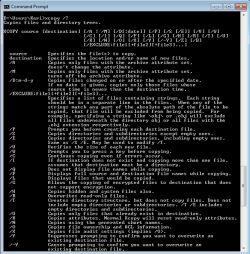
Type command_name /? on command prompt to get instructions and help on an individual command:

2012-12-19_201032.png

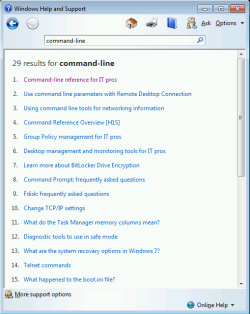
For more help and tips open Windows 7 Help & Support, search for command-line:

2012-12-19_201208.png

Kari

EDIT: Seems I am slow as usual here...
 

My Computer

Computer type
Laptop
Computer Manufacturer/Model Number
HP ENVY 17-1150eg
OS
Windows 10 Pro x64 EN-GB
CPU
1.6 GHz Intel Core i7-720QM Processor
Memory
6 GB
Graphics Card(s)
ATI Mobility Radeon HD 5850 Graphics
Sound Card
Beats sound system with integrated subwoofer
Monitor(s) Displays
17" laptop display, 22" LED and 32" Full HD TV through HDMI
Screen Resolution
1600*900 (1), 1920*1080 (2&3)
Hard Drives
Internal: 2 x 500 GB SATA Hard Disk Drive 7200 rpm
External: 2TB for backups, 3TB USB3 network drive for media
Cooling
As Envy runs a bit warm, I have it on a Cooler Master pad
Keyboard
Logitech diNovo Media Desktop Laser (bluetooth)
Mouse
Logitech Performance Mouse MX
Internet Speed
50/10 Mbps VDSL
Antivirus
Windows Defender 4.3.9431.0
Browser
Maxthon 3.5.2., IE11
Hi Brink . I am just wondering what are those "echo" commands in your Rebuild_icon_cache.bat and I don't know why I am interested with bat files . I tried typing echo in cmd and replied me "ECHO is on." . So what does that mean ?

Could you give me basic examples of .bat files Brink ? Just be basic and explain me what commands are included .

I am so sorry for inconvinience, I am just interested . :)
Any efforts are very much appreciated :) . Thanks in advance :D .

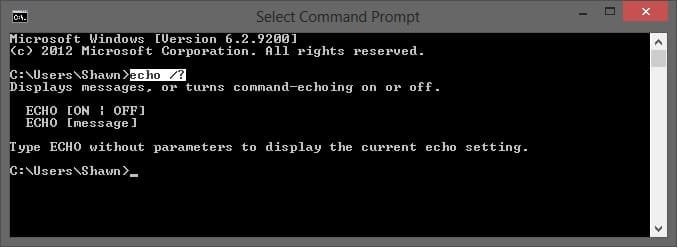
The "echo" command is used to turn on or off having the command prompt display the commands from the .bat file as they run.

echo.jpg

The link below can give you more details and examples for the echo command. The link is for XP, but is still the same.

Echo
 

My Computer

Computer type
PC/Desktop
Computer Manufacturer/Model Number
Self built custom
OS
64-bit Windows 11 Pro for Workstations
CPU
Intel i7-8700K OC'd to 5 GHz
Motherboard
ASUS ROG Maximus XI Formula Z390
Memory
64 GB (4x16GB) G.SKILL TridentZ RGB DDR4 3600 MHz
Graphics Card(s)
ASUS ROG-STRIX-GTX1080TI-O11G-GAMING
Sound Card
Integrated
Monitor(s) Displays
2 x Samsung Odyssey G7 27"
Screen Resolution
2560x1440
Hard Drives
1TB Samsung 990 PRO M.2,
4TB Samsung 990 PRO PRO M.2,
TerraMaster F8 SSD Plus NAS
PSU
Seasonic Prime Titanium 850W
Case
Thermaltake Core P3
Cooling
Corsair Hydro H115i
Keyboard
Logitech wireless K800
Mouse
Logitech MX Master 4
Internet Speed
2 Gb/s Download and 100 Mb/s Upload
Antivirus
Malwarebyte Anti-Malware Premium
Browser
Google Chrome
Other Info
Logitech Z625 speaker system,
Logitech BRIO 4K Pro webcam,
HP Color LaserJet Pro MFP M477fdn,
APC SMART-UPS RT 1000 XL - SURT1000XLI,
Galaxy S23 Plus phone
Lovus,

You might also find this below helpful for Windows 7 command reference. You would just click on a listed command to get more details and examples for it. :)

A-Z List
 

My Computer

Computer type
PC/Desktop
Computer Manufacturer/Model Number
Self built custom
OS
64-bit Windows 11 Pro for Workstations
CPU
Intel i7-8700K OC'd to 5 GHz
Motherboard
ASUS ROG Maximus XI Formula Z390
Memory
64 GB (4x16GB) G.SKILL TridentZ RGB DDR4 3600 MHz
Graphics Card(s)
ASUS ROG-STRIX-GTX1080TI-O11G-GAMING
Sound Card
Integrated
Monitor(s) Displays
2 x Samsung Odyssey G7 27"
Screen Resolution
2560x1440
Hard Drives
1TB Samsung 990 PRO M.2,
4TB Samsung 990 PRO PRO M.2,
TerraMaster F8 SSD Plus NAS
PSU
Seasonic Prime Titanium 850W
Case
Thermaltake Core P3
Cooling
Corsair Hydro H115i
Keyboard
Logitech wireless K800
Mouse
Logitech MX Master 4
Internet Speed
2 Gb/s Download and 100 Mb/s Upload
Antivirus
Malwarebyte Anti-Malware Premium
Browser
Google Chrome
Other Info
Logitech Z625 speaker system,
Logitech BRIO 4K Pro webcam,
HP Color LaserJet Pro MFP M477fdn,
APC SMART-UPS RT 1000 XL - SURT1000XLI,
Galaxy S23 Plus phone
Thank you so much folks ! I'll keep reading because I want to create .bat files for my command line shortcuts .
Thanks ! :) :) :) :) :) :) :) :) :) :) :) :) :) :) :) :) :) :) :) :) :) :) :) :) :)
 

My Computer

OS
Ultimate 32bit
Cooling
Electric Fan
Internet Speed
Slow as a TURTLE
Glad we could help. If you have any questions, then please just let us know. :)
 

My Computer

Computer type
PC/Desktop
Computer Manufacturer/Model Number
Self built custom
OS
64-bit Windows 11 Pro for Workstations
CPU
Intel i7-8700K OC'd to 5 GHz
Motherboard
ASUS ROG Maximus XI Formula Z390
Memory
64 GB (4x16GB) G.SKILL TridentZ RGB DDR4 3600 MHz
Graphics Card(s)
ASUS ROG-STRIX-GTX1080TI-O11G-GAMING
Sound Card
Integrated
Monitor(s) Displays
2 x Samsung Odyssey G7 27"
Screen Resolution
2560x1440
Hard Drives
1TB Samsung 990 PRO M.2,
4TB Samsung 990 PRO PRO M.2,
TerraMaster F8 SSD Plus NAS
PSU
Seasonic Prime Titanium 850W
Case
Thermaltake Core P3
Cooling
Corsair Hydro H115i
Keyboard
Logitech wireless K800
Mouse
Logitech MX Master 4
Internet Speed
2 Gb/s Download and 100 Mb/s Upload
Antivirus
Malwarebyte Anti-Malware Premium
Browser
Google Chrome
Other Info
Logitech Z625 speaker system,
Logitech BRIO 4K Pro webcam,
HP Color LaserJet Pro MFP M477fdn,
APC SMART-UPS RT 1000 XL - SURT1000XLI,
Galaxy S23 Plus phone
batch files can be powerful things - only run ones that you understand or trust the author

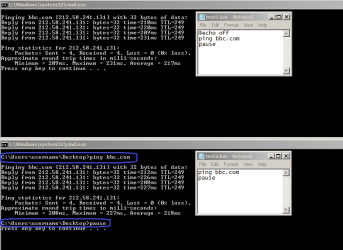
A tiny bit more about echo - you can experiment to see the differences first hand:

echo.png

:-)
 

My Computer

Computer type
Laptop
Computer Manufacturer/Model Number
Employer provided Dell Latitude
OS
W7 Pro SP1 64bit
CPU
i7
Memory
8GB
Graphics Card(s)
Intel HD Graphics
Hard Drives
crappy SSD
Antivirus
Employer mandated Symantec Endpoint Protection
Browser
Pale Moon 64bit, IE11 64bit & Chrome 64bit
Back
Top