Solved left shift key disable my number 5 key

cauyao615

New member
Local time
10:47 PM
Messages
8
so i tried using my sister's laptop(sony vaio) then i noticed that my left shift key disable the fuction of my number 5 key...i noticed it when i was trying to type % sign. So in order to type % sign you need to hold shift and press 5 key...but whenever i hold down my left shift it disables my 5 key, whats weird is it only disable the 5 key it works normal with the other key and my right shift works perfectly...only the left shift and 5 key is the problem...do u guys have any idea how to fix this?
 

My Computer My Computer

Computer type
Laptop
Computer Manufacturer/Model Number
sony
OS
64 bit window 7 ultimate

My Computer My Computer

Computer type
PC/Desktop
Computer Manufacturer/Model Number
Custom Build
OS
Windows 7 Ultimate x64
CPU
AMD Phenom II X6 Black Edition 1090T
Motherboard
Asus Crosshair IV Formula
Memory
4 x G Skill Ripjaws F3-10666CL9-4GBRL
Graphics Card(s)
Gigabyte GeForce GTX 970
Screen Resolution
1920x1080
Hard Drives
Drive #1 - Corsair Force GT (111 GB) (System)

Drive #2 - WDC WD3200AAKS-00B3A0 (298 GB) (Data & Installs)
Drive #3 - WD Ext HDD 1021 (931 GB) (Storage)
Antivirus
Eset Smart Security
Browser
Mozilla Firefox
it doesnt...now i can really confirm that it actually disables it...the 5 key doesnt turn green when left shift is hold

butit does turn green when i used the right shft


what do u think i should do?
 

My Computer My Computer

Computer type
Laptop
Computer Manufacturer/Model Number
sony
OS
64 bit window 7 ultimate
it doesnt...now i can really confirm that it actually disables it...the 5 key doesnt turn green when left shift is hold

butit does turn green when i used the right shft


what do u think i should do?

I've never encountered something like that. You're using a laptop, hm?
Do you use drivers for the keyboard?

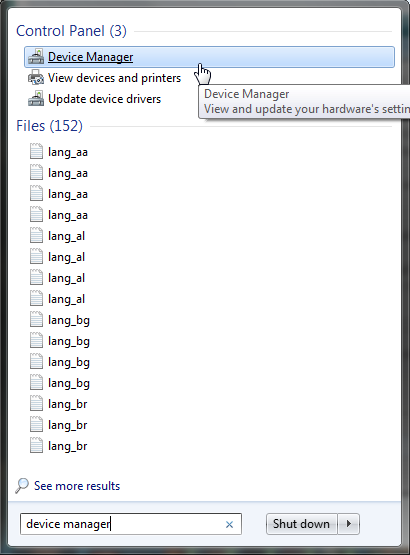
Check like so:

Search for "device manager"
Ix1mBPP.png


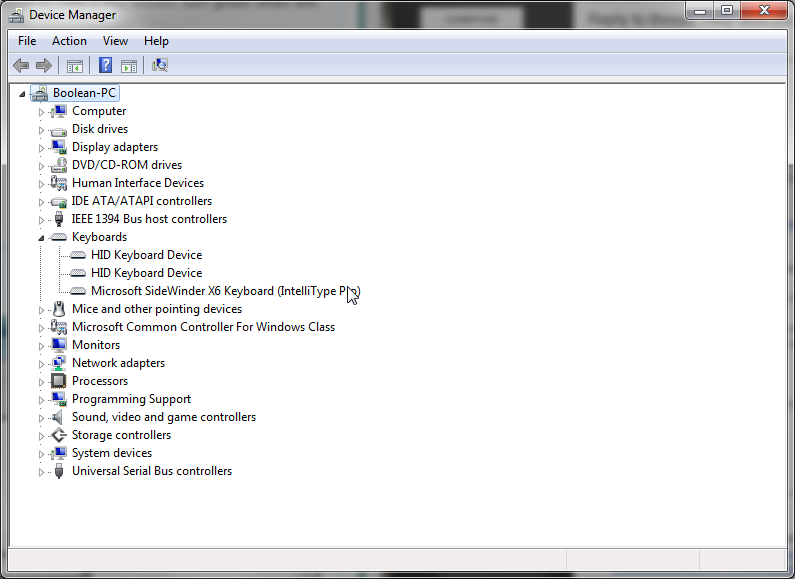
In the device manager find the tab Keyboard
9iMMgf1.png


Rightclick it and select properties.

Next open the Driver tab like here and check where the driver is from. You can also try to "Update Driver" and see if that helps.

Wt5Mabq.png
 

My Computer My Computer

Computer type
PC/Desktop
Computer Manufacturer/Model Number
Custom Build
OS
Windows 7 Ultimate x64
CPU
AMD Phenom II X6 Black Edition 1090T
Motherboard
Asus Crosshair IV Formula
Memory
4 x G Skill Ripjaws F3-10666CL9-4GBRL
Graphics Card(s)
Gigabyte GeForce GTX 970
Screen Resolution
1920x1080
Hard Drives
Drive #1 - Corsair Force GT (111 GB) (System)

Drive #2 - WDC WD3200AAKS-00B3A0 (298 GB) (Data & Installs)
Drive #3 - WD Ext HDD 1021 (931 GB) (Storage)
Antivirus
Eset Smart Security
Browser
Mozilla Firefox
its fixed now...but im not sure whatfixed it ...i tried to update the driver but it said its already updated and i also click thescan for hardware changes...not sure which of those two fixed it....thnx for the help
 

My Computer My Computer

Computer type
Laptop
Computer Manufacturer/Model Number
sony
OS
64 bit window 7 ultimate
Thanks for letting us know. Glad your problem is fixed now. Always a good thing to see uncommon problems beeing fixed that easily.
 

My Computer My Computer

Computer type
PC/Desktop
Computer Manufacturer/Model Number
Custom Build
OS
Windows 7 Ultimate x64
CPU
AMD Phenom II X6 Black Edition 1090T
Motherboard
Asus Crosshair IV Formula
Memory
4 x G Skill Ripjaws F3-10666CL9-4GBRL
Graphics Card(s)
Gigabyte GeForce GTX 970
Screen Resolution
1920x1080
Hard Drives
Drive #1 - Corsair Force GT (111 GB) (System)

Drive #2 - WDC WD3200AAKS-00B3A0 (298 GB) (Data & Installs)
Drive #3 - WD Ext HDD 1021 (931 GB) (Storage)
Antivirus
Eset Smart Security
Browser
Mozilla Firefox
Back
Top