Less than 4.0 GB RAM usable?

smurof7neves

Banned
Local time
3:46 AM
Messages
133
It's funny, because ALL of my RAM was usable some time ago. (I have no idea how long ago this was, but it was on the same OS) I am using Windows 7 Professional 32-bit.

I know about the whole 32-bit issue where some say you can't use much more than 3GB. Well, I WAS. I wouldn't be writing this thread if I hadn't noticed.

Currently, the RAM usable is down to 3.12GB, and there is a noticeable lag in performance because of this. Not sure what caused the computer to reevaluate/use less RAM, but I would like it fixed.
 

My Computer My Computer

OS
Windows 7 Professional 32-bit Service Pack 1
CPU
AMD Phenom II X4 925
Motherboard
MSI NF750-G55
Memory
4.0GB Dual-Channel DDR3 @ 533MHz
Graphics Card(s)
NVIDIA GeForce 210
Sound Card
Realtek High Definition Audio
Monitor(s) Displays
HP w1907 19" Monitor
Screen Resolution
1440x900
Hard Drives
320GB Hitachi HDP725032GLA360
500GB Western Digital WD5000AADS-00S9B0
PSU
Cooler Master RS-500-PCAR-A3
Case
Cooler Master Elite 310
Cooling
3 120mm case fans
Keyboard
Microsoft Wireless Keyboard 2000
Mouse
Microsoft Wireless Optical Mouse 2000
Internet Speed
60 Mbps down, 6 Mbps up
It is possible that one of your sticks has become bad, have you tried memtest.
Also go into your bios to see how much ram is being listed.
 

My Computer My Computer

Computer Manufacturer/Model Number
Self built
OS
Windows 7 64bit home premium
CPU
I5 3570K
Motherboard
Gigabyte Z77-DS3H
Memory
4 x 4GB Crucial Ballistix Sport DDR3 1600 Mhz
Graphics Card(s)
Gigabyte Geforce 660 TI
Sound Card
creative x-fi
Monitor(s) Displays
Primary CiBox 22" Widescreen LCD ,Secondary Dell 22" Widescr
Screen Resolution
Both 1680 x 1050
Hard Drives
2 x 500G HD (SATA) 1 x 2 TB USB
PSU
Corsair HX 620W ATX2.2 Modular SLI Complient PSU
Case
Antec 900 Ultimate Gaming Case
Cooling
3xfront 1xside 1xrear blue fan, 1 200mm blue top fan 1
Keyboard
Trust ds-3200 Wireless keyboard and mouse
Mouse
Trust ds-3200 Wireless keyboard and mouse
Internet Speed
288 / 4000
Other Info
Creative Inspire 7.1 T7900 Speakers
Trust Graphics Tablet
I have tried memtest with no errors.
 

My Computer My Computer

OS
Windows 7 Professional 32-bit Service Pack 1
CPU
AMD Phenom II X4 925
Motherboard
MSI NF750-G55
Memory
4.0GB Dual-Channel DDR3 @ 533MHz
Graphics Card(s)
NVIDIA GeForce 210
Sound Card
Realtek High Definition Audio
Monitor(s) Displays
HP w1907 19" Monitor
Screen Resolution
1440x900
Hard Drives
320GB Hitachi HDP725032GLA360
500GB Western Digital WD5000AADS-00S9B0
PSU
Cooler Master RS-500-PCAR-A3
Case
Cooler Master Elite 310
Cooling
3 120mm case fans
Keyboard
Microsoft Wireless Keyboard 2000
Mouse
Microsoft Wireless Optical Mouse 2000
Internet Speed
60 Mbps down, 6 Mbps up
It's funny, because ALL of my RAM was usable some time ago. (I have no idea how long ago this was, but it was on the same OS) I am using Windows 7 Professional 32-bit.

I know about the whole 32-bit issue where some say you can't use much more than 3GB. Well, I WAS. I wouldn't be writing this thread if I hadn't noticed.

Currently, the RAM usable is down to 3.12GB, and there is a noticeable lag in performance because of this. Not sure what caused the computer to reevaluate/use less RAM, but I would like it fixed.

Dear smurof7neves,
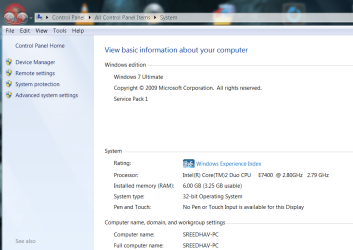
The Admin. has an tutorial where he mentions up to 4GB is par for course in 32 bit os! Kindly see my system snip:

regards,
Sreedhav
 

Attachments

  • System_2011-03-30_11-00-39.png
    System_2011-03-30_11-00-39.png
    51.4 KB · Views: 138

My Computer My Computer

Computer Manufacturer/Model Number
Sony Vaio C series VPCCB35FN laptop
OS
MS Windows 7 Home Premium 64-bit SP1
CPU
IntelCore [email protected]; Sandy Bridge 32nm Tech.
Motherboard
Sony Vaio Version:C609NJYJ
Memory
4096Mb RAM; Single ChannelDDR3@665MHz; DRAM Freq:662MHz
Graphics Card(s)
AMD Radeon HD 6630M; GPU:Whistler;BIOS Core&mem Clock:123.36
Sound Card
REALTEK High Definition Audio Device; INTEL Display Card
Monitor(s) Displays
Generic PnP Intel HD;Resolution:1920*1040 Pixels; BPP:32bits
Screen Resolution
Current Resolution:1920*1080 Pixels; Monitor Frequency:60Hz
Hard Drives
Internal HD:TOSHIBA MK5061GSY; Real Size:488 GB;NTFS; 3 Partitions; SATA; HEADS:16

External HDD: WD Elements 1023 PORTABLE; Estimated Size: 1TB; NTFS; 3 Partitions
Cooling
Lateral Exhaust with a Cooling Pad Placed Beneath.
Keyboard
Logitech Bluetooth+ Generic Integrated K-B
Mouse
Logitech Bluetooth
Internet Speed
2MBPS
Other Info
1)Trend Micro Titanium Maximum Security Suite Version:3
2)SAS-PRO

3)MBAM--PRO


4)WATERFOX+IE9 +WOT+LINKEXTEND+ DRWEBCUREIT LINK CHECKER

5)SPYWAREBLASTER

6) WINPATROL PLUS

7) SANDBOXIE and
8) A BIT OF COMMON SENSE.
hey mate,

have you tried using the sticks of ram individually?
if both read 2gb then run a memTEST on each of the sticks individually.

still if this doesn't show problems, try the ram one by one in each slot.

i do not have a lot of experience with RAM, but trying these methods has helped me before.
 

My Computer My Computer

Computer Manufacturer/Model Number
-
OS
windows 7 ultimate x64
CPU
Intel i7 950
Motherboard
gigabyte usb3
Memory
3x2gb corsair xms 1600mhz ddr3
Graphics Card(s)
ATI saphire 5770 OC 1GB
Sound Card
-
Monitor(s) Displays
22'' acer
Screen Resolution
1680 1050
Hard Drives
320gb WD blue
PSU
cooler master modular silent pro 850watt
Case
thermaltake soprano
Internet Speed
20mbps
Back
Top