Lexmark P3120 don't have a connection in XP mode

TheR

New member
Local time
3:34 AM
Messages
3
Hello all!

I've a little problem with my All-In-One device P3120 from Lexmark. I've managed to install the device in XP mode, since I found out that there are no Windows 7 or Vista drivers available. The installing progress had finished without any problems and I can also use the scanner unit - but the printer don't print anything! I get always a message that the printer don't have a connection with the computer, but that's of course wrong.
I've tried also the newest XP driver from the Lexmark homepage, but the problem is still there.

Now I have the question to the community here: Have somebody else here the same device with the same problem and maybe found out a solution? Or some general tips to get the printer printing?

OS: Windows 7 64-Bit Ultimate Edition
Device: Lexmark P3120 (also called Lexmark 3100 Series in the device manager)

Thanks to all upcoming answers and I'm hoping that someone can help me with the problem!

Best regards, René
 

My Computer My Computer

At a glance

Windows 7 64-Bit Ultimate EditionIntel Core 2 Duo, E8400 2x 3 GHzDDR3 2x 2 GB Corsair 1600 MHzASUS Extreme NGTX275
OS
Windows 7 64-Bit Ultimate Edition
CPU
Intel Core 2 Duo, E8400 2x 3 GHz
Motherboard
ASUS P5Q3
Memory
DDR3 2x 2 GB Corsair 1600 MHz
Graphics Card(s)
ASUS Extreme NGTX275
Sound Card
Onboard: Realtek ALC1200 HD-Audio
Monitor(s) Displays
Jean JD1990
Hard Drives
2x SATA2 Western Digital Caviar Blue 500 GB
I think when I had my lexmark it required me to install the driver then plug the printer in. Did you try this?
 

My Computer My Computer

At a glance

Windows 7 ultimate 64 bit / XP Home sp3intel Core 2 Duo E8400 3.0ghz8 gigs 1066 OCZ Fata1tyEVGA GTX 580 Call of Duty Black Ops Edition
Computer Manufacturer/Model Number
Self Built
OS
Windows 7 ultimate 64 bit / XP Home sp3
CPU
intel Core 2 Duo E8400 3.0ghz
Motherboard
Asus P5ND bios 1401
Memory
8 gigs 1066 OCZ Fata1ty
Graphics Card(s)
EVGA GTX 580 Call of Duty Black Ops Edition
Sound Card
Creative Soundblaster Audigy 2zs
Monitor(s) Displays
Asus 24in LCD's 2MS X2
Screen Resolution
1920x1080p @60Hz
Hard Drives
WD Caviar 500 Black/ WD Caviar 200 Blue
PSU
OCZ 700W GameXtreme
Case
NZXT Apollo
Cooling
Corsair H50 CPU/120mm x3 /60mm x2 /Corsair Dominator Ram
Keyboard
Logitech Bluetooth Wireless MX5000
Mouse
Logitech Bluetooth Wireless MX1000
Internet Speed
Download 19.83 Upload 0.97
Other Info
Logitech Z2300 Speakers/ Bose Noise Cancelling Headphones/Avermedia PCI-e Hybrid TV Bravo/Epson NX415 all in one/ 4 Port Powered USB Hub/ LG 10x Bluray Burner /TSST Corp DVDRW External
Thanks for your answer, thefabe!
I tried your advice, but unfortuntly it didn't worked.

After all, I got the printer working.
In the device manager were three "Virtual PC Integration Device" devices with question marks as icons. First I thought, that this devices don't have to do anything with my printer, because the printer already shown up right in device manager.
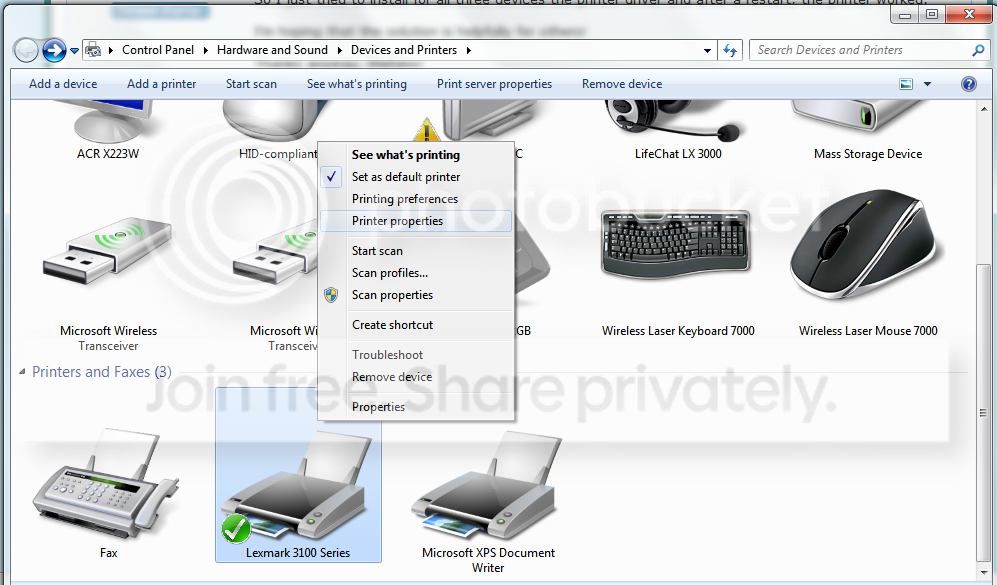
So I just tried to install for all three devices the printer driver and after a restart, the printer worked.

I'm hoping that the solution is helpfully for others!

Thanks anyway, thefabe!

Best regards
 

My Computer My Computer

At a glance

Windows 7 64-Bit Ultimate EditionIntel Core 2 Duo, E8400 2x 3 GHzDDR3 2x 2 GB Corsair 1600 MHzASUS Extreme NGTX275
OS
Windows 7 64-Bit Ultimate Edition
CPU
Intel Core 2 Duo, E8400 2x 3 GHz
Motherboard
ASUS P5Q3
Memory
DDR3 2x 2 GB Corsair 1600 MHz
Graphics Card(s)
ASUS Extreme NGTX275
Sound Card
Onboard: Realtek ALC1200 HD-Audio
Monitor(s) Displays
Jean JD1990
Hard Drives
2x SATA2 Western Digital Caviar Blue 500 GB
Hi guys, I have exact same PrinTrio P3120 printer and I finally got it to work today.

This isn't a joke, and I'm a trusted member here at sevenforums - although I haven't been on for quite a while :p.

I got nothing here to promote, I have been looking for a solution since I downloaded and installed the first Windows 7 pre-beta version.

Here's how:
Step1.png

Step2.png


If you can't figure it out with all the pictures, your looking to untick "Enable advanced printing functions"

That's it.

Thanks, and report back if it works.
 

My Computer My Computer

At a glance

Windows XPIntel Celeron ULV (max 900 mhz; set to 630 mhz)1 GB DDR2Intel GMA 900 64 MB
Computer Manufacturer/Model Number
Asus EEE PC 900HD
OS
Windows XP
CPU
Intel Celeron ULV (max 900 mhz; set to 630 mhz)
Memory
1 GB DDR2
Graphics Card(s)
Intel GMA 900 64 MB
Sound Card
Realtek HD Audio
Monitor(s) Displays
8.9 inch LED backlight display
Screen Resolution
1024 by 600
Hard Drives
160 GB
PSU
35 watt
Keyboard
just fine
Mouse
multi-touch touchpad
Internet Speed
slow
Other Info
Using a netbook currently for travel. Also own a Dell 755 and a T500 and a Toshiba P105.
Hi TechOutsider,

thank you for your answer!
Since I've got the device working in XP-mode, I'm happy with it. But a native solution would be awesome!

I can't try your solution, without Vista / W7 drivers, so which one did you install?

Best regards and thanks again!
 

My Computer My Computer

At a glance

Windows 7 64-Bit Ultimate EditionIntel Core 2 Duo, E8400 2x 3 GHzDDR3 2x 2 GB Corsair 1600 MHzASUS Extreme NGTX275
OS
Windows 7 64-Bit Ultimate Edition
CPU
Intel Core 2 Duo, E8400 2x 3 GHz
Motherboard
ASUS P5Q3
Memory
DDR3 2x 2 GB Corsair 1600 MHz
Graphics Card(s)
ASUS Extreme NGTX275
Sound Card
Onboard: Realtek ALC1200 HD-Audio
Monitor(s) Displays
Jean JD1990
Hard Drives
2x SATA2 Western Digital Caviar Blue 500 GB
Back
Top