Solved LG Monitor - Connecting Two Computers

ess1

New member
Member
Local time
1:36 PM
Messages
66
Have two computers - OS Win7 & XP. Monitor is an LG IPS235.

Is there a way to be able to run either computer from monitor with both computer cable inputs connected please?

Win 7 is connected via DVI input. I can only run XP with VGA input if I remove DVI then connect VGA cable inputs. When both cablers connected monitor screen is blank.

Thank you.
 

My Computer My Computer

At a glance

Win7
OS
Win7
Please give your system specs using Speccy
 

My Computer My Computer

At a glance

Windows 7 Ultimate 32-bit
Computer type
Laptop
Computer Manufacturer/Model Number
Compaq
OS
Windows 7 Ultimate 32-bit
Antivirus
Avast! Free Antivirus
Browser
Mozilla Firefox
The monitor likely switches the video input electronically when it detects a connection from either the digital (DVI-D) or analog (D-sub) connectors. If you connect two different running systems simultaneously, one to each video input connection, you could likely blow the monitor or get the blank screen that you've observed. You're probably lucky you didn't blow the monitor without checking with LG tech support first to determine if your model supports this arrangement.

Some monitors may be able to handle two simultaneous connections, but would give priority to either the digital or analog connection unless there was a way to manually switch from the monitor's control panel. This is a very model specific question and depends on the design of your particular monitor.

You should contact LG Electronics tech support and ask this question. I think they'll tell you not to do it or you'll void your warranty. You could also download the product manual from the LG website.

Regards
 
Last edited:

My Computer My Computer

At a glance

Windows 7 Professional x64 SP1Intel i7-980x @ 3.6GHzCorsair 12GB DDR3 RAM (3x4GB)EVGA NVIDIA GeForce GTX 760 SC
Computer type
PC/Desktop
Computer Manufacturer/Model Number
Custom Build
OS
Windows 7 Professional x64 SP1
CPU
Intel i7-980x @ 3.6GHz
Motherboard
Intel DX58SO
Memory
Corsair 12GB DDR3 RAM (3x4GB)
Graphics Card(s)
EVGA NVIDIA GeForce GTX 760 SC
Sound Card
Intel High Definition 7.1 Audio Subsystem - Realtek ALC889
Monitor(s) Displays
Dual Display - LG Electronics Flatron L227WTG
Screen Resolution
1680 x 1050 60Hz 32-bit
Hard Drives
2 Seagate Constellation ST1000NM0033 1TB SATA 6Gb/s HDDs configured as Intel SATA Array 0, RST RAID 1, Vol. 0 (C:\) & Vol. 1 (D:\), & 2 Seagate Barracuda ST500DM002 500GB SATA 6Gb/s HDDs configured as Intel SATA Array 1 RST RAID 1, Vol. 0 (E:\)
PSU
Corsair HX850W
Case
Antec P182
Cooling
Stock Intel i7-980x Cooling Solution + 4 120mm Case Fans
Keyboard
Microsoft Wireless Multimedia Keyboard 1.1
Mouse
Microsoft Standard Wireless Optical Mouse
Internet Speed
DSL - 3.0 Mb/s download 768 Kb/s upload
Antivirus
ESET Smart Security 12, Defender & SuperAntiSpyware Pro
Browser
Firefox Quantum 64-bit
Other Info
Optical Drives: Pioneer DVR-216R & TSSTcorp SH-S223Q, Anker USB 3.0 PCI-E Card, Hauppauge WinTV-HVR 2250 Dual TV Tuner Board for Windows Media Center, Bose Companion 3 Series II multimedia speaker system, APC Smart-UPS SMT1500
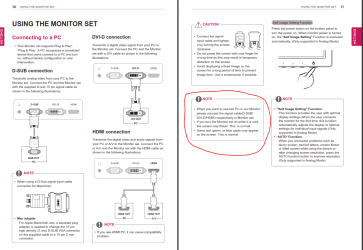
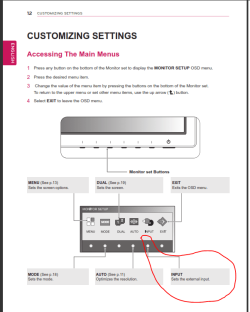
I was doing exactly what you want with my Dell monitors a while back. One PC on DVI, and the other on VGA. There was an input switch on the bottom of the monitor. Pressing it toggled from one input to the next.
You might start by going through all of your monitor's settings to see if you can find it.

EDIT:
Should work:
 

Attachments

  • Capture1.PNG
    Capture1.PNG
    80 KB · Views: 7
  • Capture2.PNG
    Capture2.PNG
    25.4 KB · Views: 1

My Computer My Computer

At a glance

Windows 7 64 Bit Home Premium SP1i7-3820GSkill F3-14900CL9Q - 16GBEVGA GeForce GTX660 - Driver 352.86
Computer type
PC/Desktop
Computer Manufacturer/Model Number
Home Built - Jan 2013
OS
Windows 7 64 Bit Home Premium SP1
CPU
i7-3820
Motherboard
Asus P9X79-PRO - Bios 4608
Memory
GSkill F3-14900CL9Q - 16GB
Graphics Card(s)
EVGA GeForce GTX660 - Driver 352.86
Sound Card
On board Realtek ALC898
Monitor(s) Displays
Acer S271HL
Screen Resolution
1920 x 1080
Hard Drives
#1- Samsung 840 Pro Series
#2- Western Digital WD1002FAEX Sata3 Black
#3- Western Digital WD1002FAEX Sata3 Black
PSU
Corsair CMPSU-850TX-V2 - 850 watt (by Seasonic)
Case
Corsair Obsidian 550D
Cooling
Standard 3 120mm case fans, Cooler Master Hyper 212 EVO
Keyboard
MS KC-0405
Mouse
Intellimouse 5-button
Internet Speed
56 Mbits/Sec (on a good day)
Antivirus
Avast & Malwarebytes
Browser
Firefox
Other Info
Asus DVD - DRW-24B1ST 24X
Thank you all.

TVeblen - Many thanks for info. Will try this.
 

My Computer My Computer

At a glance

Win7
OS
Win7
Many thanks. All now functioning.

Don't know what happened but I posted reply last week!
 

My Computer My Computer

At a glance

Win7
OS
Win7
Glad you got it working!
 

My Computer My Computer

At a glance

Windows 7 64 Bit Home Premium SP1i7-3820GSkill F3-14900CL9Q - 16GBEVGA GeForce GTX660 - Driver 352.86
Computer type
PC/Desktop
Computer Manufacturer/Model Number
Home Built - Jan 2013
OS
Windows 7 64 Bit Home Premium SP1
CPU
i7-3820
Motherboard
Asus P9X79-PRO - Bios 4608
Memory
GSkill F3-14900CL9Q - 16GB
Graphics Card(s)
EVGA GeForce GTX660 - Driver 352.86
Sound Card
On board Realtek ALC898
Monitor(s) Displays
Acer S271HL
Screen Resolution
1920 x 1080
Hard Drives
#1- Samsung 840 Pro Series
#2- Western Digital WD1002FAEX Sata3 Black
#3- Western Digital WD1002FAEX Sata3 Black
PSU
Corsair CMPSU-850TX-V2 - 850 watt (by Seasonic)
Case
Corsair Obsidian 550D
Cooling
Standard 3 120mm case fans, Cooler Master Hyper 212 EVO
Keyboard
MS KC-0405
Mouse
Intellimouse 5-button
Internet Speed
56 Mbits/Sec (on a good day)
Antivirus
Avast & Malwarebytes
Browser
Firefox
Other Info
Asus DVD - DRW-24B1ST 24X
Back
Top