Libraries Icon - Change Default Icon

How to Change the Default "Libraries" Folder Icon in Windows 7

   Information
This will show you how to change the main default Libraries icon to any custom icon that you want instead in Windows 7.
   Warning

  • You can only do this while logged into an administrator account.
  • This will affect all user account's Libraries icon on the computer.
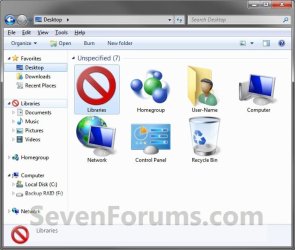
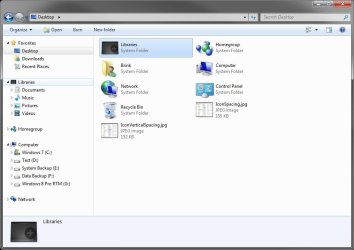
EXAMPLE: Libraries Icon
NOTE: This is the default (left screenshot) and custom (right screenshot) Libraries icon.
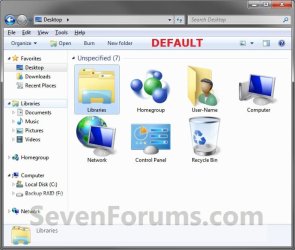
Default.jpg

After.jpg


Here's How:
1. Open the Start Menu and type regedit.exe in the search line, then press enter.

2. If prompted by UAC, then click on Yes.

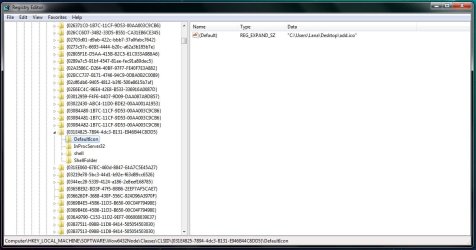
3. In Regedit, go to the location below: (See screenshot below step 4)
Code:
HKEY_CLASSES_ROOT\CLSID\{031E4825-7B94-4dc3-B131-E946B44C8DD5}\DefaultIcon
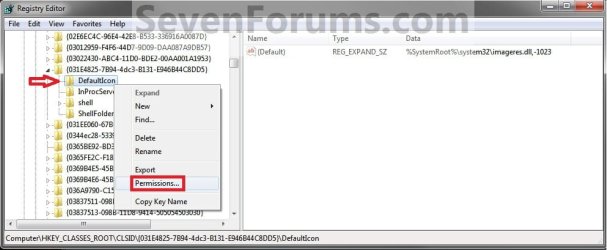
4. In the left pane of regedit, right click on the DefaultIcon key and click on Permissions. (See screenshot below)
Step1.jpg
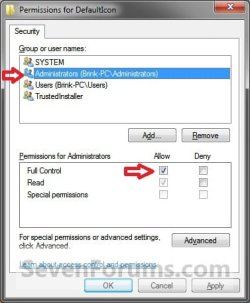
5. At the top, select the Administrators group. At the bottom, check the Allow box to the right of Full Control and click on OK. (See screenshot below)
Step2.jpg
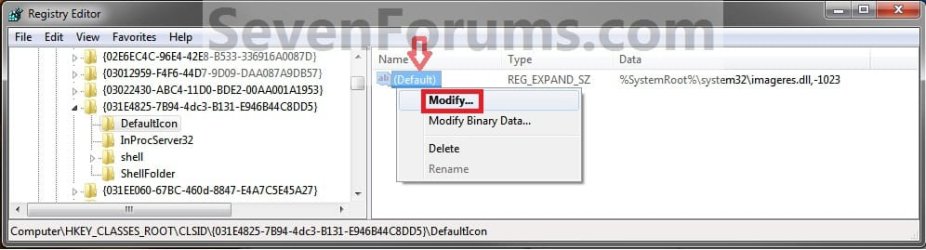
6. In the left pane of regedit, right click on (Default) and click on Modify. (See screenshot below)
Step3.jpg
7. To Restore the Default Libraries Icon
A) In the Modify window from regedit, type in the path below and click on OK.
%SystemRoot%\system32\imageres.dll,-1023
B) Go to step 10.
8. To Use a Icon of Your Own
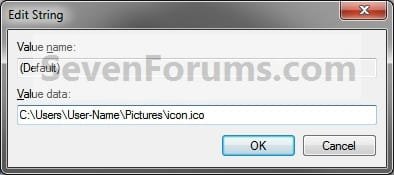
A) In the Modify window from regedit, type in the full path of where you have your custom icon (.ico file) stored at, then click on OK. (See screenshot below)
WARNING: You will need to use a 256x256 pixel icon that was made for Windows 7 and Vista for them to display properly at all of the available icon view sizes in Windows 7. You will also need to leave the icon (.ico file) saved at the exact location you typed below for it to continue to work. If you delete or move this icon, then it will no longer be displayed.
Step5.jpg
B) Go to step 10.
9. To Use another Windows 7 Icon
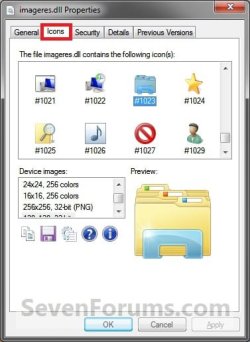
A) Download and install the free program IconViewer to add the Icons tab in the screenshot below step 9B.
NOTE: Be sure to download the correct 32-bit or 64-bit version for your Windows 7.

B) In Windows Explorer navigate to the .exe (ex: for program icons) or .dll (ex: Windows 7 icons) file that contains the icon that you want to use for the default Library icon, then right click on the file, click on Properties, and the Icons tab. (See screenshot below)
NOTE: The most common Windows 7 icons come from the C:\Windows\System32\imageres.dll file.
Tip1.jpg
C) Make note of the icon number for the icon that you want to use instead. (See screenshot above)
NOTE: For example, the default Libraries icon number is 1023. I'm going to change it to the 1027 icon number just as an example.

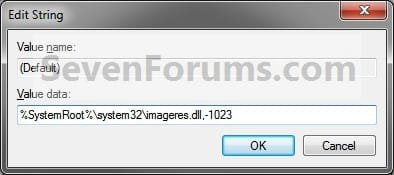
D) In the Modify window from regedit, type in the full path of the .exe or .dll file followed by ,-icon# (fullpath,-####) and click on OK. (See screenshot below)
NOTE: For example, if I want to use the path (step 9B) and the 1027 icon (step 9C), I would type:
%SystemRoot%\system32\imageres.dll,-1027

OR

C:\Windows\System32\imageres.dll,-1027
Step4.jpg
NOTE: This is the default Libraries icon value.
10. If you have 64-bit Windows 7 Installed
   Note
To also change the Libraries icon in the "Open" and "Save as" type windows as well in 64-bit Windows 7, you will also need to do this step.

If you have a 32-bit Windows 7 installed, then skip this step since doing steps 1 to 7/8/9 will change the Libraries icon in the "Open" and "Save as" type windows as well.

A) In regedit, go to the location below:
Code:
HKEY_LOCAL_MACHINE\SOFTWARE\Wow6432Node\Classes\CLSID\{031E4825-7B94-4dc3-B131-E946B44C8DD5}\DefaultIcon
B) Repeat steps 4 to 7/8/9 above.
11. Close regedit.

12. Restart the computer to fully apply.
That's it,
Shawn


Last edited:
Great tut Brink, just what i was after.
 

My Computer

Computer Manufacturer/Model Number
Custom Build
OS
W7 RTM Ultimate x64
CPU
Intel Q8400 @ 2.66GHZ
Motherboard
Gigabyte GA-EG45M-UD2H
Memory
4GB DDR2-800
Graphics Card(s)
Gainward GTS 450 GLH 1GB Edition
Sound Card
Integrated 8 Channel
Monitor(s) Displays
AOC 23.6 Inch Widescreen LCD
Screen Resolution
1920x1080
Hard Drives
Seagate 500GB Internal
Western Digital 1TB Internal

Hitachi 1TB External
PSU
Apevia Java Power 500W
Case
Cooler Master HAF 922 Black
Cooling
Stock Intel CPU Fan
Keyboard
HP SK-2960 Multimedia Keyboard
Mouse
Logitech M350 Wireless Gaming Mouse
Internet Speed
1.5MB
You're welcome. Thank you. :)
 

My Computer

Computer type
PC/Desktop
Computer Manufacturer/Model Number
Self built custom
OS
64-bit Windows 11 Pro for Workstations
CPU
Intel i7-8700K OC'd to 5 GHz
Motherboard
ASUS ROG Maximus XI Formula Z390
Memory
64 GB (4x16GB) G.SKILL TridentZ RGB DDR4 3600 MHz
Graphics Card(s)
ASUS ROG-STRIX-GTX1080TI-O11G-GAMING
Sound Card
Integrated
Monitor(s) Displays
2 x Samsung Odyssey G7 27"
Screen Resolution
2560x1440
Hard Drives
1TB Samsung 990 PRO M.2,
4TB Samsung 990 PRO PRO M.2,
TerraMaster F8 SSD Plus NAS
PSU
Seasonic Prime Titanium 850W
Case
Thermaltake Core P3
Cooling
Corsair Hydro H115i
Keyboard
Logitech wireless K800
Mouse
Logitech MX Master 4
Internet Speed
2 Gb/s Download and 100 Mb/s Upload
Antivirus
Malwarebyte Anti-Malware Premium
Browser
Google Chrome
Other Info
Logitech Z625 speaker system,
Logitech BRIO 4K Pro webcam,
HP Color LaserJet Pro MFP M477fdn,
APC SMART-UPS RT 1000 XL - SURT1000XLI,
Galaxy S23 Plus phone
When I pin it to the taskbar it comes up as the default yellow icon.
 

My Computer

Computer Manufacturer/Model Number
HP dv7t 1000 CTO
OS
Windows 7 Ultimate 7600 RTM - Windows Server 2008 R2 7600 RTM Dual Boot
CPU
Intel Core Duo
Memory
4 gigs
Graphics Card(s)
NVIDIA 9600 GT
Sound Card
IDT HD Audio
Monitor(s) Displays
Generic 1680x1050
Screen Resolution
1680x1050
Hard Drives
TOSHIBA MK2552GSX ATA Device 320 gigs
Mouse
Synaptics Port Device PS/2
Hello Psyh0t1c,

That would be because it is actually pinning the Windows Explorer icon with the Libraries icon in it's jump list instead. Sorry. :(
 

My Computer

Computer type
PC/Desktop
Computer Manufacturer/Model Number
Self built custom
OS
64-bit Windows 11 Pro for Workstations
CPU
Intel i7-8700K OC'd to 5 GHz
Motherboard
ASUS ROG Maximus XI Formula Z390
Memory
64 GB (4x16GB) G.SKILL TridentZ RGB DDR4 3600 MHz
Graphics Card(s)
ASUS ROG-STRIX-GTX1080TI-O11G-GAMING
Sound Card
Integrated
Monitor(s) Displays
2 x Samsung Odyssey G7 27"
Screen Resolution
2560x1440
Hard Drives
1TB Samsung 990 PRO M.2,
4TB Samsung 990 PRO PRO M.2,
TerraMaster F8 SSD Plus NAS
PSU
Seasonic Prime Titanium 850W
Case
Thermaltake Core P3
Cooling
Corsair Hydro H115i
Keyboard
Logitech wireless K800
Mouse
Logitech MX Master 4
Internet Speed
2 Gb/s Download and 100 Mb/s Upload
Antivirus
Malwarebyte Anti-Malware Premium
Browser
Google Chrome
Other Info
Logitech Z625 speaker system,
Logitech BRIO 4K Pro webcam,
HP Color LaserJet Pro MFP M477fdn,
APC SMART-UPS RT 1000 XL - SURT1000XLI,
Galaxy S23 Plus phone
Yeah so what I did was just changed the explorer icon and now everything is cool. :)
 

My Computer

Computer Manufacturer/Model Number
HP dv7t 1000 CTO
OS
Windows 7 Ultimate 7600 RTM - Windows Server 2008 R2 7600 RTM Dual Boot
CPU
Intel Core Duo
Memory
4 gigs
Graphics Card(s)
NVIDIA 9600 GT
Sound Card
IDT HD Audio
Monitor(s) Displays
Generic 1680x1050
Screen Resolution
1680x1050
Hard Drives
TOSHIBA MK2552GSX ATA Device 320 gigs
Mouse
Synaptics Port Device PS/2
That'll work. I'm happy to hear that you got it sorted. :)
 

My Computer

Computer type
PC/Desktop
Computer Manufacturer/Model Number
Self built custom
OS
64-bit Windows 11 Pro for Workstations
CPU
Intel i7-8700K OC'd to 5 GHz
Motherboard
ASUS ROG Maximus XI Formula Z390
Memory
64 GB (4x16GB) G.SKILL TridentZ RGB DDR4 3600 MHz
Graphics Card(s)
ASUS ROG-STRIX-GTX1080TI-O11G-GAMING
Sound Card
Integrated
Monitor(s) Displays
2 x Samsung Odyssey G7 27"
Screen Resolution
2560x1440
Hard Drives
1TB Samsung 990 PRO M.2,
4TB Samsung 990 PRO PRO M.2,
TerraMaster F8 SSD Plus NAS
PSU
Seasonic Prime Titanium 850W
Case
Thermaltake Core P3
Cooling
Corsair Hydro H115i
Keyboard
Logitech wireless K800
Mouse
Logitech MX Master 4
Internet Speed
2 Gb/s Download and 100 Mb/s Upload
Antivirus
Malwarebyte Anti-Malware Premium
Browser
Google Chrome
Other Info
Logitech Z625 speaker system,
Logitech BRIO 4K Pro webcam,
HP Color LaserJet Pro MFP M477fdn,
APC SMART-UPS RT 1000 XL - SURT1000XLI,
Galaxy S23 Plus phone
this seems like a completely great tutorial but i ran into a problem, why dont i have a CLSID folder in my HKEY_CLASSES_ROOT folder?
 

Attachments

  • HKEY.PNG
    HKEY.PNG
    14.4 KB · Views: 1,544

My Computer

Computer Manufacturer/Model Number
Toshiba/Qosmio X505-Q892
OS
Windows 7 Ultimate x64
CPU
Intel i5
Memory
4GB
Graphics Card(s)
GeForce GTX 460M
Sound Card
---
Hard Drives
500GB internal, 2TB external
Mouse
Microsoft Habu
Hello Mhelseth,

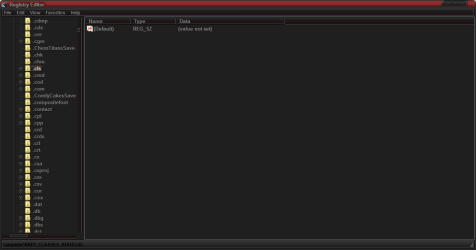
You do. You will just need to keep scrolling past the file extensions until you see it. :)
 

My Computer

Computer type
PC/Desktop
Computer Manufacturer/Model Number
Self built custom
OS
64-bit Windows 11 Pro for Workstations
CPU
Intel i7-8700K OC'd to 5 GHz
Motherboard
ASUS ROG Maximus XI Formula Z390
Memory
64 GB (4x16GB) G.SKILL TridentZ RGB DDR4 3600 MHz
Graphics Card(s)
ASUS ROG-STRIX-GTX1080TI-O11G-GAMING
Sound Card
Integrated
Monitor(s) Displays
2 x Samsung Odyssey G7 27"
Screen Resolution
2560x1440
Hard Drives
1TB Samsung 990 PRO M.2,
4TB Samsung 990 PRO PRO M.2,
TerraMaster F8 SSD Plus NAS
PSU
Seasonic Prime Titanium 850W
Case
Thermaltake Core P3
Cooling
Corsair Hydro H115i
Keyboard
Logitech wireless K800
Mouse
Logitech MX Master 4
Internet Speed
2 Gb/s Download and 100 Mb/s Upload
Antivirus
Malwarebyte Anti-Malware Premium
Browser
Google Chrome
Other Info
Logitech Z625 speaker system,
Logitech BRIO 4K Pro webcam,
HP Color LaserJet Pro MFP M477fdn,
APC SMART-UPS RT 1000 XL - SURT1000XLI,
Galaxy S23 Plus phone
Hello Mhelseth,

You do. You will just need to keep scrolling past the file extensions until you see it. :)

lol im dumb, found it thanks :)
 

My Computer

Computer Manufacturer/Model Number
Toshiba/Qosmio X505-Q892
OS
Windows 7 Ultimate x64
CPU
Intel i5
Memory
4GB
Graphics Card(s)
GeForce GTX 460M
Sound Card
---
Hard Drives
500GB internal, 2TB external
Mouse
Microsoft Habu
LOL, you're most welcome. Nar, if you didn't know, it would be easy to assume that it wasn't there. :)
 

My Computer

Computer type
PC/Desktop
Computer Manufacturer/Model Number
Self built custom
OS
64-bit Windows 11 Pro for Workstations
CPU
Intel i7-8700K OC'd to 5 GHz
Motherboard
ASUS ROG Maximus XI Formula Z390
Memory
64 GB (4x16GB) G.SKILL TridentZ RGB DDR4 3600 MHz
Graphics Card(s)
ASUS ROG-STRIX-GTX1080TI-O11G-GAMING
Sound Card
Integrated
Monitor(s) Displays
2 x Samsung Odyssey G7 27"
Screen Resolution
2560x1440
Hard Drives
1TB Samsung 990 PRO M.2,
4TB Samsung 990 PRO PRO M.2,
TerraMaster F8 SSD Plus NAS
PSU
Seasonic Prime Titanium 850W
Case
Thermaltake Core P3
Cooling
Corsair Hydro H115i
Keyboard
Logitech wireless K800
Mouse
Logitech MX Master 4
Internet Speed
2 Gb/s Download and 100 Mb/s Upload
Antivirus
Malwarebyte Anti-Malware Premium
Browser
Google Chrome
Other Info
Logitech Z625 speaker system,
Logitech BRIO 4K Pro webcam,
HP Color LaserJet Pro MFP M477fdn,
APC SMART-UPS RT 1000 XL - SURT1000XLI,
Galaxy S23 Plus phone
if all this regedit stuff seems too complicated for you, you could try the free librarian program to make it a little easier.

it has a few other library features as well.
 
Last edited by a moderator:

My Computer

Computer Manufacturer/Model Number
mickey megabyte 1234
OS
ultimate 64 sp1
CPU
i5 2500K [email protected]
Motherboard
MSI P67A-GD53
Memory
8 gigs GSkill Ripjaws 1600
Graphics Card(s)
amd hd6950
Sound Card
creative x-fi gamer
Monitor(s) Displays
samsung 24"
Screen Resolution
1920x1080
Hard Drives
ocz vertex 2e 60 gig, samsung f3 1tb, buffalo 2tb ext
PSU
antec 550
Case
antec three hundred
Cooling
i'm a cooling fan
Keyboard
saitek eclipse ii
Mouse
logitech g3
Internet Speed
about 4 Mbps
Other Info
i love win7
These tutorials have worked out great for the Favorites and Homegroup icons, but for some reason my Libraries icon refuses to change. I even tried applying the same icon that worked fine for Favorites, and still it remains the default icon. Any ideas for what might be causing the problem?
 

My Computer

Computer type
PC/Desktop
Computer Manufacturer/Model Number
HP h8-1210t
OS
Windows 7 Home Premium x64
CPU
Intel(R) Core(TM) i5-2400 CPU @ 3.10GHz
Motherboard
PEGATRON CORPORATION 2AB5
Memory
6.00 GB
Graphics Card(s)
AMD Radeon HD 6850
Sound Card
IDT High Def. Audio CODEC & AMD High Def. Audio Device
Monitor(s) Displays
20" HP Pavilion 2011x
Screen Resolution
1600 x 900 x 60 hz
Hello Vor12, and welcome to Seven Forums.

If you like, please post back with screenshots showing all of your registry locations that are in the tutorial to see if something may stand out as a reason. :)
 

My Computer

Computer type
PC/Desktop
Computer Manufacturer/Model Number
Self built custom
OS
64-bit Windows 11 Pro for Workstations
CPU
Intel i7-8700K OC'd to 5 GHz
Motherboard
ASUS ROG Maximus XI Formula Z390
Memory
64 GB (4x16GB) G.SKILL TridentZ RGB DDR4 3600 MHz
Graphics Card(s)
ASUS ROG-STRIX-GTX1080TI-O11G-GAMING
Sound Card
Integrated
Monitor(s) Displays
2 x Samsung Odyssey G7 27"
Screen Resolution
2560x1440
Hard Drives
1TB Samsung 990 PRO M.2,
4TB Samsung 990 PRO PRO M.2,
TerraMaster F8 SSD Plus NAS
PSU
Seasonic Prime Titanium 850W
Case
Thermaltake Core P3
Cooling
Corsair Hydro H115i
Keyboard
Logitech wireless K800
Mouse
Logitech MX Master 4
Internet Speed
2 Gb/s Download and 100 Mb/s Upload
Antivirus
Malwarebyte Anti-Malware Premium
Browser
Google Chrome
Other Info
Logitech Z625 speaker system,
Logitech BRIO 4K Pro webcam,
HP Color LaserJet Pro MFP M477fdn,
APC SMART-UPS RT 1000 XL - SURT1000XLI,
Galaxy S23 Plus phone
Thanks so much for the welcome and reply Brink! I'm kind of new to W7 so I've been tinkering around with customization only recently ^^;

Here are the relevant screenshots of the registry:

reg1.jpg

reg2.jpg
 

My Computer

Computer type
PC/Desktop
Computer Manufacturer/Model Number
HP h8-1210t
OS
Windows 7 Home Premium x64
CPU
Intel(R) Core(TM) i5-2400 CPU @ 3.10GHz
Motherboard
PEGATRON CORPORATION 2AB5
Memory
6.00 GB
Graphics Card(s)
AMD Radeon HD 6850
Sound Card
IDT High Def. Audio CODEC & AMD High Def. Audio Device
Monitor(s) Displays
20" HP Pavilion 2011x
Screen Resolution
1600 x 900 x 60 hz
Yeah, it takes a bit to get the hang of it, but once you, you'll be fine. :)

Did you restart the computer afterwards to apply?

I noticed that you have the .ico file on your desktop. I would recommend keeping it saved in one of your C:\Users\Public folders instead to avoid access issues with any other user account since the Public folders can be accessed by all users by default. Afterwards, you could just mofify the registry for the new path.

If the above doesn't help, then please go ahead and ZIP the add.ico file, and upload it. I'll be happy to do some playing with it to help rule it out as a cause or not as well.
 

My Computer

Computer type
PC/Desktop
Computer Manufacturer/Model Number
Self built custom
OS
64-bit Windows 11 Pro for Workstations
CPU
Intel i7-8700K OC'd to 5 GHz
Motherboard
ASUS ROG Maximus XI Formula Z390
Memory
64 GB (4x16GB) G.SKILL TridentZ RGB DDR4 3600 MHz
Graphics Card(s)
ASUS ROG-STRIX-GTX1080TI-O11G-GAMING
Sound Card
Integrated
Monitor(s) Displays
2 x Samsung Odyssey G7 27"
Screen Resolution
2560x1440
Hard Drives
1TB Samsung 990 PRO M.2,
4TB Samsung 990 PRO PRO M.2,
TerraMaster F8 SSD Plus NAS
PSU
Seasonic Prime Titanium 850W
Case
Thermaltake Core P3
Cooling
Corsair Hydro H115i
Keyboard
Logitech wireless K800
Mouse
Logitech MX Master 4
Internet Speed
2 Gb/s Download and 100 Mb/s Upload
Antivirus
Malwarebyte Anti-Malware Premium
Browser
Google Chrome
Other Info
Logitech Z625 speaker system,
Logitech BRIO 4K Pro webcam,
HP Color LaserJet Pro MFP M477fdn,
APC SMART-UPS RT 1000 XL - SURT1000XLI,
Galaxy S23 Plus phone
Gah, still no luck! I initially had the icon in my documents folder, but saw a suggestion to test it by moving it to the desktop if it failed to apply. I've restarted each time I change the registry, but even after moving it to a Public Users folder and restarting, it isn't sticking.

Here is the icon in question: View attachment add.zip

Thanks again for all your help! I really appreciate it!
 

My Computer

Computer type
PC/Desktop
Computer Manufacturer/Model Number
HP h8-1210t
OS
Windows 7 Home Premium x64
CPU
Intel(R) Core(TM) i5-2400 CPU @ 3.10GHz
Motherboard
PEGATRON CORPORATION 2AB5
Memory
6.00 GB
Graphics Card(s)
AMD Radeon HD 6850
Sound Card
IDT High Def. Audio CODEC & AMD High Def. Audio Device
Monitor(s) Displays
20" HP Pavilion 2011x
Screen Resolution
1600 x 900 x 60 hz
Vor,

I'm not sure why it's not working for you. Your registry screenshots look fine other than not using a Public folder. I used your add.ico file in my C:\Users\Public\Pictures folder, and it worked fine for me.
Libraries.jpg

Making changes to the locations in the registry in the tutorial would normally change the locations below as well after restarting the computer, but you might also double check them to make sure that they have the correct "DefaultIcon" for them as well.
  • HKEY_CLASSES_ROOT\Wow6432Node\CLSID\{031E4825-7B94-4dc3-B131-E946B44C8DD5}\DefaultIcon
  • HKEY_LOCAL_MACHINE\SOFTWARE\Classes\CLSID\{031E4825-7B94-4dc3-B131-E946B44C8DD5}\DefaultIcon
  • HKEY_LOCAL_MACHINE\SOFTWARE\Classes\Wow6432Node\CLSID\{031E4825-7B94-4dc3-B131-E946B44C8DD5}\DefaultIcon
 

My Computer

Computer type
PC/Desktop
Computer Manufacturer/Model Number
Self built custom
OS
64-bit Windows 11 Pro for Workstations
CPU
Intel i7-8700K OC'd to 5 GHz
Motherboard
ASUS ROG Maximus XI Formula Z390
Memory
64 GB (4x16GB) G.SKILL TridentZ RGB DDR4 3600 MHz
Graphics Card(s)
ASUS ROG-STRIX-GTX1080TI-O11G-GAMING
Sound Card
Integrated
Monitor(s) Displays
2 x Samsung Odyssey G7 27"
Screen Resolution
2560x1440
Hard Drives
1TB Samsung 990 PRO M.2,
4TB Samsung 990 PRO PRO M.2,
TerraMaster F8 SSD Plus NAS
PSU
Seasonic Prime Titanium 850W
Case
Thermaltake Core P3
Cooling
Corsair Hydro H115i
Keyboard
Logitech wireless K800
Mouse
Logitech MX Master 4
Internet Speed
2 Gb/s Download and 100 Mb/s Upload
Antivirus
Malwarebyte Anti-Malware Premium
Browser
Google Chrome
Other Info
Logitech Z625 speaker system,
Logitech BRIO 4K Pro webcam,
HP Color LaserJet Pro MFP M477fdn,
APC SMART-UPS RT 1000 XL - SURT1000XLI,
Galaxy S23 Plus phone
I checked those three locations and they had changed to matched my modifications - I guess I'm stuck with the default icon at this point, though I can't figure out for the life of me why :shock:

Thanks for your help either way Brink :)
 

My Computer

Computer type
PC/Desktop
Computer Manufacturer/Model Number
HP h8-1210t
OS
Windows 7 Home Premium x64
CPU
Intel(R) Core(TM) i5-2400 CPU @ 3.10GHz
Motherboard
PEGATRON CORPORATION 2AB5
Memory
6.00 GB
Graphics Card(s)
AMD Radeon HD 6850
Sound Card
IDT High Def. Audio CODEC & AMD High Def. Audio Device
Monitor(s) Displays
20" HP Pavilion 2011x
Screen Resolution
1600 x 900 x 60 hz
Back
Top