Libraries Window Opens on Startup

Kaasha

New member
Local time
9:36 PM
Messages
10
I've recently been plagued with an issue, not actually threatening (I hope), but rather annoying. After logging on, the Libraries window immediately opens, followed by my other startup programs. I've looked in both me and the admin account's startup folders, but the only item there was Dropbox. I've also ran an sfc scan and a system restore, but to no avail. Even in safe mode, the window pops up.

Many thanks to those who will help me with this minor annoyance.
 

My Computer

Computer type
PC/Desktop
Computer Manufacturer/Model Number
Custom
OS
Windows 7 Ultimate 64 bit
CPU
AMD FX-8150
Motherboard
Gigabyte 990FXA-UD3
Memory
8 GB DDR3 1600
Graphics Card(s)
NVIDIA GTX 770
Monitor(s) Displays
AOC e2251 swdn
Screen Resolution
1920x1080
Hard Drives
Kingston 120GB SSD
Seagate 1TB HDD
PSU
Antec HCG-900
Case
CoolerMaster Elite 430
Keyboard
Logitech G15
Mouse
CoolerMaster Xornet
Antivirus
Avast Internet Security
Browser
Chrome

My Computer

Computer type
PC/Desktop
Computer Manufacturer/Model Number
Self built custom
OS
64-bit Windows 11 Pro for Workstations
CPU
Intel i7-8700K OC'd to 5 GHz
Motherboard
ASUS ROG Maximus XI Formula Z390
Memory
64 GB (4x16GB) G.SKILL TridentZ RGB DDR4 3600 MHz
Graphics Card(s)
ASUS ROG-STRIX-GTX1080TI-O11G-GAMING
Sound Card
Integrated
Monitor(s) Displays
2 x Samsung Odyssey G7 27"
Screen Resolution
2560x1440
Hard Drives
1TB Samsung 990 PRO M.2,
4TB Samsung 990 PRO PRO M.2,
TerraMaster F8 SSD Plus NAS
PSU
Seasonic Prime Titanium 850W
Case
Thermaltake Core P3
Cooling
Corsair Hydro H115i
Keyboard
Logitech wireless K800
Mouse
Logitech MX Master 4
Internet Speed
2 Gb/s Download and 100 Mb/s Upload
Antivirus
Malwarebyte Anti-Malware Premium
Browser
Google Chrome
Other Info
Logitech Z625 speaker system,
Logitech BRIO 4K Pro webcam,
HP Color LaserJet Pro MFP M477fdn,
APC SMART-UPS RT 1000 XL - SURT1000XLI,
Galaxy S23 Plus phone

My Computer

Computer type
PC/Desktop
Computer Manufacturer/Model Number
Own build (new) Desk1 / Asus ROG Win 7 / Desk2 1st build
OS
Desk1 7 Home Prem / Desk2 10 Pro / Main lap Asus ROG 10 Pro 2 laptop Toshiba 7 Pro Asus P2520 7 & 10
CPU
Desk1 i5 3750K / Laptop i7 GTX 860M / Desk2 i5 2500
Motherboard
Desk1 Asus P877-V / Desk2 Gigabyte H67 UD3H / Laptop ?
Memory
Desk1 8GB (1866) / Desk2 16GB (1333) / Laptop 8Gb DDR3
Graphics Card(s)
Desk 1& 2NVidia GTX 650 & Laptops on board Intel
Sound Card
Desk 1 & 2 -XONAR DG Realtek High Def audio Laptop
Monitor(s) Displays
Desk 1 Benq HD 2450 / Desk2 Philips 24" / Laptop 17.5"
Screen Resolution
1920x1080 D1 & D2 & Laptop 1
Hard Drives
Desk1 Samsung 120GB 830 SSD
Asus ROG 256GB 850 Pro SSD
Desk2 Samsung 840 256 SSD
Toshiba 120GB EVO
PSU
Desk 1 Corsair HX 1050/ Laptop ? / Desk 2 Corsair HX 650
Case
Desk 1 Cooler HAF XM ? Toshiba laptop / Desk2 Coolermaster
Cooling
Fans on all Desk1 -2 Desk2 - all Coolermasters 5 Laptop ?
Keyboard
Desk 1 MS Sidewinder X6 Desk 2 MS Sidewinder X 4
Mouse
Desk 1&2 - Gigabyte MS 900 gamer - laptop - Logitec wireless
Internet Speed
ADSL2+
Other Info
One other Desktop (tester) and spare Toshba laptop both with SSD's
Running Kaspersky 2016 ISS on all machines config'd identically
Logitec audio stereo systems on each machine (x3)
Canon MG5250MFC
Router/modem TP-Link running WPA2SK
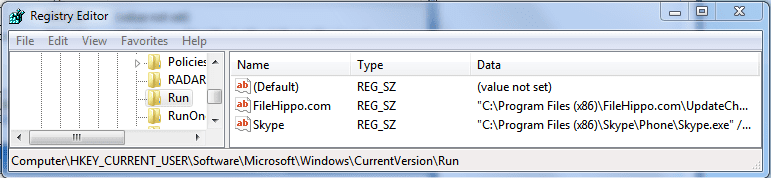
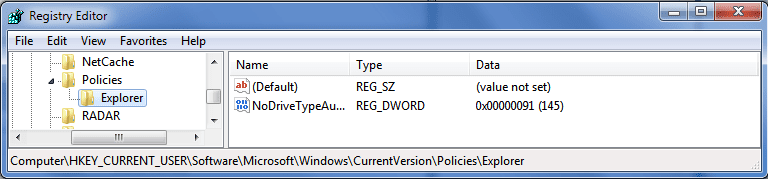
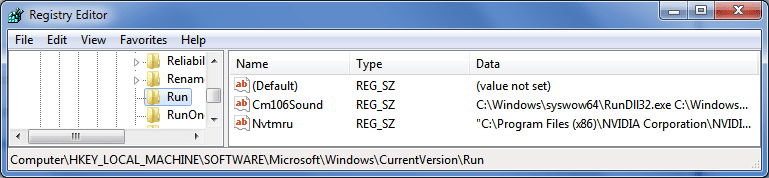
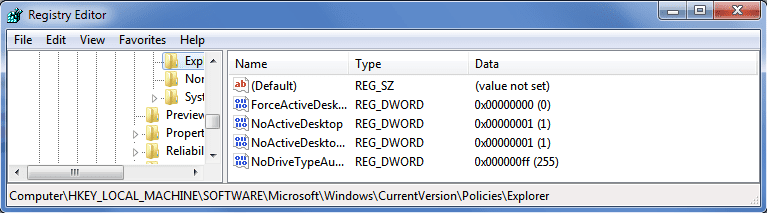
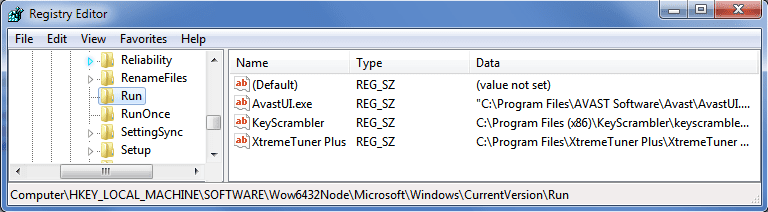
The programs listed for startup are as shown in the attached screenshots:

1.png is HKEY_CURRENT_USER\Software\Microsoft\Windows\CurrentVersion\Run

HKEY_CURRENT_USER\Software\Microsoft\Windows\CurrentVersion\RunOnce only has (Default).

2.png shows HKEY_CURRENT_USER\Software\Microsoft\Windows\CurrentVersion\Policies\Explorer, as there was no /Run to expand.

3.png is HKEY_LOCAL_MACHINE\SOFTWARE\Microsoft\Windows\CurrentVersion\Run

HKEY_LOCAL_MACHINE\SOFTWARE\Microsoft\Windows\CurrentVersion\RunOnce only has rstui.exe, due to a previous system restore attempt.

4.png shows HKEY_LOCAL_MACHINE\Software\Microsoft\Windows\CurrentVersion\Policies\Explorer, as there was no /Run to expand.

5.png is HKEY_LOCAL_MACHINE\SOFTWARE\Wow6432Node\Microsoft\Windows\CurrentVersion\Run

HKEY_LOCAL_MACHINE\SOFTWARE\Wow6432Node\Microsoft\Windows\CurrentVersion\RunOnce only has (Default).

I couldn't see anything abnormal about the startup operations from the registry.

EDIT: Running adwcleaner didn't seem to fix the issue, and I already scanned with SuperAntiSpyware and MalwareBytes, with no results from either, save for some tracking cookies.
 

Attachments

  • 1.PNG
    1.PNG
    14.3 KB · Views: 1
  • 2.PNG
    2.PNG
    12.8 KB · Views: 1
  • 3.PNG
    3.PNG
    13.3 KB · Views: 1
  • 4.PNG
    4.PNG
    13.4 KB · Views: 1
  • 5.PNG
    5.PNG
    14.3 KB · Views: 1

My Computer

Computer type
PC/Desktop
Computer Manufacturer/Model Number
Custom
OS
Windows 7 Ultimate 64 bit
CPU
AMD FX-8150
Motherboard
Gigabyte 990FXA-UD3
Memory
8 GB DDR3 1600
Graphics Card(s)
NVIDIA GTX 770
Monitor(s) Displays
AOC e2251 swdn
Screen Resolution
1920x1080
Hard Drives
Kingston 120GB SSD
Seagate 1TB HDD
PSU
Antec HCG-900
Case
CoolerMaster Elite 430
Keyboard
Logitech G15
Mouse
CoolerMaster Xornet
Antivirus
Avast Internet Security
Browser
Chrome
Back
Top