Library - Set Save Folder

How to Set the "Default Save Location" Folder for a Library in Windows 7

   Information
This will show you how to set an included folder in a Windows 7 library as the default save location folder to save everything new, that is copied or moved into that library, to that folder location. By default, everything in a library is saved into a Personal user folder.

   Note
Libraries let you access and arrange items from one or more folders quickly without moving them from their original location. Libraries themselves don't store your files or folders. Instead, they point to different locations on a hard disk or external drive attached to your computer. This gives you easy access to a category of files no matter where they are stored. For instance, if you have music files on your hard disk and on an external drive, you can access all of your music files from within the "Music" library.


For more information about Windows 7 Libraries see:
   Tip
The full path to the hidden Libraries folder is below.

C:\Users\(User-Name)\AppData\Roaming\Microsoft\Windows\Libraries

OR

%AppData%\Microsoft\Windows\Libraries


Here's How:
1. Open Windows Explorer, and click on Libraries in the navigation pane. (see screenshot below step 2)

2. Right click on the library (ex: Music) that you want to set the default save included folder for, and click on Properties. (see screenshot below)
Libraries.jpg
A) Select (hightlight) the included folder that you want to set as the default save to folder, and click on the Set save location button. (see screenshot below)
Properties-1.jpg
B) Go to step 4.
OR

3. Open the library (ex: Music) that you want to set the default save included folder for. (see screenshot below step 2)
A) Click on the # Locations toolbar button. (see screenshot below)
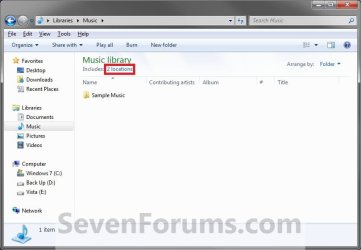
Library.jpg
B) Right click on the included folder that you want to set as the default save to folder, then click on Set as default save location. (see screenshots below)
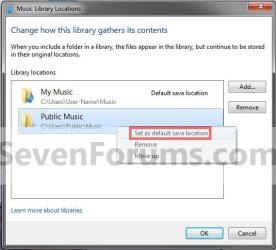
Set-1.jpg
4. Click on OK. (see screenshots below steps 2A or 3B)
NOTE: You will notice that the new default save location folder has a check mark next to it.

5. Close the library window when done. (see screenshot below step 3A).
NOTE: You will not see this if you did step 2 instead of step 3.

6. Close the Libraries window when done. (see screenshot below step 2)

That's it,
Shawn


Last edited:
Hey Shawn,
Something I've just found that's tripped me up.

If the default save location is on another drive and that drive is removed, it will no longer appear in the library.
When trying to create a new document, you may end up with a 'File System Error (512)', as a default location does not exist.
You'll then need to revisit step 3A or 4B to set one.
 

My Computer

OS
Windows 7 Enterprise
CPU
Intel Pentium Dual E2200 @2.2GHz
Motherboard
Gigabyte II-G31
Memory
4GB
Graphics Card(s)
Palit GForce 9500GT 1GB
Sound Card
onBoard
Hard Drives
WesternDigital: 250GB + 1TB + 1TB + 2TB
PSU
450W
Case
CoolerMaster CM690
Cooling
Corsair H50
Mouse
Logitech MX518
Hello Xarden,

Correct, if you were to remove the drive where the default save to location is located, then you would need to set a new save to location to stop getting the error.
 

My Computer

Computer type
PC/Desktop
Computer Manufacturer/Model Number
Self built custom
OS
64-bit Windows 11 Pro for Workstations
CPU
Intel i7-8700K OC'd to 5 GHz
Motherboard
ASUS ROG Maximus XI Formula Z390
Memory
64 GB (4x16GB) G.SKILL TridentZ RGB DDR4 3600 MHz
Graphics Card(s)
ASUS ROG-STRIX-GTX1080TI-O11G-GAMING
Sound Card
Integrated
Monitor(s) Displays
2 x Samsung Odyssey G7 27"
Screen Resolution
2560x1440
Hard Drives
1TB Samsung 990 PRO M.2,
4TB Samsung 990 PRO PRO M.2,
TerraMaster F8 SSD Plus NAS
PSU
Seasonic Prime Titanium 850W
Case
Thermaltake Core P3
Cooling
Corsair Hydro H115i
Keyboard
Logitech wireless K800
Mouse
Logitech MX Master 4
Internet Speed
2 Gb/s Download and 100 Mb/s Upload
Antivirus
Malwarebyte Anti-Malware Premium
Browser
Google Chrome
Other Info
Logitech Z625 speaker system,
Logitech BRIO 4K Pro webcam,
HP Color LaserJet Pro MFP M477fdn,
APC SMART-UPS RT 1000 XL - SURT1000XLI,
Galaxy S23 Plus phone
Hey guys.

This may be a little outside the scope of this article - it's to do with .NET programming not detecting a custom documents folder.

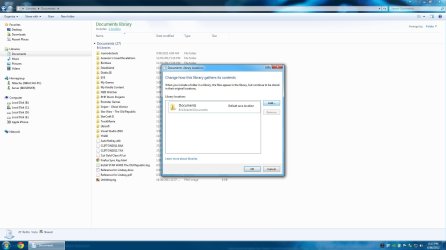
I've set up my documents library to a different location (B:\Libraries\Documents) as outlined in the steps above. I've attached a screenshot of the locations window so you can see it's set up right.

Everything works ok except an application I wrote in VS C# .NET that saves & loads a file from the Environment.SpecialFolder.Personal folder (which retrieves a dynamic path to the my documents folder). This application still reads/writes to the C:\Users\Username\Documents folder for some strange reason. This may be outside the scope of this thread but I'm just curious as to how it arrives at this destination and how to fix this - Obviously the folder path it fetches is dynamic as it gets the currently logged in username, but how come it doesn't get the right documents path? :S
 

Attachments

  • docs library.jpg
    docs library.jpg
    116.6 KB · Views: 1,106

My Computer

Computer Manufacturer/Model Number
Home built by myself.
OS
Windows 7 Ultimate x64 SP1
CPU
Intel i5 2500K
Motherboard
Asus Maximus Gene V
Memory
8Gb DDR3 1600MHz
Graphics Card(s)
2 x Gigabyte GTX550 Ti's running in SLI
Sound Card
mobo
Monitor(s) Displays
2 x Acer P444 24"
Screen Resolution
1920x1080 on both monitors
Hard Drives
WD 2TB 32M cache
PSU
can't remember
Case
Antec 900
Cooling
fan cooled
Internet Speed
ADSL2+ 18000/950
Hello CJ,

You might see if setting your program to save to the location below may work instead. It's the path to the Documents library folder itself. From there, it would actually save to whatever you had set as the default save to location in the tutorial.

%AppData%\Microsoft\Windows\Libraries\Documents.library-ms

Hope this helps,
Shawn
 

My Computer

Computer type
PC/Desktop
Computer Manufacturer/Model Number
Self built custom
OS
64-bit Windows 11 Pro for Workstations
CPU
Intel i7-8700K OC'd to 5 GHz
Motherboard
ASUS ROG Maximus XI Formula Z390
Memory
64 GB (4x16GB) G.SKILL TridentZ RGB DDR4 3600 MHz
Graphics Card(s)
ASUS ROG-STRIX-GTX1080TI-O11G-GAMING
Sound Card
Integrated
Monitor(s) Displays
2 x Samsung Odyssey G7 27"
Screen Resolution
2560x1440
Hard Drives
1TB Samsung 990 PRO M.2,
4TB Samsung 990 PRO PRO M.2,
TerraMaster F8 SSD Plus NAS
PSU
Seasonic Prime Titanium 850W
Case
Thermaltake Core P3
Cooling
Corsair Hydro H115i
Keyboard
Logitech wireless K800
Mouse
Logitech MX Master 4
Internet Speed
2 Gb/s Download and 100 Mb/s Upload
Antivirus
Malwarebyte Anti-Malware Premium
Browser
Google Chrome
Other Info
Logitech Z625 speaker system,
Logitech BRIO 4K Pro webcam,
HP Color LaserJet Pro MFP M477fdn,
APC SMART-UPS RT 1000 XL - SURT1000XLI,
Galaxy S23 Plus phone
Thanks Shawn, I'll give that a bash tonight after work! :)
 

My Computer

Computer Manufacturer/Model Number
Home built by myself.
OS
Windows 7 Ultimate x64 SP1
CPU
Intel i5 2500K
Motherboard
Asus Maximus Gene V
Memory
8Gb DDR3 1600MHz
Graphics Card(s)
2 x Gigabyte GTX550 Ti's running in SLI
Sound Card
mobo
Monitor(s) Displays
2 x Acer P444 24"
Screen Resolution
1920x1080 on both monitors
Hard Drives
WD 2TB 32M cache
PSU
can't remember
Case
Antec 900
Cooling
fan cooled
Internet Speed
ADSL2+ 18000/950
You're welcome. I hope it'll work for you. :)
 

My Computer

Computer type
PC/Desktop
Computer Manufacturer/Model Number
Self built custom
OS
64-bit Windows 11 Pro for Workstations
CPU
Intel i7-8700K OC'd to 5 GHz
Motherboard
ASUS ROG Maximus XI Formula Z390
Memory
64 GB (4x16GB) G.SKILL TridentZ RGB DDR4 3600 MHz
Graphics Card(s)
ASUS ROG-STRIX-GTX1080TI-O11G-GAMING
Sound Card
Integrated
Monitor(s) Displays
2 x Samsung Odyssey G7 27"
Screen Resolution
2560x1440
Hard Drives
1TB Samsung 990 PRO M.2,
4TB Samsung 990 PRO PRO M.2,
TerraMaster F8 SSD Plus NAS
PSU
Seasonic Prime Titanium 850W
Case
Thermaltake Core P3
Cooling
Corsair Hydro H115i
Keyboard
Logitech wireless K800
Mouse
Logitech MX Master 4
Internet Speed
2 Gb/s Download and 100 Mb/s Upload
Antivirus
Malwarebyte Anti-Malware Premium
Browser
Google Chrome
Other Info
Logitech Z625 speaker system,
Logitech BRIO 4K Pro webcam,
HP Color LaserJet Pro MFP M477fdn,
APC SMART-UPS RT 1000 XL - SURT1000XLI,
Galaxy S23 Plus phone
Well as usual it wasn't quite that easy!!!

I tried several ways to load that folder, but it seems .NET applications do not like trying to load it directly. (When I tried to create a folder in the docs it said that folder already exists, which it didn't)
I ended up doing a bit of googling/prowling through stack overflow and found this neat little API that helps with libraries and such: WindowsAPICodePack

So long story short Environment.SpecialFolder.Personal gets the common documents repository for the current user.
I had to use the ShellLibrary component of the above API, use it to find the documents library as follows:

Code:
ShellLibrary Documents = ShellLibrary.Load("Documents", Path.Combine(Environment.GetEnvironmentVariable("appdata"), @"Microsoft\Windows\Libraries\"), false);

Then get the full path of the library's default save folder and then simply continue as per normal from there... :)
Code:
string ProgramDir = Path.Combine(Documents.DefaultSaveFolder, "NZB Watcher");
string OptionsFileName = Path.Combine(ProgramDir, "options.xml");

And Huzzah!!! It's now working perfectly! Thanks for your help mate :)
 

My Computer

Computer Manufacturer/Model Number
Home built by myself.
OS
Windows 7 Ultimate x64 SP1
CPU
Intel i5 2500K
Motherboard
Asus Maximus Gene V
Memory
8Gb DDR3 1600MHz
Graphics Card(s)
2 x Gigabyte GTX550 Ti's running in SLI
Sound Card
mobo
Monitor(s) Displays
2 x Acer P444 24"
Screen Resolution
1920x1080 on both monitors
Hard Drives
WD 2TB 32M cache
PSU
can't remember
Case
Antec 900
Cooling
fan cooled
Internet Speed
ADSL2+ 18000/950
Tha'ts great news bioNuke. I'm happy to hear you got it sorted out. To bad they could just make it easier to do.
 

My Computer

Computer type
PC/Desktop
Computer Manufacturer/Model Number
Self built custom
OS
64-bit Windows 11 Pro for Workstations
CPU
Intel i7-8700K OC'd to 5 GHz
Motherboard
ASUS ROG Maximus XI Formula Z390
Memory
64 GB (4x16GB) G.SKILL TridentZ RGB DDR4 3600 MHz
Graphics Card(s)
ASUS ROG-STRIX-GTX1080TI-O11G-GAMING
Sound Card
Integrated
Monitor(s) Displays
2 x Samsung Odyssey G7 27"
Screen Resolution
2560x1440
Hard Drives
1TB Samsung 990 PRO M.2,
4TB Samsung 990 PRO PRO M.2,
TerraMaster F8 SSD Plus NAS
PSU
Seasonic Prime Titanium 850W
Case
Thermaltake Core P3
Cooling
Corsair Hydro H115i
Keyboard
Logitech wireless K800
Mouse
Logitech MX Master 4
Internet Speed
2 Gb/s Download and 100 Mb/s Upload
Antivirus
Malwarebyte Anti-Malware Premium
Browser
Google Chrome
Other Info
Logitech Z625 speaker system,
Logitech BRIO 4K Pro webcam,
HP Color LaserJet Pro MFP M477fdn,
APC SMART-UPS RT 1000 XL - SURT1000XLI,
Galaxy S23 Plus phone
thanks. this article is exactly what i was looking for. funny how ms didn't include the desktop in the library, because, like, duh
 

My Computer

Computer type
PC/Desktop
Computer Manufacturer/Model Number
hamidbuilt
OS
debian, mint, mx, 7
CPU
ryzen 7 2700
Motherboard
asrock b450 itx ac
Memory
g.skill ddr4 3200
Graphics Card(s)
evga gtx 750 ti
Monitor(s) Displays
aoc gsync
Screen Resolution
1920x1080
Hard Drives
evoplus m.2
PSU
stryker fanless (kingwin)
Case
fractal design nano s window
Keyboard
logitech
Mouse
logitech trackball
Internet Speed
dsl, one step above analog modem
Antivirus
me. i am the antivirus. i remove mcafee and norton
Browser
pale moon, sea monkey, vivaldi, firefox
Other Info
i started programming with punch cards on fortran
:thumbsup:
 

My Computer

Computer type
PC/Desktop
Computer Manufacturer/Model Number
Self built custom
OS
64-bit Windows 11 Pro for Workstations
CPU
Intel i7-8700K OC'd to 5 GHz
Motherboard
ASUS ROG Maximus XI Formula Z390
Memory
64 GB (4x16GB) G.SKILL TridentZ RGB DDR4 3600 MHz
Graphics Card(s)
ASUS ROG-STRIX-GTX1080TI-O11G-GAMING
Sound Card
Integrated
Monitor(s) Displays
2 x Samsung Odyssey G7 27"
Screen Resolution
2560x1440
Hard Drives
1TB Samsung 990 PRO M.2,
4TB Samsung 990 PRO PRO M.2,
TerraMaster F8 SSD Plus NAS
PSU
Seasonic Prime Titanium 850W
Case
Thermaltake Core P3
Cooling
Corsair Hydro H115i
Keyboard
Logitech wireless K800
Mouse
Logitech MX Master 4
Internet Speed
2 Gb/s Download and 100 Mb/s Upload
Antivirus
Malwarebyte Anti-Malware Premium
Browser
Google Chrome
Other Info
Logitech Z625 speaker system,
Logitech BRIO 4K Pro webcam,
HP Color LaserJet Pro MFP M477fdn,
APC SMART-UPS RT 1000 XL - SURT1000XLI,
Galaxy S23 Plus phone
Back
Top