[FONT="]My computer has an ASUS All Series Model (Intel) motherboard, sorry I don’t know the exact details as somebody else installed it for me a few months ago. BelArc says the main circuit board is AUSUTeK Computer Inc. H81M-PLUS Rev X.Ox. And I run Windows7 Home Premium 64-bit.[/FONT]
[FONT="]I have wi-fi and an Ethernet cable and I never turn the router off, so the lights on that are normally always on, although occasionally a red light shows it’s not using the internet.[/FONT]
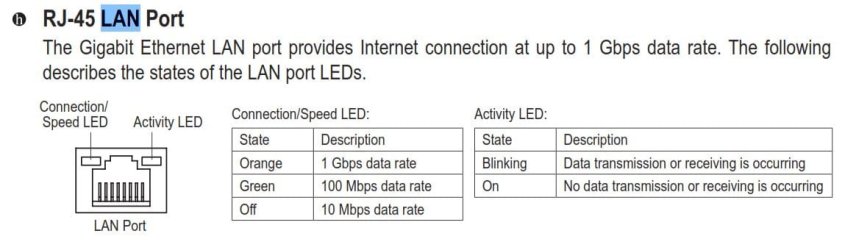
[FONT="]For the last few days I’ve noticed a light blinking from the back of the computer after shut-down (a sort of yellowy colour). I think it may be coming from the Ethernet position, and I do have a smartphone, again rarely used but always on, so maybe it’s trying to connect to that.[/FONT]
[FONT="]Not knowing exactly what’s going on, and worrying that my computer is about to die, I’ve been turning off the power to the computer completely after shutdown, although that doesn’t turn off the Ethernet connection, but it does stop the light flashing.[/FONT]
[FONT="]I’ve also noticed that when the computer is on the Ethernet cable is lit ( an orange glow) where it connects into the port – something I’ve not noticed before.[/FONT]
[FONT="]No new hardware of software has been installed.[/FONT]
[FONT="]I read somewhere that constantly turning off the power button at the back of the computer would probably damage it in time because of the power surge each time I switch it back on.[/FONT]
[FONT="]I’ve been into the Power Management settings and see that the box “Allow the computer to turn off this device to save power is checked.” And also the next box “Allow this device to wake the computer” is checked. Should I change these? I like to be able to wake up the computer when it’s been idle for a couple of hours just by hitting the space bar and/or moving the mouse.[/FONT]
[FONT="]So, my question is if what’s going on is normal, or a sign of some problem? And, if it’s normal, then is it OK to leave it just as shut down without having to turn the power off completely?[/FONT]
[FONT="]I’ll be back tomorrow to see if anyone has been able to help. Thank you.[/FONT]
[FONT="]I have wi-fi and an Ethernet cable and I never turn the router off, so the lights on that are normally always on, although occasionally a red light shows it’s not using the internet.[/FONT]
[FONT="]For the last few days I’ve noticed a light blinking from the back of the computer after shut-down (a sort of yellowy colour). I think it may be coming from the Ethernet position, and I do have a smartphone, again rarely used but always on, so maybe it’s trying to connect to that.[/FONT]
[FONT="]Not knowing exactly what’s going on, and worrying that my computer is about to die, I’ve been turning off the power to the computer completely after shutdown, although that doesn’t turn off the Ethernet connection, but it does stop the light flashing.[/FONT]
[FONT="]I’ve also noticed that when the computer is on the Ethernet cable is lit ( an orange glow) where it connects into the port – something I’ve not noticed before.[/FONT]
[FONT="]No new hardware of software has been installed.[/FONT]
[FONT="]I read somewhere that constantly turning off the power button at the back of the computer would probably damage it in time because of the power surge each time I switch it back on.[/FONT]
[FONT="]I’ve been into the Power Management settings and see that the box “Allow the computer to turn off this device to save power is checked.” And also the next box “Allow this device to wake the computer” is checked. Should I change these? I like to be able to wake up the computer when it’s been idle for a couple of hours just by hitting the space bar and/or moving the mouse.[/FONT]
[FONT="]So, my question is if what’s going on is normal, or a sign of some problem? And, if it’s normal, then is it OK to leave it just as shut down without having to turn the power off completely?[/FONT]
[FONT="]I’ll be back tomorrow to see if anyone has been able to help. Thank you.[/FONT]
My Computer
At a glance
Windows 7 Home Premium 32 bitAMD Athlon 64 4000+ Socket AM2 2.6GHz 2000FSB...4 MB (i.e. 2 x 2MB)Display adapters - NVIDIA GeForce 6150SE nFor...
- Computer Manufacturer/Model Number
- ACPIx86-based PC
- OS
- Windows 7 Home Premium 32 bit
- CPU
- AMD Athlon 64 4000+ Socket AM2 2.6GHz 2000FSB OEM Processor
- Motherboard
- MSI MS-7309 1.0 - MSI K9N6PGM2-V Socket AM2+ GeForce 6100 on
- Memory
- 4 MB (i.e. 2 x 2MB)
- Graphics Card(s)
- Display adapters - NVIDIA GeForce 6150SE nForce 430
- Sound Card
- Built in to Monitor
- Monitor(s) Displays
- Yüsmart Jean JTI98x9-1B (TFT) VGA
- Screen Resolution
- 1440x900
- Hard Drives
- 1 x 250 GB
- PSU
- eXtreme Power 460W
- Case
- CoolerMaster
- Cooling
- Akasa AK 860SF (Socket 754, 940, 939, AM2) aluminium Process
- Keyboard
- Microsoft
- Mouse
- 5-button Trust
- Internet Speed
- Download 7.0Mb/s Upload 0.8Mb/s
- Other Info
- Self built, dual core, SATA connections, and xtras: webcam and printer