
Limit RAM Cache?

Eblim

New member
Member
VIP
Local time
3:07 PM
Messages
159
Location
Eagle River, Alaska
How do I limit or reduce memory (RAM) caching?

"Why would want that?"

Because my cache takes 4GB of memory, and I only have 6GB total. I'm already using 1.4GB for open applications, which only leaves me 400 - 900mb of RAM for a heavy graphic video game (I need approximately 2GB at the very minimum). FPS is ridiculously low (frame lag).
 

My Computer

Computer type
PC/Desktop
Computer Manufacturer/Model Number
Custom Build
OS
Windows 7 Home Premium x64
CPU
Intel Core i7-3770S Quad @ 3.1 GHz (Turbo-Boost to 3.9GHz)
Motherboard
ASUS ROG Maximus V Formula ATX
Memory
16GB (DDR3) @1,600MHz Corsair Vengeance 2
Graphics Card(s)
EVGA GeForce GTX 960 SuperSC ACX 2.0+ 2GB
Monitor(s) Displays
Acer 23" S230HL
Screen Resolution
1920 x 1080
Hard Drives
Seagate 1TB @7,200rpm
PSU
850W Power Supply (Thermaltake - SP850M)
Case
NZXT SWITCH 810 Gun-Metal CA-SW810-G1
Cooling
Cooler Master Hyper 212 EVO (RR-212E-20PK)
Keyboard
Logitech G510
Mouse
Logitech G602
Internet Speed
5Mbps Download / 756kbps Upload
Antivirus
Microsoft Security Essentials
I think I found a temporary solution!

Is it a good idea to disable "Superfetch" before I play a graphically intense video game, and re-enable it after I'm finished? I'm finding this to be a good possibility for my needs.
 

My Computer

Computer type
PC/Desktop
Computer Manufacturer/Model Number
Custom Build
OS
Windows 7 Home Premium x64
CPU
Intel Core i7-3770S Quad @ 3.1 GHz (Turbo-Boost to 3.9GHz)
Motherboard
ASUS ROG Maximus V Formula ATX
Memory
16GB (DDR3) @1,600MHz Corsair Vengeance 2
Graphics Card(s)
EVGA GeForce GTX 960 SuperSC ACX 2.0+ 2GB
Monitor(s) Displays
Acer 23" S230HL
Screen Resolution
1920 x 1080
Hard Drives
Seagate 1TB @7,200rpm
PSU
850W Power Supply (Thermaltake - SP850M)
Case
NZXT SWITCH 810 Gun-Metal CA-SW810-G1
Cooling
Cooler Master Hyper 212 EVO (RR-212E-20PK)
Keyboard
Logitech G510
Mouse
Logitech G602
Internet Speed
5Mbps Download / 756kbps Upload
Antivirus
Microsoft Security Essentials

My Computer

Computer type
PC/Desktop
Computer Manufacturer/Model Number
Me
OS
Win 7 Ultimate x64
CPU
FX-8350 @ 4.6 GHz so far
Motherboard
Asus M5A97 EVO
Memory
ADATA XPG V1 Series Black 8GB DDR3 1600
Graphics Card(s)
Sapphire R9 270x Dual-X
Sound Card
Xonar DGX w/ Corsair Vengence 1300
Monitor(s) Displays
Acer S232HL Abid
Screen Resolution
1920x1080
Hard Drives
120 GB OCZ Vertex 3
500 GB Seagate 7200.12
PSU
Antec Earthwatts 650W Green
Case
Antec Three Hundred
Cooling
Cooler Master 212 EVO
Keyboard
Logitech G510
Mouse
Logitech G500s
Internet Speed
35000/3000
Didn't mean to upset you. As I said, it's for gaming. I know what caching does, but no memory frees when I start a game, at all. I have disabled Superfetch, and it's performance has increased significantly.

Thanks for the reply.
 

My Computer

Computer type
PC/Desktop
Computer Manufacturer/Model Number
Custom Build
OS
Windows 7 Home Premium x64
CPU
Intel Core i7-3770S Quad @ 3.1 GHz (Turbo-Boost to 3.9GHz)
Motherboard
ASUS ROG Maximus V Formula ATX
Memory
16GB (DDR3) @1,600MHz Corsair Vengeance 2
Graphics Card(s)
EVGA GeForce GTX 960 SuperSC ACX 2.0+ 2GB
Monitor(s) Displays
Acer 23" S230HL
Screen Resolution
1920 x 1080
Hard Drives
Seagate 1TB @7,200rpm
PSU
850W Power Supply (Thermaltake - SP850M)
Case
NZXT SWITCH 810 Gun-Metal CA-SW810-G1
Cooling
Cooler Master Hyper 212 EVO (RR-212E-20PK)
Keyboard
Logitech G510
Mouse
Logitech G602
Internet Speed
5Mbps Download / 756kbps Upload
Antivirus
Microsoft Security Essentials
I don't quite get that. Superfetch will preload frequently used applications, but if a running game requires RAM, it should replace the RAM used by the preloaded programs at no cost. Not arguing with what you see but maybe there is something more subtle at play.

Disabling superfetch before the game play should make no difference if it has already preloaded frequently accessed programs.

When you say no memory frees, what exactly do you mean? The working set of the game doesn't grow? How are you measuring this?
 

My Computer

Computer type
PC/Desktop
Computer Manufacturer/Model Number
Home built (GeneO industries)/Model 4
OS
Windows 10 Pro. EFI boot partition, full EFI boot
CPU
i7 4770k 4.4GHz (44-44-43-43 turbo) @ 1.248V
Motherboard
ASUS Maximus VI Hero
Memory
16GB (8GBx2) @2200 MHz G.skill Sniper 10-11-10-30-1, 1.6V
Graphics Card(s)
MSI GTX 970 Gaming 4G
Sound Card
Onboard SupremeFX Audio
Monitor(s) Displays
NEC Spectraview 2490WUXi-SV
Screen Resolution
1920 x 1200
Hard Drives
Samsung 850 Pro 256GB (OS), Samsung 2x 128GB 840 Pro SSD in RAID0, 3x WD Blue 6Gb/s 1TB RAID0, WD 2TB Black external USB 3.0, 2TB WD20EARS Green external USB 3.0, 2x 500GB Seagate and 1 750 GB external USB, 1x 350GB external USB3
PSU
Seasonic X-850 (2012 KM3 model)
Case
Fractal Design Define R4
Cooling
NH-D14, NF-F12, NF-A15; NF-P14, NF-P12,NF-A14, S12A PWM
Keyboard
Cooler Master Storm Quickfire Rapid - Brown
Mouse
Logitech G602
Internet Speed
126.4 Mb/s down, 24.3 Mb/s up
Other Info
USB 3.0 x8 , SATA III x8, eSATA, USB 2.0 x6. Samsung DVD R/W drive.

WEI: CPU 7.8, Memory 7.9, Graphics 7.9, Disk 7.9
I set prefetch and superfetch to only cache the bios for that reseaon, I just hate seeing so much ram being used. Would use 1.50-2.25gb out of my 4gb and i got it down to 1.15 and I saw no benefit in leaving it on as it would run about the same. Only thing i left it cache was the bios for the faster boot but that's about it. Anyways reason i did this is because it be using around 3gbs out of 4 when gaming and now it only uses 2. I did it by following this tutorial here on sevenforums http://www.sevenforums.com/tutorials/77119-superfetch-change-prefetch-data-cached.html?filter[2]=Performance%20Maintenance
 

My Computer

Computer type
PC/Desktop
Computer Manufacturer/Model Number
custom build
OS
Windows 10 64bit
CPU
AMD Phenom II X4 925 (Deneb)(2.8GHz) OC 3.4GHz
Motherboard
M5A78L-MLX Plus
Memory
Corsair Vengeance DDR3 4GBX2 (8192MB)
Graphics Card(s)
XFX HD 6870 1GB (OC)- 940MHz core, mem 1150MHz
Monitor(s) Displays
Vizio 26' 1920x1080 / Acer 1336x768
Screen Resolution
1920x1080 60Hz /1336x768
Hard Drives
Kingston Digital 60GB SSDNow V300/500gb HDD Western Digital 7200rpm (/WD 160GB HDD 7200rpm
PSU
CORSAIR CX600 600w
Case
AZZA Orion 202 EVO
Cooling
cooler master hyper TX3 cpu cooler
Keyboard
Razer DeathStalker
Mouse
Logitech Optical Gaming Mouse G400
Antivirus
Defualt on win 10
Browser
Firefox
Other Info
cpu is overclocked in bios
I set prefetch and superfetch to only cache the bios for that reseaon, I just hate seeing so much ram being used. Would use 1.50-2.25gb out of my 4gb and i got it down to 1.15 and I saw no benefit in leaving it on as it would run about the same. Only thing i left it cache was the bios for the faster boot but that's about it. Anyways reason i did this is because it be using around 3gbs out of 4 when gaming and now it only uses 2. I did it by following this tutorial here on sevenforums http://www.sevenforums.com/tutorials/77119-superfetch-change-prefetch-data-cached.html?filter[2]=Performance%20Maintenance

If you disable one of the best performace options included on windows vista and seven, file and application prefetching, why dont you go back to XP then? :huh:

Prefecth does not steals memory, if you launch a game that requieres the memory used by prefetch it gets released and assigned to the needed application, and as stated o all computer related forums: Unused ram is wasted ram.
 

My Computer

Computer type
PC/Desktop
OS
Microsoft Windows 10 Professional / Windows 7 Professional
CPU
Intel i5-3570
Motherboard
Lenovo Mahobay
Memory
16GB DDR3
Graphics Card(s)
AMD Radeon HD 7850 2GB
Sound Card
(1) Realtek HD Audio (2) AMD HD Audio
Monitor(s) Displays
LG LS192WS
Screen Resolution
1440 x 900 @ 32bit color
Hard Drives
(1) SUV300S37A/120G (2) ST3500413AS SATA Disk Device AHCI mode enabled.
PSU
Corsair HX620
Case
Thermaltake V4 Black Edition
Cooling
Cooler Master Hyper 212 + Artic Silver 5 on CPU/GPU
Keyboard
Dell SK-8115
Mouse
Razer Copperhead with MAPED mat (awesome!)
Internet Speed
100 Mbps up/down
Browser
Chrome
I set prefetch and superfetch to only cache the bios for that reseaon, I just hate seeing so much ram being used. Would use 1.50-2.25gb out of my 4gb and i got it down to 1.15 and I saw no benefit in leaving it on as it would run about the same. Only thing i left it cache was the bios for the faster boot but that's about it. Anyways reason i did this is because it be using around 3gbs out of 4 when gaming and now it only uses 2. I did it by following this tutorial here on sevenforums http://www.sevenforums.com/tutorials/77119-superfetch-change-prefetch-data-cached.html?filter[2]=Performance%20Maintenance

If you disable one of the best performace options included on windows vista and seven, file and application prefetching, why dont you go back to XP then? :huh:

Prefecth does not steals memory, if you launch a game that requieres the memory used by prefetch it gets released and assigned to the needed application, and as stated o all computer related forums: Unused ram is wasted ram.
Because windows 7 has dx11, that's why. And i like windows 7 whats wrong with me thinking differently from what you think if i see no benefit in leaving it on :rolleyes: Why would i go back to xp if I can do this and xp only supports dx9 so that is irrelevant to this topic.Plus i don't mind the 1sec difference for a application to open because anyways it will have to unload in the ram anyways, if it's just sitting there it's not helping or hurting me anyways.
 

My Computer

Computer type
PC/Desktop
Computer Manufacturer/Model Number
custom build
OS
Windows 10 64bit
CPU
AMD Phenom II X4 925 (Deneb)(2.8GHz) OC 3.4GHz
Motherboard
M5A78L-MLX Plus
Memory
Corsair Vengeance DDR3 4GBX2 (8192MB)
Graphics Card(s)
XFX HD 6870 1GB (OC)- 940MHz core, mem 1150MHz
Monitor(s) Displays
Vizio 26' 1920x1080 / Acer 1336x768
Screen Resolution
1920x1080 60Hz /1336x768
Hard Drives
Kingston Digital 60GB SSDNow V300/500gb HDD Western Digital 7200rpm (/WD 160GB HDD 7200rpm
PSU
CORSAIR CX600 600w
Case
AZZA Orion 202 EVO
Cooling
cooler master hyper TX3 cpu cooler
Keyboard
Razer DeathStalker
Mouse
Logitech Optical Gaming Mouse G400
Antivirus
Defualt on win 10
Browser
Firefox
Other Info
cpu is overclocked in bios
Capture.PNG
Can you show us this on your computer so we can see what your ram is doing.
Go to Start and type in resmon
 

My Computer

Computer type
PC/Desktop
Computer Manufacturer/Model Number
Home made Desktop
OS
Windows 10 Pro. 64/ version 1709 Windows 7 Pro/64
CPU
Intel i7-6800K @ 4.3
Motherboard
ASUS X-99 Deluxe II
Memory
Corsair Platinum 16 gig @2400
Graphics Card(s)
EVGA GTX 1070 OC
Monitor(s) Displays
Asus 27" LED LCD/VE278Q
Screen Resolution
1920-1080 or 1280-720 HDMI
Hard Drives
INTEL SSD 730-240 Gb Sata 3.0/
PSU
EVGA Platium 1200W
Case
Phanteks Luxe Tempered Glass 8 fans/ one radiator
Cooling
XSPC/ Water Cooled CPU
Keyboard
Das 4 Professional
Mouse
Logitech M705/MX Anywhere 2-S
Internet Speed
100 mbits
Antivirus
Microsoft Security Essentials/ Malwarebytes Premium 3.0/ SAS
Browser
I.E. 11 default/Firefox/ ISP Time Warner Cable/Spectrum
Other Info
LG BluRay Burner/
Sound system-KLipsch-THX/
Icy Dock ssd Hot Swap bays.
Because windows 7 has dx11, that's why. And i like windows 7 whats wrong with me thinking differently from what you think if i see no benefit in leaving it on :rolleyes: Why would i go back to xp if I can do this and xp only supports dx9 so that is irrelevant to this topic.Plus i don't mind the 1sec difference for a application to open because anyways it will have to unload in the ram anyways, if it's just sitting there it's not helping or hurting me anyways.

Lol, seriously, with a radeon 5450 and gaming in dx11? Do you even have an idea about gaming in DX11? I bet you're one of the guys who vlite windows7 to get more fps on games.
 

My Computer

Computer type
PC/Desktop
OS
Microsoft Windows 10 Professional / Windows 7 Professional
CPU
Intel i5-3570
Motherboard
Lenovo Mahobay
Memory
16GB DDR3
Graphics Card(s)
AMD Radeon HD 7850 2GB
Sound Card
(1) Realtek HD Audio (2) AMD HD Audio
Monitor(s) Displays
LG LS192WS
Screen Resolution
1440 x 900 @ 32bit color
Hard Drives
(1) SUV300S37A/120G (2) ST3500413AS SATA Disk Device AHCI mode enabled.
PSU
Corsair HX620
Case
Thermaltake V4 Black Edition
Cooling
Cooler Master Hyper 212 + Artic Silver 5 on CPU/GPU
Keyboard
Dell SK-8115
Mouse
Razer Copperhead with MAPED mat (awesome!)
Internet Speed
100 Mbps up/down
Browser
Chrome
Because windows 7 has dx11, that's why. And i like windows 7 whats wrong with me thinking differently from what you think if i see no benefit in leaving it on :rolleyes: Why would i go back to xp if I can do this and xp only supports dx9 so that is irrelevant to this topic.Plus i don't mind the 1sec difference for a application to open because anyways it will have to unload in the ram anyways, if it's just sitting there it's not helping or hurting me anyways.

Lol, seriously, with a radeon 5450 and gaming in dx11? Do you even have an idea about gaming in DX11? I bet you're one of the guys who vlite windows7 to get more fps on games.
why would i still use xp if its outdated? why does my card matter? And ye i can game in dx11 with OC the card fyi. And lastly umad? Doesn't matter anyways will be buying a xfx 6870 in two weeks once i accumulate all the money i need. Only reason i got this card was because i was on a tight budget. You can say all you want still won't agree with you about the cache thing
 

My Computer

Computer type
PC/Desktop
Computer Manufacturer/Model Number
custom build
OS
Windows 10 64bit
CPU
AMD Phenom II X4 925 (Deneb)(2.8GHz) OC 3.4GHz
Motherboard
M5A78L-MLX Plus
Memory
Corsair Vengeance DDR3 4GBX2 (8192MB)
Graphics Card(s)
XFX HD 6870 1GB (OC)- 940MHz core, mem 1150MHz
Monitor(s) Displays
Vizio 26' 1920x1080 / Acer 1336x768
Screen Resolution
1920x1080 60Hz /1336x768
Hard Drives
Kingston Digital 60GB SSDNow V300/500gb HDD Western Digital 7200rpm (/WD 160GB HDD 7200rpm
PSU
CORSAIR CX600 600w
Case
AZZA Orion 202 EVO
Cooling
cooler master hyper TX3 cpu cooler
Keyboard
Razer DeathStalker
Mouse
Logitech Optical Gaming Mouse G400
Antivirus
Defualt on win 10
Browser
Firefox
Other Info
cpu is overclocked in bios
Don't agree or agree no body cares. If you post your resmon we might be able to help explain even better.
 

My Computer

Computer type
PC/Desktop
Computer Manufacturer/Model Number
Home made Desktop
OS
Windows 10 Pro. 64/ version 1709 Windows 7 Pro/64
CPU
Intel i7-6800K @ 4.3
Motherboard
ASUS X-99 Deluxe II
Memory
Corsair Platinum 16 gig @2400
Graphics Card(s)
EVGA GTX 1070 OC
Monitor(s) Displays
Asus 27" LED LCD/VE278Q
Screen Resolution
1920-1080 or 1280-720 HDMI
Hard Drives
INTEL SSD 730-240 Gb Sata 3.0/
PSU
EVGA Platium 1200W
Case
Phanteks Luxe Tempered Glass 8 fans/ one radiator
Cooling
XSPC/ Water Cooled CPU
Keyboard
Das 4 Professional
Mouse
Logitech M705/MX Anywhere 2-S
Internet Speed
100 mbits
Antivirus
Microsoft Security Essentials/ Malwarebytes Premium 3.0/ SAS
Browser
I.E. 11 default/Firefox/ ISP Time Warner Cable/Spectrum
Other Info
LG BluRay Burner/
Sound system-KLipsch-THX/
Icy Dock ssd Hot Swap bays.
I was concerned about RAM usage when I first tried out Windows 7 during the beta period. I guess that was from habits formed back in the Win 95/Win 98 days when if available RAM dropped below 70% you saw significant performance degradation.

It's a whole new ballgame with Windows 7. It manages RAM much more effectively and is quick to respond to sudden demands from new programs being launched. You paid good money for that RAM - why not use it? :)
 

My Computer

Computer Manufacturer/Model Number
Self
OS
Main - Windows 7 Pro SP1 64-Bit; 2nd - Windows Server 2008 R2
CPU
Main - Core i7 2600K; 2nd - Core i7 920
Motherboard
Main - Asus P8Z68-V Pro/Gen3; 2nd - Gigabyte GA-EX58-UDR3
Memory
Main - 16GB Corsair Vengeance; 2nd - 12GB Corsair Vengeance
Graphics Card(s)
Main - XFX Radeon 6870 1GB; 2nd - XFX Radeon 4870 1GB
Sound Card
Both: Onboard Realtek Azalia
Monitor(s) Displays
Main - Hann 25" + I-INC 25" + Acer 23"; 2nd - Upgrading Soon
Screen Resolution
Main - 1920x1080 (All Three Monitors); 2nd - Upgrading Soon
Hard Drives
Main - (1) Crucial M4 128GB (Boot)
Main - (1) Seagate 2TB 64MB Cache (Data)
Main - (1) Seagate 2TB 64MB Cache (Data Backup)
2nd - (1) Intel X25-M SSD 80GB (Boot)
2nd - (3) Seagate 1TB 32MB Cache (Data Backup)
2nd - (1) Seagate 320GB (Because)
PSU
Main - OCZ 600W Modular; 2nd - OCZ 600W
Case
Main - Thermaltake Element G; 2nd - NZXT something or other
Cooling
Main - Corsair H80; 2nd - Prolimatech Megahalems
Keyboard
Main - Razer Reclusa; 2nd - Old MS Keyboard
Mouse
Main - Logitech MX Revolution; 2nd - Old MS Mouse
Internet Speed
20Mbps Time-Warner Cable
because on my other low end machine when i disabled it i saw a performance increase so I thought it would benefit this one also on my newer machine and it seems a bit more responsive to me. That's why I did it though if you can convince me that it helps and won't degrade performance especially when heavy gaming then i might reconsider it. Have this habbit since I tried vista and saw a big boost in that OS .
 

My Computer

Computer type
PC/Desktop
Computer Manufacturer/Model Number
custom build
OS
Windows 10 64bit
CPU
AMD Phenom II X4 925 (Deneb)(2.8GHz) OC 3.4GHz
Motherboard
M5A78L-MLX Plus
Memory
Corsair Vengeance DDR3 4GBX2 (8192MB)
Graphics Card(s)
XFX HD 6870 1GB (OC)- 940MHz core, mem 1150MHz
Monitor(s) Displays
Vizio 26' 1920x1080 / Acer 1336x768
Screen Resolution
1920x1080 60Hz /1336x768
Hard Drives
Kingston Digital 60GB SSDNow V300/500gb HDD Western Digital 7200rpm (/WD 160GB HDD 7200rpm
PSU
CORSAIR CX600 600w
Case
AZZA Orion 202 EVO
Cooling
cooler master hyper TX3 cpu cooler
Keyboard
Razer DeathStalker
Mouse
Logitech Optical Gaming Mouse G400
Antivirus
Defualt on win 10
Browser
Firefox
Other Info
cpu is overclocked in bios
Most people I know who used Vista (especially early on) felt like it needed all the help it could get when it came to performance. Most people I know who used Vista extensively and later moved on to Windows 7 tell me that there is little difference between the two, other than the huge improvement in performance under Windows 7. I personally never used Vista as my day-to-day OS.

A couple big things to remember about performance:

1) Benchmarks are all well and good and may be quite useful, but they do not always translate to "real world" performance.

2) The placebo effect is real. Six or seven years ago there was a big stir around a lot of tech forums about adding some sort of superfetch registry tweak that was supposed to speed up Win XP like crazy. I tried it and thought that it really sped things up, as did the majority of people I knew who tried it. No one seemed to think about the fact that if boosting performance was as easy as changing one registry value, maybe Microsoft might have done that by default. After all, you'll sell a lot more software if it performs well.

Apparently Microsoft got wind of the rumors about this "magic" registry tweak, because a few months later they released a white paper proving it to be a crock. Those of us who tried it "thinking" it would work actually thought it did work. When I sheepishly restored the setting to its default value I saw no decline in performance at all. In both case I saw exactly what I expected to see - a big boost after enabling it when I believed it to be true, and no difference when I believed it to be false and disabled it.

This is why they do a lot of blind studies about things like this. If you really want the truth, get a trusted friend to tweak the settings behind your back at various times, then keep track of how you feel things are working. If the system almost always seems to work better with the new settings then it probably actually did make a difference. If there is no correlation, it's all in your head. :)
 

My Computer

Computer Manufacturer/Model Number
Self
OS
Main - Windows 7 Pro SP1 64-Bit; 2nd - Windows Server 2008 R2
CPU
Main - Core i7 2600K; 2nd - Core i7 920
Motherboard
Main - Asus P8Z68-V Pro/Gen3; 2nd - Gigabyte GA-EX58-UDR3
Memory
Main - 16GB Corsair Vengeance; 2nd - 12GB Corsair Vengeance
Graphics Card(s)
Main - XFX Radeon 6870 1GB; 2nd - XFX Radeon 4870 1GB
Sound Card
Both: Onboard Realtek Azalia
Monitor(s) Displays
Main - Hann 25" + I-INC 25" + Acer 23"; 2nd - Upgrading Soon
Screen Resolution
Main - 1920x1080 (All Three Monitors); 2nd - Upgrading Soon
Hard Drives
Main - (1) Crucial M4 128GB (Boot)
Main - (1) Seagate 2TB 64MB Cache (Data)
Main - (1) Seagate 2TB 64MB Cache (Data Backup)
2nd - (1) Intel X25-M SSD 80GB (Boot)
2nd - (3) Seagate 1TB 32MB Cache (Data Backup)
2nd - (1) Seagate 320GB (Because)
PSU
Main - OCZ 600W Modular; 2nd - OCZ 600W
Case
Main - Thermaltake Element G; 2nd - NZXT something or other
Cooling
Main - Corsair H80; 2nd - Prolimatech Megahalems
Keyboard
Main - Razer Reclusa; 2nd - Old MS Keyboard
Mouse
Main - Logitech MX Revolution; 2nd - Old MS Mouse
Internet Speed
20Mbps Time-Warner Cable
I don't quite get that. Superfetch will preload frequently used applications, but if a running game requires RAM, it should replace the RAM used by the preloaded programs at no cost. Not arguing with what you see but maybe there is something more subtle at play.

Disabling superfetch before the game play should make no difference if it has already preloaded frequently accessed programs.

When you say no memory frees, what exactly do you mean? The working set of the game doesn't grow? How are you measuring this?

For example:

Let's say I have 4GB of RAM cached, and 1GB currently being used. That leaves me with 1GB memory available. Next, I'll start a graphically intense game. That 1GB of available memory will quickly be used. Now I'm left with 0 memory available, 4GB of Cache, and a game with very, very low FPS. The memory doesn't free up while I play a game. Not sure if the client I'm playing on has to do with it or not, because it's only one game specifically so far.
 

My Computer

Computer type
PC/Desktop
Computer Manufacturer/Model Number
Custom Build
OS
Windows 7 Home Premium x64
CPU
Intel Core i7-3770S Quad @ 3.1 GHz (Turbo-Boost to 3.9GHz)
Motherboard
ASUS ROG Maximus V Formula ATX
Memory
16GB (DDR3) @1,600MHz Corsair Vengeance 2
Graphics Card(s)
EVGA GeForce GTX 960 SuperSC ACX 2.0+ 2GB
Monitor(s) Displays
Acer 23" S230HL
Screen Resolution
1920 x 1080
Hard Drives
Seagate 1TB @7,200rpm
PSU
850W Power Supply (Thermaltake - SP850M)
Case
NZXT SWITCH 810 Gun-Metal CA-SW810-G1
Cooling
Cooler Master Hyper 212 EVO (RR-212E-20PK)
Keyboard
Logitech G510
Mouse
Logitech G602
Internet Speed
5Mbps Download / 756kbps Upload
Antivirus
Microsoft Security Essentials
Try running that particular game at a higher priority and see what happens. I know that's "CPU" priority, but it might be interesting to see if the RAM caching behaves any differently.
 

My Computer

Computer Manufacturer/Model Number
Self
OS
Main - Windows 7 Pro SP1 64-Bit; 2nd - Windows Server 2008 R2
CPU
Main - Core i7 2600K; 2nd - Core i7 920
Motherboard
Main - Asus P8Z68-V Pro/Gen3; 2nd - Gigabyte GA-EX58-UDR3
Memory
Main - 16GB Corsair Vengeance; 2nd - 12GB Corsair Vengeance
Graphics Card(s)
Main - XFX Radeon 6870 1GB; 2nd - XFX Radeon 4870 1GB
Sound Card
Both: Onboard Realtek Azalia
Monitor(s) Displays
Main - Hann 25" + I-INC 25" + Acer 23"; 2nd - Upgrading Soon
Screen Resolution
Main - 1920x1080 (All Three Monitors); 2nd - Upgrading Soon
Hard Drives
Main - (1) Crucial M4 128GB (Boot)
Main - (1) Seagate 2TB 64MB Cache (Data)
Main - (1) Seagate 2TB 64MB Cache (Data Backup)
2nd - (1) Intel X25-M SSD 80GB (Boot)
2nd - (3) Seagate 1TB 32MB Cache (Data Backup)
2nd - (1) Seagate 320GB (Because)
PSU
Main - OCZ 600W Modular; 2nd - OCZ 600W
Case
Main - Thermaltake Element G; 2nd - NZXT something or other
Cooling
Main - Corsair H80; 2nd - Prolimatech Megahalems
Keyboard
Main - Razer Reclusa; 2nd - Old MS Keyboard
Mouse
Main - Logitech MX Revolution; 2nd - Old MS Mouse
Internet Speed
20Mbps Time-Warner Cable
Let's say I have 4GB of RAM cached, and 1GB currently being used. That leaves me with 1GB memory available. Next, I'll start a graphically intense game. That 1GB of available memory will quickly be used. Now I'm left with 0 memory available, 4GB of Cache, and a game with very, very low FPS. The memory doesn't free up while I play a game. Not sure if the client I'm playing on has to do with it or not, because it's only one game specifically so far.

Do this. Open Resource Monitor by typing it into the start menu search. Go to the Memory tab, make sure Physical Memory is open. Then run your game for a few minutes, return to Resource Monitor while the game is active. Take a screen shot and show us.
 

My Computer

Computer type
PC/Desktop
Computer Manufacturer/Model Number
Alienware Aurora ALX R4
OS
Windows 10 Pro (x64)
CPU
Intel Core i7-3930K (3.2GHz - 4.5GHz)
Motherboard
Alienware Aurora-R4 x79
Memory
4x Samsung 4GB PC3-12800 DDR3 (16GB 1600MHz)
Graphics Card(s)
Nvidia Geforce GTX 690
Sound Card
SteelSeries Siberia Elite
Monitor(s) Displays
Dell UltraSharp U3011
Screen Resolution
2560x1600
Hard Drives
Samsung 850 Pro 256 GB, Seagate 1TB Desktop Hybrid HDD, 2x Western Digital 4TB Green HDD
PSU
875W Some Dell PSU <.<
Case
Alienware Aurora ALX
Cooling
Custom Liquid Cooling (EK CPU & GPU blocks) dual EK 480RAD
Keyboard
Logitech G710+ Mechanical
Mouse
Logitech G700s
Internet Speed
Verizon Fios (50 mbps average)
Other Info
Server: Intel NUC D54250WYK: i5-4250U, 16GB, 256 GB mSATA, Windows Server 2012 R2
How do I limit or reduce memory (RAM) caching?

"Why would want that?"

Because my cache takes 4GB of memory, and I only have 6GB total. I'm already using 1.4GB for open applications, which only leaves me 400 - 900mb of RAM for a heavy graphic video game (I need approximately 2GB at the very minimum). FPS is ridiculously low (frame lag).

How many programs do you have open when you want to play a game or how much memory does the largest consume?

I opened 2 56mb tiff files in Photoshop, 24kb svg in Illustrator, a blank doc in Word 2010, a 2mb jpg in Paint, Winamp with empty playlist, 1mb pdf in Acrobat, small project in Visual Studio, Nokia PC Suite, PowerDVD, Firefox, a folder in Explorer, Notepad and Resource Monitor, this is on top of my Anti-Virus, Firewall and a few others that load with Windows (76 processes on boot). Now this is what Resource Monitor tells me

In Use: 2540
Available: 1475
Cached: 1538
Commit: 4242/8188 (From Task Manager)

Then I ran Crysis2 and loaded my game then ALT+Tab out, fps were a little dodgy.
In Use: 3483
Available: 594
Cached: 608
Commit 7976/8655

Then I closed all programs except Crysis, fps good again.
In Use: 2801
Available: 1291
Cached: 767
Commit 5166/8188

One question I would ask is, have you made changes to the page file or does Windows manage it?

If Windows does not free the ram when you run the game you could try running a ram freeing program before playing and I would also suggest closing all unnecessary programs before playing.
 

My Computer

Computer Manufacturer/Model Number
Self built
OS
Windows 7 Ultimate x64
CPU
Intel Pentium Dual Core E5200 2.5GHz (3.77GHz OC)
Motherboard
Asus P5Q-E
Memory
Corsair 4GB DDR2 (4x1GB CM2X1024-6400C4)
Graphics Card(s)
Palit GeForce GTS 250 (1024MB)
Sound Card
On Board (ADI AD2000B 8ch HD)
Monitor(s) Displays
Samsung 32in LCD TV
Screen Resolution
1360x768
Hard Drives
2 x 1TB Samsung 103SJ (Raid0)
2 x External 500GB Samsung 502IJ (NexStar 3 HD Enclosures)
PSU
550W Antec Neo HE 550
Case
Antec P180
Cooling
Xigmatex Red Scorpion CPU Cooler. 3x120mm Fans
Keyboard
Logitech MX5000 Laser (Combo)
Mouse
Logitech MX5000 Laser (Combo)
Internet Speed
ADSL2+ (avg 10 Mbps Down, 0.80 Mbps up)
Other Info
Gigabyte GN-WP01GS 54g Wireless Lan Card
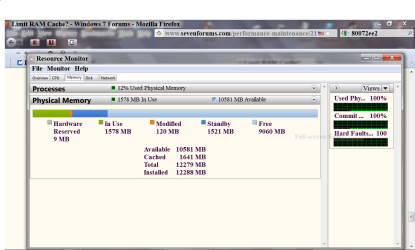
This is with 1 tab open in Google Chrome, and iTunes with a song playing.

screenshot0003february1.jpg
 

My Computer

Computer type
PC/Desktop
Computer Manufacturer/Model Number
Custom Build
OS
Windows 7 Home Premium x64
CPU
Intel Core i7-3770S Quad @ 3.1 GHz (Turbo-Boost to 3.9GHz)
Motherboard
ASUS ROG Maximus V Formula ATX
Memory
16GB (DDR3) @1,600MHz Corsair Vengeance 2
Graphics Card(s)
EVGA GeForce GTX 960 SuperSC ACX 2.0+ 2GB
Monitor(s) Displays
Acer 23" S230HL
Screen Resolution
1920 x 1080
Hard Drives
Seagate 1TB @7,200rpm
PSU
850W Power Supply (Thermaltake - SP850M)
Case
NZXT SWITCH 810 Gun-Metal CA-SW810-G1
Cooling
Cooler Master Hyper 212 EVO (RR-212E-20PK)
Keyboard
Logitech G510
Mouse
Logitech G602
Internet Speed
5Mbps Download / 756kbps Upload
Antivirus
Microsoft Security Essentials
Back
Top