Solved Limit which applications user can see

duleserbia

New member
Local time
8:51 AM
Messages
4
Hello,

How can I limit which applications user on win 7 could see?
I have attached the screenshot as I would like user to see when he/she presses the start. The screenshot I have attached is from win xp. Honestly I don't know how is this being done even on win xp.

Does anyone have clue on this?
Imagetoo - Free Image Hosting
 

My Computer My Computer

OS
Windows 7 Enterprise 32bit

My Computer My Computer

Computer type
PC/Desktop
OS
Windows 10 Home x64
CPU
INTEL Core i5-750 Quad-Core 3.37GHz
Motherboard
ASUS P7P55D
Memory
HyperX Fury Black Series 8GB (2 x 4GB) 1866Mhz
Graphics Card(s)
EVGA GeForce GTX 750 Superclocked 1GB 128-Bit GDDR5
Monitor(s) Displays
LG 32MA68HY 32" IPS
Screen Resolution
1920 x 1080
Hard Drives
Samsung 840 Evo 120GB, SEAGATE 500GB Barracuda® 7200.12, SATA 3 Gb/s, 7200 RPM, 16MB cache
PSU
ANTEC TruePower New TP-550, 80 PLUS, 550W
Case
ANTEC Three Hundred Illusion
Cooling
COOLER MASTER Hyper 212 Plus, 4 x 120mm 1 x 140mm Noctua's
Internet Speed
85 + Mbps
Antivirus
Avast
Browser
Vivaldi
So basically if I implement this limitations user will not see the applications on Start menu I have banned him from?
Also how will prevent him from seeing the Control Panel, COmputer, Network and other buttons that are also on start menu?

So the end result I would like is just like on screenshot I have supplied. User can see 3-4 apps he is working in and that's it. No Control Panel, no Computer, no search field or anything other than those 3-4 applications.
 

My Computer My Computer

OS
Windows 7 Enterprise 32bit
I have not used group policy myself as I am the only user. I will ask for others to reply to see what users can see if restrictions are in place. A Guy
 

My Computer My Computer

Computer type
PC/Desktop
OS
Windows 10 Home x64
CPU
INTEL Core i5-750 Quad-Core 3.37GHz
Motherboard
ASUS P7P55D
Memory
HyperX Fury Black Series 8GB (2 x 4GB) 1866Mhz
Graphics Card(s)
EVGA GeForce GTX 750 Superclocked 1GB 128-Bit GDDR5
Monitor(s) Displays
LG 32MA68HY 32" IPS
Screen Resolution
1920 x 1080
Hard Drives
Samsung 840 Evo 120GB, SEAGATE 500GB Barracuda® 7200.12, SATA 3 Gb/s, 7200 RPM, 16MB cache
PSU
ANTEC TruePower New TP-550, 80 PLUS, 550W
Case
ANTEC Three Hundred Illusion
Cooling
COOLER MASTER Hyper 212 Plus, 4 x 120mm 1 x 140mm Noctua's
Internet Speed
85 + Mbps
Antivirus
Avast
Browser
Vivaldi
If all you want is to remove them from the start menu for other users, I think all you have to do is remove the entry from the all users start menu tree and add it to your own username start menu. At least you could do that in XP.

All users is now public in w7, so I think all you have to do is move the shortcut from C:\ProgramData\Microsoft\Windows\Start Menu\Programs to C:\Users\yourusername\AppData\Roaming\Microsoft\Windows\Start Menu\Programs.

Edit: After re-reading your third post and realizing how much you want to prune from the start menu, I don't think you would be able to achieve that. Nor would it stop anyone from running those apps if the were able to find them. I think you would have to go with policies and maybe on top of that change the security settings of each executable. I think if you go with policies alone it won't actually stop the user from running them if the user can find the executables themselves in some round-about way.
 

My Computer My Computer

OS
Windows 7 Ultimate x64
If all you want is to remove them from the start menu for other users, I think all you have to do is remove the entry from the all users start menu tree and add it to your own username start menu. At least you could do that in XP.

All users is now public in w7, so I think all you have to do is move the shortcut from C:\ProgramData\Microsoft\Windows\Start Menu\Programs to C:\Users\yourusername\AppData\Roaming\Microsoft\Windows\Start Menu\Programs.

Thanks for info!
I will test this to see for the results
 

My Computer My Computer

OS
Windows 7 Enterprise 32bit
If that did work, wouldn't it just remove the start menu links, and not the ability to actually access the destinations through other means? A Guy
 

My Computer My Computer

Computer type
PC/Desktop
OS
Windows 10 Home x64
CPU
INTEL Core i5-750 Quad-Core 3.37GHz
Motherboard
ASUS P7P55D
Memory
HyperX Fury Black Series 8GB (2 x 4GB) 1866Mhz
Graphics Card(s)
EVGA GeForce GTX 750 Superclocked 1GB 128-Bit GDDR5
Monitor(s) Displays
LG 32MA68HY 32" IPS
Screen Resolution
1920 x 1080
Hard Drives
Samsung 840 Evo 120GB, SEAGATE 500GB Barracuda® 7200.12, SATA 3 Gb/s, 7200 RPM, 16MB cache
PSU
ANTEC TruePower New TP-550, 80 PLUS, 550W
Case
ANTEC Three Hundred Illusion
Cooling
COOLER MASTER Hyper 212 Plus, 4 x 120mm 1 x 140mm Noctua's
Internet Speed
85 + Mbps
Antivirus
Avast
Browser
Vivaldi
True.

One would not be eliminating the ability to access them.
 

My Computer My Computer

Computer Manufacturer/Model Number
Toshiba Satellite S875D-S7239 laptop
OS
MS Windows 7 Ultimate SP1 64-bit
CPU
AMD A10-4600M
Motherboard
AMD Pumori (Socket FT1)
Memory
6.00 GB Dual-Channel DDR3 @ 798MHz (11-11-12-28)
Graphics Card(s)
AMD Radeon HD 7660G
Sound Card
High Definition Audio Device
Monitor(s) Displays
Generic PnP Monitor (1600x900@60Hz)
Screen Resolution
1600x900@60Hz
Hard Drives
SSD 119GB Corsair CSSD-V128GB2 ATA Device
Keyboard
Standard PS/2 Keyboard
Mouse
HP Wireless Optical Mobile Mouse Model FHA-3410
Internet Speed
What the local pub, local coffee shop offers.
Other Info
Optical Drive:MATSHITA BD-CMB UJ160B ATA Device


Also have an Asus ha1002xp netbook with Win 7 Ultimate installed.
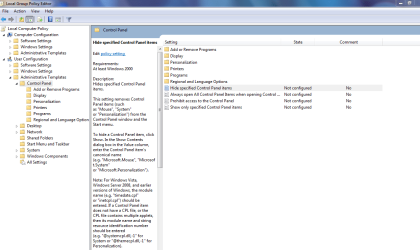
One thing you would want to do is:
WIN | type GPEDIT.MSC | ENTER
navigate as shown in following pic and investigate the options.
Prevent access.PNG
 

My Computer My Computer

Computer Manufacturer/Model Number
Toshiba Satellite S875D-S7239 laptop
OS
MS Windows 7 Ultimate SP1 64-bit
CPU
AMD A10-4600M
Motherboard
AMD Pumori (Socket FT1)
Memory
6.00 GB Dual-Channel DDR3 @ 798MHz (11-11-12-28)
Graphics Card(s)
AMD Radeon HD 7660G
Sound Card
High Definition Audio Device
Monitor(s) Displays
Generic PnP Monitor (1600x900@60Hz)
Screen Resolution
1600x900@60Hz
Hard Drives
SSD 119GB Corsair CSSD-V128GB2 ATA Device
Keyboard
Standard PS/2 Keyboard
Mouse
HP Wireless Optical Mobile Mouse Model FHA-3410
Internet Speed
What the local pub, local coffee shop offers.
Other Info
Optical Drive:MATSHITA BD-CMB UJ160B ATA Device


Also have an Asus ha1002xp netbook with Win 7 Ultimate installed.
Once I read the third post I added that edit to my original post. Didn't realize the full extent of what the OP wanted. I think you'd have to lock down most everything with policies, and even then may have to adjust security of individual executables. I don't think policy alone can do it if the user finds the executable in some roundabout way.
 

My Computer My Computer

OS
Windows 7 Ultimate x64
If all you want is to remove them from the start menu for other users, I think all you have to do is remove the entry from the all users start menu tree and add it to your own username start menu. At least you could do that in XP.

All users is now public in w7, so I think all you have to do is move the shortcut from C:\ProgramData\Microsoft\Windows\Start Menu\Programs to C:\Users\yourusername\AppData\Roaming\Microsoft\Windows\Start Menu\Programs.
Basically correct. Remove all items from "C:\ProgramData\Microsoft\Windows\Start Menu\Programs" and place all shortcuts in "C:\Users\Your Username\AppData\Roaming\Microsoft\Windows\Start Menu\Programs".

Then place the program shortcuts you want other users to use in "C:\Users\Other Username\AppData\Roaming\Microsoft\Windows\Start Menu\Programs" then only these programs should show on their Start menu.

If that did work, wouldn't it just remove the start menu links, and not the ability to actually access the destinations through other means? A Guy
This is also correct. The users will still be able to run any application they have permissions to by the cmd line, navigating to the exe file in Explorer, etc... The links provided by A Guy in post #2 should help with this but in regards to the first link here is another one in case you find you can't run the program - http://www.sevenforums.com/tutorials/151415-group-policy-apply-specific-user-group.html

For removing other things from Start check out Group Policy, specifically User Configuration > Administrative Template > Start Menu and Taskbar. Only downfall with this is it will remove any items for you as well.

EDIT: Use with above link should help.

I can't find a way to remove the Control Panel though without disabling it. You could modify each users Start menu manually if there's not too many users and under Group Policy set "Prevent changes to the Taskbar and Start Menu settings" to enabled. Users would still be able to access the Control Panel by other means though and they will not be able to change any settings relating to the Start menu or Taskbar.

EDIT: Disabling Control Panel used in conjuction with http://www.sevenforums.com/tutorials/151415-group-policy-apply-specific-user-group.html would be a better option if it works, unless you don't want access to it then you can just disable it globally. Disabling it will prevent access to any Control Panel items including Personalize, Screen Resolution when right clicking the Desktop.

As Karl pointed out you could disable only specific Control Panel items. To disable it use "Prohibit access to the Control Panel" which can be seen in Karl's screenshot.

 
Last edited:

My Computer My Computer

Computer Manufacturer/Model Number
Self built
OS
Windows 7 Ultimate x64
CPU
Intel Pentium Dual Core E5200 2.5GHz (3.77GHz OC)
Motherboard
Asus P5Q-E
Memory
Corsair 4GB DDR2 (4x1GB CM2X1024-6400C4)
Graphics Card(s)
Palit GeForce GTS 250 (1024MB)
Sound Card
On Board (ADI AD2000B 8ch HD)
Monitor(s) Displays
Samsung 32in LCD TV
Screen Resolution
1360x768
Hard Drives
2 x 1TB Samsung 103SJ (Raid0)
2 x External 500GB Samsung 502IJ (NexStar 3 HD Enclosures)
PSU
550W Antec Neo HE 550
Case
Antec P180
Cooling
Xigmatex Red Scorpion CPU Cooler. 3x120mm Fans
Keyboard
Logitech MX5000 Laser (Combo)
Mouse
Logitech MX5000 Laser (Combo)
Internet Speed
ADSL2+ (avg 10 Mbps Down, 0.80 Mbps up)
Other Info
Gigabyte GN-WP01GS 54g Wireless Lan Card
Duzzy,
See post #9 and play around with all the options.

That section of the Local Policy Editor which covers the control panel is quite flexible.
 

My Computer My Computer

Computer Manufacturer/Model Number
Toshiba Satellite S875D-S7239 laptop
OS
MS Windows 7 Ultimate SP1 64-bit
CPU
AMD A10-4600M
Motherboard
AMD Pumori (Socket FT1)
Memory
6.00 GB Dual-Channel DDR3 @ 798MHz (11-11-12-28)
Graphics Card(s)
AMD Radeon HD 7660G
Sound Card
High Definition Audio Device
Monitor(s) Displays
Generic PnP Monitor (1600x900@60Hz)
Screen Resolution
1600x900@60Hz
Hard Drives
SSD 119GB Corsair CSSD-V128GB2 ATA Device
Keyboard
Standard PS/2 Keyboard
Mouse
HP Wireless Optical Mobile Mouse Model FHA-3410
Internet Speed
What the local pub, local coffee shop offers.
Other Info
Optical Drive:MATSHITA BD-CMB UJ160B ATA Device


Also have an Asus ha1002xp netbook with Win 7 Ultimate installed.
@Karl
I was writing my post when you posted so I did make a edit to mine after seeing yours.

Good section for disabling individual items but I can only see the one option for removing it from the Start Menu and that's to enable "Prohibit access to the Control Panel".

Although it's a good reference as the OP will probably like to implement restrictions not just remove it from the Start menu.
 
Last edited:

My Computer My Computer

Computer Manufacturer/Model Number
Self built
OS
Windows 7 Ultimate x64
CPU
Intel Pentium Dual Core E5200 2.5GHz (3.77GHz OC)
Motherboard
Asus P5Q-E
Memory
Corsair 4GB DDR2 (4x1GB CM2X1024-6400C4)
Graphics Card(s)
Palit GeForce GTS 250 (1024MB)
Sound Card
On Board (ADI AD2000B 8ch HD)
Monitor(s) Displays
Samsung 32in LCD TV
Screen Resolution
1360x768
Hard Drives
2 x 1TB Samsung 103SJ (Raid0)
2 x External 500GB Samsung 502IJ (NexStar 3 HD Enclosures)
PSU
550W Antec Neo HE 550
Case
Antec P180
Cooling
Xigmatex Red Scorpion CPU Cooler. 3x120mm Fans
Keyboard
Logitech MX5000 Laser (Combo)
Mouse
Logitech MX5000 Laser (Combo)
Internet Speed
ADSL2+ (avg 10 Mbps Down, 0.80 Mbps up)
Other Info
Gigabyte GN-WP01GS 54g Wireless Lan Card
I'm having difficulty understanding your comment.

Please click on all of the items shown there and read the descriptive info.

Expand each of the "folders" and do same.
 

My Computer My Computer

Computer Manufacturer/Model Number
Toshiba Satellite S875D-S7239 laptop
OS
MS Windows 7 Ultimate SP1 64-bit
CPU
AMD A10-4600M
Motherboard
AMD Pumori (Socket FT1)
Memory
6.00 GB Dual-Channel DDR3 @ 798MHz (11-11-12-28)
Graphics Card(s)
AMD Radeon HD 7660G
Sound Card
High Definition Audio Device
Monitor(s) Displays
Generic PnP Monitor (1600x900@60Hz)
Screen Resolution
1600x900@60Hz
Hard Drives
SSD 119GB Corsair CSSD-V128GB2 ATA Device
Keyboard
Standard PS/2 Keyboard
Mouse
HP Wireless Optical Mobile Mouse Model FHA-3410
Internet Speed
What the local pub, local coffee shop offers.
Other Info
Optical Drive:MATSHITA BD-CMB UJ160B ATA Device


Also have an Asus ha1002xp netbook with Win 7 Ultimate installed.
The OP asked
How can I limit which applications user on win 7 could see?
I have attached the screenshot as I would like user to see when he/she presses the start.
All the descriptive info I read only refers to what is displayed in the Control Panel and access restictions to Control Panel Items. Not what is displayed in the Start Menu unless I'm missing something.

Except enabling "Prohibit access to the Control Panel" will remove it from the Start Menu as well as any access to it or any items via other means.

And as I said the OP will probably like to restrict access to all items or just some not just remove it from the Start menu and that is were that section would be useful.

Does that make sense?
 

My Computer My Computer

Computer Manufacturer/Model Number
Self built
OS
Windows 7 Ultimate x64
CPU
Intel Pentium Dual Core E5200 2.5GHz (3.77GHz OC)
Motherboard
Asus P5Q-E
Memory
Corsair 4GB DDR2 (4x1GB CM2X1024-6400C4)
Graphics Card(s)
Palit GeForce GTS 250 (1024MB)
Sound Card
On Board (ADI AD2000B 8ch HD)
Monitor(s) Displays
Samsung 32in LCD TV
Screen Resolution
1360x768
Hard Drives
2 x 1TB Samsung 103SJ (Raid0)
2 x External 500GB Samsung 502IJ (NexStar 3 HD Enclosures)
PSU
550W Antec Neo HE 550
Case
Antec P180
Cooling
Xigmatex Red Scorpion CPU Cooler. 3x120mm Fans
Keyboard
Logitech MX5000 Laser (Combo)
Mouse
Logitech MX5000 Laser (Combo)
Internet Speed
ADSL2+ (avg 10 Mbps Down, 0.80 Mbps up)
Other Info
Gigabyte GN-WP01GS 54g Wireless Lan Card

My Computer My Computer

Computer Manufacturer/Model Number
Toshiba Satellite S875D-S7239 laptop
OS
MS Windows 7 Ultimate SP1 64-bit
CPU
AMD A10-4600M
Motherboard
AMD Pumori (Socket FT1)
Memory
6.00 GB Dual-Channel DDR3 @ 798MHz (11-11-12-28)
Graphics Card(s)
AMD Radeon HD 7660G
Sound Card
High Definition Audio Device
Monitor(s) Displays
Generic PnP Monitor (1600x900@60Hz)
Screen Resolution
1600x900@60Hz
Hard Drives
SSD 119GB Corsair CSSD-V128GB2 ATA Device
Keyboard
Standard PS/2 Keyboard
Mouse
HP Wireless Optical Mobile Mouse Model FHA-3410
Internet Speed
What the local pub, local coffee shop offers.
Other Info
Optical Drive:MATSHITA BD-CMB UJ160B ATA Device


Also have an Asus ha1002xp netbook with Win 7 Ultimate installed.
Hey guys thanks a lot!!
I will make a combination of policy disabling access to applications for users and also do the hiding of not needed applications and settings.
It will take me some time to experiment to get the needed result - but you have supplied with all the necessary information needed!
 

My Computer My Computer

OS
Windows 7 Enterprise 32bit
Great! Glad you got what you needed. And thanks for posting your resolution!

And by the way, welcome to the forum! :)
 

My Computer My Computer

OS
Windows 7 Ultimate x64
Back
Top