
You are using an out of date browser. It may not display this or other websites correctly.
You should upgrade or use an alternative browser.
You should upgrade or use an alternative browser.
Solved Limited access on wireless network
- Thread starter shib
- Start date
Fotget this postin command prompt:
Code:reg query HKEY_LOCAL_MACHINE\SYSTEM\CurrentControlSet\Services\TcpIp
do it using copy/paste
Very sure it isn't there?
My Computer
At a glance
Microsoft Windows 7 Home Premium 64-bits 7601...Intel(R) Core(TM) i3 CPU M 370 @ 2.40GHz4,00 GBATI Mobility Radeon HD 5400 Series
- Computer type
- Laptop
- Computer Manufacturer/Model Number
- ACER ASPIRE 5742G
- OS
- Microsoft Windows 7 Home Premium 64-bits 7601 Multiprocessor Free Service Pack 1
- CPU
- Intel(R) Core(TM) i3 CPU M 370 @ 2.40GHz
- Motherboard
- Acer Aspire 5742G
- Memory
- 4,00 GB
- Graphics Card(s)
- ATI Mobility Radeon HD 5400 Series
- Sound Card
- (1) AMD High Definition Audio Device (2) Realtek High Defi
- Screen Resolution
- 1366 x 768 x 32 bits (4294967296 colors) @ 60 Hz
- Hard Drives
- WDC WD5000BEVT-22ZAT0
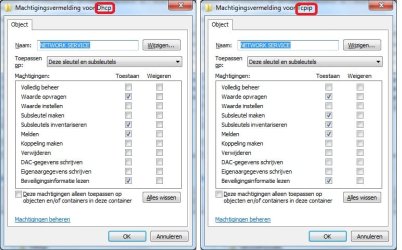
In most cases, this error can easily be solved by granting extra permissions in the registry.
To make the permission changes in the registry, do the following:
To make the permission changes in the registry, do the following:
- Click Start, click Run, type regedit and click OK
- Navigate to the following key: HKEY_LOCAL_MACHINE\SYSTEM\CurrentControlSet\Services\Dhcp
- Right click the key DHCP and click Permissions. Click Add, type network service and click OK
- Select NETWORKSERVICE and check the Full control box to grant NETWORKSERVICE full control on the DHCP key.
- Click OK to apply the changes and to close the window
- Click Start, click Run, type regedit and click OK
- Navigate to the following key: HKEY_LOCAL_MACHINE\SYSTEM\CurrentControlSet\Services\TcpIp
- Right click the key TcpIp and click Permissions. Click Add, type network service and click OK
- Select NETWORKSERVICE and check the Full control box to grant NETWORKSERVICE full control on the TcpIp key.
- Click OK to apply the changes and to close the window
My Computer
At a glance
Microsoft Windows 7 Home Premium 64-bits 7601...Intel(R) Core(TM) i3 CPU M 370 @ 2.40GHz4,00 GBATI Mobility Radeon HD 5400 Series
- Computer type
- Laptop
- Computer Manufacturer/Model Number
- ACER ASPIRE 5742G
- OS
- Microsoft Windows 7 Home Premium 64-bits 7601 Multiprocessor Free Service Pack 1
- CPU
- Intel(R) Core(TM) i3 CPU M 370 @ 2.40GHz
- Motherboard
- Acer Aspire 5742G
- Memory
- 4,00 GB
- Graphics Card(s)
- ATI Mobility Radeon HD 5400 Series
- Sound Card
- (1) AMD High Definition Audio Device (2) Realtek High Defi
- Screen Resolution
- 1366 x 768 x 32 bits (4294967296 colors) @ 60 Hz
- Hard Drives
- WDC WD5000BEVT-22ZAT0
My Computer
At a glance
Microsoft Windows 7 Home Premium 64-bits 7601...Intel(R) Core(TM) i3 CPU M 370 @ 2.40GHz4,00 GBATI Mobility Radeon HD 5400 Series
- Computer type
- Laptop
- Computer Manufacturer/Model Number
- ACER ASPIRE 5742G
- OS
- Microsoft Windows 7 Home Premium 64-bits 7601 Multiprocessor Free Service Pack 1
- CPU
- Intel(R) Core(TM) i3 CPU M 370 @ 2.40GHz
- Motherboard
- Acer Aspire 5742G
- Memory
- 4,00 GB
- Graphics Card(s)
- ATI Mobility Radeon HD 5400 Series
- Sound Card
- (1) AMD High Definition Audio Device (2) Realtek High Defi
- Screen Resolution
- 1366 x 768 x 32 bits (4294967296 colors) @ 60 Hz
- Hard Drives
- WDC WD5000BEVT-22ZAT0
My Computer
At a glance
Windows 7 Home Premium x64Intel Core i3
- Computer Manufacturer/Model Number
- HP G62
- OS
- Windows 7 Home Premium x64
- CPU
- Intel Core i3
- Motherboard
- Intel
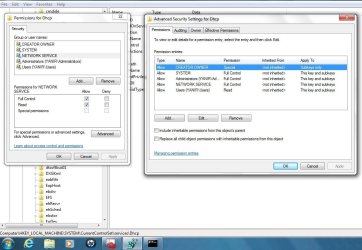
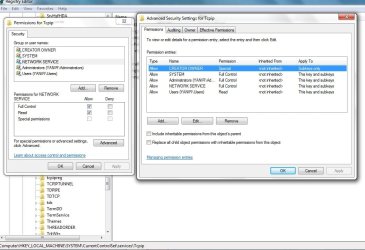
Screenshots look fine. Even more permissions as on my machinehere are the screens
i attempted to restart the dhcp client, still no luck
maybe i need to restart?
 but did you save it by pressing OK on all windows? Then you can start service DHCP client. Otherwise reboot and try to start it
My Computer
At a glance
Microsoft Windows 7 Home Premium 64-bits 7601...Intel(R) Core(TM) i3 CPU M 370 @ 2.40GHz4,00 GBATI Mobility Radeon HD 5400 Series
- Computer type
- Laptop
- Computer Manufacturer/Model Number
- ACER ASPIRE 5742G
- OS
- Microsoft Windows 7 Home Premium 64-bits 7601 Multiprocessor Free Service Pack 1
- CPU
- Intel(R) Core(TM) i3 CPU M 370 @ 2.40GHz
- Motherboard
- Acer Aspire 5742G
- Memory
- 4,00 GB
- Graphics Card(s)
- ATI Mobility Radeon HD 5400 Series
- Sound Card
- (1) AMD High Definition Audio Device (2) Realtek High Defi
- Screen Resolution
- 1366 x 768 x 32 bits (4294967296 colors) @ 60 Hz
- Hard Drives
- WDC WD5000BEVT-22ZAT0
My source: Error 5: Access is denied. when you try to start the DHCP Client service - ITExperience.NET
and my own settings
and my own settings
My Computer
At a glance
Microsoft Windows 7 Home Premium 64-bits 7601...Intel(R) Core(TM) i3 CPU M 370 @ 2.40GHz4,00 GBATI Mobility Radeon HD 5400 Series
- Computer type
- Laptop
- Computer Manufacturer/Model Number
- ACER ASPIRE 5742G
- OS
- Microsoft Windows 7 Home Premium 64-bits 7601 Multiprocessor Free Service Pack 1
- CPU
- Intel(R) Core(TM) i3 CPU M 370 @ 2.40GHz
- Motherboard
- Acer Aspire 5742G
- Memory
- 4,00 GB
- Graphics Card(s)
- ATI Mobility Radeon HD 5400 Series
- Sound Card
- (1) AMD High Definition Audio Device (2) Realtek High Defi
- Screen Resolution
- 1366 x 768 x 32 bits (4294967296 colors) @ 60 Hz
- Hard Drives
- WDC WD5000BEVT-22ZAT0
thank you for your patience.
when i try to set the permissions as yours i noticed that the Full Control turns into Read
but it's ok i guess, i tried to restart the dhcp client - didnt work
when i try to set the permissions as yours i noticed that the Full Control turns into Read
but it's ok i guess, i tried to restart the dhcp client - didnt work
My Computer
At a glance
Windows 7 Home Premium x64Intel Core i3
- Computer Manufacturer/Model Number
- HP G62
- OS
- Windows 7 Home Premium x64
- CPU
- Intel Core i3
- Motherboard
- Intel
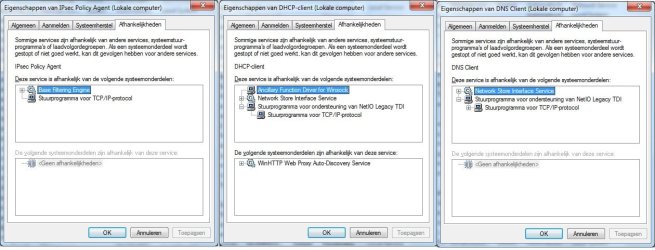
But can you start service DNS client?
and IP-sec policy agent?
I want to find a common component that fails
and IP-sec policy agent?
I want to find a common component that fails
My Computer
At a glance
Microsoft Windows 7 Home Premium 64-bits 7601...Intel(R) Core(TM) i3 CPU M 370 @ 2.40GHz4,00 GBATI Mobility Radeon HD 5400 Series
- Computer type
- Laptop
- Computer Manufacturer/Model Number
- ACER ASPIRE 5742G
- OS
- Microsoft Windows 7 Home Premium 64-bits 7601 Multiprocessor Free Service Pack 1
- CPU
- Intel(R) Core(TM) i3 CPU M 370 @ 2.40GHz
- Motherboard
- Acer Aspire 5742G
- Memory
- 4,00 GB
- Graphics Card(s)
- ATI Mobility Radeon HD 5400 Series
- Sound Card
- (1) AMD High Definition Audio Device (2) Realtek High Defi
- Screen Resolution
- 1366 x 768 x 32 bits (4294967296 colors) @ 60 Hz
- Hard Drives
- WDC WD5000BEVT-22ZAT0
aha!
DNS client restarted without problem
IPsec Policy agent did not restart! I got this message:
Windows could not start the IPsec Policy Agent service on Local Computer
Error 1068: The dependency service or group failed to start
Which is the same error i got in the network troubleshooter
DNS client restarted without problem
IPsec Policy agent did not restart! I got this message:
Windows could not start the IPsec Policy Agent service on Local Computer
Error 1068: The dependency service or group failed to start
Which is the same error i got in the network troubleshooter
My Computer
At a glance
Windows 7 Home Premium x64Intel Core i3
- Computer Manufacturer/Model Number
- HP G62
- OS
- Windows 7 Home Premium x64
- CPU
- Intel Core i3
- Motherboard
- Intel
so IPsec client and DHCP client have something in common. And that part is not a DNS client part.aha!
DNS client restarted without problem
IPsec Policy agent did not restart! I got this message:
Windows could not start the IPsec Policy Agent service on Local Computer
Error 1068: The dependency service or group failed to start
Which is the same error i got in the network troubleshooter
My Computer
At a glance
Microsoft Windows 7 Home Premium 64-bits 7601...Intel(R) Core(TM) i3 CPU M 370 @ 2.40GHz4,00 GBATI Mobility Radeon HD 5400 Series
- Computer type
- Laptop
- Computer Manufacturer/Model Number
- ACER ASPIRE 5742G
- OS
- Microsoft Windows 7 Home Premium 64-bits 7601 Multiprocessor Free Service Pack 1
- CPU
- Intel(R) Core(TM) i3 CPU M 370 @ 2.40GHz
- Motherboard
- Acer Aspire 5742G
- Memory
- 4,00 GB
- Graphics Card(s)
- ATI Mobility Radeon HD 5400 Series
- Sound Card
- (1) AMD High Definition Audio Device (2) Realtek High Defi
- Screen Resolution
- 1366 x 768 x 32 bits (4294967296 colors) @ 60 Hz
- Hard Drives
- WDC WD5000BEVT-22ZAT0
My Computer
At a glance
Microsoft Windows 7 Home Premium 64-bits 7601...Intel(R) Core(TM) i3 CPU M 370 @ 2.40GHz4,00 GBATI Mobility Radeon HD 5400 Series
- Computer type
- Laptop
- Computer Manufacturer/Model Number
- ACER ASPIRE 5742G
- OS
- Microsoft Windows 7 Home Premium 64-bits 7601 Multiprocessor Free Service Pack 1
- CPU
- Intel(R) Core(TM) i3 CPU M 370 @ 2.40GHz
- Motherboard
- Acer Aspire 5742G
- Memory
- 4,00 GB
- Graphics Card(s)
- ATI Mobility Radeon HD 5400 Series
- Sound Card
- (1) AMD High Definition Audio Device (2) Realtek High Defi
- Screen Resolution
- 1366 x 768 x 32 bits (4294967296 colors) @ 60 Hz
- Hard Drives
- WDC WD5000BEVT-22ZAT0
No, i've just checked that one myself and it does not start!
it gives me error 5 - access is denied
RPC does start
DCOM Server process launcher - starts
RPC endpoint mapper - starts
so i guess the problem is narrowed down to DHCP client, Base filtering engine and IPsec
by the way, i tried to set now the windows firewall
and i got error code 0x8007042c
i guess its related to base filtering engine - as it says on the description
it gives me error 5 - access is denied
RPC does start
DCOM Server process launcher - starts
RPC endpoint mapper - starts
so i guess the problem is narrowed down to DHCP client, Base filtering engine and IPsec
by the way, i tried to set now the windows firewall
and i got error code 0x8007042c
i guess its related to base filtering engine - as it says on the description
My Computer
At a glance
Windows 7 Home Premium x64Intel Core i3
- Computer Manufacturer/Model Number
- HP G62
- OS
- Windows 7 Home Premium x64
- CPU
- Intel Core i3
- Motherboard
- Intel
Base filtering engine doesn't start?
My Computer
At a glance
Microsoft Windows 7 Home Premium 64-bits 7601...Intel(R) Core(TM) i3 CPU M 370 @ 2.40GHz4,00 GBATI Mobility Radeon HD 5400 Series
- Computer type
- Laptop
- Computer Manufacturer/Model Number
- ACER ASPIRE 5742G
- OS
- Microsoft Windows 7 Home Premium 64-bits 7601 Multiprocessor Free Service Pack 1
- CPU
- Intel(R) Core(TM) i3 CPU M 370 @ 2.40GHz
- Motherboard
- Acer Aspire 5742G
- Memory
- 4,00 GB
- Graphics Card(s)
- ATI Mobility Radeon HD 5400 Series
- Sound Card
- (1) AMD High Definition Audio Device (2) Realtek High Defi
- Screen Resolution
- 1366 x 768 x 32 bits (4294967296 colors) @ 60 Hz
- Hard Drives
- WDC WD5000BEVT-22ZAT0
Windows firewall is depend of that that service. Same with IPsec policy. So Base filtering engine is the problem!! But its depency RPC runs fine! And DHCP client is not depend of Base filtering engine.Base filtering engine doesn't start?
So the conclusion is not right!
But is not the source of the problem.
some background info Base Filtering Engine | Black Viper | www.blackviper.com
My Computer
At a glance
Microsoft Windows 7 Home Premium 64-bits 7601...Intel(R) Core(TM) i3 CPU M 370 @ 2.40GHz4,00 GBATI Mobility Radeon HD 5400 Series
- Computer type
- Laptop
- Computer Manufacturer/Model Number
- ACER ASPIRE 5742G
- OS
- Microsoft Windows 7 Home Premium 64-bits 7601 Multiprocessor Free Service Pack 1
- CPU
- Intel(R) Core(TM) i3 CPU M 370 @ 2.40GHz
- Motherboard
- Acer Aspire 5742G
- Memory
- 4,00 GB
- Graphics Card(s)
- ATI Mobility Radeon HD 5400 Series
- Sound Card
- (1) AMD High Definition Audio Device (2) Realtek High Defi
- Screen Resolution
- 1366 x 768 x 32 bits (4294967296 colors) @ 60 Hz
- Hard Drives
- WDC WD5000BEVT-22ZAT0
The source of the problem is that Base filtering engine and DHCP client try to access some registry keys. And that keys have wrong permissions!
Is DHCP client service running as user "Local Service" it's in its properties page?
Is DHCP client service running as user "Local Service" it's in its properties page?
My Computer
At a glance
Microsoft Windows 7 Home Premium 64-bits 7601...Intel(R) Core(TM) i3 CPU M 370 @ 2.40GHz4,00 GBATI Mobility Radeon HD 5400 Series
- Computer type
- Laptop
- Computer Manufacturer/Model Number
- ACER ASPIRE 5742G
- OS
- Microsoft Windows 7 Home Premium 64-bits 7601 Multiprocessor Free Service Pack 1
- CPU
- Intel(R) Core(TM) i3 CPU M 370 @ 2.40GHz
- Motherboard
- Acer Aspire 5742G
- Memory
- 4,00 GB
- Graphics Card(s)
- ATI Mobility Radeon HD 5400 Series
- Sound Card
- (1) AMD High Definition Audio Device (2) Realtek High Defi
- Screen Resolution
- 1366 x 768 x 32 bits (4294967296 colors) @ 60 Hz
- Hard Drives
- WDC WD5000BEVT-22ZAT0
so there are at least 2 problems?
maybe its a corrupted dll file or whatever
but again, sfc /scannow didnt show anything
maybe its a corrupted dll file or whatever
but again, sfc /scannow didnt show anything
My Computer
At a glance
Windows 7 Home Premium x64Intel Core i3
- Computer Manufacturer/Model Number
- HP G62
- OS
- Windows 7 Home Premium x64
- CPU
- Intel Core i3
- Motherboard
- Intel
please checkThe source of the problem is that Base filtering engine and DHCP client try to access some registry keys. And that keys have wrong permissions!
Is DHCP client service running as user "Local Service" it's in its properties page?
My Computer
At a glance
Microsoft Windows 7 Home Premium 64-bits 7601...Intel(R) Core(TM) i3 CPU M 370 @ 2.40GHz4,00 GBATI Mobility Radeon HD 5400 Series
- Computer type
- Laptop
- Computer Manufacturer/Model Number
- ACER ASPIRE 5742G
- OS
- Microsoft Windows 7 Home Premium 64-bits 7601 Multiprocessor Free Service Pack 1
- CPU
- Intel(R) Core(TM) i3 CPU M 370 @ 2.40GHz
- Motherboard
- Acer Aspire 5742G
- Memory
- 4,00 GB
- Graphics Card(s)
- ATI Mobility Radeon HD 5400 Series
- Sound Card
- (1) AMD High Definition Audio Device (2) Realtek High Defi
- Screen Resolution
- 1366 x 768 x 32 bits (4294967296 colors) @ 60 Hz
- Hard Drives
- WDC WD5000BEVT-22ZAT0
There is no problem with DHCP clinet and the other service (very unlikely 2 problems). sfc tells you all files integrity is fine.so there are at least 2 problems?
maybe its a corrupted dll file or whatever
but again, sfc /scannow didnt show anything
There is a problem with some (or many) registry keys. Keys that are for tcpip configuration stuff.
Resetting TCP/IP won't help... it only sets some keys to default values. But you can perform the fixit on How to reset Internet Protocol (TCP/IP)
As with any program you reinstall or remove.... settings stay in registry. We have to do something like "regenerate TCP/IP registry keys to default".
When did problems start?
My Computer
At a glance
Microsoft Windows 7 Home Premium 64-bits 7601...Intel(R) Core(TM) i3 CPU M 370 @ 2.40GHz4,00 GBATI Mobility Radeon HD 5400 Series
- Computer type
- Laptop
- Computer Manufacturer/Model Number
- ACER ASPIRE 5742G
- OS
- Microsoft Windows 7 Home Premium 64-bits 7601 Multiprocessor Free Service Pack 1
- CPU
- Intel(R) Core(TM) i3 CPU M 370 @ 2.40GHz
- Motherboard
- Acer Aspire 5742G
- Memory
- 4,00 GB
- Graphics Card(s)
- ATI Mobility Radeon HD 5400 Series
- Sound Card
- (1) AMD High Definition Audio Device (2) Realtek High Defi
- Screen Resolution
- 1366 x 768 x 32 bits (4294967296 colors) @ 60 Hz
- Hard Drives
- WDC WD5000BEVT-22ZAT0
Similar threads
- Replies
- 3
- Views
- 1K

- Replies
- 2
- Views
- 1K
- Replies
- 2
- Views
- 1K
- Replies
- 5
- Views
- 2K
