Limited or no connectivity

Brembo244

No guts, no glory
Member
Local time
10:53 AM
Messages
15
Hello
I have a Arris modem that my ISP provided.
I get the exclamation sign on my network tray icon every 5 minutes and so the internet is down.
I've tried setting the DHCP manually but still the same problem.Sometimes when I click ''Troubleshoot problems'',when the wizard almost finishes,it suddenly gets back online.
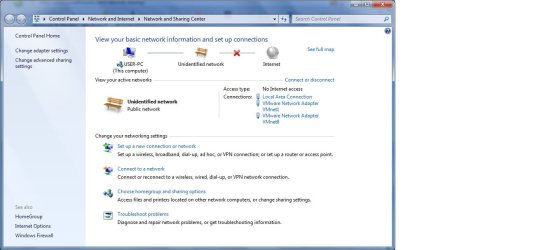
I've reseted the modem,enabled/disabled the network adapter and even installed more driver versions.I've uploaded a picture to show you how the network and sharing center looks then.
Sometimes it doesn't want to get back and the only solution is to restart.
I have Windows 7 Ultimate x86,Realtek RTL8102/8103 Family PCI-E FE adapter.
Thank you.
 

Attachments
  • gsdffsfdsfdsf.jpg
    gsdffsfdsfdsf.jpg
    62.9 KB · Views: 122

My Computer

OS
Windows 7 Ultimate x86 (32 bit)
Hello
I have a Arris modem that my ISP provided.
I get the exclamation sign on my network tray icon every 5 minutes and so the internet is down.
I've tried setting the DHCP manually but still the same problem.Sometimes when I click ''Troubleshoot problems'',when the wizard almost finishes,it suddenly gets back online.
I've reseted the modem,enabled/disabled the network adapter and even installed more driver versions.I've uploaded a picture to show you how the network and sharing center looks then.
Sometimes it doesn't want to get back and the only solution is to restart.
I have Windows 7 Ultimate x86,Realtek RTL8102/8103 Family PCI-E FE adapter.
Thank you.

Try this next time it happens

type in search

ipconfig /flushdns then

ipconfig /renew.

Did it help?


Are you running "homegroup"?


Have you re-iinstall the wifi driver?


Ken J
 

My Computer

Computer Manufacturer/Model Number
HP Pavillion dv-7 1005 Tx
OS
Win 8 Release candidate 8400
CPU
[email protected]
Memory
4 gigs
Graphics Card(s)
Nvidia 9600M
Sound Card
HD built-in
Monitor(s) Displays
17" Wxga
Screen Resolution
1440x900
Cooling
none
Internet Speed
45Mb down 5Mb up
Well first of all the modem is not wireless, it's cable.

I've tried /flushdns, /renew when it wasn't working but it gave me an error(something related to DHCP, you can figure it out).
I've also tried '' netsh winsock reset catalog ''but it worked temporarily.

I have tried the same cable on a HP Compaq NX7400 Laptop with Ubuntu and sometimes it did the same thing(drop dead all of a sudden), so my first concern is that the modem is either rubbish or I might have to contact my ISP for further details.
 

My Computer

OS
Windows 7 Ultimate x86 (32 bit)
I still couldn't figure this out...
Things i have tried(recap), and failed:

Resetting the modem by pushing the reset button or by unplugging it.
Installing several drivers including Vista ones for the NIC.
ipconfig /release/renew /flushdns/renew
netsh winsock reset catalog
setting IP's manually
I don't know why but it says Ipv6 Connectivity ''No internet access'' all the time.I've disabled it but it does the same.
Maybe it could be from using Bittorent clients?

It sometimes works fine for 1-2 days and sometimes it drops every 5 minutes.
I can't figure anything out, and this problem is extremely annoying because i cannot play any multiplayer games, or have a constant connection to the internet.

Thanks.
 

My Computer

OS
Windows 7 Ultimate x86 (32 bit)
I still couldn't figure this out...
Things i have tried(recap), and failed:

Resetting the modem by pushing the reset button or by unplugging it.
Installing several drivers including Vista ones for the NIC.
ipconfig /release/renew /flushdns/renew
netsh winsock reset catalog
setting IP's manually
I don't know why but it says Ipv6 Connectivity ''No internet access'' all the time.I've disabled it but it does the same.
Maybe it could be from using Bittorent clients?

It sometimes works fine for 1-2 days and sometimes it drops every 5 minutes.
I can't figure anything out, and this problem is extremely annoying because i cannot play any multiplayer games, or have a constant connection to the internet.

Thanks.

The IPv6 no connection message is correct, IPv6 works only on the LAN with Windows 7 so it always shows no connection "to the internet". Do not disable Ipv6.

I can't say what the actual problem is here but adding a router to the mix might improve things. If you can post the ipconfig /all from your machine I might be able to help you.

Try running this batch file which will reset winsock, reset the TCP/IP stack and release renew your IP.


Example shown below, I use the built in snipping tool for this. :)
 

Attachments

  • My ipconfig all.PNG
    My ipconfig all.PNG
    21.9 KB · Views: 89

My Computer

Computer type
PC/Desktop
Computer Manufacturer/Model Number
Home built
OS
Windows 7 Ult, Windows 8.1 Pro,
CPU
Q9650-4.275GHz, E8600 4.5GHz, E6750-3.8GHz
Motherboard
Evga 780i FTW
Memory
G.Skill PC2 9600 1200Mhz 5 5 5 15 2T
Graphics Card(s)
GTX480
Sound Card
Asus Xonar D2
Monitor(s) Displays
HannsG
Screen Resolution
1680X1050
Hard Drives
GSkill Phoenix Pro 120GB SSD
PSU
ThermalTake Toughpower 1000Watt modular
Case
ThermalTake XaserV
Cooling
Xigmatek S1283
Keyboard
Logitech G15
Mouse
Logitech G9
Internet Speed
T1
Microsoft Windows [Version 6.1.7600]
Copyright (c) 2009 Microsoft Corporation. All rights reserved.

C:\Users\user>ipconfig /all

Windows IP Configuration

Host Name . . . . . . . . . . . . : user-PC
Primary Dns Suffix . . . . . . . :
Node Type . . . . . . . . . . . . : Hybrid
IP Routing Enabled. . . . . . . . : No
WINS Proxy Enabled. . . . . . . . : No

Ethernet adapter Local Area Connection:

Connection-specific DNS Suffix . :
Description . . . . . . . . . . . : Realtek RTL8102/8103 Family PCI-E FE NIC
Physical Address. . . . . . . . . : 00-30-67-5A-96-B4
DHCP Enabled. . . . . . . . . . . : Yes
Autoconfiguration Enabled . . . . : Yes
Link-local IPv6 Address . . . . . : fe80::9db:3aea:b176:d549%11(Preferred)
IPv4 Address. . . . . . . . . . . : 78.96.170.101(Preferred)
Subnet Mask . . . . . . . . . . . : 255.255.252.0
Lease Obtained. . . . . . . . . . : Friday, November 26, 2010 7:58:36 PM
Lease Expires . . . . . . . . . . : Wednesday, December 01, 2010 8:39:40 AM
Default Gateway . . . . . . . . . : 78.96.168.1
DHCP Server . . . . . . . . . . . : 83.103.184.1
DHCPv6 IAID . . . . . . . . . . . : 234893415
DHCPv6 Client DUID. . . . . . . . : 00-01-00-01-14-23-5C-65-00-30-67-5A-96-B4

DNS Servers . . . . . . . . . . . : 95.77.94.88
78.96.7.88
NetBIOS over Tcpip. . . . . . . . : Enabled

Ethernet adapter VMware Network Adapter VMnet1:

Connection-specific DNS Suffix . :
Description . . . . . . . . . . . : VMware Virtual Ethernet Adapter for VMnet
1
Physical Address. . . . . . . . . : 00-50-56-C0-00-01
DHCP Enabled. . . . . . . . . . . : No
Autoconfiguration Enabled . . . . : Yes
Link-local IPv6 Address . . . . . : fe80::6875:b390:e224:827e%13(Preferred)
IPv4 Address. . . . . . . . . . . : 192.168.75.1(Preferred)
Subnet Mask . . . . . . . . . . . : 255.255.255.0
Default Gateway . . . . . . . . . :
DHCPv6 IAID . . . . . . . . . . . : 335564886
DHCPv6 Client DUID. . . . . . . . : 00-01-00-01-14-23-5C-65-00-30-67-5A-96-B4

DNS Servers . . . . . . . . . . . : fec0:0:0:ffff::1%1
fec0:0:0:ffff::2%1
fec0:0:0:ffff::3%1
NetBIOS over Tcpip. . . . . . . . : Enabled

Ethernet adapter VMware Network Adapter VMnet8:

Connection-specific DNS Suffix . :
Description . . . . . . . . . . . : VMware Virtual Ethernet Adapter for VMnet
8
Physical Address. . . . . . . . . : 00-50-56-C0-00-08
DHCP Enabled. . . . . . . . . . . : No
Autoconfiguration Enabled . . . . : Yes
Link-local IPv6 Address . . . . . : fe80::689b:a76d:e751:ebc6%15(Preferred)
IPv4 Address. . . . . . . . . . . : 192.168.254.1(Preferred)
Subnet Mask . . . . . . . . . . . : 255.255.255.0
Default Gateway . . . . . . . . . :
DHCPv6 IAID . . . . . . . . . . . : 369119318
DHCPv6 Client DUID. . . . . . . . : 00-01-00-01-14-23-5C-65-00-30-67-5A-96-B4

DNS Servers . . . . . . . . . . . : fec0:0:0:ffff::1%1
fec0:0:0:ffff::2%1
fec0:0:0:ffff::3%1
NetBIOS over Tcpip. . . . . . . . : Enabled

Tunnel adapter 6TO4 Adapter:

Connection-specific DNS Suffix . :
Description . . . . . . . . . . . : Microsoft 6to4 Adapter
Physical Address. . . . . . . . . : 00-00-00-00-00-00-00-E0
DHCP Enabled. . . . . . . . . . . : No
Autoconfiguration Enabled . . . . : Yes
IPv6 Address. . . . . . . . . . . : 2002:4e60:aa65::4e60:aa65(Preferred)
Default Gateway . . . . . . . . . : 2002:c058:6301::c058:6301
DNS Servers . . . . . . . . . . . : 95.77.94.88
78.96.7.88
NetBIOS over Tcpip. . . . . . . . : Disabled

Tunnel adapter isatap.{B4BC6B04-E8DF-4882-B2BF-B3EA748C0FC4}:

Media State . . . . . . . . . . . : Media disconnected
Connection-specific DNS Suffix . :
Description . . . . . . . . . . . : Microsoft ISATAP Adapter
Physical Address. . . . . . . . . : 00-00-00-00-00-00-00-E0
DHCP Enabled. . . . . . . . . . . : No
Autoconfiguration Enabled . . . . : Yes

Tunnel adapter Local Area Connection* 12:

Media State . . . . . . . . . . . : Media disconnected
Connection-specific DNS Suffix . :
Description . . . . . . . . . . . : Teredo Tunneling Pseudo-Interface
Physical Address. . . . . . . . . : 00-00-00-00-00-00-00-E0
DHCP Enabled. . . . . . . . . . . : No
Autoconfiguration Enabled . . . . : Yes

Tunnel adapter isatap.{04543DBA-3137-467B-8DD6-408B0033D4F6}:

Media State . . . . . . . . . . . : Media disconnected
Connection-specific DNS Suffix . :
Description . . . . . . . . . . . : Microsoft ISATAP Adapter #2
Physical Address. . . . . . . . . : 00-00-00-00-00-00-00-E0
DHCP Enabled. . . . . . . . . . . : No
Autoconfiguration Enabled . . . . : Yes

Tunnel adapter isatap.{6E9BC4EC-E08B-4668-93A8-4BEF76BB8B46}:

Media State . . . . . . . . . . . : Media disconnected
Connection-specific DNS Suffix . :
Description . . . . . . . . . . . : Microsoft ISATAP Adapter #3
Physical Address. . . . . . . . . : 00-00-00-00-00-00-00-E0
DHCP Enabled. . . . . . . . . . . : No
Autoconfiguration Enabled . . . . : Yes

C:\Users\user>
 

My Computer

OS
Windows 7 Ultimate x86 (32 bit)
Connection-specific DNS Suffix . :
Description . . . . . . . . . . . : Realtek RTL8102/8103 Family PCI-E FE NIC
Physical Address. . . . . . . . . : 00-30-67-5A-96-B4
DHCP Enabled. . . . . . . . . . . : Yes
Autoconfiguration Enabled . . . . : Yes
Link-local IPv6 Address . . . . . : fe80::9db:3aea:b176:d549%11(Preferred)
IPv4 Address. . . . . . . . . . . : 78.96.170.101(Preferred) < YOUR WAN ADDRESS
Subnet Mask . . . . . . . . . . . : 255.255.252.0
Lease Obtained. . . . . . . . . . : Friday, November 26, 2010 7:58:36 PM
Lease Expires . . . . . . . . . . : Wednesday, December 01, 2010 8:39:40 AM
Default Gateway . . . . . . . . . : 78.96.168.1
DHCP Server . . . . . . . . . . . : 83.103.184.1
DHCPv6 IAID . . . . . . . . . . . : 234893415
DHCPv6 Client DUID. . . . . . . . : 00-01-00-01-14-23-5C-65-00-30-67-5A-96-B4

DNS Servers . . . . . . . . . . . : 95.77.94.88
78.96.7.88
NetBIOS over Tcpip

From the info above I can see your in Romania and you aren't using a router. You seem to only be showing your WAN IP so your modem has no router functionality.

The other problem I see is that you have some sort of VM ware adaptor installed and it appears to be enabled which can cause problems. I'm not really sure what that is for but it may help to disable it because it could be causing your Unidentified issue.

The other possible problem is that you are showing quite a few 6 to 4 adaptors there which will also cause these types of problems. They also show as having a DNS assigned to them which makes no sense to me at all, "problem is in bold below".

I'm not sure how many 6 to4 adaptors are showing but if you can count them and tell me how many I can show you how to get rid of them.

There are so many problems with your ipconfig /all, I'm not sure where to start.
 
Last edited:

My Computer

Computer type
PC/Desktop
Computer Manufacturer/Model Number
Home built
OS
Windows 7 Ult, Windows 8.1 Pro,
CPU
Q9650-4.275GHz, E8600 4.5GHz, E6750-3.8GHz
Motherboard
Evga 780i FTW
Memory
G.Skill PC2 9600 1200Mhz 5 5 5 15 2T
Graphics Card(s)
GTX480
Sound Card
Asus Xonar D2
Monitor(s) Displays
HannsG
Screen Resolution
1680X1050
Hard Drives
GSkill Phoenix Pro 120GB SSD
PSU
ThermalTake Toughpower 1000Watt modular
Case
ThermalTake XaserV
Cooling
Xigmatek S1283
Keyboard
Logitech G15
Mouse
Logitech G9
Internet Speed
T1
Well yes, i'm from Romania.
I'm using VMware Player, it's a sandbox program which you can use to test other Operating Systems.I still had problems before starting using that.
As for the Batch file you gave me, it works instantly when the connection drops, but it still fails after some time.
Ipv6 looks like this:
 

Attachments

  • qwqwc.jpg
    qwqwc.jpg
    35.4 KB · Views: 51

My Computer

OS
Windows 7 Ultimate x86 (32 bit)
Well yes, i'm from Romania.
I'm using VMware Player, it's a sandbox program which you can use to test other Operating Systems.I still had problems before starting using that.
As for the Batch file you gave me, it works instantly when the connection drops, but it still fails after some time.
Ipv6 looks like this:

You need to post the screen shot of your ipconfig /all using the built in snipping tool.

I can't read the reposted copy, I need to be able to see how many of those 6to4 tunnel adaptors you have.

And you need to disable the VMware adaptor for testing as that can easily cause problems such as you are describing.
 

My Computer

Computer type
PC/Desktop
Computer Manufacturer/Model Number
Home built
OS
Windows 7 Ult, Windows 8.1 Pro,
CPU
Q9650-4.275GHz, E8600 4.5GHz, E6750-3.8GHz
Motherboard
Evga 780i FTW
Memory
G.Skill PC2 9600 1200Mhz 5 5 5 15 2T
Graphics Card(s)
GTX480
Sound Card
Asus Xonar D2
Monitor(s) Displays
HannsG
Screen Resolution
1680X1050
Hard Drives
GSkill Phoenix Pro 120GB SSD
PSU
ThermalTake Toughpower 1000Watt modular
Case
ThermalTake XaserV
Cooling
Xigmatek S1283
Keyboard
Logitech G15
Mouse
Logitech G9
Internet Speed
T1
I've disabled the VMware adapters but this might sound embarassing because i dont know what the Snipping Tool is or how to use it..
 

My Computer

OS
Windows 7 Ultimate x86 (32 bit)

My Computer

Computer type
Laptop
Computer Manufacturer/Model Number
Sony Vaio VPCEB47GM Laptop
OS
Win 7 Pro 64-bit
CPU
Intel i5 2.4 Ghz
Memory
8GB DDR3
Graphics Card(s)
Intel HD 3000
Sound Card
IDT High Definition
Monitor(s) Displays
15.6 WGXA Anti-Glare LED
Screen Resolution
1280x800
Hard Drives
640Gb 7200rpm
Antivirus
MSE
Browser
Opera (primary) with IE9 backup
here it is
 

Attachments

  • trtegfgf.JPG
    trtegfgf.JPG
    115.6 KB · Views: 32

My Computer

OS
Windows 7 Ultimate x86 (32 bit)
Somehow your WAN ip changed from the last ipconfig you posted. It seems like your ISP uses a floating IP for it's customers.

And for some reason your Ipv6 shows DNS servers which makes no sense to me, it looks like your modem does this by default so it may be correct for your particular modem.

Connection-specific DNS Suffix . :
Description . . . . . . . . . . . : Realtek RTL8102/8103 Family PCI-E FE NIC
Physical Address. . . . . . . . . : 00-30-67-5A-96-B4
DHCP Enabled. . . . . . . . . . . : Yes
Autoconfiguration Enabled . . . . : Yes
Link-local IPv6 Address . . . . . : fe80::9db:3aea:b176:d549%11(Preferred)
IPv4 Address. . . . . . . . . . . : 78.96.170.101(Preferred) changed too 85.186.123.167
Subnet Mask . . . . . . . . . . . : 255.255.252.0
Lease Obtained. . . . . . . . . . : Friday, November 26, 2010 7:58:36 PM
Lease Expires . . . . . . . . . . : Wednesday, December 01, 2010 8:39:40 AM
Default Gateway . . . . . . . . . : 78.96.168.1
DHCP Server . . . . . . . . . . . : 83.103.184.1
DHCPv6 IAID . . . . . . . . . . . : 234893415
DHCPv6 Client DUID. . . . . . . . : 00-01-00-01-14-23-5C-65-00-30-67-5A-96-B4

DNS Servers . . . . . . . . . . . : 95.77.94.88
78.96.7.88

It looks like your VMware or a bad driver helped to create extra 6 to4 adaptors which will cause problems with your connection.

You should delate the extra adaptors by going into Device Manager, go to the view setting upper right then choose "show hidden devices" then go to the "network adaptors" , after that delate all the extra 6to4 and tunnel adaptors you see there and reboot your machine. Windows will make a new one. This should help fix the problem you are seeing. :)

You should also change the network location to work or home. The tutorial for this in the link below.
http://www.sevenforums.com/tutorials/43629-network-location-set-home-work-public-network.html
 
Last edited:

My Computer

Computer type
PC/Desktop
Computer Manufacturer/Model Number
Home built
OS
Windows 7 Ult, Windows 8.1 Pro,
CPU
Q9650-4.275GHz, E8600 4.5GHz, E6750-3.8GHz
Motherboard
Evga 780i FTW
Memory
G.Skill PC2 9600 1200Mhz 5 5 5 15 2T
Graphics Card(s)
GTX480
Sound Card
Asus Xonar D2
Monitor(s) Displays
HannsG
Screen Resolution
1680X1050
Hard Drives
GSkill Phoenix Pro 120GB SSD
PSU
ThermalTake Toughpower 1000Watt modular
Case
ThermalTake XaserV
Cooling
Xigmatek S1283
Keyboard
Logitech G15
Mouse
Logitech G9
Internet Speed
T1
I have done what you said, deleted the 6to4 adapter, disabled all VMware adapters, and it is working so far.If it fails again i will let you know.
Thank you very much:)
 

My Computer

OS
Windows 7 Ultimate x86 (32 bit)
I have done what you said, deleted the 6to4 adapter, disabled all VMware adapters, and it is working so far.If it fails again i will let you know.
Thank you very much:)

We will see where this goes, it seems that either a driver or the vmware caused there to be an overload of 6to4 tunnel adaptors which is a fairly common problem. Delating them usually fixes the problem but the cause is still in question and may come back to haunt you if it's not fixed or repaired completely.

You many have a problem with the vmware because your not using a router to give it a seperate IP although it did get an IP from somewhere according to your ipconfig results.

A router would be a good investment in your case and should allow the vmware to work better.
 

My Computer

Computer type
PC/Desktop
Computer Manufacturer/Model Number
Home built
OS
Windows 7 Ult, Windows 8.1 Pro,
CPU
Q9650-4.275GHz, E8600 4.5GHz, E6750-3.8GHz
Motherboard
Evga 780i FTW
Memory
G.Skill PC2 9600 1200Mhz 5 5 5 15 2T
Graphics Card(s)
GTX480
Sound Card
Asus Xonar D2
Monitor(s) Displays
HannsG
Screen Resolution
1680X1050
Hard Drives
GSkill Phoenix Pro 120GB SSD
PSU
ThermalTake Toughpower 1000Watt modular
Case
ThermalTake XaserV
Cooling
Xigmatek S1283
Keyboard
Logitech G15
Mouse
Logitech G9
Internet Speed
T1
OK, it didn't turn out well because aprox. after 6-7 hours it does this
 

Attachments

  • abcdef.jpg
    abcdef.jpg
    123.8 KB · Views: 40

My Computer

OS
Windows 7 Ultimate x86 (32 bit)
Bummer. Hopefully chev65 will be back online in a few hours. Just out of curiosity, have you ever contacted your ISP to see if the problems are at their end?
 

My Computer

Computer type
Laptop
Computer Manufacturer/Model Number
Sony Vaio VPCEB47GM Laptop
OS
Win 7 Pro 64-bit
CPU
Intel i5 2.4 Ghz
Memory
8GB DDR3
Graphics Card(s)
Intel HD 3000
Sound Card
IDT High Definition
Monitor(s) Displays
15.6 WGXA Anti-Glare LED
Screen Resolution
1280x800
Hard Drives
640Gb 7200rpm
Antivirus
MSE
Browser
Opera (primary) with IE9 backup
Bummer. Hopefully chev65 will be back online in a few hours. Just out of curiosity, have you ever contacted your ISP to see if the problems are at their end?
I intend calling them tomorrow.
 

My Computer

OS
Windows 7 Ultimate x86 (32 bit)
OK, it didn't turn out well because aprox. after 6-7 hours it does this

At this point I'd say that a repair install is in order. I think those VMware adaptors somehow hosed your system or at least messed something up. This has worked a couple times in the last week.

Run the repair install and see if it finds something wrong and let it fix the problem if it finds one.

http://www.sevenforums.com/tutorials/3413-repair-install.html
 

My Computer

Computer type
PC/Desktop
Computer Manufacturer/Model Number
Home built
OS
Windows 7 Ult, Windows 8.1 Pro,
CPU
Q9650-4.275GHz, E8600 4.5GHz, E6750-3.8GHz
Motherboard
Evga 780i FTW
Memory
G.Skill PC2 9600 1200Mhz 5 5 5 15 2T
Graphics Card(s)
GTX480
Sound Card
Asus Xonar D2
Monitor(s) Displays
HannsG
Screen Resolution
1680X1050
Hard Drives
GSkill Phoenix Pro 120GB SSD
PSU
ThermalTake Toughpower 1000Watt modular
Case
ThermalTake XaserV
Cooling
Xigmatek S1283
Keyboard
Logitech G15
Mouse
Logitech G9
Internet Speed
T1

My Computer

Computer type
Laptop
Computer Manufacturer/Model Number
Sony Vaio VPCEB47GM Laptop
OS
Win 7 Pro 64-bit
CPU
Intel i5 2.4 Ghz
Memory
8GB DDR3
Graphics Card(s)
Intel HD 3000
Sound Card
IDT High Definition
Monitor(s) Displays
15.6 WGXA Anti-Glare LED
Screen Resolution
1280x800
Hard Drives
640Gb 7200rpm
Antivirus
MSE
Browser
Opera (primary) with IE9 backup
Back
Top