Limited search results in Outlook 2007

MrNosebleed

New member
Local time
1:55 AM
Messages
26
Hi all.

Please excuse me if someone has posted this problem before - too many threads to search to find my answer!

My problem, starting just recently, is Outlook 2007 not showing search results for most recent emails. This problam has only occurred in the last couple of weeks.

I havent checked anything unusual in search options, just doing a default search, and older emails are being retrieved, but not newer ones. Does not seem to make a difference what search criteria I use, subject or body. I know the messages are there, I can find them the long way (browsing), just can't find them in search.

Outlook is telling me that indexing is all up to date.

I DO have a LOT of messages - possibly tens of thousands.

Is there an upper limit of how many messages can be indexed? If so do I need to clear some? Would be quite a pain but I guess I could back up emails from 2007, 2008 etc and keep them somewhere else.

Or is there another fix?

Any help woudl be greatly appreciated.

Thanks in advance.
 

My Computer My Computer

At a glance

Windows 7
OS
Windows 7
Hi all.

Please excuse me if someone has posted this problem before - too many threads to search to find my answer!

My problem, starting just recently, is Outlook 2007 not showing search results for most recent emails. This problam has only occurred in the last couple of weeks.

I havent checked anything unusual in search options, just doing a default search, and older emails are being retrieved, but not newer ones. Does not seem to make a difference what search criteria I use, subject or body. I know the messages are there, I can find them the long way (browsing), just can't find them in search.

Outlook is telling me that indexing is all up to date.

I DO have a LOT of messages - possibly tens of thousands.

Is there an upper limit of how many messages can be indexed? If so do I need to clear some? Would be quite a pain but I guess I could back up emails from 2007, 2008 etc and keep them somewhere else.

Or is there another fix?

Any help woudl be greatly appreciated.

Thanks in advance.

Hi Mr Nosebleed, Welcome to SF,

I guess the problem would be with so add-ins that is conflicting. Any other search add-ins like Google etc ??

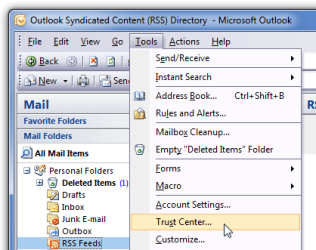
Edit: To find Go To > Tools > Trust center > Add-ins
 

My Computer My Computer

At a glance

Windows 7 Ultimate - 64-bit | Windows 8 Pro -...Intel® Core™ i7 Processor 3,610QM (2.30Hz, 6M...8 GBNVIDIA® GeForce® GT 650M 2GB Graphics, Optimu...
Computer Manufacturer/Model Number
Samsung NP550P5C-S02IN
OS
Windows 7 Ultimate - 64-bit | Windows 8 Pro - 64-bit
CPU
Intel® Core™ i7 Processor 3,610QM (2.30Hz, 6MB L3 Cach
Memory
8 GB
Graphics Card(s)
NVIDIA® GeForce® GT 650M 2GB Graphics, Optimus™ techno
Sound Card
SoundAlive™ JBL 3 Speakers (With sub-Woofer)
Monitor(s) Displays
39.62cm (15.6) SuperBright 300nit HD+ LED Display
Screen Resolution
1,600 x 900, Anti-Reflective
Hard Drives
1TB S-ATA II Hard Drive (5,400RPM)
Apart from PDFMOutlook (not sure if this is Adobe or MS) the only add-ins I have are all Microsoft, and I assume there by default.
 

My Computer My Computer

At a glance

Windows 7
OS
Windows 7
May be you can disable that as well

Open up the Trust Center by navigating to Tools –> Trust Center on the menu.

1.png

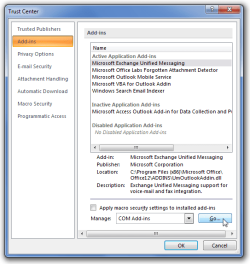
On the left-hand pane, choose Add-ins, and then near the bottom of the window you’ll see a button that will let you manage your COM Add-ins.

image6.png

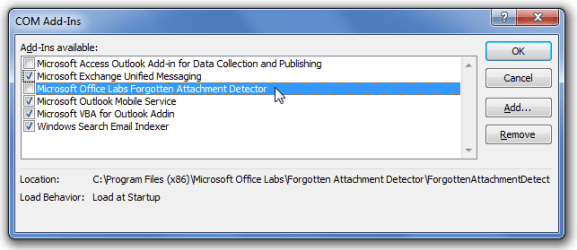
From this window, you can disable anything that you aren’t using. My recommendation would be to start off by only disabling non-Microsoft add-ins

image7.png

I would advice to Right Click on Outlook and Run as administrator while you do that

Hope that helps
 

My Computer My Computer

At a glance

Windows 7 Ultimate - 64-bit | Windows 8 Pro -...Intel® Core™ i7 Processor 3,610QM (2.30Hz, 6M...8 GBNVIDIA® GeForce® GT 650M 2GB Graphics, Optimu...
Computer Manufacturer/Model Number
Samsung NP550P5C-S02IN
OS
Windows 7 Ultimate - 64-bit | Windows 8 Pro - 64-bit
CPU
Intel® Core™ i7 Processor 3,610QM (2.30Hz, 6MB L3 Cach
Memory
8 GB
Graphics Card(s)
NVIDIA® GeForce® GT 650M 2GB Graphics, Optimus™ techno
Sound Card
SoundAlive™ JBL 3 Speakers (With sub-Woofer)
Monitor(s) Displays
39.62cm (15.6) SuperBright 300nit HD+ LED Display
Screen Resolution
1,600 x 900, Anti-Reflective
Hard Drives
1TB S-ATA II Hard Drive (5,400RPM)
Fixed. Funny thing, after I did as you said, opened Outlook as administrator and disabled PDFMOutlook, then when I closed Outlook I got am alert saying "Windows has detecte3d a serious problem in PDFMOutlook - Would you like to disable this..." Clicked yes, reopened, now getting the search results I was missing before.

So what is PDFMOutlook anyway?
 

My Computer My Computer

At a glance

Windows 7
OS
Windows 7
Fixed. Funny thing, after I did as you said, opened Outlook as administrator and disabled PDFMOutlook, then when I closed Outlook I got am alert saying "Windows has detecte3d a serious problem in PDFMOutlook - Would you like to disable this..." Clicked yes, reopened, now getting the search results I was missing before.

So what is PDFMOutlook anyway?

PDFMOutlook is an Adobe plug-in that has apparently been known to cause problems with Outlook 2007.
http://get.adobe.com/reader/
 

My Computer My Computer

At a glance

Win 7 Ultimate 64-bit. SP1.Intel i7 -720QM.[1.6GHz Turbo Boost 2.8GHz. 6...8 DDR 3 RAM. 1066MHZATI 1024 MB. DDR3. Radeon HD5650
Computer Manufacturer/Model Number
LAPTOP. HP Pavilion dv7-4010TX .
OS
Win 7 Ultimate 64-bit. SP1.
CPU
Intel i7 -720QM.[1.6GHz Turbo Boost 2.8GHz. 6MB Cache.]
Memory
8 DDR 3 RAM. 1066MHZ
Graphics Card(s)
ATI 1024 MB. DDR3. Radeon HD5650
Monitor(s) Displays
17.3" High Definition Brightview LCD. LED Backlit.
Screen Resolution
1600 x 900.
Hard Drives
640GB
Case
Laptop / notebook.
Mouse
Logitech Anywhere mouse. MX.
Internet Speed
ADSL [ but too slow ]
Fixed. Funny thing, after I did as you said, opened Outlook as administrator and disabled PDFMOutlook, then when I closed Outlook I got am alert saying "Windows has detecte3d a serious problem in PDFMOutlook - Would you like to disable this..." Clicked yes, reopened, now getting the search results I was missing before.

So what is PDFMOutlook anyway?

Glad that your issues is resolved .. Thanks for posting back :D
 

My Computer My Computer

At a glance

Windows 7 Ultimate - 64-bit | Windows 8 Pro -...Intel® Core™ i7 Processor 3,610QM (2.30Hz, 6M...8 GBNVIDIA® GeForce® GT 650M 2GB Graphics, Optimu...
Computer Manufacturer/Model Number
Samsung NP550P5C-S02IN
OS
Windows 7 Ultimate - 64-bit | Windows 8 Pro - 64-bit
CPU
Intel® Core™ i7 Processor 3,610QM (2.30Hz, 6MB L3 Cach
Memory
8 GB
Graphics Card(s)
NVIDIA® GeForce® GT 650M 2GB Graphics, Optimus™ techno
Sound Card
SoundAlive™ JBL 3 Speakers (With sub-Woofer)
Monitor(s) Displays
39.62cm (15.6) SuperBright 300nit HD+ LED Display
Screen Resolution
1,600 x 900, Anti-Reflective
Hard Drives
1TB S-ATA II Hard Drive (5,400RPM)
My problem is this. Today is 10/21/2010. When I do a search in Outlook for a recent email from this week, it will only locate emails from prior to 10/15/2010. I must have done something wrong, but have no clue. Anyone? Additonally, I am having a very frustrating problem while on the Internet. I will very frequently click on a .pdf on a site to view it and all I get is a blanlk white page? I am running W7, IE8 and Adobe 9?
 
Last edited:

My Computer My Computer

At a glance

W7 64 bit.
OS
W7 64 bit.
Mu problem is this. Today is 10/21/2010. When I do a search in Outlook for a recent email from this week, it will only locate emails from prior to 10/15/2010. I must have done something wrong, but have no clue. Anyone? Additonally, I am having a very frustrating problem while on the Internet. I will very freqyently click on a .pdf on a site to view it and all I get is a blanl white page? I am running W7, IE8 and Adobe 9?

Hello ORDNorth & welcome,

You would be better advised to start a new thread seeking help to solve your problem....
This thread is almost one year old & marked as solved.

Good luck.
 

My Computer My Computer

At a glance

Win 7 Ultimate 64-bit. SP1.Intel i7 -720QM.[1.6GHz Turbo Boost 2.8GHz. 6...8 DDR 3 RAM. 1066MHZATI 1024 MB. DDR3. Radeon HD5650
Computer Manufacturer/Model Number
LAPTOP. HP Pavilion dv7-4010TX .
OS
Win 7 Ultimate 64-bit. SP1.
CPU
Intel i7 -720QM.[1.6GHz Turbo Boost 2.8GHz. 6MB Cache.]
Memory
8 DDR 3 RAM. 1066MHZ
Graphics Card(s)
ATI 1024 MB. DDR3. Radeon HD5650
Monitor(s) Displays
17.3" High Definition Brightview LCD. LED Backlit.
Screen Resolution
1600 x 900.
Hard Drives
640GB
Case
Laptop / notebook.
Mouse
Logitech Anywhere mouse. MX.
Internet Speed
ADSL [ but too slow ]
Thanks will do that now on both issues!
 

My Computer My Computer

At a glance

W7 64 bit.
OS
W7 64 bit.
Back
Top