
Link Speed Drops when Streaming Video Content at times

hgw53t

New member
Local time
3:06 PM
Messages
26
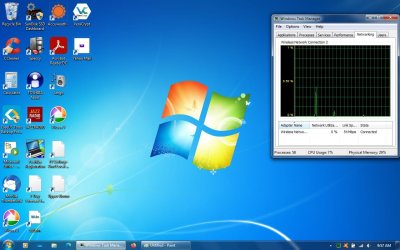
I've had the problem for a long time. Link speed drops only streaming some video such as: VIPBoxTV | Free Live Sports Streams | VIP Box Sports. It drops only when I've been streaming for at least a few minutes, maybe longer. Link speed will drop from 54 to 48 to 36 to 5 and sometimes to 1-Mbps. I do not have any other tabs or other browsers open. I've uninstalled & installed the network adapters. It seems to work a little better with the rolled back drivers than with the newest driver versions. The connection does not disconnect, but have seen where I would manually disconnect & would not reconnect until I uninstalled/ reinstalled network adapters & drivers. Attached is a screenshot of the task manager where I'm seeing this problem.
 

Attachments
  • Windows Task Manager.jpg
    Windows Task Manager.jpg
    114.2 KB · Views: 2
Last edited:

My Computer My Computer

Computer type
Laptop
Computer Manufacturer/Model Number
Toshiba
OS
Windows 7 Home Premium 32-bit
Memory
4-GB physical memory
Hard Drives
SSD 110-GB
Antivirus
Avast
Browser
I.E. 11 and Mozilla Firefox
The low rates has nothing to do with your computer or ISPN.
For most of those sites with free downloads the release the content at very low rates. If you want high speeds, you have to pay.

What is the the download speed you contracted.
Please run Speedtest by Ookla - The Global Broadband Speed Test to find your real download and upload speeds
 

My Computers My Computers

System One System Two

  • Computer type
    PC/Desktop
    Computer Manufacturer/Model Number
    custom build
    OS
    Windows 7 HP 64
    CPU
    i5 6600K - 800MHz to 4200MHz
    Motherboard
    GA-Z170-HD3P
    Memory
    4+4G GSkill DDR4 3000
    Graphics Card(s)
    IG - Intel 530
    Monitor(s) Displays
    Samsung 226BW
    Screen Resolution
    1680x1050
    Hard Drives
    (1) -1 SM951 – 128GB M.2 AHCI PCIe SSD drive for Windows 7 and Lubuntu
    (2) -1 WD SATA 3 - 1T for Data
    (3) -1 WD SATA 3 - 1T for backup
    PSU
    Thermaltake 450W TR2 gold
    Keyboard
    Old and good Chicony mechanical keyboard
    Mouse
    Logitech mX performance - 9 buttons (had to disable some)
    Internet Speed
    500Mb/s
    Browser
    Firefox 64
    Other Info
    TinyWall firewall
  • Computer type
    Laptop
    System Manufacturer/Model Number
    Asus Q550LF
    OS
    Windows 7 Pro
    CPU
    i7-4500U 800MHz to 3.0GHz
    Motherboard
    Asus Q550LF
    Memory
    (4+4)G DDR3 1600
    Graphics Card(s)
    IG intel 4400 + NVIDIA GeForce GT 745M
    Sound Card
    Realtek
    Monitor(s) Displays
    LG Display LP156WF4-SPH1
    Screen Resolution
    1920 x 1080
    Hard Drives
    BX500 120G SSD for Windows and programs +
    1T HDD for data
    Internet Speed
    500 Mb/s
    Browser
    Firefox
    Other Info
    TinyWall firewall
Hi & I check it regularly using "Speedtest by Ookla". I checked it today & it is 11 ms ping, 3.08 Mbps download & .81 Mbps upload. That is a fairly consistent result. I mean to say it stays fairly constant.
 

My Computer My Computer

Computer type
Laptop
Computer Manufacturer/Model Number
Toshiba
OS
Windows 7 Home Premium 32-bit
Memory
4-GB physical memory
Hard Drives
SSD 110-GB
Antivirus
Avast
Browser
I.E. 11 and Mozilla Firefox
Hi & I check it regularly using "Speedtest by Ookla". I checked it today & it is 11 ms ping, 3.08 Mbps download & .81 Mbps upload. That is a fairly consistent result. I mean to say it stays fairly constant.

What kind of physical link you have (Telephone line, cable TV, fiber optic)?
Is your computer connected to the Router by cable or WiFi?

For today standards and on USA, 3.08 Mbps download is a very slow rate.
 

My Computers My Computers

System One System Two

  • Computer type
    PC/Desktop
    Computer Manufacturer/Model Number
    custom build
    OS
    Windows 7 HP 64
    CPU
    i5 6600K - 800MHz to 4200MHz
    Motherboard
    GA-Z170-HD3P
    Memory
    4+4G GSkill DDR4 3000
    Graphics Card(s)
    IG - Intel 530
    Monitor(s) Displays
    Samsung 226BW
    Screen Resolution
    1680x1050
    Hard Drives
    (1) -1 SM951 – 128GB M.2 AHCI PCIe SSD drive for Windows 7 and Lubuntu
    (2) -1 WD SATA 3 - 1T for Data
    (3) -1 WD SATA 3 - 1T for backup
    PSU
    Thermaltake 450W TR2 gold
    Keyboard
    Old and good Chicony mechanical keyboard
    Mouse
    Logitech mX performance - 9 buttons (had to disable some)
    Internet Speed
    500Mb/s
    Browser
    Firefox 64
    Other Info
    TinyWall firewall
  • Computer type
    Laptop
    System Manufacturer/Model Number
    Asus Q550LF
    OS
    Windows 7 Pro
    CPU
    i7-4500U 800MHz to 3.0GHz
    Motherboard
    Asus Q550LF
    Memory
    (4+4)G DDR3 1600
    Graphics Card(s)
    IG intel 4400 + NVIDIA GeForce GT 745M
    Sound Card
    Realtek
    Monitor(s) Displays
    LG Display LP156WF4-SPH1
    Screen Resolution
    1920 x 1080
    Hard Drives
    BX500 120G SSD for Windows and programs +
    1T HDD for data
    Internet Speed
    500 Mb/s
    Browser
    Firefox
    Other Info
    TinyWall firewall
I have high speed internet using a cable modem (not fiber optic) & it is very close to computer (using WiFi) & don't think there is any interference causing the problem. I've hardwired computer to the modem using Ethernet cable & still has same problem.
 

My Computer My Computer

Computer type
Laptop
Computer Manufacturer/Model Number
Toshiba
OS
Windows 7 Home Premium 32-bit
Memory
4-GB physical memory
Hard Drives
SSD 110-GB
Antivirus
Avast
Browser
I.E. 11 and Mozilla Firefox
You say you have high speed internet but 3Mbps isn't high speed.
As you have a laptop, connect it to the router with a cable and run Speedtest to see if the problem isn't on your WiFi connection
 

My Computers My Computers

System One System Two

  • Computer type
    PC/Desktop
    Computer Manufacturer/Model Number
    custom build
    OS
    Windows 7 HP 64
    CPU
    i5 6600K - 800MHz to 4200MHz
    Motherboard
    GA-Z170-HD3P
    Memory
    4+4G GSkill DDR4 3000
    Graphics Card(s)
    IG - Intel 530
    Monitor(s) Displays
    Samsung 226BW
    Screen Resolution
    1680x1050
    Hard Drives
    (1) -1 SM951 – 128GB M.2 AHCI PCIe SSD drive for Windows 7 and Lubuntu
    (2) -1 WD SATA 3 - 1T for Data
    (3) -1 WD SATA 3 - 1T for backup
    PSU
    Thermaltake 450W TR2 gold
    Keyboard
    Old and good Chicony mechanical keyboard
    Mouse
    Logitech mX performance - 9 buttons (had to disable some)
    Internet Speed
    500Mb/s
    Browser
    Firefox 64
    Other Info
    TinyWall firewall
  • Computer type
    Laptop
    System Manufacturer/Model Number
    Asus Q550LF
    OS
    Windows 7 Pro
    CPU
    i7-4500U 800MHz to 3.0GHz
    Motherboard
    Asus Q550LF
    Memory
    (4+4)G DDR3 1600
    Graphics Card(s)
    IG intel 4400 + NVIDIA GeForce GT 745M
    Sound Card
    Realtek
    Monitor(s) Displays
    LG Display LP156WF4-SPH1
    Screen Resolution
    1920 x 1080
    Hard Drives
    BX500 120G SSD for Windows and programs +
    1T HDD for data
    Internet Speed
    500 Mb/s
    Browser
    Firefox
    Other Info
    TinyWall firewall
I get the same results when hardwired directly to modem testing with "Speedtest by Ookla".
 
Last edited:

My Computer My Computer

Computer type
Laptop
Computer Manufacturer/Model Number
Toshiba
OS
Windows 7 Home Premium 32-bit
Memory
4-GB physical memory
Hard Drives
SSD 110-GB
Antivirus
Avast
Browser
I.E. 11 and Mozilla Firefox
Update: After several days of troubleshooting, the only problem I have now is with my Microsoft Edge Browser. Every time I open it, I see where I have "limited access" which means I am disconnected. I hard wired the modem (router) to the computer & opened Edge & will work just fine. The problem is only with WiFi.
 

My Computer My Computer

Computer type
Laptop
Computer Manufacturer/Model Number
Toshiba
OS
Windows 7 Home Premium 32-bit
Memory
4-GB physical memory
Hard Drives
SSD 110-GB
Antivirus
Avast
Browser
I.E. 11 and Mozilla Firefox
dont know how old that comp is, but the wifi card must be quite old, its only showing 54 as max, b/g type.
can you screenshot the device >> properties >> Advanced details
if its available select the 5.0 band

As Mega said those speeds are NOWHERE near high speed values, there is no point in paying for better than 54 anyway
might be worth resetting your router/modem, and check if its firmware is upto date
Silly question time now
see your running Avast it might be slowing things down if your using its VPN option - its also a resource hog i'd opt for Bitdefender
 

My Computer My Computer

Computer type
PC/Desktop
Computer Manufacturer/Model Number
medionl/Aspire 6930G/acer x55a
OS
W7 home premium 32bit/W7HP 64bit/w10 tp insider ring
CPU
E5300 dual core
Motherboard
medion MS7366
Memory
3gb
Graphics Card(s)
Nvidia Geforce 7100 Nforce 630i
Monitor(s) Displays
avixc
Internet Speed
n (isp resticted to 72)
Antivirus
mse/pands
Browser
palemoon
Other Info
Belkin Fd7050 n USB using Railink RT2870 drivers, more upto date
What exactly do I need to screenshot? This laptop originally was a Windows Vista (2007). The WiFi card is a Realtek RTL8187B (network adapter). I've reset the modem & did help quite a bit. The firmware is up to date and have never had a VPN. I uninstalled Microsoft Edge last night & started computer again this morning. Mozilla Firefox seems to work faster. I saw this morning in Windows Update (important) : Microsoft Edge Update for Windows 7 for x86-bases systems (KB4567409) & dated 6/25/2020. Not sure I should install or not.
 

My Computer My Computer

Computer type
Laptop
Computer Manufacturer/Model Number
Toshiba
OS
Windows 7 Home Premium 32-bit
Memory
4-GB physical memory
Hard Drives
SSD 110-GB
Antivirus
Avast
Browser
I.E. 11 and Mozilla Firefox
Back
Top