Linksys Router weird issue

Veetus

New member
Local time
5:32 AM
Messages
3
So I attempted to go to the Linksys router forums, and I was unable to. So maybe someone here can help. I am on Windows 7 64 bit.

I have owned this Linksys WRT110 router for about 3 years now and it has served me VERY well. I am now having an issue though. It will disconnect me every now and then, but here's the weird part. It disconnects my desktop PC that is hard wired from the router, but my laptop that is connected wirelessly -- doesn't get disconnected.

Seems like people are usually having the opposite issue. I double checked and both ends of the ethernet cable are in securely. I've never heard of an ethernet cable gone bad but I suppose it's definitely possible. Anyone have any ideas?

Thanks,
Veetus
 

My Computer

OS
Windows 7 Home Premium 64bit
Memory
4GB
Graphics Card(s)
GTX 460 768MB
Monitor(s) Displays
23" ASUS
Internet Speed
Cable
Sounds like you have a bad ethernet cable or router port. Try connecting the ethernet cable to another port on the router. If that doesn't fix it, then buy a new ethernet cable and see if that doesn't fix the problem.
 

My Computer

Computer Manufacturer/Model Number
Acer Aspire AX3910-U3012 PT
OS
Windows 7 Home Premium 64 bit
CPU
Intel Pentium E5700
Memory
640GB HDD
Graphics Card(s)
Integrated Graphics
Sound Card
Integrated Audio
Monitor(s) Displays
Acer
I tried the new port thing, didn't work.

Could it be my router? Or my actual ethernet adapter?
 

My Computer

OS
Windows 7 Home Premium 64bit
Memory
4GB
Graphics Card(s)
GTX 460 768MB
Monitor(s) Displays
23" ASUS
Internet Speed
Cable
Doesn't your computer have an RJ 45 Ethernet port in which one end of the ethernet cable go into? If you're using an adapter in a USB slot, I suggest you replace that adapter and see if that fixes it, or try another USB port.

These things have so many variables, you have to try all the possibilities because it's hard to pinpoint where the problem is....though most likely it is a simple solution....once you find the culprit.

The router is permitting wireless and the wired connection is intermittently working which suggests a loose or faulty connection somewhere. It could either be the USB, the adapter, the cable, or the router port....but which one????????
 

My Computer

Computer Manufacturer/Model Number
Acer Aspire AX3910-U3012 PT
OS
Windows 7 Home Premium 64 bit
CPU
Intel Pentium E5700
Memory
640GB HDD
Graphics Card(s)
Integrated Graphics
Sound Card
Integrated Audio
Monitor(s) Displays
Acer
I am not using an adapter in a USB slot.

RJ 45 Ethernet porn? Not sure. How do I find out?
 

My Computer

OS
Windows 7 Home Premium 64bit
Memory
4GB
Graphics Card(s)
GTX 460 768MB
Monitor(s) Displays
23" ASUS
Internet Speed
Cable
I tried the new port thing, didn't work.

Could it be my router? Or my actual ethernet adapter?

To what are you referring when you suggested this?

As to the RJ 45 connection, it looks like a telephone jack, but it is much larger. One end of the ethernet cable goes into this slot on your computer and the other end goes into the port on the router itself.

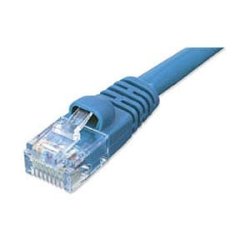
Ethernet cables are sometimes colored blue. I think that the cable itself may be the culprit. Frankly, I have no other recommendations except replacing the router itself.
 

My Computer

Computer Manufacturer/Model Number
Acer Aspire AX3910-U3012 PT
OS
Windows 7 Home Premium 64 bit
CPU
Intel Pentium E5700
Memory
640GB HDD
Graphics Card(s)
Integrated Graphics
Sound Card
Integrated Audio
Monitor(s) Displays
Acer
I don't think it is your router if the others are having no problem.

You should replace the cable that connects your computer to the router... the cable will look like this:
 

Attachments

  • Cat5 Patch Cable Blue.jpg
    Cat5 Patch Cable Blue.jpg
    5.7 KB · Views: 215

My Computer

Computer Manufacturer/Model Number
HP Pavilion Elite HPE-410f
OS
Windows 7 Ultimate x64
CPU
AMD Phenom x6 1045t
Motherboard
N/A
Memory
8 GB
Graphics Card(s)
ATI Radeon HD 5570
Sound Card
Realtek Highdefinition Audio / 5.1 Dolby Setup
Monitor(s) Displays
HP w2207h Widescreen
Screen Resolution
1680*1050
Hard Drives
1 TB (fixed), 320 Portable maxtor, Server Hard drives
PSU
350 Watt
Case
HP CASE
Cooling
Bass
Keyboard
Logitech MX 5500
Mouse
Logitech MX 5500
Internet Speed
ROAD RUNNER 16MB D/512 U
How about rolling back to a different driver for the NIC card itself. I've had windows updates "mess" up NIC drivers that were newer than the ones installed, and after I rolled back to what was there, everything worked flawlessly.
 

My Computer

Computer Manufacturer/Model Number
Custom Build
OS
windows 7 ultimate x64
CPU
AMD Phenom II x6 1090T
Motherboard
Gigabyte GA-MA770T
Memory
12gb
Graphics Card(s)
Radeon HD 4770
Sound Card
Onboard MB
Monitor(s) Displays
27" Asus LCD
Screen Resolution
Huge
Hard Drives
WD 1TB STA 3.0
PSU
Cooler MastereXtreme Power RS550
Case
Unknown
Cooling
Arctic Cooling Freezer Pro
Keyboard
Standard PS2
Mouse
USB Optical Mouse
Doesn't your computer have an RJ 45 Ethernet port in which one end of the ethernet cable go into? If you're using an adapter in a USB slot, I suggest you replace that adapter and see if that fixes it, or try another USB port.

These things have so many variables, you have to try all the possibilities because it's hard to pinpoint where the problem is....though most likely it is a simple solution....once you find the culprit.

The router is permitting wireless and the wired connection is intermittently working which suggests a loose or faulty connection somewhere. It could either be the USB, the adapter, the cable, or the router port....but which one????????
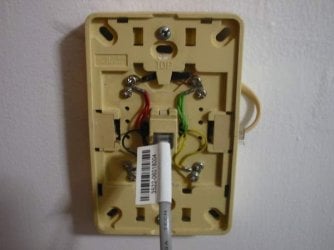
Also do check yr phone wall socket. It may be rusty & old. Replace it with a new socket. That may be the cause of it. :)
 

Attachments

  • 51876d1185709400-help-phone-wall-socket-phone-wall-socket-002.jpg
    51876d1185709400-help-phone-wall-socket-phone-wall-socket-002.jpg
    25.8 KB · Views: 3

My Computer

Computer Manufacturer/Model Number
D3f's Customs
OS
Win 7 Ultimate SP1 x64
CPU
Intel Pentium Dual Core E5300 OC'd @ 3GHz
Motherboard
Asus P5G41-M LE
Memory
Kingston 2x2GB DDR2-800 Dual Channel SDRAM
Graphics Card(s)
Integrated Intel GMA X4500
Sound Card
Realtek 5.1 HD Audio (ALC887)
Monitor(s) Displays
LG Flatron W1943S @ 60Hz
Screen Resolution
1360 x 768
Hard Drives
Internal - WD Caviar Blue 500GB, External - WD My Passport Essential 500GB
PSU
Headway 450w PSU
Case
Pixxo Slim Black mATX Case
Cooling
Stock Cpu Fan, 1 x Top Case Fan
Keyboard
Logitech K120
Mouse
Logitech LS1 Laser Mouse
Internet Speed
17.66Mb/s Down, 0.82Mb/s Up
Other Info
Creative SBS A300 2.1 Speaker System, LG GH22NS50 22x Internal Super-Multi DVD-RW, 2Wire 5012NV Wireless Modem Router
Back
Top