Listing audio files in Windows Explorer with date

Involute

New member
Local time
9:03 PM
Messages
55
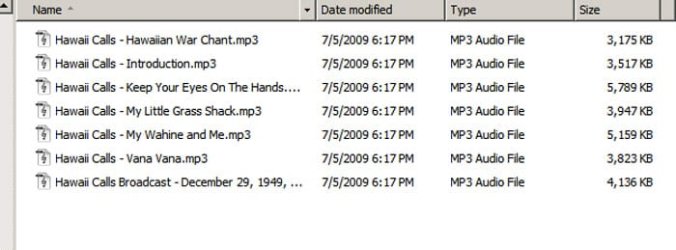
In previous versions of Windows (well, maybe not Vista; I never used it), you could select a variety of views for the files in a folder in Windows Explorer. The Details view would tell you date modified (among other things). It still works this way with Win7 except for MP3 files. With these guys, Windows tries to be oh-so-helpful by showing things like artist and album while not "cluttering" your view with date (and time) modified. I happen to really need date/time when scanning certain of my MP3s. How can I get it in Windows Explorer? Thanks.
 

My Computer My Computer

Computer Manufacturer/Model Number
Titanus
OS
Windows 7 Pro x64
CPU
Intel i7-970
Motherboard
Asus P-6X58D-E
Memory
12GB
Graphics Card(s)
Nvidia Quadro 4000
Sound Card
Creative SB X-Fi
Monitor(s) Displays
Samsung SyncMaster 204T
Hard Drives
Corsair Nova V128 128GB SSD; WD Velociraptor 600GB (x2 configured as RAID 1)
Case
Tuniq 3
Cooling
ECO Advanced Liquid Cooling
Internet Speed
Cable
Details view shows 7 or 8 different things for mp3s, including date modified.
 

Attachments

  • Untitled-1.jpg
    Untitled-1.jpg
    42.5 KB · Views: 30

My Computer My Computer

Computer type
PC/Desktop
Computer Manufacturer/Model Number
Ignatz Special; 4 speed manual gearbox; factory air conditioning; one of one
OS
Windows 7 Home Premium SP1, 64-bit
CPU
Intel Skylake i5-6600K, not overclocked
Motherboard
AsRock Z170M Extreme 4, micro ATX
Memory
8 GB HyperX DDR4-2666 (2 x 4 GB)
Graphics Card(s)
none; graphics are integrated on CPU
Sound Card
onboard: Realtek ALC1150; external: USB Behringer UF0-202
Monitor(s) Displays
Dell S2340M 23 inch IPS
Screen Resolution
1600 x 900
Hard Drives
System: Crucial MX100 series SSD, 128 GB;
Data: Samsung Spinpoint 103SJ, 1 TB;
Backup: WD Caviar Green WD30EZRX-00D8PB0, 3 TB
PSU
Rosewill SilentNight 500 watt fanless, semi-modular
Case
Antec Solo II
Cooling
Noctua NH-U12S; Noctua F12 intake, Noctua S12A exhaust
Keyboard
Microsoft 200 6JH-00001 USB
Mouse
Dell or Microsoft optical wired; USB
Antivirus
Microsoft Security Essentials and Malwarebytes Premium
Browser
Pale Moon
Other Info
All fans PWM; speeds at idle: CPU circa 500 rpm; intake circa 600 rpm; exhaust circa 600 rpm; CPU temps 27 idle and 47 C load in a warm room (27 C/81 F) when running Intel Extreme Tuning Utility stress test.
Hello Involute,

In addition, you could also add or remove columns in Windows Explorer if you like, or change the folder template of that folder to "General Items" instead of "Music" for details.

Hope this helps,
Shawn
 

My Computer My Computer

Computer type
PC/Desktop
Computer Manufacturer/Model Number
Self built custom
OS
64-bit Windows 11 Pro for Workstations
CPU
Intel i7-8700K OC'd to 5 GHz
Motherboard
ASUS ROG Maximus XI Formula Z390
Memory
64 GB (4x16GB) G.SKILL TridentZ RGB DDR4 3600 MHz
Graphics Card(s)
ASUS ROG-STRIX-GTX1080TI-O11G-GAMING
Sound Card
Integrated
Monitor(s) Displays
2 x Samsung Odyssey G7 27"
Screen Resolution
2560x1440
Hard Drives
1TB Samsung 990 PRO M.2,
4TB Samsung 990 PRO PRO M.2,
TerraMaster F8 SSD Plus NAS
PSU
Seasonic Prime Titanium 850W
Case
Thermaltake Core P3
Cooling
Corsair Hydro H115i
Keyboard
Logitech wireless K800
Mouse
Logitech MX Master 4
Internet Speed
2 Gb/s Download and 100 Mb/s Upload
Antivirus
Malwarebyte Anti-Malware Premium
Browser
Google Chrome
Other Info
Logitech Z625 speaker system,
Logitech BRIO 4K Pro webcam,
HP Color LaserJet Pro MFP M477fdn,
APC SMART-UPS RT 1000 XL - SURT1000XLI,
Galaxy S23 Plus phone
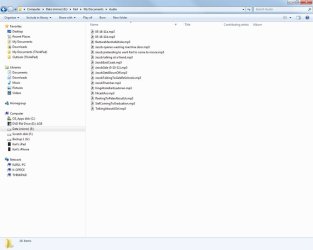
Well, here's what my view looks like with Details selected. Nothing like yours.
 

Attachments

  • screen.jpg
    screen.jpg
    46.2 KB · Views: 22

My Computer My Computer

Computer Manufacturer/Model Number
Titanus
OS
Windows 7 Pro x64
CPU
Intel i7-970
Motherboard
Asus P-6X58D-E
Memory
12GB
Graphics Card(s)
Nvidia Quadro 4000
Sound Card
Creative SB X-Fi
Monitor(s) Displays
Samsung SyncMaster 204T
Hard Drives
Corsair Nova V128 128GB SSD; WD Velociraptor 600GB (x2 configured as RAID 1)
Case
Tuniq 3
Cooling
ECO Advanced Liquid Cooling
Internet Speed
Cable
Right click the column headings and you should see several more choices, which you can check or uncheck.
 

My Computer My Computer

Computer type
PC/Desktop
Computer Manufacturer/Model Number
Ignatz Special; 4 speed manual gearbox; factory air conditioning; one of one
OS
Windows 7 Home Premium SP1, 64-bit
CPU
Intel Skylake i5-6600K, not overclocked
Motherboard
AsRock Z170M Extreme 4, micro ATX
Memory
8 GB HyperX DDR4-2666 (2 x 4 GB)
Graphics Card(s)
none; graphics are integrated on CPU
Sound Card
onboard: Realtek ALC1150; external: USB Behringer UF0-202
Monitor(s) Displays
Dell S2340M 23 inch IPS
Screen Resolution
1600 x 900
Hard Drives
System: Crucial MX100 series SSD, 128 GB;
Data: Samsung Spinpoint 103SJ, 1 TB;
Backup: WD Caviar Green WD30EZRX-00D8PB0, 3 TB
PSU
Rosewill SilentNight 500 watt fanless, semi-modular
Case
Antec Solo II
Cooling
Noctua NH-U12S; Noctua F12 intake, Noctua S12A exhaust
Keyboard
Microsoft 200 6JH-00001 USB
Mouse
Dell or Microsoft optical wired; USB
Antivirus
Microsoft Security Essentials and Malwarebytes Premium
Browser
Pale Moon
Other Info
All fans PWM; speeds at idle: CPU circa 500 rpm; intake circa 600 rpm; exhaust circa 600 rpm; CPU temps 27 idle and 47 C load in a warm room (27 C/81 F) when running Intel Extreme Tuning Utility stress test.
Aaah, that's what I was looking for. Thanks. Is there a way to make a view created this way the default, so I don't have to set it up every time?
 

My Computer My Computer

Computer Manufacturer/Model Number
Titanus
OS
Windows 7 Pro x64
CPU
Intel i7-970
Motherboard
Asus P-6X58D-E
Memory
12GB
Graphics Card(s)
Nvidia Quadro 4000
Sound Card
Creative SB X-Fi
Monitor(s) Displays
Samsung SyncMaster 204T
Hard Drives
Corsair Nova V128 128GB SSD; WD Velociraptor 600GB (x2 configured as RAID 1)
Case
Tuniq 3
Cooling
ECO Advanced Liquid Cooling
Internet Speed
Cable
Folder settings don't always stick, but you can try this:

Pick an mp3 folder and set it to details view manually, showing the items you want it to show.

Then highlight that folder and go to organize/folder and search options. Choose the view tab and then choose "apply to folders".

That may or may not work. All I can tell you is that it is confusing, but if you keep manually setting upper level folders to the details view, you should eventually get them all to behave.
 
Last edited by a moderator:

My Computer My Computer

Computer type
PC/Desktop
Computer Manufacturer/Model Number
Ignatz Special; 4 speed manual gearbox; factory air conditioning; one of one
OS
Windows 7 Home Premium SP1, 64-bit
CPU
Intel Skylake i5-6600K, not overclocked
Motherboard
AsRock Z170M Extreme 4, micro ATX
Memory
8 GB HyperX DDR4-2666 (2 x 4 GB)
Graphics Card(s)
none; graphics are integrated on CPU
Sound Card
onboard: Realtek ALC1150; external: USB Behringer UF0-202
Monitor(s) Displays
Dell S2340M 23 inch IPS
Screen Resolution
1600 x 900
Hard Drives
System: Crucial MX100 series SSD, 128 GB;
Data: Samsung Spinpoint 103SJ, 1 TB;
Backup: WD Caviar Green WD30EZRX-00D8PB0, 3 TB
PSU
Rosewill SilentNight 500 watt fanless, semi-modular
Case
Antec Solo II
Cooling
Noctua NH-U12S; Noctua F12 intake, Noctua S12A exhaust
Keyboard
Microsoft 200 6JH-00001 USB
Mouse
Dell or Microsoft optical wired; USB
Antivirus
Microsoft Security Essentials and Malwarebytes Premium
Browser
Pale Moon
Other Info
All fans PWM; speeds at idle: CPU circa 500 rpm; intake circa 600 rpm; exhaust circa 600 rpm; CPU temps 27 idle and 47 C load in a warm room (27 C/81 F) when running Intel Extreme Tuning Utility stress test.

My Computer My Computer

Computer type
PC/Desktop
Computer Manufacturer/Model Number
Self built custom
OS
64-bit Windows 11 Pro for Workstations
CPU
Intel i7-8700K OC'd to 5 GHz
Motherboard
ASUS ROG Maximus XI Formula Z390
Memory
64 GB (4x16GB) G.SKILL TridentZ RGB DDR4 3600 MHz
Graphics Card(s)
ASUS ROG-STRIX-GTX1080TI-O11G-GAMING
Sound Card
Integrated
Monitor(s) Displays
2 x Samsung Odyssey G7 27"
Screen Resolution
2560x1440
Hard Drives
1TB Samsung 990 PRO M.2,
4TB Samsung 990 PRO PRO M.2,
TerraMaster F8 SSD Plus NAS
PSU
Seasonic Prime Titanium 850W
Case
Thermaltake Core P3
Cooling
Corsair Hydro H115i
Keyboard
Logitech wireless K800
Mouse
Logitech MX Master 4
Internet Speed
2 Gb/s Download and 100 Mb/s Upload
Antivirus
Malwarebyte Anti-Malware Premium
Browser
Google Chrome
Other Info
Logitech Z625 speaker system,
Logitech BRIO 4K Pro webcam,
HP Color LaserJet Pro MFP M477fdn,
APC SMART-UPS RT 1000 XL - SURT1000XLI,
Galaxy S23 Plus phone
Back
Top