Solved .lnk files for All Programs menu

Merlin2000

New member
Member
Local time
10:16 AM
Messages
91
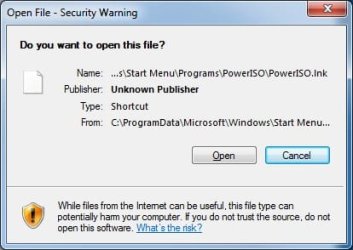
Whenever I open an item inside the start menu, it prompts with windows asking me if I want to open the file. Any idea why it does this now?

See attached screenshot.
 

Attachments

  • lnk issue.jpg
    lnk issue.jpg
    20.7 KB · Views: 10,041

My Computer

OS
Windows 7
I've tried to reset the link association using a cmd and typing "assoc" but that didn't seem to work. I've seen a couple fixes using regedit for Vista, but didn't want to run it on Windows 7.
 

My Computer

OS
Windows 7
I agree, do not mess with the registry, unless you are proficient in that area.

I would try a system restore from before the problem. This situation is more of a pain than a problem. It may be best not to try anything involving the registry.

If you feel that you shoud use regedit, make sure you back up the registry first.

-
 

My Computer

Computer type
PC/Desktop
Computer Manufacturer/Model Number
Dell XPS 420
OS
Windows 10, Home Clean Install
CPU
Intel Core2 processsor Q8200(2.33Ghz 1333FSB) Quad Core Tech
Motherboard
Dell
Memory
6 gb
Graphics Card(s)
ATI Radeon 256MB HD3650
Sound Card
Intergrated 7.1 Channel Audio
Monitor(s) Displays
Dell SP2009W 20"
Hard Drives
640 GB Serial ATA Hard drive
Cooling
Fan
Keyboard
Dell USB Keyboard
Mouse
Dell Premium Optical USB
Internet Speed
DSL 2.85
System restore imo is one of those last resorts. I'd rather not mess with it unless I have to. There is a registry fix out there somewhere... just can't seem to find out where. If people were able to fix it for Vista, then the problem should be known.

I'll probably just do a system restore if I can't figure it out within the next week or so.
 

My Computer

OS
Windows 7
try this first. right click the poweriso shortcut and delete it. then go to program files / poweriso and send a copy of the poweriso exe to the desktop as a shortcut, then move that shortcut to the old poweriso spot in the start menu. see if you click the new start menu shortcut if it works correctly.
 

My Computer

OS
windows

My Computer

Computer type
PC/Desktop
Computer Manufacturer/Model Number
Self built custom
OS
64-bit Windows 11 Pro for Workstations
CPU
Intel i7-8700K OC'd to 5 GHz
Motherboard
ASUS ROG Maximus XI Formula Z390
Memory
64 GB (4x16GB) G.SKILL TridentZ RGB DDR4 3600 MHz
Graphics Card(s)
ASUS ROG-STRIX-GTX1080TI-O11G-GAMING
Sound Card
Integrated
Monitor(s) Displays
2 x Samsung Odyssey G7 27"
Screen Resolution
2560x1440
Hard Drives
1TB Samsung 990 PRO M.2,
4TB Samsung 990 PRO PRO M.2,
TerraMaster F8 SSD Plus NAS
PSU
Seasonic Prime Titanium 850W
Case
Thermaltake Core P3
Cooling
Corsair Hydro H115i
Keyboard
Logitech wireless K800
Mouse
Logitech MX Master 4
Internet Speed
2 Gb/s Download and 100 Mb/s Upload
Antivirus
Malwarebyte Anti-Malware Premium
Browser
Google Chrome
Other Info
Logitech Z625 speaker system,
Logitech BRIO 4K Pro webcam,
HP Color LaserJet Pro MFP M477fdn,
APC SMART-UPS RT 1000 XL - SURT1000XLI,
Galaxy S23 Plus phone
That did not work for me, I still have the same problem. I ran across this thread: All of my shortcuts go to the same program and they all have the extension, .lnk.

However, when I open up File Type Doctor, and select .lnk in the extension type, the "Actions in right-click menu" were:

CompactContentMenu Class
Open Containing Folder Menu
Shortcut

Not sure which ones to delete/add.

Does anyone else have Creative Element PowerTools and can check their settings for the lnk extension?

Basically, any shorcut that appears in this folder, that is a shortcut for an EXE file, brings up the prompt in my first post: C:\ProgramData\Microsoft\Windows\Start Menu\Programs

If it is a shortcut for a pdf, txt file, etc.. it opens it up without any open file security warning...

If I navigate directly to the .exe file, and double click it, it opens without a problem.

If I take the current .exe file, and create a new shortcut on the desktop, then it works when I double click that shortcut on the desktop.

I have UAC set to the lowest security setting possible. One tutorial I found suggests I add .lnk files to the "Inclusion list for moderate risk file types" exclusion list, but that doesn't sound like the right way to "fix" the actual problem.
 

My Computer

OS
Windows 7
I had someone test their lnk file associations to make sure mine lined up correctly using PowerTools, and all appears to be well with those. See: http://www.sevenforums.com/general-discussion/66233-need-tester-win-7-x64-using-power-tools.html

So I'm at a loss about what else to test.

Right now I know that the shortcut .lnk file works correctly with all files except for .exe file! When I open .exe files directly, no warnings or anything pops up.

The warning box just seems so weird to be receiving!

53919d1266090151-lnk-files-all-programs-menu-lnk-issue.jpg
 

My Computer

OS
Windows 7

My Computer

Computer Manufacturer/Model Number
Custom
OS
Windows 7 Professional x64
CPU
Intel i7 2600K OC'd @ 4620 MHz
Motherboard
Asus P8Z68-V Pro
Memory
16GB GSkill Sniper 2133 Mhz (4x4GB)
Graphics Card(s)
EVGA GeForce GTX 480 SuperClocked+
Sound Card
Realtek High Definition Audio
Monitor(s) Displays
2x Acer S273HLbmii 27"
Screen Resolution
2 x 1920x1080
Hard Drives
64GB Crucial M4 SSD

Storage: Hitachi 1TB 5400RPM, Samsung 1.5TB 5400RPM
PSU
Corsair HW Series 750w (modular)
Case
Cooler Master HAF 932 Advanced Blue Edition
Cooling
CM Hyper 212+ CPU cooler, 3x 230mm + 1x 140mm case fans
Keyboard
Logitech MK320 (wireless)
Mouse
Logitech MK320 (wireless)
Internet Speed
30 Mb/s : 2 Mb/s
.lnk should not be associated with any program. Check in your filetype associations and change if required.
 

My Computer

Computer Manufacturer/Model Number
HP, Dell, Gateway, Toshiba - 4 laptops and 2 desktops
OS
Vista, Windows7, Mint Mate, Zorin, Windows 8
CPU
from 1.6GHz Duo to i7
Monitor(s) Displays
2x HP w2207
Hard Drives
5x HDD, 7x SSD, 12x Externals
Keyboard
with trackball - no mices
Mouse
Trackball mice
Internet Speed
DSL 6000
If you use internet explorer you can try a reset there - as it may be a zone trust level issue

Alternately check the properties of the shortcut or actual programs an see if you have an UNBLOCK button - I used to haver this when using firefox where the program was automatically blocked when downloaded.

Also check the permissions on the start menu folders - this should give a different error or prompt but the permissions could be a factor
 

My Computers

System One System Two

  • Computer type
    PC/Desktop
    Computer Manufacturer/Model Number
    ChillBlast - Custom to my design
    OS
    Windows 11 Pro x64 [Latest Release and Release Preview]
    CPU
    Ryzen 9 5950X, 3.8 - 5.2 MHz
    Motherboard
    Asus Prime X570-Pro
    Memory
    64GB [2 x 32GB] DDR4 3200MHz
    Graphics Card(s)
    4GB NVIDIA GEFORCE GTX 1650 Ti
    Sound Card
    On-board SPDIF to 5.1 System + HDMI [5.1 system]
    Monitor(s) Displays
    32" UHD 32 Bit HDR Monitor + 43" UHD 4K 32Bit HDR TV
    Screen Resolution
    2 x 3840 x 2160 @60Hz
    Hard Drives
    1TB M2 SSD OS, 500GB Fast Access SSD, 2 x 8TB Data + Various Externals from 1TB to 4TB, 10TB NAS
    PSU
    NZXT C750 80 PLUS Gold 750W Modular PSU
    Case
    Workstation Case [Matt Black]
    Cooling
    NZXT Kraken X63 280mm CPU Cooler +2x Quiet Case fans
    Keyboard
    Logitech Wireless MX Keys & K400 + others
    Mouse
    Logitech Wireless MX Master 3S
    Internet Speed
    920 MB Down 50 MB Up
    Antivirus
    BitDefender Total Security Pro
    Browser
    Chrome (always run latest Non-Beta)
    Other Info
    Also run ...
    Laptop - Quad 8GB - Windows 10 Pro x64
    Nexus 7 Android tablet x2
    Samsung 10.2" tablet
    Blackview TAB 8 4G Android Tablet c/w Keyboard
    Wacom Intuos Pro Medium Pen Pad
    Wacom Intuos Pro Small Pen Pad
    Wacom Expresskeys Remote
    Loopdeck+ Graphics Controller
    Shuttle Pro v2 Control
  • Computer type
    Laptop
    System Manufacturer/Model Number
    Dell XPS 17 10750H
    OS
    Windows 11 Pro x64 Latest RP
    CPU
    Intel I7 10750H 5.0GHz
    Motherboard
    Dell XPS
    Memory
    32GB [2x16GB] DDR4 2933 MHz
    Graphics Card(s)
    nVidia GTX1650Ti 4 GB GDDR6
    Sound Card
    Stock [Realtek] 4 Speaker
    Monitor(s) Displays
    17" IPS UHD+ Infinity Edge Touchscreen
    Screen Resolution
    3840 x 2400
    Hard Drives
    2TB M2 NVMe, 4TB External + various 500GB & 1TB External NVMe (also have access to spinner HDD from
    PSU
    Stock
    Case
    Stock XPS Aluminium & Carbon Fibre
    Cooling
    Stock - Active Fan Control
    Keyboard
    Backlit + Various Logitech
    Mouse
    Stock Track Pad + Logitech MX Trackball
    Internet Speed
    72 MB Down 18MB Up
    Browser
    Chrome
    Other Info
    Also run ...
    Laptop - Quad 8GB - Windows 10 Pro x64
    Nexus 7 Android tablet x2
    10.2" tablet
    Sony Z3 Android Smartphone
    Wacom Intuos Pro Medium Pen Pad
    Wacom Intuos Pro Small Pen Pad
    Wacom Expresskeys Remote
    Loopdeck+ Graphics Controller
    Shuttle Pro v2 Control Pad
    10TB NAS
I would suggest a System Restore. You can scan for affected programs before you actually apply the changes. System Restore
- I'd really prefer not to do a system restore. I have license codes that I would have to export from the registry now, and re import them again later. It will be a huge pain to go through and re-enter all my registry keys that will be erased with System Restore.

.lnk should not be associated with any program. Check in your filetype associations and change if required.
- See my screenshot here http://www.sevenforums.com/attachme...-7-x64-using-power-tools-file.type.doctor.jpg


If you use internet explorer you can try a reset there - as it may be a zone trust level issue
- I did the "Reset all zones to default levels"

Alternately check the properties of the shortcut or actual programs an see if you have an UNBLOCK button - I used to haver this when using firefox where the program was automatically blocked when downloaded.
- No unblock button in the right-click menu or properties. It is also not being locked (checked with LockHunter)

Also check the permissions on the start menu folders - this should give a different error or prompt but the permissions could be a factor
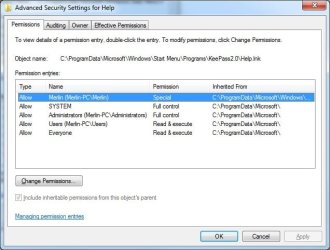
- I opened up the Advanced permissions button, it shows a check next to "Special permission" - I compared the values of a shortcut that works (non .exe shortcut) to the permissions of the shortcut that does not work, such as the .exe one. It looks to be the same permissions:
 

Attachments

  • keepasshelp.jpg
    keepasshelp.jpg
    44.1 KB · Views: 43
  • keepassexe.jpg
    keepassexe.jpg
    45.8 KB · Views: 30

My Computer

OS
Windows 7
To make matters even more weird...

This directory C:\ProgramData\Microsoft\Windows\Start Menu has a couple shortcuts to exe files. ALL of these shortcuts work. If I copy/move a shortcut into the Programs folder, then it has the problem and displays the prompt screenshot in my first post.

So, all shortcuts in C:\ProgramData\Microsoft\Windows\Start Menu\Programs have issues, but shortcuts outside that folder, work fine.
 

My Computer

OS
Windows 7
I'm not sure if this is the same with all systems, but just in case it is:

Code:
Windows Registry Editor Version 5.00

[HKEY_CLASSES_ROOT\.lnk]
@="lnkfile"
[HKEY_CLASSES_ROOT\.lnk\ShellEx]
[HKEY_CLASSES_ROOT\.lnk\ShellEx\{000214EE-0000-0000-C000-000000000046}]
@="{00021401-0000-0000-C000-000000000046}"
[HKEY_CLASSES_ROOT\.lnk\ShellEx\{000214F9-0000-0000-C000-000000000046}]
@="{00021401-0000-0000-C000-000000000046}"
[HKEY_CLASSES_ROOT\.lnk\ShellEx\{00021500-0000-0000-C000-000000000046}]
@="{00021401-0000-0000-C000-000000000046}"
[HKEY_CLASSES_ROOT\.lnk\ShellEx\{BB2E617C-0920-11d1-9A0B-00C04FC2D6C1}]
@="{00021401-0000-0000-C000-000000000046}"
[HKEY_CLASSES_ROOT\.lnk\ShellNew]
"Handler"="{ceefea1b-3e29-4ef1-b34c-fec79c4f70af}"
"IconPath"=hex(2):25,00,53,00,79,00,73,00,74,00,65,00,6d,00,52,00,6f,00,6f,00,\
  74,00,25,00,5c,00,73,00,79,00,73,00,74,00,65,00,6d,00,33,00,32,00,5c,00,73,\
  00,68,00,65,00,6c,00,6c,00,33,00,32,00,2e,00,64,00,6c,00,6c,00,2c,00,2d,00,\
  31,00,36,00,37,00,36,00,39,00,00,00
"ItemName"="@shell32.dll,-30397"
"MenuText"="@shell32.dll,-30318"
"NullFile"=""
[HKEY_CLASSES_ROOT\.lnk\ShellNew\Config]
"DontRename"=""

DISCLAIMER: I disclaim myself from all registry damages you may inflict with your registry.
 

My Computer

Computer Manufacturer/Model Number
Asus G73SW-XN2
OS
Windows 2000 5.0 Build 2195
CPU
Intel Core i7-2630QM@2GHz(2.9GHz Turbo Boost) [Sandy Bridge]
Motherboard
Asus G73SW (Intel HM65 Chipset)
Memory
Kingston DDR3 1333 16GB (4GBx4)
Graphics Card(s)
nVidia GTX 460m 1.5GB
Sound Card
EAX Advanced HD 5.0, THX TruStudio
Monitor(s) Displays
17.3 in. primary & 23 in. secondary
Screen Resolution
1920x1080
Hard Drives
Seagate Momentus XT (SATA II) 500 GB @ 7200 RPM
Hitachi (SATA II) 500GB @ 7200 RPM

Non Raid because ASUS was crappy to choose an HM65 Chipset
Keyboard
Built-in 102-Key Backlit Keyboard
Other Info
It's a Laptop.
Ok your ability (or not) to execute these shortcuts normally must be based on either the Users or everyone group.

Can you snip these, and post here, for a file that does not work correctly and I'll see if I can notice any discrepancies
 

My Computers

System One System Two

  • Computer type
    PC/Desktop
    Computer Manufacturer/Model Number
    ChillBlast - Custom to my design
    OS
    Windows 11 Pro x64 [Latest Release and Release Preview]
    CPU
    Ryzen 9 5950X, 3.8 - 5.2 MHz
    Motherboard
    Asus Prime X570-Pro
    Memory
    64GB [2 x 32GB] DDR4 3200MHz
    Graphics Card(s)
    4GB NVIDIA GEFORCE GTX 1650 Ti
    Sound Card
    On-board SPDIF to 5.1 System + HDMI [5.1 system]
    Monitor(s) Displays
    32" UHD 32 Bit HDR Monitor + 43" UHD 4K 32Bit HDR TV
    Screen Resolution
    2 x 3840 x 2160 @60Hz
    Hard Drives
    1TB M2 SSD OS, 500GB Fast Access SSD, 2 x 8TB Data + Various Externals from 1TB to 4TB, 10TB NAS
    PSU
    NZXT C750 80 PLUS Gold 750W Modular PSU
    Case
    Workstation Case [Matt Black]
    Cooling
    NZXT Kraken X63 280mm CPU Cooler +2x Quiet Case fans
    Keyboard
    Logitech Wireless MX Keys & K400 + others
    Mouse
    Logitech Wireless MX Master 3S
    Internet Speed
    920 MB Down 50 MB Up
    Antivirus
    BitDefender Total Security Pro
    Browser
    Chrome (always run latest Non-Beta)
    Other Info
    Also run ...
    Laptop - Quad 8GB - Windows 10 Pro x64
    Nexus 7 Android tablet x2
    Samsung 10.2" tablet
    Blackview TAB 8 4G Android Tablet c/w Keyboard
    Wacom Intuos Pro Medium Pen Pad
    Wacom Intuos Pro Small Pen Pad
    Wacom Expresskeys Remote
    Loopdeck+ Graphics Controller
    Shuttle Pro v2 Control
  • Computer type
    Laptop
    System Manufacturer/Model Number
    Dell XPS 17 10750H
    OS
    Windows 11 Pro x64 Latest RP
    CPU
    Intel I7 10750H 5.0GHz
    Motherboard
    Dell XPS
    Memory
    32GB [2x16GB] DDR4 2933 MHz
    Graphics Card(s)
    nVidia GTX1650Ti 4 GB GDDR6
    Sound Card
    Stock [Realtek] 4 Speaker
    Monitor(s) Displays
    17" IPS UHD+ Infinity Edge Touchscreen
    Screen Resolution
    3840 x 2400
    Hard Drives
    2TB M2 NVMe, 4TB External + various 500GB & 1TB External NVMe (also have access to spinner HDD from
    PSU
    Stock
    Case
    Stock XPS Aluminium & Carbon Fibre
    Cooling
    Stock - Active Fan Control
    Keyboard
    Backlit + Various Logitech
    Mouse
    Stock Track Pad + Logitech MX Trackball
    Internet Speed
    72 MB Down 18MB Up
    Browser
    Chrome
    Other Info
    Also run ...
    Laptop - Quad 8GB - Windows 10 Pro x64
    Nexus 7 Android tablet x2
    10.2" tablet
    Sony Z3 Android Smartphone
    Wacom Intuos Pro Medium Pen Pad
    Wacom Intuos Pro Small Pen Pad
    Wacom Expresskeys Remote
    Loopdeck+ Graphics Controller
    Shuttle Pro v2 Control Pad
    10TB NAS
I'm not sure if this is the same with all systems, but just in case it is:
- Thanks for the suggestion, Barman linked over to the tutorial with that inside, it didn't fix the problem though :(

Ok your ability (or not) to execute these shortcuts normally must be based on either the Users or everyone group.

Can you snip these, and post here, for a file that does not work correctly and I'll see if I can notice any discrepancies
- Can you clarify what to post? I right-click on a working shortcut, go to Properties, then Security, then? Or something else? Basically, post all the settings for a working file, for all the users and groups listed under the Security tab, and then do the same for a file that doesn't work. Is that right?
 

My Computer

OS
Windows 7
Sorry wasn't clear

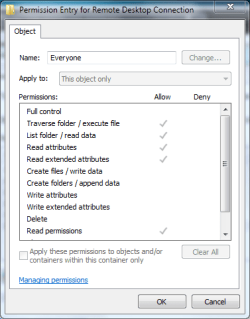
in the advanced permissions you should be able to double click on the users and everyone groups and show the actual rights they have assigned.

permissins detail.PNG
 

My Computers

System One System Two

  • Computer type
    PC/Desktop
    Computer Manufacturer/Model Number
    ChillBlast - Custom to my design
    OS
    Windows 11 Pro x64 [Latest Release and Release Preview]
    CPU
    Ryzen 9 5950X, 3.8 - 5.2 MHz
    Motherboard
    Asus Prime X570-Pro
    Memory
    64GB [2 x 32GB] DDR4 3200MHz
    Graphics Card(s)
    4GB NVIDIA GEFORCE GTX 1650 Ti
    Sound Card
    On-board SPDIF to 5.1 System + HDMI [5.1 system]
    Monitor(s) Displays
    32" UHD 32 Bit HDR Monitor + 43" UHD 4K 32Bit HDR TV
    Screen Resolution
    2 x 3840 x 2160 @60Hz
    Hard Drives
    1TB M2 SSD OS, 500GB Fast Access SSD, 2 x 8TB Data + Various Externals from 1TB to 4TB, 10TB NAS
    PSU
    NZXT C750 80 PLUS Gold 750W Modular PSU
    Case
    Workstation Case [Matt Black]
    Cooling
    NZXT Kraken X63 280mm CPU Cooler +2x Quiet Case fans
    Keyboard
    Logitech Wireless MX Keys & K400 + others
    Mouse
    Logitech Wireless MX Master 3S
    Internet Speed
    920 MB Down 50 MB Up
    Antivirus
    BitDefender Total Security Pro
    Browser
    Chrome (always run latest Non-Beta)
    Other Info
    Also run ...
    Laptop - Quad 8GB - Windows 10 Pro x64
    Nexus 7 Android tablet x2
    Samsung 10.2" tablet
    Blackview TAB 8 4G Android Tablet c/w Keyboard
    Wacom Intuos Pro Medium Pen Pad
    Wacom Intuos Pro Small Pen Pad
    Wacom Expresskeys Remote
    Loopdeck+ Graphics Controller
    Shuttle Pro v2 Control
  • Computer type
    Laptop
    System Manufacturer/Model Number
    Dell XPS 17 10750H
    OS
    Windows 11 Pro x64 Latest RP
    CPU
    Intel I7 10750H 5.0GHz
    Motherboard
    Dell XPS
    Memory
    32GB [2x16GB] DDR4 2933 MHz
    Graphics Card(s)
    nVidia GTX1650Ti 4 GB GDDR6
    Sound Card
    Stock [Realtek] 4 Speaker
    Monitor(s) Displays
    17" IPS UHD+ Infinity Edge Touchscreen
    Screen Resolution
    3840 x 2400
    Hard Drives
    2TB M2 NVMe, 4TB External + various 500GB & 1TB External NVMe (also have access to spinner HDD from
    PSU
    Stock
    Case
    Stock XPS Aluminium & Carbon Fibre
    Cooling
    Stock - Active Fan Control
    Keyboard
    Backlit + Various Logitech
    Mouse
    Stock Track Pad + Logitech MX Trackball
    Internet Speed
    72 MB Down 18MB Up
    Browser
    Chrome
    Other Info
    Also run ...
    Laptop - Quad 8GB - Windows 10 Pro x64
    Nexus 7 Android tablet x2
    10.2" tablet
    Sony Z3 Android Smartphone
    Wacom Intuos Pro Medium Pen Pad
    Wacom Intuos Pro Small Pen Pad
    Wacom Expresskeys Remote
    Loopdeck+ Graphics Controller
    Shuttle Pro v2 Control Pad
    10TB NAS
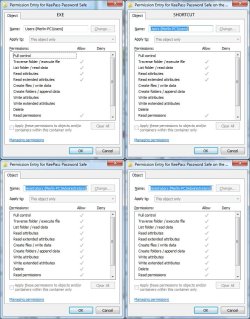
Ah, thanks for the clarification! I compared the two, exe (left) to lnk (right) and the users and administrator groups appear to be the same :cry:

I guess this is not what we wanted to see :huh:

Btw, when I right-click on the file and go to "Run as administrator", I do NOT receive the error prompt window. I think you're on the right track regarding the user groups being messed up. Just dunno where to go from here.
 

Attachments

  • exe.vs.shortcut.jpg
    exe.vs.shortcut.jpg
    117.8 KB · Views: 33

My Computer

OS
Windows 7
Ok time to experiment/workaround ;)

go to the all users folder and (take ownership if you need to), give your user (merlin?), full control, and let it propagate down to all files and any sub folders.

Unless there are any deny permissions floating about in the tree, this should work correctly now, (from what you observe with run as admin working)

The experiment part is that if you wish you can adjust the details by removing permissions until you discover what actual combination you need - an interesting experiment if you have time but should not be required ;)
 

My Computers

System One System Two

  • Computer type
    PC/Desktop
    Computer Manufacturer/Model Number
    ChillBlast - Custom to my design
    OS
    Windows 11 Pro x64 [Latest Release and Release Preview]
    CPU
    Ryzen 9 5950X, 3.8 - 5.2 MHz
    Motherboard
    Asus Prime X570-Pro
    Memory
    64GB [2 x 32GB] DDR4 3200MHz
    Graphics Card(s)
    4GB NVIDIA GEFORCE GTX 1650 Ti
    Sound Card
    On-board SPDIF to 5.1 System + HDMI [5.1 system]
    Monitor(s) Displays
    32" UHD 32 Bit HDR Monitor + 43" UHD 4K 32Bit HDR TV
    Screen Resolution
    2 x 3840 x 2160 @60Hz
    Hard Drives
    1TB M2 SSD OS, 500GB Fast Access SSD, 2 x 8TB Data + Various Externals from 1TB to 4TB, 10TB NAS
    PSU
    NZXT C750 80 PLUS Gold 750W Modular PSU
    Case
    Workstation Case [Matt Black]
    Cooling
    NZXT Kraken X63 280mm CPU Cooler +2x Quiet Case fans
    Keyboard
    Logitech Wireless MX Keys & K400 + others
    Mouse
    Logitech Wireless MX Master 3S
    Internet Speed
    920 MB Down 50 MB Up
    Antivirus
    BitDefender Total Security Pro
    Browser
    Chrome (always run latest Non-Beta)
    Other Info
    Also run ...
    Laptop - Quad 8GB - Windows 10 Pro x64
    Nexus 7 Android tablet x2
    Samsung 10.2" tablet
    Blackview TAB 8 4G Android Tablet c/w Keyboard
    Wacom Intuos Pro Medium Pen Pad
    Wacom Intuos Pro Small Pen Pad
    Wacom Expresskeys Remote
    Loopdeck+ Graphics Controller
    Shuttle Pro v2 Control
  • Computer type
    Laptop
    System Manufacturer/Model Number
    Dell XPS 17 10750H
    OS
    Windows 11 Pro x64 Latest RP
    CPU
    Intel I7 10750H 5.0GHz
    Motherboard
    Dell XPS
    Memory
    32GB [2x16GB] DDR4 2933 MHz
    Graphics Card(s)
    nVidia GTX1650Ti 4 GB GDDR6
    Sound Card
    Stock [Realtek] 4 Speaker
    Monitor(s) Displays
    17" IPS UHD+ Infinity Edge Touchscreen
    Screen Resolution
    3840 x 2400
    Hard Drives
    2TB M2 NVMe, 4TB External + various 500GB & 1TB External NVMe (also have access to spinner HDD from
    PSU
    Stock
    Case
    Stock XPS Aluminium & Carbon Fibre
    Cooling
    Stock - Active Fan Control
    Keyboard
    Backlit + Various Logitech
    Mouse
    Stock Track Pad + Logitech MX Trackball
    Internet Speed
    72 MB Down 18MB Up
    Browser
    Chrome
    Other Info
    Also run ...
    Laptop - Quad 8GB - Windows 10 Pro x64
    Nexus 7 Android tablet x2
    10.2" tablet
    Sony Z3 Android Smartphone
    Wacom Intuos Pro Medium Pen Pad
    Wacom Intuos Pro Small Pen Pad
    Wacom Expresskeys Remote
    Loopdeck+ Graphics Controller
    Shuttle Pro v2 Control Pad
    10TB NAS
Back
Top