Solved .lnk files for All Programs menu

go to the all users folder and (take ownership if you need to), give your user (merlin?), full control, and let it propagate down to all files and any sub folders.
- Bear with me here, I'm a Vista/Win 7 newb. What's the "User's Folder" - I have C:\Users or C:\Users\Merlin (access denied to this one)

If I open a window, type "%UserProfile%", it takes me to Merlin, but there is no way to move up one level, or grab the address from the top address bar location :/
 

My Computer

OS
Windows 7
I noticed "C:\Users\All Users" I guess this is what you mean by "all users" folder?

Do you know how I give myself (Merlin) full control?

I right-clicked on "All users" folder, went to properties, Security, then Edit

I added a new user "Merlin" - hit check names to make sure it's formatted correct (then it showed up with an underline).

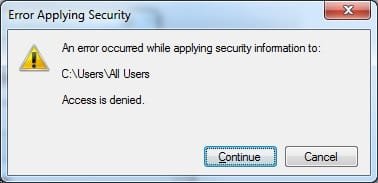
When I hit OK, it tries to apply the changes, and then comes back with a "Access is Denied"

When I deleted the new Merlin user I added, it comes back with the same Access is Denied window (attached)

I do have the option to "Take Ownership" of the All Users folder, I think it's the LockHunter program that does that, but I'm not sure if that would screw anything up, so I won't try it unless you suggest it.
 

Attachments

  • access.denied.jpg
    access.denied.jpg
    9.9 KB · Views: 10

My Computer

OS
Windows 7
Have you ever done an offline chkdsk? as in chkdsk /f? chkdsk fixes security descriptors sometimes. Maybe it might be able to fix yours.
 

My Computer

Computer Manufacturer/Model Number
Asus G73SW-XN2
OS
Windows 2000 5.0 Build 2195
CPU
Intel Core i7-2630QM@2GHz(2.9GHz Turbo Boost) [Sandy Bridge]
Motherboard
Asus G73SW (Intel HM65 Chipset)
Memory
Kingston DDR3 1333 16GB (4GBx4)
Graphics Card(s)
nVidia GTX 460m 1.5GB
Sound Card
EAX Advanced HD 5.0, THX TruStudio
Monitor(s) Displays
17.3 in. primary & 23 in. secondary
Screen Resolution
1920x1080
Hard Drives
Seagate Momentus XT (SATA II) 500 GB @ 7200 RPM
Hitachi (SATA II) 500GB @ 7200 RPM

Non Raid because ASUS was crappy to choose an HM65 Chipset
Keyboard
Built-in 102-Key Backlit Keyboard
Other Info
It's a Laptop.
Sorry again, should be more specific, the folder I mean is the All Users start menu folder at ...

C:\ProgramData\Microsoft\Windows\Start Menu

And use the properties - security tab to add Full control to your username
 

My Computers

System One System Two

  • Computer type
    PC/Desktop
    Computer Manufacturer/Model Number
    ChillBlast - Custom to my design
    OS
    Windows 11 Pro x64 [Latest Release and Release Preview]
    CPU
    Ryzen 9 5950X, 3.8 - 5.2 MHz
    Motherboard
    Asus Prime X570-Pro
    Memory
    64GB [2 x 32GB] DDR4 3200MHz
    Graphics Card(s)
    4GB NVIDIA GEFORCE GTX 1650 Ti
    Sound Card
    On-board SPDIF to 5.1 System + HDMI [5.1 system]
    Monitor(s) Displays
    32" UHD 32 Bit HDR Monitor + 43" UHD 4K 32Bit HDR TV
    Screen Resolution
    2 x 3840 x 2160 @60Hz
    Hard Drives
    1TB M2 SSD OS, 500GB Fast Access SSD, 2 x 8TB Data + Various Externals from 1TB to 4TB, 10TB NAS
    PSU
    NZXT C750 80 PLUS Gold 750W Modular PSU
    Case
    Workstation Case [Matt Black]
    Cooling
    NZXT Kraken X63 280mm CPU Cooler +2x Quiet Case fans
    Keyboard
    Logitech Wireless MX Keys & K400 + others
    Mouse
    Logitech Wireless MX Master 3S
    Internet Speed
    920 MB Down 50 MB Up
    Antivirus
    BitDefender Total Security Pro
    Browser
    Chrome (always run latest Non-Beta)
    Other Info
    Also run ...
    Laptop - Quad 8GB - Windows 10 Pro x64
    Nexus 7 Android tablet x2
    Samsung 10.2" tablet
    Blackview TAB 8 4G Android Tablet c/w Keyboard
    Wacom Intuos Pro Medium Pen Pad
    Wacom Intuos Pro Small Pen Pad
    Wacom Expresskeys Remote
    Loopdeck+ Graphics Controller
    Shuttle Pro v2 Control
  • Computer type
    Laptop
    System Manufacturer/Model Number
    Dell XPS 17 10750H
    OS
    Windows 11 Pro x64 Latest RP
    CPU
    Intel I7 10750H 5.0GHz
    Motherboard
    Dell XPS
    Memory
    32GB [2x16GB] DDR4 2933 MHz
    Graphics Card(s)
    nVidia GTX1650Ti 4 GB GDDR6
    Sound Card
    Stock [Realtek] 4 Speaker
    Monitor(s) Displays
    17" IPS UHD+ Infinity Edge Touchscreen
    Screen Resolution
    3840 x 2400
    Hard Drives
    2TB M2 NVMe, 4TB External + various 500GB & 1TB External NVMe (also have access to spinner HDD from
    PSU
    Stock
    Case
    Stock XPS Aluminium & Carbon Fibre
    Cooling
    Stock - Active Fan Control
    Keyboard
    Backlit + Various Logitech
    Mouse
    Stock Track Pad + Logitech MX Trackball
    Internet Speed
    72 MB Down 18MB Up
    Browser
    Chrome
    Other Info
    Also run ...
    Laptop - Quad 8GB - Windows 10 Pro x64
    Nexus 7 Android tablet x2
    10.2" tablet
    Sony Z3 Android Smartphone
    Wacom Intuos Pro Medium Pen Pad
    Wacom Intuos Pro Small Pen Pad
    Wacom Expresskeys Remote
    Loopdeck+ Graphics Controller
    Shuttle Pro v2 Control Pad
    10TB NAS
And use the properties - security tab to add Full control to your username
- For "Merlin (Merlin-PC\Merlin)" and "Users (Merlin-PC\Users)" I checked "Full Control" under allow. It didn't work, but I verified the permissions were successfully sent to sub folders/files.

Have you ever done an offline chkdsk? as in chkdsk /f? chkdsk fixes security descriptors sometimes. Maybe it might be able to fix yours.

- I thought chkdsk was just to fix logical drive problems? BarMan, do you suggest I do this?
 

My Computer

OS
Windows 7
I am at a loss here to understand exactly what is causing the dialogue to be presented. :confused:

As you do not receive the prompt when running as administrator but only when running as a standard user, the changes to the permissions on the shortcuts should have solved the issue, as your user now has the same rights as the administrator.

There is definitely some form of corruption here and It may be in many places :(

One thing we could try here is to create a new user account (administrator not standard) - log in as the new user and see if the issue remains - if the issue is gone then the corruption is with your current user account and it should be possible to migrate your settings to a new user account as a cure then delete the original corrupt account.

The other possible cause would be a permissions issue but on the actual exe files rather than the shortcuts

Can you run an .exe file directly from somewhere in c:\program files\... ?

Also if you right click on an exe file in c\program files\... and send a shortcut to the desktop will this run correctly?

As for the question of a chkdsk /f it should do no harm and may cure the issue as stated by arkhi, but I would not expect this in this case

Another command line option would be a system file check (sfc /scannow), which may cure a corrupted system file :confused:
 

My Computers

System One System Two

  • Computer type
    PC/Desktop
    Computer Manufacturer/Model Number
    ChillBlast - Custom to my design
    OS
    Windows 11 Pro x64 [Latest Release and Release Preview]
    CPU
    Ryzen 9 5950X, 3.8 - 5.2 MHz
    Motherboard
    Asus Prime X570-Pro
    Memory
    64GB [2 x 32GB] DDR4 3200MHz
    Graphics Card(s)
    4GB NVIDIA GEFORCE GTX 1650 Ti
    Sound Card
    On-board SPDIF to 5.1 System + HDMI [5.1 system]
    Monitor(s) Displays
    32" UHD 32 Bit HDR Monitor + 43" UHD 4K 32Bit HDR TV
    Screen Resolution
    2 x 3840 x 2160 @60Hz
    Hard Drives
    1TB M2 SSD OS, 500GB Fast Access SSD, 2 x 8TB Data + Various Externals from 1TB to 4TB, 10TB NAS
    PSU
    NZXT C750 80 PLUS Gold 750W Modular PSU
    Case
    Workstation Case [Matt Black]
    Cooling
    NZXT Kraken X63 280mm CPU Cooler +2x Quiet Case fans
    Keyboard
    Logitech Wireless MX Keys & K400 + others
    Mouse
    Logitech Wireless MX Master 3S
    Internet Speed
    920 MB Down 50 MB Up
    Antivirus
    BitDefender Total Security Pro
    Browser
    Chrome (always run latest Non-Beta)
    Other Info
    Also run ...
    Laptop - Quad 8GB - Windows 10 Pro x64
    Nexus 7 Android tablet x2
    Samsung 10.2" tablet
    Blackview TAB 8 4G Android Tablet c/w Keyboard
    Wacom Intuos Pro Medium Pen Pad
    Wacom Intuos Pro Small Pen Pad
    Wacom Expresskeys Remote
    Loopdeck+ Graphics Controller
    Shuttle Pro v2 Control
  • Computer type
    Laptop
    System Manufacturer/Model Number
    Dell XPS 17 10750H
    OS
    Windows 11 Pro x64 Latest RP
    CPU
    Intel I7 10750H 5.0GHz
    Motherboard
    Dell XPS
    Memory
    32GB [2x16GB] DDR4 2933 MHz
    Graphics Card(s)
    nVidia GTX1650Ti 4 GB GDDR6
    Sound Card
    Stock [Realtek] 4 Speaker
    Monitor(s) Displays
    17" IPS UHD+ Infinity Edge Touchscreen
    Screen Resolution
    3840 x 2400
    Hard Drives
    2TB M2 NVMe, 4TB External + various 500GB & 1TB External NVMe (also have access to spinner HDD from
    PSU
    Stock
    Case
    Stock XPS Aluminium & Carbon Fibre
    Cooling
    Stock - Active Fan Control
    Keyboard
    Backlit + Various Logitech
    Mouse
    Stock Track Pad + Logitech MX Trackball
    Internet Speed
    72 MB Down 18MB Up
    Browser
    Chrome
    Other Info
    Also run ...
    Laptop - Quad 8GB - Windows 10 Pro x64
    Nexus 7 Android tablet x2
    10.2" tablet
    Sony Z3 Android Smartphone
    Wacom Intuos Pro Medium Pen Pad
    Wacom Intuos Pro Small Pen Pad
    Wacom Expresskeys Remote
    Loopdeck+ Graphics Controller
    Shuttle Pro v2 Control Pad
    10TB NAS
Can you run an .exe file directly from somewhere in c:\program files\... ?
- Works perfectly fine running it directly like that. It ONLY happens when I open the shortcut within the start menu folder.

I'll run both of those commands, report back, and then create a new user account.

Btw, I think the only registry changes I've done, are outlined here: Get Windows XP Styled Classic All Programs List in Windows Vista and 7 - Tweaking with Vishal - I went all the way through step 3, but did not complete step 4 and onward. Since then, I've reverted my changes.

Can you tell me what your value is for the registry key "Favorites" located at "HKEY_CURRENT_USER\Software\Microsoft\Windows\CurrentVersion\Explorer\Shell Folders"?

Should it be:

C:\Users\Merlin\Favorites

OR


%USERPROFILE%\Favorites
 

My Computer

OS
Windows 7
reg entry should be C:\users\merlin ... although the %userprofile% string should actually equate to the same thing, if you are logged in as merlin.

Mine is actually re-directed to a data drive as I do not store my settings on the system drive but the principle applies just the same

Edit

one extra thing to try - open the start menu right click on the all programs link and select open, (not open all users), check the permissions for your user on the programs folder that you see there. (shortcuts are held in two locations and it could be that the personal location is what is corrupted, rather than the general one which we have already changed)
 

My Computers

System One System Two

  • Computer type
    PC/Desktop
    Computer Manufacturer/Model Number
    ChillBlast - Custom to my design
    OS
    Windows 11 Pro x64 [Latest Release and Release Preview]
    CPU
    Ryzen 9 5950X, 3.8 - 5.2 MHz
    Motherboard
    Asus Prime X570-Pro
    Memory
    64GB [2 x 32GB] DDR4 3200MHz
    Graphics Card(s)
    4GB NVIDIA GEFORCE GTX 1650 Ti
    Sound Card
    On-board SPDIF to 5.1 System + HDMI [5.1 system]
    Monitor(s) Displays
    32" UHD 32 Bit HDR Monitor + 43" UHD 4K 32Bit HDR TV
    Screen Resolution
    2 x 3840 x 2160 @60Hz
    Hard Drives
    1TB M2 SSD OS, 500GB Fast Access SSD, 2 x 8TB Data + Various Externals from 1TB to 4TB, 10TB NAS
    PSU
    NZXT C750 80 PLUS Gold 750W Modular PSU
    Case
    Workstation Case [Matt Black]
    Cooling
    NZXT Kraken X63 280mm CPU Cooler +2x Quiet Case fans
    Keyboard
    Logitech Wireless MX Keys & K400 + others
    Mouse
    Logitech Wireless MX Master 3S
    Internet Speed
    920 MB Down 50 MB Up
    Antivirus
    BitDefender Total Security Pro
    Browser
    Chrome (always run latest Non-Beta)
    Other Info
    Also run ...
    Laptop - Quad 8GB - Windows 10 Pro x64
    Nexus 7 Android tablet x2
    Samsung 10.2" tablet
    Blackview TAB 8 4G Android Tablet c/w Keyboard
    Wacom Intuos Pro Medium Pen Pad
    Wacom Intuos Pro Small Pen Pad
    Wacom Expresskeys Remote
    Loopdeck+ Graphics Controller
    Shuttle Pro v2 Control
  • Computer type
    Laptop
    System Manufacturer/Model Number
    Dell XPS 17 10750H
    OS
    Windows 11 Pro x64 Latest RP
    CPU
    Intel I7 10750H 5.0GHz
    Motherboard
    Dell XPS
    Memory
    32GB [2x16GB] DDR4 2933 MHz
    Graphics Card(s)
    nVidia GTX1650Ti 4 GB GDDR6
    Sound Card
    Stock [Realtek] 4 Speaker
    Monitor(s) Displays
    17" IPS UHD+ Infinity Edge Touchscreen
    Screen Resolution
    3840 x 2400
    Hard Drives
    2TB M2 NVMe, 4TB External + various 500GB & 1TB External NVMe (also have access to spinner HDD from
    PSU
    Stock
    Case
    Stock XPS Aluminium & Carbon Fibre
    Cooling
    Stock - Active Fan Control
    Keyboard
    Backlit + Various Logitech
    Mouse
    Stock Track Pad + Logitech MX Trackball
    Internet Speed
    72 MB Down 18MB Up
    Browser
    Chrome
    Other Info
    Also run ...
    Laptop - Quad 8GB - Windows 10 Pro x64
    Nexus 7 Android tablet x2
    10.2" tablet
    Sony Z3 Android Smartphone
    Wacom Intuos Pro Medium Pen Pad
    Wacom Intuos Pro Small Pen Pad
    Wacom Expresskeys Remote
    Loopdeck+ Graphics Controller
    Shuttle Pro v2 Control Pad
    10TB NAS
reg entry should be C:\users\merlin ... although the %userprofile% string should actually equate to the same thing, if you are logged in as merlin.
- Ok, well that's how mine so, so that's not the problem :(

one extra thing to try - open the start menu right click on the all programs link and select open, (not open all users), check the permissions for your user on the programs folder that you see there. (shortcuts are held in two locations and it could be that the personal location is what is corrupted, rather than the general one which we have already changed)
- I just verified that the start menu for Merlin (C:\Users\Merlin\AppData\Roaming\Microsoft\Windows\Start Menu\Programs) works perfectly fine. It's only the start menu @ C:\ProgramData\Microsoft\Windows\Start Menu that has the problem.

Could it have something to do with the "Group Policy Settings" program? Maybe something I need to change in that program?

I modified the shortcut icon for .pdf documents. Apparently the entry is stored via the registry, so I modified that icon only. Not sure if that could effect this.

I'm going to try a new user account right now and report back. I ran the "sfc /scannow" command and all reported to be ok. I can run the chkdisk later tonight when I'm done with work, I need the computer on today so I can't run chkdisk just yet.

Just created a 2nd user, logged into that user, and I have the SAME problem. Same exact behavior!!!! :mad::mad::mad:

Is there a way to always run lnk files as the administrator? I found this post at EE that may have a solution inside, I don't have an account so I can't view it: http://www.experts-exchange.com/Microsoft/Applications/Q_23911975.html

I think I'm going to smelt my Windows 7 disc and see if that helps :sarc:
Albr%C3%A1s%20smelting.jpg


If I go to the shortcut properties, and check to always run as admin, it does not display the prompt.

Another edit: I Found this post http://www.tabletpcquestions.com/sh...w-to-remove-Open-File-Security-Warning-window that talks about using icacls

I did
cd C:\ProgramData\Microsoft\Windows\Start Menu
icacls links /setintegritylevel (OI)(CI)low

And it shows it affected 1 file, but did not fix the problem.

Another Edit: Here's another thread that looks to be similar!!! http://www.sevenforums.com/customiz...ic-menu-shortcuts-attributes-big-mistake.html

 
Last edited:

My Computer

OS
Windows 7
Holy shit! It worked!!!

Anyone with my problem, please check out this tutorial: http://www.sevenforums.com/customiz...cuts-attributes-big-mistake-3.html#post467352

Thanks Barman for working with me on all of this. After endless troubleshooting, I was getting ready just to accept the fact I need to live with it lol.

(If you don't mind, you may want to edit the post I linked to and remove the extra space between the / and word "setintegritylevel" right now it shows up as "/ setintegritylevel" and it should be "/setintegritylevel")

The solution, repeated (credit given to poster in my link above), is:

- Click Start and in Accessories find the CommandPrompt (or click start and type cmd)
- Right click on the found CommandPrompt or cmd.exe and choose: 'Run as Administrator'
- Type the following commands (each line followed by <enter>)
CD \ProgramData\Microsoft\Windows\
icacls StartM~1 /setintegritylevel (CI)low
CD Start Menu
icacls Programs /setintegritylevel (CI)low
 

My Computer

OS
Windows 7
Glad to hear you have things working for you

Have edited spaces from linked post ;)
 

My Computers

System One System Two

  • Computer type
    PC/Desktop
    Computer Manufacturer/Model Number
    ChillBlast - Custom to my design
    OS
    Windows 11 Pro x64 [Latest Release and Release Preview]
    CPU
    Ryzen 9 5950X, 3.8 - 5.2 MHz
    Motherboard
    Asus Prime X570-Pro
    Memory
    64GB [2 x 32GB] DDR4 3200MHz
    Graphics Card(s)
    4GB NVIDIA GEFORCE GTX 1650 Ti
    Sound Card
    On-board SPDIF to 5.1 System + HDMI [5.1 system]
    Monitor(s) Displays
    32" UHD 32 Bit HDR Monitor + 43" UHD 4K 32Bit HDR TV
    Screen Resolution
    2 x 3840 x 2160 @60Hz
    Hard Drives
    1TB M2 SSD OS, 500GB Fast Access SSD, 2 x 8TB Data + Various Externals from 1TB to 4TB, 10TB NAS
    PSU
    NZXT C750 80 PLUS Gold 750W Modular PSU
    Case
    Workstation Case [Matt Black]
    Cooling
    NZXT Kraken X63 280mm CPU Cooler +2x Quiet Case fans
    Keyboard
    Logitech Wireless MX Keys & K400 + others
    Mouse
    Logitech Wireless MX Master 3S
    Internet Speed
    920 MB Down 50 MB Up
    Antivirus
    BitDefender Total Security Pro
    Browser
    Chrome (always run latest Non-Beta)
    Other Info
    Also run ...
    Laptop - Quad 8GB - Windows 10 Pro x64
    Nexus 7 Android tablet x2
    Samsung 10.2" tablet
    Blackview TAB 8 4G Android Tablet c/w Keyboard
    Wacom Intuos Pro Medium Pen Pad
    Wacom Intuos Pro Small Pen Pad
    Wacom Expresskeys Remote
    Loopdeck+ Graphics Controller
    Shuttle Pro v2 Control
  • Computer type
    Laptop
    System Manufacturer/Model Number
    Dell XPS 17 10750H
    OS
    Windows 11 Pro x64 Latest RP
    CPU
    Intel I7 10750H 5.0GHz
    Motherboard
    Dell XPS
    Memory
    32GB [2x16GB] DDR4 2933 MHz
    Graphics Card(s)
    nVidia GTX1650Ti 4 GB GDDR6
    Sound Card
    Stock [Realtek] 4 Speaker
    Monitor(s) Displays
    17" IPS UHD+ Infinity Edge Touchscreen
    Screen Resolution
    3840 x 2400
    Hard Drives
    2TB M2 NVMe, 4TB External + various 500GB & 1TB External NVMe (also have access to spinner HDD from
    PSU
    Stock
    Case
    Stock XPS Aluminium & Carbon Fibre
    Cooling
    Stock - Active Fan Control
    Keyboard
    Backlit + Various Logitech
    Mouse
    Stock Track Pad + Logitech MX Trackball
    Internet Speed
    72 MB Down 18MB Up
    Browser
    Chrome
    Other Info
    Also run ...
    Laptop - Quad 8GB - Windows 10 Pro x64
    Nexus 7 Android tablet x2
    10.2" tablet
    Sony Z3 Android Smartphone
    Wacom Intuos Pro Medium Pen Pad
    Wacom Intuos Pro Small Pen Pad
    Wacom Expresskeys Remote
    Loopdeck+ Graphics Controller
    Shuttle Pro v2 Control Pad
    10TB NAS
Merlin2000 & Barman58, you two have been very helpful. I applaud you both. If it were not for the troubleshooting I too would not have been able to come out of this alive. :D

For those whom may bump into this thread, I had also done the cmd line suggestion Merlin2000 said.

The solution, repeated (credit given to poster in my link above), is:

- Click Start and in Accessories find the CommandPrompt (or click start and type cmd)
- Right click on the found CommandPrompt or cmd.exe and choose: 'Run as Administrator'
- Type the following commands (each line followed by the <enter> key)
Code:
CD \ProgramData\Microsoft\Windows\
  icacls StartM~1 /setintegritylevel (CI)low
  CD Start Menu
  icacls Programs /setintegritylevel (CI)low

Good work guys. Keep up this great website as it helps so many people out. You guys deserve rewards. :geek:
 

My Computer

OS
Win 7
Last edited by a moderator:

My Computer

OS
Windows Seven Ultimate
Back
Top