Solved Local Area Connection in Device Manager Uninstalled

WaffleCopter

New member
Local time
1:39 AM
Messages
4
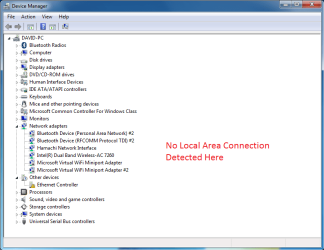
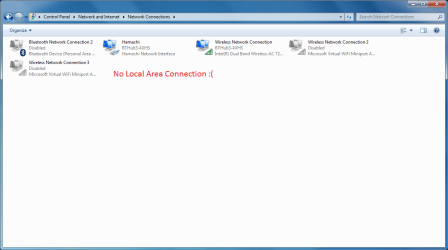
I have uninstalled my Local Area Connection in Device Manager and I'm I'm unsure how to re-install it.

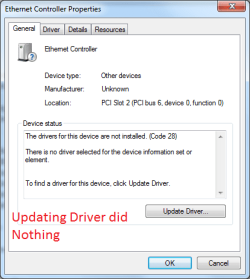
I use an ethernet cable connection, which the ethernet controller also states that there are no drivers; though that might be due to there being no local area connection.

(If your wondering why I uninstalled it in the first place my connection kept disconnecting and I wanted to re-start it)

Here is some picture attachments to help aid you below, thanks:
 

Attachments
  • Evidence 1.png
    Evidence 1.png
    90.5 KB · Views: 2
  • Evidence 2.png
    Evidence 2.png
    71 KB · Views: 0
  • Evidence 3.png
    Evidence 3.png
    32.7 KB · Views: 22

My Computer

Computer type
PC/Desktop
Computer Manufacturer/Model Number
Alienware
OS
Windows 7
CPU
Intel i7-5820K @ 3.30 GHz
Memory
16GB
Graphics Card(s)
NVIDIA GeForce GTX 980
Hard Drives
C: 2TB
Antivirus
AVG
Browser
Chrome
Hi David,
Your ethernet is there but as you can see from your screenshot, no drivers
check your specks for the motherboard, post them, and from there you will be able to install the correct ones.
They will already be on your comp by the way.

Roy
 

My Computer

Computer type
PC/Desktop
Computer Manufacturer/Model Number
medionl/Aspire 6930G/acer x55a
OS
W7 home premium 32bit/W7HP 64bit/w10 tp insider ring
CPU
E5300 dual core
Motherboard
medion MS7366
Memory
3gb
Graphics Card(s)
Nvidia Geforce 7100 Nforce 630i
Monitor(s) Displays
avixc
Internet Speed
n (isp resticted to 72)
Antivirus
mse/pands
Browser
palemoon
Other Info
Belkin Fd7050 n USB using Railink RT2870 drivers, more upto date
Thank you for the reply Roy

I'm unsure where I'll be able to find my motherboard specs which you asked for.
Sorry for the inconvenience but I'll be able to find it with some needed guidance

I'll be downloading a software in the meantime though to help.
 

My Computer

Computer type
PC/Desktop
Computer Manufacturer/Model Number
Alienware
OS
Windows 7
CPU
Intel i7-5820K @ 3.30 GHz
Memory
16GB
Graphics Card(s)
NVIDIA GeForce GTX 980
Hard Drives
C: 2TB
Antivirus
AVG
Browser
Chrome
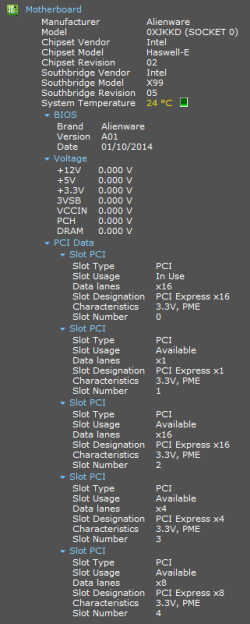
Here is the specs of my motherboard Roy. Hopefully everything is there that's needed.

EDIT: I believe I have found the correct driver, downloading now.
 

Attachments

  • Evidence 4.png
    Evidence 4.png
    25.3 KB · Views: 1
Last edited:

My Computer

Computer type
PC/Desktop
Computer Manufacturer/Model Number
Alienware
OS
Windows 7
CPU
Intel i7-5820K @ 3.30 GHz
Memory
16GB
Graphics Card(s)
NVIDIA GeForce GTX 980
Hard Drives
C: 2TB
Antivirus
AVG
Browser
Chrome
Hi
Sorry bout the delay, that Hamachi ethernet was bothering me, i was doing some checking.
It appears to be to do with a VPN, (virtual private network), dont know why you need one thou.
If this is a Dell system, please use the direct link below BUT download it to your desktop.

Qualcomm LAN Killer E2201 Driver Driver Details | Dell US

Then go to the unrecognised problem device and update/install the driver
via search my computer>browse>desktop.

after you have done this and assuming it works i would remove Hamachi, AFTER creating a restore point.

Roy
 

My Computer

Computer type
PC/Desktop
Computer Manufacturer/Model Number
medionl/Aspire 6930G/acer x55a
OS
W7 home premium 32bit/W7HP 64bit/w10 tp insider ring
CPU
E5300 dual core
Motherboard
medion MS7366
Memory
3gb
Graphics Card(s)
Nvidia Geforce 7100 Nforce 630i
Monitor(s) Displays
avixc
Internet Speed
n (isp resticted to 72)
Antivirus
mse/pands
Browser
palemoon
Other Info
Belkin Fd7050 n USB using Railink RT2870 drivers, more upto date
Thank you so much Roy for your input.

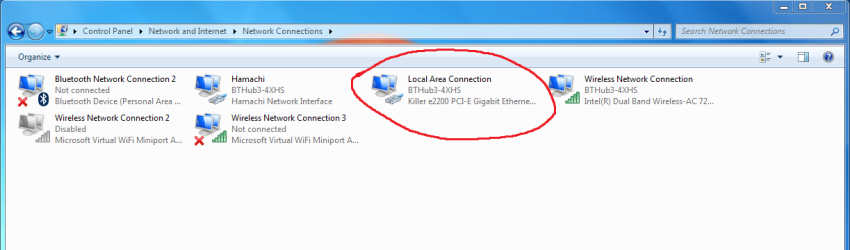
After downloading the link to my desktop, and updating/installing it to my ethernet controller I now have my local area connection back :)
 

Attachments

  • Evidence 5.png
    Evidence 5.png
    85.5 KB · Views: 1

My Computer

Computer type
PC/Desktop
Computer Manufacturer/Model Number
Alienware
OS
Windows 7
CPU
Intel i7-5820K @ 3.30 GHz
Memory
16GB
Graphics Card(s)
NVIDIA GeForce GTX 980
Hard Drives
C: 2TB
Antivirus
AVG
Browser
Chrome
Back
Top