Solved Local Area Connection Missing from network adapters but operational

Steve

New member
Local time
6:43 AM
Messages
10
I have no Local Area Connections showing up in my Network Connections folder. I have an operational network connection via the ethernet port on my HP pavillion running Windows 7 Ultimate and the icon shows up in the status bar. I have no way of copying and modifying it.
My connections for my home group shows a blank although I am connected.

What has happened to the Local Area Connection icons, display data? More importantly how do I restore it?

I was trying to connect to a piece of equipment and discovered that I could not locate the local area connections to copy and create the required communication specifications.:confused:

Thanks
Steve
 

My Computer My Computer

Computer type
Laptop
Computer Manufacturer/Model Number
HP Pavillion DV7 laptop
OS
Win 7 Ultimate 64 bit
CPU
i5
Memory
8 GB
Hard Drives
Hitachi 1 TB HD
Crucial M4 256 MB SSD
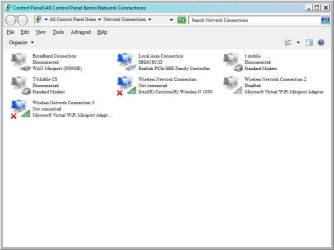
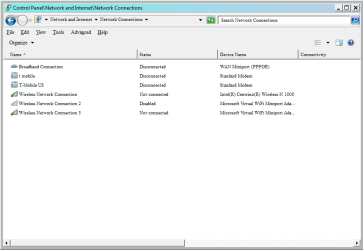
Could you post a screenshot of what is available in your network connections so that I can better identify your issue.

Could you go to device manager and then check if there are any red X's by any devices. If so please post back your results

To access device manager please open the attached folder and then open the file to view the steps.

Many Thanks,
Josh! :)
 

Attachments

My Computer My Computer

Computer type
PC/Desktop
Computer Manufacturer/Model Number
Custom Built
OS
Windows 7 Professional x64 SP1 ; Windows Server 2012 R2 Standard
CPU
Intel Core i5 2400 @ 3.10GHz
Motherboard
Foxconn H67MP-S/-V/H67MP
Memory
8.0GB DDR3 @ 665MHz (2GBx4)
Graphics Card(s)
AMD Radeon HD 6870
Sound Card
Realtek High Definition Audio
Monitor(s) Displays
AOC 2243W & SMB1930NW
Screen Resolution
1440x900 & 1920x1080
Hard Drives
977GB Seagate ST31000524AS ATA Drive (SATA)
250GB WD iSCSI attached Drive
PSU
750W Gaming PSU
Case
Novatech Night
Cooling
Fan
Keyboard
Dell Standard PS/2 Keyboard
Mouse
R.A.T 07 Gaming Mouse
Internet Speed
Download: 10 Mbps Ping: 30ms Upload: 0.81 Mbps
Browser
Google Chrome
Other Info
Optiarc DVD RW AD-5260S ATA Device
requested screenshots attached

I re-installed the chipset driver for the Ethernet and the Local area Connection now displays when there is an internet connection and it shows on the connection in the network and sharing folder.
It does not display when there is not a cable plugged in.

I also seem to be missing the following WAN miniport drivers L2TP, PPTP and SSTP. The network monitor driver is being flagged as incorrect. How do I reinstall these so that I have other options than PPOE when creating a new connection?
 

Attachments

  • network adapters.jpg
    network adapters.jpg
    39.9 KB · Views: 6
  • network connections.png
    network connections.png
    12.6 KB · Views: 5
  • network connections.jpg
    network connections.jpg
    35.5 KB · Views: 7

My Computer My Computer

Computer type
Laptop
Computer Manufacturer/Model Number
HP Pavillion DV7 laptop
OS
Win 7 Ultimate 64 bit
CPU
i5
Memory
8 GB
Hard Drives
Hitachi 1 TB HD
Crucial M4 256 MB SSD
OK - The solution to the problem was the re-installation of the Ethernet chipset driver. This gave back the Local Area connection displayed in the Network and Sharing as a connection and in the network connections folder when I have an Ethernet cable connected to the RJ45 port. From there I was able to adjust my settings to connect to the piece of equipment I needed to connect to.

During the troubleshooting, I had found the driver for my WAN Miniport (Network Monitor) was bad and that I was missing my WAN Miniport (L2TP), (PPTP) and (SSTP) adapters.
The WAN Miniport (Network Monitor) was the easiest to repair as it was present in the Device manager and the others were not. All I had to do to correct this issue was go to Control Panel; Troubleshooting; Hardware and Sound and run the Hardware and Devices troubleshooter. This corrected the bad driver for the WAN Miniport (Network Monitor).

The other three WAN Miniport drivers required downloading Devcon from the Windows Driver Development Kit. Once I had downloaded the Devcon for amd64 since I am running Windows 7 x64, I installed it in my windows folder. I then opened the cmd window with administrator privileges and typed the following from the windows folder prompt. >devcon install c:\windows\inf\netrasa.inf MS_L2ptMiniport or (MS_PptpMiniport or MS_SstpMiniport) for the WAN miniport drivers I needed to install. The system told me the node was created, the driver needed to be installed and that Devcon had failed for each of the adapters.

Device manager displayed unknown device or each. I then updated driver, scanned for hardware changes and checked properties to add driver. After about a minute the driver was added and unknown device was replaced by the appropriate WAN adapter display.
 

My Computer My Computer

Computer type
Laptop
Computer Manufacturer/Model Number
HP Pavillion DV7 laptop
OS
Win 7 Ultimate 64 bit
CPU
i5
Memory
8 GB
Hard Drives
Hitachi 1 TB HD
Crucial M4 256 MB SSD
Back
Top