Solved "Local Area Connection" missing in "Change adapter Settings".. Plz hlp

LAN is missing? What does that mean exactly because the last time I checked LAN = local area network which you can have with either a wireless or wired connection. Missing LAN makes absolutely no sense in this context.

What you are missing is the Ethernet adaptor which appears to not be working anymore which would be a hardware related problem, this has nothing to do with a missing LAN or Windows 7 and has everything to do with hardware failure. Sometimes clearing the cmos will fix this sort of problem. :)
 

My Computer My Computer

At a glance

Windows 7 Ult, Windows 8.1 Pro,Q9650-4.275GHz, E8600 4.5GHz, E6750-3.8GHzG.Skill PC2 9600 1200Mhz 5 5 5 15 2TGTX480
Computer type
PC/Desktop
Computer Manufacturer/Model Number
Home built
OS
Windows 7 Ult, Windows 8.1 Pro,
CPU
Q9650-4.275GHz, E8600 4.5GHz, E6750-3.8GHz
Motherboard
Evga 780i FTW
Memory
G.Skill PC2 9600 1200Mhz 5 5 5 15 2T
Graphics Card(s)
GTX480
Sound Card
Asus Xonar D2
Monitor(s) Displays
HannsG
Screen Resolution
1680X1050
Hard Drives
GSkill Phoenix Pro 120GB SSD
PSU
ThermalTake Toughpower 1000Watt modular
Case
ThermalTake XaserV
Cooling
Xigmatek S1283
Keyboard
Logitech G15
Mouse
Logitech G9
Internet Speed
T1
So you reinstalled but didn't have the ethernet plugged in? And you now have deliberately turned off wireless (which does work) to troubleshoot ethernet?

Is the wire plugged in now to the modem/router, and does it have a driver in Device Manager? After installing connected to wireless did your run all Important and Optional Windows Updates to see if an Ethernet driver was delivered? If not import it from the Support Downloads webpage for your model PC or device.

Rightclick on Local Area Connection in Change Adapter Settings of Network and Sharing Center, run its Troubleshooter only. Make sure it's enabled there.
 
LAN is missing? What does that mean exactly because the last time I checked LAN = local area network which you can have with either a wireless or wired connection. Missing LAN makes absolutely no sense in this context.

What you are missing is the Ethernet adaptor which appears to not be working anymore which would be a hardware related problem, this has nothing to do with a missing LAN or Windows 7 and has everything to do with hardware failure. Sometimes clearing the cmos will fix this sort of problem. :)

Hello , I mean the Wired Connection Problem. Can u tell more as how to clean CMOS?
 

My Computer My Computer

At a glance

Windows 7 ultimate SP1
Computer type
Laptop
Computer Manufacturer/Model Number
Dell
OS
Windows 7 ultimate SP1
So you reinstalled but didn't have the ethernet plugged in? And you now have deliberately turned off wireless (which does work) to troubleshoot ethernet?

Is the wire plugged in now to the modem/router, and does it have a driver in Device Manager? After installing connected to wireless did your run all Important and Optional Windows Updates to see if an Ethernet driver was delivered? If not import it from the Support Downloads webpage for your model PC or device.

Rightclick on Local Area Connection in Change Adapter Settings of Network and Sharing Center, run its Troubleshooter only. Make sure it's enabled there.


Yes Greg, I re-installed without the wire plugged in. and delibrately turned off wireless to troubleshoot wired connection.

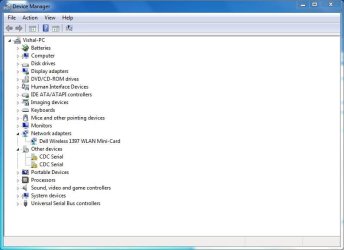
and about the driver in Device Manager. I have posted one screenshot. There is No existence of ethernet there.. so no chance of driver being installed.
 

Attachments

  • Device manager.JPG
    Device manager.JPG
    44.8 KB · Views: 4

My Computer My Computer

At a glance

Windows 7 ultimate SP1
Computer type
Laptop
Computer Manufacturer/Model Number
Dell
OS
Windows 7 ultimate SP1
Reboot the PC and tap the Dell F2 key to access BIOS setup. Browse carefully through each tab to see if you can see LAN settings for the ethernet connection which have been changed. Then reset BIOS to Defaults, save changes and exit.

Does the ethernet adapter show up in Device Manager now? Try on the View tab enabling Hidden Devices.

Next enable wireless driver and run Windows Updates repeatedly with reboots to install all IMportant and Optional Updates in the hope it will provide the missing driver.

In addition plug in the ethernet cable and watch closely for activity in the bottom-right System Tray. Then unplug the router and model and plug each back in. Try plugging ethernet to both the router and the modem while watching for activity on SysTray.

Do you have a phone plugged in that's needing those CDC drivers? Have you checked the Dell Support Downloads webpage for your tag number to see if there are drivers for that, or tried another LAN driver provided? I would reinstall the chipset and then try all LAN drivers.
 
Reboot the PC and tap the Dell F2 key to access BIOS setup. Browse carefully through each tab to see if you can see LAN settings for the ethernet connection which have been changed. Then reset BIOS to Defaults, save changes and exit.

Does the ethernet adapter show up in Device Manager now? Try on the View tab enabling Hidden Devices.

Next enable wireless driver and run Windows Updates repeatedly with reboots to install all IMportant and Optional Updates in the hope it will provide the missing driver.

In addition plug in the ethernet cable and watch closely for activity in the bottom-right System Tray. Then unplug the router and model and plug each back in. Try plugging ethernet to both the router and the modem while watching for activity on SysTray.

Do you have a phone plugged in that's needing those CDC drivers? Have you checked the Dell Support Downloads webpage for your tag number to see if there are drivers for that, or tried another LAN driver provided? I would reinstall the chipset and then try all LAN drivers.


Hey Greg I'm delighted to tell you. "It worked" . I follwed your above mentioned instructions and inspected the BIOS options. I found there that the NIC card was DISABLED. I quickly enabled it . and Its Done. thanks a Ton
 

Attachments

  • Finally.JPG
    Finally.JPG
    37.7 KB · Views: 2

My Computer My Computer

At a glance

Windows 7 ultimate SP1
Computer type
Laptop
Computer Manufacturer/Model Number
Dell
OS
Windows 7 ultimate SP1
Delighted to see that this one is now resolved. Ten out of Ten again Greg!
vishalsahu Perhaps you would now like to edit your System specs to show the correct OS!
 

My Computer My Computer

At a glance

Microsoft Windows 7 Home Premium 64-bit 7601 ...Intel(R) Core(TM) i7-3770 CPU @ 3.40GHz8.00 GBIntel(R) HD Graphics 4000
Computer type
PC/Desktop
OS
Microsoft Windows 7 Home Premium 64-bit 7601 Multiprocessor Free Service Pack 1
CPU
Intel(R) Core(TM) i7-3770 CPU @ 3.40GHz
Motherboard
ASUSTeK COMPUTER INC. P8H77-M
Memory
8.00 GB
Graphics Card(s)
Intel(R) HD Graphics 4000
Sound Card
On Board
Monitor(s) Displays
Dell 24"
Screen Resolution
1920 x 1080
Hard Drives
(1) INTEL SSDSC2CT180A3 ATA Device (2) ST500DM002-1BD142 ATA Device (3) WDC WD3200AAKS-75L9A0 ATA Device (4) Generic- Compact Flash USB Device (5) Generic- MS/MS-Pro USB Device (6) Generic- SD/MMC USB Device (7) Generic- SM/xD-Picture USB
PSU
500w Corsair
Case
Cooler Master
Cooling
3 Fans
Keyboard
Logitech MK300
Mouse
Logitech WOM
Internet Speed
75Mb
Antivirus
Norton 360
Browser
Firefox, Opera, IE
Once again a good example how important it is to follow the given instructions to the letter. Happy to see OP's issue resolved, nice work again, Greg.

Kari
 

My Computer My Computer

At a glance

Windows 10 Pro x64 EN-GB1.6 GHz Intel Core i7-720QM Processor6 GBATI Mobility Radeon HD 5850 Graphics
Computer type
Laptop
Computer Manufacturer/Model Number
HP ENVY 17-1150eg
OS
Windows 10 Pro x64 EN-GB
CPU
1.6 GHz Intel Core i7-720QM Processor
Memory
6 GB
Graphics Card(s)
ATI Mobility Radeon HD 5850 Graphics
Sound Card
Beats sound system with integrated subwoofer
Monitor(s) Displays
17" laptop display, 22" LED and 32" Full HD TV through HDMI
Screen Resolution
1600*900 (1), 1920*1080 (2&3)
Hard Drives
Internal: 2 x 500 GB SATA Hard Disk Drive 7200 rpm
External: 2TB for backups, 3TB USB3 network drive for media
Cooling
As Envy runs a bit warm, I have it on a Cooler Master pad
Keyboard
Logitech diNovo Media Desktop Laser (bluetooth)
Mouse
Logitech Performance Mouse MX
Internet Speed
50/10 Mbps VDSL
Antivirus
Windows Defender 4.3.9431.0
Browser
Maxthon 3.5.2., IE11
same problem

LAN adapter cannot be found and I do not know how to uninstall the windows 7 SP1 upgrade
 

My Computer My Computer

At a glance

windows 7 ultimate 64 bit
Computer type
PC/Desktop
Computer Manufacturer/Model Number
custom
OS
windows 7 ultimate 64 bit
Look in Device Manager to see what devices are listed under Network Adapters, click on them to see if they are working correctly.

Look also in Device Manager for any devices without a driver as symbolized by a !, or any Unknown Devices or Controllers that are missing their drivers.

Install the LAN driver for your model PC or LAN device or Motherboard from its Support Downloads webpage

Report back on each step.
 
Back
Top