
located threats- system32\drivers\spuo.sys What is it & can i delete?

amitamit2

New member
Local time
10:08 PM
Messages
17
located threats- system32\drivers\spuo.sys What is it & can i delete?

AVG found a bunch of threats in said location (picture included). Can anyone tell me what that is exactly, what could it affect in my computer, and most importantly - can i safely "heal"/"remove" said files?
I don't wanna carelessly mess with system32...
 

Attachments
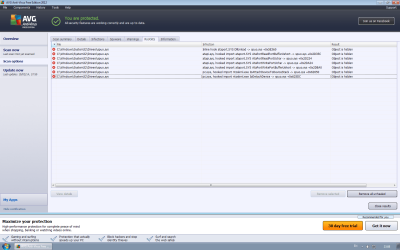
  • Untitled.png
    Untitled.png
    50.2 KB · Views: 23

My Computer My Computer

At a glance

windows 7 ultimate x64AMD Phenom II x4 920 Processor (4 CPUs), ~2.8GHz8GB Ram DDR2nVIDIA GeForce GTS 450
Computer type
PC/Desktop
Computer Manufacturer/Model Number
Asus
OS
windows 7 ultimate x64
CPU
AMD Phenom II x4 920 Processor (4 CPUs), ~2.8GHz
Memory
8GB Ram DDR2
Graphics Card(s)
nVIDIA GeForce GTS 450
Antivirus
AVG Free
Browser
Firefox
Thank you amitamit2 for posting here as requested. I want to follow this.
 

My Computer My Computer

At a glance

Windows 10 Pro. 64/ version 1709 Windows 7 Pr...Intel i7-6800K @ 4.3Corsair Platinum 16 gig @2400EVGA GTX 1070 OC
Computer type
PC/Desktop
Computer Manufacturer/Model Number
Home made Desktop
OS
Windows 10 Pro. 64/ version 1709 Windows 7 Pro/64
CPU
Intel i7-6800K @ 4.3
Motherboard
ASUS X-99 Deluxe II
Memory
Corsair Platinum 16 gig @2400
Graphics Card(s)
EVGA GTX 1070 OC
Monitor(s) Displays
Asus 27" LED LCD/VE278Q
Screen Resolution
1920-1080 or 1280-720 HDMI
Hard Drives
INTEL SSD 730-240 Gb Sata 3.0/
PSU
EVGA Platium 1200W
Case
Phanteks Luxe Tempered Glass 8 fans/ one radiator
Cooling
XSPC/ Water Cooled CPU
Keyboard
Das 4 Professional
Mouse
Logitech M705/MX Anywhere 2-S
Internet Speed
100 mbits
Antivirus
Microsoft Security Essentials/ Malwarebytes Premium 3.0/ SAS
Browser
I.E. 11 default/Firefox/ ISP Time Warner Cable/Spectrum
Other Info
LG BluRay Burner/
Sound system-KLipsch-THX/
Icy Dock ssd Hot Swap bays.
Have you tried to use AVG to fix the issue?
Does the he sp** file change after addressing the issue and restarting the computer?

Let's see what the following anti-rootkit tool has to show...

Please go to the Malwarebytes Anti-Rootkit Download

Save to the Desktop (easy to find)

Right-click the file and select: Extract here... (to the Desktop)

Open its folder and double-click on mbar.exe to start the program.

Follow the prompts and be sure to update the definitions when it asks.

If it detects any infections, allow the program to remove them.

When the program is done, two reports are created in the mbar folder:
1. system-log.txt
2. mbar-log-2013-02-18 (20-13-32).txt (corresponds to mbar-log-year-month-day (hour-minute-second).txt)

Please provide both reports in your reply.
 

My Computer My Computer

At a glance

Windows 7 Home Premium
Computer type
PC/Desktop
Computer Manufacturer/Model Number
An ol' eMachines
OS
Windows 7 Home Premium
Internet Speed
Fine for me...I'm retired!
BTW, what version of AVG do you have?
 

My Computer My Computer

At a glance

Windows 7 Home Premium
Computer type
PC/Desktop
Computer Manufacturer/Model Number
An ol' eMachines
OS
Windows 7 Home Premium
Internet Speed
Fine for me...I'm retired!

My Computer My Computer

At a glance

Windows 7 Professional x64Intel i5 quad processor16 GBRadeon HD 5770
Computer type
PC/Desktop
Computer Manufacturer/Model Number
Custom Built
OS
Windows 7 Professional x64
CPU
Intel i5 quad processor
Motherboard
DP67BG
Memory
16 GB
Graphics Card(s)
Radeon HD 5770
Sound Card
Realtek High Definition Audio
Monitor(s) Displays
Samsung SyncMaster
Screen Resolution
1920X1080
Hard Drives
WD 2TB (SATA Internal)
WD 1TB (USB External)
PSU
Corsair GS800
Case
Tower (Generic)
Cooling
3 Internal Fans
Keyboard
MS Wireless
Mouse
MS Optical Wired
Internet Speed
54 mbps
Antivirus
Emsisoft
Browser
IE-Version 9, Palemoon-Version 24.2.0
Some good information there, however, the programs mentioned are another story.

RootkitRevealer
About 6 or more years ago, it was going strong.
Haven't seen anyone use it lately, and the last time I did, it did not support any Operating
System beyond XP.

Has it been updated now to run in Windows 7, and now it is back??
Hmmmm....

F-Secure BlackLight
This program may run in Windows 7 32-bit. However, the system being dealt with is 64-bit.

As far as the program goes, you will need to find specific instructions as to how to use it.
It is not meant for casual use, and will result in Windows not operating properly, if used incorrectly.

At this point, it is more than likely the detections are false. AVG had this problem before now.
 
Last edited:

My Computer My Computer

At a glance

Windows 7 Home Premium
Computer type
PC/Desktop
Computer Manufacturer/Model Number
An ol' eMachines
OS
Windows 7 Home Premium
Internet Speed
Fine for me...I'm retired!
False Positive Detections?

Some good information there, however, the programs mentioned are anothe story.

RootkitRevealer
About 6 or more years ago, it was going strong.
Haven't seen anyone use it lately, and the last time I did, it did not support any Operating
System beyond XP.

Has it been updated now to run in Windows 7, and now it is back??
Hmmmm....

F-Secure BlackLight
This program may run in Windows 7 32-bit. However, the system being dealt with is 64-bit.

As far as the program goes, you will need to find specific instructions as to how to use it.
It is not meant for casual use, and will result in Windows not operating properly, if used incorrectly.

At this point, it is more than likely the detections are false. AVG had this problem before now.

I reckon Cottonball knows best. It's probably false positive detection by AVG and you need to confirm by another source.

I've used many rootkit detectors/ revealers and the only one that never gave a false positive detection was:

Removing rootkit with the Trend Micro Rootkit Buster

You need the 64bit version for Windows 7
 

My Computer My Computer

At a glance

Microsoft Windows 7 Home Premium 64-bit 7601 ...AMD C-60 APU with Radeon(tm) HD Graphics4.00 GBAMD Radeon HD 6290 Graphics
Computer type
Laptop
Computer Manufacturer/Model Number
ASUS
OS
Microsoft Windows 7 Home Premium 64-bit 7601 Multiprocessor Free Service Pack 1
CPU
AMD C-60 APU with Radeon(tm) HD Graphics
Motherboard
ASUSTeK COMPUTER INC. X501U
Memory
4.00 GB
Graphics Card(s)
AMD Radeon HD 6290 Graphics
Sound Card
(1) AMD High Definition Audio Device (2) Realtek High Defi
Screen Resolution
1366 x 768 x 32 bits (4294967296 colors) @ 60 Hz
Hard Drives
Hitachi HTS545050A7E380 SATA Disk Device
Antivirus
Comodo CIS & FW, SecureAplus App Whitelisting, Threatfire
Browser
Cyberfox 64bit, Opera 64bit, Airfox
Other Info
Spy-The-Spy, HitmanPro.Alert, Norton Connect Safe, MJRegWatcher, BitDefender TrafficLight, Voodoo Shield, Zemana AntiMalware
Good choice, Callender!


@amitamit2:

Since it is best to use more than one tool to confirm results, also run the program...

Please download Trend Micro Rootkit Buster:
Removing rootkit with the Trend Micro Rootkit Buster
Select the file that corresponds to your system (64-bit)
Save the file on the Desktop

Right-click RootkitBuster.exe, and select: Run as Administrator

To use the program, accept the terms of the license agreement, and then click: Next
On the next console, press: Scan Now

Wait for the program to finish scanning the computer and until you see the results of the scan.
You can also press the Log tab to obtain the report.

At the screen containing the results, press: Full Results

A 1392158435 - Notepad (numbers will vary) report opens on the Desktop containing info such as:

Trend Micro RootkitBuster
| Module version: 5.0.0.1129
| Computer Name: CB-PC
| OS version: 6.1-7601
| User Name: CB

Please provide the results of the XXXXXXXXXX - Notepad in your reply.

Thanks!
 

My Computer My Computer

At a glance

Windows 7 Home Premium
Computer type
PC/Desktop
Computer Manufacturer/Model Number
An ol' eMachines
OS
Windows 7 Home Premium
Internet Speed
Fine for me...I'm retired!
cottonball, i downloaded Malwarebytes Anti-Rootkit as u instructed and will shortly write down what the results were.
And about your questions:
Have you tried to use AVG to fix the issue?
As i said, i was afraid to press the remove all unhealed button, because those things were on system 32 and i asked if it's safe to click it.
BTW, what version of AVG do you have?
I don't know any more than what the pic in the first post says... "AVG antivirus free edition 2012, last updated 10/2/2014"... that's what it says... (Date is opposite for Americans, switch 10/2 to -> 2/10)

EDIT:
Since it is best to use more than one tool to confirm results, also run the program...
Please download Trend Micro Rootkit Buster:
Will do!
 

My Computer My Computer

At a glance

windows 7 ultimate x64AMD Phenom II x4 920 Processor (4 CPUs), ~2.8GHz8GB Ram DDR2nVIDIA GeForce GTS 450
Computer type
PC/Desktop
Computer Manufacturer/Model Number
Asus
OS
windows 7 ultimate x64
CPU
AMD Phenom II x4 920 Processor (4 CPUs), ~2.8GHz
Memory
8GB Ram DDR2
Graphics Card(s)
nVIDIA GeForce GTS 450
Antivirus
AVG Free
Browser
Firefox
Malware Bytes keeps getting stuck on random files and isn't completing its scan... I'll give it a few more minutes to let it try to get itself unstuck on history.ie5\index.dat and if it's still there i'll try the other one this time...

EDIT:
Nvm, it's through with the file... took abnormally long... it's having similar pauses in a lot of files... this is gonna take a while... a long long while...

EDIT 2: Malware Bytes is done. Seems like i had a big "boxore" problem, not sure if it's a big deal or not (Logs included).
After restarting, I proceeded to use Trend Micro; It scanned for about half a second and produced no results...
 

Attachments

Last edited:

My Computer My Computer

At a glance

windows 7 ultimate x64AMD Phenom II x4 920 Processor (4 CPUs), ~2.8GHz8GB Ram DDR2nVIDIA GeForce GTS 450
Computer type
PC/Desktop
Computer Manufacturer/Model Number
Asus
OS
windows 7 ultimate x64
CPU
AMD Phenom II x4 920 Processor (4 CPUs), ~2.8GHz
Memory
8GB Ram DDR2
Graphics Card(s)
nVIDIA GeForce GTS 450
Antivirus
AVG Free
Browser
Firefox
Judging by the previous results, am I to conclude that AVG gave me false positives and that i shouldn't erase them?
 

My Computer My Computer

At a glance

windows 7 ultimate x64AMD Phenom II x4 920 Processor (4 CPUs), ~2.8GHz8GB Ram DDR2nVIDIA GeForce GTS 450
Computer type
PC/Desktop
Computer Manufacturer/Model Number
Asus
OS
windows 7 ultimate x64
CPU
AMD Phenom II x4 920 Processor (4 CPUs), ~2.8GHz
Memory
8GB Ram DDR2
Graphics Card(s)
nVIDIA GeForce GTS 450
Antivirus
AVG Free
Browser
Firefox
Let's submit the file for analysis to VirusTotal
http://www.virustotal.com/

File:
C:\Windows\System32\drivers\spuo.sys

Use the 'Choose File' button to navigate to the location of the file.

In the Choose file to upload prompt, select the file, then, click the 'Open' button.
The file is now displayed in the blank box of VirusTotal
Click: Scan It, and wait for the results.
If you get a message saying: File has already been analyzed, click: Reanalyze file now

:ar: Once scanned, please provide the link to the results page in your reply.
 

My Computer My Computer

At a glance

Windows 7 Home Premium
Computer type
PC/Desktop
Computer Manufacturer/Model Number
An ol' eMachines
OS
Windows 7 Home Premium
Internet Speed
Fine for me...I'm retired!
i tried searching for it but couldn't locate it... I tried "show hidden folders" AND un-checking "hide protected operating files" but i still couldn't see it in said location...
 

My Computer My Computer

At a glance

windows 7 ultimate x64AMD Phenom II x4 920 Processor (4 CPUs), ~2.8GHz8GB Ram DDR2nVIDIA GeForce GTS 450
Computer type
PC/Desktop
Computer Manufacturer/Model Number
Asus
OS
windows 7 ultimate x64
CPU
AMD Phenom II x4 920 Processor (4 CPUs), ~2.8GHz
Memory
8GB Ram DDR2
Graphics Card(s)
nVIDIA GeForce GTS 450
Antivirus
AVG Free
Browser
Firefox

My Computer My Computer

At a glance

Microsoft Windows 7 Home Premium 64-bit 7601 ...AMD C-60 APU with Radeon(tm) HD Graphics4.00 GBAMD Radeon HD 6290 Graphics
Computer type
Laptop
Computer Manufacturer/Model Number
ASUS
OS
Microsoft Windows 7 Home Premium 64-bit 7601 Multiprocessor Free Service Pack 1
CPU
AMD C-60 APU with Radeon(tm) HD Graphics
Motherboard
ASUSTeK COMPUTER INC. X501U
Memory
4.00 GB
Graphics Card(s)
AMD Radeon HD 6290 Graphics
Sound Card
(1) AMD High Definition Audio Device (2) Realtek High Defi
Screen Resolution
1366 x 768 x 32 bits (4294967296 colors) @ 60 Hz
Hard Drives
Hitachi HTS545050A7E380 SATA Disk Device
Antivirus
Comodo CIS & FW, SecureAplus App Whitelisting, Threatfire
Browser
Cyberfox 64bit, Opera 64bit, Airfox
Other Info
Spy-The-Spy, HitmanPro.Alert, Norton Connect Safe, MJRegWatcher, BitDefender TrafficLight, Voodoo Shield, Zemana AntiMalware
I used to use Daemon Tools a lot. Even though i haven't turned it on in a long long time, it looks like it still had its virtual drive in my computer. I used Defogger as instructed and am re-running the Anti-Rootkit softwares again.
So far, Micro Trend hasn't found anything (as usual), and Malwarebytes is taking it's sweet time with the scan (again... as usual).
I also saw that it could be what was causing some of my windows updates to regularly not install. I'll also be installing all waiting windows updates now.
 

My Computer My Computer

At a glance

windows 7 ultimate x64AMD Phenom II x4 920 Processor (4 CPUs), ~2.8GHz8GB Ram DDR2nVIDIA GeForce GTS 450
Computer type
PC/Desktop
Computer Manufacturer/Model Number
Asus
OS
windows 7 ultimate x64
CPU
AMD Phenom II x4 920 Processor (4 CPUs), ~2.8GHz
Memory
8GB Ram DDR2
Graphics Card(s)
nVIDIA GeForce GTS 450
Antivirus
AVG Free
Browser
Firefox
If I recall correctly, Daemon tools has been known to cause some hang-ups with sptd.sys

However, what we have here is spuo.sys

Also, the fact that the file cannot be found anywhere seems to confirm that this is an AVG issue.
 

My Computer My Computer

At a glance

Windows 7 Home Premium
Computer type
PC/Desktop
Computer Manufacturer/Model Number
An ol' eMachines
OS
Windows 7 Home Premium
Internet Speed
Fine for me...I'm retired!
In any case, both Anti-Rootkits found nothing and i've completed all pending windows updates. So r u saying that i should ignore AVG's findings?
Also, do you have any other suggestions on things i should do?
So far the issue has stopped but i'm not sure if it's permanently gone; and if it is, then i'm not really sure what exactly cured the problem...
 

My Computer My Computer

At a glance

windows 7 ultimate x64AMD Phenom II x4 920 Processor (4 CPUs), ~2.8GHz8GB Ram DDR2nVIDIA GeForce GTS 450
Computer type
PC/Desktop
Computer Manufacturer/Model Number
Asus
OS
windows 7 ultimate x64
CPU
AMD Phenom II x4 920 Processor (4 CPUs), ~2.8GHz
Memory
8GB Ram DDR2
Graphics Card(s)
nVIDIA GeForce GTS 450
Antivirus
AVG Free
Browser
Firefox
spuo.sys

If I recall correctly, Daemon tools has been known to cause some hang-ups with sptd.sys

However, what we have here is spuo.sys

Also, the fact that the file cannot be found anywhere seems to confirm that this is an AVG issue.

Line of thought was - if Daemon Tools is installed it could possibly interfere with scanners that could detect spuo.sys. Not that deactivating the Damon Tools driver or removing it would eliminate spuo.sus as it's clearly nothing to do with Daemon Tools.
 

My Computer My Computer

At a glance

Microsoft Windows 7 Home Premium 64-bit 7601 ...AMD C-60 APU with Radeon(tm) HD Graphics4.00 GBAMD Radeon HD 6290 Graphics
Computer type
Laptop
Computer Manufacturer/Model Number
ASUS
OS
Microsoft Windows 7 Home Premium 64-bit 7601 Multiprocessor Free Service Pack 1
CPU
AMD C-60 APU with Radeon(tm) HD Graphics
Motherboard
ASUSTeK COMPUTER INC. X501U
Memory
4.00 GB
Graphics Card(s)
AMD Radeon HD 6290 Graphics
Sound Card
(1) AMD High Definition Audio Device (2) Realtek High Defi
Screen Resolution
1366 x 768 x 32 bits (4294967296 colors) @ 60 Hz
Hard Drives
Hitachi HTS545050A7E380 SATA Disk Device
Antivirus
Comodo CIS & FW, SecureAplus App Whitelisting, Threatfire
Browser
Cyberfox 64bit, Opera 64bit, Airfox
Other Info
Spy-The-Spy, HitmanPro.Alert, Norton Connect Safe, MJRegWatcher, BitDefender TrafficLight, Voodoo Shield, Zemana AntiMalware
Hmmmm...to my understanding, Daemon Tools use a hidden driver (sptd.sys) as part of its
CD Emulation, and may be seen as a Rootkit, or will interfere with the proper operation
of Rootkit scanners.

sptd.sys cannot be opened, shows as a hidden object, etc.

That is why a program called Defogger is run.
Download Defogger - MajorGeeks

It enables or disables CD emulation, a step often required in removing difficult malware.

However, as mentioned before, IMO spuo.sys is not a relative...;)
 

My Computer My Computer

At a glance

Windows 7 Home Premium
Computer type
PC/Desktop
Computer Manufacturer/Model Number
An ol' eMachines
OS
Windows 7 Home Premium
Internet Speed
Fine for me...I'm retired!
Hmmmm...to my understanding, Daemon Tools use a hidden driver (sptd.sys) as part of its
CD Emulation, and may be seen as a Rootkit, or will interfere with the proper operation
of Rootkit scanners.

sptd.sys cannot be opened, shows as a hidden object, etc.

That is why a program called Defogger is sometimes run.
Download Defogger - MajorGeeks
It enables or disables CD emulation, a step often required in removing difficult malware.

However, as mentioned before, IMO spuo.sys is not a relative...I could be wrong, though. ;)
 

My Computer My Computer

At a glance

Windows 7 Home Premium
Computer type
PC/Desktop
Computer Manufacturer/Model Number
An ol' eMachines
OS
Windows 7 Home Premium
Internet Speed
Fine for me...I'm retired!
Back
Top