
How to Create a "Lock Computer" Shortcut in Windows 7 and Windows 8
Information
This tutorial will show you how to create a Lock Computer shortcut that can be used where you like in Windows 7 and Windows 8.
Tip
By default, you can also press the Windows + L keys to lock the computer.
Here's How:
1. Right click anywhere on your desktop, and click/tap on New and Shortcut.
2. Type rundll32.exe user32.dll,LockWorkStation and click/tap on Next.
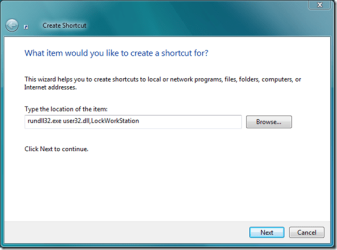
3. Type Lock Computer for the name, and click/tap on Finish.
NOTE: You can name this shortcut what you like though.
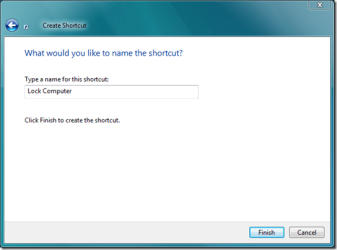
4. You are done. Now next time you want to lock your computer, simply click this shortcut. That’s all. Enjoy!
Tip
This is the icon I'm using right now if you would like to use it for your shortcut too. 

5. In Windows 7, you can now Pin to Taskbar or Pin to Start Menu, add to Quick Launch, assign a keyboard shortcut to it, or move this shortcut to where you like for easy use.
6. In Windows 8, you can Pin to Taskbar on desktop, Pin to Start screen, add to Quick Launch, assign a keyboard shortcut to it, or move this shortcut to where you like for easy use.
Related Tutorials
- How to Create a Log Off Shortcut in Windows
- How to Create a Shut Down Windows Shortcut in Windows 7
- How to Create a Restart Computer Shortcut in Windows
- How to Create a Abort Shortcut in Windows
- How to Create a Shut Down Computer Shortcut in Windows
- How to Create a Switch User Shortcut in Windows 7
- How to Create a Hibernate Shortcut in Windows
- How to Create a Sleep Shortcut in Windows
- How to Lock, Log off, Restart, Shut Down, and Switch User in Windows 8
- How to Add or Remove Lock Computer from the CTRL+ALT+DEL Screen
- How to Display User Information or Not when a Windows Session is Locked
- How to Add "Lock Computer" to the Desktop Context Menu in Windows 7
- How to Add "Lock Computer" to the Desktop Context Menu in Windows 8
- How to Add "Lock Computer and Turn Off Monitor" to the Context Menu in Windows
- How to Add a "Power" Cascading Desktop Context Menu in Windows 7
- How to Change Default Action of Alt+F4 "Shut Down Windows" Dialog in Windows 8 and 8.1
Last edited by a moderator:


