
Log On Screen Text Shadow - Change

How to Change the Windows 7 Log On Screen Text Shadow

   Information
This will show you how to have dark, the default light, or no text or button shadow in the Windows 7 log on screen. This can be helpful if you changed your log on screen background to a darker or lighter image.

The log on screen includes the Welcome, Shutdown, Lock Computer, Switch User, Ctrl+Alt+Del Security Screen, Log on, and Log off screens.

You must be logged in as an administrator to be able to do the steps in this tutorial.

   Note
Credit to Rafael Rivera for finding the registry locations for this.


Here's How:
1. For the Default Log On Screen Text
NOTE: The default log on screen text has lighter text shadow.
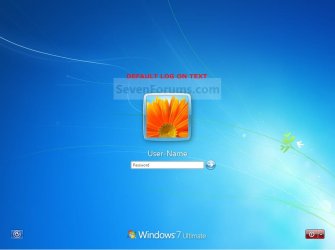
Default.jpg

A) Click on the Download button below to download the file below, and go to step 4 below.
Default_Log_On_Text.reg

Download


2. For Darker Log On Screen Text Shadow
NOTE: This can help with lighter log on screen backgrounds.
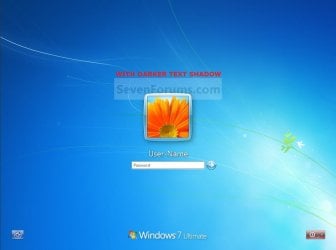
Dark_Text_Shadow.jpg

A) Click on the Download button below to download the file below, and go to step 4 below.
Darker_Log_On_Text_Shadow.reg

Download


3. For No Log On Screen Text Shadow
NOTE: This can help with darker log on screen backgrounds.
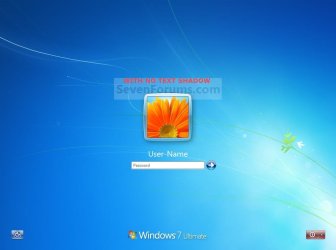
No_Text_Shadow.jpg

A) Click on the Download button below to download the file below, and go to step 4 below.
No_Log_On_Text_Shadow.reg

Download


4. Save the .reg file to the desktop.

5. Right click the extracted .reg file, and click on Merge.

6. Click on Run, Yes (UAC), Yes, and OK when prompted.

7. Press Ctrl+Alt+Del (Security Screen) or log off (log on screen) to see the applied changes.

8. When finished, you can delete the downloaded .reg file if you like.
That's it,
Shawn


Attachments

Last edited:
Thanks for the reply and assistance.

It's not the login screen that concerns me ... it's the menu list that displays after I press CTRL ALT DEL. It's soooooo light. Is there a way to make the text darkerd, or is the solution - to use your "darker shadow" fix that you included above. I'd include a screen shot, but it would appear that Windows 7 CTRL ALT DEL screen won't go to the clipboard (tried Prt Scr, tried ALT Prt Scr ... nada). I can capture other windows, but not this one.

Thanks for any insights.
 

My Computer

Computer Manufacturer/Model Number
HP - special model for future shop - media centre
OS
Windows 7 Beta Build 7100
CPU
quad 2.66
Motherboard
HP - dunno
Memory
4GB
Graphics Card(s)
Nvidia 8800
Sound Card
Ingetrated
Monitor(s) Displays
Samsung, LG
Screen Resolution
highest available
Hard Drives
2 x's 500gb
Case
HP - nothing special
Cooling
nothing special
Keyboard
wireless - HP
Mouse
ordinary optical, wired
Internet Speed
rather fast
Hello Cowtoon,

When applying this tutorial, it will affect the Ctrl+Alt+Del Security Screen text as well. :)
 

My Computer

Computer type
PC/Desktop
Computer Manufacturer/Model Number
Self built custom
OS
64-bit Windows 11 Pro for Workstations
CPU
Intel i7-8700K OC'd to 5 GHz
Motherboard
ASUS ROG Maximus XI Formula Z390
Memory
64 GB (4x16GB) G.SKILL TridentZ RGB DDR4 3600 MHz
Graphics Card(s)
ASUS ROG-STRIX-GTX1080TI-O11G-GAMING
Sound Card
Integrated
Monitor(s) Displays
2 x Samsung Odyssey G7 27"
Screen Resolution
2560x1440
Hard Drives
1TB Samsung 990 PRO M.2,
4TB Samsung 990 PRO PRO M.2,
TerraMaster F8 SSD Plus NAS
PSU
Seasonic Prime Titanium 850W
Case
Thermaltake Core P3
Cooling
Corsair Hydro H115i
Keyboard
Logitech wireless K800
Mouse
Logitech MX Master 4
Internet Speed
2 Gb/s Download and 100 Mb/s Upload
Antivirus
Malwarebyte Anti-Malware Premium
Browser
Google Chrome
Other Info
Logitech Z625 speaker system,
Logitech BRIO 4K Pro webcam,
HP Color LaserJet Pro MFP M477fdn,
APC SMART-UPS RT 1000 XL - SURT1000XLI,
Galaxy S23 Plus phone
Thank you very much. I merged the file into my registry and it has improved the legibility of the CTRL ALT DEL menu.
 

My Computer

Computer Manufacturer/Model Number
HP - special model for future shop - media centre
OS
Windows 7 Beta Build 7100
CPU
quad 2.66
Motherboard
HP - dunno
Memory
4GB
Graphics Card(s)
Nvidia 8800
Sound Card
Ingetrated
Monitor(s) Displays
Samsung, LG
Screen Resolution
highest available
Hard Drives
2 x's 500gb
Case
HP - nothing special
Cooling
nothing special
Keyboard
wireless - HP
Mouse
ordinary optical, wired
Internet Speed
rather fast
You're most welcome Cowtoon. :)
 

My Computer

Computer type
PC/Desktop
Computer Manufacturer/Model Number
Self built custom
OS
64-bit Windows 11 Pro for Workstations
CPU
Intel i7-8700K OC'd to 5 GHz
Motherboard
ASUS ROG Maximus XI Formula Z390
Memory
64 GB (4x16GB) G.SKILL TridentZ RGB DDR4 3600 MHz
Graphics Card(s)
ASUS ROG-STRIX-GTX1080TI-O11G-GAMING
Sound Card
Integrated
Monitor(s) Displays
2 x Samsung Odyssey G7 27"
Screen Resolution
2560x1440
Hard Drives
1TB Samsung 990 PRO M.2,
4TB Samsung 990 PRO PRO M.2,
TerraMaster F8 SSD Plus NAS
PSU
Seasonic Prime Titanium 850W
Case
Thermaltake Core P3
Cooling
Corsair Hydro H115i
Keyboard
Logitech wireless K800
Mouse
Logitech MX Master 4
Internet Speed
2 Gb/s Download and 100 Mb/s Upload
Antivirus
Malwarebyte Anti-Malware Premium
Browser
Google Chrome
Other Info
Logitech Z625 speaker system,
Logitech BRIO 4K Pro webcam,
HP Color LaserJet Pro MFP M477fdn,
APC SMART-UPS RT 1000 XL - SURT1000XLI,
Galaxy S23 Plus phone
Back
Top