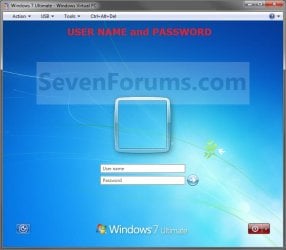
Log On with User Name and Password

How to Make Windows 7 Require a User Name and Password in Log On Screen

   Information
This will show you how to make Windows 7 require all users to type in their user name and password in the Windows log on screen instead of only selecting their user icon and entering their password. This is like the old classic Windows log on screen.
   Note
For the "User name" entry field in the log on screen, you would type in your account's user name as it is on your C:\Users\(user-name) folder. To log on to a domain, you would type Domain Name (Computer Name)/User name instead in the "User name" entry field.

If you did not create a password (recommended to have one) for your user account, then just leave the field empty. You can press TAB or SHIFT+TAB to move between the User name and Password fields if you entered something incorrectly.

EXAMPLE: Log On Screen
NOTE: This is the default log on screen (left screenshot below) and the user name and password log on screen (right screenshot below).
Default.jpg

Changed.jpg


OPTION ONE

Using a REG File Download


1. To Enable Enter User Name and Password Log On Screen
A) Click on the Download button below to download the file below.
Log_On_with_User_Name_and_Password.reg

Download


B) Go to step 3.
2. To Restore Enter Password Only Log On Screen
NOTE: This is the default setting.
A) Click on the Download button below to download the file below.
Log_On_with_Default_Password_Only.reg

Download


3. Click on Save, and save the .reg file to the Desktop.

4. Right click on the downloaded .reg file and click on Merge.

5. Click on the Run, Yes, Yes, and then OK when prompted.

6. When done, you can delete the .reg file on desktop if you like.

7. Log off and log on to see the change.

8. You may also wish to set the same setting for the locked computer screen: How to Display User Information or Not when a Windows Session is Locked


OPTION TWO

Manually in Registry Editor


1. Open the Start Menu, then type regedit in the search box and press enter.

2. If prompted by UAC, then click on Yes.

3. In regedit, navigate to: (See screenshot below)

Code:
HKEY_LOCAL_MACHINE\SOFTWARE\Microsoft\Windows\CurrentVersion\Policies\System
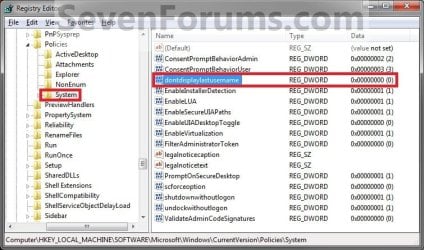
Reg.jpg
4. In the right pane, right click on dontdisplaylastusername and click on Modify. (See screenshot above)

5. To Enable Enter User Name and Password Log On Screen
A) Type 1 and click on OK. (See screenshot below)

B) Go to step 7.
6. To Restore Enter Password Only Log On Screen
NOTE: This is the default setting.
A) Type 0 (number zero) and click on OK. (See screenshot above)
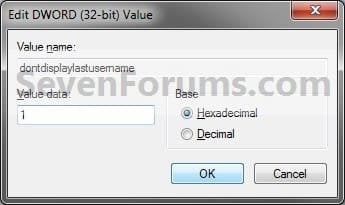
Modify.jpg
7. Close regedit.

8. Log off and log on to see the change.

9. You may also wish to set the same setting for the locked computer screen: How to Display User Information or Not when a Windows Session is Locked


OPTION THREE

Through Local Security Policy


1. Open the Local Security Policy editor.

2. In the left pane, expand Local Policies, and click on Security Options. (See screenshot below)
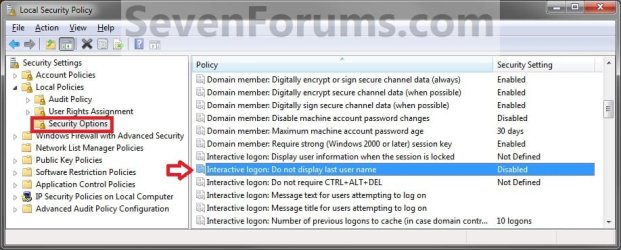
secpol.jpg
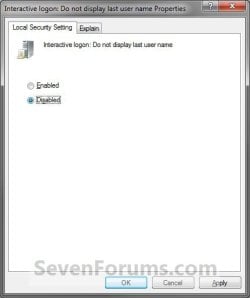
3. In the right pane, right click on Interactive logon: Do not display last user name and click on Properties. (See screenshot above)

4. To Enable Enter User Name and Password Log On Screen
A) Select (dot) Enabled, and click on OK. (See screenshot below)
Properties.jpg
B) Go to step 7.
5. To Restore Enter Password Only Log On Screen
NOTE: This is the default setting.
A) Select (dot) Disabled, and click on OK. (See screenshot above)
6. Close the Local Security Policy window.

7. Log off and log on to see the change.

8. You may also wish to set the same setting for the locked computer screen: How to Display User Information or Not when a Windows Session is Locked
That's it,
Shawn


Attachments

Last edited:
I have a question... is there some sort of way to make it so there's no pesky border... i do love loging in this way because i don't like the picture in the way of the log in screen but there's no point if there's no way to get rid of the border.

Hello Ajnineinchnails,

I haven't tried them, but there are these options below that one may work. Be sure to create a restore point before doing so in case it doesn't work, and you'll be able to do a system restore to undo it.

http://www.sevenforums.com/customiz...frame-startup-login-screen-2.html#post1515671

http://www.sevenforums.com/customization/134085-remove-user-picture-help-please.html#post1154097

Hope this helps,
Shawn
 
Last edited:

My Computer My Computer

At a glance

64-bit Windows 11 Pro for WorkstationsIntel i7-8700K OC'd to 5 GHz64 GB (4x16GB) G.SKILL TridentZ RGB DDR4 3600...ASUS ROG-STRIX-GTX1080TI-O11G-GAMING
Computer type
PC/Desktop
Computer Manufacturer/Model Number
Self built custom
OS
64-bit Windows 11 Pro for Workstations
CPU
Intel i7-8700K OC'd to 5 GHz
Motherboard
ASUS ROG Maximus XI Formula Z390
Memory
64 GB (4x16GB) G.SKILL TridentZ RGB DDR4 3600 MHz
Graphics Card(s)
ASUS ROG-STRIX-GTX1080TI-O11G-GAMING
Sound Card
Integrated
Monitor(s) Displays
2 x Samsung Odyssey G7 27"
Screen Resolution
2560x1440
Hard Drives
1TB Samsung 990 PRO M.2,
4TB Samsung 990 PRO PRO M.2,
TerraMaster F8 SSD Plus NAS
PSU
Seasonic Prime Titanium 850W
Case
Thermaltake Core P3
Cooling
Corsair Hydro H115i
Keyboard
Logitech wireless K800
Mouse
Logitech MX Master 4
Internet Speed
2 Gb/s Download and 100 Mb/s Upload
Antivirus
Malwarebyte Anti-Malware Premium
Browser
Google Chrome
Other Info
Logitech Z625 speaker system,
Logitech BRIO 4K Pro webcam,
HP Color LaserJet Pro MFP M477fdn,
APC SMART-UPS RT 1000 XL - SURT1000XLI,
Galaxy S23 Plus phone
it partially works for me because when i log out i get to choose between who just logged out and other user so when i click other user it still require a username and pasword even though i set it not to. pleas help!
 

My Computer My Computer

At a glance

Windows 7 Professional 64bitIntel Core i54GB1GB AMD Radeon HD 7450A
Computer Manufacturer/Model Number
HP
OS
Windows 7 Professional 64bit
CPU
Intel Core i5
Memory
4GB
Graphics Card(s)
1GB AMD Radeon HD 7450A
Sound Card
Beats Audio
Monitor(s) Displays
HP Touchsmart 420t HD display
Screen Resolution
1920X1080
Hard Drives
1-1TB
Keyboard
Wireless HP
Mouse
Wireless HP
Internet Speed
20mbps
Hello Doglover, and welcome to Seven Forums.

This is normal. When you select "Other User" instead of a specific user's icon, you will always have to enter the username and password so Windows will know what "Other User" you wanted to log in as. :)
 

My Computer My Computer

At a glance

64-bit Windows 11 Pro for WorkstationsIntel i7-8700K OC'd to 5 GHz64 GB (4x16GB) G.SKILL TridentZ RGB DDR4 3600...ASUS ROG-STRIX-GTX1080TI-O11G-GAMING
Computer type
PC/Desktop
Computer Manufacturer/Model Number
Self built custom
OS
64-bit Windows 11 Pro for Workstations
CPU
Intel i7-8700K OC'd to 5 GHz
Motherboard
ASUS ROG Maximus XI Formula Z390
Memory
64 GB (4x16GB) G.SKILL TridentZ RGB DDR4 3600 MHz
Graphics Card(s)
ASUS ROG-STRIX-GTX1080TI-O11G-GAMING
Sound Card
Integrated
Monitor(s) Displays
2 x Samsung Odyssey G7 27"
Screen Resolution
2560x1440
Hard Drives
1TB Samsung 990 PRO M.2,
4TB Samsung 990 PRO PRO M.2,
TerraMaster F8 SSD Plus NAS
PSU
Seasonic Prime Titanium 850W
Case
Thermaltake Core P3
Cooling
Corsair Hydro H115i
Keyboard
Logitech wireless K800
Mouse
Logitech MX Master 4
Internet Speed
2 Gb/s Download and 100 Mb/s Upload
Antivirus
Malwarebyte Anti-Malware Premium
Browser
Google Chrome
Other Info
Logitech Z625 speaker system,
Logitech BRIO 4K Pro webcam,
HP Color LaserJet Pro MFP M477fdn,
APC SMART-UPS RT 1000 XL - SURT1000XLI,
Galaxy S23 Plus phone
So is there no way to fix that?
 

My Computer My Computer

At a glance

Windows 7 Professional 64bitIntel Core i54GB1GB AMD Radeon HD 7450A
Computer Manufacturer/Model Number
HP
OS
Windows 7 Professional 64bit
CPU
Intel Core i5
Memory
4GB
Graphics Card(s)
1GB AMD Radeon HD 7450A
Sound Card
Beats Audio
Monitor(s) Displays
HP Touchsmart 420t HD display
Screen Resolution
1920X1080
Hard Drives
1-1TB
Keyboard
Wireless HP
Mouse
Wireless HP
Internet Speed
20mbps
Last edited:

My Computer My Computer

At a glance

64-bit Windows 11 Pro for WorkstationsIntel i7-8700K OC'd to 5 GHz64 GB (4x16GB) G.SKILL TridentZ RGB DDR4 3600...ASUS ROG-STRIX-GTX1080TI-O11G-GAMING
Computer type
PC/Desktop
Computer Manufacturer/Model Number
Self built custom
OS
64-bit Windows 11 Pro for Workstations
CPU
Intel i7-8700K OC'd to 5 GHz
Motherboard
ASUS ROG Maximus XI Formula Z390
Memory
64 GB (4x16GB) G.SKILL TridentZ RGB DDR4 3600 MHz
Graphics Card(s)
ASUS ROG-STRIX-GTX1080TI-O11G-GAMING
Sound Card
Integrated
Monitor(s) Displays
2 x Samsung Odyssey G7 27"
Screen Resolution
2560x1440
Hard Drives
1TB Samsung 990 PRO M.2,
4TB Samsung 990 PRO PRO M.2,
TerraMaster F8 SSD Plus NAS
PSU
Seasonic Prime Titanium 850W
Case
Thermaltake Core P3
Cooling
Corsair Hydro H115i
Keyboard
Logitech wireless K800
Mouse
Logitech MX Master 4
Internet Speed
2 Gb/s Download and 100 Mb/s Upload
Antivirus
Malwarebyte Anti-Malware Premium
Browser
Google Chrome
Other Info
Logitech Z625 speaker system,
Logitech BRIO 4K Pro webcam,
HP Color LaserJet Pro MFP M477fdn,
APC SMART-UPS RT 1000 XL - SURT1000XLI,
Galaxy S23 Plus phone
Thank you so much! It worked
 

My Computer My Computer

At a glance

Windows 7 Professional 64bitIntel Core i54GB1GB AMD Radeon HD 7450A
Computer Manufacturer/Model Number
HP
OS
Windows 7 Professional 64bit
CPU
Intel Core i5
Memory
4GB
Graphics Card(s)
1GB AMD Radeon HD 7450A
Sound Card
Beats Audio
Monitor(s) Displays
HP Touchsmart 420t HD display
Screen Resolution
1920X1080
Hard Drives
1-1TB
Keyboard
Wireless HP
Mouse
Wireless HP
Internet Speed
20mbps
You're most welcome Doglover. :)
 

My Computer My Computer

At a glance

64-bit Windows 11 Pro for WorkstationsIntel i7-8700K OC'd to 5 GHz64 GB (4x16GB) G.SKILL TridentZ RGB DDR4 3600...ASUS ROG-STRIX-GTX1080TI-O11G-GAMING
Computer type
PC/Desktop
Computer Manufacturer/Model Number
Self built custom
OS
64-bit Windows 11 Pro for Workstations
CPU
Intel i7-8700K OC'd to 5 GHz
Motherboard
ASUS ROG Maximus XI Formula Z390
Memory
64 GB (4x16GB) G.SKILL TridentZ RGB DDR4 3600 MHz
Graphics Card(s)
ASUS ROG-STRIX-GTX1080TI-O11G-GAMING
Sound Card
Integrated
Monitor(s) Displays
2 x Samsung Odyssey G7 27"
Screen Resolution
2560x1440
Hard Drives
1TB Samsung 990 PRO M.2,
4TB Samsung 990 PRO PRO M.2,
TerraMaster F8 SSD Plus NAS
PSU
Seasonic Prime Titanium 850W
Case
Thermaltake Core P3
Cooling
Corsair Hydro H115i
Keyboard
Logitech wireless K800
Mouse
Logitech MX Master 4
Internet Speed
2 Gb/s Download and 100 Mb/s Upload
Antivirus
Malwarebyte Anti-Malware Premium
Browser
Google Chrome
Other Info
Logitech Z625 speaker system,
Logitech BRIO 4K Pro webcam,
HP Color LaserJet Pro MFP M477fdn,
APC SMART-UPS RT 1000 XL - SURT1000XLI,
Galaxy S23 Plus phone
infosmall1.png
Information

This will show you how to make Windows 7 require all users to type in their user name and password in the Windows log on screen instead of only selecting their user icon and entering their password.

How do I do just the opposite - that is, how do I get a log on screen from which users can select their User Icon and enter only their password? The default on my fresh installation of Windows 7 is that Windows automagically logs on to the 'built-in' Adminsitrator account with no password required.

Thanks!
 

My Computer My Computer

At a glance

Windows 7 Home Premium SP1 64 bit
OS
Windows 7 Home Premium SP1 64 bit

My Computer My Computer

At a glance

64-bit Windows 11 Pro for WorkstationsIntel i7-8700K OC'd to 5 GHz64 GB (4x16GB) G.SKILL TridentZ RGB DDR4 3600...ASUS ROG-STRIX-GTX1080TI-O11G-GAMING
Computer type
PC/Desktop
Computer Manufacturer/Model Number
Self built custom
OS
64-bit Windows 11 Pro for Workstations
CPU
Intel i7-8700K OC'd to 5 GHz
Motherboard
ASUS ROG Maximus XI Formula Z390
Memory
64 GB (4x16GB) G.SKILL TridentZ RGB DDR4 3600 MHz
Graphics Card(s)
ASUS ROG-STRIX-GTX1080TI-O11G-GAMING
Sound Card
Integrated
Monitor(s) Displays
2 x Samsung Odyssey G7 27"
Screen Resolution
2560x1440
Hard Drives
1TB Samsung 990 PRO M.2,
4TB Samsung 990 PRO PRO M.2,
TerraMaster F8 SSD Plus NAS
PSU
Seasonic Prime Titanium 850W
Case
Thermaltake Core P3
Cooling
Corsair Hydro H115i
Keyboard
Logitech wireless K800
Mouse
Logitech MX Master 4
Internet Speed
2 Gb/s Download and 100 Mb/s Upload
Antivirus
Malwarebyte Anti-Malware Premium
Browser
Google Chrome
Other Info
Logitech Z625 speaker system,
Logitech BRIO 4K Pro webcam,
HP Color LaserJet Pro MFP M477fdn,
APC SMART-UPS RT 1000 XL - SURT1000XLI,
Galaxy S23 Plus phone
Hi Shawn,

I will repeat some info from my posts in another tutorial thread dealing with logins, then from now on I will stick to posting in this thread because this one is closer to the topic of what I want to accomplish.

I have an Administrator account that was 'just there' after the Windows 7 install completed. I'm guessing that it has no password because every time Windows starts up it starts in that account without requiring a password.
I have created a standard account with my name and a password.
I have created a standard account with my wife's name and no password.
I have turned on the Guest account.

Rather than automatically start up directly into the Administrator account, I would like to have a log-in screen that shows all of the User icons and names.

I do not want to have to enter a user name. I want to have to enter only the password for an account that is password-protected. This is the way that Windows 7 works on my wife's Dell PC. I don't know how it got that way, it just 'is'!

Thanks!
 

My Computer My Computer

At a glance

Windows 7 Home Premium SP1 64 bit
OS
Windows 7 Home Premium SP1 64 bit
Hi Shawn,

I will repeat some info from my posts in another tutorial thread dealing with logins, then from now on I will stick to posting in this thread because this one is closer to the topic of what I want to accomplish.

I have an Administrator account that was 'just there' after the Windows 7 install completed. I'm guessing that it has no password because every time Windows starts up it starts in that account without requiring a password.
I have created a standard account with my name and a password.
I have created a standard account with my wife's name and no password.
I have turned on the Guest account.

Rather than automatically start up directly into the Administrator account, I would like to have a log-in screen that shows all of the User icons and names.

I do not want to have to enter a user name. I want to have to enter only the password for an account that is password-protected. This is the way that Windows 7 works on my wife's Dell PC. I don't know how it got that way, it just 'is'!

Thanks!

Check to make sure that you have the Users must enter a user name and password to use this computer box checked in ntplwiz at the link below.

Log On Automatically at Startup
 

My Computer My Computer

At a glance

64-bit Windows 11 Pro for WorkstationsIntel i7-8700K OC'd to 5 GHz64 GB (4x16GB) G.SKILL TridentZ RGB DDR4 3600...ASUS ROG-STRIX-GTX1080TI-O11G-GAMING
Computer type
PC/Desktop
Computer Manufacturer/Model Number
Self built custom
OS
64-bit Windows 11 Pro for Workstations
CPU
Intel i7-8700K OC'd to 5 GHz
Motherboard
ASUS ROG Maximus XI Formula Z390
Memory
64 GB (4x16GB) G.SKILL TridentZ RGB DDR4 3600 MHz
Graphics Card(s)
ASUS ROG-STRIX-GTX1080TI-O11G-GAMING
Sound Card
Integrated
Monitor(s) Displays
2 x Samsung Odyssey G7 27"
Screen Resolution
2560x1440
Hard Drives
1TB Samsung 990 PRO M.2,
4TB Samsung 990 PRO PRO M.2,
TerraMaster F8 SSD Plus NAS
PSU
Seasonic Prime Titanium 850W
Case
Thermaltake Core P3
Cooling
Corsair Hydro H115i
Keyboard
Logitech wireless K800
Mouse
Logitech MX Master 4
Internet Speed
2 Gb/s Download and 100 Mb/s Upload
Antivirus
Malwarebyte Anti-Malware Premium
Browser
Google Chrome
Other Info
Logitech Z625 speaker system,
Logitech BRIO 4K Pro webcam,
HP Color LaserJet Pro MFP M477fdn,
APC SMART-UPS RT 1000 XL - SURT1000XLI,
Galaxy S23 Plus phone
Check to make sure that you have the Users must enter a user name and password to use this computer box checked in ntplwiz at the link below.

Log On Automatically at Startup

I'm quite sure that I do not have it checked, because I do not want users to have to enter a user name. I believe that I did check this at one point and that's what happened - Other Users came up and I had to enter a user name and password.

(Not to complicate this discussion, but because of that experience I'm also studying your 'Fix Showing Only "Other User" and Last Logged On User' tutorial. In my case, however, I never got a Last Logged On User. No matter who the last logged on user was I always got Administrator.)

Anyway, I will check that box and report back what the resulting behavior is.

Thanks!
 

My Computer My Computer

At a glance

Windows 7 Home Premium SP1 64 bit
OS
Windows 7 Home Premium SP1 64 bit
Check to make sure that you have the Users must enter a user name and password to use this computer box checked in ntplwiz at the link below.

Log On Automatically at Startup

Hi again Shawn,

OK, that did it. I was leery, because I didn't want to have to enter a User Name, but with that box checked I don't have to - the user name shows under each User Icon and all I have to do is enter the Password for the selected account, if it has a password. Not at all intuitive, but just what I wanted.

Thank you! These forums, and the tutorials you've created, are outstanding! All one has to do is follow your instructions.

By the way, I don't know how often you run into users like me who are running Windows on a Mac. I suspect that most of us post our Windows questions on an Apple forum because we tend to think in terms of the hardware rather than the OS, but I have a tip for anyone like me who is lucky enough to think of asking Windows questions on a Windows forum - do not ever invoke Secure Login. Control-Alt-Delete is not recognized by Windows on a Mac. Turn Secure Login on and you will sit forever looking at the screen that tells you to press Control-Alt-Delete until you Force Quit and re-install Windows. Or do you have a work-around for that?

Thanks again, and Happy New Year
 

My Computer My Computer

At a glance

Windows 7 Home Premium SP1 64 bit
OS
Windows 7 Home Premium SP1 64 bit
You're most welcome Yodrak. I'm happy to hear that you got it sorted. :)

Thank you for the CRTL+ALT+DEL tip. I'm afraid that I don't have a workaround for that though. :(

I hope you have a safe and Happy New Year as well. :party:
 

My Computer My Computer

At a glance

64-bit Windows 11 Pro for WorkstationsIntel i7-8700K OC'd to 5 GHz64 GB (4x16GB) G.SKILL TridentZ RGB DDR4 3600...ASUS ROG-STRIX-GTX1080TI-O11G-GAMING
Computer type
PC/Desktop
Computer Manufacturer/Model Number
Self built custom
OS
64-bit Windows 11 Pro for Workstations
CPU
Intel i7-8700K OC'd to 5 GHz
Motherboard
ASUS ROG Maximus XI Formula Z390
Memory
64 GB (4x16GB) G.SKILL TridentZ RGB DDR4 3600 MHz
Graphics Card(s)
ASUS ROG-STRIX-GTX1080TI-O11G-GAMING
Sound Card
Integrated
Monitor(s) Displays
2 x Samsung Odyssey G7 27"
Screen Resolution
2560x1440
Hard Drives
1TB Samsung 990 PRO M.2,
4TB Samsung 990 PRO PRO M.2,
TerraMaster F8 SSD Plus NAS
PSU
Seasonic Prime Titanium 850W
Case
Thermaltake Core P3
Cooling
Corsair Hydro H115i
Keyboard
Logitech wireless K800
Mouse
Logitech MX Master 4
Internet Speed
2 Gb/s Download and 100 Mb/s Upload
Antivirus
Malwarebyte Anti-Malware Premium
Browser
Google Chrome
Other Info
Logitech Z625 speaker system,
Logitech BRIO 4K Pro webcam,
HP Color LaserJet Pro MFP M477fdn,
APC SMART-UPS RT 1000 XL - SURT1000XLI,
Galaxy S23 Plus phone
I did Wht u had said using registry editor and I restarted the computer. I then tried to log
In but it did not allow me to. Why is this and how can I fix this??
 

My Computer My Computer

At a glance

Windows 6 Home Basic x32
OS
Windows 6 Home Basic x32
I did Wht u had said using registry editor and I restarted the computer. I then tried to log
In but it did not allow me to. Why is this and how can I fix this??

Try Option 1 or 3.
 

My Computer My Computer

At a glance

Windows 7 Ultimate SP1 - 64 BitIntel Core i5 2500k2x4GB DDR3 1333HzAti Radeon 6770
Computer type
PC/Desktop
Computer Manufacturer/Model Number
Novatech iRush Pro
OS
Windows 7 Ultimate SP1 - 64 Bit
CPU
Intel Core i5 2500k
Motherboard
Foxconn H67M-S/H67M-V/H67
Memory
2x4GB DDR3 1333Hz
Graphics Card(s)
Ati Radeon 6770
Sound Card
None
Monitor(s) Displays
Samsung S22B150
Screen Resolution
1920x1080
Hard Drives
2x500GB
PSU
500W
Cooling
Fan
Keyboard
HP KU0316
Mouse
Wireless Logitech M185
Internet Speed
20MB/s
Antivirus
Avast Free
Browser
Google Chrome
Other Info
Logitech M185 Mouse
KU-M316 Keyboard
@infinite: but the thing is I can't even log into windows itself. So I dont think opt 1 or 3 will work
 

My Computer My Computer

At a glance

Windows 6 Home Basic x32
OS
Windows 6 Home Basic x32
What do you mean - what happens?
 

My Computer My Computer

At a glance

Windows 7 Ultimate SP1 - 64 BitIntel Core i5 2500k2x4GB DDR3 1333HzAti Radeon 6770
Computer type
PC/Desktop
Computer Manufacturer/Model Number
Novatech iRush Pro
OS
Windows 7 Ultimate SP1 - 64 Bit
CPU
Intel Core i5 2500k
Motherboard
Foxconn H67M-S/H67M-V/H67
Memory
2x4GB DDR3 1333Hz
Graphics Card(s)
Ati Radeon 6770
Sound Card
None
Monitor(s) Displays
Samsung S22B150
Screen Resolution
1920x1080
Hard Drives
2x500GB
PSU
500W
Cooling
Fan
Keyboard
HP KU0316
Mouse
Wireless Logitech M185
Internet Speed
20MB/s
Antivirus
Avast Free
Browser
Google Chrome
Other Info
Logitech M185 Mouse
KU-M316 Keyboard
Hello shawn got a serious problem. I enabled the built in administrator account in windows 7 using your tutorial then i set a password for it. Then i hid the administrator account from login screen by tweaking the registry using your guide. I logged off and logged in with another user account which is after my name. Everything was going fine. Then i enabled the do not show last user name option by using step 3 of this tutorial of yours. Then i logged off again to see everything worked or not. Here the problem started i could not login to my account by writing my username and password. I am sure all spellings were correct but i was still getting the error 'username or password incorrect'. But i could login to the built in administrator account by typing in 'administrator' in user name section and its password. I disabled the option of showing the last user account. And then i could again log in my own account using my old password. But i want to login to my accountby typing both username and password. Can u tell me what went wrong. Please reply soon.
 

My Computer My Computer

At a glance

Windows 7 ultimatex64Core i54 gbIntel HD graphics
Computer Manufacturer/Model Number
Lenovi g560
OS
Windows 7 ultimatex64
CPU
Core i5
Memory
4 gb
Graphics Card(s)
Intel HD graphics
Hello Abhi, and welcome to Seven Forums. :)

Which tutorial did you use to hide the administrator account with just to make sure I know which one? Could you provide a link?

As a test, change the password for your user account, use step 4 of OPTION THREE again, and see if you are able to log on to your user account now. Be sure to also check that you do not have caps lock on.
 

My Computer My Computer

At a glance

64-bit Windows 11 Pro for WorkstationsIntel i7-8700K OC'd to 5 GHz64 GB (4x16GB) G.SKILL TridentZ RGB DDR4 3600...ASUS ROG-STRIX-GTX1080TI-O11G-GAMING
Computer type
PC/Desktop
Computer Manufacturer/Model Number
Self built custom
OS
64-bit Windows 11 Pro for Workstations
CPU
Intel i7-8700K OC'd to 5 GHz
Motherboard
ASUS ROG Maximus XI Formula Z390
Memory
64 GB (4x16GB) G.SKILL TridentZ RGB DDR4 3600 MHz
Graphics Card(s)
ASUS ROG-STRIX-GTX1080TI-O11G-GAMING
Sound Card
Integrated
Monitor(s) Displays
2 x Samsung Odyssey G7 27"
Screen Resolution
2560x1440
Hard Drives
1TB Samsung 990 PRO M.2,
4TB Samsung 990 PRO PRO M.2,
TerraMaster F8 SSD Plus NAS
PSU
Seasonic Prime Titanium 850W
Case
Thermaltake Core P3
Cooling
Corsair Hydro H115i
Keyboard
Logitech wireless K800
Mouse
Logitech MX Master 4
Internet Speed
2 Gb/s Download and 100 Mb/s Upload
Antivirus
Malwarebyte Anti-Malware Premium
Browser
Google Chrome
Other Info
Logitech Z625 speaker system,
Logitech BRIO 4K Pro webcam,
HP Color LaserJet Pro MFP M477fdn,
APC SMART-UPS RT 1000 XL - SURT1000XLI,
Galaxy S23 Plus phone
Back
Top