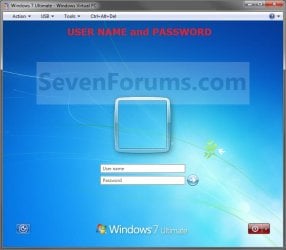
Log On with User Name and Password

How to Make Windows 7 Require a User Name and Password in Log On Screen

   Information
This will show you how to make Windows 7 require all users to type in their user name and password in the Windows log on screen instead of only selecting their user icon and entering their password. This is like the old classic Windows log on screen.
   Note
For the "User name" entry field in the log on screen, you would type in your account's user name as it is on your C:\Users\(user-name) folder. To log on to a domain, you would type Domain Name (Computer Name)/User name instead in the "User name" entry field.

If you did not create a password (recommended to have one) for your user account, then just leave the field empty. You can press TAB or SHIFT+TAB to move between the User name and Password fields if you entered something incorrectly.

EXAMPLE: Log On Screen
NOTE: This is the default log on screen (left screenshot below) and the user name and password log on screen (right screenshot below).
Default.jpg

Changed.jpg


OPTION ONE

Using a REG File Download


1. To Enable Enter User Name and Password Log On Screen
A) Click on the Download button below to download the file below.
Log_On_with_User_Name_and_Password.reg

Download


B) Go to step 3.
2. To Restore Enter Password Only Log On Screen
NOTE: This is the default setting.
A) Click on the Download button below to download the file below.
Log_On_with_Default_Password_Only.reg

Download


3. Click on Save, and save the .reg file to the Desktop.

4. Right click on the downloaded .reg file and click on Merge.

5. Click on the Run, Yes, Yes, and then OK when prompted.

6. When done, you can delete the .reg file on desktop if you like.

7. Log off and log on to see the change.

8. You may also wish to set the same setting for the locked computer screen: How to Display User Information or Not when a Windows Session is Locked


OPTION TWO

Manually in Registry Editor


1. Open the Start Menu, then type regedit in the search box and press enter.

2. If prompted by UAC, then click on Yes.

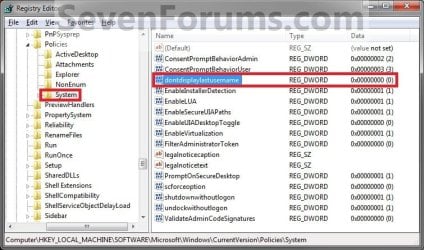
3. In regedit, navigate to: (See screenshot below)

Code:
HKEY_LOCAL_MACHINE\SOFTWARE\Microsoft\Windows\CurrentVersion\Policies\System
Reg.jpg
4. In the right pane, right click on dontdisplaylastusername and click on Modify. (See screenshot above)

5. To Enable Enter User Name and Password Log On Screen
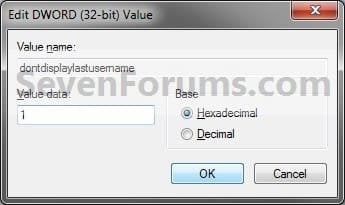
A) Type 1 and click on OK. (See screenshot below)

B) Go to step 7.
6. To Restore Enter Password Only Log On Screen
NOTE: This is the default setting.
A) Type 0 (number zero) and click on OK. (See screenshot above)
Modify.jpg
7. Close regedit.

8. Log off and log on to see the change.

9. You may also wish to set the same setting for the locked computer screen: How to Display User Information or Not when a Windows Session is Locked


OPTION THREE

Through Local Security Policy


1. Open the Local Security Policy editor.

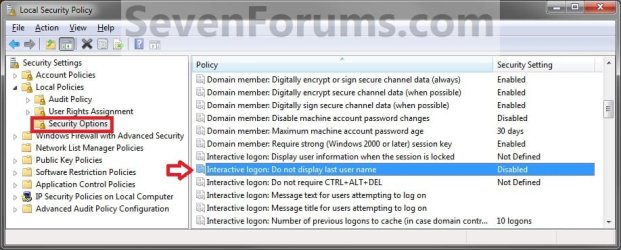
2. In the left pane, expand Local Policies, and click on Security Options. (See screenshot below)
secpol.jpg
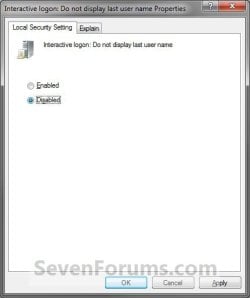
3. In the right pane, right click on Interactive logon: Do not display last user name and click on Properties. (See screenshot above)

4. To Enable Enter User Name and Password Log On Screen
A) Select (dot) Enabled, and click on OK. (See screenshot below)
Properties.jpg
B) Go to step 7.
5. To Restore Enter Password Only Log On Screen
NOTE: This is the default setting.
A) Select (dot) Disabled, and click on OK. (See screenshot above)
6. Close the Local Security Policy window.

7. Log off and log on to see the change.

8. You may also wish to set the same setting for the locked computer screen: How to Display User Information or Not when a Windows Session is Locked
That's it,
Shawn


Attachments

Last edited:
Great tutorial, Shawn! I can't count how many times I have tried to find this info for other members here.

Bookmarked. ;)
 

My Computer

Computer Manufacturer/Model Number
Custom
OS
Windows 7 Professional x64
CPU
Intel i7 2600K OC'd @ 4620 MHz
Motherboard
Asus P8Z68-V Pro
Memory
16GB GSkill Sniper 2133 Mhz (4x4GB)
Graphics Card(s)
EVGA GeForce GTX 480 SuperClocked+
Sound Card
Realtek High Definition Audio
Monitor(s) Displays
2x Acer S273HLbmii 27"
Screen Resolution
2 x 1920x1080
Hard Drives
64GB Crucial M4 SSD

Storage: Hitachi 1TB 5400RPM, Samsung 1.5TB 5400RPM
PSU
Corsair HW Series 750w (modular)
Case
Cooler Master HAF 932 Advanced Blue Edition
Cooling
CM Hyper 212+ CPU cooler, 3x 230mm + 1x 140mm case fans
Keyboard
Logitech MK320 (wireless)
Mouse
Logitech MK320 (wireless)
Internet Speed
30 Mb/s : 2 Mb/s
Thank you, and you're welcome Jonathan. :)
 

My Computer

Computer type
PC/Desktop
Computer Manufacturer/Model Number
Self built custom
OS
64-bit Windows 11 Pro for Workstations
CPU
Intel i7-8700K OC'd to 5 GHz
Motherboard
ASUS ROG Maximus XI Formula Z390
Memory
64 GB (4x16GB) G.SKILL TridentZ RGB DDR4 3600 MHz
Graphics Card(s)
ASUS ROG-STRIX-GTX1080TI-O11G-GAMING
Sound Card
Integrated
Monitor(s) Displays
2 x Samsung Odyssey G7 27"
Screen Resolution
2560x1440
Hard Drives
1TB Samsung 990 PRO M.2,
4TB Samsung 990 PRO PRO M.2,
TerraMaster F8 SSD Plus NAS
PSU
Seasonic Prime Titanium 850W
Case
Thermaltake Core P3
Cooling
Corsair Hydro H115i
Keyboard
Logitech wireless K800
Mouse
Logitech MX Master 4
Internet Speed
2 Gb/s Download and 100 Mb/s Upload
Antivirus
Malwarebyte Anti-Malware Premium
Browser
Google Chrome
Other Info
Logitech Z625 speaker system,
Logitech BRIO 4K Pro webcam,
HP Color LaserJet Pro MFP M477fdn,
APC SMART-UPS RT 1000 XL - SURT1000XLI,
Galaxy S23 Plus phone
startup logon with default user and prompt on password

hello, please help me if there is any solution - on one pc I start with direct typing of password, on my wifes first screen looks like this:
IMAG0007.jpg

this mean one click to this screen:
IMAG0008.jpg

is there any way to set up laptop without this first screen? As I wrote, on my another PC is direct first screen when booting with prepared typing password box.

sorry for these poor pics:confused: and thanks for any solutions
 

My Computer

OS
w7
Hello Kkuro, and welcome to Seven Forums.

If you have more than one user account on the computer, then by default you will have to select one of the accounts icon first, then type in it's password.

The only way to have it startup like the second screenshot is to only have one user account on the computer.

Hope this helps,
Shawn
 

My Computer

Computer type
PC/Desktop
Computer Manufacturer/Model Number
Self built custom
OS
64-bit Windows 11 Pro for Workstations
CPU
Intel i7-8700K OC'd to 5 GHz
Motherboard
ASUS ROG Maximus XI Formula Z390
Memory
64 GB (4x16GB) G.SKILL TridentZ RGB DDR4 3600 MHz
Graphics Card(s)
ASUS ROG-STRIX-GTX1080TI-O11G-GAMING
Sound Card
Integrated
Monitor(s) Displays
2 x Samsung Odyssey G7 27"
Screen Resolution
2560x1440
Hard Drives
1TB Samsung 990 PRO M.2,
4TB Samsung 990 PRO PRO M.2,
TerraMaster F8 SSD Plus NAS
PSU
Seasonic Prime Titanium 850W
Case
Thermaltake Core P3
Cooling
Corsair Hydro H115i
Keyboard
Logitech wireless K800
Mouse
Logitech MX Master 4
Internet Speed
2 Gb/s Download and 100 Mb/s Upload
Antivirus
Malwarebyte Anti-Malware Premium
Browser
Google Chrome
Other Info
Logitech Z625 speaker system,
Logitech BRIO 4K Pro webcam,
HP Color LaserJet Pro MFP M477fdn,
APC SMART-UPS RT 1000 XL - SURT1000XLI,
Galaxy S23 Plus phone
fu... thats fast forum... I didnt except :D thanks for answer but I still compare this with that other laptop, where it works for me fine. when I go to account settings, I can see three accounts, my (admin), ASP.NET Machine Accouunt (standard user), and Guest (account turned off). And it works. but on that laptop where appears that unnecessary window I only have two accounts. Mine and two built in accounts, administrator and guest - turned off... thanks for writing anyway. great forum.:thumbsup:
 

My Computer

OS
w7
I suppose that you could use this tutorial to enter the username and password at the same time to only have the one icon at log on.
 

My Computer

Computer type
PC/Desktop
Computer Manufacturer/Model Number
Self built custom
OS
64-bit Windows 11 Pro for Workstations
CPU
Intel i7-8700K OC'd to 5 GHz
Motherboard
ASUS ROG Maximus XI Formula Z390
Memory
64 GB (4x16GB) G.SKILL TridentZ RGB DDR4 3600 MHz
Graphics Card(s)
ASUS ROG-STRIX-GTX1080TI-O11G-GAMING
Sound Card
Integrated
Monitor(s) Displays
2 x Samsung Odyssey G7 27"
Screen Resolution
2560x1440
Hard Drives
1TB Samsung 990 PRO M.2,
4TB Samsung 990 PRO PRO M.2,
TerraMaster F8 SSD Plus NAS
PSU
Seasonic Prime Titanium 850W
Case
Thermaltake Core P3
Cooling
Corsair Hydro H115i
Keyboard
Logitech wireless K800
Mouse
Logitech MX Master 4
Internet Speed
2 Gb/s Download and 100 Mb/s Upload
Antivirus
Malwarebyte Anti-Malware Premium
Browser
Google Chrome
Other Info
Logitech Z625 speaker system,
Logitech BRIO 4K Pro webcam,
HP Color LaserJet Pro MFP M477fdn,
APC SMART-UPS RT 1000 XL - SURT1000XLI,
Galaxy S23 Plus phone
Works great.
Does this method works on XP?
Please send me a PM letting me know :D

BTW
really great tutorial!
this forum is amazing! Its just perfect!!! you dont need to improve anything!
I like beeing a part of this comunnity :D
 

My Computer

OS
Windows 7 Ultimate 64-Bit
CPU
Intel Core 2 Duo E8400 @ 3.00GHz
Motherboard
Gigabyte Technology Co., Ltd. EP45T-UD3LR (Socket 775)
Memory
4.0GB Dual-Channel DDR3 @ 666MHz 9-9-9-24
Graphics Card(s)
M1917A on NVIDIA GeForce GTS 250
Works great.
Does this method works on XP?
Please send me a PM letting me know :D

BTW
really great tutorial!
this forum is amazing! Its just perfect!!! you dont need to improve anything!
I like beeing a part of this comunnity :D
Yes, just type control userpasswords2 into the Run dialogue and there you go.
 

My Computer

Computer Manufacturer/Model Number
Custom
OS
Windows 7 Professional x64
CPU
Intel i7 2600K OC'd @ 4620 MHz
Motherboard
Asus P8Z68-V Pro
Memory
16GB GSkill Sniper 2133 Mhz (4x4GB)
Graphics Card(s)
EVGA GeForce GTX 480 SuperClocked+
Sound Card
Realtek High Definition Audio
Monitor(s) Displays
2x Acer S273HLbmii 27"
Screen Resolution
2 x 1920x1080
Hard Drives
64GB Crucial M4 SSD

Storage: Hitachi 1TB 5400RPM, Samsung 1.5TB 5400RPM
PSU
Corsair HW Series 750w (modular)
Case
Cooler Master HAF 932 Advanced Blue Edition
Cooling
CM Hyper 212+ CPU cooler, 3x 230mm + 1x 140mm case fans
Keyboard
Logitech MK320 (wireless)
Mouse
Logitech MK320 (wireless)
Internet Speed
30 Mb/s : 2 Mb/s
Any way to make this happen on a key combo? Say Ctrl Alt Del?
 

My Computer

Computer Manufacturer/Model Number
Toshiba Satellite L505D-S9565
OS
Windows 7 Home Premium x64, Mac OS X 10.6.2 x64
CPU
AMD Athlon X2 Dual-Core 2.1 GHz
Motherboard
Toshiba Built-In with Insyde H20 BIOS 1.40
Memory
4 GB DDR2 800 MHz
Graphics Card(s)
ATI Radeon HD Mobility 3100 Graphics 256MB to 1468 MB Shared
Sound Card
Realtek Mobile ALC272 HD Audio
Monitor(s) Displays
15.6" TFT LCD with TruBrite, Samsung 1080p HDTV
Screen Resolution
1366x768, 1920x1080
Hard Drives
❶:Main: Toshiba 250 GB SATA 5400 RPM
PSU
N/A
Case
N/A
Cooling
Built-in/Open window in winter :P
Keyboard
Built-in
Mouse
Build-in Symantics SmartTouch Pad
Internet Speed
55 MB/sec Down, 9 MB/sec Up
Other Info
❷:Backup: Seagate FreeAgent Desk USB 2.0 5400 RPM
❸:Media: Toshiba 640 GB USB 2.0 5400 RPM Portable Edition

My Computer

Computer type
PC/Desktop
Computer Manufacturer/Model Number
Self built custom
OS
64-bit Windows 11 Pro for Workstations
CPU
Intel i7-8700K OC'd to 5 GHz
Motherboard
ASUS ROG Maximus XI Formula Z390
Memory
64 GB (4x16GB) G.SKILL TridentZ RGB DDR4 3600 MHz
Graphics Card(s)
ASUS ROG-STRIX-GTX1080TI-O11G-GAMING
Sound Card
Integrated
Monitor(s) Displays
2 x Samsung Odyssey G7 27"
Screen Resolution
2560x1440
Hard Drives
1TB Samsung 990 PRO M.2,
4TB Samsung 990 PRO PRO M.2,
TerraMaster F8 SSD Plus NAS
PSU
Seasonic Prime Titanium 850W
Case
Thermaltake Core P3
Cooling
Corsair Hydro H115i
Keyboard
Logitech wireless K800
Mouse
Logitech MX Master 4
Internet Speed
2 Gb/s Download and 100 Mb/s Upload
Antivirus
Malwarebyte Anti-Malware Premium
Browser
Google Chrome
Other Info
Logitech Z625 speaker system,
Logitech BRIO 4K Pro webcam,
HP Color LaserJet Pro MFP M477fdn,
APC SMART-UPS RT 1000 XL - SURT1000XLI,
Galaxy S23 Plus phone
I dont get how that changes anything.
 

My Computer

Computer Manufacturer/Model Number
Toshiba Satellite L505D-S9565
OS
Windows 7 Home Premium x64, Mac OS X 10.6.2 x64
CPU
AMD Athlon X2 Dual-Core 2.1 GHz
Motherboard
Toshiba Built-In with Insyde H20 BIOS 1.40
Memory
4 GB DDR2 800 MHz
Graphics Card(s)
ATI Radeon HD Mobility 3100 Graphics 256MB to 1468 MB Shared
Sound Card
Realtek Mobile ALC272 HD Audio
Monitor(s) Displays
15.6" TFT LCD with TruBrite, Samsung 1080p HDTV
Screen Resolution
1366x768, 1920x1080
Hard Drives
❶:Main: Toshiba 250 GB SATA 5400 RPM
PSU
N/A
Case
N/A
Cooling
Built-in/Open window in winter :P
Keyboard
Built-in
Mouse
Build-in Symantics SmartTouch Pad
Internet Speed
55 MB/sec Down, 9 MB/sec Up
Other Info
❷:Backup: Seagate FreeAgent Desk USB 2.0 5400 RPM
❸:Media: Toshiba 640 GB USB 2.0 5400 RPM Portable Edition
Once you do this tutorial to enable user name and password at log on, you could use the keyboard shortcut (ex: CTRL+ALT+S) assigned to the "Switch User" shortcut at will to enter the log on screen where you must enter the user name and password.
 

My Computer

Computer type
PC/Desktop
Computer Manufacturer/Model Number
Self built custom
OS
64-bit Windows 11 Pro for Workstations
CPU
Intel i7-8700K OC'd to 5 GHz
Motherboard
ASUS ROG Maximus XI Formula Z390
Memory
64 GB (4x16GB) G.SKILL TridentZ RGB DDR4 3600 MHz
Graphics Card(s)
ASUS ROG-STRIX-GTX1080TI-O11G-GAMING
Sound Card
Integrated
Monitor(s) Displays
2 x Samsung Odyssey G7 27"
Screen Resolution
2560x1440
Hard Drives
1TB Samsung 990 PRO M.2,
4TB Samsung 990 PRO PRO M.2,
TerraMaster F8 SSD Plus NAS
PSU
Seasonic Prime Titanium 850W
Case
Thermaltake Core P3
Cooling
Corsair Hydro H115i
Keyboard
Logitech wireless K800
Mouse
Logitech MX Master 4
Internet Speed
2 Gb/s Download and 100 Mb/s Upload
Antivirus
Malwarebyte Anti-Malware Premium
Browser
Google Chrome
Other Info
Logitech Z625 speaker system,
Logitech BRIO 4K Pro webcam,
HP Color LaserJet Pro MFP M477fdn,
APC SMART-UPS RT 1000 XL - SURT1000XLI,
Galaxy S23 Plus phone
Has anyone tried the registry method, if so is it safe? I don't like usually tweaking the registry so I would use the .reg file, but I don't want it to mess up my computer, and Local Policy is out because I have Home Premium
 

My Computer

Computer Manufacturer/Model Number
Toshiba
OS
Windows 7 Home Premium x64
CPU
AMD
Memory
4 GB
Graphics Card(s)
ATI Radeon Intergrated Graphics
Sound Card
Realtek
Screen Resolution
1366 X 768
Hard Drives
223 GB HDD
Hello RJ,

Yes, all the options have been tested and used myself and are completely safe to do if followed step by step. The REG file download was designed to be the easiest and safest method to do. All tutorials I post include a east to do "undo" option in case you decide to undo it later. :)
 

My Computer

Computer type
PC/Desktop
Computer Manufacturer/Model Number
Self built custom
OS
64-bit Windows 11 Pro for Workstations
CPU
Intel i7-8700K OC'd to 5 GHz
Motherboard
ASUS ROG Maximus XI Formula Z390
Memory
64 GB (4x16GB) G.SKILL TridentZ RGB DDR4 3600 MHz
Graphics Card(s)
ASUS ROG-STRIX-GTX1080TI-O11G-GAMING
Sound Card
Integrated
Monitor(s) Displays
2 x Samsung Odyssey G7 27"
Screen Resolution
2560x1440
Hard Drives
1TB Samsung 990 PRO M.2,
4TB Samsung 990 PRO PRO M.2,
TerraMaster F8 SSD Plus NAS
PSU
Seasonic Prime Titanium 850W
Case
Thermaltake Core P3
Cooling
Corsair Hydro H115i
Keyboard
Logitech wireless K800
Mouse
Logitech MX Master 4
Internet Speed
2 Gb/s Download and 100 Mb/s Upload
Antivirus
Malwarebyte Anti-Malware Premium
Browser
Google Chrome
Other Info
Logitech Z625 speaker system,
Logitech BRIO 4K Pro webcam,
HP Color LaserJet Pro MFP M477fdn,
APC SMART-UPS RT 1000 XL - SURT1000XLI,
Galaxy S23 Plus phone
How to Undo

Well i tried this out for awhile for awhile. But im getting annoyed with it how do i undo it? If possible
 

My Computer

Computer Manufacturer/Model Number
Dell
OS
Windows 7
CPU
Dell
Motherboard
Intel
Memory
4gb
Graphics Card(s)
Intel HD
Sound Card
Unknown
Monitor(s) Displays
1
Hard Drives
1 OS:C
PSU
?
Case
?
Cooling
?
Hello Studio, and welcome to Seven Forums.

You can use the To Restore Default Password Only Log On Screen step in either option to do so.

Hope this helps,
Shawn
 

My Computer

Computer type
PC/Desktop
Computer Manufacturer/Model Number
Self built custom
OS
64-bit Windows 11 Pro for Workstations
CPU
Intel i7-8700K OC'd to 5 GHz
Motherboard
ASUS ROG Maximus XI Formula Z390
Memory
64 GB (4x16GB) G.SKILL TridentZ RGB DDR4 3600 MHz
Graphics Card(s)
ASUS ROG-STRIX-GTX1080TI-O11G-GAMING
Sound Card
Integrated
Monitor(s) Displays
2 x Samsung Odyssey G7 27"
Screen Resolution
2560x1440
Hard Drives
1TB Samsung 990 PRO M.2,
4TB Samsung 990 PRO PRO M.2,
TerraMaster F8 SSD Plus NAS
PSU
Seasonic Prime Titanium 850W
Case
Thermaltake Core P3
Cooling
Corsair Hydro H115i
Keyboard
Logitech wireless K800
Mouse
Logitech MX Master 4
Internet Speed
2 Gb/s Download and 100 Mb/s Upload
Antivirus
Malwarebyte Anti-Malware Premium
Browser
Google Chrome
Other Info
Logitech Z625 speaker system,
Logitech BRIO 4K Pro webcam,
HP Color LaserJet Pro MFP M477fdn,
APC SMART-UPS RT 1000 XL - SURT1000XLI,
Galaxy S23 Plus phone
I know this post is old but cheers, I was looking for something like this for my old Windows 7 laptop and for the new one :)
 

My Computer

Computer Manufacturer/Model Number
Hp Compaq CQ56 156SA
OS
windows 7 Home Premium 64 Bit
CPU
AMD V140
Memory
2GB
Graphics Card(s)
ATI Mobility Radeon HD 4250
Sound Card
Realtek
Monitor(s) Displays
Generic
Screen Resolution
1366 x 768
Hard Drives
Hitachi
Mouse
Wireless LG
Internet Speed
Finger-licking good
Other Info
Windows 7 Home Premium Pre-Installed.
Old Machine: HP Pavilion DV6 1120sa (R.I.P)
Cheers. :)
 

My Computer

Computer type
PC/Desktop
Computer Manufacturer/Model Number
Self built custom
OS
64-bit Windows 11 Pro for Workstations
CPU
Intel i7-8700K OC'd to 5 GHz
Motherboard
ASUS ROG Maximus XI Formula Z390
Memory
64 GB (4x16GB) G.SKILL TridentZ RGB DDR4 3600 MHz
Graphics Card(s)
ASUS ROG-STRIX-GTX1080TI-O11G-GAMING
Sound Card
Integrated
Monitor(s) Displays
2 x Samsung Odyssey G7 27"
Screen Resolution
2560x1440
Hard Drives
1TB Samsung 990 PRO M.2,
4TB Samsung 990 PRO PRO M.2,
TerraMaster F8 SSD Plus NAS
PSU
Seasonic Prime Titanium 850W
Case
Thermaltake Core P3
Cooling
Corsair Hydro H115i
Keyboard
Logitech wireless K800
Mouse
Logitech MX Master 4
Internet Speed
2 Gb/s Download and 100 Mb/s Upload
Antivirus
Malwarebyte Anti-Malware Premium
Browser
Google Chrome
Other Info
Logitech Z625 speaker system,
Logitech BRIO 4K Pro webcam,
HP Color LaserJet Pro MFP M477fdn,
APC SMART-UPS RT 1000 XL - SURT1000XLI,
Galaxy S23 Plus phone
I have a question... is there some sort of way to make it so there's no pesky border... i do love loging in this way because i don't like the picture in the way of the log in screen but there's no point if there's no way to get rid of the border.
 

My Computer

OS
win 7
Back
Top