Login with RDP, without bumping current session.

Hello,
It looks like the tool does not work any more. Can some one confirm this on their system for me?

Nope, still works.

Have you downloaded the right one for your Win7 build?

There are different versions for different builds.
Well here is the situation:

If the server has 2 users A and B and if A is logged in, the client can only log on with B's credentials without interrupting A's session. This has worked fine since the RC, I just thought the hack was supposed to allow the client system to log on using A's credentials as well. This is, however, not the case. Just wanted to clarify what it is that the hack does.

Sorry Ragzarok, but you're wrong.

I don't know why it's not working in your case.

But in my entire network I can logon remotely with client A's credentials, while client A is logged on.
That is the whole purpose of the script.

Again, why it's not working for you, is hard to tell, cause it can be multiple causes.
In many cases permissions and users have been messed with.

Make sure you download the right version.
Mind the build number, and if it's 32bit or 64bit.

I assure you the problem isn't the script.
I've tested it on more than 30 different systems.

Greetings.
 

My Computer

OS
Win7 Build 7600 x86
CPU
Pentium II 300MHz
Motherboard
Asus
Memory
32mb EDO RAM
Graphics Card(s)
Diamond Viper
Sound Card
Soundblaster 16
Monitor(s) Displays
14" AOC CRT 16K color
Screen Resolution
800x600
Hard Drives
300mb Quantum fireball
PSU
110 Watts
Cooling
Passive
Keyboard
Trust Ergonomic
Mouse
Generic
Internet Speed
256K u 128K d
Cuncurrent Users can logon twice with same credentials

Well here is the situation:

If the server has 2 users A and B and if A is logged in, the client can only log on with B's credentials without interrupting A's session. This has worked fine since the RC, I just thought the hack was supposed to allow the client system to log on using A's credentials as well. This is, however, not the case. Just wanted to clarify what it is that the hack does.

Dear Ragzarok,

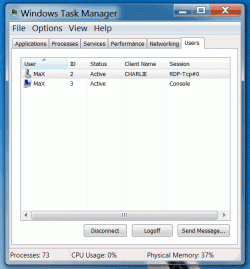
if the mod is done correctly, when A is logged in let's say from remote, another user can login as A from the console or from another remote location :thumbsup: (this I couldn't test yet because I don't have 3 computers here). Pity that skype won't work on both sessions :doh:

Of course if you want to do this you must run the script with the parameter "multi", or set your registry "HKLM\SYSTEM\CurrentControlSet\Control\Terminal Server" fSingleSessionPerUser=0

You can verify this from the image that I attached.

Ciao!
 

Attachments

  • CuncurrentUsers.gif
    CuncurrentUsers.gif
    30.1 KB · Views: 78

My Computer

Computer Manufacturer/Model Number
self-assembled
OS
Windows7 RTM 7600 x64
CPU
AMD Phenom
Motherboard
ASUS M3A32-MVP Deluxe
Memory
4 GBytes
Graphics Card(s)
nVidia GeForce 8800 GT
Monitor(s) Displays
2x Samsung Syncmaster 244T
Screen Resolution
1920x1200 (x2)
PSU
Xilence 650 W
Cooling
Accelero X1 on graphic card
strange

(...)
Make sure you download the right version.
Mind the build number, and if it's 32bit or 64bit.

I assure you the problem isn't the script.
I've tested it on more than 30 different systems.
(...)

...well, I am surprised about this because in my case I experienced a different behavior of the script on two systems that were identical. Anyway it was not so difficult to figure out and copy the dll files manually.

But it is very strange. I will do a test on the next 7system I have in my hands.
 

My Computer

Computer Manufacturer/Model Number
self-assembled
OS
Windows7 RTM 7600 x64
CPU
AMD Phenom
Motherboard
ASUS M3A32-MVP Deluxe
Memory
4 GBytes
Graphics Card(s)
nVidia GeForce 8800 GT
Monitor(s) Displays
2x Samsung Syncmaster 244T
Screen Resolution
1920x1200 (x2)
PSU
Xilence 650 W
Cooling
Accelero X1 on graphic card
Yeah, it looks like you're right on this. I reinstalled and applied the hack again, and it is now working as it should. Thanks.

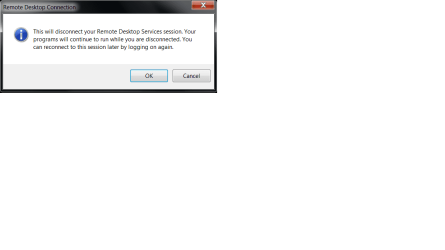
Now only one thing remains, how to disable that prompt that RDC always gives when you disconnect from the server?
 

My Computer

Computer Manufacturer/Model Number
SevenForums
OS
7 Prof
CPU
Q9550
Motherboard
Maximus II Formula
Memory
2x2 Mushkin Ascent 8500
Graphics Card(s)
4870X2
Sound Card
X-Fi Xtreme Gamer
Monitor(s) Displays
LN32A550
Screen Resolution
1920x1080
Hard Drives
Intel G2 80GB
5x1TB
PSU
Corsair 1000
Case
Cosmos
Cooling
Yates^13
Keyboard
G15v1
Mouse
MX518
Internet Speed
6Mbps
(...)

Now only one thing remains, how to disable that prompt that RDC always gives when you disconnect from the server?

can you please be a little bit more precise about the prompt? From your information I am guessing right now that you are leaving the session open instead of real disconnecting (...and consuming unnecessarily huge amount of memory)

MaX
 

My Computer

Computer Manufacturer/Model Number
self-assembled
OS
Windows7 RTM 7600 x64
CPU
AMD Phenom
Motherboard
ASUS M3A32-MVP Deluxe
Memory
4 GBytes
Graphics Card(s)
nVidia GeForce 8800 GT
Monitor(s) Displays
2x Samsung Syncmaster 244T
Screen Resolution
1920x1200 (x2)
PSU
Xilence 650 W
Cooling
Accelero X1 on graphic card
(...)

Now only one thing remains, how to disable that prompt that RDC always gives when you disconnect from the server?

can you please be a little bit more precise about the prompt? From your information I am guessing right now that you are leaving the session open instead of real disconnecting (...and consuming unnecessarily huge amount of memory)

MaX
\
This is the prompt when you close the remote session.
Edit: Leaving the session open really only takes up about 38MB of RAM so it's not that bad. Although I do close the connections whenever possible b/c I have a few machines that I constantly work on, thus, the aforementioned prompt does consume a little more time. I mean...really...but still better to be efficient if possible.
 

Attachments

  • Untitled.png
    Untitled.png
    10.8 KB · Views: 213

My Computer

Computer Manufacturer/Model Number
SevenForums
OS
7 Prof
CPU
Q9550
Motherboard
Maximus II Formula
Memory
2x2 Mushkin Ascent 8500
Graphics Card(s)
4870X2
Sound Card
X-Fi Xtreme Gamer
Monitor(s) Displays
LN32A550
Screen Resolution
1920x1080
Hard Drives
Intel G2 80GB
5x1TB
PSU
Corsair 1000
Case
Cosmos
Cooling
Yates^13
Keyboard
G15v1
Mouse
MX518
Internet Speed
6Mbps
logoff instead of close button

Dear Ragzarok,

normally I get this message when I close the remote session by the "x" button in the top-right of the window.

I don't get it if I do "Start / Logoff" ("Win7button / logoff" on Win7)

MaX
 

My Computer

Computer Manufacturer/Model Number
self-assembled
OS
Windows7 RTM 7600 x64
CPU
AMD Phenom
Motherboard
ASUS M3A32-MVP Deluxe
Memory
4 GBytes
Graphics Card(s)
nVidia GeForce 8800 GT
Monitor(s) Displays
2x Samsung Syncmaster 244T
Screen Resolution
1920x1200 (x2)
PSU
Xilence 650 W
Cooling
Accelero X1 on graphic card
Please guys, correct me if you think this is wrong: If I configure my firewall so that RDP can use alternative ports, could I have two RDP sessions simultaneously from two different computers?

Please don't call me an idiot when answering, that name is reserved to be used exclusively only by my ex-wives.;)

Kari

I have set this up at home to work, allowing me to RDP to all of the machines at home. Just map various external ports to port 3389 of each of the internal machines, so that perhaps:

55555 = 192.168.1.100:3389
55556 = 192.168.1.101:3389

works like a charm
 

My Computer

Computer Manufacturer/Model Number
Homebrew
OS
Windows 7 Enterprise 64 bit
CPU
2x AMD Opteron 280 2.4 Ghz Dual Core
Motherboard
ASUS K8N-DL nforce4
Memory
4Gb
Graphics Card(s)
Nvidia Geforce 6200 TC
Sound Card
Realtek
Monitor(s) Displays
Acer 24"
Screen Resolution
1920x1080
Hard Drives
160 Gb System install disk
250Gb Archive storage
500Gb Work and Clutter space
PSU
Noname 600w (after 2 Antecs failed, I just decided to save)
Case
Antec Server Case
Cooling
Air
Keyboard
Old HP Business workstation PS/2
Mouse
Standard Logitech laser 2 button w/ scroll wheel, USB
Internet Speed
10Mb Cable
Hi there

RDP'ing to the SAME machine concurrently with different users is normally a problem unless its a SERVER.

There is a problem with this -- usually on THE ROUTER apart from the OS itself.

You need to port forward the port to a specific address on your lan so you'll have to enable your router to forward say prt XXXX and YYYY to IP 192.X.X.X as the previous post says - but this will normally be for a single user.

RDP'ing to DIFFERENT machines isn't a problem so long as you know the internal LAN address and set the port forwarding OK - even then only 1 session per (non server) machine will work without all sorts of tricks which I've never tried.


(Tunnelling might be a partial solution).

I doubt also if having two users with the same ID logged on is a good idea - even if it is possible (I don't know) as what happens with simultaneous data updates.

I'm sure a retail home version of an OS DOES NOT HAVE the same robust locking mechanism as a commercial database system.


If you need 2 users to simulatneously be able to change data on a remote machine that's NOT a server ithen IMO a method would be to RDP to a virtual machine running on the actual machine you want to connect to --and then use "bog standard" networking to make your changes on the HOST disks (easy to share disks between a VM and its host).

(You wont be able to RDP to the HOST from a Virtual machine if both of these are running on the same physical host -- you wont have a console --crash --its not a Linux system that can run with a virtual console or even none at all).

Cheers
jimbo
 

My Computer

Computer type
PC/Desktop
Computer Manufacturer/Model Number
Custom built, several laptops HP/ASUS
OS
Linux CENTOS 7 / various Windows OS'es and servers
CPU
Intel i7 Intel i5
Memory
8GB, 16GB
Graphics Card(s)
On Motherboard
Sound Card
Realtek HD audio
Monitor(s) Displays
Apple Cinema display, Samsung LCD
Screen Resolution
1920 X 1080
Hard Drives
4 X 1TB SATA
Mouse
Toshiba wireless laser
Internet Speed
> 20MB up
Please guys, correct me if you think this is wrong: If I configure my firewall so that RDP can use alternative ports, could I have two RDP sessions simultaneously from two different computers?

Please don't call me an idiot when answering, that name is reserved to be used exclusively only by my ex-wives.;)

Kari

I have set this up at home to work, allowing me to RDP to all of the machines at home. Just map various external ports to port 3389 of each of the internal machines, so that perhaps:

55555 = 192.168.1.100:3389
55556 = 192.168.1.101:3389

works like a charm

kair: you can have multiple sessions on whatever computer you are on. You don't need 2 different computers. Example: On my main machine I can remote into 2 or more machines at the same time. I can remote into 3 or 4 different machines all at the same time. The issue at hand is remoting into 1 machine while someone is logged on and not forcing them to have to log off. Example: I am away from home and my wife is logged into my home computer. I want to remote in to my home computer while my wife is logged in and not force her to log off. This normally can only be done if the home machine is a SERVER.

macksgarage: this has ALWAYS been a possibility, as early as XP, with no special software or reg hacks. This is more a function of the router than the OS.
 
Last edited:

My Computer

Computer Manufacturer/Model Number
Dell XPS 8300
OS
Win7 x64
CPU
Intel(R) Core(TM) i7-2600 CPU @ 3.40GHz
Memory
16GB Dual-Channel
Graphics Card(s)
NVIDIA GeForce GTS 450
Monitor(s) Displays
Viewsonic VX2753mh-LED 27" HDMI
Screen Resolution
1920x1080
Server 2008 ENT x64 and Server 2008 R2 ENT x64?????????

I have only tried the RTM version and that worked with "install multi", so the " - " in the 7100 version might be a typo.
If you use the " - " and when login in still bumps the current session, just run the script again but this time without " - ".


This is the link for Win7 RTM 7600.16385 both x86 and x64
Missing Remote

This is the link for Build 7100 RC both x86 and x64
Missing Remote


All credits to this article go to the guys at "www.missingremote.com"
I used search, but I must admit I did not read every post in the thread... (sorry, that is bad forum procedure but...) Anyhow, I have a Laptop running WINDOWS 7 ENT. x64 and the script worked wonderfully in multi mode for what I wanted it for. My question is very simple and if no one already has the answer I can always just try it, but do you believe this will work in WINDOWS 2008 R2 ENT x64 which should be the same code base as WIN7. Furthermore, I could really solve ALL of my RDP dis-likings if it were to work on WINDOWS 2008 ENT x64 (SP-2) as well. Then finally I could say goodbye to the very annoyance that this script was created to avoid! Anyone tested this on either of those OS's yet? If I were a betting man, I would say it will work for R2, but who knows as far as straight up Server 2008 ENT. x64... Anyone that could relay their experiences if they have any would be helpful; otherwise I will just test it on everything and report back. Many thanks and oh, BTW great job with the forum - in all respects; you have quite a userbase and I am very pleased for you all. Your implementation of vBulletin is astounding as well (I have always found vBulletin to be a major PITA when I have had to deal with it) so you folks are doing rather well here and I am glad to be part of this community. Thanks in advance. Regards, FILMGUY
 

My Computer

Computer Manufacturer/Model Number
PUPCo Rsearch Group
OS
WIN7 ENT x64, Windows Server 2008 ENT x64, Windows Server 2008 R2 ENT x64, CentOS 5.5 x64
CPU
2 X Intel XENON X5482 Quad Cores @ 3.2GHz
Motherboard
TYAN Tempest i5400PW S5397 (S5397WAG2NRF)
Memory
16 X Kingston 2GB DDR2 800 MHz FBDIM's On a FSB @ 1600MHz
Graphics Card(s)
2 X EVGA 9800GT's OC'ed from the factory.
Sound Card
Realtek ALC262 Onboard, PCI-488x card running MOTU HD-192's
Monitor(s) Displays
2 - 19" Viewsonic VX922's, 1 - JVC Pro 24" DT-HD Monitor
Hard Drives
2 - 300GB 10K RPM Raptors
11- 500GB Seagate 7200 RPM 32MB Cache HDD's
1 - 1000GB Seagate 7200 RPM 32MB Cache HDD
PSU
Proprietary
Case
Specialized Rack-Mount Hot-Swapable Chassis
Cooling
Too many extremly loud fans
Dear Ragzarok,

I have experienced a malfunctioning on another Win7 7600 x64 system. I cannot tell you the reason why I had two different behaviors on two systems that were apparently identical, but I could figure out what was happening.

The script was setting all the registry keys correctly, but it was not copying the dll files in the proper path. So just try to run the script with the options that you need, then stop the RDP service(s) and manually copy the files

32_termsrv.dll -> %WINDIR%\system32\termsrv.dll
64_termsrv.dll -> %WINDIR%\SysWOW64\termsrv.dll

Start the RDP service(s) and in my case everything was fine.

Now I'm going to verify the argument of following post, because it seems to me that when I tested I could logon multiple cuncurrent users (I'm not sure, it was couple of weeks ago).

Hope this have helped

FYI:

32_termsrv.dll -> %WINDIR%\system32\termsrv.dll
64_termsrv.dll -> %WINDIR%\SysWOW64\termsrv.dll

is backwards, it should be:

64_termsrv.dll -> %WINDIR%\system32\termsrv.dll
32_termsrv.dll -> %WINDIR%\SysWOW64\termsrv.dll

64 bit drivers are in the "system32" folder and 32 bit drivers are in the "SysWOW64". SysWOW64 stands for System Windows on Windows 64. Translation system32 Windows 32 on Windows 64.

I hope that helps.
 

My Computer

Computer type
PC/Desktop
Computer Manufacturer/Model Number
Dell OP7010
OS
Windows 7 Enterprise (x64); Windows Server 2008 R2 (x64)
Memory
16GB
Monitor(s) Displays
4 Dell 24" LCD
Screen Resolution
1280x1024
Keyboard
Dell
Mouse
Dell Optical
Internet Speed
40meg
no experimental confirmation

FYI:

32_termsrv.dll -> %WINDIR%\system32\termsrv.dll
64_termsrv.dll -> %WINDIR%\SysWOW64\termsrv.dll

is backwards, it should be:

64_termsrv.dll -> %WINDIR%\system32\termsrv.dll
32_termsrv.dll -> %WINDIR%\SysWOW64\termsrv.dll

64 bit drivers are in the "system32" folder and 32 bit drivers are in the "SysWOW64". SysWOW64 stands for System Windows on Windows 64. Translation system32 Windows 32 on Windows 64.

I hope that helps.

:shock::shock::shock:
Dear FYI,

what you are writing has no experimental confirmation from what I did to have the tweak working properly. I manually copied:

32_termsrv.dll -> %WINDIR%\system32\termsrv.dll
64_termsrv.dll -> %WINDIR%\SysWOW64\termsrv.dll

and everything worked (and works) fine.
I cannot explain this.
 

My Computer

Computer Manufacturer/Model Number
self-assembled
OS
Windows7 RTM 7600 x64
CPU
AMD Phenom
Motherboard
ASUS M3A32-MVP Deluxe
Memory
4 GBytes
Graphics Card(s)
nVidia GeForce 8800 GT
Monitor(s) Displays
2x Samsung Syncmaster 244T
Screen Resolution
1920x1200 (x2)
PSU
Xilence 650 W
Cooling
Accelero X1 on graphic card
about Windows SERVERs 2008

I used search, (...).
Regards, FILMGUY

Dear FILMGUY,

if I had to bet, I'd also bet that the trick works on WinSRV 2008s.
Would be interesting to have another confirmation of where 32_termsrv.dll and 64_termsrv.dll should go...

Let us know if you try it out, it's very interesting ;)
 

My Computer

Computer Manufacturer/Model Number
self-assembled
OS
Windows7 RTM 7600 x64
CPU
AMD Phenom
Motherboard
ASUS M3A32-MVP Deluxe
Memory
4 GBytes
Graphics Card(s)
nVidia GeForce 8800 GT
Monitor(s) Displays
2x Samsung Syncmaster 244T
Screen Resolution
1920x1200 (x2)
PSU
Xilence 650 W
Cooling
Accelero X1 on graphic card

My Computer

Computer Manufacturer/Model Number
Sytemax
OS
7 Pro 64 Bit
CPU
8300 Quad 2.53Ghz
Motherboard
Asus
Memory
4GB DDR Crucial
Graphics Card(s)
Intel
We actually run a terminal services server. I can not only log in to a user machine but we can share the desktop. I can watch what they are doing and/or I can take control and they can watch what I am doing, as well as I can log in with out bumping them, but we have 8000+ machines.

This is a great find for home and small network. Nice work.
 

My Computer

Computer Manufacturer/Model Number
Home Built
OS
Windows 7; Server 08; Window Home Server; Vista; XP
CPU
Intel E8400 @ 3.4Ghz
Motherboard
Gigabyte P35 DS3L
Memory
8 Gb Patriot DDr2 800
Graphics Card(s)
NVidia GTX460 OC
Sound Card
Onboard
Monitor(s) Displays
Samsung 21"
Screen Resolution
1920x1080
Hard Drives
Seagate 160Gb x2
Samsung 250Gb
PSU
Cooler Master 650w 52a on 12v
Case
Antec 300
Cooling
Stock
Keyboard
HP Standard USB
Mouse
Logitech 518
Internet Speed
25Mbit Down 1.5Mbit up
Other Info
http://www.speedtest.net/result/723924362.png
this is not a great find, this opens an old vulnerability that would cripple any home or business infrastructure, if exploited. question: why isn't this the standard, if it's so great?
 

My Computer

OS
7 Pro
Please help me a little. When I type "cd\Win7RDP" in the cmd, it says path specified not found.

I just realized I'm supposed to type it without the quotes.
--------------------------------
I'm confused with how the parallelism work. I can log into one user on from two different computer. The scenario is like this.

At the same time:
Local user - logs into User Account "Alex" - plays with the computer
Remote user - logs into User Account "Alex" - plays with the computer

In this case, the Local user can't see what's going on. So the remote user starts downloading a say "Winamp.msi" in Internet Download Manager. But the local user doesn't see the file as downloading when he opens Internet Download Manager.

My question is, when Remote User ends the remote session, does the downloading of Winamp.msi still continues, as it would if I never applied this patch. If so, how does the Local User access or reveal this background/hidden running on the computer?
 

My Computer

Computer Manufacturer/Model Number
Dell E4300
OS
Windows 7 Ultimate
CPU
Intel C2D SP9400
Motherboard
Intel GS45
Memory
2GB DDR3
Graphics Card(s)
Integrated =(
Sound Card
Integrated =(
Monitor(s) Displays
Matte LCD
Screen Resolution
1280x800
Hard Drives
Intel X25-M Gen 2 SSD
WD Caviar Black
Mouse
MX 518, V470 - Logitech
why isn't it standard?

this is not a great find, this opens an old vulnerability that would cripple any home or business infrastructure, if exploited. question: why isn't this the standard, if it's so great?

There are many other vulnerabilities that are more critical than this one, which requires anyway login/passwd combination. Furthermore, an user so skilled to implement this trick is normally not leaving default Administrator/blank login combination. As I said in my previous post, this feature was standard until WinXP RC3, but then, at the very last moment MS changed the default to the actual standard.

Answer to your question is quite simple: Terminal Server OS, which has this as standard, costs much more than normal OS ;)
 

My Computer

Computer Manufacturer/Model Number
self-assembled
OS
Windows7 RTM 7600 x64
CPU
AMD Phenom
Motherboard
ASUS M3A32-MVP Deluxe
Memory
4 GBytes
Graphics Card(s)
nVidia GeForce 8800 GT
Monitor(s) Displays
2x Samsung Syncmaster 244T
Screen Resolution
1920x1200 (x2)
PSU
Xilence 650 W
Cooling
Accelero X1 on graphic card
I was about to update the Vista Home Premium in the office to Win 7 Pro in order to have RDP active (unhappy with the VNC solution). Hesitated because it would mean reintalling programs, etc.

On a whim I did a google search and found the dll fix that enables the RDP that Vista HP already has. Which the OP has listed.

I can vouch that both RDP on Vista HP and concurrent sessions on Vista and Win 7 Pro work great. :D

Someone can be sitting at the machine as user2 and I can log in, completely transparent, as a different user
 

My Computer

Computer Manufacturer/Model Number
Danpass 642
OS
Win 7 64 Pro
CPU
E4400
Motherboard
P5N-E SLI
Memory
2GB - G.Skill DDR2 800 F2-6400CL5D-2GBNQ
Graphics Card(s)
Sapphire 100172L Radeon X1550 256mb
Sound Card
built-in
Monitor(s) Displays
Viewsonic 19"
Screen Resolution
1440x900
PSU
Ultra ULT-VX600
Case
Antec Three Hundred
Cooling
Stock Antec 120 and 140 fans on low plus two 120s for intake
Back
Top