kicks
New member
- Local time
- 10:23 PM
- Messages
- 13
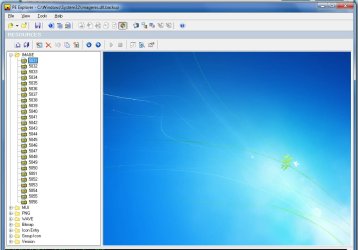
I am running Win7 pro with the logon background as shown in
www.sevenforums.com/tutorials/5382-log-screen-change.html
When I open C:\Windows\System32\oobe\background.bmp in Paint or Picture Manager, I see it with a different appearance.
There is a bright area in the center and a separated bright area at the right bottom. Converting the bmp to jpg and resizing to 1280 did not help.
How does windows generate the coherent ONE bright area?
Or is there a different path to my *true* logon background?
P.S. I am aware of thread http://www.sevenforums.com/general-...on-about-default-logon-background-7068-a.html Is does not answer my question, though.
www.sevenforums.com/tutorials/5382-log-screen-change.html
When I open C:\Windows\System32\oobe\background.bmp in Paint or Picture Manager, I see it with a different appearance.
There is a bright area in the center and a separated bright area at the right bottom. Converting the bmp to jpg and resizing to 1280 did not help.
How does windows generate the coherent ONE bright area?
Or is there a different path to my *true* logon background?
P.S. I am aware of thread http://www.sevenforums.com/general-...on-about-default-logon-background-7068-a.html Is does not answer my question, though.
Attachments

My Computer
- Computer type
- PC/Desktop
- OS
- Win7 pro 32-bit +SP1 as multiboot with XP and Win8
- CPU
- AMD Athlon 64 X2 dual core 3800+
- Motherboard
- A8N
- Memory
- 3 GB
- Monitor(s) Displays
- 2x 1920x1080, 1x Beamer
- Internet Speed
- 100.000 kbps by fiber