Logon background image - different appearances

kicks

New member
Local time
10:45 PM
Messages
13
I am running Win7 pro with the logon background as shown in
www.sevenforums.com/tutorials/5382-log-screen-change.html

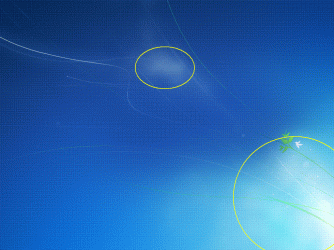
When I open C:\Windows\System32\oobe\background.bmp in Paint or Picture Manager, I see it with a different appearance.
There is a bright area in the center and a separated bright area at the right bottom. Converting the bmp to jpg and resizing to 1280 did not help.

How does windows generate the coherent ONE bright area?
Or is there a different path to my *true* logon background?

P.S. I am aware of thread http://www.sevenforums.com/general-...on-about-default-logon-background-7068-a.html Is does not answer my question, though.
 

Attachments
  • background_cli.GIF
    background_cli.GIF
    118.8 KB · Views: 171

My Computer

Computer type
PC/Desktop
OS
Win7 pro 32-bit +SP1 as multiboot with XP and Win8
CPU
AMD Athlon 64 X2 dual core 3800+
Motherboard
A8N
Memory
3 GB
Monitor(s) Displays
2x 1920x1080, 1x Beamer
Internet Speed
100.000 kbps by fiber
Actually, I believe this is quite simple. The directory is C:\Windows\System32\oobe\info\backgrounds, not C:\Windows\System32\oobe.

That may be why you are getting confused. The default Windows 7 desktop background is similar to the default logon screen background.
 

My Computer

Computer Manufacturer/Model Number
Custom
OS
Windows 7 Professional x64
CPU
Intel i7 2600K OC'd @ 4620 MHz
Motherboard
Asus P8Z68-V Pro
Memory
16GB GSkill Sniper 2133 Mhz (4x4GB)
Graphics Card(s)
EVGA GeForce GTX 480 SuperClocked+
Sound Card
Realtek High Definition Audio
Monitor(s) Displays
2x Acer S273HLbmii 27"
Screen Resolution
2 x 1920x1080
Hard Drives
64GB Crucial M4 SSD

Storage: Hitachi 1TB 5400RPM, Samsung 1.5TB 5400RPM
PSU
Corsair HW Series 750w (modular)
Case
Cooler Master HAF 932 Advanced Blue Edition
Cooling
CM Hyper 212+ CPU cooler, 3x 230mm + 1x 140mm case fans
Keyboard
Logitech MK320 (wireless)
Mouse
Logitech MK320 (wireless)
Internet Speed
30 Mb/s : 2 Mb/s
In C:\Windows\System32\oobe\info\backgrounds, there are only a couple of completely different jpg. All the more I am wondering, where the actual logon background is stored.
 

My Computer

Computer type
PC/Desktop
OS
Win7 pro 32-bit +SP1 as multiboot with XP and Win8
CPU
AMD Athlon 64 X2 dual core 3800+
Motherboard
A8N
Memory
3 GB
Monitor(s) Displays
2x 1920x1080, 1x Beamer
Internet Speed
100.000 kbps by fiber
The actual background is stored in C:\Windows\System32\oobe\info\backgrounds.

You can also use method 1 of the tutorial to use the program to change the background,
 

My Computer

Computer Manufacturer/Model Number
Custom
OS
Windows 7 Professional x64
CPU
Intel i7 2600K OC'd @ 4620 MHz
Motherboard
Asus P8Z68-V Pro
Memory
16GB GSkill Sniper 2133 Mhz (4x4GB)
Graphics Card(s)
EVGA GeForce GTX 480 SuperClocked+
Sound Card
Realtek High Definition Audio
Monitor(s) Displays
2x Acer S273HLbmii 27"
Screen Resolution
2 x 1920x1080
Hard Drives
64GB Crucial M4 SSD

Storage: Hitachi 1TB 5400RPM, Samsung 1.5TB 5400RPM
PSU
Corsair HW Series 750w (modular)
Case
Cooler Master HAF 932 Advanced Blue Edition
Cooling
CM Hyper 212+ CPU cooler, 3x 230mm + 1x 140mm case fans
Keyboard
Logitech MK320 (wireless)
Mouse
Logitech MK320 (wireless)
Internet Speed
30 Mb/s : 2 Mb/s
As said above, sorry, my C:\Windows\System32\oobe\info\backgrounds does not contain my actual logon background.

Of course, before posting, I had done an explorer search. I made sure that all files and folders, and additionally my OS files, were set to visible in folder options. I searched C:\ for .jpg and .bmp. But no picture is showing my logon/logoff background image.

So, in what path and file is my logon background hidden?
 

My Computer

Computer type
PC/Desktop
OS
Win7 pro 32-bit +SP1 as multiboot with XP and Win8
CPU
AMD Athlon 64 X2 dual core 3800+
Motherboard
A8N
Memory
3 GB
Monitor(s) Displays
2x 1920x1080, 1x Beamer
Internet Speed
100.000 kbps by fiber
As said above, sorry, my C:\Windows\System32\oobe\info\backgrounds does not contain my actual logon background.

Of course, before posting, I had done an explorer search. I made sure that all files and folders, and additionally my OS files, were set to visible in folder options. I searched C:\ for .jpg and .bmp. But no picture is showing my logon/logoff background image.

So, in what path and file is my logon background hidden?

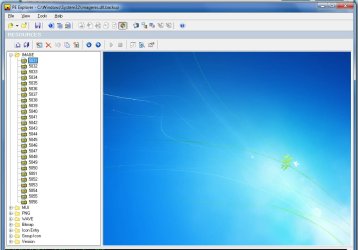
Not hidden. Its in the resource file used by logonui.exe. The file you are looking for is called imageres.dll which is located in your system32 folder (if your running x86).

It has many different sizes. I would have posted the image, but this way people know where to look.

Good luck
 

Attachments

  • imageres.jpg
    imageres.jpg
    84.9 KB · Views: 428

My Computer

OS
Windows 7 Ultimate x86
CPU
amd64
BINGO!
Exactly what I was trying to find out.
Many thanks!
 

My Computer

Computer type
PC/Desktop
OS
Win7 pro 32-bit +SP1 as multiboot with XP and Win8
CPU
AMD Athlon 64 X2 dual core 3800+
Motherboard
A8N
Memory
3 GB
Monitor(s) Displays
2x 1920x1080, 1x Beamer
Internet Speed
100.000 kbps by fiber
Back
Top