Logon Screen - Fix Showing Only "Other User" and Last Logged On User

Logon Screen - Fix Showing Only "Other User" and Last Logged On User

How to Fix Windows 7 Logon Screen Showing Only "Other User" and Last Logged On User Icon

   Information
If your Windows 7 login, welcome, or switch user screen only displays the last user that was logged on and Other User icons instead of the icons of all users created on the computer, then this tutorial will show you how to fix this.

You must be logged in as an administrator to be able to do the steps in this tutorial.

   Warning
It is highly recommended that you create a restore point before doing this tutorial. This way if you make a mistake that leaves Windows 7 unbootable or messed up, you would be able to easily do a system restore and select the restore point to undo and fix the mistake.


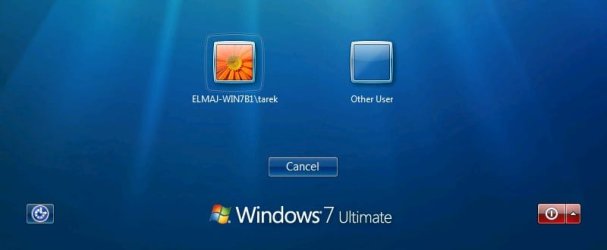
EXAMPLE: Windows 7 Logon, Welcome, or Switch User Screen
NOTE: Image from here.
Example.jpg


Here's How:

   Note
Before getting started, if you have Windows set to automatically log on to a user account at startup, then do step 5 in Option One of the tutorial linked below to redo the settings to make sure that the correct user is selected and that the correct password is entered for the selected user.

How to Automatically Log On a User Account at Windows 7 Startup


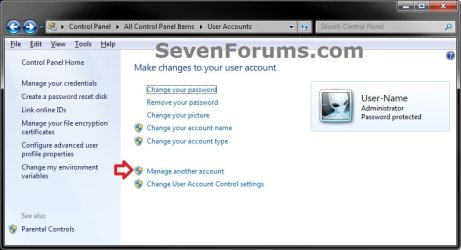
1. Open the Control Panel (icons view), click on the User Accounts icon, and click on the Manage another account link. (see screenshot below)
User-Accounts-1.jpg
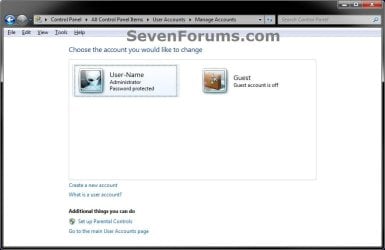
2. Make note of the user names for all user accounts that you have created in Windows 7 for the steps below. (see screenshot below)
NOTE: In addition to any name (ex: User-Name) of user accounts that you created, you will also have a Guest and the built-in Administrator (if enabled) accounts by default.
User-Accounts.jpg
3. In the Start Menu, type regedit in the search box and press Enter.

4. If prompted by UAC, then click on Yes.

5. In regedit, navigate to the location below. (see screenshot below step 6)

Code:
HKEY_LOCAL_MACHINE\SOFTWARE\Microsoft\Windows NT\CurrentVersion\ProfileList

6. If you have a .DEFAULT key in the left pane as a subkey under the ProfileList key, then right click on .DEFAULT, and click on Delete. (see screenshot below)
Default.jpg

A) Click on Yes to confirm to delete. (see screenshot below)
Delete.jpg
7. In the left pane under the ProfileList key, you will need to select and look at each S-1-5-xx subkey one at a time for the following items below.

   Warning
Please review each item listed below before deleting any S-1-5-xx subkey. You would only want to delete a S-1-5-xx subkey if you need to as outlined below.


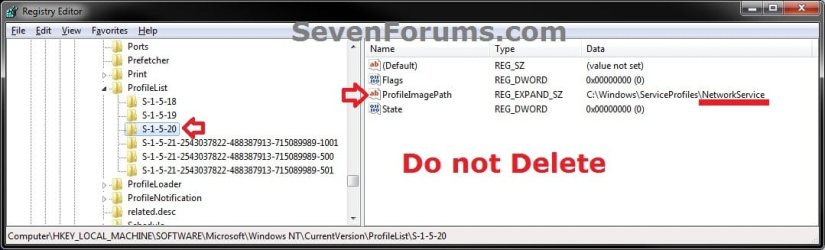
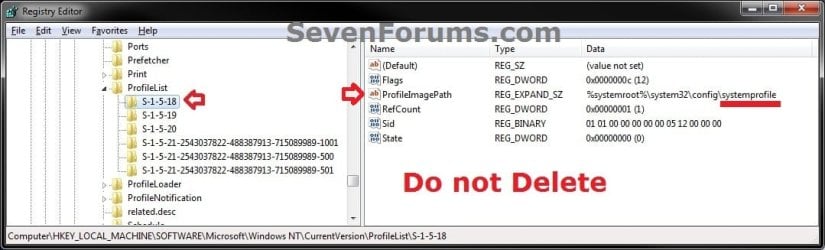
A) Do not delete S-1-5-xx subkeys in the left pane that have systemprofile, LocalService, and NetworkService names in the ProfileImagePath value in the right pane.
NOTE: These are system accounts used by Windows 7. (see screenshots below)
1.jpg
2.jpg
3.jpg
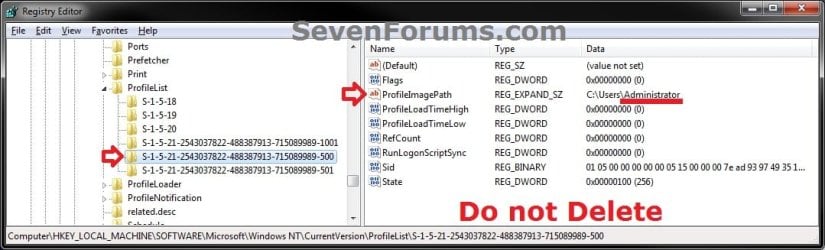
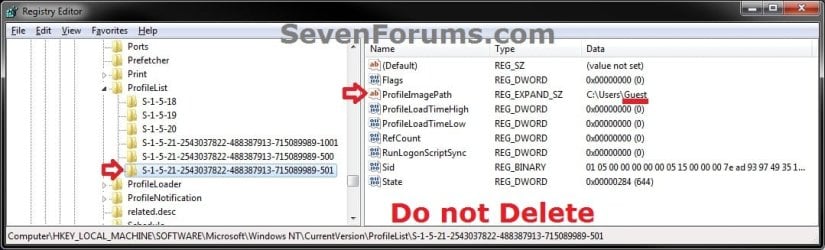
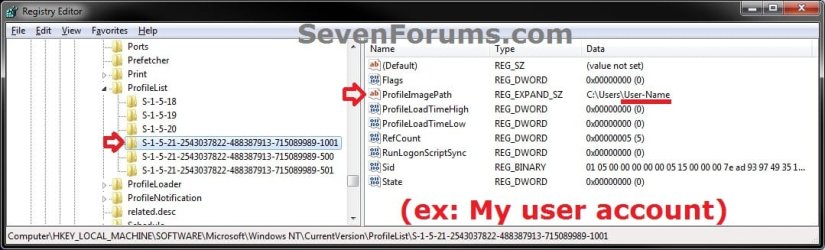
B) Do not delete S-1-5-xx subkeys in the left pane that have Guest, Administrator, or names of user accounts (ex: User-Name) in the ProfileImagePath value in the right pane from step 2 that you created in Windows 7. (see screenshots below)
4.jpg
5.jpg
6.jpg
C) If a selected S-1-5-xx subkey in the left pane has a user name in the ProfileImagePath value in the right pane that is not a user account that you have created in Windows 7 from step 2 or from step 7B, then right click on the S-1-5-xx subkey, click on Delete, and Yes to confirm.

D) If any selected S-1-5-xx subkey in the left pane does not have at least all 3 of the default Flags, ProfileImagePath, and State values in it's right pane, then right click on the S-1-5-xx subkey, click on Delete, and Yes to confirm. (see screenshot below)
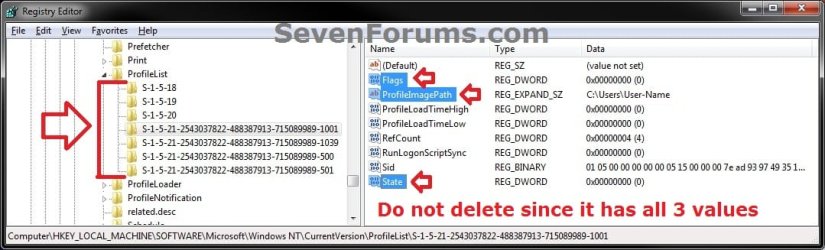
profiles.jpg
8. When finished, close regedit and User Accounts windows.

9. Log off or Switch User to test and see if the logon screen is now back to normal again with all user icons displayed.


That's it,
Shawn


Last edited:
Hello Lee, and welcome to Seven Forums. :)

If you haven't already, double check to see if what's in the blue note box above step 1 may be the issue.
 

My Computer My Computer

At a glance

64-bit Windows 11 Pro for WorkstationsIntel i7-8700K OC'd to 5 GHz64 GB (4x16GB) G.SKILL TridentZ RGB DDR4 3600...ASUS ROG-STRIX-GTX1080TI-O11G-GAMING
Computer type
PC/Desktop
Computer Manufacturer/Model Number
Self built custom
OS
64-bit Windows 11 Pro for Workstations
CPU
Intel i7-8700K OC'd to 5 GHz
Motherboard
ASUS ROG Maximus XI Formula Z390
Memory
64 GB (4x16GB) G.SKILL TridentZ RGB DDR4 3600 MHz
Graphics Card(s)
ASUS ROG-STRIX-GTX1080TI-O11G-GAMING
Sound Card
Integrated
Monitor(s) Displays
2 x Samsung Odyssey G7 27"
Screen Resolution
2560x1440
Hard Drives
1TB Samsung 990 PRO M.2,
4TB Samsung 990 PRO PRO M.2,
TerraMaster F8 SSD Plus NAS
PSU
Seasonic Prime Titanium 850W
Case
Thermaltake Core P3
Cooling
Corsair Hydro H115i
Keyboard
Logitech wireless K800
Mouse
Logitech MX Master 4
Internet Speed
2 Gb/s Download and 100 Mb/s Upload
Antivirus
Malwarebyte Anti-Malware Premium
Browser
Google Chrome
Other Info
Logitech Z625 speaker system,
Logitech BRIO 4K Pro webcam,
HP Color LaserJet Pro MFP M477fdn,
APC SMART-UPS RT 1000 XL - SURT1000XLI,
Galaxy S23 Plus phone
Thanks but...

I am currently getting a startup screen that has the Admin account listed by itself with a logon password box and a button that says "switch user". When the "switch user" button is clicked, the next screen shows the last user's icon and an icon to "Show other users". I'm shooting for a start screen that displays both of the users and no icon that displays "Show other users." Following the tutorial would have automatically logged in the preferred user.
 

My Computer My Computer

At a glance

7 64 bitIntel
Computer type
Laptop
Computer Manufacturer/Model Number
ASUS
OS
7 64 bit
CPU
Intel
Do you have the Users must enter a user name and password to use this computer box checked in netplwiz?

Did you need to do step 7C or 7D in the tutorial on the first page here to delete references to non existing accounts.
 

My Computer My Computer

At a glance

64-bit Windows 11 Pro for WorkstationsIntel i7-8700K OC'd to 5 GHz64 GB (4x16GB) G.SKILL TridentZ RGB DDR4 3600...ASUS ROG-STRIX-GTX1080TI-O11G-GAMING
Computer type
PC/Desktop
Computer Manufacturer/Model Number
Self built custom
OS
64-bit Windows 11 Pro for Workstations
CPU
Intel i7-8700K OC'd to 5 GHz
Motherboard
ASUS ROG Maximus XI Formula Z390
Memory
64 GB (4x16GB) G.SKILL TridentZ RGB DDR4 3600 MHz
Graphics Card(s)
ASUS ROG-STRIX-GTX1080TI-O11G-GAMING
Sound Card
Integrated
Monitor(s) Displays
2 x Samsung Odyssey G7 27"
Screen Resolution
2560x1440
Hard Drives
1TB Samsung 990 PRO M.2,
4TB Samsung 990 PRO PRO M.2,
TerraMaster F8 SSD Plus NAS
PSU
Seasonic Prime Titanium 850W
Case
Thermaltake Core P3
Cooling
Corsair Hydro H115i
Keyboard
Logitech wireless K800
Mouse
Logitech MX Master 4
Internet Speed
2 Gb/s Download and 100 Mb/s Upload
Antivirus
Malwarebyte Anti-Malware Premium
Browser
Google Chrome
Other Info
Logitech Z625 speaker system,
Logitech BRIO 4K Pro webcam,
HP Color LaserJet Pro MFP M477fdn,
APC SMART-UPS RT 1000 XL - SURT1000XLI,
Galaxy S23 Plus phone
Last Logged On User & "Other User" on Welcome Screen

I originally posted this to the KB4489878 thread, on 12 March 2019, then later discovered this "Other User" thread which appears to be the same symptom.

[I have an HP desktop running Windows 7-32 Home Premium, with two user accounts. I installed KB4474419 & KB4489878 and when it re-booted, the User 1 account was available & usable. The User 2 account was missing & just showed a blank icon window & was unusable. I uninstalled KB4489878 and re-booted. This time User 1 was blank & unusable, but User 2 was available & usable. So I uninstalled KB4474419 and both user accounts were available & usable. I then tried installing KB4489878 by itself and User 1 was available & User 2 was unavailable. So I have now removed both updates & hidden them in Windows Updates. Is there a workaround for this problem? Is Microsoft working on a fix?

I forgot to mention in my first post, that I also have a Windows 7-64 bit Professional PC on which both of the subject updates installed and are working just fine.

4/13/2019
On 4/10/2019 I installed KB4493132 & KB4493472 on my 32 bit machine. Now I have the same problem that I had initially with the other two KBs, in my first posting. Yesterday, I discovered that this problem is the same as the "Other User" problem that shows up with the last user displayed on the logon screen, with the blank user logon box labeled "Other User". So I will pursue that avenue to troubleshoot the problem.]

I have tried all ideas on this "Other User" thread, except the "Tweaker", but they did not fix the problem. Any other ideas will be welcomed. Thanks!
 

My Computer My Computer

At a glance

Windows 7-64bit Professional
Computer type
PC/Desktop
OS
Windows 7-64bit Professional

My Computer My Computer

At a glance

64-bit Windows 11 Pro for WorkstationsIntel i7-8700K OC'd to 5 GHz64 GB (4x16GB) G.SKILL TridentZ RGB DDR4 3600...ASUS ROG-STRIX-GTX1080TI-O11G-GAMING
Computer type
PC/Desktop
Computer Manufacturer/Model Number
Self built custom
OS
64-bit Windows 11 Pro for Workstations
CPU
Intel i7-8700K OC'd to 5 GHz
Motherboard
ASUS ROG Maximus XI Formula Z390
Memory
64 GB (4x16GB) G.SKILL TridentZ RGB DDR4 3600 MHz
Graphics Card(s)
ASUS ROG-STRIX-GTX1080TI-O11G-GAMING
Sound Card
Integrated
Monitor(s) Displays
2 x Samsung Odyssey G7 27"
Screen Resolution
2560x1440
Hard Drives
1TB Samsung 990 PRO M.2,
4TB Samsung 990 PRO PRO M.2,
TerraMaster F8 SSD Plus NAS
PSU
Seasonic Prime Titanium 850W
Case
Thermaltake Core P3
Cooling
Corsair Hydro H115i
Keyboard
Logitech wireless K800
Mouse
Logitech MX Master 4
Internet Speed
2 Gb/s Download and 100 Mb/s Upload
Antivirus
Malwarebyte Anti-Malware Premium
Browser
Google Chrome
Other Info
Logitech Z625 speaker system,
Logitech BRIO 4K Pro webcam,
HP Color LaserJet Pro MFP M477fdn,
APC SMART-UPS RT 1000 XL - SURT1000XLI,
Galaxy S23 Plus phone
Question

Thanks, Brink, for your prompt reply!

Would I need to uninstall the four other KBs that caused the problem, before installing KB4493448?
 

My Computer My Computer

At a glance

Windows 7-64bit Professional
Computer type
PC/Desktop
OS
Windows 7-64bit Professional
You could test installing KB4493448 first in an attempt to avoid having to uninstall the others.

If it doesn't help, then you could test by uninstalling the others.
 

My Computer My Computer

At a glance

64-bit Windows 11 Pro for WorkstationsIntel i7-8700K OC'd to 5 GHz64 GB (4x16GB) G.SKILL TridentZ RGB DDR4 3600...ASUS ROG-STRIX-GTX1080TI-O11G-GAMING
Computer type
PC/Desktop
Computer Manufacturer/Model Number
Self built custom
OS
64-bit Windows 11 Pro for Workstations
CPU
Intel i7-8700K OC'd to 5 GHz
Motherboard
ASUS ROG Maximus XI Formula Z390
Memory
64 GB (4x16GB) G.SKILL TridentZ RGB DDR4 3600 MHz
Graphics Card(s)
ASUS ROG-STRIX-GTX1080TI-O11G-GAMING
Sound Card
Integrated
Monitor(s) Displays
2 x Samsung Odyssey G7 27"
Screen Resolution
2560x1440
Hard Drives
1TB Samsung 990 PRO M.2,
4TB Samsung 990 PRO PRO M.2,
TerraMaster F8 SSD Plus NAS
PSU
Seasonic Prime Titanium 850W
Case
Thermaltake Core P3
Cooling
Corsair Hydro H115i
Keyboard
Logitech wireless K800
Mouse
Logitech MX Master 4
Internet Speed
2 Gb/s Download and 100 Mb/s Upload
Antivirus
Malwarebyte Anti-Malware Premium
Browser
Google Chrome
Other Info
Logitech Z625 speaker system,
Logitech BRIO 4K Pro webcam,
HP Color LaserJet Pro MFP M477fdn,
APC SMART-UPS RT 1000 XL - SURT1000XLI,
Galaxy S23 Plus phone
Well, Brink, I installed KB4493448 and it failed to fix the problem. Tomorrow, I will start uninstalling the four offending KBs & see what happens.
 

My Computer My Computer

At a glance

Windows 7-64bit Professional
Computer type
PC/Desktop
OS
Windows 7-64bit Professional
Latest findings

I uninstalled the following, one at a time & checked the results:

KB4474419 Still fails.
KB4489878 Still fails.
KB4493472 Still fails.
KB4493448 The problem is gone & my original Welcome Screen is back to normal, showing the correct users!!!
KB4493132 Is still on & all is well, so it does not support the failure.

I then installed each of the first four KBs above, one at a time, and any one of them, alone, will cause the "Other User" failure.

Incidentally I previously ran CHKDSK & SFC on my C: drive, error free. So I have no idea why this error occurs. So far, I have not seen reports of this related to any of the above failing KBs from other users of this forum. At this point I am clueless. So I am reluctantly considering upgrading to Windows 10.:cry:

Your help is very much appreciated!
 

My Computer My Computer

At a glance

Windows 7-64bit Professional
Computer type
PC/Desktop
OS
Windows 7-64bit Professional
As a test, if you create a new account on the computer, does it do the same with it?

If not, then you could use the new account as a workaround for now. :(
 

My Computer My Computer

At a glance

64-bit Windows 11 Pro for WorkstationsIntel i7-8700K OC'd to 5 GHz64 GB (4x16GB) G.SKILL TridentZ RGB DDR4 3600...ASUS ROG-STRIX-GTX1080TI-O11G-GAMING
Computer type
PC/Desktop
Computer Manufacturer/Model Number
Self built custom
OS
64-bit Windows 11 Pro for Workstations
CPU
Intel i7-8700K OC'd to 5 GHz
Motherboard
ASUS ROG Maximus XI Formula Z390
Memory
64 GB (4x16GB) G.SKILL TridentZ RGB DDR4 3600 MHz
Graphics Card(s)
ASUS ROG-STRIX-GTX1080TI-O11G-GAMING
Sound Card
Integrated
Monitor(s) Displays
2 x Samsung Odyssey G7 27"
Screen Resolution
2560x1440
Hard Drives
1TB Samsung 990 PRO M.2,
4TB Samsung 990 PRO PRO M.2,
TerraMaster F8 SSD Plus NAS
PSU
Seasonic Prime Titanium 850W
Case
Thermaltake Core P3
Cooling
Corsair Hydro H115i
Keyboard
Logitech wireless K800
Mouse
Logitech MX Master 4
Internet Speed
2 Gb/s Download and 100 Mb/s Upload
Antivirus
Malwarebyte Anti-Malware Premium
Browser
Google Chrome
Other Info
Logitech Z625 speaker system,
Logitech BRIO 4K Pro webcam,
HP Color LaserJet Pro MFP M477fdn,
APC SMART-UPS RT 1000 XL - SURT1000XLI,
Galaxy S23 Plus phone
Workaround?

Brink,

Actually, I could install all of the failing KBs, just for security reasons, and still make the thing function. That is because I have learned how to switch users by using the "Other User" login. It is a nuisance, but I could live with it if necessary. However, I will have to switch to Win 10 next year anyway, so I may just do the switch now, so my "Sweetie" will have a working Windows OS. I'm an octogenarian, so I could be pushing up daisies before 2020! :D

I will stay subscribed to this thread, in order to see if someone comes up with more information on this problem.

Thanks again!
 

My Computer My Computer

At a glance

Windows 7-64bit Professional
Computer type
PC/Desktop
OS
Windows 7-64bit Professional
Please let us know how it went.
 

My Computer My Computer

At a glance

64-bit Windows 11 Pro for WorkstationsIntel i7-8700K OC'd to 5 GHz64 GB (4x16GB) G.SKILL TridentZ RGB DDR4 3600...ASUS ROG-STRIX-GTX1080TI-O11G-GAMING
Computer type
PC/Desktop
Computer Manufacturer/Model Number
Self built custom
OS
64-bit Windows 11 Pro for Workstations
CPU
Intel i7-8700K OC'd to 5 GHz
Motherboard
ASUS ROG Maximus XI Formula Z390
Memory
64 GB (4x16GB) G.SKILL TridentZ RGB DDR4 3600 MHz
Graphics Card(s)
ASUS ROG-STRIX-GTX1080TI-O11G-GAMING
Sound Card
Integrated
Monitor(s) Displays
2 x Samsung Odyssey G7 27"
Screen Resolution
2560x1440
Hard Drives
1TB Samsung 990 PRO M.2,
4TB Samsung 990 PRO PRO M.2,
TerraMaster F8 SSD Plus NAS
PSU
Seasonic Prime Titanium 850W
Case
Thermaltake Core P3
Cooling
Corsair Hydro H115i
Keyboard
Logitech wireless K800
Mouse
Logitech MX Master 4
Internet Speed
2 Gb/s Download and 100 Mb/s Upload
Antivirus
Malwarebyte Anti-Malware Premium
Browser
Google Chrome
Other Info
Logitech Z625 speaker system,
Logitech BRIO 4K Pro webcam,
HP Color LaserJet Pro MFP M477fdn,
APC SMART-UPS RT 1000 XL - SURT1000XLI,
Galaxy S23 Plus phone
Upgrade to Windows 10.

Hi, again, Brink,

Several years ago, I bought a new PC that had Windows 8 installed. (Bear in mind that I serviced mainframe computers, from the largest water-cooled ones, down to PCs, for 35 years, so I have a pretty good grasp on dealing with this stuff.) I tried for almost two weeks to make Win 8 work for me, but finally gave up and took the PC back for a refund. I then bought the same model PC with Windows 7. I still have it. A few years later, I installed the free copy of Windows 10, and found that I detested it, as well, mainly because it was a complete guessing game as to where many basic things were, and those irritating tiles were in my face all the time! I reverted to Windows 7 using the Win 10 option to uninstall. That caused problems in Win 7 that I spent months straightening out. I finally upgraded from Win 7 Home Premium to Professional in order to clear up the remaining problems.

Now Microsoft gives me little choice but to upgrade to Windows 10. First, I upgraded the 32 bit PC, which has had an intermittent Blue Screen Of Death error, for several years, which I tried in vane to get rid of. On the first installation try, it failed, showing the culprit to be a file named SMR311.SYS, which is a Symantic driver, left over from a Norton Security Suite which I had tried. I had used the Norton Cleaner to take it all off, but it missed this file. I deleted the file, and tried the Win 10 installation again, with success. To my great surprise Win 10 came up with the desktop looking just like Win 7! Now I find that Microsoft has corrected a lot of things that I hated about the earlier version. I was so pleased that I have now installed Win 10 on my 64 bit PC.

I am hoping that getting rid of that Symantic driver file will fix the BSOD on my 32 bit PC.

Interestingly, I find that Win 10 can still be installed, free of charge, by downloading the ISO file from MS, and doing an in-place upgrade. This is explained on many tech websites.

So far, I am very pleased!

Thanks for your help!
 

My Computer My Computer

At a glance

Windows 7-64bit Professional
Computer type
PC/Desktop
OS
Windows 7-64bit Professional
Harlon,

I'm happy to hear it's going well so far. Personally, I prefer to clean install Windows 10 for the best results, but do understand that some may need to upgrade instead.

Windows 10 can be made to run a lot like Windows 7 with some tweaking.

If you like, we have a sister site Windows 10 Help Forums where we would be happy to help with any Windows 10 questions or issues you may have.
 

My Computer My Computer

At a glance

64-bit Windows 11 Pro for WorkstationsIntel i7-8700K OC'd to 5 GHz64 GB (4x16GB) G.SKILL TridentZ RGB DDR4 3600...ASUS ROG-STRIX-GTX1080TI-O11G-GAMING
Computer type
PC/Desktop
Computer Manufacturer/Model Number
Self built custom
OS
64-bit Windows 11 Pro for Workstations
CPU
Intel i7-8700K OC'd to 5 GHz
Motherboard
ASUS ROG Maximus XI Formula Z390
Memory
64 GB (4x16GB) G.SKILL TridentZ RGB DDR4 3600 MHz
Graphics Card(s)
ASUS ROG-STRIX-GTX1080TI-O11G-GAMING
Sound Card
Integrated
Monitor(s) Displays
2 x Samsung Odyssey G7 27"
Screen Resolution
2560x1440
Hard Drives
1TB Samsung 990 PRO M.2,
4TB Samsung 990 PRO PRO M.2,
TerraMaster F8 SSD Plus NAS
PSU
Seasonic Prime Titanium 850W
Case
Thermaltake Core P3
Cooling
Corsair Hydro H115i
Keyboard
Logitech wireless K800
Mouse
Logitech MX Master 4
Internet Speed
2 Gb/s Download and 100 Mb/s Upload
Antivirus
Malwarebyte Anti-Malware Premium
Browser
Google Chrome
Other Info
Logitech Z625 speaker system,
Logitech BRIO 4K Pro webcam,
HP Color LaserJet Pro MFP M477fdn,
APC SMART-UPS RT 1000 XL - SURT1000XLI,
Galaxy S23 Plus phone
Windows 7 Pro 64 bit joined to Domain. ITaccount and Admin account local created/active. After a Domain User signs into this pc, I want at boot to show these said User Accounts...icons/pictures. Only showing last login or Other. No .default in ProfileList nor any incorrect keys/entries. Any suggestions?
 

My Computer My Computer

At a glance

Win7 64
Computer type
PC/Desktop
OS
Win7 64
Back
Top