Logon Screen "Windows 7" logo remove/change?

CorneliusM

Religiously Free
Power User
Local time
11:51 AM
Messages
120
Location
Edinburgh
Hi all,

I'm specifically looking for a way to change the logon screen Windows logo from its (personally) ugly appearence to white (both examples attached), I'd rather not remove the logo because I have it in my head that a plain white logo would match the "Windows 7 Home Premium/Ultimate/etc" text at the bottom of the screen.

I have opened authui.dll in notepad although I'm not too sure if it is possible to edit this .dll with notepad. I really do not want to use a resource hacker program to do it. I mean, I'm quite happy going into the registry to activate my own logon background and as happy editing a picture to fit nicely to my resolution! Hell, I go into the registry to do what most merge a downloaded .reg file to do! I am perfectly happy customizing Windows manually as I believe its a perfect way of being able to undo any problems that occur.

Excuse the length of this post and an apparent rant, I really am hoping that there is an "offline" method of customizing the logon logo!


EDIT: I don't mean the Boot animation. I just realized it may seem so by the attached images!

Cheers!
 

Attachments
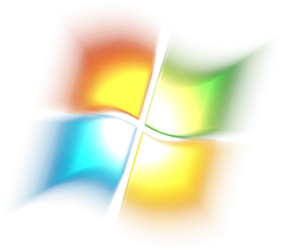
  • 7logo.png
    7logo.png
    62.3 KB · Views: 286
  • Windows 7 White Logo.png
    Windows 7 White Logo.png
    7.4 KB · Views: 16,383
Last edited:

My Computer

Computer Manufacturer/Model Number
Hp Compaq CQ56 156SA
OS
windows 7 Home Premium 64 Bit
CPU
AMD V140
Memory
2GB
Graphics Card(s)
ATI Mobility Radeon HD 4250
Sound Card
Realtek
Monitor(s) Displays
Generic
Screen Resolution
1366 x 768
Hard Drives
Hitachi
Mouse
Wireless LG
Internet Speed
Finger-licking good
Other Info
Windows 7 Home Premium Pre-Installed.
Old Machine: HP Pavilion DV6 1120sa (R.I.P)
Hey, cheers for the quick reply,

I know how to change the logon background, I did however find a couple of interesting links on the link you gave me that I will try in the next couple of days, didn't want to have to use a program to do it but it looks as though I'll need to :(

Cheers dude!


My Computer

Computer Manufacturer/Model Number
Hp Compaq CQ56 156SA
OS
windows 7 Home Premium 64 Bit
CPU
AMD V140
Memory
2GB
Graphics Card(s)
ATI Mobility Radeon HD 4250
Sound Card
Realtek
Monitor(s) Displays
Generic
Screen Resolution
1366 x 768
Hard Drives
Hitachi
Mouse
Wireless LG
Internet Speed
Finger-licking good
Other Info
Windows 7 Home Premium Pre-Installed.
Old Machine: HP Pavilion DV6 1120sa (R.I.P)
Sorry, I misread your post.

But hope the links help you out!
 

My Computer

OS
windows 7 ultimate
Cheers man, in the end I decided agaisnt changing it in case it screws Windows up somehow! :)

Sorry, I misread your post.

But hope the links help you out!
 

My Computer

Computer Manufacturer/Model Number
Hp Compaq CQ56 156SA
OS
windows 7 Home Premium 64 Bit
CPU
AMD V140
Memory
2GB
Graphics Card(s)
ATI Mobility Radeon HD 4250
Sound Card
Realtek
Monitor(s) Displays
Generic
Screen Resolution
1366 x 768
Hard Drives
Hitachi
Mouse
Wireless LG
Internet Speed
Finger-licking good
Other Info
Windows 7 Home Premium Pre-Installed.
Old Machine: HP Pavilion DV6 1120sa (R.I.P)
Try going to msconfig, select the Boot Tab and select No GUI Boot checkbox.
 

My Computer

Computer type
PC/Desktop
Computer Manufacturer/Model Number
Novatech iRush Pro
OS
Windows 7 Ultimate SP1 - 64 Bit
CPU
Intel Core i5 2500k
Motherboard
Foxconn H67M-S/H67M-V/H67
Memory
2x4GB DDR3 1333Hz
Graphics Card(s)
Ati Radeon 6770
Sound Card
None
Monitor(s) Displays
Samsung S22B150
Screen Resolution
1920x1080
Hard Drives
2x500GB
PSU
500W
Cooling
Fan
Keyboard
HP KU0316
Mouse
Wireless Logitech M185
Internet Speed
20MB/s
Antivirus
Avast Free
Browser
Google Chrome
Other Info
Logitech M185 Mouse
KU-M316 Keyboard
i want to remove the windows logo on the logon screen on Windows 7 starter. Any tips?
 

My Computer

OS
Windows 7 starter
i want to remove the windows logo on the logon screen on Windows 7 starter. Any tips?

Welcome to the Seven Forums
Posting the same question in multiple posts http://www.sevenforums.com/customization/16746-remove-welcome-screen-3.html#post1857353 is against the forum rules, and these are old posts. Next time start a new thread.
In a other post you said you are able to do it with Pro and Ultimate they must be different then starter I do not have starter so I am unable to help.
I have always wanted to ask this question how much time you do you spend on the login screen that this logo bothers you.
Jerry
 

My Computer

Computer type
Laptop
Computer Manufacturer/Model Number
Sager NP9170
OS
Win 7 Pro x64 / Win 10 Pro
CPU
Intel(R) Core(TM) i7-3630QM CPU @ 2.40GHz
Motherboard
CLEVO P170EM
Memory
12 GB
Graphics Card(s)
(1) Intel(R) HD Graphics 4000 (2) NVIDIA GeForce GTX 675M
Sound Card
(1) Realtek High Definition Audio (2) Intel(R) Display Aud
Monitor(s) Displays
17.3
Screen Resolution
1920x1080
Hard Drives
(1) Samsung 860 EVO 500GB(OS) (1) Samsung 860 EVO 500GB(Data)
Keyboard
Backlite
Antivirus
MSE, Malwarebytes Pro
Browser
Firefox
Other Info
DESKTOP: Custom-built.
OS: Win 10 Pro x64.
CASE: Rosewill R5.
CPU: Intel I5 4670K CPU @ 3.40GHz.
CPU COOLER: Cool Master Hyper 212 EVO.
MOTHERBOARD: Asus Z87-A.
MEMORY: Kingston HyperX 2x4 GB.
GPU: Nvidia Geforce 650 TI.
PSU: Corsair TX750.
DRIVES: (1) Samsung 840 120 GB SSD (2) Western Digital blue 500 GB 7200 RPM.
thanks for the reply Jerry.

I work for a software development company that started to manufacture smaller units to assist our clients in using our software. I want to create a environment where these units don't look like they are using windows in order to stop users trying to tamper with the unit.

The last step i need to create this environment is to simply remove that logo.
 

My Computer

OS
Windows 7 starter
Thank you for explaining it, it makes me more understanding of why you would want to remove it. Maybe someone will come along with the starter version and be able to help you.
Jerry
 

My Computer

Computer type
Laptop
Computer Manufacturer/Model Number
Sager NP9170
OS
Win 7 Pro x64 / Win 10 Pro
CPU
Intel(R) Core(TM) i7-3630QM CPU @ 2.40GHz
Motherboard
CLEVO P170EM
Memory
12 GB
Graphics Card(s)
(1) Intel(R) HD Graphics 4000 (2) NVIDIA GeForce GTX 675M
Sound Card
(1) Realtek High Definition Audio (2) Intel(R) Display Aud
Monitor(s) Displays
17.3
Screen Resolution
1920x1080
Hard Drives
(1) Samsung 860 EVO 500GB(OS) (1) Samsung 860 EVO 500GB(Data)
Keyboard
Backlite
Antivirus
MSE, Malwarebytes Pro
Browser
Firefox
Other Info
DESKTOP: Custom-built.
OS: Win 10 Pro x64.
CASE: Rosewill R5.
CPU: Intel I5 4670K CPU @ 3.40GHz.
CPU COOLER: Cool Master Hyper 212 EVO.
MOTHERBOARD: Asus Z87-A.
MEMORY: Kingston HyperX 2x4 GB.
GPU: Nvidia Geforce 650 TI.
PSU: Corsair TX750.
DRIVES: (1) Samsung 840 120 GB SSD (2) Western Digital blue 500 GB 7200 RPM.
That's good to hear, I guess the terminology was the confusing part from Windows logo to text branding
 

My Computer

Computer type
Laptop
Computer Manufacturer/Model Number
Sager NP9170
OS
Win 7 Pro x64 / Win 10 Pro
CPU
Intel(R) Core(TM) i7-3630QM CPU @ 2.40GHz
Motherboard
CLEVO P170EM
Memory
12 GB
Graphics Card(s)
(1) Intel(R) HD Graphics 4000 (2) NVIDIA GeForce GTX 675M
Sound Card
(1) Realtek High Definition Audio (2) Intel(R) Display Aud
Monitor(s) Displays
17.3
Screen Resolution
1920x1080
Hard Drives
(1) Samsung 860 EVO 500GB(OS) (1) Samsung 860 EVO 500GB(Data)
Keyboard
Backlite
Antivirus
MSE, Malwarebytes Pro
Browser
Firefox
Other Info
DESKTOP: Custom-built.
OS: Win 10 Pro x64.
CASE: Rosewill R5.
CPU: Intel I5 4670K CPU @ 3.40GHz.
CPU COOLER: Cool Master Hyper 212 EVO.
MOTHERBOARD: Asus Z87-A.
MEMORY: Kingston HyperX 2x4 GB.
GPU: Nvidia Geforce 650 TI.
PSU: Corsair TX750.
DRIVES: (1) Samsung 840 120 GB SSD (2) Western Digital blue 500 GB 7200 RPM.
I locked myself out of my hp laptop i have win 7 enterprise how do i get pass my logon screen i foregot my user name i put on it
 

My Computer

OS
windows 7
Back
Top