Solved Long boot time between BIOS screen and Windows

Malwarebytes looks like a real problem. Do you have Real Time protection enabled which you need because you get infected otherwise using only MSE, or more aggressive free solution which is also lightweight Panda Cloud?

Either way I would uninstall it to see how much it helps, install it later and possibly only install the free scanner.

Keep in mind that if you turn off any Startups using Soluto that it will replace them when you uninstall the Program, so I'd look at other ways to also turn them off first like msconfig>Startup and >Services. The ones it offers to delay may be accessible to do that in Services.msc. Once you have manually turned them off or delayed then you can when ready uninstall Soluto as I do because (wait for it) it actually can delay Startup! :rolleyes: This is not a reason not to use its Startup detection tools though as I do sometimes because nothing other than the Trace gets deeper, and the Trace seems to be only readable by its author Cluberti who may be unavailable.
 
Hi Greg !

yes, I have real time protection enabled on Malwarebytes, if that's what youa re asking, both for malware and for malicious website protection.

Is Panda Cloud similar to Malwarebytes ?

LE: Uninstalled Malwarebytes. While this did speed up the Windows login, the boot screen issue has not changed at all. it still took almost a minute to pass it during boot.

LE2: Counted the times.
- Time from fans starting to motherboard splash screen: 15 seconds
- Motherboard splash screen: 1 min 29 seconds
- time between motherboard splashs creen and "Starting Windows" boot screen: 2 seconds
- "Starting Windows" boot screen: 16 seconds
- "Starting Windows" to log-in screen: 2 seconds

So the big problem here is the motherboard splash screen, which, even disabled from BIOS, still takes the same amount of time to pass. Soluto isn't helping with this, apparently. Unless I'm missing something.
 
Last edited:

My Computer My Computer

Computer type
PC/Desktop
Computer Manufacturer/Model Number
AuthenticAMD
OS
Windows 7 Ultimate SP1 64-bit
CPU
AMD FX-6100 Six-Core @ 4:00 Ghz
Motherboard
Gigabyte GA-970A-UD3
Memory
12 GB
Graphics Card(s)
NVIDIA Geforce GTX 660
Sound Card
Realtek High Definition Audio
Monitor(s) Displays
2 x BenQ 24" wide 16:9, 1 x Toshiba HDTV
Screen Resolution
1920x1080
Hard Drives
WDC WD10 EFRX-68JPCN0 SATA
Cooling
Deepcool Gammaxx 200
Keyboard
Newmen USB
Mouse
Logitech G700
Browser
Mozilla Firefox
Try resetting BIOS to optimal defaults after checking SATA controller setting. What is the Fast Boot setting? Try another.

Next try running a few Startup Repairs.

But first please post back a screenshot of Disk Management - Post a Screen Capture Image

Do you remember what changes your made using Tune Up Utilities? These are easily forgotten and later lead to problems which need reversing by changing the setting back or doing a System Restore if there is still a System Restore point. It might still be worth rolling back as far as you can with System Restore. Do you have any System Image backups?
 
Hi and/or good morning.

Here is disk management. Will check BIOS now.
 

Attachments

  • Capture.JPG
    Capture.JPG
    94.8 KB · Views: 1

My Computer My Computer

Computer type
PC/Desktop
Computer Manufacturer/Model Number
AuthenticAMD
OS
Windows 7 Ultimate SP1 64-bit
CPU
AMD FX-6100 Six-Core @ 4:00 Ghz
Motherboard
Gigabyte GA-970A-UD3
Memory
12 GB
Graphics Card(s)
NVIDIA Geforce GTX 660
Sound Card
Realtek High Definition Audio
Monitor(s) Displays
2 x BenQ 24" wide 16:9, 1 x Toshiba HDTV
Screen Resolution
1920x1080
Hard Drives
WDC WD10 EFRX-68JPCN0 SATA
Cooling
Deepcool Gammaxx 200
Keyboard
Newmen USB
Mouse
Logitech G700
Browser
Mozilla Firefox
- Time from fans starting to motherboard splash screen: 15 seconds
- Motherboard splash screen: 1 min 29 seconds
- time between motherboard splashs creen and "Starting Windows" boot screen: 2 seconds
- "Starting Windows" boot screen: 16 seconds
- "Starting Windows" to log-in screen: 2 seconds

So the big problem here is the motherboard splash screen, which, even disabled from BIOS, still takes the same amount of time to pass. Soluto isn't helping with this, apparently. Unless I'm missing something.
Does not appear to me to be a Windows issue at all. Maybe you accidentally set BIOS to test your memory. Turn-off the "Splash screen" option in BIOS and look for an option to shorten POSTs.
 

My Computer My Computer

Computer type
Laptop
Computer Manufacturer/Model Number
Dell Latitude E6540 Laptop
OS
Windows 7 Professional 64bit
CPU
Intel Core i7 4600M @ 2.90GHz
Motherboard
Dell Inc. 0CYT5F (SOCKET 0)
Memory
16.0GB Dual-Channel DDR3 @ 797MHz (11-11-11-28)
Graphics Card(s)
Intel HD Graphics 4600 (Dell) 2048MB ATI AMD Radeon HD 8790M
Sound Card
Realtek High Definition Audio
Monitor(s) Displays
HP ZR30w (2560x1600@60Hz)
Hard Drives
256GB LITEONIT LMT-256M6M-41 mm SATA (SSD)
1TB Samsung SSD 860 EVO mSATA SATA (SSD)
2TB USB 3.0 USB Device
115GB SanDisk Ultra Fit USB
Other Info
Multiple Dell E-Port Plus II Port Replicator/Docking Stations 0Y72NH USB 3.0 + 130W AC Adapters
Uninstalled TuneUp yesterday, installed Soluto. Uninstalled Malwarebytes last night as SOluto said it took too long to load. Restarted today and set BIOS to Optimized Defaults. Nothing changed the splash screen. Couldn't find a quick boot option.

However, Windows started, took 2:18 minutes again, the required apps this time took 1:29 min to load, instead of last nights 1:18 and instead of 38 required apps this time there are 42 required apps to load, SOluto included.

Oh, and to top it all off, my icons are changed to the other screen again.

LE: Got a beta bios from Gigabyte. I ahd the newest stable one and since I was out of choices, I got the BETA version of the new one and it seems to have fixed the problem. Splash screen now takes 5-6 seconds to pass.

Now, for the icons problem, should I open a new thread ?
 

Attachments

  • Untitled.jpg
    Untitled.jpg
    635.8 KB · Views: 0
Last edited:

My Computer My Computer

Computer type
PC/Desktop
Computer Manufacturer/Model Number
AuthenticAMD
OS
Windows 7 Ultimate SP1 64-bit
CPU
AMD FX-6100 Six-Core @ 4:00 Ghz
Motherboard
Gigabyte GA-970A-UD3
Memory
12 GB
Graphics Card(s)
NVIDIA Geforce GTX 660
Sound Card
Realtek High Definition Audio
Monitor(s) Displays
2 x BenQ 24" wide 16:9, 1 x Toshiba HDTV
Screen Resolution
1920x1080
Hard Drives
WDC WD10 EFRX-68JPCN0 SATA
Cooling
Deepcool Gammaxx 200
Keyboard
Newmen USB
Mouse
Logitech G700
Browser
Mozilla Firefox
Have you tried with all Startups turned off in msconfig>Startup and msconfig>Services (after Hiding all MS Services)?

What is the boot time then?

If better then I would let everything else except your AV be started manually, and if the AV delays it any more than a few seconds I would change it.
 
Hi Greg !

Yes, I tried that yesterday and didn't work. The beta bios update seems to have done the job, like I edited in my previous post. Boot now takes about 58 seconds, including starting up programs on logon.

The only problem remaining is the icons changing between screens, an issue which still occurs since I uninstalled TuneUp a few days ago.
 

My Computer My Computer

Computer type
PC/Desktop
Computer Manufacturer/Model Number
AuthenticAMD
OS
Windows 7 Ultimate SP1 64-bit
CPU
AMD FX-6100 Six-Core @ 4:00 Ghz
Motherboard
Gigabyte GA-970A-UD3
Memory
12 GB
Graphics Card(s)
NVIDIA Geforce GTX 660
Sound Card
Realtek High Definition Audio
Monitor(s) Displays
2 x BenQ 24" wide 16:9, 1 x Toshiba HDTV
Screen Resolution
1920x1080
Hard Drives
WDC WD10 EFRX-68JPCN0 SATA
Cooling
Deepcool Gammaxx 200
Keyboard
Newmen USB
Mouse
Logitech G700
Browser
Mozilla Firefox
Do you have a System Restore point before Tune Up utiltiies was installed?

Do you remember the setting you changed in Tune Up Utilties to make the icons different? If so then you may need to reinstall it to change that setting, then uninstall it again.
 
Legolas13 you have been receiving a lot of great help.
Yes I'm still watching. I just wanted to leave a reminder.

When you removed the Tuneup programs it did not put the setting it changed back to default. Meaning they are the same way the Tuneup program left them. The hard part is knowing what was changed so you can manually put them back the way they should be.

Back to watching.
Thanks Greg for the great help.
 

My Computer My Computer

Computer type
PC/Desktop
Computer Manufacturer/Model Number
Home made Desktop
OS
Windows 10 Pro. 64/ version 1709 Windows 7 Pro/64
CPU
Intel i7-6800K @ 4.3
Motherboard
ASUS X-99 Deluxe II
Memory
Corsair Platinum 16 gig @2400
Graphics Card(s)
EVGA GTX 1070 OC
Monitor(s) Displays
Asus 27" LED LCD/VE278Q
Screen Resolution
1920-1080 or 1280-720 HDMI
Hard Drives
INTEL SSD 730-240 Gb Sata 3.0/
PSU
EVGA Platium 1200W
Case
Phanteks Luxe Tempered Glass 8 fans/ one radiator
Cooling
XSPC/ Water Cooled CPU
Keyboard
Das 4 Professional
Mouse
Logitech M705/MX Anywhere 2-S
Internet Speed
100 mbits
Antivirus
Microsoft Security Essentials/ Malwarebytes Premium 3.0/ SAS
Browser
I.E. 11 default/Firefox/ ISP Time Warner Cable/Spectrum
Other Info
LG BluRay Burner/
Sound system-KLipsch-THX/
Icy Dock ssd Hot Swap bays.
That's the thing. I installed TuneUp exactly because it has the option to keep icons in place, since I have had the problem with the icons changing displays at startup for over a year and couldn't find any solution whatsoever. I installed TuneUp exactly because it has the option to "fix icons on desktop", and it did, while it was installed.

Thing is, I cam to the conclusion it's probably due to a Windows update because about 7 months ago I got tired of trying to fix it and reinstalled Windows...unfortunately, after getting all the Win Updates, it started happening again.

After that I installed TuneUp and it fixed the problem.

No restore points whatsoever.

INterestng thing is that my main display, which has the icons by default is connected to the GTX, while at startup the icons always change to the second display, which is connected to the 9600GT. They never change to the HDTV, since that one is also connected to the GTX.

Seeing as how they are always changed between two displays and two different video cards, never appearing on the TV at startup, I think this issue is a matter of "which video card is detected first at startup".

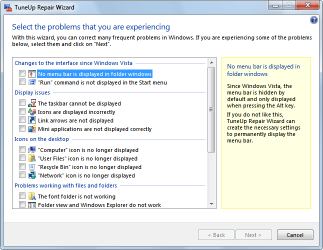
TuneUP has a "TuneUp Repair Wizard" which has most frequently encountered problems in Windows and in the Display Issues category it had "Icons are displayed incorrectly".

I just checked that and everything was fine afterwards. After uninstalling TuneUP two days ago, the problem with the icons started appearing again. I searched the problem and people with dual monitors have had it as well, but always for different reasons. I just ahve to find MY reason or at least establish some sure steps of reproducing.
 

Attachments

  • Repair_Wizard_1.png
    Repair_Wizard_1.png
    21.9 KB · Views: 18

My Computer My Computer

Computer type
PC/Desktop
Computer Manufacturer/Model Number
AuthenticAMD
OS
Windows 7 Ultimate SP1 64-bit
CPU
AMD FX-6100 Six-Core @ 4:00 Ghz
Motherboard
Gigabyte GA-970A-UD3
Memory
12 GB
Graphics Card(s)
NVIDIA Geforce GTX 660
Sound Card
Realtek High Definition Audio
Monitor(s) Displays
2 x BenQ 24" wide 16:9, 1 x Toshiba HDTV
Screen Resolution
1920x1080
Hard Drives
WDC WD10 EFRX-68JPCN0 SATA
Cooling
Deepcool Gammaxx 200
Keyboard
Newmen USB
Mouse
Logitech G700
Browser
Mozilla Firefox
You may have found one use for Tune Up Utilities that makes it worth having, but I'd be suspicious if any further problems arise since it is connected with so many problems we see here.

Normally the best way to lock Desktop icons into position is right click an empty area of desktop to Refresh. This may not pertain to Dual Monitors, however. You can look for extra controls for these in your prevailing Display software. This is one reason that Display software may need to startup with Windows, to maintain any special controls for Dual Monitors. If not I would not have this software either installed or starting with Windows. But I am a lean startup purist, because that way lies best performance.
 
Your problem very well might be because you are using two mismatch video cards. Nvidia and Windows 7 probably don't have the ability to handle such a thing. It could also be very confusing to your bios when booting. Seldom does mismatch video cards work as they should.

Your video cards are completely different series.

Graphics Card NVIDIA Geforce 9600 GT, NVIDIA Geforce GTX 460
 

My Computer My Computer

Computer type
PC/Desktop
Computer Manufacturer/Model Number
Home made Desktop
OS
Windows 10 Pro. 64/ version 1709 Windows 7 Pro/64
CPU
Intel i7-6800K @ 4.3
Motherboard
ASUS X-99 Deluxe II
Memory
Corsair Platinum 16 gig @2400
Graphics Card(s)
EVGA GTX 1070 OC
Monitor(s) Displays
Asus 27" LED LCD/VE278Q
Screen Resolution
1920-1080 or 1280-720 HDMI
Hard Drives
INTEL SSD 730-240 Gb Sata 3.0/
PSU
EVGA Platium 1200W
Case
Phanteks Luxe Tempered Glass 8 fans/ one radiator
Cooling
XSPC/ Water Cooled CPU
Keyboard
Das 4 Professional
Mouse
Logitech M705/MX Anywhere 2-S
Internet Speed
100 mbits
Antivirus
Microsoft Security Essentials/ Malwarebytes Premium 3.0/ SAS
Browser
I.E. 11 default/Firefox/ ISP Time Warner Cable/Spectrum
Other Info
LG BluRay Burner/
Sound system-KLipsch-THX/
Icy Dock ssd Hot Swap bays.
I know, but it's the best I can do until I can afford a card that can support 3 displays at once.

Refresh doesn't do the job, but that's okay. I'll just have to accept this until I can get a better video card.

i'll close this thread since the major issue is fixed now. Thank you everyone !
 

My Computer My Computer

Computer type
PC/Desktop
Computer Manufacturer/Model Number
AuthenticAMD
OS
Windows 7 Ultimate SP1 64-bit
CPU
AMD FX-6100 Six-Core @ 4:00 Ghz
Motherboard
Gigabyte GA-970A-UD3
Memory
12 GB
Graphics Card(s)
NVIDIA Geforce GTX 660
Sound Card
Realtek High Definition Audio
Monitor(s) Displays
2 x BenQ 24" wide 16:9, 1 x Toshiba HDTV
Screen Resolution
1920x1080
Hard Drives
WDC WD10 EFRX-68JPCN0 SATA
Cooling
Deepcool Gammaxx 200
Keyboard
Newmen USB
Mouse
Logitech G700
Browser
Mozilla Firefox
Is this switchable graphics, normally controlled by Nvidia software?

If not try using only the strongest card. I'd disable the other in BIOS, Dev Mgr or physically remove.
 
I considered that but I need all 3 displays for work, the problem is that even though the GTX 460 has 2xDVI and 1xmini HDMI, it does not support 3 displays at once. So I need both cards active to have 3 displays active, at least until I can afford a card that supports 3 displays.
 

My Computer My Computer

Computer type
PC/Desktop
Computer Manufacturer/Model Number
AuthenticAMD
OS
Windows 7 Ultimate SP1 64-bit
CPU
AMD FX-6100 Six-Core @ 4:00 Ghz
Motherboard
Gigabyte GA-970A-UD3
Memory
12 GB
Graphics Card(s)
NVIDIA Geforce GTX 660
Sound Card
Realtek High Definition Audio
Monitor(s) Displays
2 x BenQ 24" wide 16:9, 1 x Toshiba HDTV
Screen Resolution
1920x1080
Hard Drives
WDC WD10 EFRX-68JPCN0 SATA
Cooling
Deepcool Gammaxx 200
Keyboard
Newmen USB
Mouse
Logitech G700
Browser
Mozilla Firefox
Well for my 2 cents worth for what little it is worth and I am no expert but the specs between those two GPU's is to me not going to make them work together well at all if you look they both use different memory and clock speeds for two obvious things and I am sure there must be someone who might verify or discount what I have said so what Layback has said makes sense e to me in that you really need to match them a bit better.
GeForce GTX 460 | Specifications | GeForce

GeForce 9600 GT | Specifications | GeForce
 

My Computer My Computer

Computer type
PC/Desktop
Computer Manufacturer/Model Number
Own build (new) Desk1 / Asus ROG Win 7 / Desk2 1st build
OS
Desk1 7 Home Prem / Desk2 10 Pro / Main lap Asus ROG 10 Pro 2 laptop Toshiba 7 Pro Asus P2520 7 & 10
CPU
Desk1 i5 3750K / Laptop i7 GTX 860M / Desk2 i5 2500
Motherboard
Desk1 Asus P877-V / Desk2 Gigabyte H67 UD3H / Laptop ?
Memory
Desk1 8GB (1866) / Desk2 16GB (1333) / Laptop 8Gb DDR3
Graphics Card(s)
Desk 1& 2NVidia GTX 650 & Laptops on board Intel
Sound Card
Desk 1 & 2 -XONAR DG Realtek High Def audio Laptop
Monitor(s) Displays
Desk 1 Benq HD 2450 / Desk2 Philips 24" / Laptop 17.5"
Screen Resolution
1920x1080 D1 & D2 & Laptop 1
Hard Drives
Desk1 Samsung 120GB 830 SSD
Asus ROG 256GB 850 Pro SSD
Desk2 Samsung 840 256 SSD
Toshiba 120GB EVO
PSU
Desk 1 Corsair HX 1050/ Laptop ? / Desk 2 Corsair HX 650
Case
Desk 1 Cooler HAF XM ? Toshiba laptop / Desk2 Coolermaster
Cooling
Fans on all Desk1 -2 Desk2 - all Coolermasters 5 Laptop ?
Keyboard
Desk 1 MS Sidewinder X6 Desk 2 MS Sidewinder X 4
Mouse
Desk 1&2 - Gigabyte MS 900 gamer - laptop - Logitec wireless
Internet Speed
ADSL2+
Other Info
One other Desktop (tester) and spare Toshba laptop both with SSD's
Running Kaspersky 2016 ISS on all machines config'd identically
Logitec audio stereo systems on each machine (x3)
Canon MG5250MFC
Router/modem TP-Link running WPA2SK
Back
Top