Solved Looking for an equalizer?

Double

New member
Member
VIP
Local time
11:36 AM
Messages
140
I posted this question months ago and got no responses, then the idea suddenly hit me that I should ask the Sound & Audio forum :)

I'm not very familiar with Windows and audio (I stream using online players), and I'm looking for an equalizer that can interface with streamed music. Is there anything I can do?

The only information I have regarding my sound setup is the sound card: IDT High Definition Audio CODEC.
 

My Computer

Computer type
Laptop
Computer Manufacturer/Model Number
HP Pavilion dv7-3188cl
OS
Windows 10 Home 64-bit
CPU
Intel Core i5 430M @2.27GHz
Motherboard
Hewlett-Packard 365C
Memory
6.00GB Dual-Channel DDR3 @532MHz
Graphics Card(s)
512MB NVIDIA GeForce G105M
Sound Card
IDT High Definition Audio CODEC
Monitor(s) Displays
Generic PnP Monitor
Screen Resolution
1600x900 @60Hz
Hard Drives
298GB Hitachi
PSU
AC 100-240V~1.6A 50-60Hz, DC 19V 4.7A
Mouse
Razer DeathAdder Left-Hander
Antivirus
Avast Free
Browser
Google Chrome
Other Info
Malwarebytes Pro, Malwarebytes Anti-Exploit, uBlock Origin
I'm not familiar with the IDT sound, but if it has a "Sound Panel" similar to what RealTek has it may have an equalizer in that.
 

My Computer

Computer type
PC/Desktop
Computer Manufacturer/Model Number
My Own Build
OS
Windows 10 64 bit
CPU
Intel i7 6700K
Motherboard
ASUS ROG Maximus VIII Hero
Memory
16GB Corsair Dominator
Graphics Card(s)
Intel CPU Graphics
Sound Card
RealTek
Monitor(s) Displays
27" Dell S2719dgf
Screen Resolution
2560X1440
Hard Drives
1 TB Samsung 850 EVO SSD for Win 10 Pro
500GB Samsung 850 EVO SSD for Win 10 Insider
2 TB drive for backup
PSU
EVGA Supernova 750G2
Case
BeQuiet Silent Base 600
Cooling
Deepcool Captain 120EX
Keyboard
Microsoft Wireless 2000
Mouse
Microsoft wireless
Internet Speed
100 MB/sec (Cable)
Antivirus
Microsoft Defender and Malwarebytes
Browser
Edge/Firefox
Other Info
Cakewalk (Sonar) by BandLab and Studio One 4.1 Pro recording studio software. MOTU 896Mk3 Hybrid recording interface, Frontier Tranzport wireless control unit, Behringer X-Touch Control Surface.
Five USB connected optical drives for CD Audio production using Nero BurningROM
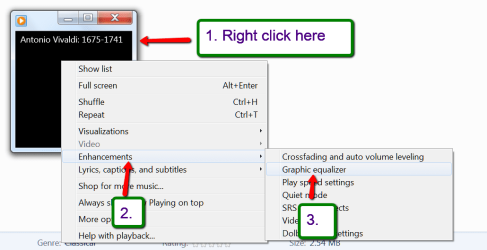
There is an equalizer in Windows Media Player (WMP).


2014-01-04_1032.png

2014-01-04_1035.png
 

My Computer

Computer Manufacturer/Model Number
HP, Dell, Gateway, Toshiba - 4 laptops and 2 desktops
OS
Vista, Windows7, Mint Mate, Zorin, Windows 8
CPU
from 1.6GHz Duo to i7
Monitor(s) Displays
2x HP w2207
Hard Drives
5x HDD, 7x SSD, 12x Externals
Keyboard
with trackball - no mices
Mouse
Trackball mice
Internet Speed
DSL 6000
I'm not familiar with the IDT sound, but if it has a "Sound Panel" similar to what RealTek has it may have an equalizer in that.
I looked around, but I'm not seeing much in terms of menus...

fd9102.jpg


clicking on Mixer:
5cg045.jpg


There is an equalizer in Windows Media Player (WMP).
Does it integrate w/streamed music? I haven't used WMP in years.. :eek:
 

My Computer

Computer type
Laptop
Computer Manufacturer/Model Number
HP Pavilion dv7-3188cl
OS
Windows 10 Home 64-bit
CPU
Intel Core i5 430M @2.27GHz
Motherboard
Hewlett-Packard 365C
Memory
6.00GB Dual-Channel DDR3 @532MHz
Graphics Card(s)
512MB NVIDIA GeForce G105M
Sound Card
IDT High Definition Audio CODEC
Monitor(s) Displays
Generic PnP Monitor
Screen Resolution
1600x900 @60Hz
Hard Drives
298GB Hitachi
PSU
AC 100-240V~1.6A 50-60Hz, DC 19V 4.7A
Mouse
Razer DeathAdder Left-Hander
Antivirus
Avast Free
Browser
Google Chrome
Other Info
Malwarebytes Pro, Malwarebytes Anti-Exploit, uBlock Origin
This is what the good book says.

<H1 class=title>Listen to Internet radio using Windows Media Player
You can find live audio streams of radio stations on the Internet using the Windows Media Guide website, and then listen to them using Windows Media Player. You can use Windows Media Guide to search for specific stations, or you can browse stations by genre.
To listen to Internet radio

  1. <LI class=step>Click the Start button
    GetContent.aspx
    , click All Programs, and then click Windows Media Player.
    If the Player is currently open and you’re in Now Playing mode, click the Switch to Library button
    GetContent.aspx
    in the upper-right corner of the Player.
    <LI class=step>Click Media Guide in the lower left corner of the Player Library.
    If the Online stores button is visible instead of the Media Guide button, click the arrow to the right of the Online stores button, and then click Media Guide.
    <LI class=step>Click Internet Radio at the top of the Windows Media Guide webpage.
    <LI class=step>Do one of the following:
    • <LI class=listItem>Browse for a station by clicking on a genre.
    • Click Search for radio stations, type a search term in the search box, and then press Enter.
      You can filter your search results by clicking menus near the search box, and then selecting values for genre, language, and country or region.
  2. Click Listen below the radio station you want to hear.
Note

  • You can also listen to Internet radio using some online stores available in Windows Media Player. For more information, check your online store's website.
</H1>
 

My Computer

Computer Manufacturer/Model Number
HP, Dell, Gateway, Toshiba - 4 laptops and 2 desktops
OS
Vista, Windows7, Mint Mate, Zorin, Windows 8
CPU
from 1.6GHz Duo to i7
Monitor(s) Displays
2x HP w2207
Hard Drives
5x HDD, 7x SSD, 12x Externals
Keyboard
with trackball - no mices
Mouse
Trackball mice
Internet Speed
DSL 6000
I guess I should mention that I'm trying to stream music and radio from Google Play Music (from the Chrome web browser), none of my music library is stored locally.
 

My Computer

Computer type
Laptop
Computer Manufacturer/Model Number
HP Pavilion dv7-3188cl
OS
Windows 10 Home 64-bit
CPU
Intel Core i5 430M @2.27GHz
Motherboard
Hewlett-Packard 365C
Memory
6.00GB Dual-Channel DDR3 @532MHz
Graphics Card(s)
512MB NVIDIA GeForce G105M
Sound Card
IDT High Definition Audio CODEC
Monitor(s) Displays
Generic PnP Monitor
Screen Resolution
1600x900 @60Hz
Hard Drives
298GB Hitachi
PSU
AC 100-240V~1.6A 50-60Hz, DC 19V 4.7A
Mouse
Razer DeathAdder Left-Hander
Antivirus
Avast Free
Browser
Google Chrome
Other Info
Malwarebytes Pro, Malwarebytes Anti-Exploit, uBlock Origin
bump
 

My Computer

Computer type
Laptop
Computer Manufacturer/Model Number
HP Pavilion dv7-3188cl
OS
Windows 10 Home 64-bit
CPU
Intel Core i5 430M @2.27GHz
Motherboard
Hewlett-Packard 365C
Memory
6.00GB Dual-Channel DDR3 @532MHz
Graphics Card(s)
512MB NVIDIA GeForce G105M
Sound Card
IDT High Definition Audio CODEC
Monitor(s) Displays
Generic PnP Monitor
Screen Resolution
1600x900 @60Hz
Hard Drives
298GB Hitachi
PSU
AC 100-240V~1.6A 50-60Hz, DC 19V 4.7A
Mouse
Razer DeathAdder Left-Hander
Antivirus
Avast Free
Browser
Google Chrome
Other Info
Malwarebytes Pro, Malwarebytes Anti-Exploit, uBlock Origin
I don't think there is anything like what you want, especially considering the age of this thread and no one has responded with what you want.

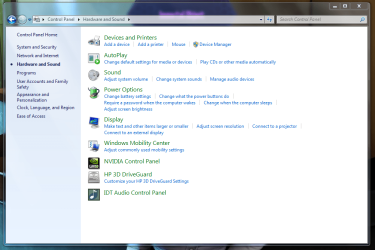
In reference to my original post, to see if you have some sort of IDT sound options, go to the Control Panel/Hardware and Sound. See if any IDT application is listed.
 

My Computer

Computer type
PC/Desktop
Computer Manufacturer/Model Number
My Own Build
OS
Windows 10 64 bit
CPU
Intel i7 6700K
Motherboard
ASUS ROG Maximus VIII Hero
Memory
16GB Corsair Dominator
Graphics Card(s)
Intel CPU Graphics
Sound Card
RealTek
Monitor(s) Displays
27" Dell S2719dgf
Screen Resolution
2560X1440
Hard Drives
1 TB Samsung 850 EVO SSD for Win 10 Pro
500GB Samsung 850 EVO SSD for Win 10 Insider
2 TB drive for backup
PSU
EVGA Supernova 750G2
Case
BeQuiet Silent Base 600
Cooling
Deepcool Captain 120EX
Keyboard
Microsoft Wireless 2000
Mouse
Microsoft wireless
Internet Speed
100 MB/sec (Cable)
Antivirus
Microsoft Defender and Malwarebytes
Browser
Edge/Firefox
Other Info
Cakewalk (Sonar) by BandLab and Studio One 4.1 Pro recording studio software. MOTU 896Mk3 Hybrid recording interface, Frontier Tranzport wireless control unit, Behringer X-Touch Control Surface.
Five USB connected optical drives for CD Audio production using Nero BurningROM
I don't think there is anything like what you want, especially considering the age of this thread and no one has responded with what you want.

In reference to my original post, to see if you have some sort of IDT sound options, go to the Control Panel/Hardware and Sound. See if any IDT application is listed.
I keep bumping this thread is because I look over and see the Android OS brimming with equalizers in the Google Play Store. I'm trying to understand why Windows hasn't been given the same attention, the platform has been around much longer.

I did finally discover the built-in EQ to my system, it was inside Hardware And Sound all this time. For some reason I completely glanced over it, assuming everything was inside "Sound".

Control Panel > Hardware And Sound > IDT Audio Control Panel
Capture3.PNG
Capture2.PNG
 

My Computer

Computer type
Laptop
Computer Manufacturer/Model Number
HP Pavilion dv7-3188cl
OS
Windows 10 Home 64-bit
CPU
Intel Core i5 430M @2.27GHz
Motherboard
Hewlett-Packard 365C
Memory
6.00GB Dual-Channel DDR3 @532MHz
Graphics Card(s)
512MB NVIDIA GeForce G105M
Sound Card
IDT High Definition Audio CODEC
Monitor(s) Displays
Generic PnP Monitor
Screen Resolution
1600x900 @60Hz
Hard Drives
298GB Hitachi
PSU
AC 100-240V~1.6A 50-60Hz, DC 19V 4.7A
Mouse
Razer DeathAdder Left-Hander
Antivirus
Avast Free
Browser
Google Chrome
Other Info
Malwarebytes Pro, Malwarebytes Anti-Exploit, uBlock Origin
Third party equalisers are rare in windows as there is usually an equaliser in the application used to play media,

Some sound card/chip manufacturers do provide them, and even some of the default windows sound drivers do also. Realtek, which is probably now the defacto standard for windows sound, for example, supplies one plus other spacialisation options.

Of course as soon as you start to playback in WMP or VLC for example their built in sound control systems will take over

The android market is very different to the windows market as they tend to be producing sound through small, underpowered and often low quality speakers in phones and tablets, these do tend to need a bit of enhancement, Most of the Windows devices, even laptops tend to have better audio hardware to begin with so are in less need of enhancement.

For your particular usage as stated above you could take a look here which may help, or check out VLC which fully supports streaming and has a full set of sound shaping built in
 

My Computers

System One System Two

  • Computer type
    PC/Desktop
    Computer Manufacturer/Model Number
    ChillBlast - Custom to my design
    OS
    Windows 11 Pro x64 [Latest Release and Release Preview]
    CPU
    Ryzen 9 5950X, 3.8 - 5.2 MHz
    Motherboard
    Asus Prime X570-Pro
    Memory
    64GB [2 x 32GB] DDR4 3200MHz
    Graphics Card(s)
    4GB NVIDIA GEFORCE GTX 1650 Ti
    Sound Card
    On-board SPDIF to 5.1 System + HDMI [5.1 system]
    Monitor(s) Displays
    32" UHD 32 Bit HDR Monitor + 43" UHD 4K 32Bit HDR TV
    Screen Resolution
    2 x 3840 x 2160 @60Hz
    Hard Drives
    1TB M2 SSD OS, 500GB Fast Access SSD, 2 x 8TB Data + Various Externals from 1TB to 4TB, 10TB NAS
    PSU
    NZXT C750 80 PLUS Gold 750W Modular PSU
    Case
    Workstation Case [Matt Black]
    Cooling
    NZXT Kraken X63 280mm CPU Cooler +2x Quiet Case fans
    Keyboard
    Logitech Wireless MX Keys & K400 + others
    Mouse
    Logitech Wireless MX Master 3S
    Internet Speed
    920 MB Down 50 MB Up
    Antivirus
    BitDefender Total Security Pro
    Browser
    Chrome (always run latest Non-Beta)
    Other Info
    Also run ...
    Laptop - Quad 8GB - Windows 10 Pro x64
    Nexus 7 Android tablet x2
    Samsung 10.2" tablet
    Blackview TAB 8 4G Android Tablet c/w Keyboard
    Wacom Intuos Pro Medium Pen Pad
    Wacom Intuos Pro Small Pen Pad
    Wacom Expresskeys Remote
    Loopdeck+ Graphics Controller
    Shuttle Pro v2 Control
  • Computer type
    Laptop
    System Manufacturer/Model Number
    Dell XPS 17 10750H
    OS
    Windows 11 Pro x64 Latest RP
    CPU
    Intel I7 10750H 5.0GHz
    Motherboard
    Dell XPS
    Memory
    32GB [2x16GB] DDR4 2933 MHz
    Graphics Card(s)
    nVidia GTX1650Ti 4 GB GDDR6
    Sound Card
    Stock [Realtek] 4 Speaker
    Monitor(s) Displays
    17" IPS UHD+ Infinity Edge Touchscreen
    Screen Resolution
    3840 x 2400
    Hard Drives
    2TB M2 NVMe, 4TB External + various 500GB & 1TB External NVMe (also have access to spinner HDD from
    PSU
    Stock
    Case
    Stock XPS Aluminium & Carbon Fibre
    Cooling
    Stock - Active Fan Control
    Keyboard
    Backlit + Various Logitech
    Mouse
    Stock Track Pad + Logitech MX Trackball
    Internet Speed
    72 MB Down 18MB Up
    Browser
    Chrome
    Other Info
    Also run ...
    Laptop - Quad 8GB - Windows 10 Pro x64
    Nexus 7 Android tablet x2
    10.2" tablet
    Sony Z3 Android Smartphone
    Wacom Intuos Pro Medium Pen Pad
    Wacom Intuos Pro Small Pen Pad
    Wacom Expresskeys Remote
    Loopdeck+ Graphics Controller
    Shuttle Pro v2 Control Pad
    10TB NAS
I don't think there is anything like what you want, especially considering the age of this thread and no one has responded with what you want.

In reference to my original post, to see if you have some sort of IDT sound options, go to the Control Panel/Hardware and Sound. See if any IDT application is listed.
I keep bumping this thread is because I look over and see the Android OS brimming with equalizers in the Google Play Store. I'm trying to understand why Windows hasn't been given the same attention, the platform has been around much longer.

I did finally discover the built-in EQ to my system, it was inside Hardware And Sound all this time. For some reason I completely glanced over it, assuming everything was inside "Sound".

Control Panel > Hardware And Sound > IDT Audio Control Panel
View attachment 303734
View attachment 303735

Thank you! :geek:
 

My Computer

Computer type
PC/Desktop
Computer Manufacturer/Model Number
HP
OS
Windows 7 Home Premium 64bit
Back
Top