Looking to Upgrade to a New SSD

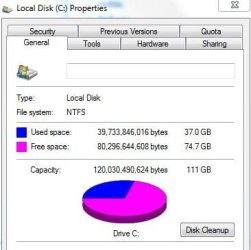
Hello again. well i uninstalled Sony Vegas 10 and Photoshop 6.0 from the SSD and i am now down to 37 GIG's on the SSD.
 

Attachments

  • program removal.JPG
    program removal.JPG
    26.6 KB · Views: 3

My Computer My Computer

At a glance

Genuine windows 7X64AMD 8320 FX Processor8 Gigs Corsair Vengance DDR3 1886 MHZEVGA GTX 750 Ti FTW
Computer type
PC/Desktop
Computer Manufacturer/Model Number
Personal build
OS
Genuine windows 7X64
CPU
AMD 8320 FX Processor
Motherboard
Asus Sabertoothe 990 FX R2.0 AM2+/AM2 AMD MB
Memory
8 Gigs Corsair Vengance DDR3 1886 MHZ
Graphics Card(s)
EVGA GTX 750 Ti FTW
Sound Card
On board
Monitor(s) Displays
ASUS VE247H 24 inch
Screen Resolution
HDMI
Hard Drives
Samsung 120GB 2.5-inch SSD 840 SATA III
PSU
Corsair 750 Watts
Case
Gigabyte case
Cooling
Zellman CNPS 10 Extreme
Internet Speed
50megs
Antivirus
AVG Free
Not to worry as SSD's don't suffer from low disk space to near the same extent as a spinner !
 

My Computer My Computer

At a glance

Windows 7 Ultimate 64i7 3770k OC'd 4.6 @ 1.17v, also FX 8120 & i5 ...32 gb G.Skill Sniper DDR3 10-12-12-31 @ 2133XFX Radeon 7870 2GB DDR5
Computer type
PC/Desktop
Computer Manufacturer/Model Number
A blend of brains, brawn and dumb luck.
OS
Windows 7 Ultimate 64
CPU
i7 3770k OC'd 4.6 @ 1.17v, also FX 8120 & i5 miniITX
Motherboard
MSI P67A-GD80 b3
Memory
32 gb G.Skill Sniper DDR3 10-12-12-31 @ 2133
Graphics Card(s)
XFX Radeon 7870 2GB DDR5
Sound Card
Sound Blaster Z Series Card
Monitor(s) Displays
(2) LG LED 23" 1920 x 1080 2ms Monitors via mini d-port
Screen Resolution
1680 X 1050 p
Hard Drives
Samsung 256 gb 830 SSD sata III
(1) 1 tb WD Black
(2) 1 tb Hitachi deskmates/sata II
(2) 1 tb WD green/sata II
(2) 3 tb Seagate Barracuda
(1) 120 gb OCZ Vertex SS
(1) Drobo 5N w/5 Seagate 3tb
PSU
EVGA modular 1000G2 80% gold rating & APC 1200 RS
Case
CoolerMaster Storm Styker
Cooling
7 case fans 140mm & 120mm, NZXT Kraken X60
Keyboard
(2) Logitech Illuminated Keyboards (1) usb (1) wireless
Mouse
Logitech G700 & T-BC21 - nano nx for the laptop
Internet Speed
Basic 120mbps down
Antivirus
Trend Micro Titanium Max Security & Malwarebytes Premium
Browser
Chrome and IE 10
Other Info
5 Noctua case fans + 3 Noctua in p/p on NZXT cooler
Integrated hot swap drive bays for 2.5" Drives
(2) Lite-on dvd/cd/Blu Ray optical 22X
Integrated fan controller and led on/off
HP Officejet Pro 8630 all-n-one
Hot-swappable 3.5" hard drive bay
Netgear Nighthawk router
Asus USB 3 & sata 6 PCIe card
Vantec IDE to sata adptr./Ultra sata adptr
Lenovo L420 i5 lappy with m sata
Drobo 5N advanced NAS
Well, I guess Sony Vegas 10 and Photoshop 6.0 are big programs and need a lot of space. Your SSD load is no problem. Just make sure that you always keep 10 to 20% free space. Else the garbage collection may not work so well.
 

My Computer My Computer

At a glance

Vista, Windows7, Mint Mate, Zorin, Windows 8from 1.6GHz Duo to i7
Computer Manufacturer/Model Number
HP, Dell, Gateway, Toshiba - 4 laptops and 2 desktops
OS
Vista, Windows7, Mint Mate, Zorin, Windows 8
CPU
from 1.6GHz Duo to i7
Monitor(s) Displays
2x HP w2207
Hard Drives
5x HDD, 7x SSD, 12x Externals
Keyboard
with trackball - no mices
Mouse
Trackball mice
Internet Speed
DSL 6000
Here is the way I move user files to the spinner:

1. I create folders for Documents, Music, Videos, and Pictures on the spinner

2. I right click on those folders and INCLUDE them in their respective libraries

3. I rename them in the library (the left pane) to e.g. WHS Documents. That way they will not also be called 'My Documents'

4. I move my own folders (not the OS default folders) to their repective folders on the spinner. The OS default folders I leave in place because certain programs want to store things there. When you move the user folders, make sure that the program generated folders are not being moved.

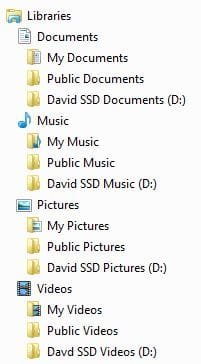
You then will end up with 3 folders in the library - e.g. for Videos (see picture)
My Videos
Public Videos
Your name Videos

The advantage of this setup is that the program generated folders (which are usually quite small) will not get mixed up with your user folders.

There is another way to move the user folders and that is via the location tab in the folder properties. But that moves everything and the default location of those folders. Very often that gets messed up if you don't do it right and you are stuck with them where they are because the location tab disappears. Not recommended to do it that way (although I once published a video tutorial showing how to do that, LOL). You live and learn.

If I do this for "My Documents", I will be moving the contents of "My Documents" to the HDD; then I delete the contents of the same folder on the SSD, but leave the folder.
Do I understand this correctly ?
 

My Computer My Computer

At a glance

Windows 8.1.1 64biti7-4700MQ8.0GB PC3-12800 DDR3L SDRAM 1600 MHzIntel® HD Graphics 4600
Computer type
Laptop
Computer Manufacturer/Model Number
Lenovo Z710 #59400485
OS
Windows 8.1.1 64bit
CPU
i7-4700MQ
Memory
8.0GB PC3-12800 DDR3L SDRAM 1600 MHz
Graphics Card(s)
Intel® HD Graphics 4600
Sound Card
on-board
Monitor(s) Displays
17.3"
Screen Resolution
1920x1080
Hard Drives
1TB 5400 RPM;(OS,programs)


Hitachi, 1Tb external,(B'up)
PSU
4 Cell 41 Watt Hour Lithium-Ion
Case
Lenovo
Cooling
Air in, Air out.
Keyboard
Logitech - Y-UY95 - Illuminated
Mouse
M$ - Arc Touch
Internet Speed
59 Mb down / 25 Mb up
Antivirus
Defender
Browser
Firefox (newest)
Other Info
MBAM Pro, SAS Pro, Revo Pro.

Ext. HP 2311 Monitor
Kind of. If you 'MOVE' your documents, then they are gone in the original location. It is like a cut/paste, not a copy/paste. And yes, leave the system generated folder on the SSD. Move only your own stuff. And also do not move any folders that were generated by programs.
 

My Computer My Computer

At a glance

Vista, Windows7, Mint Mate, Zorin, Windows 8from 1.6GHz Duo to i7
Computer Manufacturer/Model Number
HP, Dell, Gateway, Toshiba - 4 laptops and 2 desktops
OS
Vista, Windows7, Mint Mate, Zorin, Windows 8
CPU
from 1.6GHz Duo to i7
Monitor(s) Displays
2x HP w2207
Hard Drives
5x HDD, 7x SSD, 12x Externals
Keyboard
with trackball - no mices
Mouse
Trackball mice
Internet Speed
DSL 6000
Kind of. If you 'MOVE' your documents, then they are gone in the original location. It is like a cut/paste, not a copy/paste. And yes, leave the system generated folder on the SSD. Move only your own stuff. And also do not move any folders that were generated by programs.

Forgive my slowness here.
I would be doing the "cut/paste" ?
so they would only be on the HDD ?
 

My Computer My Computer

At a glance

Windows 8.1.1 64biti7-4700MQ8.0GB PC3-12800 DDR3L SDRAM 1600 MHzIntel® HD Graphics 4600
Computer type
Laptop
Computer Manufacturer/Model Number
Lenovo Z710 #59400485
OS
Windows 8.1.1 64bit
CPU
i7-4700MQ
Memory
8.0GB PC3-12800 DDR3L SDRAM 1600 MHz
Graphics Card(s)
Intel® HD Graphics 4600
Sound Card
on-board
Monitor(s) Displays
17.3"
Screen Resolution
1920x1080
Hard Drives
1TB 5400 RPM;(OS,programs)


Hitachi, 1Tb external,(B'up)
PSU
4 Cell 41 Watt Hour Lithium-Ion
Case
Lenovo
Cooling
Air in, Air out.
Keyboard
Logitech - Y-UY95 - Illuminated
Mouse
M$ - Arc Touch
Internet Speed
59 Mb down / 25 Mb up
Antivirus
Defender
Browser
Firefox (newest)
Other Info
MBAM Pro, SAS Pro, Revo Pro.

Ext. HP 2311 Monitor
Right.
 

My Computer My Computer

At a glance

Vista, Windows7, Mint Mate, Zorin, Windows 8from 1.6GHz Duo to i7
Computer Manufacturer/Model Number
HP, Dell, Gateway, Toshiba - 4 laptops and 2 desktops
OS
Vista, Windows7, Mint Mate, Zorin, Windows 8
CPU
from 1.6GHz Duo to i7
Monitor(s) Displays
2x HP w2207
Hard Drives
5x HDD, 7x SSD, 12x Externals
Keyboard
with trackball - no mices
Mouse
Trackball mice
Internet Speed
DSL 6000
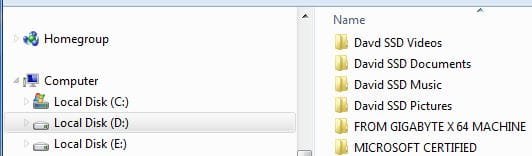
Hello Again.... Quoting WHS, i created the Folders for the libraries. but i don't understand " i move my own Folders, not the OS Default folders" part ??

Do i move the newly created David SSD Folders to the Spinner. ?

Does this look Right ?


4. I move my own folders (not the OS default folders) to their repective folders on the spinner. The OS default folders I leave in place because certain programs want to store things there. When you move the user folders, make sure that the program generated folders are not being moved.

You then will end up with 3 folders in the library - e.g. for Videos (see picture)
My Videos
Public Videos
Your name Videos

The advantage of this setup is that the program generated folders (which are usually quite small) will not get mixed up with your user folders.
 

Attachments

  • Created folders on Spinner.JPG
    Created folders on Spinner.JPG
    19 KB · Views: 4
  • New Folders on Spinner.JPG
    New Folders on Spinner.JPG
    19.3 KB · Views: 4

My Computer My Computer

At a glance

Genuine windows 7X64AMD 8320 FX Processor8 Gigs Corsair Vengance DDR3 1886 MHZEVGA GTX 750 Ti FTW
Computer type
PC/Desktop
Computer Manufacturer/Model Number
Personal build
OS
Genuine windows 7X64
CPU
AMD 8320 FX Processor
Motherboard
Asus Sabertoothe 990 FX R2.0 AM2+/AM2 AMD MB
Memory
8 Gigs Corsair Vengance DDR3 1886 MHZ
Graphics Card(s)
EVGA GTX 750 Ti FTW
Sound Card
On board
Monitor(s) Displays
ASUS VE247H 24 inch
Screen Resolution
HDMI
Hard Drives
Samsung 120GB 2.5-inch SSD 840 SATA III
PSU
Corsair 750 Watts
Case
Gigabyte case
Cooling
Zellman CNPS 10 Extreme
Internet Speed
50megs
Antivirus
AVG Free

Thank you,
you are a God !

One last question; can I safely move Dragon Naturally Speaking to the HDD and still have it function properly ?
 

My Computer My Computer

At a glance

Windows 8.1.1 64biti7-4700MQ8.0GB PC3-12800 DDR3L SDRAM 1600 MHzIntel® HD Graphics 4600
Computer type
Laptop
Computer Manufacturer/Model Number
Lenovo Z710 #59400485
OS
Windows 8.1.1 64bit
CPU
i7-4700MQ
Memory
8.0GB PC3-12800 DDR3L SDRAM 1600 MHz
Graphics Card(s)
Intel® HD Graphics 4600
Sound Card
on-board
Monitor(s) Displays
17.3"
Screen Resolution
1920x1080
Hard Drives
1TB 5400 RPM;(OS,programs)


Hitachi, 1Tb external,(B'up)
PSU
4 Cell 41 Watt Hour Lithium-Ion
Case
Lenovo
Cooling
Air in, Air out.
Keyboard
Logitech - Y-UY95 - Illuminated
Mouse
M$ - Arc Touch
Internet Speed
59 Mb down / 25 Mb up
Antivirus
Defender
Browser
Firefox (newest)
Other Info
MBAM Pro, SAS Pro, Revo Pro.

Ext. HP 2311 Monitor

Thank you,
you are a God !

One last question; can I safely move Dragon Naturally Speaking to the HDD and still have it function properly ?
A program you cannot just move. You have to uninstall it on the SSD and then reinstall it. During the reinstallation, you can direct the installer to put it into a predefined folder on the HDD - if it lets you. That does not work for each and every program.
 

My Computer My Computer

At a glance

Vista, Windows7, Mint Mate, Zorin, Windows 8from 1.6GHz Duo to i7
Computer Manufacturer/Model Number
HP, Dell, Gateway, Toshiba - 4 laptops and 2 desktops
OS
Vista, Windows7, Mint Mate, Zorin, Windows 8
CPU
from 1.6GHz Duo to i7
Monitor(s) Displays
2x HP w2207
Hard Drives
5x HDD, 7x SSD, 12x Externals
Keyboard
with trackball - no mices
Mouse
Trackball mice
Internet Speed
DSL 6000
@ Pantz,

If I read your picture right, your David-XXX folders are on D which I assume is a partition on the spinner. To those you move your own folders, but e.g. not the My Documents or My Videos folder on your picture. Just your subfolders within those.

And especially in My Documents, there may be a few program generated folders (e.g. Gimp, Macrium, Format Factory does that). Do not move those.

PS: You guys are tough customers. Can easily wear out an old man. LOL.
 

My Computer My Computer

At a glance

Vista, Windows7, Mint Mate, Zorin, Windows 8from 1.6GHz Duo to i7
Computer Manufacturer/Model Number
HP, Dell, Gateway, Toshiba - 4 laptops and 2 desktops
OS
Vista, Windows7, Mint Mate, Zorin, Windows 8
CPU
from 1.6GHz Duo to i7
Monitor(s) Displays
2x HP w2207
Hard Drives
5x HDD, 7x SSD, 12x Externals
Keyboard
with trackball - no mices
Mouse
Trackball mice
Internet Speed
DSL 6000

Thank you,
you are a God !

One last question; can I safely move Dragon Naturally Speaking to the HDD and still have it function properly ?
A program you cannot just move. You have to uninstall it on the SSD and then reinstall it. During the reinstallation, you can direct the installer to put it into a predefined folder on the HDD - if it lets you. That does not work for each and every program.

OK, I gotcha now. I was afraid that would be the answer for programs, not even going to attempt it.

Again, Thank's a big whole heap !

Sorry, didn't mean to beat up on an old man, I'll try to remember the next time I take a swing at you !
 

My Computer My Computer

At a glance

Windows 8.1.1 64biti7-4700MQ8.0GB PC3-12800 DDR3L SDRAM 1600 MHzIntel® HD Graphics 4600
Computer type
Laptop
Computer Manufacturer/Model Number
Lenovo Z710 #59400485
OS
Windows 8.1.1 64bit
CPU
i7-4700MQ
Memory
8.0GB PC3-12800 DDR3L SDRAM 1600 MHz
Graphics Card(s)
Intel® HD Graphics 4600
Sound Card
on-board
Monitor(s) Displays
17.3"
Screen Resolution
1920x1080
Hard Drives
1TB 5400 RPM;(OS,programs)


Hitachi, 1Tb external,(B'up)
PSU
4 Cell 41 Watt Hour Lithium-Ion
Case
Lenovo
Cooling
Air in, Air out.
Keyboard
Logitech - Y-UY95 - Illuminated
Mouse
M$ - Arc Touch
Internet Speed
59 Mb down / 25 Mb up
Antivirus
Defender
Browser
Firefox (newest)
Other Info
MBAM Pro, SAS Pro, Revo Pro.

Ext. HP 2311 Monitor
Lol, WHS, I usually just point people to a tutorial.....I'm going to have to step it up! Good job buddy.
 

My Computer My Computer

At a glance

Windows 7 Professional 64bit SP1Intel Core i5-3570K @ 4.5GHzCorsair Vengeance 16GB (4x4) @1866MHz CL 9-9-...EVGA GTX 750 Ti FTW
Computer type
PC/Desktop
Computer Manufacturer/Model Number
Custom Built
OS
Windows 7 Professional 64bit SP1
CPU
Intel Core i5-3570K @ 4.5GHz
Motherboard
Asus Sabertooth Z77
Memory
Corsair Vengeance 16GB (4x4) @1866MHz CL 9-9-9-24 1T
Graphics Card(s)
EVGA GTX 750 Ti FTW
Sound Card
Onboard Audio
Monitor(s) Displays
Dell S2309W
Screen Resolution
1920x1080
Hard Drives
Samsung 830 128GB SSD - OS
(4) Seagate 5TB HDD
(1) Seagate 2TB HDD
PSU
Seasonic X750 80+ Gold Full Modular
Case
Antec Eleven Hundred Super Mid Tower
Cooling
Intel Liquid Cooler
Keyboard
Max Nighthawk X8 Mechanical keyboard
Mouse
Mionix Naos 7000
Internet Speed
50 Mbps Down / 10 Mbps Up
Antivirus
Microsoft Security Essentials/Malwarebytes Anti-Malware
Browser
Chrome/Firefox
Other Info
Klipsch ProMedia 2.1's
Asus RT-N66R Wireless Router
Lol, WHS, I usually just point people to a tutorial.....I'm going to have to step it up! Good job buddy.
Yeah, these youngens need all the help they can get. It's called spoon feeding.
 

My Computer My Computer

At a glance

Vista, Windows7, Mint Mate, Zorin, Windows 8from 1.6GHz Duo to i7
Computer Manufacturer/Model Number
HP, Dell, Gateway, Toshiba - 4 laptops and 2 desktops
OS
Vista, Windows7, Mint Mate, Zorin, Windows 8
CPU
from 1.6GHz Duo to i7
Monitor(s) Displays
2x HP w2207
Hard Drives
5x HDD, 7x SSD, 12x Externals
Keyboard
with trackball - no mices
Mouse
Trackball mice
Internet Speed
DSL 6000
Hello again,
Lol, WHS, I usually just point people to a tutorial.....I'm going to have to step it up! Good job buddy.
Yeah, these youngens need all the help they can get. It's called spoon feeding.

well if 50+ is young then i am young,

@ Pantz,

If I read your picture right, your David-XXX folders are on D which I assume is a partition on the spinner. To those you move your own folders, but e.g. not the My Documents or My Videos folder on your picture. Just your subfolders within those.

And especially in My Documents, there may be a few program generated folders (e.g. Gimp, Macrium, Format Factory does that). Do not move those.

PS: You guys are tough customers. Can easily wear out an old man. LOL.

Yes WHS you are reading it right..... David XXX Folders are on the D Partition on the spinner.

So i cam move my profile Folders to the David XXX Folders on D Spinner ?

Ans yes WHS did a great job, i even gave him a REP ....
 

My Computer My Computer

At a glance

Genuine windows 7X64AMD 8320 FX Processor8 Gigs Corsair Vengance DDR3 1886 MHZEVGA GTX 750 Ti FTW
Computer type
PC/Desktop
Computer Manufacturer/Model Number
Personal build
OS
Genuine windows 7X64
CPU
AMD 8320 FX Processor
Motherboard
Asus Sabertoothe 990 FX R2.0 AM2+/AM2 AMD MB
Memory
8 Gigs Corsair Vengance DDR3 1886 MHZ
Graphics Card(s)
EVGA GTX 750 Ti FTW
Sound Card
On board
Monitor(s) Displays
ASUS VE247H 24 inch
Screen Resolution
HDMI
Hard Drives
Samsung 120GB 2.5-inch SSD 840 SATA III
PSU
Corsair 750 Watts
Case
Gigabyte case
Cooling
Zellman CNPS 10 Extreme
Internet Speed
50megs
Antivirus
AVG Free
I am a bit confused about the word 'Profile Folders'. Are those folders you created yourself ??

Btw. You have the age of my son - still young. And thanks for the rep.
 

My Computer My Computer

At a glance

Vista, Windows7, Mint Mate, Zorin, Windows 8from 1.6GHz Duo to i7
Computer Manufacturer/Model Number
HP, Dell, Gateway, Toshiba - 4 laptops and 2 desktops
OS
Vista, Windows7, Mint Mate, Zorin, Windows 8
CPU
from 1.6GHz Duo to i7
Monitor(s) Displays
2x HP w2207
Hard Drives
5x HDD, 7x SSD, 12x Externals
Keyboard
with trackball - no mices
Mouse
Trackball mice
Internet Speed
DSL 6000
Hello Again, I re-read the post again, maybe i am missing something ?

That's about right. You have to also change the boot order in the BIOS so that the SSD is second in line (the CD/DVD drive should always be first). Else your PC will not find the SSD and boot from the old system.

The user data I would leave on the HDD. From the SSD system, right click on Documents, Music, etc. and INCLUDE those into the respective libraries.

Even better, with your old system still in place, make an independent Data Partition, define a Documents, Music, etc. folder in that new partition and move your stuff there. Then it is not tied to your old system partition which you might want to delete one day anyhow. Then apply the INCLUDE to those folders.

Important: before you create a new partition on the HDD, make sure you have only 3 (or less) primary partitions on the HDD. Check in Disk Management.

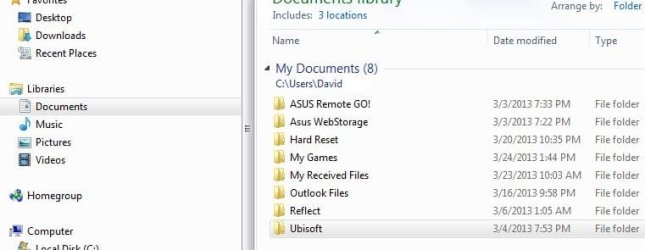
I have done the above, i think i should have said user data. the only thing that are in those folders on the SSD, is what Windows installed there, Except in the Documents folder on the SSD, are limited programs i installed for the MB.( MB Software) As of now there is nothing in the DAVID XXXX Folders on the D partition
 

Attachments

  • SSD Folderss A.JPG
    SSD Folderss A.JPG
    34.4 KB · Views: 4

My Computer My Computer

At a glance

Genuine windows 7X64AMD 8320 FX Processor8 Gigs Corsair Vengance DDR3 1886 MHZEVGA GTX 750 Ti FTW
Computer type
PC/Desktop
Computer Manufacturer/Model Number
Personal build
OS
Genuine windows 7X64
CPU
AMD 8320 FX Processor
Motherboard
Asus Sabertoothe 990 FX R2.0 AM2+/AM2 AMD MB
Memory
8 Gigs Corsair Vengance DDR3 1886 MHZ
Graphics Card(s)
EVGA GTX 750 Ti FTW
Sound Card
On board
Monitor(s) Displays
ASUS VE247H 24 inch
Screen Resolution
HDMI
Hard Drives
Samsung 120GB 2.5-inch SSD 840 SATA III
PSU
Corsair 750 Watts
Case
Gigabyte case
Cooling
Zellman CNPS 10 Extreme
Internet Speed
50megs
Antivirus
AVG Free
Well, then the day you load up pictures and music, or make videos, or produce your own documents, Then they should go into your folders on D. My user data folders on the spinner have gotten quite big over time. I have a lot of videos and music.
 

My Computer My Computer

At a glance

Vista, Windows7, Mint Mate, Zorin, Windows 8from 1.6GHz Duo to i7
Computer Manufacturer/Model Number
HP, Dell, Gateway, Toshiba - 4 laptops and 2 desktops
OS
Vista, Windows7, Mint Mate, Zorin, Windows 8
CPU
from 1.6GHz Duo to i7
Monitor(s) Displays
2x HP w2207
Hard Drives
5x HDD, 7x SSD, 12x Externals
Keyboard
with trackball - no mices
Mouse
Trackball mice
Internet Speed
DSL 6000
Hello Again. OK, so everything is OK , I may want to put the David XXX folders on a Different partition, since the D Partition is getting full. just follow previous steps, and put them on a Different, and put all docs, videos. music in the appropriate folders on that partition from now on ?

Thanks
 

My Computer My Computer

At a glance

Genuine windows 7X64AMD 8320 FX Processor8 Gigs Corsair Vengance DDR3 1886 MHZEVGA GTX 750 Ti FTW
Computer type
PC/Desktop
Computer Manufacturer/Model Number
Personal build
OS
Genuine windows 7X64
CPU
AMD 8320 FX Processor
Motherboard
Asus Sabertoothe 990 FX R2.0 AM2+/AM2 AMD MB
Memory
8 Gigs Corsair Vengance DDR3 1886 MHZ
Graphics Card(s)
EVGA GTX 750 Ti FTW
Sound Card
On board
Monitor(s) Displays
ASUS VE247H 24 inch
Screen Resolution
HDMI
Hard Drives
Samsung 120GB 2.5-inch SSD 840 SATA III
PSU
Corsair 750 Watts
Case
Gigabyte case
Cooling
Zellman CNPS 10 Extreme
Internet Speed
50megs
Antivirus
AVG Free
If you define them on a different partition, you will have to INCLUDE them again into the appropriate libraries. You may then want to get rid of the old D partition entries. Just right click on each library in the left pane > Properties > highlight the D entry > click the Remove button > Apply (important).
 

My Computer My Computer

At a glance

Vista, Windows7, Mint Mate, Zorin, Windows 8from 1.6GHz Duo to i7
Computer Manufacturer/Model Number
HP, Dell, Gateway, Toshiba - 4 laptops and 2 desktops
OS
Vista, Windows7, Mint Mate, Zorin, Windows 8
CPU
from 1.6GHz Duo to i7
Monitor(s) Displays
2x HP w2207
Hard Drives
5x HDD, 7x SSD, 12x Externals
Keyboard
with trackball - no mices
Mouse
Trackball mice
Internet Speed
DSL 6000
Back
Top