
Looks like XP?

Did you try in different User account ???

Ya, its still the same thing, I am trying to uninstall the updates, but I don' know if thats it....could it be becuase i deleted temp folders?

i don't believe Temp files would have effect on Aero. As Greg told try to remove your Display drivers and reboot and reinstall it. I suspect that could be the problem because Windows update might have tried to update you Display drivers which messed up
 

My Computer

Computer Manufacturer/Model Number
Samsung NP550P5C-S02IN
OS
Windows 7 Ultimate - 64-bit | Windows 8 Pro - 64-bit
CPU
Intel® Core™ i7 Processor 3,610QM (2.30Hz, 6MB L3 Cach
Memory
8 GB
Graphics Card(s)
NVIDIA® GeForce® GT 650M 2GB Graphics, Optimus™ techno
Sound Card
SoundAlive™ JBL 3 Speakers (With sub-Woofer)
Monitor(s) Displays
39.62cm (15.6) SuperBright 300nit HD+ LED Display
Screen Resolution
1,600 x 900, Anti-Reflective
Hard Drives
1TB S-ATA II Hard Drive (5,400RPM)
My Computer

Computer Manufacturer/Model Number
Samsung NP550P5C-S02IN
OS
Windows 7 Ultimate - 64-bit | Windows 8 Pro - 64-bit
CPU
Intel® Core™ i7 Processor 3,610QM (2.30Hz, 6MB L3 Cach
Memory
8 GB
Graphics Card(s)
NVIDIA® GeForce® GT 650M 2GB Graphics, Optimus™ techno
Sound Card
SoundAlive™ JBL 3 Speakers (With sub-Woofer)
Monitor(s) Displays
39.62cm (15.6) SuperBright 300nit HD+ LED Display
Screen Resolution
1,600 x 900, Anti-Reflective
Hard Drives
1TB S-ATA II Hard Drive (5,400RPM)
Rightclick on blank area of Desktop to Personalize, select an Aero Theme.


If this fails, run the Aero Troubleshooter. Type Troubleshoot in Start Search box.

Did you attempt to roll back Display driver, or reinstall? THere may be several to try in Device Manager>Display Adapter>Update Driver>Browse my computer>Let Me Choose list where they are stored.

As a last resort I would try Capt. Jack's advice to run a Repair Install.

And since you did an inferior in-place Upgrade, which imports Vista corruption, I would consider a formatted clean install from boot in your future.
 
Last edited:
nvm i think i got it.
 
Last edited:

My Computer

OS
windows 7
Did you do the Repair ??
 

My Computer

Computer Manufacturer/Model Number
Samsung NP550P5C-S02IN
OS
Windows 7 Ultimate - 64-bit | Windows 8 Pro - 64-bit
CPU
Intel® Core™ i7 Processor 3,610QM (2.30Hz, 6MB L3 Cach
Memory
8 GB
Graphics Card(s)
NVIDIA® GeForce® GT 650M 2GB Graphics, Optimus™ techno
Sound Card
SoundAlive™ JBL 3 Speakers (With sub-Woofer)
Monitor(s) Displays
39.62cm (15.6) SuperBright 300nit HD+ LED Display
Screen Resolution
1,600 x 900, Anti-Reflective
Hard Drives
1TB S-ATA II Hard Drive (5,400RPM)
so before it said it wasnt vista or 7, now its saying windows 7 pro cant go to home. So ya.
 

My Computer

OS
windows 7
I downloaded windows 7 from the store, I don't have the disc.
 

My Computer

OS
windows 7

My Computer

Computer type
PC/Desktop
Computer Manufacturer/Model Number
Systems by SmartEyeball
OS
8 Pro x64
CPU
i7 3770K 4.6GHz
Motherboard
ASUS P8Z77 WS
Memory
16GB G.Skill Trident X 2666mhz
Graphics Card(s)
x2 EVGA 780 Ti Superclocked SLI
Sound Card
SB X-FI Surround 5.1 PRO USB / ATH-AD900 Headphones
Monitor(s) Displays
x3 Dell U2410 / 58" Samsung
Screen Resolution
5760*1200/ 1920*1200
Hard Drives
2x Intel 520 240GB (RAID 0) * 2x WD Caviar Blacks 2TB (RAID 0) * 2TB WD Caviar Black * Sony Optirac DVD
PSU
Silverstone Strider Evolution 1200W
Case
Thermaltake Level 10 GT Snow Edition
Cooling
Noctua NH-D14
Keyboard
Topre Realforce // Ducky Shine MX Black // Filco Ninja TKL
Mouse
Thermaltake Theron (Highly Recommended) + Razer Imperator
Antivirus
MSE
Browser
IE, FF, WaterFox
Other Info
GT Extreme V2 Sim Racing Cockpit + 40" LCD and K/B Mouse stand ▼
Fanatec CSR Elite Wheel + Clubsport V1 Pedals + CSR shifter/7G-H ▼Saitek X52 Pro ▼ TrackIR 5 Pro
Buttkicker v2 Seat Rumbler with Dedicated 5.1 and Sub Woofer attached to frame ▼
=
Bloody Big Grin
Where is Classic Theme in Win7? Been looking for the Theme Menu and it looks like it's gone.
 
Last edited:
Where is Classic Theme in Win7? Been looking for the Theme Menu and it looks like it's gone.

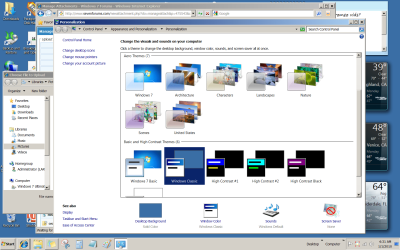
Right click on Desktop -> Personalize -> Basic and High Contrast Themes. There is Windows 7 Basic and Windows Classic. I believe that both are without Aero. Above these there are Aero Themes, like Windows 7, Architecture, etc.
 

My Computer

Computer Manufacturer/Model Number
Dell Inspiron 530
OS
Windows 7 Ultimate (x64)
CPU
Q6600
Memory
8 GB
Graphics Card(s)
ATI Radeon HD 2600 XT
Monitor(s) Displays
Samsung Syncmaster P2450
Screen Resolution
1920x1080
Hard Drives
Samsung HD103UJ
Samsung HD501LJ
Internet Speed
25 Mb/s
Had I been in place of yours, I would have tried another update . Download and update to windows 7 ultimate. it may reactivate aero.
Moreover, try to have a windows 7 dvd, or at least repair disc. It is difficult to overcome all the problems without it.
 

My Computer

Computer type
PC/Desktop
Computer Manufacturer/Model Number
Self Assembled
OS
Microsoft Windows 10 Pro Insider Preview 64-bit
CPU
Intel(R) Core(TM) i3-4130 CPU @ 3.40GHz
Motherboard
Gigabyte Technology Co., Ltd. B85M-D3H
Memory
Corsair Vengence 4GB x2 (8.00GB Dual-Channel DDR3 @ 798MHz)
Graphics Card(s)
2047MB GeForce GTS 450 (ZOTAC International)
Sound Card
Onboard (Realtek High Definition Audio)
Monitor(s) Displays
LG Flatron E2040T
Screen Resolution
1600x900
Hard Drives
Western Digital 1 TB
Seagate 500 GB
PSU
Corsair VS550
Case
Cooler Master K380
Cooling
Cooler Master Seidon 120V Plus
Keyboard
Logitech MK260r
Mouse
Logitech MK260r
Internet Speed
PMPL Broadband
Antivirus
Windows Defender + MBAM
Browser
Firefox
Other Info
Dell Studio 15" Laptop
Have you gotten the Windows Classic Theme like this:

Capture.PNG

Enable an Aero theme up above them.

Good job, Unifex. Those Classic Themes were hidden in scroll down on the Personalize page
 
Last edited:
I likewise had this problem (right click not working to change properties and the screen looking like XP instead of 7). To solve it, I went to the "Windows Update" program on my computer. It gives instruction on how to uninstall an update. I located and uninstalled the last Windows update. I restarted, and everything returned to normal.

My guess is that the the update may have been corrupted when downloaded. I remember seeing the update message when I shut down on Friday, and then Tuesday (after the 3 day holiday weekend) I had the problem.

So, hopefully this is the end of it.
 

My Computer

Computer type
PC/Desktop
Computer Manufacturer/Model Number
Dell
OS
Windows & Professional
Back
Top